engine DODGE RAM 2500 GAS 2008 3.G Repair Manual
[x] Cancel search | Manufacturer: DODGE, Model Year: 2008, Model line: RAM 2500 GAS, Model: DODGE RAM 2500 GAS 2008 3.GPages: 554, PDF Size: 9.93 MB
Page 310 of 554
Transfer Case Position Indicator Lights Ð
Electronically Shifted Transfer Case Only
Transfer case position indicator lights are located in the
instrument cluster and indicate the current and desired
transfer case selection. When you select a different trans-
fer case position, the indicator lights will do the follow-
ing:
If All Shift Conditions Are Met:
1. The current position indicator light will turn OFF.
2. The selected position indicator light will flash until the
transfer case completes the shift.
3. When the shift is complete, the indicator light for the
selected position will stop flashing and remain ON.
If One or More Shift Conditions Are Not Met:
1. The indicator light for the current position will remain
ON.2. The newly selected position indicator light will con-
tinue to flash.
3. The transfer casewill notshift.
NOTE:Before retrying a selection, make certain that all
the necessary requirements for selecting a new transfer
case position have been met. To retry the selection, turn
the control knob back to the current position, wait five
seconds, and retry selection. To find the shift require-
ments, refer to the9Shifting Procedure9for your transfer
case, located in this section of the owner's manual.
The ªSERVICE 4WDº warning light monitors the electric
shift 4WD system. If this light remains on after engine
start up or illuminates during driving, it means that the
4WD system is not functioning properly and that service
is required.
308 STARTING AND OPERATING
Page 311 of 554
WARNING!
Always engage the parking brake when powering
down the vehicle if the(SERVICE 4WD(light is
illuminated. Not engaging the parking brake may
allow the vehicle to roll, which may cause personal
injury.
NOTE:Do not attempt to make a shift while only the
front or rear wheels are spinning, as this can cause
damage to driveline components.When operating your vehicle in 4WD LOW, the engine
speed is approximately three times that of the 2WD or
4WD LOCK positions at a given road speed. Take care
not to overspeed the engine and do not exceed 25 mph
(40 km/h).
Proper operation of 4-wheel drive vehicles depends on
tires of equal size, type and circumference on each wheel.
Any difference in tire size can cause damage to the
transfer case.
Because 4-wheel drive provides improved traction, there
is a tendency to exceed safe turning and stopping speeds.
Do not go faster than road conditions permit.
STARTING AND OPERATING 309
5
Page 314 of 554
ignition key must be in the ON position with the engine
either running or off. This shift cannot be completed if the
key is in the ACC position.
NOTE:The 4x4 system will not allow shifts between
2WD/4WD LOCK if the front and/or rear wheels are
spinning (no traction). In this situation the selected
position indicator light will flash and the original posi-
tion indicator light will remain ON. At this time, reduce
speed and stop spinning the wheels to complete the shift.
2WD or 4WD LOCK,4WD LOW
NOTE:When shifting into or out of 4WD LOW some
gear noise may be heard. This noise is normal and is not
detrimental to the vehicle or occupants.Shifting can be performed with the vehicle rolling 2 to 3
mph (3 to 5 km/h) or completely stopped. USE EITHER
OF THE FOLLOWING PROCEDURES:
Preferred Procedure
1. With engine running, slow vehicle to 2 to 3 mph (3 to
5 km/h).
2. Shift the transmission into NEUTRAL (depress clutch
on manual transmissions).
3. While still rolling, rotate the transfer case control
switch to the desired position.
4. After the desired position indicator light is ON (not
flashing), shift transmission back into gear (release clutch
on manual transmissions).
312 STARTING AND OPERATING
Page 315 of 554
Alternate Procedure
1. Bring the vehicle to complete stop.
2. With the key ON and the engine either OFF or
running, shift the transmission into NEUTRAL (depress
clutch on manual transmissions).
3. Rotate the transfer case control switch to the desired
position.
4. After the desired position indicator light is ON (not
flashing), shift transmission back into gear (release clutch
on manual transmissions).
NOTE:If steps 1 or 2 of either the Preferred or Alternate
Procedure are not satisfied prior to attempting the shift
then the desired position indicator light will flash con-
tinuously while the original position indicator light is
ON, until all requirements have been met.NOTE:The ignition key must be ON for a shift to take
place and for the position indicator lights to be operable.
If the key is not ON then the shift will not take place and
no position indicator lights will be on or flashing.
NOTE:If your are leaving your vehicle stored for longer
than 21 days, refer to the section on ªVehicle Storage.º
LIMITED-SLIP DIFFERENTIAL ± IF EQUIPPED
The limited-slip differential provides additional traction
on snow, ice, mud, sand and gravel, particularly when
there is a difference between the traction characteristics
of the surface under the right and left rear wheels. During
normal driving and cornering, the limited-slip unit per-
forms similarly to a conventional differential. On slip-
pery surfaces, however, the differential delivers more of
the driving effort to the rear wheel having the better
traction.
The limited-slip differential is especially helpful during
slippery driving conditions. With both rear wheels on a
STARTING AND OPERATING 313
5
Page 316 of 554
slippery surface, a slight application of the accelerator
will supply maximum traction. When starting with only
one rear wheel on an excessively slippery surface, slight
momentary application of the parking brake may be
necessary to gain maximum traction.
WARNING!
On vehicles equipped with a limited-slip differen-
tial, never run the engine with one rear wheel off the
ground, since the vehicle may drive through the rear
wheel remaining on the ground. You could lose
control of the vehicle.
Care should be taken to avoid sudden accelerations when
both rear wheels are on a slippery surface. This could
cause both rear wheels to spin, and allow the vehicle to
slide sideways on the crowned surface of a road or in a
turn.
DRIVING ON SLIPPERY SURFACES
When driving on wet or slushy roads, it is possible for a
wedge of water to build up between the tire and road
surface. This is known as hydroplaning and may cause
partial or complete loss of vehicle control and stopping
ability. To reduce this possibility, the following precau-
tions should be observed:
1. Slow down during rainstorms or when roads are
slushy.
2. Slow down if road has standing water or puddles.
3. Replace tires when tread wear indicators first become
visible.
4. Keep tires properly inflated.
5. Maintain sufficient distance between your vehicle and
the car in front to avoid a collision in a sudden stop.
314 STARTING AND OPERATING
Page 318 of 554
CAUTION!
²Driving through standing water may cause dam-
age to your vehicle's drivetrain components. Al-
ways inspect your vehicle's fluids (i.e., engine oil,
transmission, axle, etc.) for signs of contamination
(i.e., fluid that is milky or foamy in appearance)
after driving through standing water. Do not con-
tinue to operate the vehicle if any fluid appears
contaminated, as this may result in further dam-
age. Such damage is not covered by the New
Vehicle Limited Warranty.
²Getting water inside your vehicle's engine can
cause it to lock up and stall out, and cause serious
internal damage to the engine. Such damage is not
covered by the New Vehicle Limited Warranty.
WARNING!
²Driving through standing water limits your vehi-
cle's traction capabilities. Do not exceed 5 mph (8
km/h) when driving through standing water.
²Driving through standing water limits your vehi-
cle's braking capabilities, which increases stop-
ping distances. Therefore, after driving through
standing water, drive slowly and lightly press on
the brake pedal several times to dry the brakes.
²Getting water inside your vehicle's engine can
cause it to lock up and stall out, and leave you
stranded.
²Failure to follow these warnings may result in
injuries that are serious or fatal to you, your
passengers, and others around you.
316 STARTING AND OPERATING
Page 321 of 554
WARNING!
²Always fully apply the parking brake when leaving
your vehicle, or it may roll and cause damage or
injury. Also be certain to leave an automatic trans-
mission in PARK, a manual transmission in RE-
VERSE or FIRST gear. Failure to do so may allow
the vehicle to roll and cause damage or injury.
²Never leave children alone in a vehicle. Leaving
unattended children in a vehicle is dangerous for a
number of reasons. A child or others could be
seriously or fatally injured. Don't leave the key in
the ignition. A child could operate power win-
dows, other controls, or move the vehicle.
²Be sure the parking brake is fully disengaged before
driving, failure to do so can lead to brake problems
due to excessive heating of the rear brakes.
When parking on a hill, turn the front wheels toward the
curb on a downhill grade and away from the curb on an
uphill grade.
The parking brake should always be applied whenever
the driver is not in the vehicle.
BRAKE SYSTEM
If power assist is lost for any reason (for example,
repeated brake applications with the engine off), the
brakes will still function. However, you will experience a
substantial increase in braking effort to stop the vehicle.
If either the front or rear hydraulic system loses normal
braking capability, the remaining system will still func-
tion with some loss of overall braking effectiveness. This
will be evident by increased pedal travel during applica-
tion, greater pedal force required to slow or stop, and
activation of the BRAKE warning lamp and the ABS lamp
(if equipped) during brake use.
STARTING AND OPERATING 319
5
Page 328 of 554
Traction Control System (TCS)
The TCS system monitors the amount of wheel spin of
each of the driven wheels. If wheel spin is detected, brake
pressure is applied to the slipping wheel(s), and engine
power is reduced to provide enhanced acceleration and
stability. A feature of the TCS system functions similar to
a limited-slip differential and controls the wheel spin
across a driven axle. If one wheel on a driven axle is
spinning faster than the other, the system will apply the
brake of the spinning wheel. This will allow more engine
torque to be applied to the wheel that is not spinning.
This feature remains active even if TCS and ESP are in the
ªPartial Offº mode. Refer to ªESP (Electronic Stability
Program)º in this Section of this manual. This brake
pressure modulation transfers drive torque from slipping
to non-slipping wheels to provide optimal forward trac-
tion.
BAS (Brake Assist System)
The BAS is designed to optimize the vehicle's braking
capability during emergency braking maneuvers. The
BAS system detects an emergency braking situation by
sensing the rate and amount of brake application and
then applies optimum pressure to the brakes. The system
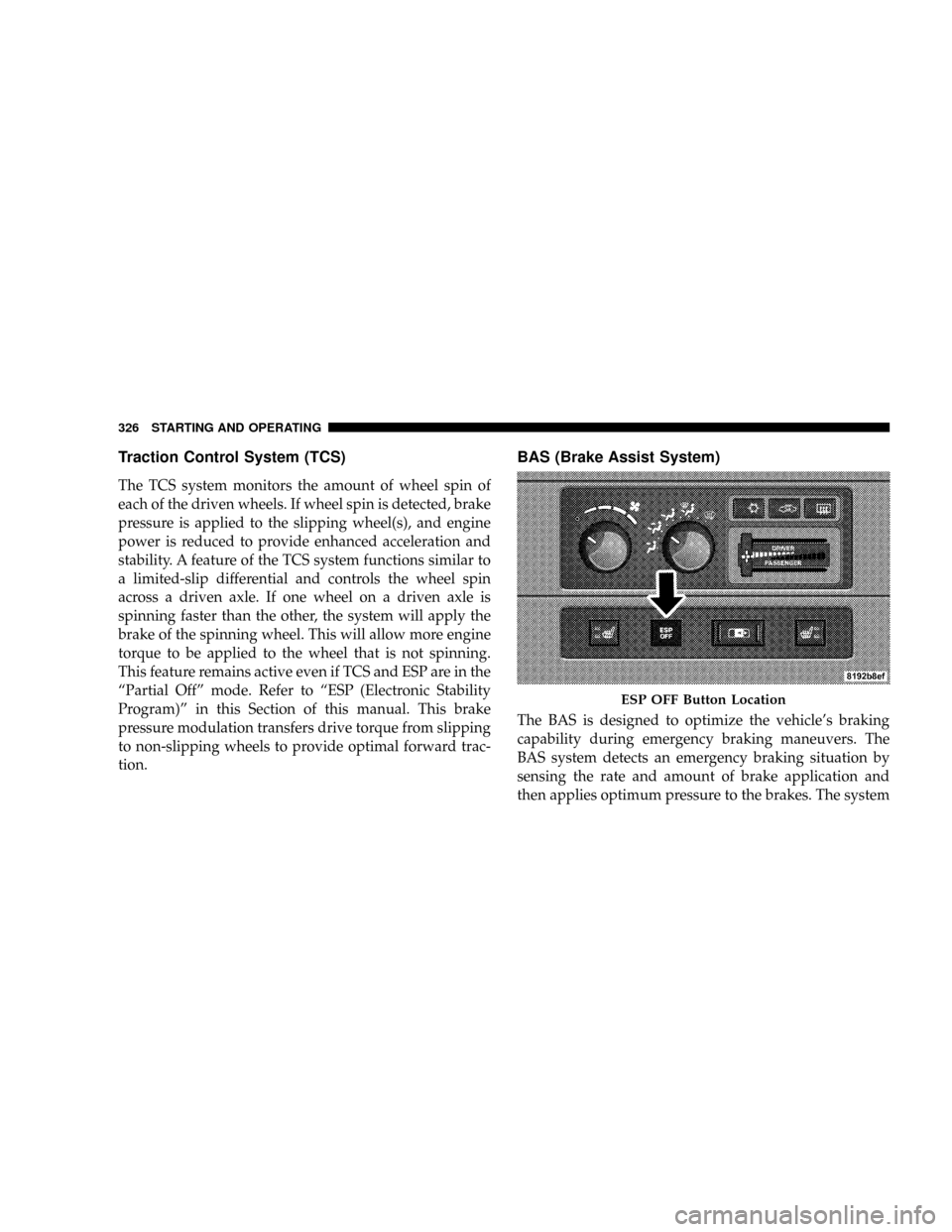
ESP OFF Button Location
326 STARTING AND OPERATING
Page 333 of 554
WARNING!
HSA is not a parking brake. If you stop the vehicle on
a hill without putting the transmission in PARK or
using the parking brake, it will roll down the incline
and could cause a collision with another vehicle or
object. Always remember to use the parking brake
while parking on a hill, and that the driver is
responsible for braking the vehicle.
HSA Off
If you wish to turn off the HSA system, follow this
procedure:
1. Start with the engine off and vehicle in PARK (auto-
matic transmission) or NEUTRAL with clutch out
(manual transmission) with wheels straight. Apply park-
ing brake on manual transmission vehicle.2. Start the engine.
3. With the engine running, the brake applied, and the
clutch out, rotate the steering wheel 180É counterclock-
wise from center.
4. Press ESP button four times within twenty seconds.
The ªESP/TCS Indicator Lightº should appear and dis-
appear four times.
5. Rotate the steering wheel 360É clockwise (180É clock-
wise from center).
6. Cycle ignition switch OFF then ON.
7. If the sequence was completed properly, the ªESP/
TCS Indicator Lightº will blink several times to confirm
HSA is off.
Steps 1-7 must be completed within 90 seconds to turn off
HSA. Repeat steps 1-7 to re-enable HSA functionality.
STARTING AND OPERATING 331
5
Page 334 of 554
Electronic Roll Mitigation (ERM)
The ERM system anticipates the potential for wheel lift
by monitoring the driver 's steering wheel input and the
speed of the vehicle. When ERM determines that the rate
of change of the steering wheel angle and vehicle speed
are sufficient to potentially cause wheel lift, it applies the
appropriate brake and may reduce engine power to
lessen the chance that wheel lift will occur. ERM will only
intervene during very severe or evasive driving maneu-
vers.
ERM can only reduce the chance of wheel lift occurring
during severe or evasive driving maneuvers. It cannot
prevent wheel lift due to other factors such as road
conditions, leaving the roadway or striking objects or
other vehicles.WARNING!
Many factors, such as vehicle loading, road condi-
tions and driving conditions, influence the chance
that wheel lift or rollover may occur.
²ERM cannot prevent all wheel lift or rollovers,
especially those that involve leaving the roadway
or striking objects or other vehicles. Only a safe,
attentive, and skillful driver can prevent accidents.
²The capabilities of an ERM-equipped vehicle
must never be exploited in a reckless or dangerous
manner which could jeopardize the user's safety
or the safety of others.
332 STARTING AND OPERATING