light DODGE RAM 3500 GAS 2008 3.G Repair Manual
[x] Cancel search | Manufacturer: DODGE, Model Year: 2008, Model line: RAM 3500 GAS, Model: DODGE RAM 3500 GAS 2008 3.GPages: 554, PDF Size: 9.93 MB
Page 252 of 554
User Defined Clock
If you wish to set the clock to a time different than the
system clock, you can manually adjust the time by
choosing the ªUser Defined Clockº option.
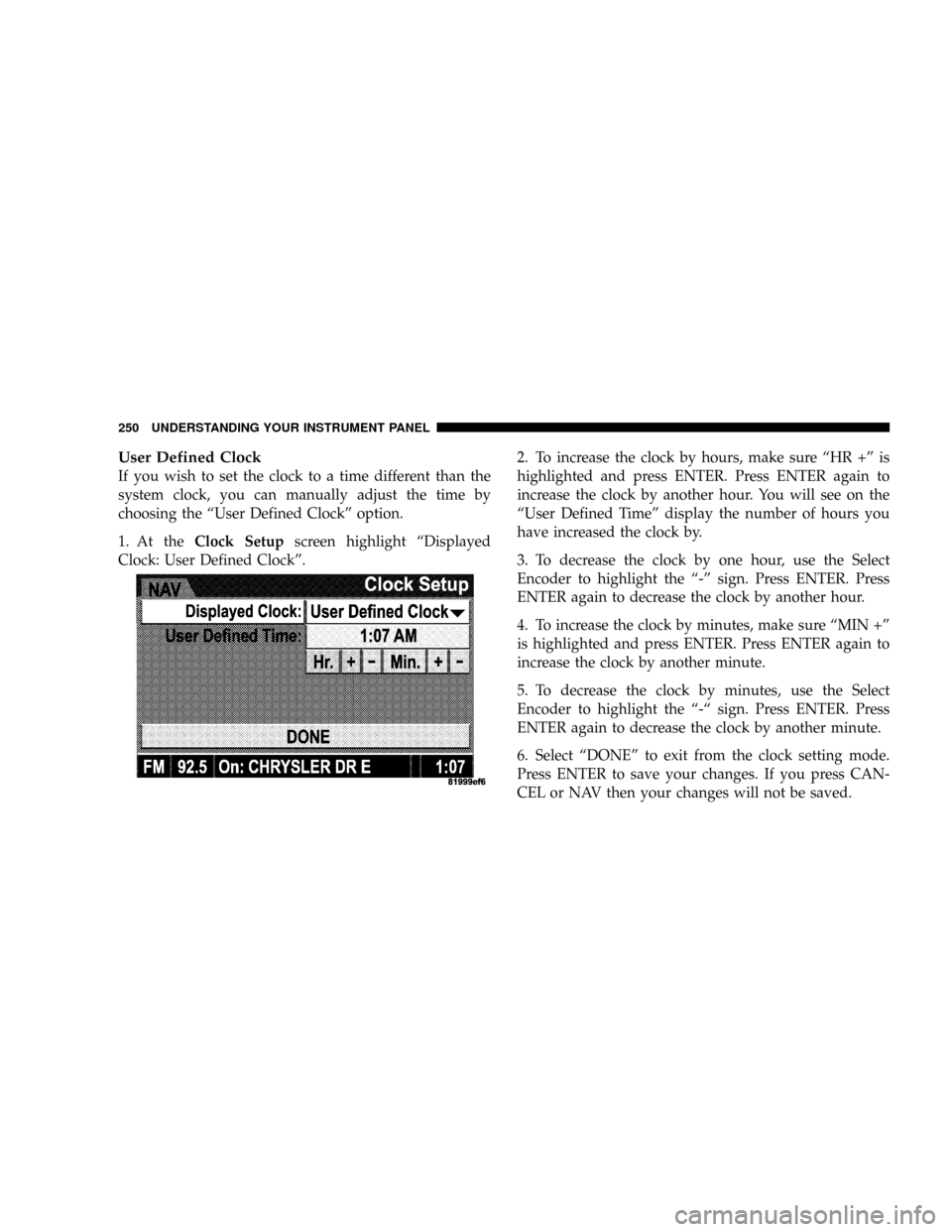
1. At theClock Setupscreen highlight ªDisplayed
Clock: User Defined Clockº.2. To increase the clock by hours, make sure ªHR +º is
highlighted and press ENTER. Press ENTER again to
increase the clock by another hour. You will see on the
ªUser Defined Timeº display the number of hours you
have increased the clock by.
3. To decrease the clock by one hour, use the Select
Encoder to highlight the ª-º sign. Press ENTER. Press
ENTER again to decrease the clock by another hour.
4. To increase the clock by minutes, make sure ªMIN +º
is highlighted and press ENTER. Press ENTER again to
increase the clock by another minute.
5. To decrease the clock by minutes, use the Select
Encoder to highlight the ª-ª sign. Press ENTER. Press
ENTER again to decrease the clock by another minute.
6. Select ªDONEº to exit from the clock setting mode.
Press ENTER to save your changes. If you press CAN-
CEL or NAV then your changes will not be saved.
250 UNDERSTANDING YOUR INSTRUMENT PANEL
Page 259 of 554
CASSETTE TAPE AND PLAYER MAINTENANCE
To keep the cassette tapes and player in good condition,
take the following precautions:
1. Do not use cassette tapes longer than C-90; otherwise,
sound quality and tape durability will be greatly dimin-
ished.
2. Keep the cassette tape in its case to protect from
slackness and dust when it is not in use.
3. Keep the cassette tape away from direct sunlight, heat
and magnetic fields such as the radio speakers.
4. Before inserting a tape, make sure that the label is
adhering flatly to the cassette.
5. A loose tape should be corrected before use. To rewind
a loose tape, insert the eraser end of a pencil into the tape
drive gear and twist the pencil in the required direction.Maintain your cassette tape player. The head and capstan
shaft in the cassette player can pick up dirt or tape
deposits each time a cassette is played. The result of
deposits on the capstan shaft may cause the tape to wrap
around and become lodged in the tape transport. The
other adverse condition is low or ªmuddyº sound from
one or both channels, as if the treble tone control were
turned all the way down. To prevent this, you should
periodically clean the head with a commercially available
wet cleaning cassette.
As preventive maintenance, clean the head about every
30 hours of use. If you wait until the head becomes very
dirty (noticeably poor sound), it may not be possible to
remove all deposits with a simple wet cleaning cassette.
UNDERSTANDING YOUR INSTRUMENT PANEL 257
4
Page 260 of 554
COMPACT DISC MAINTENANCE
To keep the compact discs in good condition, take the
following precautions:
1. Handle the disc by its edge; avoid touching the
surface.
2. If the disc is stained, clean the surface with a soft cloth,
wiping from center to edge.
3. Do not apply paper or tape to the disc; avoid scratch-
ing the disc.
4. Do not use solvents such as benzene, thinner, cleaners,
or antistatic sprays.
5. Store the disc in its case after playing.
6. Do not expose the disc to direct sunlight.
7. Do not store the disc where temperatures may become
too high.NOTE:If you experience difficulty in playing a particu-
lar disc, it may be damaged, oversized, or have theft
protection encoding. Try a known good disc before
considering disc player service.
RADIO OPERATION AND CELLULAR PHONES
Under certain conditions, the operation of a cellular
phone in your vehicle can cause erratic or noisy perfor-
mance from your radio. This condition may be lessened
or eliminated by relocating the cellular phone antenna.
This condition is not harmful to the radio. If your radio
performance does not satisfactorily ªclearº by the repo-
sitioning of the antenna, it is recommended that the radio
volume be turned down or off during cellular phone
operation.
258 UNDERSTANDING YOUR INSTRUMENT PANEL
Page 263 of 554
Blower Control
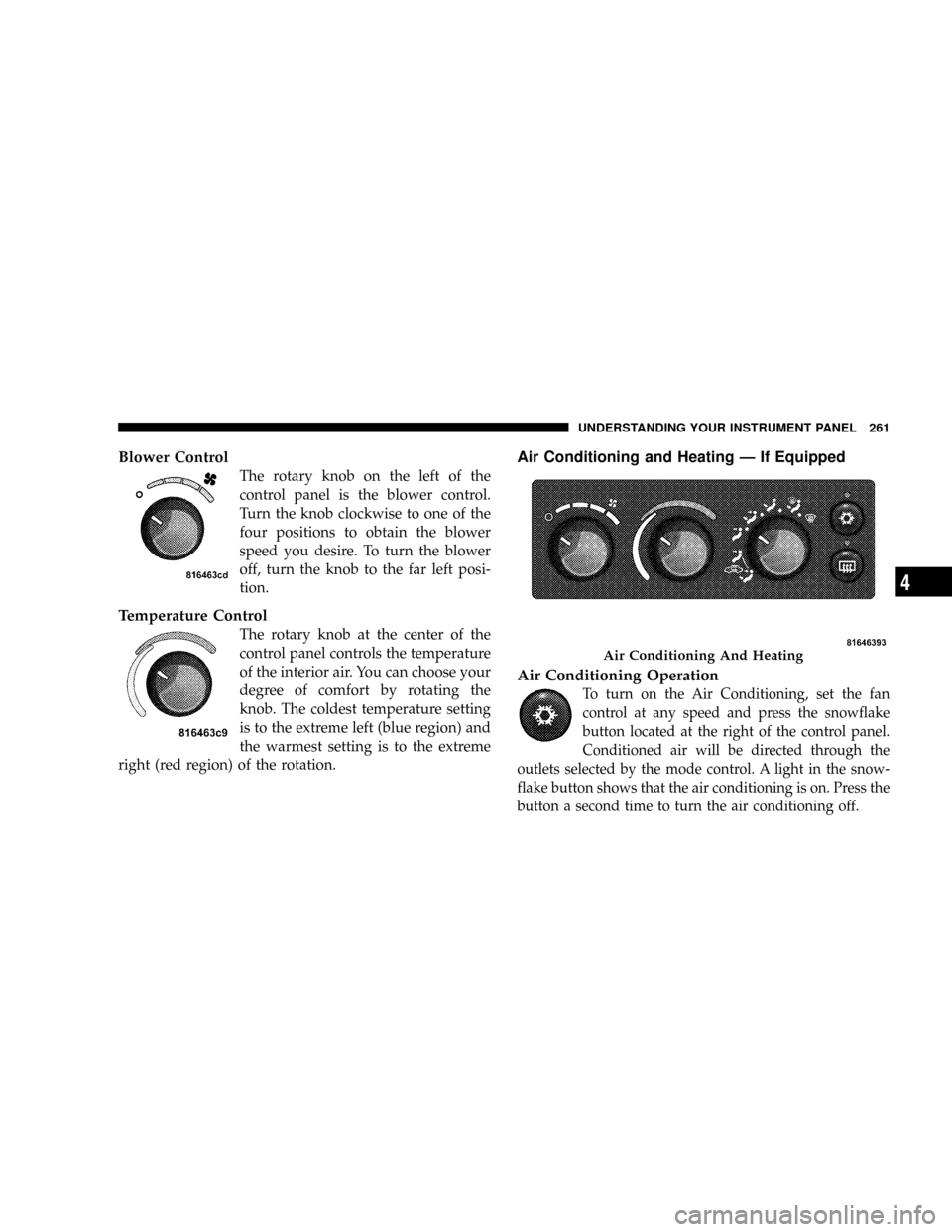
The rotary knob on the left of the
control panel is the blower control.
Turn the knob clockwise to one of the
four positions to obtain the blower
speed you desire. To turn the blower
off, turn the knob to the far left posi-
tion.
Temperature Control
The rotary knob at the center of the
control panel controls the temperature
of the interior air. You can choose your
degree of comfort by rotating the
knob. The coldest temperature setting
is to the extreme left (blue region) and
the warmest setting is to the extreme
right (red region) of the rotation.
Air Conditioning and Heating Ð If Equipped
Air Conditioning Operation
To turn on the Air Conditioning, set the fan
control at any speed and press the snowflake
button located at the right of the control panel.
Conditioned air will be directed through the
outlets selected by the mode control. A light in the snow-
flake button shows that the air conditioning is on. Press the
button a second time to turn the air conditioning off.
Air Conditioning And Heating
UNDERSTANDING YOUR INSTRUMENT PANEL 261
4
Page 264 of 554
Slight changes in engine speed or power may be noticed
when the air conditioning compressor is on. This is a
normal occurrence as the compressor will cycle on and
off to maintain comfort and increase fuel economy.
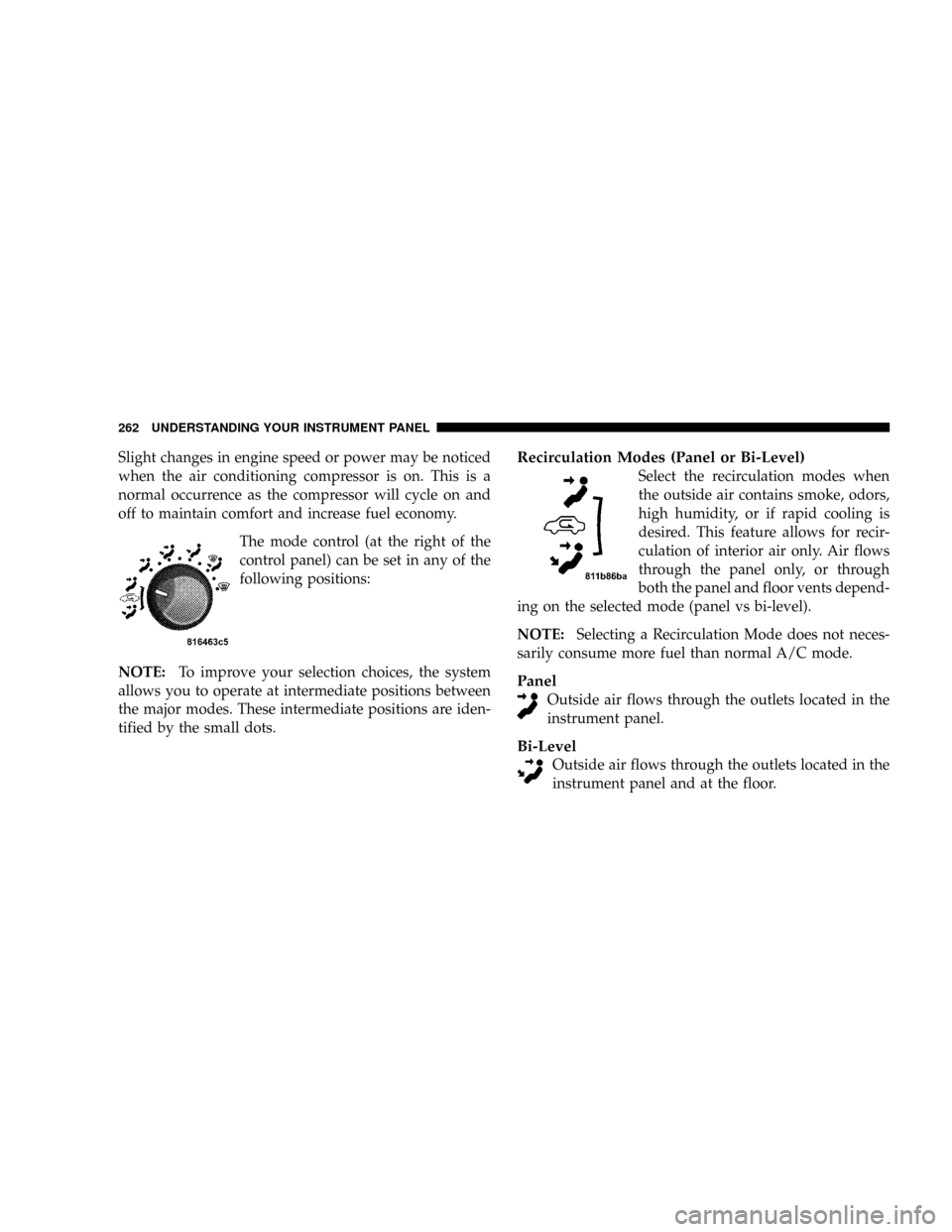
The mode control (at the right of the
control panel) can be set in any of the
following positions:
NOTE:To improve your selection choices, the system
allows you to operate at intermediate positions between
the major modes. These intermediate positions are iden-
tified by the small dots.Recirculation Modes (Panel or Bi-Level)
Select the recirculation modes when
the outside air contains smoke, odors,
high humidity, or if rapid cooling is
desired. This feature allows for recir-
culation of interior air only. Air flows
through the panel only, or through
both the panel and floor vents depend-
ing on the selected mode (panel vs bi-level).
NOTE:Selecting a Recirculation Mode does not neces-
sarily consume more fuel than normal A/C mode.
Panel
Outside air flows through the outlets located in the
instrument panel.
Bi-Level
Outside air flows through the outlets located in the
instrument panel and at the floor.
262 UNDERSTANDING YOUR INSTRUMENT PANEL
Page 267 of 554
Air Conditioning and Heating Operation
To turn on the Air Conditioning, set the fan control at any
speed and press the snowflake button located on the
control panel. Conditioned air will be directed through
the outlets selected by the mode control. A light in the
snowflake button shows that the air conditioning is on.
Press the button a second time to turn the air condition-
ing off.
A/C Pushbutton
With the fan control in the ON posi-
tion, pushing the A/C button turns on
the air conditioning compressor. An
indicator light on the button shows
that the Air Conditioning compressor
is on. Conditioned air is now directed
through the mode outlets selected.
Pushing the button a second time turns the compressor
OFF.
Recirculation Pushbutton
Pushing the Recirculation button al-
lows interior air to recirculate continu-
ously in any position except defrost
and defrost/floor mode for rapid cool
down of the interior. See ªFast
Cooldownº later in this section.
Mode Control
The mode control allows you to
choose from several patterns of air
distribution.
UNDERSTANDING YOUR INSTRUMENT PANEL 265
4
Page 271 of 554
Window Fogging
Windows will fog on the inside when the humidity inside
the vehicle is high. This often occurs in mild or cool
temperatures when it's rainy or humid. In most cases
turning on the air conditioning (pressing the snowflake
button) will clear the fog. Adjust the temperature control,
air direction and blower speed to maintain comfort.
As the temperature gets colder it may be necessary to
direct air onto the windshield by using MIX Mode
position on the control. Adjust the temperature control
and blower speed to maintain comfort. Higher blower
speeds will reduce fogging. Interior fogging on the
windshield can be quickly removed by selecting the
defrost mode.
Regular cleaning of the inside of the windows with a
non-filming cleaning solution (vinegar and water works
very well) will help prevent contaminates (cigarettesmoke, perfumes, etc.) from sticking to the windows.
Contaminates increase the rate of window fogging.
Summer Operation
Air conditioned vehicles must be protected with a high
quality antifreeze coolant during summer to provide
proper corrosion protection and to raise the boiling point
of the coolant for protection against overheating. A 50 %
concentration is recommended. For proper coolant type,
refer to ªRecommended Fluids and Genuine Partsº in
Section 7.
When using the air conditioner in extremely heavy traffic
in hot weather, especially when towing a trailer, addi-
tional engine cooling may be required. If this situation is
encountered, operate the transmission in a lower gear to
increase engine RPM, coolant flow and fan speed. When
stopped in heavy traffic, it may be necessary to shift into
NEUTRAL and depress the accelerator slightly for fast
idle operation to increase coolant flow and fan speed.
UNDERSTANDING YOUR INSTRUMENT PANEL 269
4
Page 276 of 554
NTransfer Case Reminder Light............298
NElectronically Shifted Transfer Case Operating
Information/Precautions (5 Position Switch) Ð
If Equipped.........................298
NShifting Procedure Ð Electronically Shifted
Transfer Case........................304
NElectronically Shifted Transfer Case Operating
Information/Precautions (4 Position Switch) Ð
If Equipped.........................306
NShifting Procedure Ð Electronically Shifted
Transfer Case........................311
mLimited-Slip Differential ± If Equipped........313
mDriving On Slippery Surfaces..............314
mDriving Through Water..................315
NFlowing/Rising Water..................315mDriving Off-Road.......................317
mParking Brake.........................318
mBrake System..........................319
N3500 Dual Rear Wheel Models Only........320
NBrake Noise.........................320
NRear Wheel Anti-Lock (RWAL) Brake System Ð
If Equipped.........................320
NFour-Wheel Anti-Lock Brake System Ð
If Equipped.........................321
mPower Steering........................323
mElectronic Brake Control System
(ABS/TCS/BAS/HSA/ERM/ESP/TSC) Ð
If Equipped...........................324
NABS (Anti-Lock Brake System)............325
274 STARTING AND OPERATING
Page 277 of 554
NTraction Control System (TCS)............326
NBAS (Brake Assist System)...............326
NHSA (Hill Start Assist)..................328
NElectronic Roll Mitigation (ERM)..........332
NESP (Electronic Stability Program).........333
NTSC (Trailer Sway Control)..............337
mMulti-Displacement System (MDS) Ð
5.7L Engine Only.......................338
mTire Safety Information...................339
NTire Markings........................339
NTire Loading And Tire Pressure...........343
mTires Ð General Information...............347
NTire Pressure.........................347mSupplemental Tire Pressure Information Ð
If Equipped...........................357
mTire Chains...........................357
mSnow Tires...........................359
mTire Rotation Recommendations............359
NDual Rear Wheels.....................361
mTire Pressure Monitor System (TPMS) Ð
If Equipped...........................362
NTire Pressure Monitor System (TPMS) ªLight
Loadº Reset Switch Description ±
If Equipped.........................365
NTire Pressure Monitor System Components . . . 368
NGeneral Information...................371
STARTING AND OPERATING 275
5
Page 279 of 554
NTowing Tips.........................398
NTrailer Towing Mirrors Ð If Equipped......400
mSnowplow............................401
N1500 Models (Light Duty)...............401
NBefore Plowing.......................403
NSnowplow Model Prep Package Availability . . 403
NOver The Road Operation With Snowplow
Attached...........................404
NMethods For Removing Snow............404NOperating Tips.......................404
NGeneral Maintenance...................405
mRecreational Towing (Behind Motorhome, Etc.) . . 406
NRecreational Towing ±
2-Wheel Drive Models..................406
NRecreational Towing ±
4-Wheel Drive Models..................406
mEquipment Identification Plate.............413
STARTING AND OPERATING 277
5