service DODGE RAM 5500 CHASSIS CAB 2008 3.G Owner's Manual
[x] Cancel search | Manufacturer: DODGE, Model Year: 2008, Model line: RAM 5500 CHASSIS CAB, Model: DODGE RAM 5500 CHASSIS CAB 2008 3.GPages: 528, PDF Size: 7.84 MB
Page 182 of 528

the electric shift 4WD system. If the SERV 4WD light
stays on or comes on during driving, it means that the
4WD system is not functioning properly and that service
is required.
23. Water In Fuel Indicator Ð Diesel Only
Indicates there is water detected in the fuel
filter. Refer to the Maintenance section, Drain-
ing Fuel/Water Separator Filter, for water
drain procedure.(See page 417 for more infor-
mation.)
24. Transmission Oil Temperature Warning Light
(Automatic Transmissions Only)
This light indicates that there is excessive trans-
mission fluid temperature that might occur
with severe usage such as trailer towing. It may
also occur when operating the vehicle in a high
torque converter slip condition, such as 4-wheel-drive
operation (e.g. snow plowing, off- road operation). If thislight comes on, stop the vehicle and run the engine at idle
or faster, with the transmission in NEUTRAL until the
light goes off.
25. Wait To Start Indicator Ð Diesel Only
The Wait To Start Indicator will illuminate when
the ignition is turned to the run position and the
intake manifold temperature is below 66 degrees F.
Follow engine starting procedure for proper engine start-
ing and operating. Wait until the Wait To Start Indicator
turns OFF then start the vehicle.
NOTE:The Wait To Start Indicator may not illuminate if
the engine coolant temperature is warm enough.
26. Odometer/Trip Odometer Button
Press this button to toggle between the odometer and the
trip odometer display. Holding the button in resets the
trip odometer reading when in trip mode.
182 UNDERSTANDING YOUR INSTRUMENT PANEL
Page 226 of 528

VIDEO ENTERTAINMENT SYSTEM (SALES CODE
XRV) Ð IF EQUIPPED
The optional VESŸ (Video Entertainment System) con-
sists of a DVD player and LCD (liquid crystal display)
screen, a battery-powered remote control, and two head-
sets. The system is located in the headliner behind the
front row seat. Refer to your VESŸ User's Manual for
detailed operating instructions.
SATELLITE RADIO Ð IF EQUIPPED
Satellite radio uses direct satellite to receiver broadcast-
ing technology to provide clear digital sound, coast to
coast. The subscription service provider is SiriusŸ Satel-
lite Radio. This service offers over 100 channels of music,
sports, news, entertainment, and programming for chil-
dren, directly from its satellites and broadcasting studios.
System Activation
Sirius Satellite Radio service is pre-activated, and you
may begin listening immediately to the one year of
SIRIUS audio service that is included with the factory-
installed satellite radio system in your vehicle. Sirius will
contact you to supply a welcome kit and to confirm
subscription information, including the set up of your
on-line listening account at no additional charge. For
further information, call the toll-free number 888-539-
7474, or visit the Sirius web site at www.sirius.com.
Please have the following information available when
calling:
1. The Electronic Serial Number/Sirius Identification
Number (ESN/SID).
2. Your Vehicle Identification Number.
226 UNDERSTANDING YOUR INSTRUMENT PANEL
Page 233 of 528

COMPACT DISC MAINTENANCE
To keep the compact discs in good condition, take the
following precautions:
1. Handle the disc by its edge; avoid touching the
surface.
2. If the disc is stained, clean the surface with a soft cloth,
wiping from center to edge.
3. Do not apply paper or tape to the disc; avoid scratch-
ing the disc.
4. Do not use solvents such as benzene, thinner, cleaners,
or antistatic sprays.
5. Store the disc in its case after playing.
6. Do not expose the disc to direct sunlight.
7. Do not store the disc where temperatures may become
too high.NOTE:If you experience difficulty in playing a particu-
lar disc, it may be damaged, oversized, or have theft
protection encoding. Try a known good disc before
considering disc player service.
RADIO OPERATION AND CELLULAR PHONES
Under certain conditions, the operation of a cellular
phone in your vehicle can cause erratic or noisy perfor-
mance from your radio. This condition may be lessened
or eliminated by relocating the cellular phone antenna.
This condition is not harmful to the radio. If your radio
performance does not satisfactorily ªclearº by the repo-
sitioning of the antenna, it is recommended that the radio
volume be turned down or off during cellular phone
operation.
UNDERSTANDING YOUR INSTRUMENT PANEL 233
4
Page 268 of 528

Engine Speed Control
CAUTION!
Prevent overspeeding the engine going down hill.
When descending steep grades, use a combination of
gears and service brakes to control vehicle/engine
speed. Overspeed can cause severe engine damage.
Operating Precautions
Avoid Overheating The Engine
The temperature of the coolant (a mixture of 50%
ethylene-glycol and 50% water) must not exceed the
normal range of the temperature gauge (240ÉF/116ÉC)
with a 16 psi (110 kPa) radiator cap.
Usually the coolant temperature indicated during opera-
tion will be to the left of center in the normal range of the
gauge.
Avoid Low Coolant Temperature Operation
Continual operation at low coolant temperature below
the normal range on the gauge (140ÉF/60ÉC) can be
harmful to the engine. Low coolant temperature can
cause incomplete combustion which allows carbon and
varnish to form on piston rings and injector nozzles.
Also, the unburned fuel can enter the crankcase, diluting
the lubricating oil and causing rapid wear to the engine.
Cooling System Tips Ð Automatic Transmission
To reduce potential for engine and transmission over-
heating in high ambient temperature conditions, take the
following actions:
²City Driving Ð
when stopped, put transmission in neutral and increase
engine idle speed.
²Highway Driving Ð
reduce your speed.
268 STARTING AND OPERATING
Page 269 of 528

²Up Steep Hills Ð
select a lower transmission gear, but try and keep the
torque converter clutch engaged.
²Air Conditioning Ð
turn it off temporarily.
Do Not Operate The Engine With Low Oil
Pressure
When the engine is at normal operating temperature, the
minimum oil pressures required are:
Idle 700 to 800 RPM............... 10psi(69kPa)
Full speed and load.............. 30psi(207 kPa)
CAUTION!
If oil pressure falls to less than normal readings, shut
the engine off immediately. Failure to do so could
result in immediate and severe engine damage.
Do Not Operate The Engine With Failed Parts
Practically all failures give some warning before the parts
fail. Be on the alert for changes in performance, sounds,
and visual evidence that the engine requires service.
Some important clues are:
²engine misfiring or vibrating severely
²sudden loss of power
²unusual engine noises
²fuel, oil or coolant leaks
²sudden change, outside the normal operating range, in
the engine operating temperature
²excessive smoke
²oil pressure drop
STARTING AND OPERATING 269
5
Page 296 of 528
If One or More Shift Conditions are not Met
1. The indicator light for the current position will remain
ON.
2. The newly selected position indicator light will con-
tinue to flash.
3. The transfer casewill notshift.
NOTE:Before retrying a selection, make certain that all
the necessary requirements for selecting a new transfer
case position have been met. To retry the selection, turn
the control knob back to the current position, wait five (5)
seconds, and retry selection. To find the shift require-
ments, refer to the9Shifting Procedure9for your transfer
case, located in this section of the owner's manual.The ªSERVICE 4WDº warning light monitors the electric
shift 4WD system. If this light remains on after engine
start up or illuminates during driving, it means that the
4WD system is not functioning properly and that service
is required.
WARNING!
Always engage the parking brake when powering
down the vehicle if the(Service 4WD(light is illu-
minated. Not engaging the parking brake may allow
the vehicle to roll which may cause personal injury.
NOTE:Do not attempt to make a shift while only the
front or rear wheels are spinning, as this can cause
damage to driveline components.
296 STARTING AND OPERATING
Page 302 of 528

POWER TAKE OFF OPERATION ± IF EQUIPPED
The Dodge Chassis Cab vehicle, when equipped with
either the automatic 6 speed or manual G-56 6 speed
transmissions, will allow for an aftermarket upfit with a
transmission driven PTO (power take off). The customer
will have the ability to operate the PTO in either a
ªstationaryº or ªmobileº mode. The vehicles will be
factory set to the ªstationaryº mode. In order to select the
ªmobileº mode a DaimlerChrysler Dealership is required
to modify the vehicles settings using their proprietary
Dealer service tool.
Stationary Mode
To operate the PTO in this mode the vehicle must meet
the following conditions:
²Be in ªparkº position (vehicles equipped with auto-
matic transmission)
²Upfitter provider (on/off) switch has been activated
²Parking brake applied (vehicles equipped with
manual transmission)
²Vehicle must be running
²No vehicle, brake or clutch switch faults present
²PTO must be correctly installed using the vehicle
provided circuits
The customer has the choice to operate the PTO by
utilizing the cruise control switches or by utilizing a
remote control (provided by the PTO supplier). To oper-
ate the feature using the cruise control switches the
customer must first activate the up fitter provided on/off
switch. Next, the cruise control ªonº switch is selected.
Following this step the ªsetº switch must be depressed.
The vehicle is now in the PTO mode and is ready for use.
In order to increase or decrease the engine idle speed, to
optimize the PTO function, the ªaccelº and ªdecelº cruise
switches can be used respectively. To disengage PTO
302 STARTING AND OPERATING
Page 303 of 528

operation and return to ªstandard vehicle operationº
simply turn the up fitter provided on/off switch to the off
position or press the ªcancelº cruise switch.
To operate the PTO via a remote switch the customer
must make sure the above conditions are met. It is vital
for proper operation that the PTO and remote have been
installed correctly paying special attention to ensure the
vehicle provided wiring has been connected properly.
This is the responsibility of the installer of the PTO and
switches/remote system. It is the responsibility of the
PTO manufacturer to ensure that their electrical (switches
and remote) system is compatible with the vehicle's
electrical architecture and software functionality.
Mobile Mode
To operate the PTO in this mode the vehicle must meet
the following conditions:
²Dealer selected ªmobileº mode activated via Dealer
proprietary service tool
²Upfitter provider (on/off) switch has been activated
²Vehicle must be in ªparkº or ªdriveº position (vehicles
equipped with automatic transmission)
²Parking brake must not be applied
²No vehicle, brake or clutch switch faults present
²Vehicle must be running
²PTO must be correctly installed using the vehicle
provided circuits
The customer may choose to use the PTO while the
vehicle is moving. To do so the PTO function must be
activated prior to taking the vehicle out of ªparkº. This is
accomplished by activating the up fitter provided PTO
on/off switch. At this point the customer may place the
vehicle in a forward or reverse gear and have PTO
STARTING AND OPERATING 303
5
Page 313 of 528
WARNING!
Continued operation with reduced power steering
assist could pose a safety risk to yourself and others.
Service should be obtained as soon as possible.
CAUTION!
Prolonged operation of the steering system at the end
of the steering wheel travel will increase the steering
fluid temperature and should be avoided when pos-
sible. Damage to the power steering pump may occur.
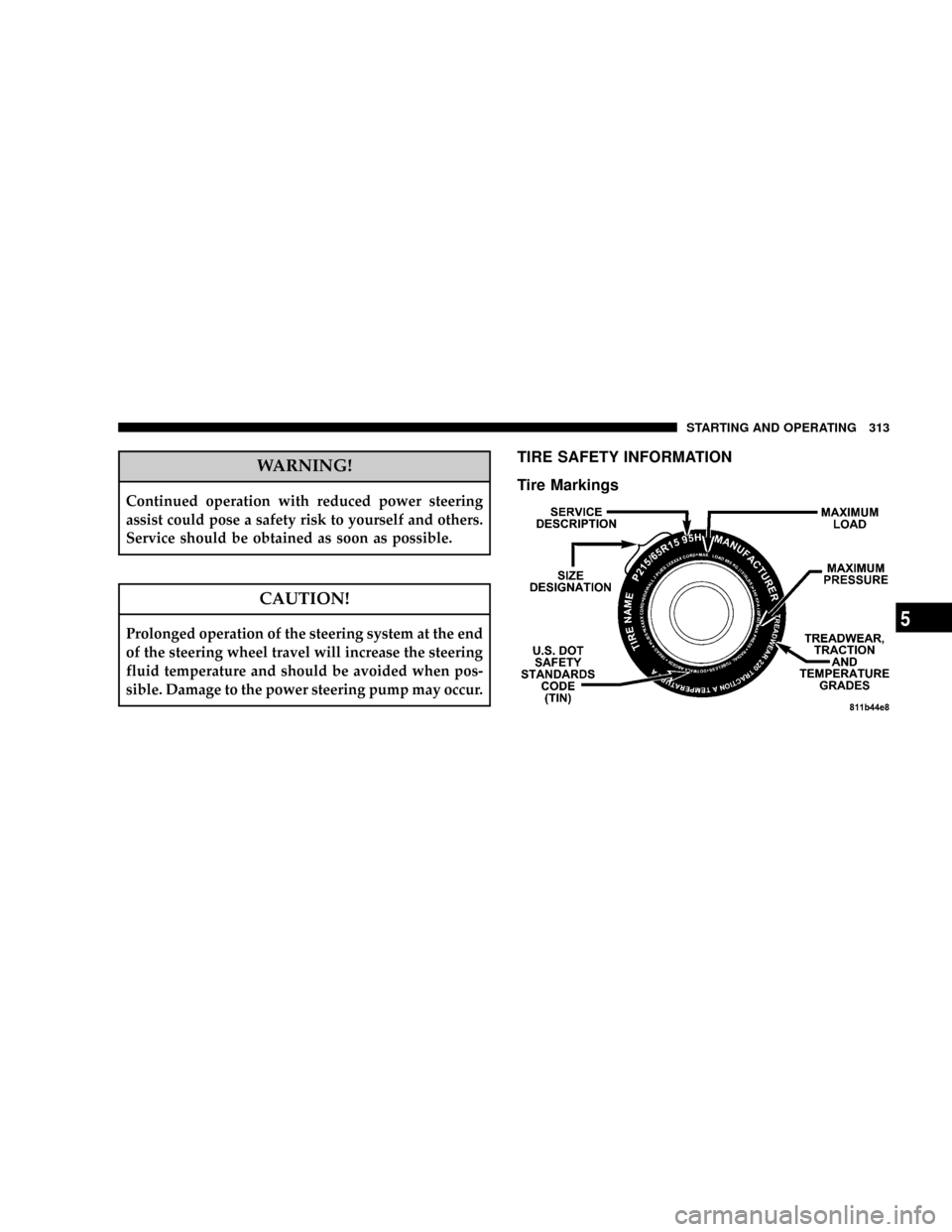
TIRE SAFETY INFORMATION
Tire Markings
STARTING AND OPERATING 313
5
Page 316 of 528

EXAMPLE:
Service Description:
95= Load Index
ÐA numerical code associated with the maximum load a tire can carry.
H= Speed Symbol
ÐA symbol indicating the range of speeds at which a tire can carry a load corresponding
to its load index under certain operating conditions.
ÐThe maximum speed corresponding to the Speed Symbol should only be achieved un-
der specified operating conditions (i.e. tire pressure, vehicle loading, road conditions, and
posted speed limits).
Load Identification:
(....blank....(= Absence of any text on sidewall of the tire indicates a Standard Load (SL) Tire
Extra Load (XL)= Extra Load (or Reinforced) Tire
Light Load= Light Load Tire
C,D,E= Load range associated with the maximum load a tire can carry at a specified pressure
Maximum LoadÐ Maximum Load indicates the maximum load this tire is designed to carry.
Maximum PressureÐ
Maximum Pressure indicates the maximum permissible cold tire inflation pressure for this tire.
316 STARTING AND OPERATING