service indicator DODGE RAM SRT-10 2006 Service Owner's Manual
[x] Cancel search | Manufacturer: DODGE, Model Year: 2006, Model line: RAM SRT-10, Model: DODGE RAM SRT-10 2006Pages: 5267, PDF Size: 68.7 MB
Page 2959 of 5267
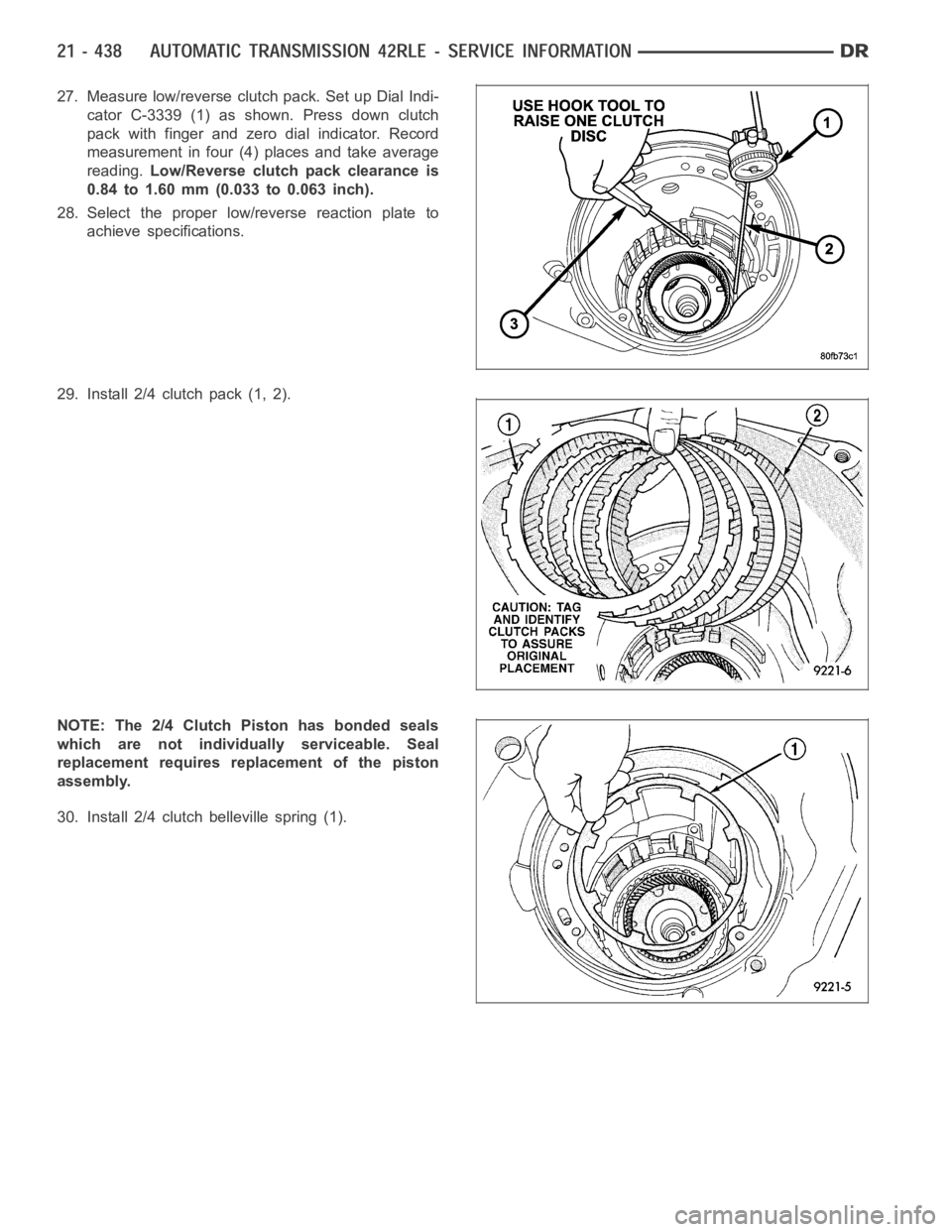
27. Measure low/reverse clutch pack. Set up Dial Indi-
cator C-3339 (1) as shown. Press down clutch
pack with finger and zero dial indicator. Record
measurement in four (4) places and take average
reading.Low/Reverse clutch pack clearance is
0.84 to 1.60 mm (0.033 to 0.063 inch).
28. Select the proper low/reverse reaction plate to
achieve specifications.
29. Install 2/4 clutch pack (1, 2).
NOTE: The 2/4 Clutch Piston has bonded seals
which are not individually serviceable. Seal
replacement requires replacement of the piston
assembly.
30. Install 2/4 clutch belleville spring (1).
Page 3014 of 5267
FLUID AND FILTER
DIAGNOSIS AND TESTING
CAUSES OF BURNT FLUID
Burnt, discolored fluid is a result of overheating which has two primary causes.
1. A result of restricted fluid flow through the main and/or auxiliary cooler. This condition is usually the result of a
faulty or improperly installed drainback valve, a damaged oil cooler, or severe restrictions in the coolers and lines
caused by debris or kinked lines.
2. Heavy duty operation with a vehicle not properly equipped for this type of operation. Trailer towing or similar high
load operation will overheat the transmission fluid if the vehicle is improperly equipped. Such vehicles should
have an auxiliary transmission fluid cooler, a heavy duty cooling system,and the engine/axle ratio combination
needed to handle heavy loads.
EFFECTS OF INCORRECT FLUID LEVEL
Alowfluidlevelallowsthepumptotakeinairalongwiththefluid.Airinthe fluid will cause fluid pressures to be
low and develop slower than normal. If the transmission is overfilled, thegears churn the fluid into foam. This aer-
ates the fluid and causing the same conditions occurring with a low level. In either case, air bubbles cause fluid
overheating, oxidation, and varnish buildup which interferes with valveand clutch operation. Foaming also causes
fluid expansion which can result in fluid overflow from the transmission vent or fill tube. Fluid overflow can easily be
mistaken for a leak if inspection is not careful.
FLUID CONTAMINATION
Transmission fluid contamination is generally a result of:
adding incorrect fluid
failure to clean dipstick and fill tube when checking level
engine coolant entering the fluid
internal failure that generates debris
overheat that generates sludge (fluid breakdown)
failure to replace contaminated converter after repair
The use of non-recommended fluids can result in transmission failure. Theusual results are erratic shifts, slippage,
abnormal wear and eventual failure due to fluid breakdown and sludge formation. Avoid this condition by using rec-
ommended fluids only.
The dipstick cap and fill tube should be wiped clean before checking fluid level. Dirt, grease and other foreign mate-
rial on the cap and tube could fall into the tube if not removed beforehand. Take the time to wipe the cap and tube
clean before withdrawing the dipstick.
Engine coolant in the transmission fluid is generally caused by a cooler malfunction. The only remedy is to replace
the radiator as the cooler in the radiator is not a serviceable part. If coolant has circulated through the transmission,
an overhaul is necessary.
The torque converter should also be replaced whenever a failure generatessludge and debris. This is necessary
because normal converter flushing procedures will not remove all contaminants.
STANDARD PROCEDURE
FLUID LEVEL CHECK
The transmission sump has a dipstick to check oil similar to most automatictransmissions. It is located on the left
side of the engine. Be sure to wipe all dirt from dipstick handle before removing.
The torque converter fills in both the PARK and NEUTRAL positions. Place the selector lever in PARK to be sure
that the fluid level check is accurate.The engine should be running at idle speed for at least one minute, with
the vehicle on level ground.At normal operating temperature (approximately 82° C or 180° F), the fluidlevel is
correct if it is in the HOT region (cross-hatched area) on the oil level indicator. The fluid level should be in COLD
region at 21° C (70° F) fluid temperature. Adjust fluid level as necessary.Use only Mopar
ATF+4, Automatic Trans-
mission Fluid.
Page 4317 of 5267
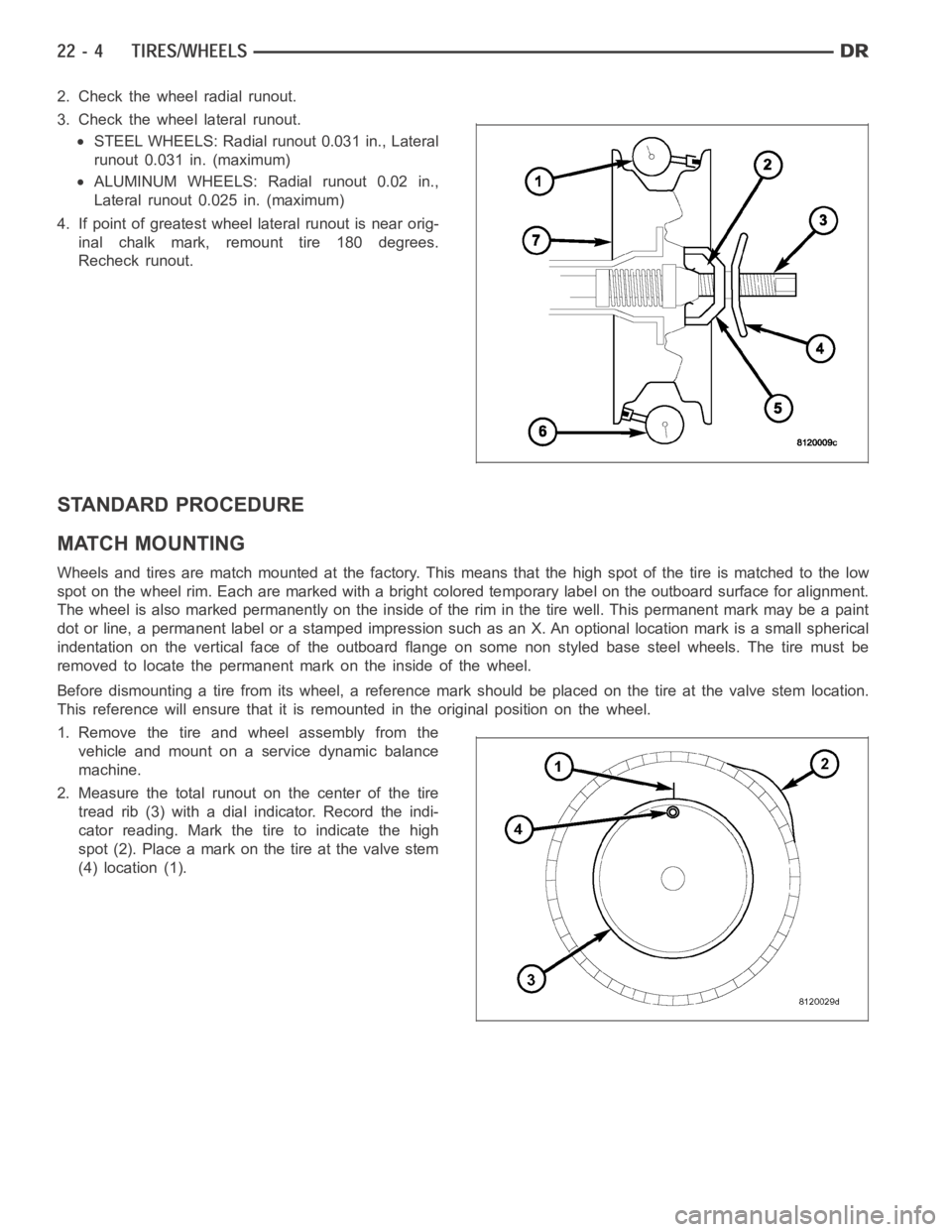
2. Check the wheel radial runout.
3. Check the wheel lateral runout.
STEEL WHEELS: Radial runout 0.031 in., Lateral
runout 0.031 in. (maximum)
ALUMINUM WHEELS: Radial runout 0.02 in.,
Lateral runout 0.025 in. (maximum)
4. If point of greatest wheel lateral runout is near orig-
inal chalk mark, remount tire 180 degrees.
Recheck runout.
STANDARD PROCEDURE
MATCH MOUNTING
Wheels and tires are match mounted at the factory. This means that the high spot of the tire is matched to the low
spot on the wheel rim. Each are marked with a bright colored temporary labelon the outboard surface for alignment.
The wheel is also marked permanently on the inside of the rim in the tire well. This permanent mark may be a paint
dot or line, a permanent label or a stamped impression such as an X. An optional location mark is a small spherical
indentation on the vertical face of the outboard flange on some non styled base steel wheels. The tire must be
removed to locate the permanent mark on the inside of the wheel.
Before dismounting a tire from its wheel, a reference mark should be placedon the tire at the valve stem location.
This reference will ensure that it is remounted in the original position onthe wheel.
1. Remove the tire and wheel assembly from the
vehicle and mount on a service dynamic balance
machine.
2. Measure the total runout on the center of the tire
tread rib (3) with a dial indicator. Record the indi-
cator reading. Mark the tire to indicate the high
spot (2). Place a mark on the tire at the valve stem
(4) location (1).
Page 4318 of 5267
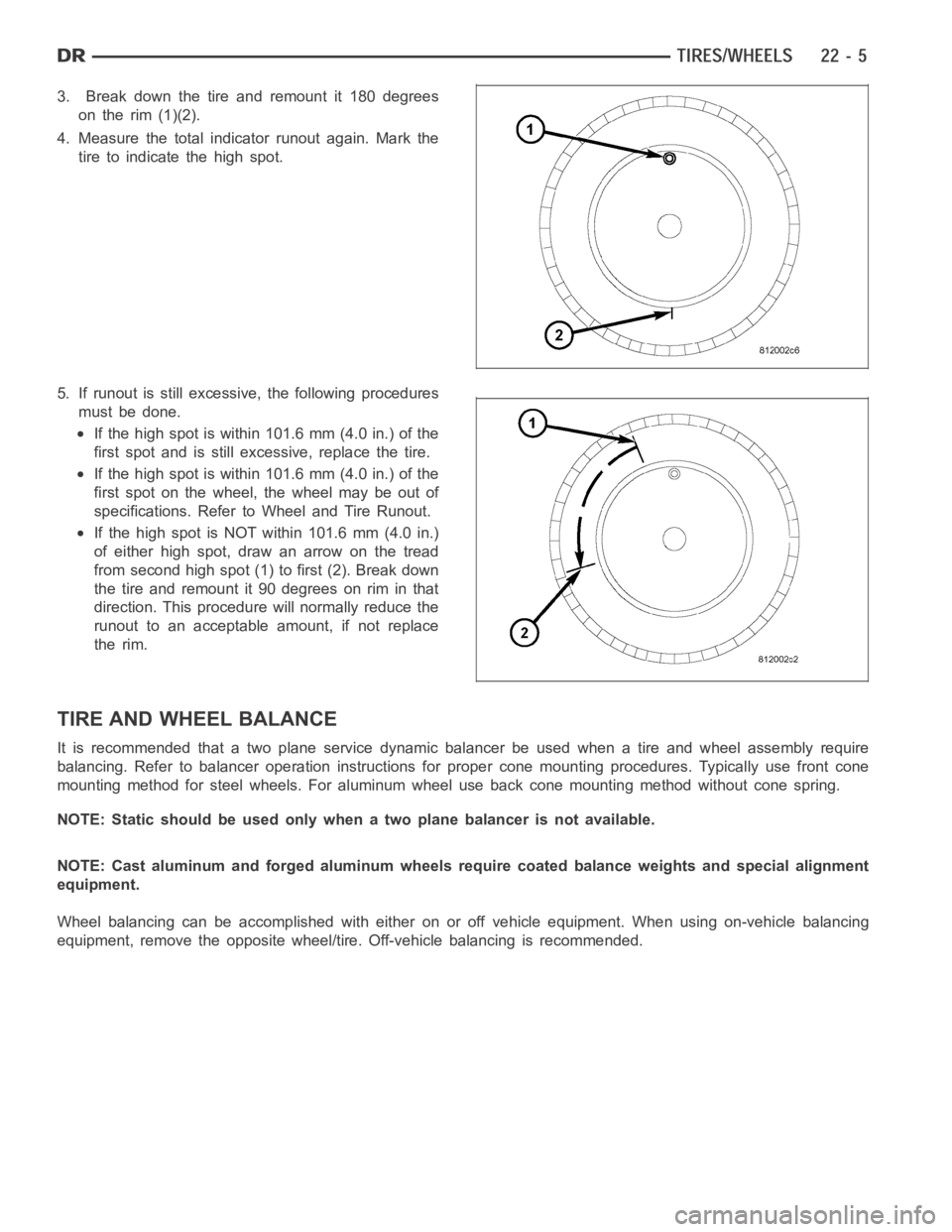
3. Break down the tire and remount it 180 degrees
on the rim (1)(2).
4. Measure the total indicator runout again. Mark the
tire to indicate the high spot.
5. If runout is still excessive, the following procedures
must be done.
If the high spot is within 101.6 mm (4.0 in.) of the
first spot and is still excessive, replace the tire.
If the high spot is within 101.6 mm (4.0 in.) of the
first spot on the wheel, the wheel may be out of
specifications. Refer to Wheel and Tire Runout.
IfthehighspotisNOTwithin101.6mm(4.0in.)
of either high spot, draw an arrow on the tread
from second high spot (1) to first (2). Break down
the tire and remount it 90 degrees on rim in that
direction. This procedure will normally reduce the
runout to an acceptable amount, if not replace
the rim.
TIRE AND WHEEL BALANCE
It is recommended that a two plane service dynamic balancer be used when a tire and wheel assembly require
balancing. Refer to balancer operation instructions for proper cone mounting procedures. Typically use front cone
mounting method for steel wheels. For aluminum wheel use back cone mounting method without cone spring.
NOTE: Static should be used only when a two plane balancer is not available.
NOTE: Cast aluminum and forged aluminum wheels require coated balance weights and special alignment
equipment.
Wheel balancing can be accomplished with either on or off vehicle equipment. When using on-vehicle balancing
equipment, remove the opposite wheel/tire. Off-vehicle balancing is recommended.
Page 4944 of 5267
B1001–A/C SWITCH REQUEST INPUT CIRCUIT LOW (SINGLE-ZONE)
For a complete wiring diagramRefer to Section 8W.
Theory of Operation
The A/C mode switch input changes when the switch is pushed down. A stored DTC B1001 indicates that the A/C
mode switch was stuck in a pushed position for more than two minutes, but hassince returned to its normal state.
An active DTC B1001 indicates that the A/C mode switch is stuck in a pushed position.AnactiveDTCB1001will
also prevent proper A/C mode switch and status indicator function as evidenced by not being able to turn the A/C
status indicator either on if off or off if on.
When Monitored:
With the ignition on.
Set Condition:
If the A/C mode switch stays in a pushed position for more than two minutes. This DTC has a maturing time
of two minutes and a de-maturing time of two seconds. If the DTC’s status changes from active to stored it will
stay in memory for 100 ignition cycles.
Possible Causes
A/C HEATER CONTROL DAMAGED
OBJECT HOLDING A/C MODE SWITCH IN A PUSHED POSITION
SUBSTANCE CAUSING A/C MODE SWITCH TO GET STUCK IN A PUSHED POSITION
A/C HEATER CONTROL
Diagnostic Test
1.INSPECT THE A/C HEATER CONTROL FOR DAMAGE
Inspect the A/C Heater Control for damage.
Is the A/C Heater Control damaged?
Ye s>>
Replace the A/C Heater Control in accordance with the Service Information.
Perform BODY VERIFICATION TEST – VER 1. (Refer to 8 - ELECTRICAL/ELECTRONIC CONTROL
MODULES - STANDARD PROCEDURE).
No>>
Go To 2
2.INSPECT FOR OBJECT OR SUBSTANCE CAUSING THE A/C MODE SWITCH TO STAY OR STICKIN A
PUSHED POSITION
Inspect the A/C Heater Control for anything that would cause the A/C mode switch to stay or stick in a pushed
position.
Is anything present that would cause the A/C mode switch to stay or stick in apushed position?
Ye s>>
Repair as necessary.
Perform BODY VERIFICATION TEST – VER 1. (Refer to 8 - ELECTRICAL/ELECTRONIC CONTROL
MODULES - STANDARD PROCEDURE).
No>>
Go To 3
Page 4945 of 5267
3.CHECK FOR NORMAL A/C MODE SWITCH & STATUS INDICATOR FUNCTION
Turn the ignition on.
Turn the blower control on.
Press the A/C mode switch on and off several times while observing the A/C status indicator.
Does the A/C status indicator turn on and off with respect to the switch position?
Ye s>>
Go To 4
No>>
Replace the A/C Heater Control in accordance with the Service Information.
Perform BODY VERIFICATION TEST – VER 1. (Refer to 8 - ELECTRICAL/ELECTRONIC CONTROL
MODULES - STANDARD PROCEDURE).
4.VERIFY THAT DTC B1001–A/C SWITCH REQUEST INPUT CIRCUIT LOW IS STILL ACTIVE
Turn the blower control off.
With the scan tool, erase HVAC DTCs.
Turn the ignition off, wait 10 seconds, and then turn the ignition on. Wait two minutes before proceeding.
With the scan tool, read HVAC DTCs.
Does the scan tool display active: B1001–A/C SWITCH REQUEST INPUT CIRCUITLOW?
Ye s>>
Replace the A/C Heater Control in accordance with the Service Information.
Perform BODY VERIFICATION TEST – VER 1. (Refer to 8 - ELECTRICAL/ELECTRONIC CONTROL
MODULES - STANDARD PROCEDURE).
No>>
Perform BODY VERIFICATION TEST – VER 1. (Refer to 8 - ELECTRICAL/ELECTRONIC CONTROL
MODULES - STANDARD PROCEDURE).
Page 4946 of 5267
B1016–REAR DEFROST SWITCH REQUEST INPUT CIRCUIT LOW (SINGLE-ZONE)
For a complete wiring diagramRefer to Section 8W.
Theory of Operation
The Rear Defrost mode switch input changes when the switch is pushed down. Astored DTC B1016 indicates that
the Rear Defrost mode switch was stuck in a pushed position for more than twominutes, but has since returned to
its normal state. An active DTC B1016 indicates that the Rear Defrost mode switch is stuck in a pushed position. An
active DTC B1016 will also prevent proper Rear Defrost mode switch and status indicator function as evidenced by
not being able to turn the Rear Defrost status indicator either on if off or off if on.
When Monitored:
With the ignition on.
Set Condition:
If the Rear Defrost mode switch stays in a pushed position for more than two minutes. This DTC has a matur-
ing time of two minutes and a de-maturing time of two seconds. If the DTC’s status changes from active to
stored it will stay in memory for 100 ignition cycles.
Possible Causes
A/C HEATER CONTROL DAMAGED
OBJECT HOLDING REAR DEFROST MODE SWITCH IN A PUSHED POSITION
SUBSTANCE CAUSING REAR DEFROST MODE SWITCH TO GET STUCK IN A PUSHED POSITION
A/C HEATER CONTROL
Diagnostic Test
1.INSPECT THE A/C HEATER CONTROL FOR DAMAGE
Inspect the A/C Heater Control for damage.
Is the A/C Heater Control damaged?
Ye s>>
Replace the A/C Heater Control in accordance with the Service Information.
Perform BODY VERIFICATION TEST – VER 1. (Refer to 8 - ELECTRICAL/ELECTRONIC CONTROL
MODULES - STANDARD PROCEDURE).
No>>
Go To 2
2.INSPECT FOR OBJECT OR SUBSTANCE CAUSING THE REAR DEFROST MODE SWITCH TO STAYOR
STICK IN A PUSHED POSITION
Inspect the A/C Heater Control for anything that would cause the Rear Defrost mode switch to stay or stick in a
pushed position.
Is anything present that would cause the Rear Defrost mode switch to stay orstick in a pushed posi-
tion?
Ye s>>
Repair as necessary.
Perform BODY VERIFICATION TEST – VER 1. (Refer to 8 - ELECTRICAL/ELECTRONIC CONTROL
MODULES - STANDARD PROCEDURE).
No>>
Go To 3
Page 4947 of 5267
3.CHECK FOR NORMAL REAR DEFROST MODE SWITCH & STATUS INDICATOR FUNCTION
Turn the ignition on.
Press the Rear Defrost mode switch on and off several times while observingthe status indicator.
Does the Rear Defrost status indicator turn on and off with respect to the switch position?
Ye s>>
Go To 4
No>>
Replace the A/C Heater Control in accordance with the Service Information.
Perform BODY VERIFICATION TEST – VER 1. (Refer to 8 - ELECTRICAL/ELECTRONIC CONTROL
MODULES - STANDARD PROCEDURE).
4.VERIFY THAT DTC B1016–REAR DEFROST SWITCH REQUEST INPUT CIRCUIT LOW IS STILL ACTIVE
With the scan tool, erase HVAC DTCs.
Turn the ignition off, wait 10 seconds, and then turn the ignition on. Wait two minutes before proceeding.
With the scan tool, read HVAC DTCs.
Does the scan tool display active: B1016–REAR DEFROST SWITCH REQUEST INPUT CIRCUIT LOW?
Ye s>>
Replace the A/C Heater Control in accordance with the Service Information.
Perform BODY VERIFICATION TEST – VER 1. (Refer to 8 - ELECTRICAL/ELECTRONIC CONTROL
MODULES - STANDARD PROCEDURE).
No>>
Perform BODY VERIFICATION TEST – VER 1. (Refer to 8 - ELECTRICAL/ELECTRONIC CONTROL
MODULES - STANDARD PROCEDURE).
Page 5047 of 5267
With the scan tool in HVAC, select System Tests and then select Cooldown test. Allow the test to run to completion.
Does the scan tool display a status message that indicates a fault has occurred?
Yes, Conditions Too Cold - Test Not Run
If running, turn the A/C compressor off. Verify that the work area ambient temperature is above 15.6°C
(60°F). If not, move the vehicle to a warmer work area. Verify that the evaporator temperature is above
13°C (55°F). If not, set the blower to high speed and allow the blower to run for five minutes. Then, run
the Cooldown Test again.
Yes, Blowers Not On High - Test Not Run
Set the blower speed to high speed and then run the Cooldown Test again.
Yes, No Results Stored/Test Not Complete
Verify that power is not interrupted while rerunning the Cooldown Test.
Yes, Refrigerant Temperature Sensor Error
For Dual-Zone HVAC systems, refer to B10B2–A/C COOL DOWN TEST PERFORMANCEfor the diag-
nostic test procedure. For Single-Zone HVAC systems, refer to B1079–CLIMATE CONTROL COOL
DOWN TEST EXCESSIVE TIME for the diagnostic test procedure.
Yes, DTC Set During Routine - Test Not Passed
For Dual-Zone HVAC systems, refer to B10B2–A/C COOL DOWN TEST PERFORMANCEfor the diag-
nostic test procedure. For Single-Zone HVAC systems, refer to B1079–CLIMATE CONTROL COOL
DOWN TEST EXCESSIVE TIME for the diagnostic test procedure.
No>>
Asnecessary,eitherGoTo3,4,or5,or Perform BODY VERIFICATION TEST - VER1. (Refer to 8 -
ELECTRICAL/ELECTRONIC CONTROL MODULES - STANDARD PROCEDURE).
3.MODE SWITCH & DOOR ACTUATOR CIRCUIT TEST
NOTE: If at anytime a DTC becomes active during this test, proceed to the conclusion question.
NOTE: If multiple DTCs are active, diagnose those that relate to a short circuit first.
NOTE: Dual-Zone A/C Heater Controls do not set DTCs for stuck mode switches. Therefore, verify that the
A/C Heater Control is not damaged and that the mode switches and status indicators function properly and
repair as necessary before proceeding.
If not done so previously, start the engine.
Turn the Blower control to the low speed position.
Set the Blend control (single-zone) or Driver Blend control (dual-zone) to the full cold position.
If equipped, set the Passenger Blend control to the full cold position.
Monitor the scan tool for active HVAC DTCs while performing the following test steps.
If equipped, press the A/C mode switch on, wait 30 seconds, and then press itoff.
On Dual-Zone systems, press the Recirc mode switch on, wait 30 seconds, andthen press it off.
If equipped, press the EBL mode switch on, wait 30 seconds, and then press itoff.
Move the Blend control (single-zone) or Driver Blend control (dual-zone)from full cold to full hot, wait 30 seconds,
and then move it back to full cold.
If equipped, move the Passenger Blend control from full cold to full hot, wait 30 seconds, and then moved it back
to full cold.
Turn the Mode select control to the defrost position, wait 30 seconds, and then turn it to the panel position (dual-
zone) or panel / recirc position (single-zone). Wait 30 seconds before proceeding.
Does the scan tool display any active DTCs?
Ye s>>
Diagnose and repair the DTC(s). Refer to the Table of Contents in this Section for a complete list of
HVAC related symptoms.
No>>
If you are here due to a stored DTC, it is possible that a technician may not have erased the DTC
following a repair. If possible, verify if the vehicle was recently in for this type of service. Otherwise,
either Go To 4 or 5, or visually inspect the related wiring harness for chafed, pierced, pinched, and
partially broken wires and the wiring harness connectors for broken, bent, pushed out, and corroded
terminals, and repair as necessary.
Perform BODY VERIFICATION TEST - VER 1. (Refer to 8 - ELECTRICAL/ELECTRONIC CONTROL
MODULES - STANDARD PROCEDURE).
Page 5048 of 5267
4.ACTUATOR DTC DETECTION TEST
NOTE: The Actuator DTC Detection Test clears all door actuator related DTCs when the test is actuated.
If not done so previously, start the engine.
With the scan tool, select System Tests and then select Actuator DTC Detection. When the test is complete, select
View DTCs.
Does the scan tool display any DTCs?
Yes, Dual-Zone
Diagnose and repair the DTC(s). If multiple DTCs are present, beginning with the passenger blend door,
diagnose and repair all short high DTCs and then all short low DTCs. Refer tothe Table of Contents in
this Section for a complete list of HVAC related symptoms.
Yes, Single-Zone
Diagnose and repair the DTC(s). If multiple DTCs are present, beginning with the common circuit, diag-
nose and repair all short high DTCs and then all short low DTCs. Refer to the Table of Contents in this
Section for a complete list of HVAC related symptoms.
No>>
If you are here due to a stored DTC, it is possible that a technician may not have erased the DTC
following a repair. If possible, verify if the vehicle was recently in for this type of service. Otherwise,
either Go To 5 or visually inspect the related wiring harness for chafed, pierced, pinched, and partially
broken wires and the wiring harness connectors for broken, bent, pushed out, and corroded terminals,
and repair as necessary.
Perform BODY VERIFICATION TEST - VER 1. (Refer to 8 - ELECTRICAL/ELECTRONIC CONTROL
MODULES - STANDARD PROCEDURE).
5.ACTUATOR CALIBRATION TEST
NOTE: For vehicles equipped with EBL, running the HVAC Door Recalibrationwill cause the EBL status
indicator to flash.
NOTE: The Actuator Calibration Test clears all door actuator related DTCswhen the test is actuated.
If not done so previously, start the engine.
With the scan tool, select System Tests and then select Actuator Calibration Test. When the test is complete, select
View DTCs.
Does the scan tool display any DTCs?
Ye s>>
Diagnose and repair the DTC(s). Refer to the Table of Contents in this Section for a complete list of
HVAC related symptoms.
No>>
No problem found. However, if you are here due to a stored DTC, it is possiblethat a technician may
not have erased the DTC following a repair. If possible, verify if the vehicle was recently in for this type
of service. Otherwise, visually inspect the related wiring harness for chafed, pierced, pinched, and par-
tially broken wires and the wiring harness connectors for broken, bent, pushed out, and corroded ter-
minals, and repair as necessary.
Perform BODY VERIFICATION TEST - VER 1. (Refer to 8 - ELECTRICAL/ELECTRONIC CONTROL
MODULES - STANDARD PROCEDURE).