reset DODGE SPRINTER 2005 1.G Owners Manual
[x] Cancel search | Manufacturer: DODGE, Model Year: 2005, Model line: SPRINTER, Model: DODGE SPRINTER 2005 1.GPages: 288, PDF Size: 27.89 MB
Page 95 of 288

UNDERSTANDING YOUR INSTRUMENT PANEL 95
4
The multi-function indicator can be used to call up the
odometer, trip meter, clock and outside temperature,
or information such as remaining time/distance until
the next service is due, or the engine oil level.
If your vehicle is equipped with reversing aid, the
multi-function indicator also displays the distance
between your vehicle and a detected obstacle.
The multi-function indicator is activated by:
Turning the key to position 2 in the ignition lock,
opening the driver’s door,
pressing one of the buttons ( ‘), I , ç or
æ ,
switching the side lights on, refer to "Combination
Switch". 1. Press the button (
‘) to switch between the
odometer and the trip meter, and to reset the trip
meter.
Press the button ( ‘) to activate the ASSYST
maintenance computer.
2. Press the I button to switch between the time
and outside temperature and to activate the time
adjustment.
3. Press the ç to adjust (dim) the display and
instrument lighting and to adjust the clock.
4. Press the æ to adjust (brighten) the display and
instrument lighting and to adjust the clock.
Page 97 of 288
UNDERSTANDING YOUR INSTRUMENT PANEL 97
4
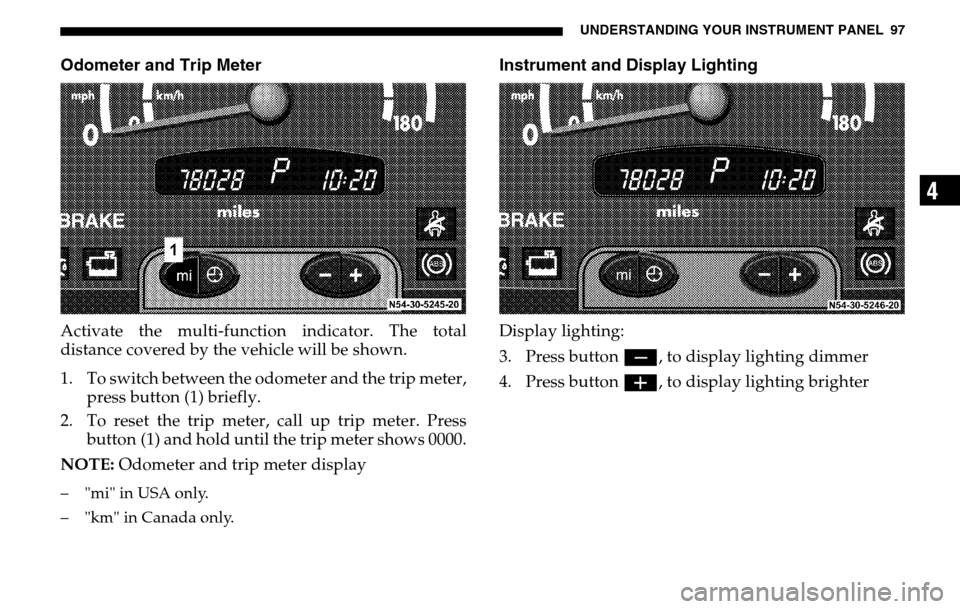
Odometer and Trip MeterActivate the multi-function indicator. The total
distance covered by the vehicle will be shown.
1. To switch between the odometer and the trip meter, press button (1) briefly.
2. To reset the trip meter, call up trip meter. Press
button (1) and hold until the trip meter shows 0000.
NOTE: Odometer and trip meter display– "mi" in USA only.
– "km" in Canada only.
Instrument and Display LightingDisplay lighting:
3. Press button ç, to display lighting dimmer
4. Press button æ, to display lighting brighter
Page 111 of 288

UNDERSTANDING YOUR INSTRUMENT PANEL 111
4
Depending on the driving style, the mileage covered
and the operating conditions, the next service due is
displayed either as a remaining distance in "mi"
(in km) or as a remaining time in "days". The length of
time between services should not exceed 2 years.
The display will be cancelled when the
button ( ‘) is pressed, or automatically after
10 seconds.
When a service has been performed, have the ASSYST
maintenance computer reset by an authorized Sprinter
Dealer.
Should your Sprinter for any reason not be serviced by
an authorized Sprinter Dealer, the ASSYST
maintenance computer can, in exceptional
circumstances, be reset as follows:
Turn the key to position 2 in the ignition lock and
immediately press the button ( ‘) twice.
Within 10 seconds, return the key to position 0 in the
ignition lock.
Press and hold the button ( ‘). Turn the key to
position 2 in the ignition lock. Keep the
button ( ‘) pressed. The maintenance indicator with the current remaining
time/distance is shown.
After about 10 seconds, an acoustic signal will sound
and the maintenance indicator is displayed with the
new remaining time/distance.
Release the button (
‘).
NOTE:
The ASSYST maintenance computer provides
information on the optimum maintenance requirements.
If maintenance intervals are not observed, resulting
damage will not be covered by Warranty.
The ASSYST maintenance computer is not an engine
oil gauge.
Engine oil level – for display in instrument cluster, see
next page.
If the engine oil level indicator lamp lights up, refer to
"Engine Oil Level Indicator Lamp".
If the battery is disconnected, the time is not recorded
by the ASSYST maintenance computer. Such periods
must be considered if maintenance intervals are
measured by time.
Page 123 of 288
UNDERSTANDING YOUR INSTRUMENT PANEL 123
4
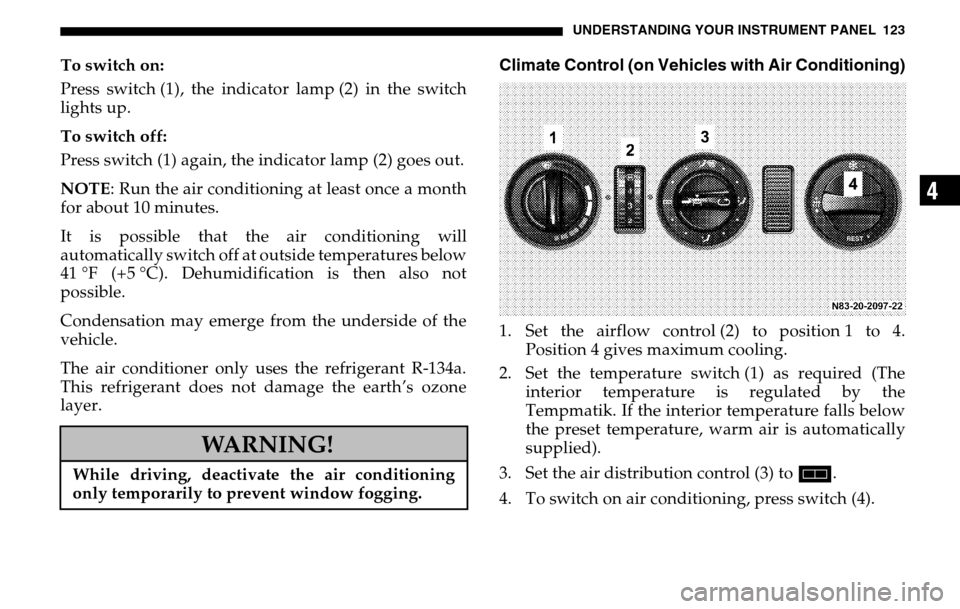
To switch on:
Press switch (1), the indicator lamp (2) in the switch
lights up.
To switch off:
Press switch (1) again, the indicator lamp (2) goes out.
NOTE : Run the air conditioning at least once a month
for about 10 minutes.
It is possible that the air conditioning will
automatically switch off at outside temperatures below
41 °F (+5 °C). Dehumidification is then also not
possible.
Condensation may emerge from the underside of the
vehicle.
The air conditioner only uses the refrigerant R-134a.
This refrigerant does not damage the earth’s ozone
layer.
Climate Control (on Vehicles with Air Conditioning)1. Set the airflow control (2) to position 1 to 4. Position 4 gives maximum cooling.
2. Set the temperature switch (1) as required (The interior temperature is regulated by the
Tempmatik. If the interior temperature falls below
the preset temperature, warm air is automatically
supplied).
3. Set the air distribution control (3) to h.
4. To switch on air conditioning, press switch (4).
WARNING!
While driving, deactivate the air conditioning
only temporarily to prevent window fogging.
Page 133 of 288

UNDERSTANDING YOUR INSTRUMENT PANEL 133
4
6. ButtonH – Select memory (1 – 3), activate
preselected time
7. Button ö – Switch on heater
8. Button ý – Set time, day, and preselected time;
shorten heating period (min. 1 minute)
9. Button þ – Set time, day, and preselected time;
lengthen heating period (max. 120 minutes)
10. Air Heater only, adjustable temperature selection transformer – adjustment range from 50 °F to 86 °F
(+10 °C to +30 °C)
NOTE: All symbols and digits in the display will flash
if the battery voltage has been interrupted over a
longer period of time. The timer must be reset.
The heater cannot be switched on until the time of day
has been set.
The timer lights up when the heater is switched on. Switching the Auxiliary Heater On and Off - Ignition
Off
To switch it on:
Press button
ö.
The vehicle-side blower automatically switches on.
Display: Symbol ö and remaining heating period.
The remaining heating period can be lengthened by
using the button þ (max. of 120 minutes); it may be
shortened by using the button ý (min. of 1 minute).
To switch off:
Press button ö again.
The blower inside the vehicle automatically switches
off. The auxiliary heater will automatically switch off
after about 3 minutes.
Display: Current time and current day of the week
(about 15 seconds).
Switching the Auxiliary Heater On and Off - Ignition
On
To switch it on:
Press the button ö.
Page 266 of 288

266 MAINTENANCE SCHEDULES
M A I
N T
E
N A
N
C E
S
C
H
E
D
U L
E
S8
MAINTENANCE - WITH ASSYST MAINTENANCE
COMPUTERASSYST provides you with information on the best
possible timing for maintenance work.
When the next maintenance service is due, this will be
indicated in the multi-function display with the
symbol
9 Oil service and fuel filter replacement
9 Maintenance service - displayed in km/miles
or days.
9
If the display shows the number of days, the symbol
È will also appear in the multi-function display.
You should have the maintenance performed within
the stated period/distance.
The service indicator will be reset by your Sprinter
Dealer after an oil service and/or maintenance service
has been performed.
REGULAR CHECK-UPSTo maintain the safe operation of your vehicle, it is
recommended that you perform the following tasks on
a regular basis (i.e., weekly or whenever the vehicle is
refueled). Check:
Engine oil level
Brake system, clutch mechanism – fluid level
Battery – acid level
Windshield washer system and headlamp cleaning
system – fluid level
Mechanical assemblies (e. g. ,engine, transmission, etc.) – check for leaks
Condition of tires and tire pressures
All exterior lights
Page 268 of 288

268 MAINTENANCE SCHEDULES
M A I
N T
E
N A
N
C E
S
C
H
E
D
U L
E
S8
SCOPE OF WORK FOR MAINTENANCE SERVICE
Oil ServiceOil change
Engine:
Oil change and filter replacement
Check fluid levels of the following system, refill as
necessary.
If fluid is lost, trace and eliminate cause – as a separate
order.
Power-assisted steering
Lubrication work:
Trailer tow hitch (original equipment)
Maintenance
ASSYST maintenance computer reset Function check
Signalling system,
warning and indicator lamps
Headlamps, exterior lighting
Windscreen wipers,
windscreen washer system
Check for leaks and damage.
Check for abrasion points and ensure that
lines are correctly routed!
All assemblies:
Engine, transmission, transfer case, front axle, rear
axle, steering, power steering pump
All lines and hoses, sensor cables
Rubber boots on front axle drive shafts,
rubber boots on front axle suspension ball joints, shock
absorbers