steering DODGE SPRINTER 2008 2.G User Guide
[x] Cancel search | Manufacturer: DODGE, Model Year: 2008, Model line: SPRINTER, Model: DODGE SPRINTER 2008 2.GPages: 666, PDF Size: 14.11 MB
Page 50 of 666
48 SafetyOccupant safety
2
Your vehicle is equipped with the follow-
ing airbags, depending on the equip-
ment version:\4
Driver’s front airbag, located in the
steering wheel
\4
Passenger’s front airbag, located
above the glove box
\4
Thorax sidebags* in the outer sides
of the driver’s seat and the passen-
ger’s individual seat
\4
Windowbags* in the side of the roof
frame between the A and B-pillars
Each airbag's cover is marked with the
letters "SRS/AIRBAG" or "AIRBAG".
How airbags workAn airbag inflates within milliseconds.
The
1
warning lamp in the instru-
ment cluster comes on.
Airbag inflation slows down and restricts
the movement of the vehicle occupant.
Warning (Continued)
G
\4Do not cover the padded boss of the
steering wheel, the passenger’s air-
bag cover, the windowbag cover or
the thorax / sidebag cover with film or
other material. Do not affix any badg-
es or stickers to these areas.\4Do not hang any hard objects, for ex-
ample coat hangers, on the grab han-
dles or coat hooks.\4Do not place any items in the storage
compartment above the passenger’s
airbag if they protrude from the com-
partment. The passenger’s airbag
must be able to inflate unimpeded.The risk of injuries from an airbag cannot
be entirely ruled out due to the high speed
at which the airbag is required to inflate.
iIf the airbags are triggered, you will
hear a bang and a small amount of
dust may also be released. The bang
will not damage your hearing and the
dust does not constitute a health
hazard.
nf_BA.book Page 48 Friday, January 25, 2008 3:53 PM
Page 52 of 666
50 SafetyOccupant safety
2
Front airbagsThe front airbags are designed to in-
crease protection to the driver’s and
passenger’s/passengers' head and
chest.
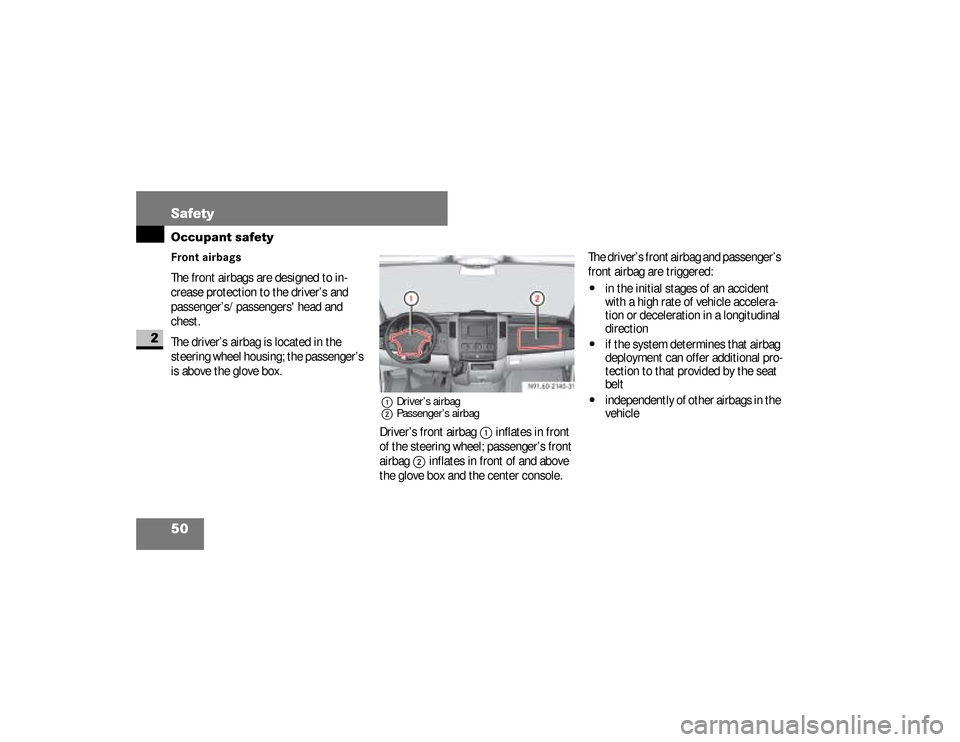
The driver’s airbag is located in the
steering wheel housing; the passenger’s
is above the glove box.
1Driver’s airbag
2Passenger’s airbagDriver’s front airbag
1
inflates in front
of the steering wheel; passenger’s front
airbag
2
inflates in front of and above
the glove box and the center console.The driver’s front airbag and passenger’s
front airbag are triggered:
\4
in the initial stages of an accident
with a high rate of vehicle accelera-
tion or deceleration in a longitudinal
direction
\4
if the system determines that airbag
deployment can offer additional pro-
tection to that provided by the seat
belt
\4
independently of other airbags in the
vehicle N91.60-2140-31
nf_BA.book Page 50 Friday, January 25, 2008 3:53 PM
Page 72 of 666
70 SafetyDriving safety systems
2
ABS regulates the brake pressure in
such a way that the wheels do not lock
when you brake. This allows you to con-
tinue steering when braking.
ABS works from a speed of about 3 mph
(5 km/h) upwards, regardless of road
surface conditions.
ABS works on slippery surfaces, even
when you only brake gently.There is a malfunction if the
-
indica-
tor lamp is permanently lit while the en-
gine is running (
\2
page 466).
Despite this, the normal driving and
braking functions remain available.
iOnly use wheels with the recom-
mended tire sizes (
\2
page 623), oth-
erwise the driving safety systems will
not work correctly.
Antilock Brake System (ABS)
Warning
G
Do not depress the brake pedal several
times in quick succession (pumping). De-
press the brake firmly and evenly. Pump-
ing the brake pedal may reduce the
braking effect.
nf_BA.book Page 70 Friday, January 25, 2008 3:53 PM
Page 73 of 666
71 Safety
Driving safety systems
2
BrakingIf ABS intervenes during braking, you will
feel the steering wheel vibrate gently
and the brake pedal pulsate.
If ABS intervenes: \1
Continue to depress the brake pedal
firmly until the braking situation is
over.
For full brake application:
\1
Depress the brake pedal with maxi-
mum force.Brake Assist operates in emergency
braking situations. If you depress the
brake pedal quickly, BAS automatically
increases the brake pressure, thereby
reducing the stopping distance.
\1
Keep the brake pedal firmly de-
pressed until the emergency braking
situation is over.
ABS prevents the wheels from lock-
ing.
When you release the brake pedal, the
brakes will work as normal again. BAS is
deactivated.
Warning
G
Always adapt your driving style to the pre-
vailing road and weather conditions, and
maintain an adequately safe distance
from other road users as well as any ob-
stacles on the road.
If ABS malfunctions, the wheels could
lock when you brake. This means that the
steerability of the vehicle is restricted
during braking and the stopping distance
may increase. If ABS is deactivated due to
a malfunction, BAS is also deactivated.
Brake Assist (BAS)
nf_BA.book Page 71 Friday, January 25, 2008 3:53 PM
Page 74 of 666
72 SafetyDriving safety systems
2
Vehicles without steering wheel but-
tons:
There is a malfunction if the
k
indi-
cator lamp is permanently lit while the
engine is running (
\2
page 73).ESP
® monitors driving stability and de-
tects a tendency of the vehicle to under-
steer or oversteer (skidding) in good
time. ESP
® stabilizes the vehicle by
braking individual wheels, limiting the
engine power output, and greatly assists
y o u w h e n d r i v i n g o n w e t o r s l i p p e r y r o a d
surfaces. ESP
® also stabilizes the vehi-
cle when braking.
When ESP
® intervenes, the
v
warn-
ing lamp in the speedometer flashes.
Warning
G
If BAS malfunctions, the brake system is
still available with the full brake boosting
effect. In an emergency braking situation,
however, the braking force will not be ad-
ditionally boosted automatically and the
stopping distance may increase.
Electronic Stability Program
(ESP
®)
Warning
G
Proceed as follows if the v warning
lamp in the speedometer flashes:
\4Do not deactivate ASR under any cir-
cumstances.
\4Only depress the accelerator pedal as
far as necessary when pulling away.
\4Adapt your driving style to suit the
prevailing road and weather condi-
tions.
Otherwise, the vehicle could begin to
skid.
ESP
® cannot reduce the risk of an acci-
dent if you drive too fast. ESP
® is unable
to override the laws of physics.
nf_BA.book Page 72 Friday, January 25, 2008 3:53 PM
Page 76 of 666
74 SafetyDriving safety systems
2
If the road surface is not capable of pro-
viding sufficient traction, bearing in
mind the tires, load and gradient, it is
not be possible to pull away smoothly
even with ASR.
Vehicles without steering wheel but-
tons:
There is a malfunction if the
k
indi-
cator lamp is permanently lit while the
engine is running (
\2
page 73).
If ASR malfunctions, engine power out-
put may be reduced.
Activating/deactivating ASRASR is automatically activated as soon
as the engine is switched on.
It may be best to deactivate ASR in the
following situations:\4
if snow chains are being used
\4
in deep snow
\4
on sand or gravelIf you deactivate ASR:
\4
the engine’s torque is then no longer
limited and the drive wheels could
spin; the spinning wheels produce a
cutting effect for better traction
\4
traction control still intervenes by
braking if one drive wheel reaches its
grip limit, for example if the surface
under one side of the vehicle is slip-
pery. The wheel is then braked to in-
crease traction in this situation.
\4
ESP
® still intervenes to stabilize the
vehicle
nf_BA.book Page 74 Friday, January 25, 2008 3:53 PM
Page 83 of 666
81 Controls in detail
3
C ontrols in detail
Opening and closing............. 83
Key positions........... 111
Seats........... 112
Steering wheel adjustment........... 127
Lighting........... 129
Instrument cluster........... 142
Operating system without steering wheel buttons........... 147
Operating system with steering wheel buttons*........... 151
Driving and parking........... 183
Automatic transmission........... 201
Good visibility........... 208
nf_BA.book Page 81 Friday, January 25, 2008 3:53 PM
Page 113 of 666
111 Controls in detail
Key positions
3
\3 Key positions
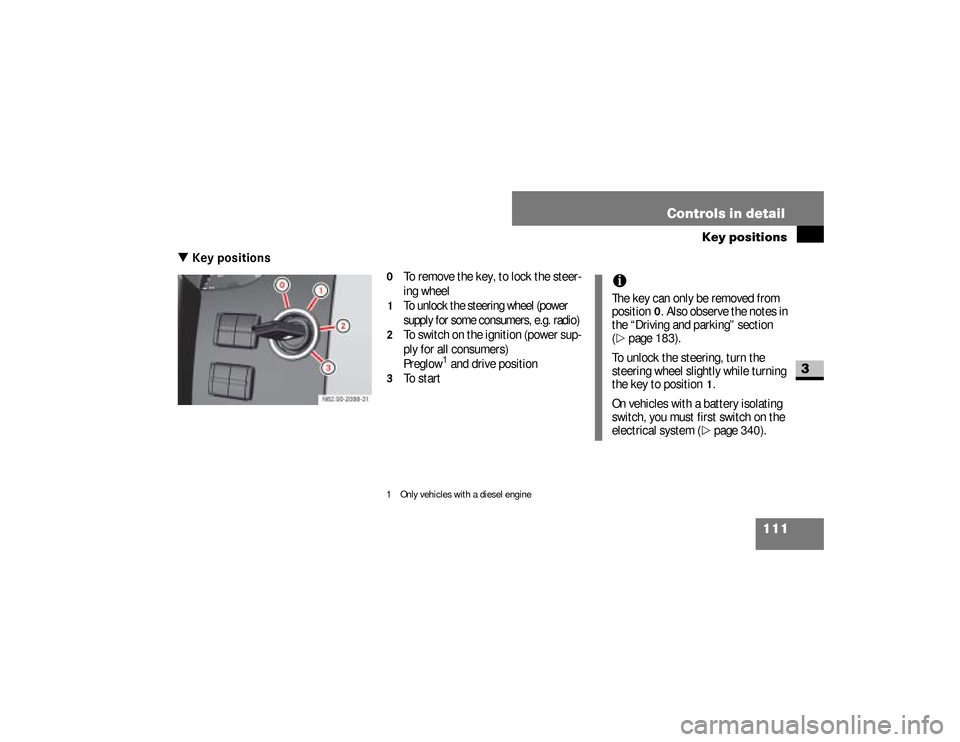
0
To remove the key, to lock the steer-
ing wheel
1
To unlock the steering wheel (power
supply for some consumers, e.g. radio)
2
To switch on the ignition (power sup-
ply for all consumers)
Preglow
1 and drive position
3
To start
1 Only vehicles with a diesel engine
iThe key can only be removed from
position
0. Also observe the notes in
the “Driving and parking” section
(
\2
page 183).
To unlock the steering, turn the
steering wheel slightly while turning
the key to position
1.
On vehicles with a battery isolating
switch, you must first switch on the
electrical system (\2
page 340).
nf_BA.book Page 111 Friday, January 25, 2008 3:53 PM
Page 114 of 666
112 Controls in detailSeats
3
\3 SeatsDriver’s and passenger’s seatsWarning
G
Only adjust the seats when the vehicle is
stationary and the handbrake is applied.
You could otherwise lose control of the
vehicle as a result of the seat moving and
cause an accident.
Warning
G
Make sure that nobody can become
trapped as the seat is adjusted. Never
place your hands under the seat or near to
moving parts.Your seat must be adjusted in such a way
that you can wear the seat belt correctly
(\2page 39). Observe the following points:\4Position the backrest as vertically as
possible and sit upright.
Continued
Warning (Continued)
G
\4Avoid seat positions that do not allow
the seat belt to be routed correctly.
The shoulder section of the seat belt
must be routed across the middle of
your shoulder and must fit closely
across your chest. The lap section of
the belt must be routed as low as pos-
sible across your pelvic area, i.e.
across your hip joints. Never drive
with the backrest tilted too far back.\4
Your arms should be slightly bent when
you are holding the steering wheel.
Continued
nf_BA.book Page 112 Friday, January 25, 2008 3:53 PM
Page 119 of 666
117 Controls in detailSeats
3
The driver’s and passenger’s seat can be
rotated by 180° to be opposite of the di-
rection of travel.The seats engage in the direction of trav-
el or opposite the direction of travel as
well as at 50° pointing towards the exit.Fold the handbrake lever down as far as
it will go. You could otherwise damage
the handbrake or the handbrake lever.
\1
Make sure the handbrake is applied
and the handbrake lever is folded
down as far as it will go
(\2
page 191).
\1
Set the steering wheel so that there
is sufficient clearance for turning and
adjusting the driver’s seat
(\2
page 127).
Warning
G
The driver’s and passenger’s seat must be
adjusted and properly engaged in the di-
rection of travel for driving. Otherwise you
will not be able to operate the vehicle
safely.
The restraint systems in your vehicle will
only function as intended when the dri-
ver’s and passenger’s seat are engaged in
the direction of travel.
!
CAUTION
When rotating the seats, make sure
there is sufficient space. If neces-
sary, move the seat fore or aft to
avoid colliding with adjacent add-on
parts.
\4
Fold the handbrake lever down
as far as it will go. You could
otherwise damage the handbra-
ke or the handbrake lever.
iMove the passenger’s seat forward
as far as it will go before rotating it
(\2
page 114).
nf_BA.book Page 117 Friday, January 25, 2008 3:53 PM