ignition DODGE STRATUS COUPE 2005 2.G Repair Manual
[x] Cancel search | Manufacturer: DODGE, Model Year: 2005, Model line: STRATUS COUPE, Model: DODGE STRATUS COUPE 2005 2.GPages: 396
Page 218 of 396

ELECTRONIC DIGITAL CLOCK
The clock and radio each use the display panel built into
the radio. A digital readout indicates the time in hours
and minutes whenever the ignition switch is in the ON or
ACC position.
Clock setting procedure
1. Using the point of a ballpoint pen or similar object,
press either the hour (H) or minute (M) buttons on the
radio. The time setting will increase each time you press
the button.
2. Press any other button to exit from the clock setting
mode.
GENERAL INFORMATION ABOUT YOUR RADIO
A vehicle is not an ideal place to listen to the radio,
because the vehicle moves, and reception conditions are
constantly changing. Buildings, terrain, signal distance
and noise from other vehicles are all working against
good reception.
Please read the following information regarding radio
reception, especially those regarding stereo transmission.
H12G0010
FM AM
25 to 40 mile radius
(40 to 64 Km)100 mile radius
(160 Km)
218 FOR PLEASANT DRIVING
Page 220 of 396

The direct signal from the broadcast station reaches the
antenna slightly before the reflected signal. This time
difference may cause some reception disturbance or
flutter.
This typically occurs in urban areas.
Cross modulation
If one listens to a weak station and is in the vicinity of
another strong station, both stations might be received
simultaneously.
FM stereo reception
Stereo reception requires a very high broadcast signal
quality. This means that disturbances mentioned previ-
ously become more marked and the reception range is
somewhat diminished during stereo reception.
Causes of disturbances
FM can be affected by electrical systems of vehicles in the
vicinity, especially those without electronic noise sup-
pression for the ignition system. The disturbance is even
greater if the station is weak or poorly tuned.
H12G0030H12G0040
220 FOR PLEASANT DRIVING
Page 221 of 396

FM reception is not as sensitive to electrical disturbances
as AM. AM reception is sensitive to electrical distur-
bances such as power lines, lightning and other types of
similar electrical phenomena.
WHIP ANTENNA
To remove the whip antenna, turn it counterclockwise.
CAUTION!
It is recommended to remove the whip antenna
before going into an automatic vehicle wash or
passing under places with a low height clearance.
AM STEREO & FM STEREO RADIO WITH
GRAPHIC EQUALIZER, CASSETTE TAPE PLAYER
AND CD PLAYER (IF SO EQUIPPED)
Operating Instructions - Radio Mode
NOTE:
Power to operate the radio is supplied through
the ignition switch. It must be in the ON or ACC position
to operate the radio.
H11A3220
FOR PLEASANT DRIVING 221
6
Page 224 of 396

Seek Button
Press the SEEK button up for the next selection on the
tape and down to return to the beginning of the current
selection.
Press the SEEK button up or down to move the track
number to skip forward or backward 1 to 6 selections.
Press the SEEK button once to move 1 selection, twice to
move 2 selections, etc.
Fast Forward (FF)
Press the FF button up momentarily to advance the tape
in the direction that it is playing. The tape will advance
until the button is pressed again or the end of the tape is
reached. At the end of the tape, the tape will play in the
opposite direction.
Rewind (RW)
Press the RW button momentarily to reverse the tape
direction. The tape will reverse until the button is pressed
again or until the end of the tape is reached. At the end of
the tape, the tape will play in the opposite direction.
Tape Eject
Press the EJT Tape button and the cassette will disengage
and eject from the radio.
Scan Button
Press this button to play 10 seconds of each selection.
Press the scan button a second time to cancel the feature.
Changing Tape Direction
If you wish to change the direction of tape travel (side
being played), press the TIME button. The lighted arrow
in the display window will show the new direction.
Metal Tape Selection
If a standard metal tape is inserted into the player, the
player will automatically select the correct equalization
and the 70 symbol will appear in the display window.
Pinch Roller Release
If ignition power or the radio ON/OFF switch are turned
off, the pinch roller will automatically retract to protect
the tape from any damage. When power is restored to the
tape player, the pinch roller will automatically reengage
and the tape will resume play.
224 FOR PLEASANT DRIVING
Page 225 of 396

Noise Reduction
The Dolby noise reduction system* is on whenever the
tape player is on, but may be switched off.
To turn off the Dolby noise reduction system: Press the
NR button (button 2) after you insert the tape. The NR
light in the display will go off when the Dolby NR
System is off. The Dolby NR System is automatically
reactivated each time a tape is inserted.
*Dolby noise reduction manufactured under license from
Dolby Laboratories Licensing Corporation. ªDolbyº and the
double-D symbol are trademarks of Dolby Laboratories.
Operation Instructions Ð CD Player
NOTE:
The ignition switch must be in the ON or ACC
position and the volume control ON before the CD player
will operate.
Inserting The Compact Disc
You may either insert or eject a disc with the radio OFF.
If you insert a disc with the ignition ON and the radio
OFF, the display will show the CD symbol then the time
of day will be displayed.If the volume control is ON, the unit will switch from
radio to CD mode and begin to play when you insert the
disc. The display will show the track number and index
time in minutes and seconds. Play will begin at the start
of track 1.
Seek Button
Press the top of the SEEK button for the next selection on
the CD. Press the bottom of the button to return to the
beginning of the current selection, or return to the
beginning of the previous selection if the tape is within
the first 10 seconds of the current selection.
EJT CD (Eject) Button
Press this button and the disc will unload and move to
the entrance for easy removal. The unit will switch to the
radio mode.
If you do not remove the disc within 15 seconds, it will be
reloaded. The radio will remain in the Radio mode.
The disc can be ejected with the radio OFF.
FF/TUNE/RW Button
Press the FF (Fast Forward) button and the CD player
will fast forward through the tracks until the button is
FOR PLEASANT DRIVING 225
6
Page 227 of 396

Maintain your cassette tape player. The head and capstan
shaft in the cassette player can pick up dirt or tape
deposits each time a cassette is played. The result of
deposits on the capstan shaft may cause the tape to wrap
around and become lodged in the tape transport. The
other adverse condition is low or ªmuddyº sound from
one or both channels, as if the treble tone control were
turned all the way down. To prevent this, you should
periodically clean the head with a commercially available
WET cleaning cassette.
As preventive maintenance, clean the head about every
30 hours of use. If you wait until the head becomes very
dirty (noticeably poor sound), it may not be possible to
remove all deposits with a simple WET cleaning cassette.AM/FM STEREO RADIO WITH 4 DISC CD
CHANGER (IF SO EQUIPPED)
Operating Instructions - Radio Mode
NOTE:
Power to operate the radio is supplied through
the ignition switch. It must be in the ON or ACC position
to operate the radio.
Power Switch, Volume Control
Press the ON/VOL control to turn the radio on. Turn the
volume control clockwise to increase the volume.
FOR PLEASANT DRIVING 227
6
Page 229 of 396

To Set The Pushbutton Memory
When you are receiving a station that you wish to commit
to push-button memory, press the SET button. SET 1 will
show in the display window. Select the push-button you
wish to lock onto this station and press and release that
button. If a station is not selected within 5 seconds after
pressing the SET button, the station will continue to play
but will not be locked into push-button memory.
You may add a second station to each push-button by
repeating the above procedure with this exception: Press
the SET button twice and SET 2 will show in the display
window. Each button can be set for SET 1 and SET 2 in
both AM and FM. This allows a total of 10 AM and 10 FM
stations to be locked into memory. You can recall the
stations stored in SET 2 memory by pressing the push-
button twice.
To Change From Clock To Radio Mode
Press the time button to change the display between
radio frequency and time.
General Information
This radio complies with Part 15 of FCC rules and with
RS-210 of Industry Canada. Operation is subject to the
following conditions:
1. This device may not cause harmful interference,
2.
This device must accept any interference received, in-
cluding interference that may cause undesired operation.
NOTE:Changes or modifications not expressively ap-
proved by the party responsible for compliance could
void the user's authority to operate the equipment.
Operating Instructions Ð CD Changer
NOTE
: The ignition switch must be in the ON or ACC
position and the volume control ON before the CD player
will operate.
Inserting the Compact Disc
You may either insert or eject a disc with the radio OFF.
If you insert a disc with the ignition ON and the radio
OFF the time of day will be displayed. If the volume
control is ON, the unit will switch from radio to CD mode
and begin to play when you insert the disc. The display
FOR PLEASANT DRIVING 229
6
Page 231 of 396
Playing Discs
The radio display indicates the CD number (the slot
where the CD is loaded), and the current track being
played at the time.
If more than one CD is loaded in the CD changer, it
automatically plays the next CD after playing the last
track of the current CD. If there is only one CD loaded, it
will automatically return to the first track of the CD. To
play any available disc select the desired disc position
button.
Removing Discs from the CD Changer
1. Press the load/eject button then press the desired disc
position button to eject that CD.
2. The display will flash the disc number that is being
ejected.
3. If the disc is not removed from the unit within 15
seconds the disc will automatically re-load.
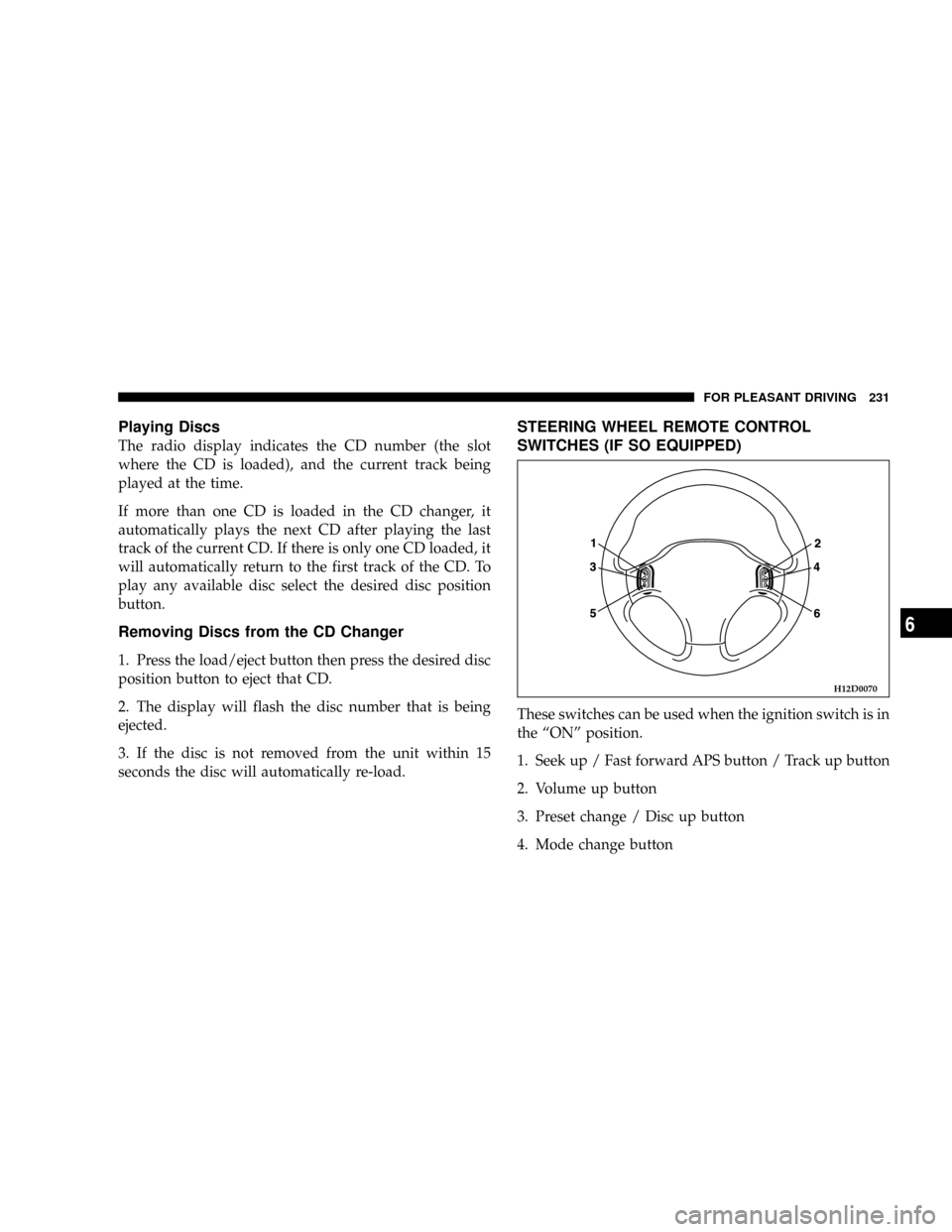
STEERING WHEEL REMOTE CONTROL
SWITCHES (IF SO EQUIPPED)
These switches can be used when the ignition switch is in
the ªONº position.
1. Seek up / Fast forward APS button / Track up button
2. Volume up button
3. Preset change / Disc up button
4. Mode change button
H12D0070
FOR PLEASANT DRIVING 231
6
Page 239 of 396
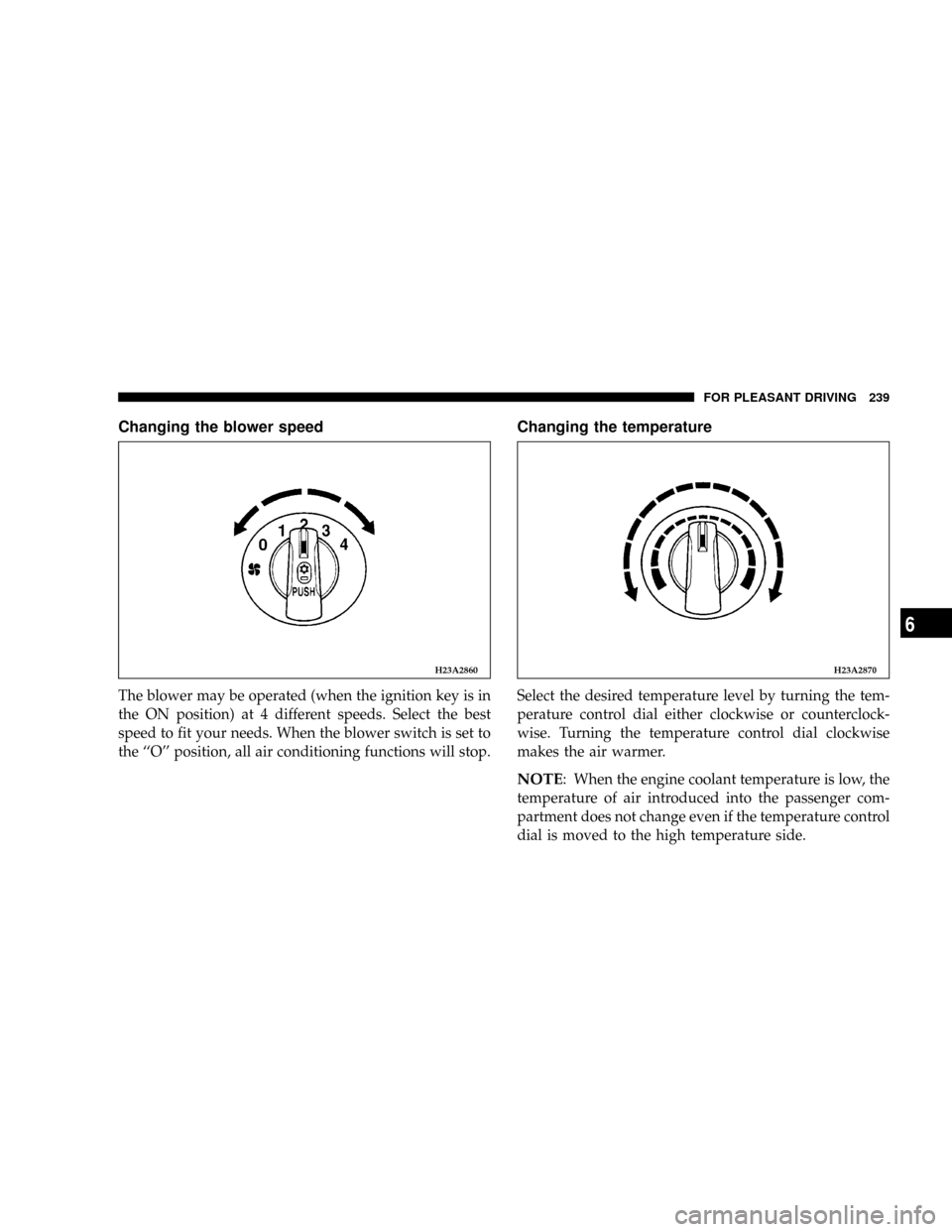
Changing the blower speed
The blower may be operated (when the ignition key is in
the ON position) at 4 different speeds. Select the best
speed to fit your needs. When the blower switch is set to
the ``O'' position, all air conditioning functions will stop.
Changing the temperature
Select the desired temperature level by turning the tem-
perature control dial either clockwise or counterclock-
wise. Turning the temperature control dial clockwise
makes the air warmer.
NOTE: When the engine coolant temperature is low, the
temperature of air introduced into the passenger com-
partment does not change even if the temperature control
dial is moved to the high temperature side.
H23A2860H23A2870
FOR PLEASANT DRIVING 239
6
Page 270 of 396

Before installing the wheel cover to the wheel, make sure
that the opening with the symbol mark is correctly
aligned with the air valve.
JACKING AND TIRE CHANGING
If a tire must be changed, do so only after making sure
the vehicle is stopped in a safe, flat location.
Jacking up the vehicle
1. Park the vehicle on level and stable ground.
2. Switch on the hazard warning flashers, set up a
warning triangle, flashing signal light, etc., at an ad-
equate distance from the vehicle, and have all passengers
leave the vehicle. Turn the ignition key to the ªLOCKº
position.
3. Set the parking brake firmly, and move the gearshift
lever (manual transaxle) to the ªNº (Neutral) position or
move the selector lever (automatic transaxle) to the ªPº
(PARK) position.4. Apply a chock or block (A) at the tire diagonally
opposite the tire (B) to be changed.
NOTE: The chock shown is not supplied with the ve-
hicle. It is recommended that you keep one in the vehicle
for use if required.
N24A0100
A
B
270 EMERGENCIES