display DODGE VIPER 2005 ZB / 2.G User Guide
[x] Cancel search | Manufacturer: DODGE, Model Year: 2005, Model line: VIPER, Model: DODGE VIPER 2005 ZB / 2.GPages: 264, PDF Size: 9.66 MB
Page 100 of 264
Scan
Press the Scan button to scan through each track on the
CD currently playing.
FF/TUNE/RW
Press FF (Fast Forward) and the CD player will begin to
fast forward until FF is released. The RW ( Reverse)
button works in a similar manner.
Random Play—SET / RND
Press the RND button while the CD is playing to activate
Random Play. This feature plays the tracks on the disc in
random order to provide an interesting change of pace.
Press the SEEK button to move to the next randomly
selected track.
Press the SET / RND button a second time to stop
Random Play.
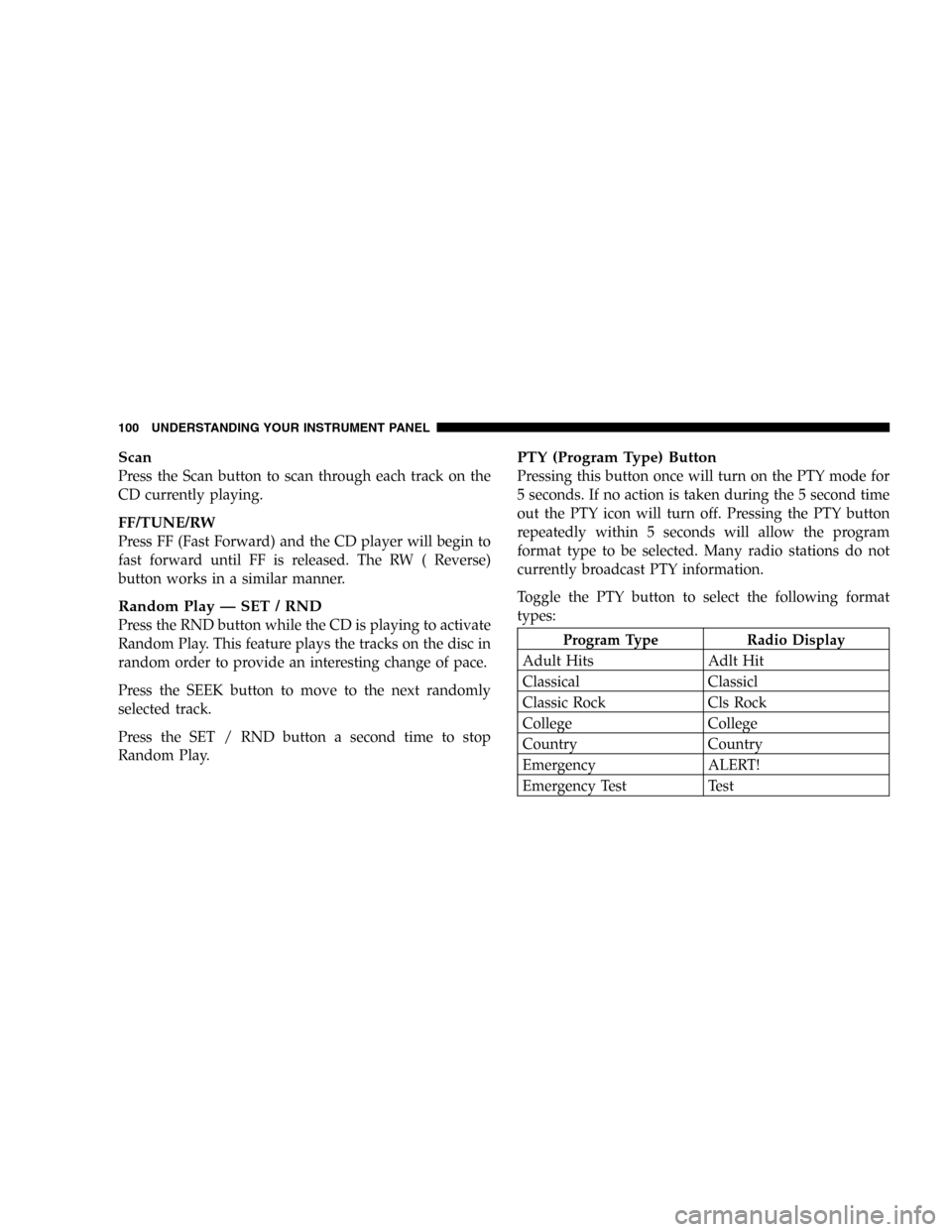
PTY (Program Type) Button
Pressing this button once will turn on the PTY mode for
5 seconds. If no action is taken during the 5 second time
out the PTY icon will turn off. Pressing the PTY button
repeatedly within 5 seconds will allow the program
format type to be selected. Many radio stations do not
currently broadcast PTY information.
Toggle the PTY button to select the following format
types:
Program Type Radio Display
Adult Hits Adlt Hit
Classical Classicl
Classic Rock Cls Rock
College College
Country Country
Emergency ALERT!
Emergency Test Test
100 UNDERSTANDING YOUR INSTRUMENT PANEL
Page 101 of 264
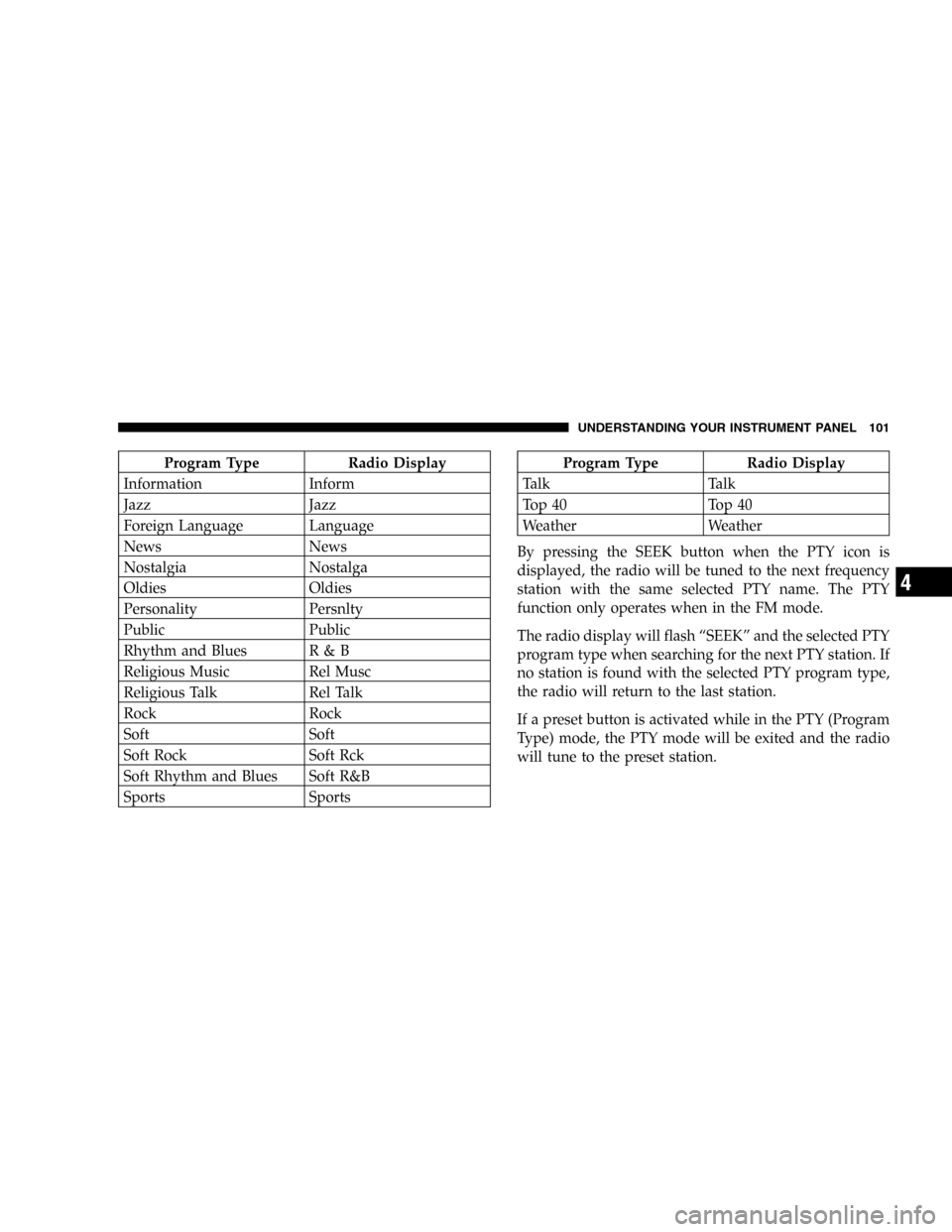
Program Type Radio Display
Information Inform
Jazz Jazz
Foreign Language Language
News News
Nostalgia Nostalga
Oldies Oldies
Personality Persnlty
Public Public
Rhythm and Blues R & B
Religious Music Rel Musc
Religious Talk Rel Talk
Rock Rock
Soft Soft
Soft Rock Soft Rck
Soft Rhythm and Blues Soft R&B
Sports SportsProgram Type Radio Display
Talk Talk
Top 40 Top 40
Weather Weather
By pressing the SEEK button when the PTY icon is
displayed, the radio will be tuned to the next frequency
station with the same selected PTY name. The PTY
function only operates when in the FM mode.
The radio display will flash“SEEK”and the selected PTY
program type when searching for the next PTY station. If
no station is found with the selected PTY program type,
the radio will return to the last station.
If a preset button is activated while in the PTY (Program
Type) mode, the PTY mode will be exited and the radio
will tune to the preset station.
UNDERSTANDING YOUR INSTRUMENT PANEL 101
4
Page 102 of 264

By pressing the SCAN button when the PTY icon is
displayed, the radio will stop at every PTY station on the
band and list each corresponding program type in the
radio display.
Time
Press the TIME button to change the display from
elapsed CD playing time to time of day.
Operating Instructions - Satellite Radio Mode (If
Equipped)
Refer to the Satellite Radio section of the Owner’s
Manual.
CD Diagnostic Indicators
When driving over a very rough road, the CD player may
skip momentarily. Skipping will not damage the disc or
the player, and play will resume automatically.
As a safeguard and to protect your CD player, one of the
following warning symbols may appear on your display.A CD HOT symbol indicates the player is too hot.
CD HOT will pause the operation. Play can be resumed
when the operating temperature is corrected or another
MODE is selected.
CD ERROR will appear on the display if the laser is
unable to read the Disc data for the following reasons:
•Warped disc
•Excessive vibration
•Disc inserted upside down
•Damaged disc
•Water condensation on optics
102 UNDERSTANDING YOUR INSTRUMENT PANEL
Page 139 of 264
Improper alignment will not cause vehicle vibration.
Vibration may be a result of tire and wheel out-of-
balance. Proper balancing will reduce vibration and
avoid tire cupping and spotty wear.
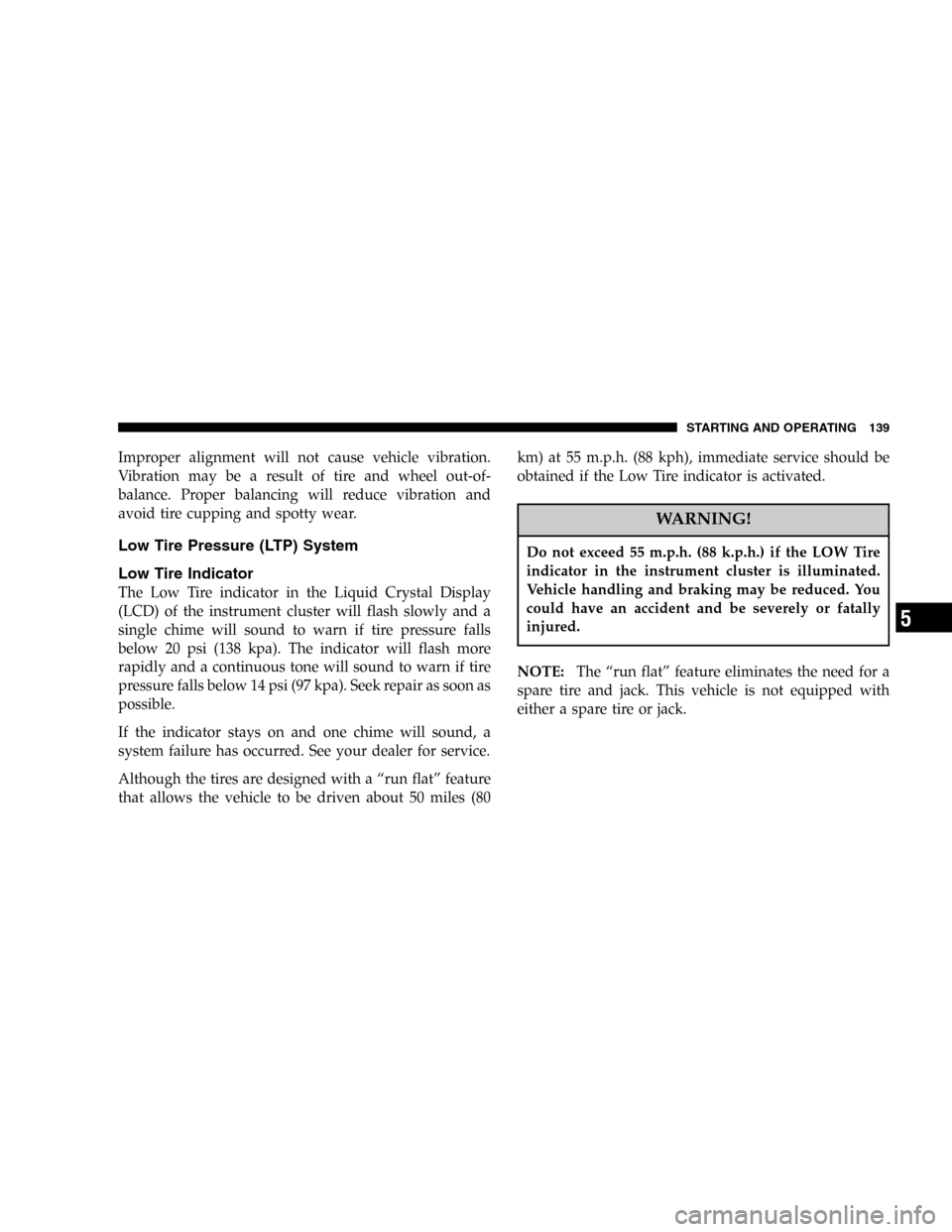
Low Tire Pressure (LTP) System
Low Tire Indicator
The Low Tire indicator in the Liquid Crystal Display
(LCD) of the instrument cluster will flash slowly and a
single chime will sound to warn if tire pressure falls
below 20 psi (138 kpa). The indicator will flash more
rapidly and a continuous tone will sound to warn if tire
pressure falls below 14 psi (97 kpa). Seek repair as soon as
possible.
If the indicator stays on and one chime will sound, a
system failure has occurred. See your dealer for service.
Although the tires are designed with a“run flat”feature
that allows the vehicle to be driven about 50 miles (80km) at 55 m.p.h. (88 kph), immediate service should be
obtained if the Low Tire indicator is activated.
WARNING!
Do not exceed 55 m.p.h. (88 k.p.h.) if the LOW Tire
indicator in the instrument cluster is illuminated.
Vehicle handling and braking may be reduced. You
could have an accident and be severely or fatally
injured.
NOTE:The“run flat”feature eliminates the need for a
spare tire and jack. This vehicle is not equipped with
either a spare tire or jack.
STARTING AND OPERATING 139
5