bulb DODGE VIPER 2009 ZB II / 2.G User Guide
[x] Cancel search | Manufacturer: DODGE, Model Year: 2009, Model line: VIPER, Model: DODGE VIPER 2009 ZB II / 2.GPages: 299, PDF Size: 5.14 MB
Page 238 of 299
properly. If not, there is a problem with a switch or the
system. See your authorized dealer for service.
•Cover the vehicle whenever possible to prevent acci-
dental damage to the finish.
REPLACEMENT BULBS
LIGHT BULBS — Interior Bulb Number
Message Center Indicators.................. 103
Cluster................................ 103
Gauge Pack............................ 103
Heater Control........................... 37
Interior Light..........................212–2
Courtesy Foot Well Lights.................. 194
Cargo Light (Coupe Liftgate)................ 168LIGHT BULBS — Exterior
(Convertible Models) Bulb Number
Low/High Beam High Intensity Discharge
(HID) Headlight.... Serviced at authorized dealer only
Auxiliary High Beam Headlight......(HB3A) 9005XS
Front Park/Turn Signal Light.............3157AK
Fog Light.......................(H10 U) 9145
Front Side Marker Light..................2886X
Center High Mounted Stop Light (CHMSL). . . 16 LED
(not serviceable)
Tail/Stop Light.........................3157
Taillight............................... 194
Rear Marker Light........................ 194
Backup Light...........................3157
Rear Turn Signal Light..................3457AK
License Light........................... 168
236 MAINTAINING YOUR VEHICLE
Page 239 of 299
LIGHT BULBS — Exterior
(Coupe Models) Bulb Number
Low/High Beam High Intensity Discharge
(HID) Headlight.... Serviced at authorized dealer only
Auxiliary High Beam Headlight......(HB3A) 9005XS
Front Park/Turn Signal Light.............3157AK
Fog Light.......................(H10 U) 9145
Front Side Marker Light..................2886X
Center High Mounted Stop Light (CHMSL). . . 16 LED
(not serviceable)
Tail/Stop/Turn Signal Light................3157
Rear Marker Light........................ 194
Backup Light...........................3157
License Light........................... 168
NOTE:Upon turning the High Intensity Discharge
(HID) Headlights on, there is a blue hue to the lamps.
This diminishes and becomes more white after approxi-
mately 10 seconds as the system charges.BULB REPLACEMENT
Auxiliary High Beam Headlight, Front Park/Turn
Signal Light, Front Side Marker Light
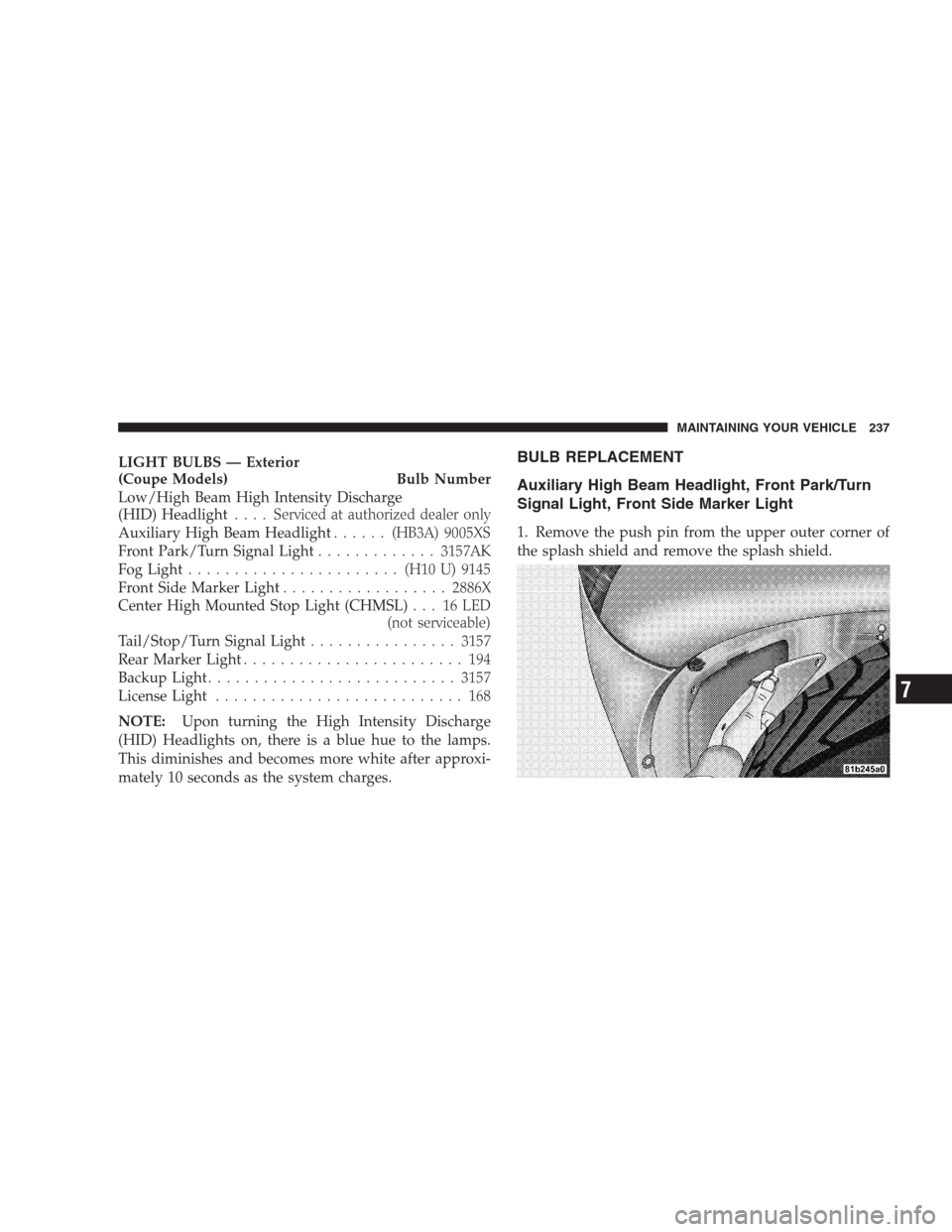
1. Remove the push pin from the upper outer corner of
the splash shield and remove the splash shield.
MAINTAINING YOUR VEHICLE 237
7
Page 240 of 299
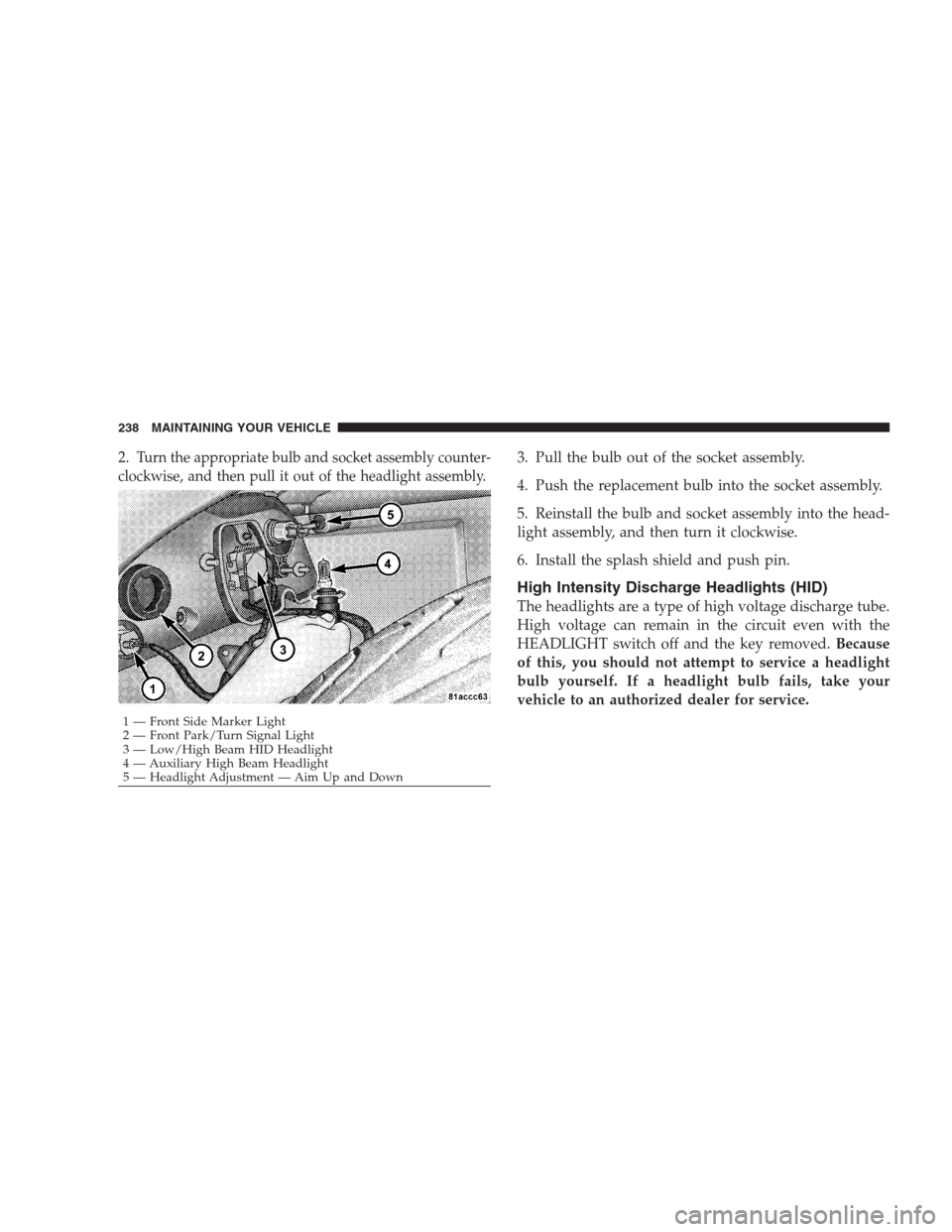
2.Turn the appropriate bulb and socket assembly counter-
clockwise, and then pull it out of the headlight assembly.3. Pull the bulb out of the socket assembly.
4. Push the replacement bulb into the socket assembly.
5. Reinstall the bulb and socket assembly into the head-
light assembly, and then turn it clockwise.
6. Install the splash shield and push pin.
High Intensity Discharge Headlights (HID)
The headlights are a type of high voltage discharge tube.
High voltage can remain in the circuit even with the
HEADLIGHT switch off and the key removed.Because
of this, you should not attempt to service a headlight
bulb yourself. If a headlight bulb fails, take your
vehicle to an authorized dealer for service.
1 — Front Side Marker Light
2 — Front Park/Turn Signal Light
3 — Low/High Beam HID Headlight
4 — Auxiliary High Beam Headlight
5 — Headlight Adjustment — Aim Up and Down 238 MAINTAINING YOUR VEHICLE
Page 241 of 299
WARNING!
A transient high tension occurs at the bulb sockets of
High Intensity Discharge (HID) headlights when the
HEADLIGHT switch is turned ON. It may cause
serious electrical shock or electrocution if not ser-
viced properly. See your authorized dealer for ser-
vice.
NOTE:
•When the High Intensity Discharge Headlights (HID)
are turned on, there is a blue hue to the lights. This
diminishes and becomes more white after approxi-
mately 10 seconds as the system charges.
•If High Intensity Discharge (HID) lights are not work-
ing, cycle the HEADLIGHT switch four times to see if
it will restrike.
Front Fog Light
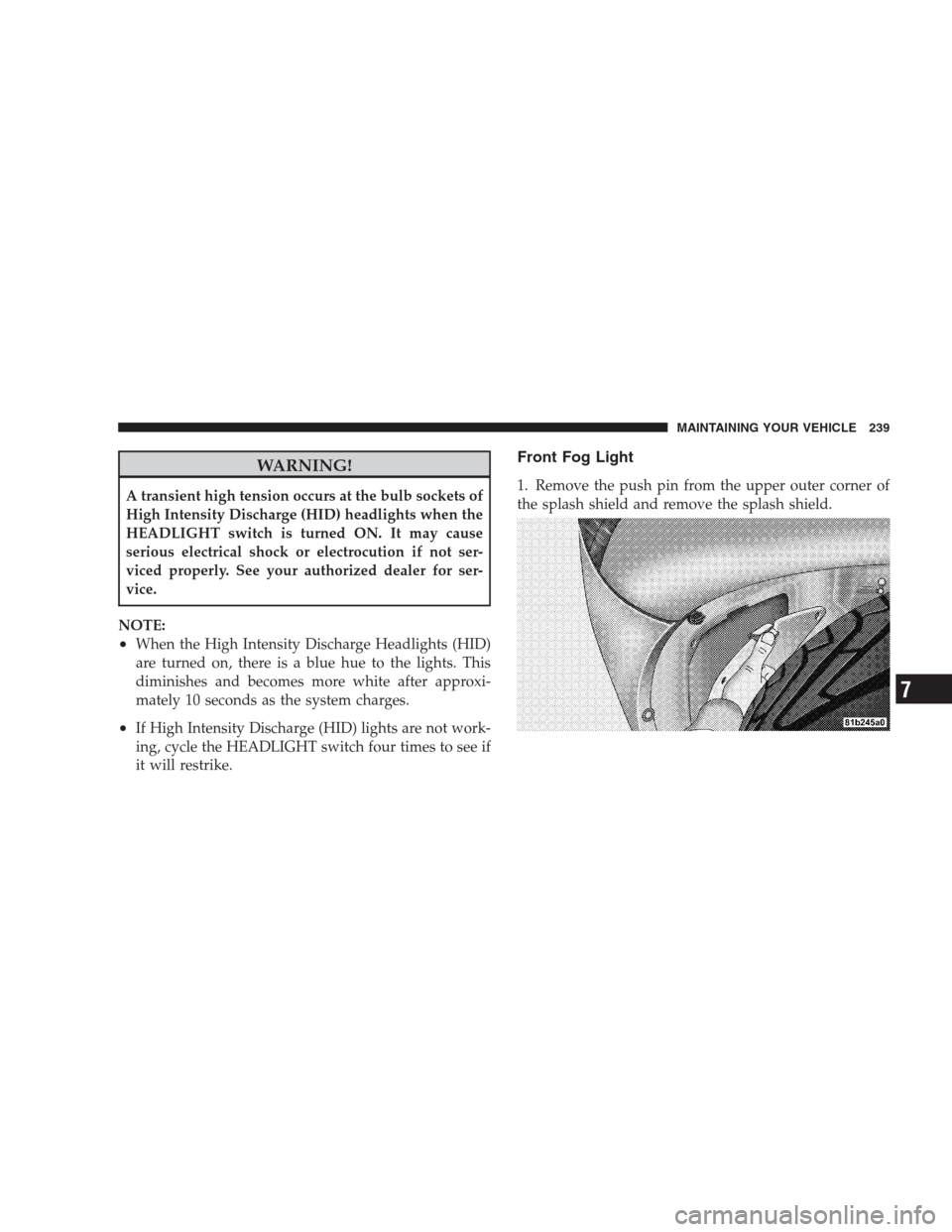
1. Remove the push pin from the upper outer corner of
the splash shield and remove the splash shield.
MAINTAINING YOUR VEHICLE 239
7
Page 242 of 299

2. Turn the bulb and socket assembly counterclockwise,
and then pull it out of the front fog light assembly.
3. Pull the bulb out of the socket assembly.
4. Push the replacement bulb into the socket assembly.
5. Reinstall the bulb and socket assembly into the front
fog light assembly, and then turn it clockwise.6. Install the splash shield and push pin.
Taillight, Tail/Stop Light, Rear Marker Light
1. Open the trunk
2. Remove the two fasteners and then remove the access
panel.
240 MAINTAINING YOUR VEHICLE
Page 243 of 299

3. Turn the appropriate bulb and socket assembly coun-
terclockwise, and then pull it out of the upper light
assembly.4. Pull the bulb out of the socket assembly.
5. Push the replacement bulb into the socket assembly.
6. Reinstall the bulb and socket assembly into the upper
light assembly, and then turn it clockwise.
7. Install the access panel and the two fasteners.
8. Close the trunk.
Taillight, Tail/Stop Light, Rear Marker Light
(Coupe Models)
For bulb replacement, see your authorized dealer.
1 — Rear Marker Light
2 — Tail/Stop Light
3 — TaillightMAINTAINING YOUR VEHICLE 241
7
Page 245 of 299

4. Remove the three bulb and socket assemblies from the
upper light assembly by turning them counterclockwise
and then pulling them out of the upper light assembly.5. Remove the upper light assembly.
MAINTAINING YOUR VEHICLE 243
7
Page 246 of 299
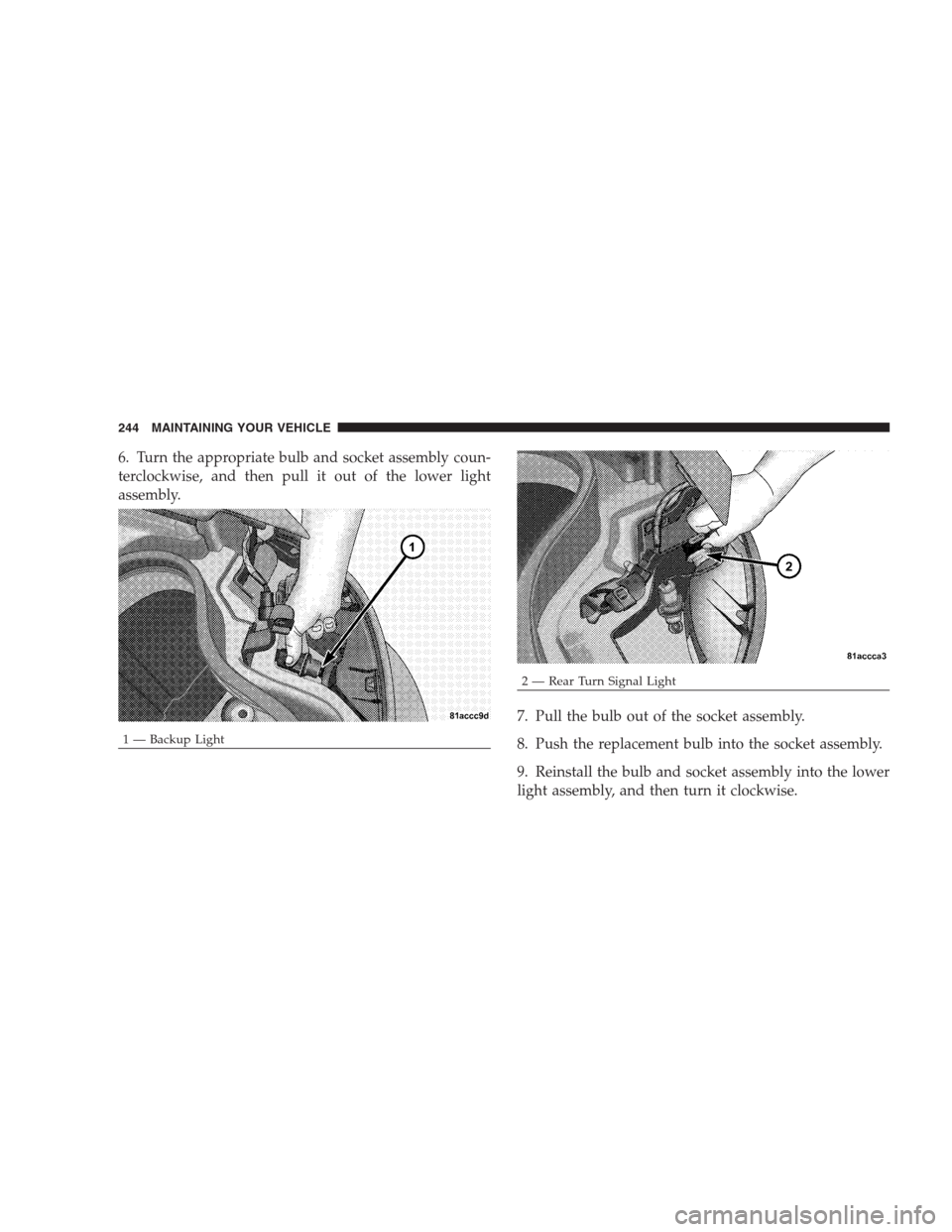
6. Turn the appropriate bulb and socket assembly coun-
terclockwise, and then pull it out of the lower light
assembly.
7. Pull the bulb out of the socket assembly.
8. Push the replacement bulb into the socket assembly.
9. Reinstall the bulb and socket assembly into the lower
light assembly, and then turn it clockwise.
1 — Backup Light
2 — Rear Turn Signal Light 244 MAINTAINING YOUR VEHICLE
Page 247 of 299

10. Reinstall the three bulb and socket assemblies into
the upper light assembly, and turn them clockwise.
11. Reinstall the upper light assembly and the three
retaining nuts.
12. Install the access panel and the two fasteners.
13. Close the trunk.
License Light
1. Open the trunk.
2. Turn the bulb and socket assembly counterclockwise,
and then pull it out of the housing.3. Pull the bulb out of the socket assembly.
4. Push the replacement bulb into the socket assembly.
5. Reinstall the bulb and socket assembly into the hous-
ing, and then turn it clockwise.
6. Close the trunk.
MAINTAINING YOUR VEHICLE 245
7
Page 283 of 299
Location..........................192,207
Saving Feature (Protection)............... 210
Storing Vehicle........................ 210
Belts, Seat............................33,34
Body Mechanism Lubrication............... 212
Boot, Convertible Top...................69,74
B-Pillar Location........................ 156
Brake, Parking.......................... 145
Brake System........................147,222
Anti-Lock (ABS)....................147,148
Fluid Check.......................222,248
Master Cylinder....................... 222
Warning Light........................ 104
Break-In Recommendations, New Vehicle.....59,147
Bulb Replacement....................... 237
Bulbs, Light............................ 236
Capacities, Antifreeze (Engine Coolant)........ 246
Capacities, Fluid........................ 246Caps, Filler
Fuel................................ 175
Oil (Engine).......................... 205
Power Steering........................ 144
Radiator (Coolant Pressure)............... 219
Car Washes............................ 227
Carbon Monoxide Warning...............60,174
CD (Compact Disc) Changer................ 116
CD (Compact Disc) Player............... 111,115
Cellular Phone.......................... 125
Chains, Tire............................ 167
Charging System Light.................... 109
Chart, Tire Sizing........................ 153
Check Engine Light
(Malfunction Indicator Light)............... 201
Checks, Safety........................... 60
Child Restraint....................53,54,55,58
Child Restraint Tether Anchors............... 56
Circuit Breakers......................... 230
INDEX 281
10