key DODGE VIPER 2015 VX / 3.G Owner's Manual
[x] Cancel search | Manufacturer: DODGE, Model Year: 2015, Model line: VIPER, Model: DODGE VIPER 2015 VX / 3.GPages: 400, PDF Size: 9.59 MB
Page 163 of 400
Driver Information Display (DID) Messages
•Front Seat Belts Unbuckled
•Driver Seat Belt Unbuckled
•Passenger Seat Belt Unbuckled
•Key Fob Battery Low
•Service Air Bag System
•ESC Status (ESC OFF, ESC ON, ESC SPORT, ESC
TRACK, RAIN MODE) — Refer to “Starting And
Operating” for further information.
•Oil Pressure Low
•Fuel Low
•Service Antilock Brake System
•Service Electronic Throttle Control
•Cruise Off
•Cruise Ready
•Cruise Set To XXX MPH
•Tire Pressure Screen With Low Tire Pressure Warnings
•Service Tire Pressure System
•Parking Brake Engaged
•Brake Fluid Low
•Service Electronic Braking System
•Engine Temperature Hot
•Battery Voltage Low
•Service Electronic Throttle Control
•Lights On
•Right Turn Signal Light Out
•Left Turn Signal Light Out
4
UNDERSTANDING YOUR INSTRUMENT PANEL 161
Page 184 of 400
arrow button on the touchscreen to return to the previous
menu, or push the back button on the faceplate.
•Headlight Illumination On Approach
When this feature is selected, the headlights will activate
and remain on for 0, 30, 60, or 90 seconds when the doors
are unlocked with the Remote Keyless Entry (RKE)
transmitter. To change the Illuminated Approach status,
press the “+” or “-” button on the touchscreen to select
your desired time interval. Press the back arrow button
on the touchscreen to return to the previous menu, or
push the back button on the faceplate.
•Headlights With Wipers
When this feature is selected, and the headlight switch is
in the AUTO position, the headlights will turn on ap-
proximately 10 seconds after the wipers are turned on.
The headlights will also turn off when the wipers are
turned off if they were turned on by this feature. To make
your selection, press the Headlights With Wipers button
on the touchscreen, until a check-mark appears next to
setting, showing that setting has been selected. Press the
back arrow button on the touchscreen to return to the
previous menu, or push the back button on the faceplate.
•Daytime Running Lights
When this feature is selected, the headlights will turn on
whenever the vehicle is set in motion. To make your
selection, press the Daytime Running Lights button on
the touchscreen, until a check-mark appears next to
setting, showing that setting has been selected. Press the
back arrow button on the touchscreen to return to the
previous menu, or push the back button on the faceplate.
•Flash Lights With Lock
When this feature is selected, the exterior lights will flash
when the doors are locked or unlocked with the Remote
Keyless Entry (RKE) transmitter. This feature may be
selected with or without the sound horn on lock feature
selected. To make your selection, press the Flash Lights
182 UNDERSTANDING YOUR INSTRUMENT PANEL
Page 185 of 400
with Lock button on the touchscreen, until a check-mark
appears next to setting, showing that setting has been
selected. Press the back arrow button on the touchscreen
to return to the previous menu, or push the back button
on the faceplate.
Doors & Locks
After pressing the Doors & Locks button on the touch-
screen the following settings will be available.
•Auto Door Locks
When this feature is selected, all doors will lock auto-
matically when the vehicle reaches a speed of 15 mph
(24 km/h). To make your selection, press the “Auto Door
Locks” button on the touchscreen, until a check-mark
appears next to setting, showing that setting has been
selected. Press the back arrow button on the touchscreen
to return to the previous menu, or push the back button
on the faceplate.
•Auto Unlock On Exit
When this feature is selected, all doors will unlock when
the vehicle is stopped, the transmission is in the PARK or
NEUTRAL position and the driver’s door is opened. To
make your selection, press the Auto Unlock On Exit
button on the touchscreen, until a check-mark appears
next to setting, showing that setting has been selected.
Press the back arrow button on the touchscreen to return
to the previous menu, or push the back button on the
faceplate.
•Flash Lights With Lock
When this feature is selected, the exterior lights will flash
when the doors are locked or unlocked with the Remote
Keyless Entry (RKE) transmitter or the Passive Entry
Feature. To make your selection, press the Flash Lights
With Lock button on the touchscreen, until a check-mark
appears next to setting, showing that setting has been
4
UNDERSTANDING YOUR INSTRUMENT PANEL 183
Page 186 of 400
selected. Press the back arrow button on the touchscreen
to return to the previous menu, or push the back button
on the faceplate.
•Sound Horn With Lock
When this feature is selected, the horn will sound when
the Key Fob Lock button is pressed. To make your
selection, push the Sound Horn With Remote Lock
button on the touchscreen, until a check-mark appears
next to setting, showing that setting has been selected.
Press the back arrow button on the touchscreen to return
to the previous menu, or push the back button on the
faceplate.
•1st Press Of Key Fob Unlocks
When#Driver Door#is selected with 1st Press Of Key Fob
Unlocks, only the driver’s door will unlock with the first
press of the Remote Keyless Entry (RKE) transmitter
UNLOCK button. You must press the RKE transmitter
UNLOCK button twice to unlock the passenger’s doors.
When#All Doors#is selected for 1st Press Of Key Fob
Unlocks, all doors will unlock on the first press of the
RKE transmitter UNLOCK button.
NOTE:If the vehicle is programmed 1st Press Of Key Fob
Unlocks “All Doors,” all doors will unlock no matter
which Passive Entry equipped door handle is grasped. If
1st Press Of Key Fob Unlocks “Driver Door” is pro-
grammed, only the driver ’s door will unlock when the
driver ’s door is grasped. With Passive Entry, if 1st Press
Of Key Fob Unlocks “Driver Door” is programmed,
touching the handle more than once will only result in
the driver ’s door opening. If “Driver Door” is selected,
once the driver door is opened, the interior door lock/
unlock switch can be used to unlock all doors (or use
RKE transmitter).
•Passive Entry
This feature allows you to lock and unlock the vehicles
door(s) without having to press the Remote Keyless
184 UNDERSTANDING YOUR INSTRUMENT PANEL
Page 187 of 400
Entry (RKE) transmitter lock or unlock buttons. To make
your selection, press the “Passive Entry” button on the
touchscreen, until a check-mark appears next to setting,
showing that setting has been selected. Press the back
arrow button on the touchscreen to return to the previous
menu, or push the back button on the faceplate. Refer to
“Keyless Enter-N-Go™” in “Things To Know Before
Starting Your Vehicle”.
Engine Off Options
After pressing the Engine Off Options button on the
touchscreen the following settings will be available.
•Engine Off Power Delay
When this feature is selected, the power window
switches, radio, Uconnect® phone system (if equipped),
DVD video system (if equipped), power sunroof (if
equipped), and power outlets will remain active for up to
10 minutes after the ignition is cycled to OFF. Opening
either front door will cancel this feature. To change the
“Engine Off Power Delay” status, press the 0 seconds, 45
seconds, 5 minutes or 10 minutes button on the touch-
screen. Then press the back arrow/Done button on the
touchscreen.
•Headlight Off Delay
When this feature is selected, the driver can choose to
have the headlights remain on for 0, 30, 60, or 90 seconds
when exiting the vehicle. To change the “Headlight Off
Delay” status, press the#Up#or#Down#arrow button on
the touchscreen to select your desired time interval. Press
the back arrow/Done button on the touchscreen to return
to the previous menu.
4
UNDERSTANDING YOUR INSTRUMENT PANEL 185
Page 207 of 400
Uconnect® VOICE RECOGNITION QUICK TIPS
Introducing Uconnect®
Start using Uconnect® Voice Recognition with these
helpful quick tips. It provides the key Voice Commands
and tips you need to know to control your Uconnect®
8.4AN system.
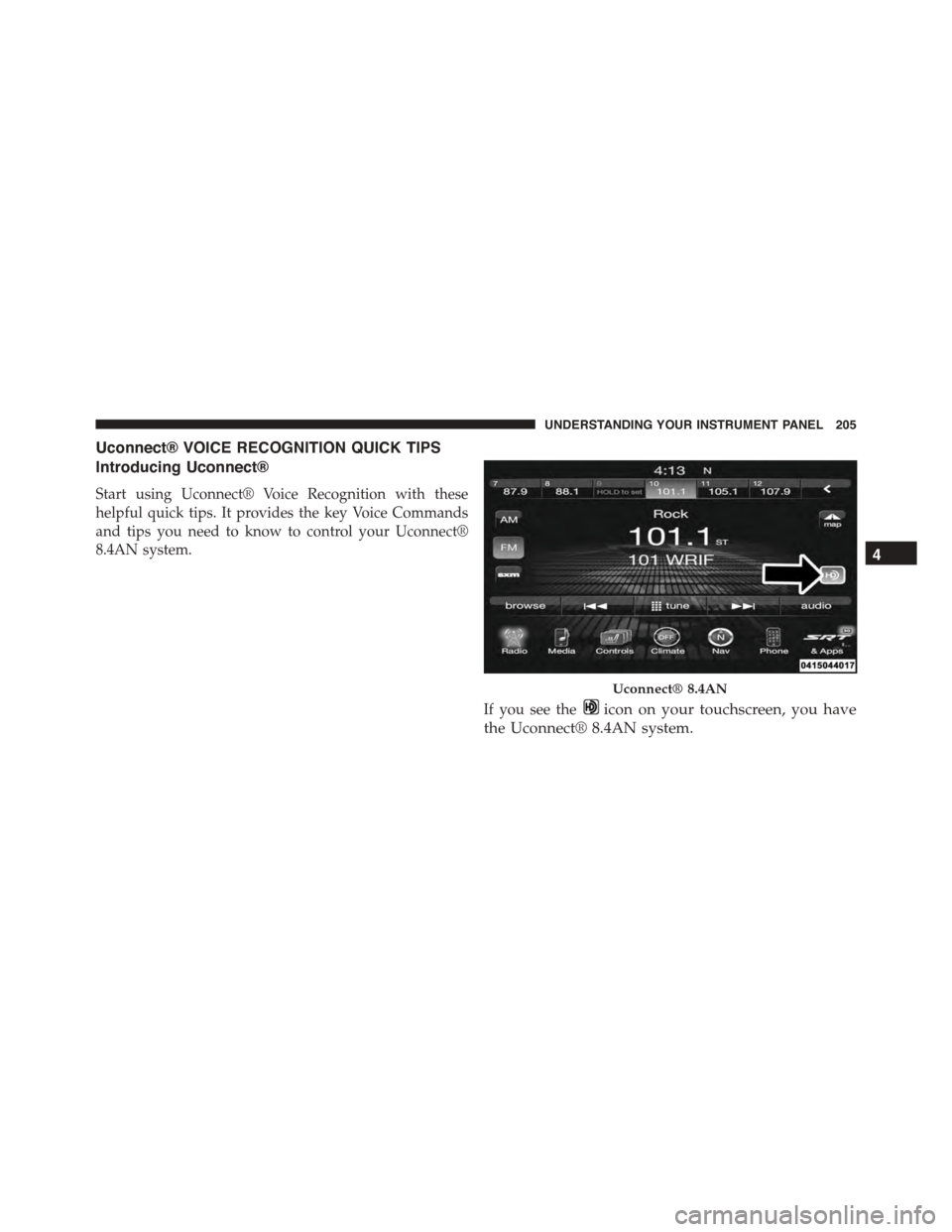
If you see theicon on your touchscreen, you have
the Uconnect® 8.4AN system.
Uconnect® 8.4AN
4
UNDERSTANDING YOUR INSTRUMENT PANEL 205
Page 224 of 400
STARTING PROCEDURES
Before starting your vehicle, adjust your seat, adjust the
inside and outside mirrors, fasten your seat belt, and if
present, instruct any other occupant to buckle their seat
belt.
WARNING!
Never leave children alone in a vehicle. Leaving
unattended children in a vehicle is dangerous for a
number of reasons. A child or others could be seri-
ously or fatally injured. Do not leave the Key Fob in
or near the vehicle (or in a location accessible to
children), and do not leave the ignition of a vehicle
equipped with Keyless Enter-N-Go™ in the ACC or
ON/RUN mode. A child could operate power win-
dows, other controls, or move the vehicle.
CAUTION!
Long periods of engine idling, especially at higher
than normal engine idle speeds, can cause excessive
exhaust temperatures, which can damage your ve-
hicle. Do not leave your vehicle unattended with the
engine running.
Normal Starting
CAUTION!
The engine in your vehicle is designed for operation
down to 0°F (-18°C). Starting the engine below 0°F
(-18°C) coolant temperature creates a potential for
scuffing or seizing of internal components in this
high performance engine. To prevent engine damage,
do not start the engine at temperatures below 0°F
(-18°C).
222 STARTING AND OPERATING
Page 240 of 400
The “Brake System Warning Light” in the instrument
cluster will turn on when the ignition is in the ON/RUN
position and the parking brake is applied.
NOTE:
•This light only shows that the parking brake is applied
or a brake/ABS system fault. It does not show the
degree of brake application. If the “Brake System
Warning Light” is illuminated when the parking brake
is not applied please see your authorized dealer.
•Each time the parking brake is applied, the instrument
cluster will automatically go to the highest illumina-
tion setting regardless of the dimmer control setting.
WARNING!
•Never leave children alone in a vehicle, or with
access to an unlocked vehicle. Allowing children to
be in a vehicle unattended is dangerous for a
number of reasons. A child or others could be
injured seriously or fatally. Do not leave the key
fob in or near the vehicle (or in a location accessible
to children), and do not leave the ignition of a
vehicle equipped with Keyless Enter-N-Go in the
ACC or ON/RUN mode. A child could operate
power windows, other controls, or move the ve-
hicle.
•Ensure the parking brake is fully disengaged be-
fore driving. Failure to do so can lead to brake
failure, and an accident.
238 STARTING AND OPERATING
Page 355 of 400
Check the battery every four to six weeks to ensure that
the voltage is above 12.10 Volts. The voltage will drop
more rapidly in hot temperatures. If battery voltage
drops below 12.10 Volts, follow the battery recharge
procedure in the Service Manual.
NOTE:To help prevent the battery from discharging
during shorter periods of inactivity, perform the follow-
ing:
1. Make sure that the liftgate, hood, doors, windows are
completely closed.
2. Make sure that Remote Keyless Entry (RKE) transmit-
ter is operating and that the battery is good.
3. Make sure that the HOOD, LIFTGATE, and DOOR
switches are in adjustment. Perform the quick system
check, which follows:
Use the remote transmitter to set the alarm. If the alarm
SET light comes on and flashes, the system is operating
properly. If not, there is a problem with a switch or the
system. See your authorized dealer for service.
If you plan to store the vehicle longer than 30 days, we
recommend using Hibernation Mode to conserve bat-
tery power. Refer to “Hibernation Mode” in Mainte-
nance Procedures for further information.7
MAINTAINING YOUR VEHICLE 353
Page 383 of 400
Auto Down Power Windows..................28
Automatic Door Locks......................26
Automatic Headlights......................103
Auto Unlock, Doors........................27
Auto Up Power Windows....................29
Auxiliary Electrical Outlet (Power Outlet)........129
Auxiliary Power Outlet.....................129
Battery.................................318
Emergency Starting......................303
Jump Starting..........................303
Keyless Transmitter Replacement (RKE)........22
Location..............................318
Remote Battery Replacement................22
Saving Feature (Protection)................320
Storing Vehicle.........................320
Transmitter Battery Replacement.............22
Belts, Seat...............................32
Body Mechanism Lubrication.................322
B-Pillar Location..........................254
Brake Control System, Electronic..............241
Brake, Parking...........................237
Brake System............................239
Anti-Lock (ABS)........................239
Fluid Check...........................333
Master Cylinder........................333
Warning Light.........................146
Break-In Recommendations, New Vehicle.........81
Brightness, Interior Lights...................107
Bulb Replacement.........................356
Bulbs, Light..............................85
Camera, Rear............................118
Capacities, Antifreeze (Engine Coolant)..........357
Capacities, Fluid..........................357
Caps, Filler
Oil (Engine)...........................317
Power Steering.........................236
10
INDEX 381