light FIAT 124 SPIDER 2016 2.G Owners Manual
[x] Cancel search | Manufacturer: FIAT, Model Year: 2016, Model line: 124 SPIDER, Model: FIAT 124 SPIDER 2016 2.GPages: 216, PDF Size: 3.1 MB
Page 164 of 216
If the coolant reservoir is empty or new
coolant is required frequently, contact a
Fiat Dealership.
BRAKE / CLUTCH FLUID
197)
47)
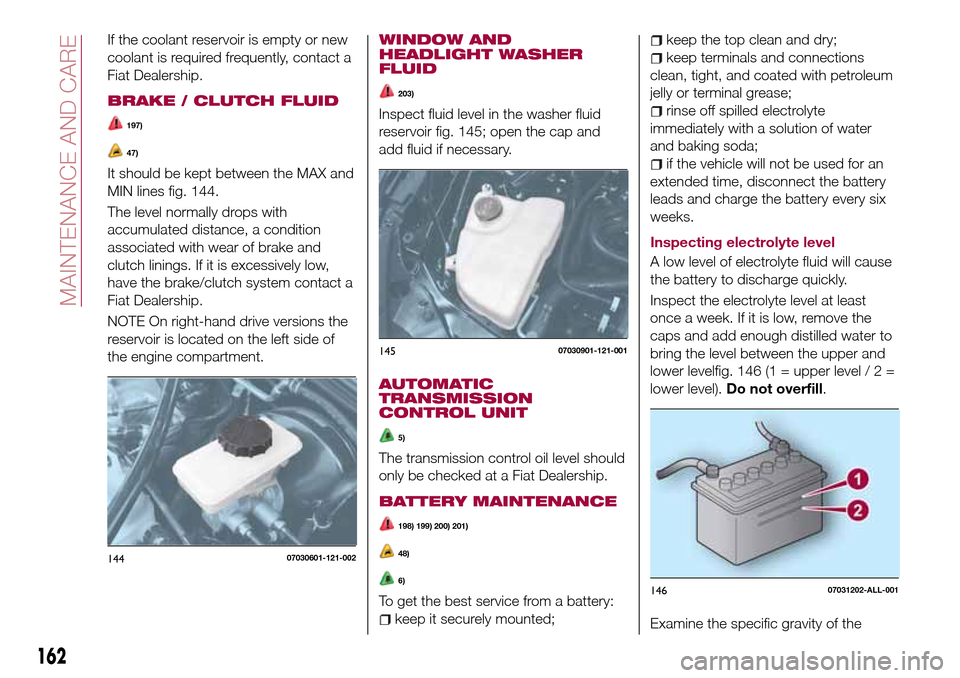
It should be kept between the MAX and
MIN lines fig. 144.
The level normally drops with
accumulated distance, a condition
associated with wear of brake and
clutch linings. If it is excessively low,
have the brake/clutch system contact a
Fiat Dealership.
NOTE On right-hand drive versions the
reservoir is located on the left side of
the engine compartment.
WINDOW AND
HEADLIGHT WASHER
FLUID
203)
Inspect fluid level in the washer fluid
reservoir fig. 145; open the cap and
add fluid if necessary.
AUTOMATIC
TRANSMISSION
CONTROL UNIT
5)
The transmission control oil level should
only be checked at a Fiat Dealership.
BATTERY MAINTENANCE
198) 199) 200) 201)
48)
6)
To get the best service from a battery:
keep it securely mounted;
keep the top clean and dry;
keep terminals and connections
clean, tight, and coated with petroleum
jelly or terminal grease;
rinse off spilled electrolyte
immediately with a solution of water
and baking soda;
if the vehicle will not be used for an
extended time, disconnect the battery
leads and charge the battery every six
weeks.
Inspecting electrolyte level
A low level of electrolyte fluid will cause
the battery to discharge quickly.
Inspect the electrolyte level at least
once a week. If it is low, remove the
caps and add enough distilled water to
bring the level between the upper and
lower levelfig. 146 (1 = upper level / 2 =
lower level).Do not overfill.
Examine the specific gravity of the
14407030601-121-002
14507030901-121-001
14607031202-ALL-001
162
MAINTENANCE AND CARE
Page 169 of 216
BODYWORK
PRESERVING THE
PAINTWORK
52) 53)
7)
Touch up abrasions and scratches
immediately to prevent the formation of
rust.
To correctly wash the vehicle, follow
these instructions:
is the vehicle is washed remove the
aerial;
if high pressure jets or cleaners are
used to wash the vehicle, keep a
distance of at least 40 cm from the
bodywork to avoid damage or
alteration. Build up of water could
cause damage to the vehicle in the long
term;
wash the bodywork using a low
pressure jet of water if possible;
wipe a sponge with a slightly soapy
solution over the bodywork, frequently
rinsing the sponge;
rinse well with water and dry with a
jet of air or a chamois leather.
Dry the less visible parts (e.g. door
frames, bonnet, headlight frames, etc.)
with special care, as water may
stagnate more easily in these areas. Do
not wash the vehicle after it has beenleft in the sun or with the bonnet hot:
this may alter the shine of the
paintwork.
Exterior plastic parts must be cleaned
in the same way as the rest of the
vehicle.
IMPORTANT Avoid parking under trees;
the resin dropped by trees makes the
paintwork go opaque and increases the
possibility of corrosion.
IMPORTANT Bird droppings must be
washed off immediately and thoroughly
as the acid they contain is particularly
aggressive.
Paint chipping
Paint chipping occurs when gravel
thrown in the air by another vehicle's
tires hits your vehicle.
Keeping a safe distance between you
and the vehicle ahead reduces the
chances of having your paint chipped
by flying gravel.
IMPORTANT The paint chipping zone
varies with the speed of the vehicle. For
example, when travelling at 90 km/h,
the paint chipping zone is 50 m.
IMPORTANT In low temperatures a
vehicle's finish hardens. This increases
the chance of paint chipping.IMPORTANT Chipped paint can lead to
rust forming on your vehicle. Before this
happens, repair the damage by using
FCA touch-up paint according to the
instructions in this section. Failure to
repair the affected area could lead to
serious rusting and expensive repairs.
MAINTAINING THE
FINISH
Washing
To help protect the finish from rust and
deterioration, wash your vehicle
thoroughly and frequently, at least once
a month, with lukewarm or cold water.
IMPORTANT FCA is not responsible for
scratches caused by automatic car
washes or improper washing.
Scratches are more noticeable on
vehicles with darker paint finishes.
IMPORTANT Keep hands and scrapers
clear of the windscreen when the wiper
lever is in the AUTO position and the
ignition is switched ON as fingers could
be pinched or the wipers and wiper
blades damaged when the wipers
activate automatically. If you are going
to clean the windscreen, be sure the
wipers are turned off completely (when
it is most likely that the engine is left
running) this is particularly important
when clearing ice and snow.
167
Page 170 of 216
IMPORTANT Do not spray water in the
engine compartment. Otherwise, it
could result in engine-starting problems
or damage to electrical parts.
IMPORTANT When washing and
waxing the vehicle, be careful not to
apply excessive force to any single area
of the vehicle bonnet. Otherwise, you
could dent the vehicle.
IMPORTANT Do not use automatic car
washing machines and car washing
devices using high water pressure.
IMPORTANT Make sure that the fuel
flap is closed and lock the doors.
Otherwise, the fuel flap may be
forcefully opened by water pressure
causing damage to the vehicle or fuel
flap.
IMPORTANT Do not use steel wool,
abrasive cleaners, or strong detergents
containing highly alkaline or caustic
agents on chromeplated or anodised
aluminium parts. This may damage the
protective coating; also, cleaners and
detergents may discolour or deteriorate
the paint.
Thoroughly rinse off all soap with
lukewarm or cold water. Do not allow
soap to dry on the finish.
211)
WARNING
211)Dry off brakes that have become wet
by driving slowly, releasing the accelerator
pedal and lightly applying the brakes
several times until the brake performance
returns to normal. Driving with wet brakes
is dangerous. Increased stopping distance
or the vehicle pulling to one side when
braking could result in a serious accident.
Light braking will indicate whether the
brakes have been affected.
IMPORTANT
52)In order to preserve the appearance of
the paint abrasive products and/or polishes
should not be used for cleaning the vehicle.53)Avoid washing with rollers and/or
brushes in washing stations. Wash the
vehicle only by hand using neutral pH
detergents; dry it with a wet chamois
leather. Abrasive products and/or polishes
should not be used for cleaning the car.
Bird droppings must be washed off
immediately and thoroughly as the acid
they contain is particularly aggressive.
Avoid (if at all possible) parking the vehicle
under trees; remove vegetable resins
immediately as, when dried, it may only be
possible to remove them with abrasive
products and/or polishes, which is highly
inadvisable as they could alter the typical
opaqueness of the paint. Do not use pure
windscreen washer fluid for cleaning the
front windscreen and rear window; dilute it
min. 50% with water. Only use pure screen
washer fluid when strictly necessary due to
outside temperature conditions.
IMPORTANT
7)Detergents cause water pollution. Only
wash your vehicle in areas equipped to
collect and treat wastewater from this type
of activity.
168
MAINTENANCE AND CARE
Page 171 of 216
INTERIORS
SEATS AND FABRIC
PARTS
Seat belt maintenance
213) 214)
Clean the soiled area by lightly dabbing
it with a soft cloth soaked in a mild
detergent (approx. 5%) diluted with
water.
Wipe off the remaining detergent using
a cloth soaked in clean water and
wrung out well.
Before retracting seat belts which have
been pulled out for cleaning, dry them
off thoroughly and make sure there is
no remaining moisture on them.
NOTE Clean seat belts diligently if they
get dirty. Leaving them uncleaned will
make it dif cult to clean them later, and
it may affect the smooth retracting of
the seat belt.
PLASTIC PART
MAINTENANCE
54)
Instrument panel top maintenance
212)
Wipe the soiled area with a soft cloth
soaked in a mild detergent (approx. 5%)
diluted with water.Wipe off the remaining detergent using
a cloth soaked in clean water and
wrung out well.
WARNING
212)Do not spray water into the vehicle
cabin. Spraying water into the vehicle cabin
is dangerous as electrical devices such as
the audio and switches could get wet
resulting in a malfunction or vehicle fire.
213)If a seat belt appears frayed or has
abrasions, have it replaced by a Fiat
Dealership. If a seat belts is used under
such a condition, it cannot function at its
full capacity which could result in serious
injury or death.
214)Use a mild detergent to remove
soiling from a seat belt. If organic solvents
are used for cleaning the seat belts or they
become stained or bleached, there is the
possibility of them becoming weakened
and as a result, they may not function at
their full capacity which could cause
serious injury or death.
215)Never use flammable products, such
as petrol ether or rectified petrol to clean
the inside of the car. The electrostatic
charges which are generated by rubbing
during the cleaning operation may cause a
fire.
216)Do not keep aerosol cans in the car:
they might explode. Aerosol cans must not
be exposed to a temperature exceeding
50°C. When the vehicle is exposed to
sunlight, the internal temperature can
greatly exceed this value.217)There must be no obstacles on the
floor underneath the pedals; make sure
that mats are always flat and do not
interfere with the pedals.
IMPORTANT
54)Never use alcohol, petrols and
derivatives to clean the dashboard and
instrument panel lens.
169
Page 192 of 216
AF (Alternative Frequency);
REG (Regional Programme);
ALC (Automatic volume adjustment);
BASS (Low pitch sound);
TREB (Treble sound);
FADE (Front/back volume balance);
BAL (Left/right volume balance);
BEEP (Audio operation sound);
12Hr < > 24Hr (12 Hr/24 Hr time
adjustment).
CLOCK
Setting the time
The clock can be set at any time when
the ignition is switched to ACC or ON.
To adjust the time, press the clock
buttonFM/AMfor about 2 seconds
until a beep is heard. The clock's
current time will flash.
Time adjustment
To adjust the time, press the
hour/minute set button
/
while the clock's current time is
flashing.
The hours advance while the hour set
button
is pressed. The minutes
advance while the minute
set
button is pressed.
Press the clock buttonFM/AMagain
to start the clock.
OPERATING THE RADIO
Radio ON: press a band selector
button FM/AM to turn the radio on.
Band selection: press the band
selector buttonFM/AMto switch the
bands as follows: M1–FM2–MW/LW
Manual tuning: select the station by
pressing the tuning button
/
lightly.
Seek tuning: press tuning button
/. The search stops when a
station is found.
Scan tuning: press and hold the scan
buttonMEDIAto automatically sample
strong stations. Scanning stops at each
station for about 5 seconds. To hold a
station, press and hold the scan button
MEDIA again during this interval.
Preset channel tuning
The 6 preset channels can be used to
store 6 MW/LW and 12 FM stations.
To set a channel first select MW/LW,
FM1, or FM2. Tune to the desired
station.
Press a channel preset button for
about 2 seconds until a beep is heard.
The preset channel number or station
frequency will be displayed. The station
is now held in the memory.
Repeat this operation for the other
stations and bands you want to store.
To tune one in the memory, selectMW/LW, FM1, or FM2 and then press
its channel preset button. The station
frequency or the channel number will be
displayed.
AUX / USB / iPod MODE
Auxiliary jack / USB port
Audio can be heard from the vehicle's
speakers by connecting a commercially
available portable audio unit to the
auxiliary jack. A commercially-available,
non-impedance (3.5 Ø) stereo mini plug
lead is required. In addition, audio can
be played from the vehicle audio device
by connecting a USB device or an iPod
to the USB port.
How to use AUX mode
Switch the ignition to ACC or ON, press
the power/volume dial to turn the audio
system on and press theMEDIA
button of the audio unit to change to
the AUX mode.
How to use USB mode
This unit does not support a USB
3.0 device. In addition, other devices
may not be supported depending on
the model or OS version.
Playback
Switch the ignition to ACC or ON, press
the power/volume dial to turn the audio
system on and press theMEDIA
190
MULTIMEDIA
Page 198 of 216
Displays the favorites list. Press
and hold to store the currently
tuned station to the favorites list.
Searches your desired station
from the station list. Tunes to
each station in the station list for
10 seconds. Select again when
your desired station is tuned. If
the station list is not available, it
switches to the station list update
screen. Perform the station list
updating.
Switches the TA mode on and
off.
/Returns to the
previous/goes to the next
station. Touch and hold to
return to the top station in
the previous/next ensemble.
Displays the DAB radio setting
screen.
Displays sound settings to adjust
audio quality level.
SETTINGS
NOTE Depending on the grade and
specification, the screen display may
differ.
Select the
icon on the home screen
to display the Settings screen. Switch
the tab and select the setting item you
want to change.You can customize settings in the setup
display as follows:
“Display”: refer to “Volume/Display/
Sound controls” paragraph in Radio 7
supplement;
“Sound”: refer to “Volume/Display/
Sound controls” paragraph in Radio 7
supplement;
“Clock”: “Adjust Time”, “GPS Sync”,
“Time Format”, “Time Zone Select”,
“Daylight Savings Time”;
“Vehicle”: rain sensing Wiper/Door
Lock/Other;
“Devices”: selectBluetooth®or
“Network Management”;
“System”: “Tool Tips”, “Language”,
“Temperature”, “Distance”, “Music
Database Update”, “Factory Reset”,
“About (agreements and disclaimers)”,
“About (version Information)”
AUX / USB / iPod MODE
Audio can be heard from the vehicle's
speakers by connecting a commercially
available portable audio unit to the
auxiliary jack. A commercially-available,
non-impedance (3.5 Ø) stereo mini plug
lead is required.
In addition, audio can be played from
the vehicle audio device by connecting
a USB device or an iPod to the USB
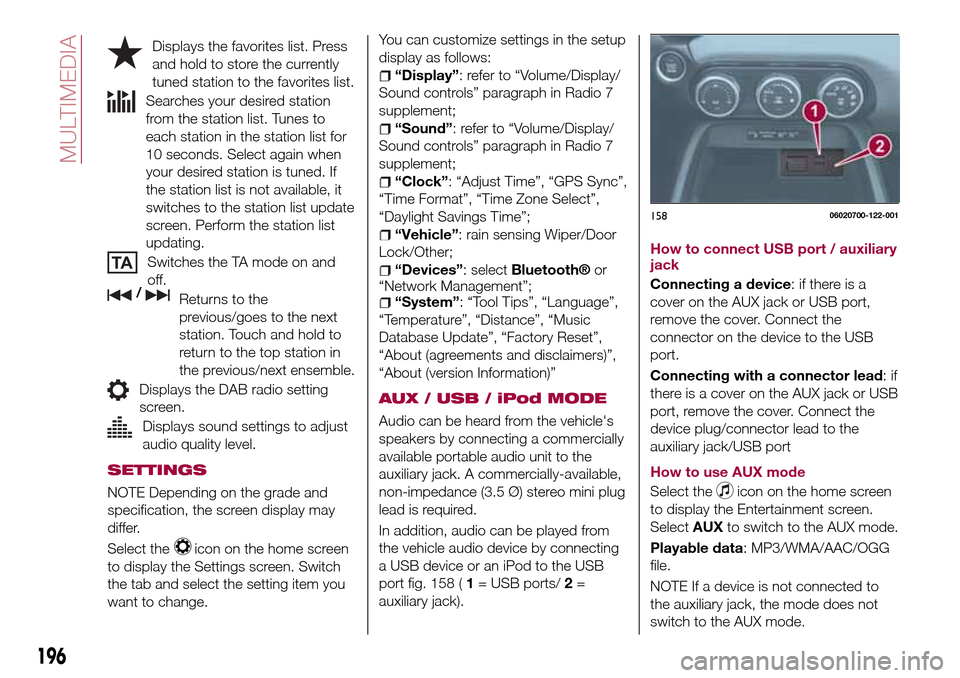
port fig. 158 (1= USB ports/2=
auxiliary jack).How to connect USB port / auxiliary
jack
Connecting a device: if there is a
cover on the AUX jack or USB port,
remove the cover. Connect the
connector on the device to the USB
port.
Connecting with a connector lead:if
there is a cover on the AUX jack or USB
port, remove the cover. Connect the
device plug/connector lead to the
auxiliary jack/USB port
How to use AUX mode
Select the
icon on the home screen
to display the Entertainment screen.
SelectAUXto switch to the AUX mode.
Playable data: MP3/WMA/AAC/OGG
file.
NOTE If a device is not connected to
the auxiliary jack, the mode does not
switch to the AUX mode.
15806020700-122-001
196
MULTIMEDIA
Page 201 of 216
iDisplays the screen where traffic
information and the GPS reception
conditions can be set and verified.
Cancels waypoint/route.
Finds Places nearby. You can
search for Points Of Interest (POI) near
the vehicle position.
Displays the route parameters
and the route in its full length on the
map. You can also perform
route-related actions such as editing or
cancelling your route, picking route
alternatives, avoiding parts of the route,
simulating navigation or adding the
destination to your Favourites.
2D/3DChanges View mode. The
map view mode can be changed (2D
north up/2D heading up/3D).
Switches to the Settings screen
where you change navigation settings.
NOTE Some functions are not available
depending on some countries and
regions.
NAVIGATING ON THE MAP
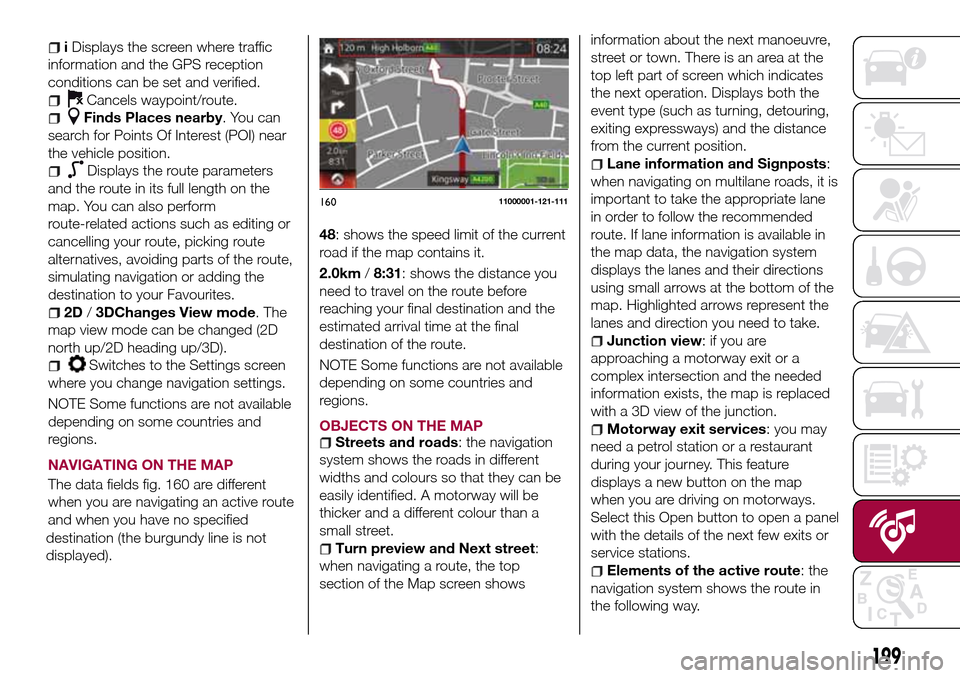
The data fields fig. 160 are different
when you are navigating an active route
and when you have no specified
destination (the burgundy line is not
displayed).48: shows the speed limit of the current
road if the map contains it.
2.0km/8:31: shows the distance you
need to travel on the route before
reaching your final destination and the
estimated arrival time at the final
destination of the route.
NOTE Some functions are not available
depending on some countries and
regions.
OBJECTS ON THE MAP
Streets and roads: the navigation
system shows the roads in different
widths and colours so that they can be
easily identified. A motorway will be
thicker and a different colour than a
small street.
Turn preview and Next street:
when navigating a route, the top
section of the Map screen showsinformation about the next manoeuvre,
street or town. There is an area at the
top left part of screen which indicates
the next operation. Displays both the
event type (such as turning, detouring,
exiting expressways) and the distance
from the current position.
Lane information and Signposts:
when navigating on multilane roads, it is
important to take the appropriate lane
in order to follow the recommended
route. If lane information is available in
the map data, the navigation system
displays the lanes and their directions
using small arrows at the bottom of the
map. Highlighted arrows represent the
lanes and direction you need to take.
Junction view: if you are
approaching a motorway exit or a
complex intersection and the needed
information exists, the map is replaced
with a 3D view of the junction.
Motorway exit services: you may
need a petrol station or a restaurant
during your journey. This feature
displays a new button on the map
when you are driving on motorways.
Select this Open button to open a panel
with the details of the next few exits or
service stations.
Elements of the active route: the
navigation system shows the route in
the following way.
16011000001-121-111
199
Page 204 of 216
IMPORTANT INFORMATION AND RECOMMENDATIONS
WARNING
BRAKE SYSTEMDo not coast with the engine stalled or turned off, find a safe place to stop. Coasting with the engine stalled or turned off is
dangerous. Braking will require more effort, and the brake's power-assist could be depleted if you pump the brake. This will
cause longer stopping distances or even an accident.
Shift to a lower gear when going down steep hills. Driving with your foot continuously on the brake pedal or steadily applying
the brakes for long distances is dangerous. This causes overheated brakes, resulting in longer stopping distances or even total
brake failure. This could cause loss of vehicle control and a serious accident. Avoid continuous application of the brakes.
Dry off brakes that have become wet by driving slowly, releasing the accelerator pedal and lightly applying the brakes
several times until the brake performance returns to normal. Driving with wet brakes is dangerous. Increased stopping distance
or the vehicle pulling to one side when braking could result in a serious accident. Light braking will indicate whether the brakes
have been affected.
INTERNAL EQUIPMENTNever use a cup holder to hold hot liquids while the vehicle is moving. Using a cup holder to hold hot liquids while the
vehicle is moving is dangerous. If the contents spill, you could be scalded.
Do not put anything other than plastic bottles, cups or drink cans in cup holders. Putting objects other than plastic bottles,
cups or drink cans in a cup holder is dangerous. During sudden braking or manoeuvring, occupants could be hit and injured,
or objects could be thrown around the vehicle, causing interference with the driver and the possibility of an accident. Only use
a cup holder for plastic bottles, cups or drink cans.
Keep storage boxes closed when driving. Driving with the storage boxes open is dangerous. To reduce the possibility of
injury in an accident or a sudden stop, keep the storage boxes closed when driving.
Do not put articles in storage spaces with no lid. Putting articles in storage spaces with no lid is dangerous as they could be
thrown around the cabin if the vehicle is suddenly accelerated and cause injury depending on how the article is stored.
DRIVING TIPS
Never stop the engine when going down a hill: stopping the engine when going down a hill is dangerous. This causes the
loss of power steering and power brake control, and may cause damage to the drivetrain. Any loss of steering or braking
control could cause an accident.
Page 205 of 216
Be extremely careful if it is necessary to downshift on slippery surfaces: downshifting into lower gear while driving on slippery
surfaces is dangerous. The sudden change in tyre speed could cause the tyres to skid. This could lead to loss of vehicle
control and an accident.
Make sure the floor mats are secured with the grommets or the retainers to prevent them from bunching up under the foot
pedals (driver's side): using a floor mat that is not secured is dangerous as it will interfere with the accelerator and brake pedal
operation (driver's side), which could result in an accident.
Only use a floor mat which conforms to the shape of the floor on the driver's side and make sure it is oriented correctly.
Secure the floor mat using the grommets or retainers. There are various ways to secure floor mats depending on the type
used, therefore secure the mat according to the type. After installing the floor mat, make sure that it does not slide from side to
side or back and forth, and that there is sufficient clearance with the accelerator and brake pedals on the driver's side.
After removing the floor mat for cleaning or some other reason, always securely reinstall it while paying attention to the
precautions just mentioned.
Do not install two floor mats, one on top of the other, on the driver's side: installing two floor mats, one on top of the other,
on the driver's side is dangerous as the retention pins can only keep one floor mat from sliding forward.
Loose floor mat(s) will interfere with the foot pedals and could result in an accident.
When using a heavy duty floor mat for winter, always remove the original floor mat.
Do not spin the wheels at high speed, and do not allow anyone to stand behind a wheel when pushing the vehicle: when
the vehicle is stuck, spinning the wheels at high speed is dangerous. The spinning tyre could overheat and explode. This could
cause serious injuries.
Use only the same size and type tyres (snow, radial, or non-radial) on all four wheels: using tyres different in size or type is
dangerous. Your vehicle's handling could be greatly affected and result in an accident.
Dry off brakes that have become wet by driving slowly, releasing the accelerator pedal and lightly applying the brakes
several times until the brake performance returns to normal: driving with wet brakes is dangerous. Increased stopping distance
or the vehicle pulling to one side when braking could result in a serious accident. Light braking will indicate whether the brakes
have been affected.
Page 212 of 216
INDEX
ABS system................67
Active bonnet precautions........68
Active safety systems...........67
Advanced Keyless Entry System....14
AFS (Adaptive Front Lighting
System)..................27
Attaching the tow hooks........150
Auto-wiper control............29
Automatic climate control system.......................34
Automatic lighting.............25
Automatic transmission.........111
Auxiliary driving systems.........71
Battery (maintenance).........162
Battery recharging............164
Bodywork (care and
maintenance).............167
Bonnet....................40
Boot lid...................38
Boot lid (opening).............38
Brake Assist................110
Brake/clutch fluid (level check). . . .162
Checking levels.............160
Child restraint system suitability
for various seat position.......85
Child seat installation position.....84
Child-restraint precautions.......80
Child-restraint system types......83
Climate control system..........31CO2 emissions..............184
Coming Home light system.......25
Constant monitoring..........107
Control panel and instruments.....46
Convertible Top (lowering)........41
Convertible Top (Soft Top)........41
Cruise Control..............114
Dashboard..................8
Dimensions................177
Doors.....................16
Double locking system..........16
Driver Air Bag................95
DRL (Daytime Running Lights).....24
DSC system................67
Emergency flap opening.......120
Emergency stop signal system. . . .127
Emergency towing............152
Engine...................172
Engine compartment..........160
Engine coolant (level check)......161
Engine oil (level check).........161
Essential information............3
Exterior lights................24
Flash to pass...............25
Fluid capacities..............178
Fluids and lubricants..........179
Front fog lights...............25
Fuel consumption............183
Fuel filler cap...............120Fuse block (engine compartment)......................138
Fuse block (left side of the vehicle)......................141
Fuses (under the bonnet)........137
Fuses (vehicle's left side)........136
Gear lever positions..........112
Gear Shift Indicator............50
Hazard warning lights.........127
Hazard warning lights (control). . . .127
Head restraints...............21
Headlight washer.............30
Headlights..................24
Heated seats................19
Heavy-dute use of the vehicle
(scheduled servicing)........155
High beams.................25
HLA function................74
How the SRS Air bags work......95
How to use this manual..........3
Identification data............171
Ignition switch...............11
Immobilizer system............15
INFO switch.................49
Installing child restraint systems....89
Interiors..................169
Jump starting..............148
Jump starting (procedure).......148
Key battery replacement........10
Keyless Entry System...........9
Keys......................9
INDEX