brake light FIAT 124 SPIDER 2016 2.G User Guide
[x] Cancel search | Manufacturer: FIAT, Model Year: 2016, Model line: 124 SPIDER, Model: FIAT 124 SPIDER 2016 2.GPages: 216, PDF Size: 3.1 MB
Page 69 of 216
ACTIVE SAFETY
SYSTEMS
The vehicle has the following active
safety systems:
ABS (Anti-lock Braking System);
TCS (Traction Contol System);
DSC (Dynamic Stability Control);
Active bonnet (active pedestrian
protection).
For the operation of the systems, see
the following pages.
ABS SYSTEM (Antilock
Brake System)
65) 66) 67) 68)
The ABS control unit continuously
monitors the speed of each wheel. If
one wheel is about to lock up, the ABS
responds by automatically releasing
and reapplying that wheel's brake.
The driver will feel a slight vibration in
the brake pedal and may hear a
chattering noise from the brake system.
This is normal ABS system operation.
Continue to depress the brake pedal
without pumping the brakes.
The warning light turns on when the
system has a malfunction. Refer to
“Warning lights and messages”
paragraph in “Knowing the instrument
panel” chapter.
NOTE Braking distances may be longer
on loose surfaces (snow or gravel, forexample) which usually have a hard
foundation. A vehicle with a normal
braking system may require less
distance to stop under these conditions
because the tires will build up a wedge
of surface layer when the wheels skid.
NOTE The sound of the ABS operating
may be heard when starting the engine
or immediately after starting the vehicle,
however, it does not indicate a
malfunction.
TCS SYSTEM (Traction
Control System)
69) 70) 71)
The Traction Control System (TCS)
enhances traction and safety by
controlling engine torque and braking.
When the TCS detects driving wheel
slippage, it lowers engine torque and
operates the brakes to prevent loss of
traction.
This means that on a slick surface, the
engine adjusts automatically to provide
optimum power to the drive wheels,
limiting wheel spin and loss of traction.
The warning light turns on when the
system has a malfunction. Refer to
“Warning lights and messages”
paragraph in “Knowing the instrument
panel” chapter.TCS / DSC indicator light
The
indicator light stays on for a few
seconds when the ignition is switched
ON.
If the TCS or DSC is operating, the
indicator light flashes.
If the
light stays on, the TCS, DSC or
the brake assist system may have a
malfunction and they may not operate
correctly. Contact a Fiat Dealership.
IMPORTANT In addition to the warning
light flashing, a slight labouring sound
will come from the engine. This
indicates that the TCS/DSC is
operating properly.
IMPORTANT On slippery surfaces, such
as fresh snow, it will be impossible to
achieve high rpm when the TCS is on.
DSC SYSTEM (Dynamic
Stability Control)
72) 73) 74)
The Dynamic Stability Control (DSC)
automatically controls braking and
engine torque in conjunction with
systems such as ABS and TCS to help
control side slip when driving on
slippery surfaces, or during sudden or
evasive manoeuvring, enhancing vehicle
safety. Refer to “ABS system (Antilock
Brake System)” and “TCS system
(Traction Control System)”.
67
Page 70 of 216
DSC operation is possible at speeds
greater than 20 km/h.
The warning light turns on when the
system has a malfunction. Refer to
“Warning lights and messages”
paragraph in “Knowing the instrument
panel” chapter.
NOTE The DSC may not operate
correctly unless the following are
observed:
use tires of the correct size specified
for your vehicle on all four wheels;
use tires of the same manufacturer,
brand and tread pattern on all four
wheels;
do not mix worn tires.
IMPORTANT The DSC may not operate
correctly when tire chains are used or a
temporary spare tire is installed
because the tire diameter changes.
TCS / DSC indicator light
The
indicator light stays on for a few
seconds when the ignition is switched
ON. If the TCS or DSC is operating, the
indicator light flashes.
If the light stays on, the TCS, DSC or
the brake assist system may have a
malfunction and they may not operate
correctly. Take your vehicle to a Fiat
Dealership.DSC OFF indicator light
The
indicator light stays on for a few
seconds when the ignition is switched
ON. It also illuminates when the DSC
OFF switch is pressed and TCS/DSC is
switched off.
If the light remains illuminated and the
TCS/DSC is not switched off, contact a
Fiat Dealership. The DSC may have a
malfunction.
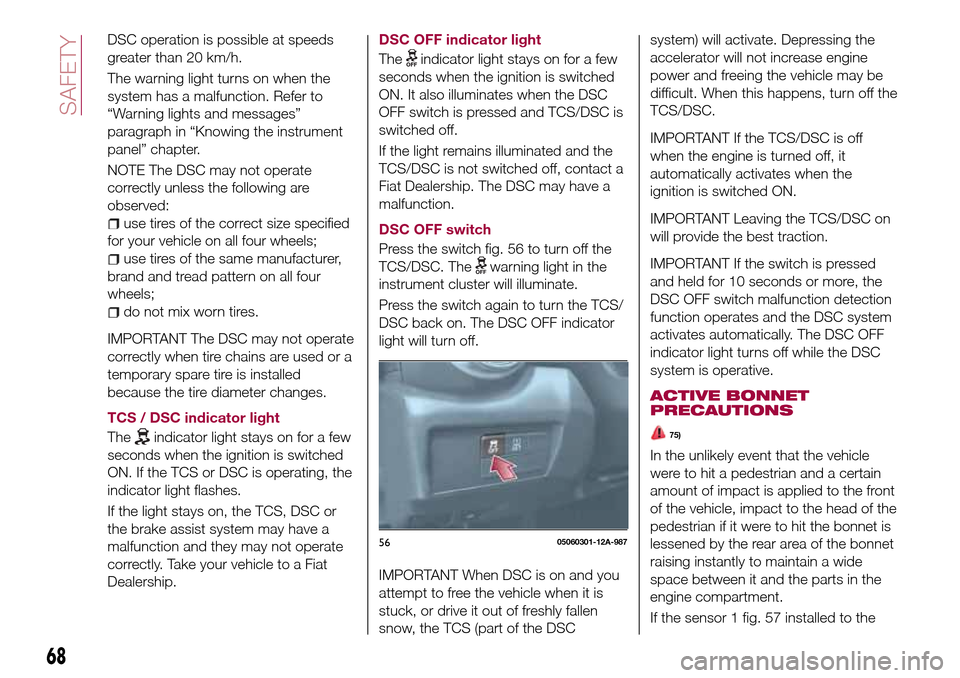
DSC OFF switch
Press the switch fig. 56 to turn off the
TCS/DSC. The
warning light in the
instrument cluster will illuminate.
Press the switch again to turn the TCS/
DSC back on. The DSC OFF indicator
light will turn off.
IMPORTANT When DSC is on and you
attempt to free the vehicle when it is
stuck, or drive it out of freshly fallen
snow, the TCS (part of the DSCsystem) will activate. Depressing the
accelerator will not increase engine
power and freeing the vehicle may be
difficult. When this happens, turn off the
TCS/DSC.
IMPORTANT If the TCS/DSC is off
when the engine is turned off, it
automatically activates when the
ignition is switched ON.
IMPORTANT Leaving the TCS/DSC on
will provide the best traction.
IMPORTANT If the switch is pressed
and held for 10 seconds or more, the
DSC OFF switch malfunction detection
function operates and the DSC system
activates automatically. The DSC OFF
indicator light turns off while the DSC
system is operative.
ACTIVE BONNET
PRECAUTIONS
75)
In the unlikely event that the vehicle
were to hit a pedestrian and a certain
amount of impact is applied to the front
of the vehicle, impact to the head of the
pedestrian if it were to hit the bonnet is
lessened by the rear area of the bonnet
raising instantly to maintain a wide
space between it and the parts in the
engine compartment.
If the sensor 1 fig. 57 installed to the
5605060301-12A-987
68
SAFETY
Page 72 of 216
front bumper. In addition, it may
activate depending on the level of
impact from even a light object, small
animal, or other small object;
the system may also activate if the
lower part of the vehicle or the front
bumper receives an impact from one of
the following situations:
– the vehicle hits a curb;
– the vehicle falls into a deep ditch or
hole;
– the vehicle bounces and hits the
ground;
– the front, bottom part of the vehicle
contacts the slope of a parking
garage, the surface of an even,
undulating road, or a protruding or
fallen object on the road.
Situations in which the active
bonnet may not activate
The active bonnet may not active in the
following situations as an impact would
be difficult to detect:
the pedestrian gets hit at an angle or
by the side areas on the left and right of
the front bumper;
the vehicle hits a pedestrian who is
carrying something such as a bag
which can absorb the impact.
Situations in which the system does
not activate
The active bonnet does not activate
under the following conditions:
the front bumper gets hit while the
vehicle is being driven at a speed
insufficient to activate the system;
the vehicle gets hit from the side or
the rear;
the vehicle rolls or turns over (the
active bonnet may operate depending
on the accident conditions).
WARNING
65)Do not rely on ABS as a substitute for
safe driving. The ABS cannot compensate
for unsafe and reckless driving, excessive
speed, tailgating (following another vehicle
too closely), driving on ice and snow, and
hydroplaning (reduced tire friction and road
contact because of water on the road
surface). You can still have an accident.
66)When the ABS intervenes and you feel
the brake pedal pulsating, do not reduce
the pressure, but hold it down firmly and
confidently; in doing so you will brake in the
shortest distance possible, depending on
the current road conditions.
67)For the correct operation of the ABS,
the tyres must of necessity be the same
make and type on all wheels, in perfect
condition and, above all, of the prescribed
type and dimensions.
68)If the ABS intervenes, this indicates
that the grip of the tyres on the road is
nearing its limit: you must slow down to a
speed compatible with the available grip.69)Do not rely on the Traction Control
System (TCS) as a substitute for safe
driving. The Traction Control System (TCS)
cannot compensate for unsafe and
reckless driving, excessive speed, tailgating
(following another vehicle too closely), and
hydroplaning (reduced tire friction and road
contact because of water on the road
surface). You can still have an accident.
70)Use snow tires or tire chains and drive
at reduced speeds when roads are
covered with ice and/or snow. Driving
without proper traction devices on snow
and/or ice-covered roads is dangerous.
The Traction Control System (TCS) alone
cannot provide adequate traction and you
could still have an accident.
71)The capability of the TCS must never
be tested irresponsibly and dangerously, in
such a way as to compromise personal
safety and the safety of others.
72)Do not rely on the DSC as a substitute
for safe driving: the Dynamic Stability
Control (DSC) cannot compensate for
unsafe and reckless driving, excessive
speed, tailgating (following another vehicle
too closely), and hydroplaning (reduced tire
friction and road contact because of water
on the road surface). You can still have an
accident.
73)For the correct operation of the DSC
system, the tyres must necessarily be of
the same make and type on all wheels, in
perfect condition and, above all, of the
prescribed type and size.
74)The capability of the DSC system must
never be tested irresponsibly and
dangerously, in such a way as to
compromise personal safety and the safety
of others.
70
SAFETY
Page 76 of 216
Tire Pressure Monitoring System
initialization
(versions with conventional tires)
In the following cases, system
initialization must be performed so that
the system operates normally:
a tire pressure is adjusted;
tire rotation is performed;
a tire or wheel is replaced;
the battery is replaced or completely
drained;
the tire pressure monitoring system
warning light is illuminated.
Initialization method
Proceed as follows:
park the car in a safe place and firmly
apply the parking brake;
let the tires cool, then adjust the tire
pressure of all four (4) tires to the
specified pressure indicated on the tire
pressure label located on the driver's
door frame (door open);
switch the ignition ON;
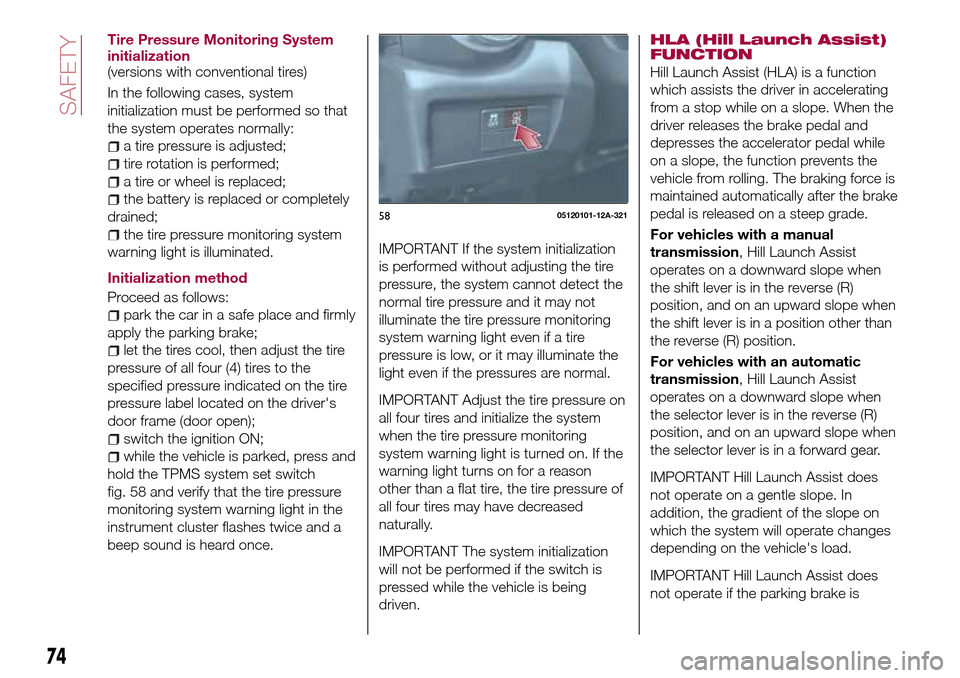
while the vehicle is parked, press and
hold the TPMS system set switch
fig. 58 and verify that the tire pressure
monitoring system warning light in the
instrument cluster flashes twice and a
beep sound is heard once.
IMPORTANT If the system initialization
is performed without adjusting the tire
pressure, the system cannot detect the
normal tire pressure and it may not
illuminate the tire pressure monitoring
system warning light even if a tire
pressure is low, or it may illuminate the
light even if the pressures are normal.
IMPORTANT Adjust the tire pressure on
all four tires and initialize the system
when the tire pressure monitoring
system warning light is turned on. If the
warning light turns on for a reason
other than a flat tire, the tire pressure of
all four tires may have decreased
naturally.
IMPORTANT The system initialization
will not be performed if the switch is
pressed while the vehicle is being
driven.HLA (Hill Launch Assist)
FUNCTION
Hill Launch Assist (HLA) is a function
which assists the driver in accelerating
from a stop while on a slope. When the
driver releases the brake pedal and
depresses the accelerator pedal while
on a slope, the function prevents the
vehicle from rolling. The braking force is
maintained automatically after the brake
pedal is released on a steep grade.
For vehicles with a manual
transmission, Hill Launch Assist
operates on a downward slope when
the shift lever is in the reverse (R)
position, and on an upward slope when
the shift lever is in a position other than
the reverse (R) position.
For vehicles with an automatic
transmission, Hill Launch Assist
operates on a downward slope when
the selector lever is in the reverse (R)
position, and on an upward slope when
the selector lever is in a forward gear.
IMPORTANT Hill Launch Assist does
not operate on a gentle slope. In
addition, the gradient of the slope on
which the system will operate changes
depending on the vehicle's load.
IMPORTANT Hill Launch Assist does
not operate if the parking brake is
5805120101-12A-321
74
SAFETY
Page 77 of 216
applied, the vehicle has not stopped
completely, or the clutch pedal is
released.
IMPORTANT While Hill Launch Assist is
operating, the brake pedal may feel stiff
and vibrate, however, this does not
indicate a malfunction.
IMPORTANT Hill Launch Assist does
not operate while the TCS/DSC
indicator light is illuminated. Refer to
“Warning lights and messages”
paragraph in “Knowing the instrument
panel” chapter.
IMPORTANT Hill Launch Assist (HLA)
does not turn off even if the DSC OFF
switch is pressed to turn off the
TCS/DSC.
IMPORTANT For vehicles with an
automatic transmission although the Hill
Launch Assist does not operate during
idling stop, the vehicle roll prevention
function operates to prevent vehicle roll.
IMPORTANT Do not rely completely on
Hill Launch Assist. Hill Launch Assist is
an auxiliary device for accelerating from
a stop on a slope. The system only
operates for about two seconds and
therefore, relying only on the system,
when accelerating from a stop is
dangerous because the vehicle may
move (roll) unexpectedly and cause anaccident. The vehicle could roll
depending on the vehicle's load or if it
is towing something. In addition, for
vehicles with a manual transmission,
the vehicle could still roll depending on
how the clutch pedal or the accelerator
pedal is operated. Always confirm the
safety around the vehicle before starting
to drive the vehicle.
WARNING
76)The presence of the TPMS does not
permit the driver to neglect regular checks
of the tire pressure, including for the spare
wheel, and correct maintenance: the
system is not used to signal a possible fault
to a tire. Tire pressure must be checked
with tires rested and cold. Should it
become necessary for whatever reason to
check pressure with warm tires, do not
reduce pressure even though it is higher
than the prescribed value. Repeat the
check when the tires are cold.
77)Replacing the normal tires with winter
tires and vice versa requires an inspection
of the TPMS, which should be carried out
only by a Fiat Dealership.
78)Changes in outside temperature may
cause tire pressures to vary. The system
may temporarily indicate insufficient
pressure. In this case check the tire
inflation pressure with the tires cold and, if
necessary top up the inflation pressure.
OCCUPANT
PROTECTION
SYSTEMS
The most important safety equipment
of the vehicle comprise the following
protection systems:
seat belts;
SBA (Seat Belt Alert) system;
head restraints;
child restraint systems;
front air bags and side air bags.
Read the information given the following
pages with the utmost care.
It is of fundamental importance that the
protection systems are used in the
correct way to guarantee the maximum
possible safety level for the driver and
the passengers.
75
Page 112 of 216
Brake Assist
During emergency braking situations
when it is necessary to depress the
brake pedal with greater force, the
brake assist system provides braking
assistance, thus enhancing braking
performance.
When the brake pedal is depressed
hard or depressed more quickly, the
brakes apply more firmly.
NOTE When the brake pedal is
depressed hard or depressed more
quickly, the pedal will feel softer but the
brakes will apply more firmly. This is a
normal effect of the brake assist
operation and does not indicate a
malfunction.
NOTE When the brake pedal is
depressed hard or depressed more
quickly, a motor/pump operation noise
may be heard. This is a normal effect of
the brake assist and does not indicate a
malfunction.
NOTE The brake assist equipment does
not supersede the functionality of the
vehicle's main braking system.
WARNING
133)In the case of parking manoeuvres on
roads on a gradient, the front wheels must
be steered towards the pavement (when
parking downhill), or in the opposite
direction if the vehicle is parked uphill. If the
vehicle is parked on a steep slope, it is
advisable to block the wheels with a wedge
or stone.
134)Never leave children unattended in
the vehicle. Keep away the key when
leaving the vehicle and take it with you.
135)Do not drive with worn disc pads.
Driving with worn disc pads is dangerous.
The brakes could fail and cause a serious
accident. As soon as you hear a
screeching noise contact a Fiat Dealership.
MANUAL
TRANSMISSION
136) 137) 138)
25)
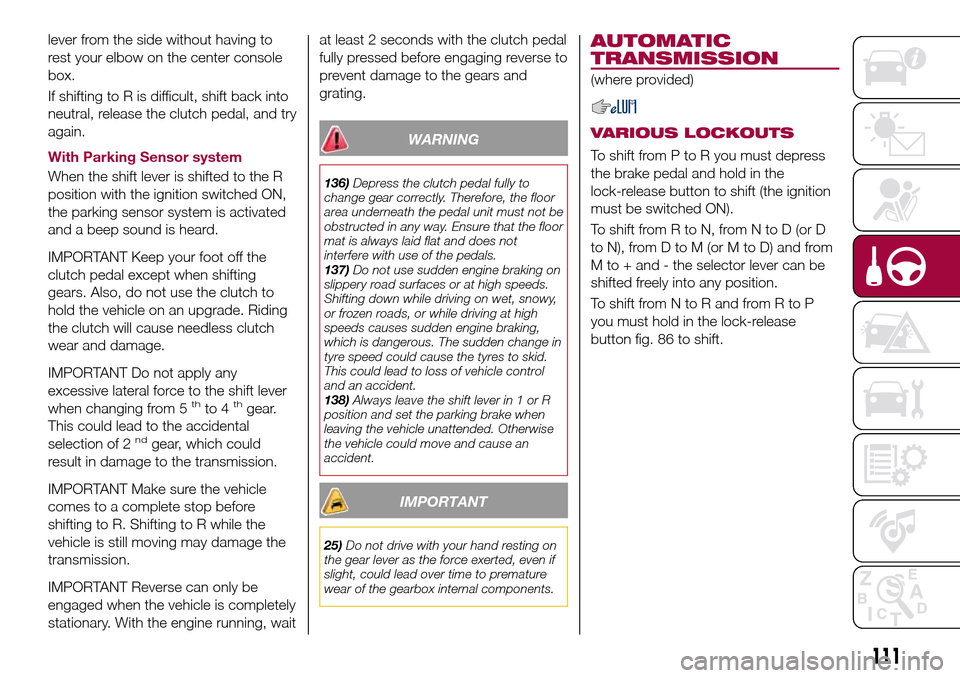
To engage the gears, press the clutch
pedal fully and put the gear lever into
the required position. The diagram for
gear engagement is shown on the knob
fig. 85.
Depress the clutch pedal all the way
down while shifting; then release it
slowly.
Your vehicle is equipped with a device
to prevent shifting to R (reverse) by
mistake. Push the shift lever downward
and shift to R.
A natural driving posture can be
achieved by lightly gripping the shift
8505210101-12A-001
110
STARTING AND OPERATING
Page 113 of 216
lever from the side without having to
rest your elbow on the center console
box.
If shifting to R is difficult, shift back into
neutral, release the clutch pedal, and try
again.
With Parking Sensor system
When the shift lever is shifted to the R
position with the ignition switched ON,
the parking sensor system is activated
and a beep sound is heard.
IMPORTANT Keep your foot off the
clutch pedal except when shifting
gears. Also, do not use the clutch to
hold the vehicle on an upgrade. Riding
the clutch will cause needless clutch
wear and damage.
IMPORTANT Do not apply any
excessive lateral force to the shift lever
when changing from 5
thto 4thgear.
This could lead to the accidental
selection of 2
ndgear, which could
result in damage to the transmission.
IMPORTANT Make sure the vehicle
comes to a complete stop before
shifting to R. Shifting to R while the
vehicle is still moving may damage the
transmission.
IMPORTANT Reverse can only be
engaged when the vehicle is completely
stationary. With the engine running, waitat least 2 seconds with the clutch pedal
fully pressed before engaging reverse to
prevent damage to the gears and
grating.
WARNING
136)Depress the clutch pedal fully to
change gear correctly. Therefore, the floor
area underneath the pedal unit must not be
obstructed in any way. Ensure that the floor
mat is always laid flat and does not
interfere with use of the pedals.
137)Do not use sudden engine braking on
slippery road surfaces or at high speeds.
Shifting down while driving on wet, snowy,
or frozen roads, or while driving at high
speeds causes sudden engine braking,
which is dangerous. The sudden change in
tyre speed could cause the tyres to skid.
This could lead to loss of vehicle control
and an accident.
138)Always leave the shift lever in 1 or R
position and set the parking brake when
leaving the vehicle unattended. Otherwise
the vehicle could move and cause an
accident.
IMPORTANT
25)Do not drive with your hand resting on
the gear lever as the force exerted, even if
slight, could lead over time to premature
wear of the gearbox internal components.
AUTOMATIC
TRANSMISSION
(where provided)
VARIOUS LOCKOUTS
To shift from P to R you must depress
the brake pedal and hold in the
lock-release button to shift (the ignition
must be switched ON).
To shift from R to N, from N to D (or D
to N), from D to M (or M to D) and from
M to + and - the selector lever can be
shifted freely into any position.
To shift from N to R and from R to P
you must hold in the lock-release
button fig. 86 to shift.
111
Page 114 of 216
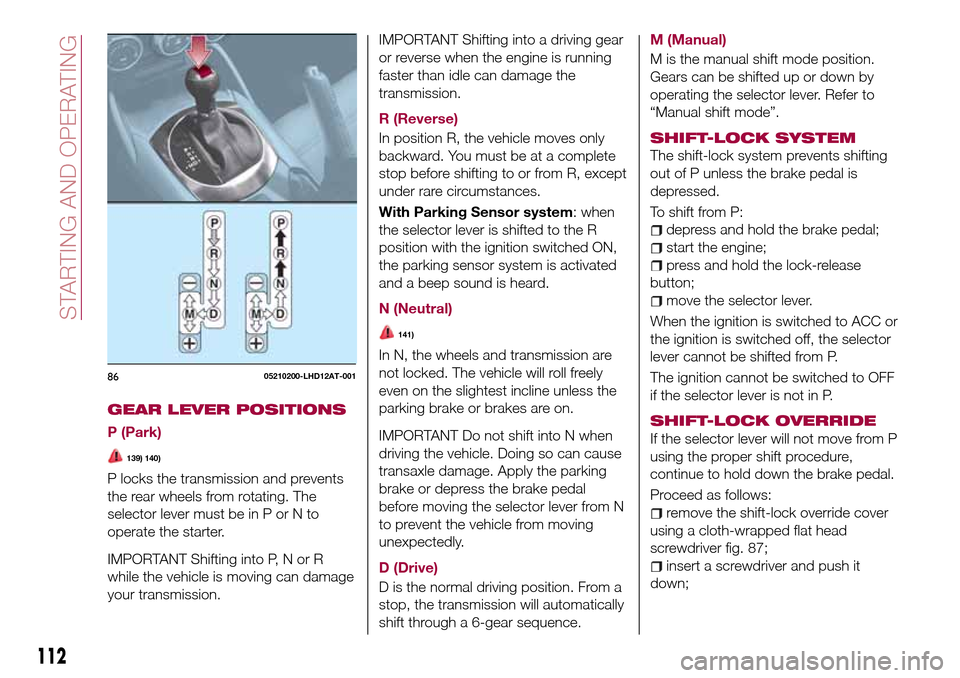
GEAR LEVER POSITIONS
P (Park)
139) 140)
P locks the transmission and prevents
the rear wheels from rotating. The
selector lever must be in P or N to
operate the starter.
IMPORTANT Shifting into P, N or R
while the vehicle is moving can damage
your transmission.IMPORTANT Shifting into a driving gear
or reverse when the engine is running
faster than idle can damage the
transmission.
R (Reverse)
In position R, the vehicle moves only
backward. You must be at a complete
stop before shifting to or from R, except
under rare circumstances.
With Parking Sensor system: when
the selector lever is shifted to the R
position with the ignition switched ON,
the parking sensor system is activated
and a beep sound is heard.
N (Neutral)
141)
In N, the wheels and transmission are
not locked. The vehicle will roll freely
even on the slightest incline unless the
parking brake or brakes are on.
IMPORTANT Do not shift into N when
driving the vehicle. Doing so can cause
transaxle damage. Apply the parking
brake or depress the brake pedal
before moving the selector lever from N
to prevent the vehicle from moving
unexpectedly.
D (Drive)
D is the normal driving position. From a
stop, the transmission will automatically
shift through a 6-gear sequence.M (Manual)
M is the manual shift mode position.
Gears can be shifted up or down by
operating the selector lever. Refer to
“Manual shift mode”.
SHIFT-LOCK SYSTEM
The shift-lock system prevents shifting
out of P unless the brake pedal is
depressed.
To shift from P:
depress and hold the brake pedal;
start the engine;
press and hold the lock-release
button;
move the selector lever.
When the ignition is switched to ACC or
the ignition is switched off, the selector
lever cannot be shifted from P.
The ignition cannot be switched to OFF
if the selector lever is not in P.
SHIFT-LOCK OVERRIDE
If the selector lever will not move from P
using the proper shift procedure,
continue to hold down the brake pedal.
Proceed as follows:
remove the shift-lock override cover
using a cloth-wrapped flat head
screwdriver fig. 87;
insert a screwdriver and push it
down;
8605210200-LHD12AT-001
112
STARTING AND OPERATING
Page 116 of 216
DRIVING TIPS
142) 143)
Passing
For extra power when passing another
vehicle or climbing steep grades,
depress the accelerator fully. The
transmission will shift to a lower gear,
depending on vehicle speed.
Climbing steep grades from a stop
To climb a steep grade from a stopped
position depress the brake pedal, shift
to D or M1, depending on the load
weight and grade steepness, release
the brake pedal while gradually
accelerating.
Descending steep grades
When descending a steep grade, shift
to lower gears, depending on load
weight and grade steepness.
Descend slowly, using the brakes only
occasionally to prevent them from
overheating.
WARNING
139)Always set the selector lever to P and
set the parking brake. Only setting the
selector lever to the P position without
using the parking brake to hold the vehicle
is dangerous. If P fails to hold, the vehicle
could move and cause an accident.140)If the engine is running faster than
idle, do not shift from N or P into a driving
gear. It's dangerous to shift from N or P
into a driving gear when the engine is
running faster than idle. If this is done, the
vehicle could move suddenly, causing an
accident or serious injury.
141)Do not shift into N when driving the
vehicle. Shifting into N while driving is
dangerous. Engine braking cannot be
applied when decelerating which could
lead to an accident or serious injury.
142)Do not use engine braking on slippery
road surfaces or at high speeds. Shifting
down while driving on wet, snowy, or
frozen roads, or while driving at high
speeds causes sudden engine braking,
which is dangerous. The sudden change in
tire speed could cause the tires to skid.
This could lead to loss of vehicle control
and an accident.
143)Do not let the vehicle move in a
direction opposite to the direction selected
by the selector lever. Do not let the vehicle
move backward with the selector lever in a
forward position, or do not let the vehicle
move forward with the selector lever in the
reverse position. Otherwise, the engine
may stop, causing the loss of the power
brake and power steering functions, and
make it difficult to control the vehicle which
could result in an accident.
CRUISE CONTROL
This is an electronically controlled
driving assistance device that allows the
desired vehicle speed to be maintained,
without having to press the accelerator
pedal.
This device can be used at a speed
above 25 km/h on long stretches of dry,
straight roads with few variations (e.g.
motorways).
It is therefore not recommended to use
this device on extra-urban roads with
traffic. Do not use it in town.
ACTIVATION /
DEACTIVATION
144) 145) 146) 147)
IMPORTANT When the ignition is
switched off, the system status before it
was turned off is maintained. For
example, if the ignition is switched off
while the cruise control is operating, the
system will be operable when the
ignition is switched ON the next time.
Activating the device
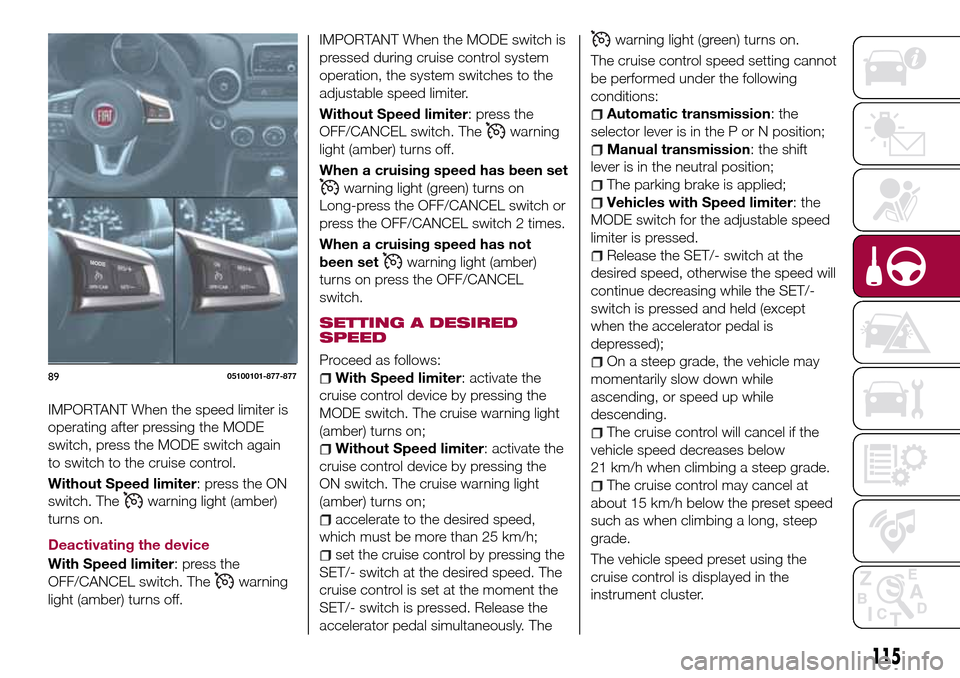
With Speed limiter: press the MODE
switch. The
warning light (amber)
turns on.
114
STARTING AND OPERATING
Page 117 of 216
IMPORTANT When the speed limiter is
operating after pressing the MODE
switch, press the MODE switch again
to switch to the cruise control.
Without Speed limiter: press the ON
switch. The
warning light (amber)
turns on.
Deactivating the device
With Speed limiter: press the
OFF/CANCEL switch. The
warning
light (amber) turns off.
IMPORTANT When the MODE switch is
pressed during cruise control system
operation, the system switches to the
adjustable speed limiter.
Without Speed limiter: press the
OFF/CANCEL switch. The
warning
light (amber) turns off.
When a cruising speed has been set
warning light (green) turns on
Long-press the OFF/CANCEL switch or
press the OFF/CANCEL switch 2 times.
When a cruising speed has not
been set
warning light (amber)
turns on press the OFF/CANCEL
switch.
SETTING A DESIRED
SPEED
Proceed as follows:
With Speed limiter: activate the
cruise control device by pressing the
MODE switch. The cruise warning light
(amber) turns on;
Without Speed limiter: activate the
cruise control device by pressing the
ON switch. The cruise warning light
(amber) turns on;
accelerate to the desired speed,
which must be more than 25 km/h;
set the cruise control by pressing the
SET/- switch at the desired speed. The
cruise control is set at the moment the
SET/- switch is pressed. Release the
accelerator pedal simultaneously. The
warning light (green) turns on.
The cruise control speed setting cannot
be performed under the following
conditions:
Automatic transmission: the
selector lever is in the P or N position;
Manual transmission: the shift
lever is in the neutral position;
The parking brake is applied;
Vehicles with Speed limiter: the
MODE switch for the adjustable speed
limiter is pressed.
Release the SET/- switch at the
desired speed, otherwise the speed will
continue decreasing while the SET/-
switch is pressed and held (except
when the accelerator pedal is
depressed);
On a steep grade, the vehicle may
momentarily slow down while
ascending, or speed up while
descending.
The cruise control will cancel if the
vehicle speed decreases below
21 km/h when climbing a steep grade.
The cruise control may cancel at
about 15 km/h below the preset speed
such as when climbing a long, steep
grade.
The vehicle speed preset using the
cruise control is displayed in the
instrument cluster.
8905100101-877-877
115