warning light FIAT 124 SPIDER 2016 2.G User Guide
[x] Cancel search | Manufacturer: FIAT, Model Year: 2016, Model line: 124 SPIDER, Model: FIAT 124 SPIDER 2016 2.GPages: 216, PDF Size: 3.1 MB
Page 27 of 216
HIGH BEAMS
The headlights switch between high
and low beams by moving the lever
forward or backward.
When the headlight high-beams are on,
the
warning light is turned on.
FLASH TO PASS
Can be used when the ignition is
switched ON.
To flash the headlights, pull the lever
fully towards you (the headlight switch
does not need to be on).
The
warning light in the instrument
cluster illuminates simultaneously.
The lever will return to the normal
position when released.
AUTOMATIC LIGHTING(where provided)
Light sensor
When the headlight switch is in the
AUTOposition and the ignition is
switched ON, the light sensor senses
the surrounding lightness or darkness
and automatically turns the headlights,
other exterior lights and dashboard
illumination on or off.
IMPORTANT The light sensor also
works as a rain sensor for the
auto-wiper control. Keep hands and
scrapers clear of the windshield when
the wiper lever is in the AUTO positionand the ignition is switched ON as
fingers could be pinched or the wipers
and wiper blades damaged when the
wipers activate automatically. If you are
going to clean the windshield, be sure
the wipers are turned off completely
(this is particularly important when
clearing ice and snow) when it is
particularly tempting to leave the engine
running.
COMING HOME LIGHT
SYSTEM
The coming me home light system
turns on the headlights (low beams)
when the lever is operated.
System activation
When the lever is pulled with the ignition
switched to ACC or OFF, the low beam
headlights turn on.
The headlights turn off after a certain
period of time has elapsed after the
doors are closed.
The time until the headlights turn off
after all of the doors are closed can be
changed. If no operations are done for
3 minutes after the lever is pulled, the
headlights turn off.
The headlights turn off if the lever is
pulled again while the headlights are on.
FRONT FOG LIGHTS
The front fog light can be used when
the ignition is switched to ON.
The front fog lights improve visibility at
night and in presence of fog.
Activation
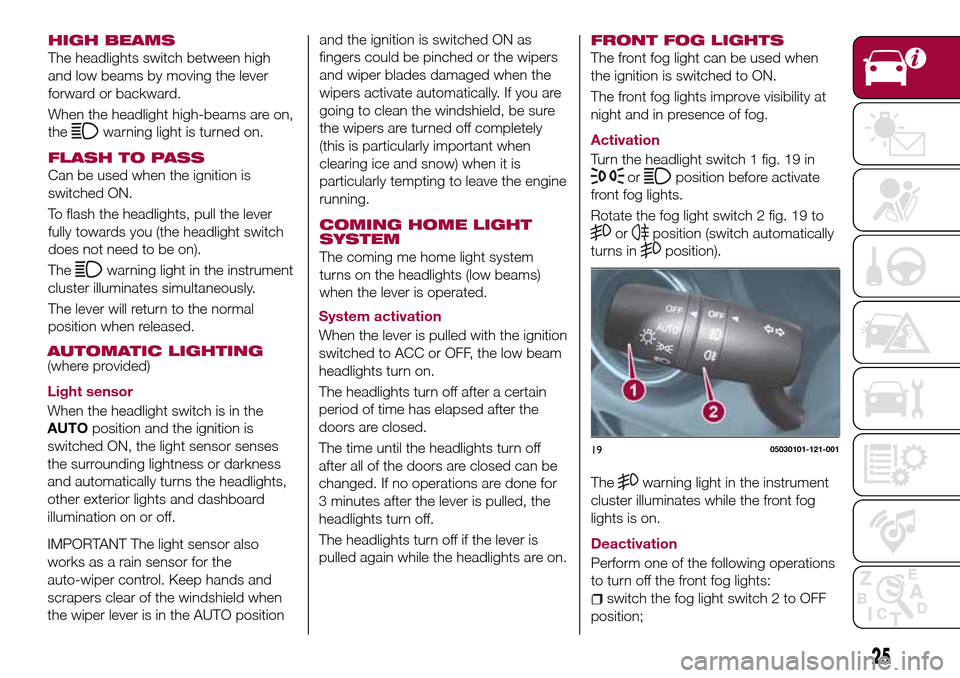
Turn the headlight switch 1 fig. 19 in
orposition before activate
front fog lights.
Rotate the fog light switch 2 fig. 19 to
orposition (switch automatically
turns in
position).
25
Thewarning light in the instrument
cluster illuminates while the front fog
lights is on.
Deactivation
Perform one of the following operations
to turn off the front fog lights:
switch the fog light switch 2 to OFF
position;
1905030101-121-001
Page 28 of 216
turn the headlight switch 1 to OFF
position;
switch the ignition to a position other
than ON.
The
warning light in the instrument
cluster goes off when the front fog
lighst is turned off.
With auto-light control
When the fog light switch 2 is in
or
position and the headlight switch is
in AUTO position, the front fog lights will
light up together with the headlights,
the exterior lights and the dashboard.
If the fog light switch 2 is turned to
position (the front fog light switch
2 returns to
position automatically),
the rear fog light and the respective
indicator on the instrument panel will
also light up.
REAR FOG LIGHTS
The rear fog lights can be used when
the ignition is switched ON.
The rear fog light helps your vehicle to
be seen. When the lights are turned on,
the rear fog lights indicator light in the
instrument cluster turns on.
Versions with front fog lights
Activation
The headlight switch 1 must be put in
orposition before turning on
the rear fog lights.To turn the rear fog light on, rotate the
fog light switch 2 to the
position (the
fog light switch automatically returns to
position).
The
warning light in the instrument
cluster illuminates while the rear fog
light is on.
Deactivation
To turn the rear fog light off, do any of
the following:
rotate the fog light switch 2 to the
position again (the fog light switch
automatically returns to the
position);
turn the headlight switch 1 to the
OFF position;
switch the ignition to a position other
than ON.
The
warning light in the instrument
cluster goes off when the rear fog light
is turned off.
When you turn on the rear fog light, the
front fog lights will also turn on.
If the fog light switch 2 is rotated to the
position (the fog light switch
automatically returns to the
position) the front fog light indicator
lamp on the instrument cluster will also
illuminate.
With auto-light control
When the headlight switch is in the
AUTOposition, the rear fog light willturn on once the headlights, the exterior
lights and instrument panel illumination
are on.
Versions without front fog lights
The headlights must be turned on to
turn on the rear fog light.
Activation
To turn on the rear fog light on, rotate
the fog light switch 2 to the
position
(the fog light switch returns to its
original position automatically).
The rear fog light indicator light in the
instrument cluster illuminates while the
rear fog light is on.
26
GETTING TO KNOW YOUR VEHICLE
Deactivation
To turn the rear fog light off, do any of
the following:
rotate the fog light switch 2 to the
position again (the fog light switch
automatically returns to the
position);
rotate the fog light switch 2 to the
OFF position;
turn the headlight switch 1 to the
OFF position.
TURN SIGNALS
The ignition must be switched ON to
use the turn and lane-change signals.
Move the signal lever down (for a left
turn) or up (for a right turn) to the stop
position. The signal will self-cancel after
the turn is completed.
Page 29 of 216
If the indicator light continues to flash
after a turn, manually return the lever to
its original position.
The turn signal indicators (green)
in the instrument cluster flash
according to the operation of the turn
signal lever to show which signal is
working.
If an indicator light stays on without
flashing or if it flashes abnormally, one
of the turn signal bulbs may be burned
out.
LANE CHANGE SIGNALS
Move the lever halfway toward the
direction of the lane change (until the
indicator flashes) and hold it there. It will
return to the off position when released.
Three-flash turn signal
After releasing the turn signal lever, the
turn signal indicator flashes three times.
The operation can be cancelled by
moving the lever in the direction
opposite to which it was operated.
Adaptive Front Lighting
System (AFS)
(where provided)
The adaptive front lighting system (AFS)
automatically adjusts the headlight
beams to the left or right in conjunction
with the operation of the steering wheel
after the headlights have been turned
on.A system malfunction or operation
conditions are indicated by a warning.
Refer to “Warning lights on instrument
panel” paragraph in “Knowing the
instrument panel” chapter.
NOTE
Headlights are equipped which do
not blind drivers approaching in the
opposite direction no matter what side
of the road you must drive your vehicle
(left-hand or right-hand traffic).
Therefore, it is not necessary to adjust
the optical axis of the headlights when
switching temporarily to driving on the
opposite side of the road (left-hand or
right-hand traffic).
The Adaptive Front Lighting System
(AFS) function can be switched to
operable/ inoperable using the
personalisation function. Refer to
“Personalisation features” paragraph in
“Knowing the instrument panel”
chapter.
27
HEADLAMP LEVELLING
The number of passengers and weight
of cargo in the luggage compartment
change the angle of the headlights.
Auto type
The angle of the headlights will be
automatically adjusted when turning on
the headlights.Manual type
The headlight levelling switch is used to
adjust the angle of the headlights
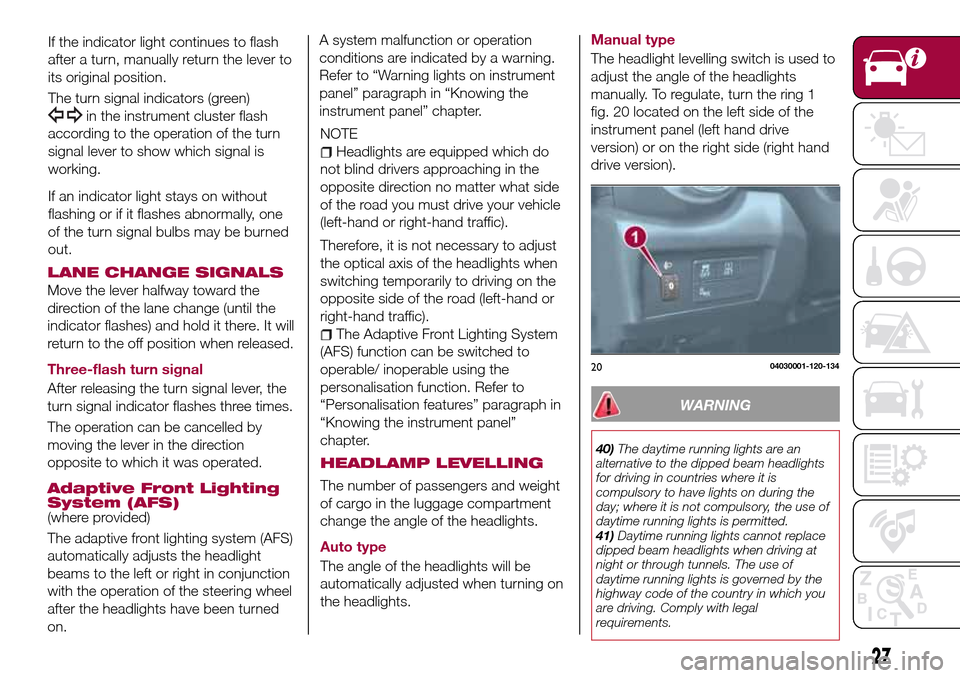
manually. To regulate, turn the ring 1
fig. 20 located on the left side of the
instrument panel (left hand drive
version) or on the right side (right hand
drive version).
2004030001-120-134
WARNING
40)The daytime running lights are an
alternative to the dipped beam headlights
for driving in countries where it is
compulsory to have lights on during the
day; where it is not compulsory, the use of
daytime running lights is permitted.
41)Daytime running lights cannot replace
dipped beam headlights when driving at
night or through tunnels. The use of
daytime running lights is governed by the
highway code of the country in which you
are driving. Comply with legal
requirements.
Page 32 of 216
30
GETTING TO KNOW YOUR VEHICLE
IMPORTANT Because heavy ice and
snow can jam the wiper blades, the
wiper motor is protected from motor
breakdown, overheating and possible
fire by a circuit breaker. This
mechanism will automatically stop
operation of the blades, but only for
about 5 minutes. If this happens, turn
off the wiper switch and park off the
right-of-way, and remove the snow and
ice. After 5 minutes, turn on the switch
and the blades should operate
normally. If they do not resume
functioning, contact a Fiat Dealership
as soon as possible. Drive to the side of
the road and park off the right-of-way.
Wait until the weather clears before
trying to drive with the wipers
inoperative.
WINDSCREEN WASHER
Pull the lever toward you and hold it to
spray washer fluid.
With the wiper lever in theOFFor
intermittent position/AUTOposition,
the wipers will operate continuously
until the lever is released.
If the washer does not work, inspect
the fluid level. If the fluid level is normal,
contact a Fiat Dealership.With headlight washers
When the headlights are on, the
headlight washers operate
automatically once every fifth time the
windshield washer operates.
HEADLIGHT WASHER(where provided)
The ignition must be switched ON and
the headlights must be turned on.
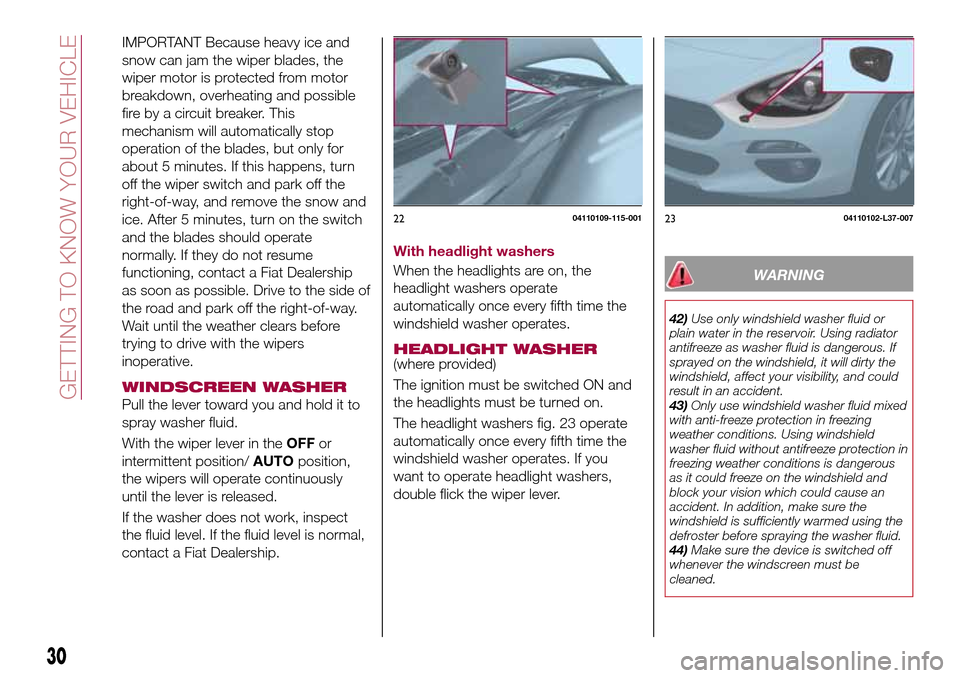
The headlight washers fig. 23 operate
automatically once every fifth time the
windshield washer operates. If you
want to operate headlight washers,
double flick the wiper lever.
WARNING
42)Use only windshield washer fluid or
plain water in the reservoir. Using radiator
antifreeze as washer fluid is dangerous. If
sprayed on the windshield, it will dirty the
windshield, affect your visibility, and could
result in an accident.
43)Only use windshield washer fluid mixed
with anti-freeze protection in freezing
weather conditions. Using windshield
washer fluid without antifreeze protection in
freezing weather conditions is dangerous
as it could freeze on the windshield and
block your vision which could cause an
accident. In addition, make sure the
windshield is sufficiently warmed using the
defroster before spraying the washer fluid.
44)Make sure the device is switched off
whenever the windscreen must be
cleaned.
2204110109-115-0012304110102-L37-007
Page 38 of 216
36
GETTING TO KNOW YOUR VEHICLE
procedure can be done on both door
switches. The power window auto
function will only resume on the power
window that has been reset:
close the doors and the convertible
top;
switch the ignition ON;
make sure that the power window
lock switch located on the driver's door
is not depressed;
press the switch and fully open the
window;
pull up the switch to fully close the
window and continue holding the
switch for about 2 seconds after the
window fully closed;
repeat steps 4-5 for the passenger
power window while seated in the
passenger seat;
make sure that the power windows
operate correctly using the door
switches.
After the system has been re-initialized,
passenger window can be fully opened
automatically using the master control
switches. If the automatic power
window operation does not operate
normally while the doors or convertible
top are opened/closed, reset it using
the above procedures.
POWER WINDOW LOCK
SWITCH
This feature prevents the passenger's
power window from operating. Keep
this switch in the locked position while
children are in the vehicle.
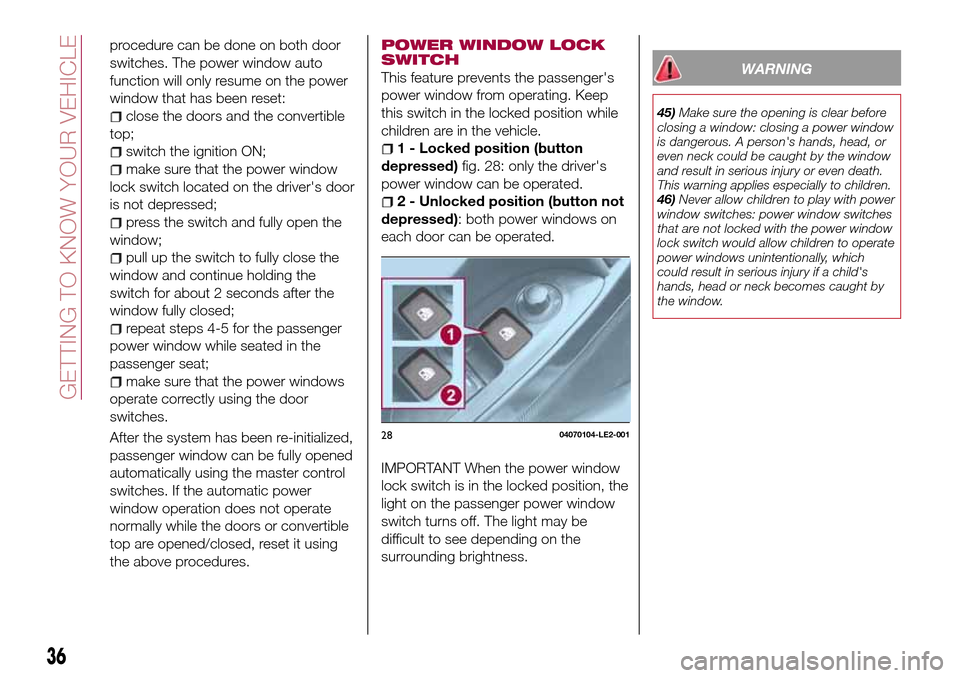
1 - Locked position (button
depressed)fig. 28: only the driver's
power window can be operated.
2 - Unlocked position (button not
depressed): both power windows on
each door can be operated.
IMPORTANT When the power window
lock switch is in the locked position, the
light on the passenger power window
switch turns off. The light may be
difficult to see depending on the
surrounding brightness.
WARNING
45)Make sure the opening is clear before
closing a window: closing a power window
is dangerous. A person's hands, head, or
even neck could be caught by the window
and result in serious injury or even death.
This warning applies especially to children.
46)Never allow children to play with power
window switches: power window switches
that are not locked with the power window
lock switch would allow children to operate
power windows unintentionally, which
could result in serious injury if a child's
hands, head or neck becomes caught by
the window.
2804070104-LE2-001
Page 39 of 216
37
INTERNAL
EQUIPMENT
ACCESSORY SOCKET
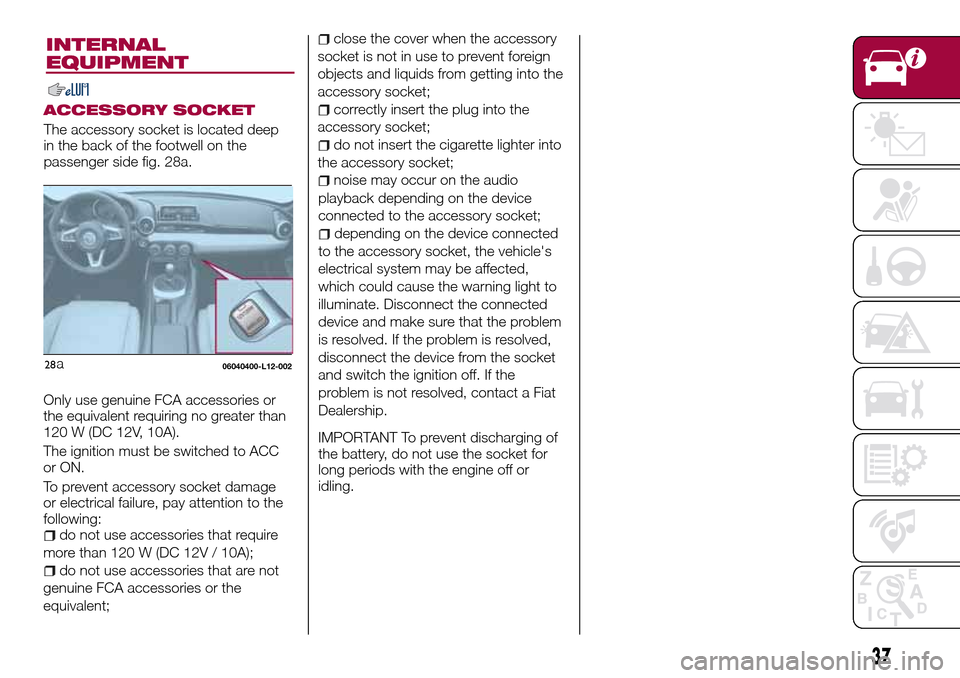
The accessory socket is located deep
in the back of the footwell on the
passenger side fig. 28a.
Only use genuine FCA accessories or
the equivalent requiring no greater than
120 W (DC 12V, 10A).
The ignition must be switched to ACC
or ON.
To prevent accessory socket damage
or electrical failure, pay attention to the
following:
do not use accessories that require
more than 120 W (DC 12V / 10A);
do not use accessories that are not
genuine FCA accessories or the
equivalent;
06040400-L12-002
close the cover when the accessory
socket is not in use to prevent foreign
objects and liquids from getting into the
accessory socket;
correctly insert the plug into the
accessory socket;
do not insert the cigarette lighter into
the accessory socket;
noise may occur on the audio
playback depending on the device
connected to the accessory socket;
depending on the device connected
to the accessory socket, the vehicle's
electrical system may be affected,
which could cause the warning light to
illuminate. Disconnect the connected
device and make sure that the problem
is resolved. If the problem is resolved,
disconnect the device from the socket
and switch the ignition off. If the
problem is not resolved, contact a Fiat
Dealership.
IMPORTANT To prevent discharging of
the battery, do not use the socket for
long periods with the engine off or
idling.
28a
Page 47 of 216
KNOWING THE INSTRUMENT PANEL
This section of the owner handbook
gives you all the information you need
to understand, interpret and use the
instrument panel correctly.CONTROL PANEL AND
INSTRUMENTS..............46
WARNING LIGHTS AND
MESSAGES................51
45
Page 51 of 216
When the illumination dimmer is
canceled, the instrument cluster cannot
be dimmed even if the position lights
are turned on. When the illumination
dimmer is canceled, the screen in the
center display switches to constant
display of the daytime screen.
TRIP COMPUTER AND
INFO SWITCH
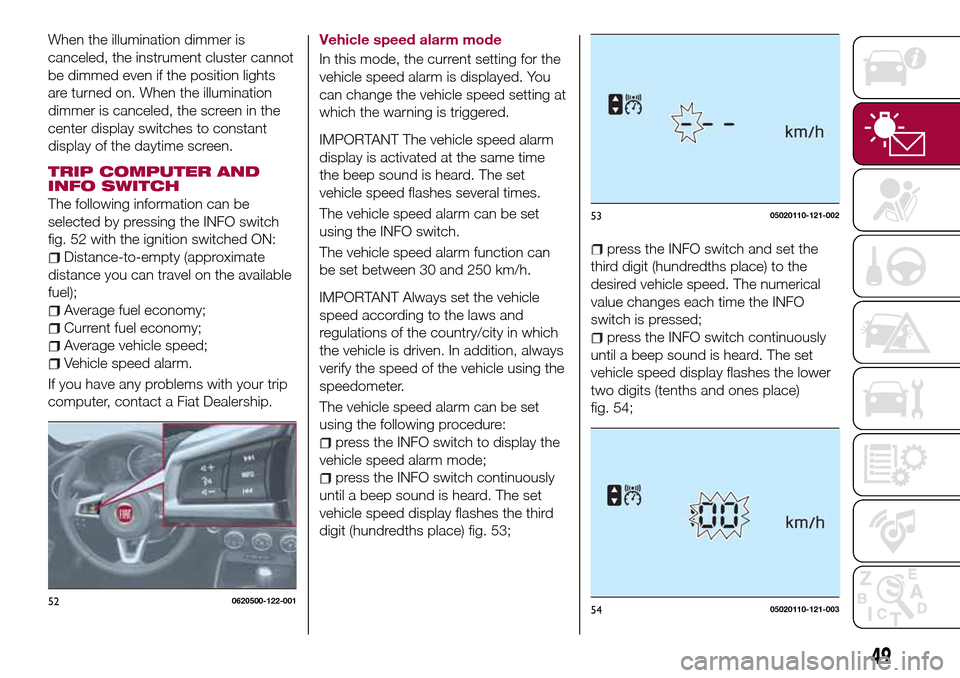
The following information can be
selected by pressing the INFO switch
fig. 52 with the ignition switched ON:
Distance-to-empty (approximate
distance you can travel on the available
fuel);
Average fuel economy;
Current fuel economy;
Average vehicle speed;
Vehicle speed alarm.
If you have any problems with your trip
computer, contact a Fiat Dealership.Vehicle speed alarm mode
In this mode, the current setting for the
vehicle speed alarm is displayed. You
can change the vehicle speed setting at
which the warning is triggered.
IMPORTANT The vehicle speed alarm
display is activated at the same time
the beep sound is heard. The set
vehicle speed flashes several times.
The vehicle speed alarm can be set
using the INFO switch.
The vehicle speed alarm function can
be set between 30 and 250 km/h.
IMPORTANT Always set the vehicle
speed according to the laws and
regulations of the country/city in which
the vehicle is driven. In addition, always
verify the speed of the vehicle using the
speedometer.
The vehicle speed alarm can be set
using the following procedure:
press the INFO switch to display the
vehicle speed alarm mode;
press the INFO switch continuously
until a beep sound is heard. The set
vehicle speed display flashes the third
digit (hundredths place) fig. 53;
press the INFO switch and set the
third digit (hundredths place) to the
desired vehicle speed. The numerical
value changes each time the INFO
switch is pressed;
press the INFO switch continuously
until a beep sound is heard. The set
vehicle speed display flashes the lower
two digits (tenths and ones place)
fig. 54;
520620500-122-001
5305020110-121-002
5405020110-121-003
49
Page 53 of 216
WARNING LIGHTS AND MESSAGES
IMPORTANT The warning light in the instrument panel appears together with a dedicated message and/or acoustic signal
when applicable. These indications are indicative and precautionary and as such must not be considered as exhaustive and/or
alternative to the information contained in the Owner Handbook, which you are advised to read carefully in all cases. Always
refer to the information in this chapter in the event of a failure indication.
IMPORTANT Failure indications displayed are divided into two categories: serious and less serious failures. Serious failures are
indicated by a repeated and prolonged warning "cycle". Less serious failures are indicated by a warning "cycle" with a shorter
duration. The display cycle of both categories can be interrupted. The instrument panel warning light will stay on until the cause
of the failure is eliminated.
Vehicles with Radio 7”
The warning contents can be verified on the audio system.
Proceed as follows:
if the warning light is turned on, selecticon on the home screen to display the application screen;
select “Warning Guidance” to display the current warnings;
select the applicable warning to view the warning details.
For the following warning/indicator lights:
Master warning light;
Brake system warning light;
ABS warning light;
Charging system warning light;
Engine oil warning light;
Check engine light;
High engine coolant temperature warning light;
Automatic transmission warning light;
Power steering malfunction indicator light;
Air Bag/Seat Belt pretensioner system warning light;
Active bonnet warning light;
Low fuel warning light;
Seat belt warning light;
Door-ajar warning light;
Low washer fluid level warning light;
Tyre Pressure Monitoring System warning light;
51
Page 54 of 216
KEY warning light;
LED headlight KEY warning light;
Wrench indicator light;
TCS/DSC indicator light;
DSC OFF indicator light;
Security indicator light;
Passenger Air Bag deactivation indicator light (where provided).
The light turns on when the ignition is switched on for an operation check, and turns off a few seconds later or when the engine
is started. If the light does not turn on or remains turned on, have the vehicle inspected at Fiat Dealership.
Only for “Brake system warning light”: the light turns on continuously when the parking brake is applied.
52
KNOWING THE INSTRUMENT PANEL