fuel FIAT 124 SPIDER 2017 2.G User Guide
[x] Cancel search | Manufacturer: FIAT, Model Year: 2017, Model line: 124 SPIDER, Model: FIAT 124 SPIDER 2017 2.GPages: 300, PDF Size: 121.24 MB
Page 31 of 300
To Unlock
Driver's door request switch located on
the exterior door handle.
To unlock the doors, trunk lid, and the
fuel filler door, push the request switch
on the exterior door handle and the
hazard warning lights will flash twice.
To unlock both doors and the fuel filler
door, push the request switch on the
exterior door handle again within three
seconds and two more beep sounds
will be heard.
Front Passenger Door Request
Switch:
To unlock both doors and the fuel filler
door, push the request switch on the
exterior door handle. A beep sound will
be heard twice and the hazard warning
lights will flash twice.
Note:
Confirm that both doors, and the
fuel filler door are securely locked.
Confirm that both doors, and the
fuel filler door are securely locked. For
the trunk lid, move it without pushing
the electric trunk lid opener to verify
that the trunk lid has not been left
open.
Both doors and the fuel filler door
cannot be locked when any door is
open.
It may require a few seconds for the
doors to unlock after the request
switch on the exterior door handle is
pushed.
A beep sound is heard for confirmation
when the doors, and fuel filler door are
locked/unlocked using the request
switch on the exterior door handle. If
you prefer, the beep sound can be
turned off.
The volume of the beep sound can also
be changed. Use the following
procedure to change the setting:
1. Place the ignition in the OFF position
and close both of the doors and the
trunk lid.
2. Open the driver's door.
3. Within 30 seconds of opening the
driver's door, push and hold the lock
button on the key fob for five
seconds or longer. The doors, and fuel
filler door will lock, an audible beep will
activate at the currently set volume (if
the beep sound is currently set to not
activate, it will not activate). The setting
changes each time the lock
button
on the key fob is pushed and the beep
sound activates at the set volume (if the
beep sound has been set to not
activate, it will not activate). 4. The setting change is completed by
doing any one of the following:
Place the ignition in the ACC or ON
position.
Closing the driver's door.
Opening the trunk lid.
Not operating the key fob for
10 seconds.
Pushing any button except the
lockbutton on the key fob.
pushing a request switch on the
exterior door handle.
With Vehicle Security Alarm System
The hazard warning lights flash when
the Vehicle Security Alarm System is
armed or disarmed (refer to “Vehicle
Security Alarm System” found in
“Getting To Know Your Vehicle”.
The setting can be changed so that the
doors and the fuel filler door are locked
automatically without pushing the
request switch on the exterior door
handle, (refer to “Personalization
Features” paragraph in “Knowing The
Instrument Panel” chapter).
29
Page 32 of 300
Auto-Lock Function
A beep sound is heard when both
doors are closed while the key is being
carried. Both doors, the trunk lid, and
fuel door are locked automatically after
about three seconds when the
Advanced Keyless Entry key fob is out
of the operational range.
The hazard warning lights will flash
once (even if the driver is in the
operational range, both doors, trunk lid,
and the fuel filler door are locked
automatically after about 30 seconds).
If you are out of the operational range
before the doors and the trunk lid are
completely closed or another key fob is
left in the vehicle, the auto-lock function
will not work.
Always make sure that both doors and
the trunk lid are closed and locked
before leaving the vehicle. The
auto-lock function does not close the
power windows.Auto Re-Lock Function
After unlocking with the request switch
on the exterior door handle, both doors,
and the fuel filler door will automatically
lock if any of the following operations
are not performed within about
60 seconds.
If your vehicle has a Vehicle Security
Alarm System, the hazard warning
lights will flash for confirmation.
The time required for the doors to lock
automatically can be changed (refer to
“Personalization Features” paragraph in
“Knowing the instrument panel”
chapter).
Opening a door or the trunk lid.
Placing the ignition in any position
other than the OFF position.
Locking/Unlocking With A Key Fob
Both doors, trunk lid, and the fuel filler
door can be locked/unlocked by
operating the keyless entry system key
fob: refer to “Keyless Entry System” in
“Keys” paragraph. Locking/Unlocking With Door-Lock
Switch
Both doors and the fuel filler door lock
automatically when the lock side is
pushed. They unlock when the unlock
side is pushed.
To lock both the doors and the fuel filler
door from an open door, push the lock
side of the door lock switch and then
close the door.
Note:
When locking the doors this
way, be careful not to leave the key fob
inside the vehicle.
30
GETTING TO KNOW YOUR VEHICLE
Page 33 of 300
Auto Lock / Unlock Function — If Equipped
When the vehicle speed exceeds 12 MPH (20 km/h), both doors, and fuel filler door lock automatically.
When the ignition is placed in the OFF position, both doors, and fuel filler door unlock automatically.
These functions can also be disabled so that they do not operate.
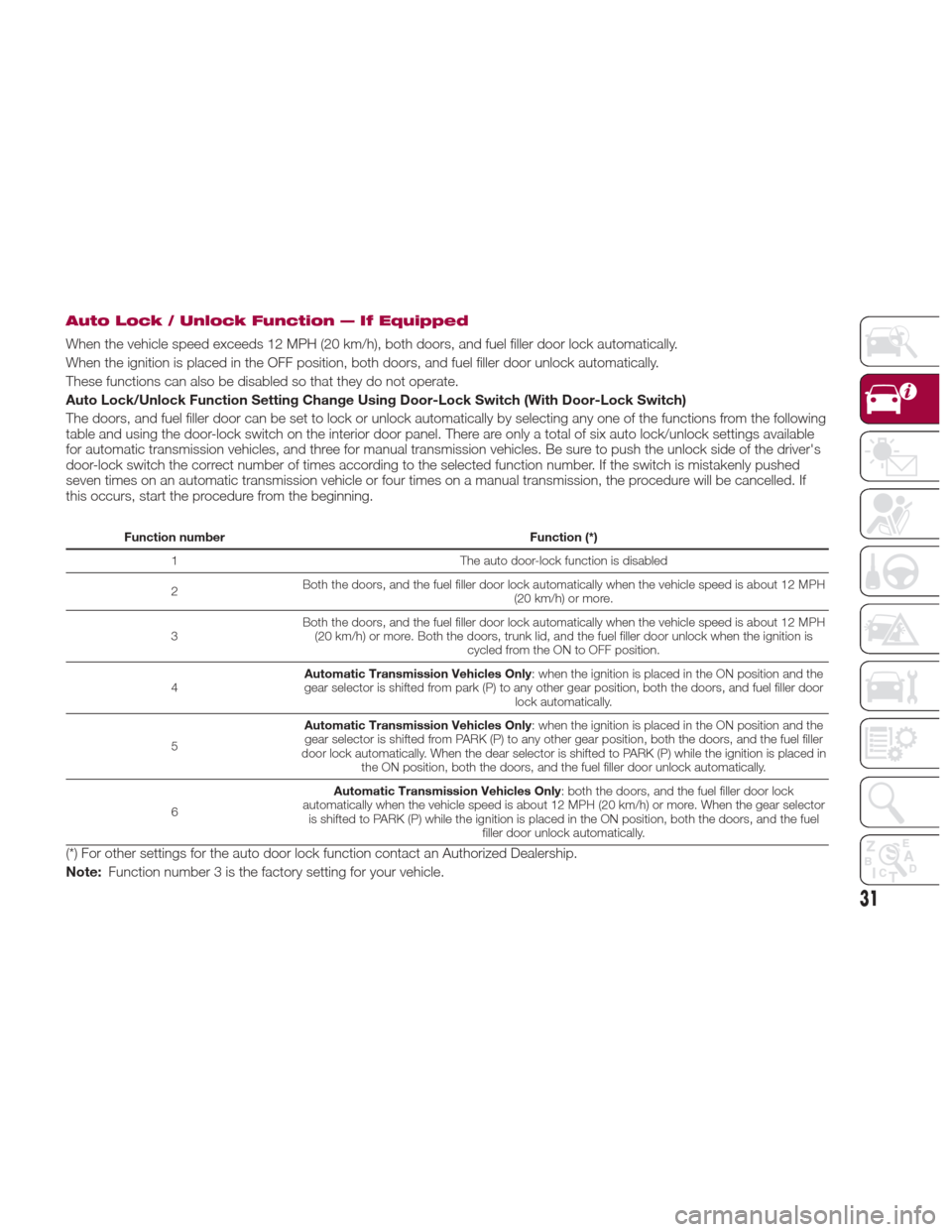
Auto Lock/Unlock Function Setting Change Using Door-Lock Switch (With Door-Lock Switch)
The doors, and fuel filler door can be set to lock or unlock automatically by selecting any one of the functions from the following
table and using the door-lock switch on the interior door panel. There are only a total of six auto lock/unlock settings available
for automatic transmission vehicles, and three for manual transmission vehicles. Be sure to push the unlock side of the driver's
door-lock switch the correct number of times according to the selected function number. If the switch is mistakenly pushed
seven times on an automatic transmission vehicle or four times on a manual transmission, the procedure will be cancelled. If
this occurs, start the procedure from the beginning.
Function numberFunction (*)
1 The auto door-lock function is disabled
2 Both the doors, and the fuel filler door lock automatically when the vehicle speed is about 12 MPH
(20 km/h) or more.
3 Both the doors, and the fuel filler door lock automatically when the vehicle speed is about 12 MPH
(20 km/h) or more. Both the doors, trunk lid, and the fuel filler door unlock when the ignition is cycled from the ON to OFF position.
4 Automatic Transmission Vehicles Only
: when the ignition is placed in the ON position and the
gear selector is shifted from park (P) to any other gear position, both the doors, and fuel filler door lock automatically.
5 Automatic Transmission Vehicles Only
: when the ignition is placed in the ON position and the
gear selector is shifted from PARK (P) to any other gear position, both the doors, and the fuel filler
door lock automatically. When the dear selector is shifted to PARK (P) while the ignition is placed in the ON position, both the doors, and the fuel filler door unlock automatically.
6 Automatic Transmission Vehicles Only
: both the doors, and the fuel filler door lock
automatically when the vehicle speed is about 12 MPH (20 km/h) or more. When the gear selector is shifted to PARK (P) while the ignition is placed in the ON position, both the doors, and the fuel filler door unlock automatically.
(*) For other settings for the auto door lock function contact an Authorized Dealership.
Note:Function number 3 is the factory setting for your vehicle.
31
Page 34 of 300
Settings Changing
Settings can be changed using the
following procedure:
1. Safely park the vehicle. Both doors
must remain closed.
2. Place the ignition in the ON position.
3. Push and hold the lock side of the
driver's door-lock switch within
20 seconds of placing the ignition in the
ON position, and make sure a beep
sound is heard about eight seconds
afterwards.
4. Refer to the auto lock/unlock
function setting table, determine the
function number for the desired setting.
Push the unlock side of the driver's
door-lock switch the same number of
times as the selected function number
(example: if you select function 2, push
the unlock side of the switch only two
times).
5. Three seconds after the function
setting has been changed, a beep
sound will beep in the amount of the
selected function number (example:
Function number 3 = three beep
sounds). Automatic Transmission Vehicles
The doors cannot be locked or
unlocked while the setting
function is being performed.
The procedure can be cancelled by
pushing the lock side of the door-lock
switch.
Note:
The vehicle lock-out prevention
feature prevents you from locking
yourself out of the vehicle. Both doors,
trunk lid, and the fuel filler door will
automatically unlock if they are locked
using the power door locks with any
door open. If both the doors are closed
even though the trunk lid is open, both
the doors and the fuel filler door will
lock.
Door Unlock (Control) System
With Collision Detection — if
equipped : this system automatically
unlocks the doors, trunk lid, and the
fuel filler door in the event the vehicle is
involved in an accident to allow
passengers to get out of the vehicle
immediately and prevent being trapped
inside. While the ignition is placed in the ON position and in the event the
vehicle receives an impact strong
enough to inflate the air bags, both the
doors, the trunk lid, and fuel filler door
are automatically unlocked after about
six seconds have elapsed from the
time of the accident. The doors, trunk
lid, and the fuel filler door may not
unlock depending on how an impact is
applied, the force of the impact, and
other conditions of the accident. If
door-related systems or the battery is
malfunctioning, the doors, trunk lid,
and the fuel filler door will not unlock.
When opening a door, the power
windows open a little automatically.
When closing the door, the power
windows close automatically. This is a
function for improving the sealing of
the window, and it does not mean
there is a problem. If the vehicle battery
is disconnected for vehicle
maintenance or other reasons, the
power windows will not open or close
automatically. If the power windows do
not open or close, the automatic
open/close mechanism for the
windows must be reset.
32
GETTING TO KNOW YOUR VEHICLE
Page 76 of 300
Caution!
Before opening the convertible top,
make sure the rear window defroster
switch is turned off. Otherwise the heat
generated from the window defroster
could damage the convertible top and the
internal material.
Make sure nothing is on the convertible
top or near the back window when raising
or lowering the convertible top. Even small
objects may interfere and cause damage.
Do not drive through an automatic car
wash; it may damage the convertible top.
Do not raise or lower the convertible top
when the temperature is below 41 °F
(5 °C); this will damage the convertible top
material.
Do not lower the convertible top when
it's wet. If the convertible top dries while
folded, it will deteriorate and mold.
Do not raise or lower the convertible top
in a strong wind as it could damage the
convertible top or cause an unexpected
accident.
ELECTRIC POWER
STEERING
Power Steering
Electric power steering is only operable
when the engine is running.
If the engine is off or if the power
steering system is inoperable, you can
still steer, but it requires more physical
effort.
If the steering feels stiffer than usual
during normal driving or the steering
vibrates, contact your Authorized
Dealer.
The
warning light notifies the driver
of system abnormalities and operation
conditions.
Note: Never hold the steering wheel to
the extreme left or right for more than
five seconds with the engine running.
This could damage the power steering
system.
ENVIRONMENT
PROTECTION
SYSTEMS
Emission Control System
This vehicle is equipped with an
emission control system (the catalytic
converter is part of this system) that
enables the vehicle to comply with
existing exhaust emissions
requirements.
Ignoring the following precautions could
cause lead to accumulate on the
catalyst inside the converter or cause
the converter to get very hot. Either
condition will damage the converter and
cause poor performance:
USE ONLY UNLEADED FUEL.
Do not drive your vehicle with any
sign of engine malfunction.
Do not coast with the ignition off.
Do not descend steep grades in gear
with the ignition off.
Do not operate the engine at high
idle for more than two minutes.
74
GETTING TO KNOW YOUR VEHICLE
Page 78 of 300
GETTING TO KNOW YOUR INSTRUMENT PANEL
ONBOARD DIAGNOSTIC
SYSTEM — OBD II...........77
CONTROL PANEL AND
INSTRUMENTS..............78
MAINTENANCE MONITOR —
IF EQUIPPED ...............85
FUEL ECONOMY MONITOR —
IF EQUIPPED ...............88
WARNING LIGHTS AND
MESSAGES ................90
PERSONALIZATION FEATURES . .108
76
GETTING TO KNOW YOUR INSTRUMENT PANEL
Page 79 of 300
ONBOARD
DIAGNOSTIC
SYSTEM — OBD II
Your vehicle is equipped with a
sophisticated Onboard Diagnostic
system called OBD II. This system
monitors the performance of the
emissions, engine, and automatic
transmission control systems. When
these systems are operating properly,
your vehicle will provide excellent
performance and fuel economy, as well
as engine emissions well within current
government regulations.
If any of these systems require service,
the OBD II system will turn on the
Malfunction Indicator Light (MIL). It will
also store diagnostic codes and other
information to assist your service
technician in making repairs. Although
your vehicle will usually be drivable and
not need towing, see your authorized
dealer for service as soon as possible.
Caution!
Prolonged driving with the MIL on could
cause further damage to the emission
control system. It could also affect fuel
economy and driveability. The vehicle must
be serviced before any emissions tests can
be performed.
If the MIL is flashing while the engine is
running, severe catalytic converter damage
and power loss will soon occur. Immediate
service is required.
Onboard Diagnostic
System (OBD II)
Cybersecurity
Your vehicle is required to have an
Onboard Diagnostic system (OBD II)
and a connection port to allow access
to information related to the
performance of your emissions
controls. Authorized service technicians
may need to access this information to
assist with the diagnosis and service of
your vehicle and emissions system.
Warning!
ONLY an authorized service technician
should connect equipment to the OBD II
connection port in order to diagnose or
service your vehicle.
If unauthorized equipment is connected
to the OBD II connection port, such as a
driver-behavior tracking device, it may:
Be possible that vehicle systems,
including safety related systems, could be
impaired or a loss of vehicle control could
occur that may result in an accident
involving serious injury or death.
Access, or allow others to access,
information stored in your vehicle systems,
including personal information.
For further information, refer to “Privacy
Practices” and “Uconnect
CyberSecurity” in “All About Uconnect
Access” in your Owner’s Manual Radio
Supplement and “Cybersecurity” in
“Multimedia”.
77
Page 80 of 300
CONTROL PANEL AND INSTRUMENTS
Instrument Cluster
1 — Odometer/Trip Computer And Trip Computer Button/Dashboard Illumination
2 — Tachometer
3 — Speedometer
4 — Automatic Transmission Info Display
5 — Odometer/Trip Computer Info/Engine Coolant Temperature Gauge/Fuel Gauge/Outside Temperature/Cruise Control/Info
Switch Display
05020100-667-333Spider Instrument Cluster
78
GETTING TO KNOW YOUR INSTRUMENT PANEL
Page 81 of 300
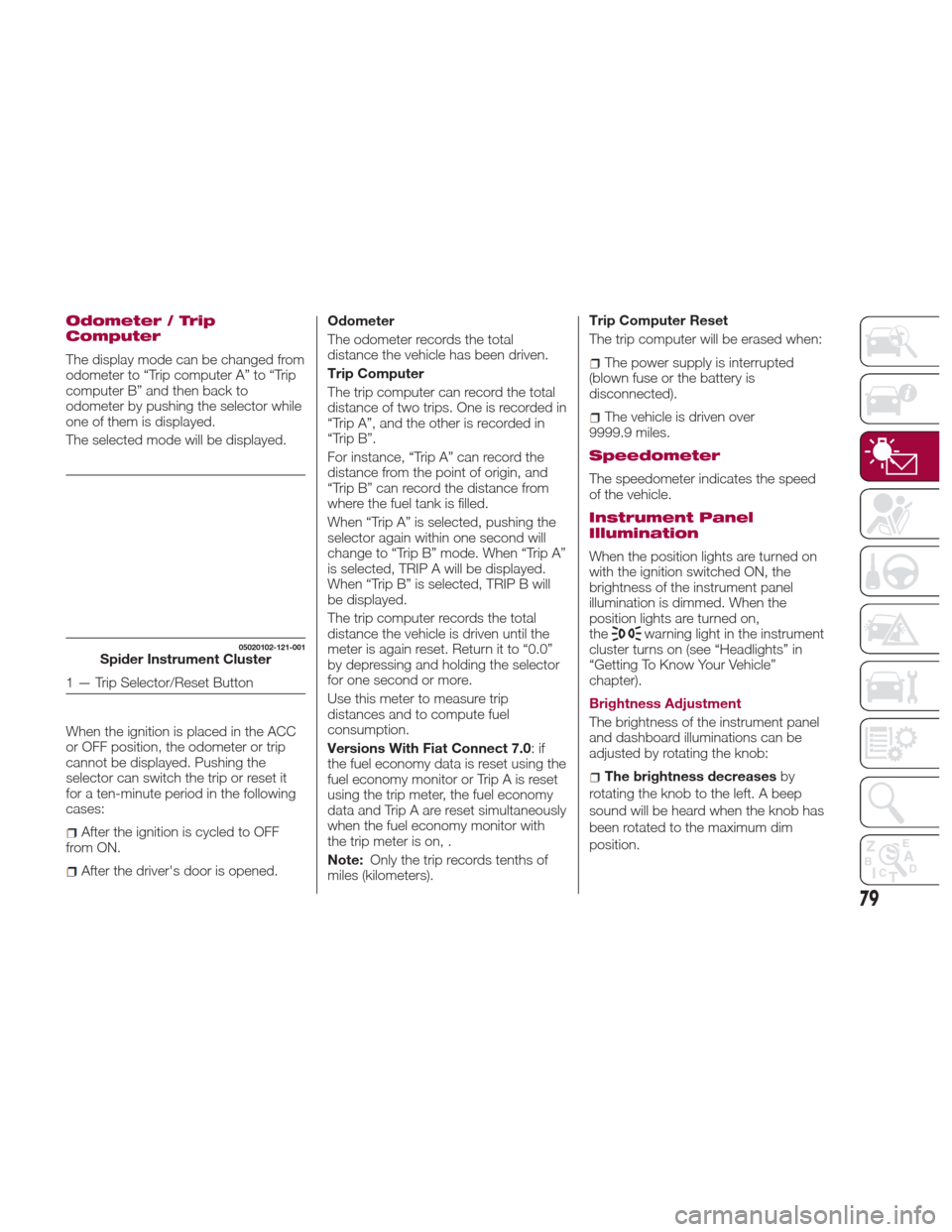
Odometer / Trip
Computer
The display mode can be changed from
odometer to “Trip computer A” to “Trip
computer B” and then back to
odometer by pushing the selector while
one of them is displayed.
The selected mode will be displayed.
When the ignition is placed in the ACC
or OFF position, the odometer or trip
cannot be displayed. Pushing the
selector can switch the trip or reset it
for a ten-minute period in the following
cases:
After the ignition is cycled to OFF
from ON.
After the driver's door is opened. Odometer
The odometer records the total
distance the vehicle has been driven.
Trip Computer
The trip computer can record the total
distance of two trips. One is recorded in
“Trip A”, and the other is recorded in
“Trip B”.
For instance, “Trip A” can record the
distance from the point of origin, and
“Trip B” can record the distance from
where the fuel tank is filled.
When “Trip A” is selected, pushing the
selector again within one second will
change to “Trip B” mode. When “Trip A”
is selected, TRIP A will be displayed.
When “Trip B” is selected, TRIP B will
be displayed.
The trip computer records the total
distance the vehicle is driven until the
meter is again reset. Return it to “0.0”
by depressing and holding the selector
for one second or more.
Use this meter to measure trip
distances and to compute fuel
consumption.
Versions With Fiat Connect 7.0
:if
the fuel economy data is reset using the
fuel economy monitor or Trip A is reset
using the trip meter, the fuel economy
data and Trip A are reset simultaneously
when the fuel economy monitor with
the trip meter is on, .
Note: Only the trip records tenths of
miles (kilometers). Trip Computer Reset
The trip computer will be erased when:
The power supply is interrupted
(blown fuse or the battery is
disconnected).
The vehicle is driven over
9999.9 miles.
Speedometer
The speedometer indicates the speed
of the vehicle.
Instrument Panel
Illumination
When the position lights are turned on
with the ignition switched ON, the
brightness of the instrument panel
illumination is dimmed. When the
position lights are turned on,
the
warning light in the instrument
cluster turns on (see “Headlights” in
“Getting To Know Your Vehicle”
chapter).
Brightness Adjustment
The brightness of the instrument panel
and dashboard illuminations can be
adjusted by rotating the knob:
The brightness decreases by
rotating the knob to the left. A beep
sound will be heard when the knob has
been rotated to the maximum dim
position.
05020102-121-001Spider Instrument Cluster
1 — Trip Selector/Reset Button
79
Page 82 of 300
The brightness increasesby
rotating the knob to the right.
Cancelling Illumination Dimmer
Rotate the knob to the right until a beep
is heard while the instrument cluster is
dimmed with the ignition switched ON.
If the instrument cluster's visibility is
reduced due to glare from surrounding
brightness, cancel the illumination
dimmer.
When the illumination dimmer is
canceled, the instrument cluster cannot
be dimmed even if the position lights
are turned on. When the illumination
dimmer is canceled, the screen in the
center display switches to constant
display of the daytime screen.Trip Computer And Info
Switch
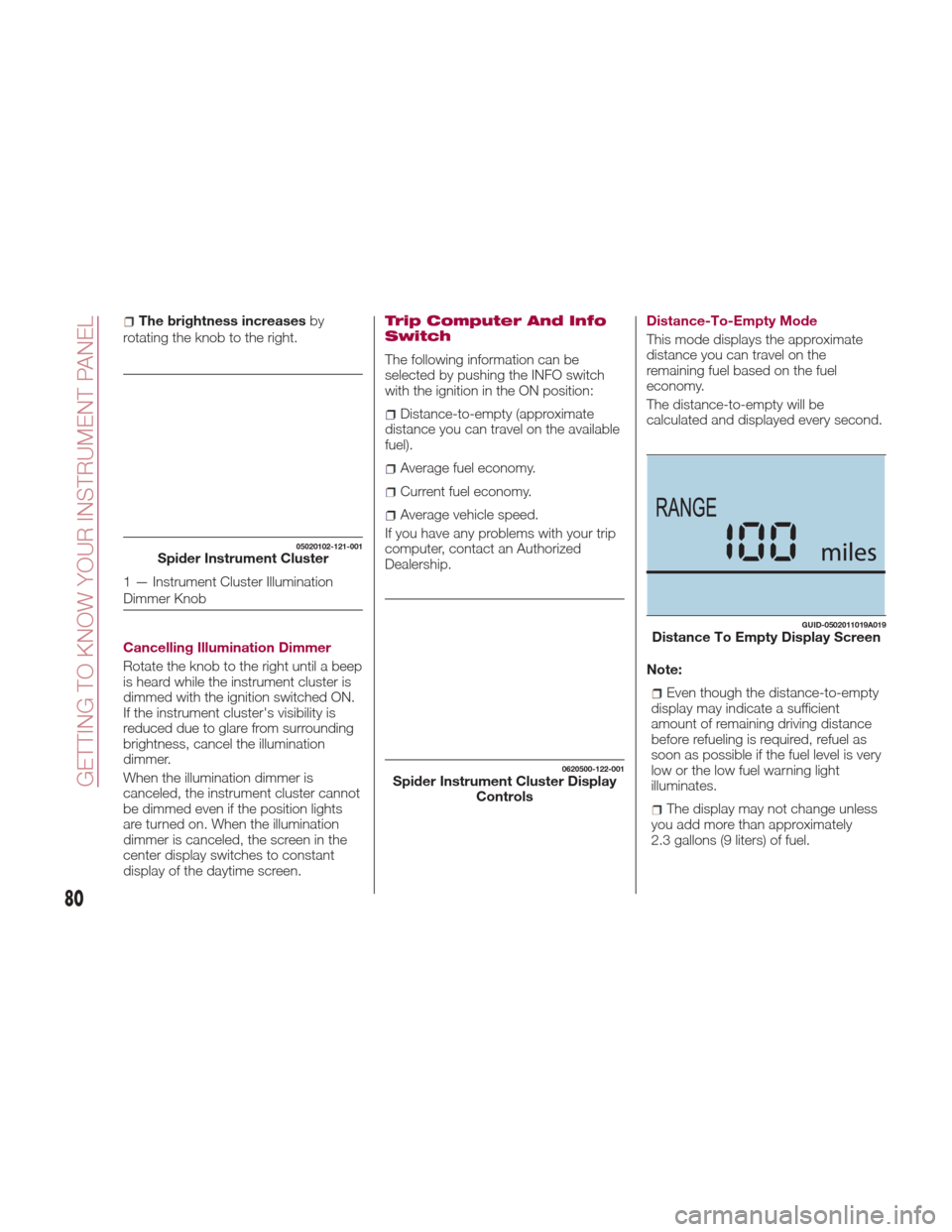
The following information can be
selected by pushing the INFO switch
with the ignition in the ON position:
Distance-to-empty (approximate
distance you can travel on the available
fuel).
Average fuel economy.
Current fuel economy.
Average vehicle speed.
If you have any problems with your trip
computer, contact an Authorized
Dealership. Distance-To-Empty Mode
This mode displays the approximate
distance you can travel on the
remaining fuel based on the fuel
economy.
The distance-to-empty will be
calculated and displayed every second.
Note:
Even though the distance-to-empty
display may indicate a sufficient
amount of remaining driving distance
before refueling is required, refuel as
soon as possible if the fuel level is very
low or the low fuel warning light
illuminates.
The display may not change unless
you add more than approximately
2.3 gallons (9 liters) of fuel.
05020102-121-001Spider Instrument Cluster
1 — Instrument Cluster Illumination
Dimmer Knob
0620500-122-001Spider Instrument Cluster Display Controls
GUID-0502011019A019Distance To Empty Display Screen
80
GETTING TO KNOW YOUR INSTRUMENT PANEL