steering FIAT 124 SPIDER 2017 2.G Owner's Manual
[x] Cancel search | Manufacturer: FIAT, Model Year: 2017, Model line: 124 SPIDER, Model: FIAT 124 SPIDER 2017 2.GPages: 300, PDF Size: 121.24 MB
Page 159 of 300
Caution!
Changing to manual shift mode while
driving will not damage the transmission.
Note:
If you change to manual shift mode
when the vehicle is stopped, the gear
will shift to M1.
If you change to manual shift mode
while the vehicle is moving it will remain
in the current gear until a manual shift
request is made.
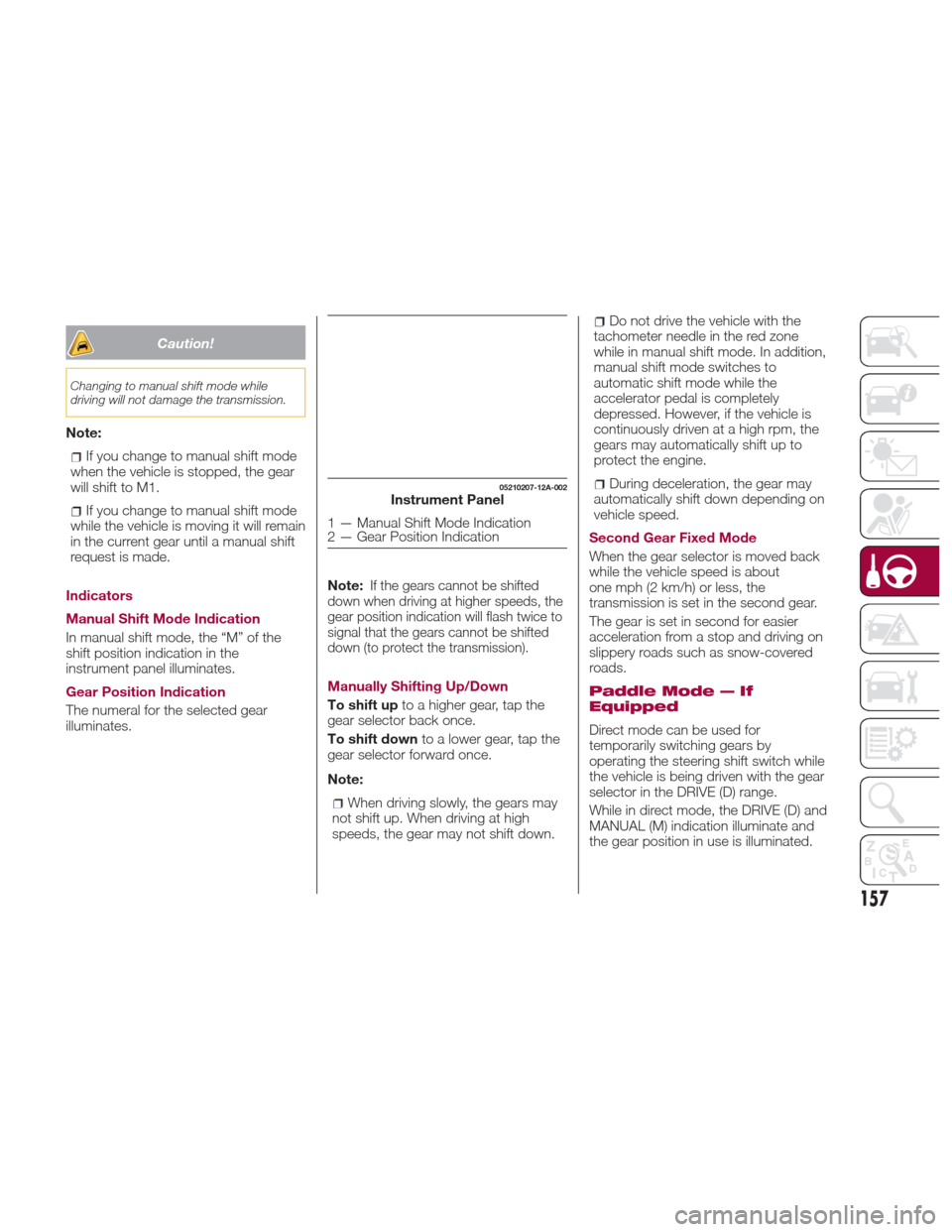
Indicators
Manual Shift Mode Indication
In manual shift mode, the “M” of the
shift position indication in the
instrument panel illuminates.
Gear Position Indication
The numeral for the selected gear
illuminates. Note:
If the gears cannot be shifted
down when driving at higher speeds, the
gear position indication will flash twice to
signal that the gears cannot be shifted
down (to protect the transmission).
Manually Shifting Up/Down
To shift up to a higher gear, tap the
gear selector back once.
To shift down to a lower gear, tap the
gear selector forward once.
Note:
When driving slowly, the gears may
not shift up. When driving at high
speeds, the gear may not shift down.
Do not drive the vehicle with the
tachometer needle in the red zone
while in manual shift mode. In addition,
manual shift mode switches to
automatic shift mode while the
accelerator pedal is completely
depressed. However, if the vehicle is
continuously driven at a high rpm, the
gears may automatically shift up to
protect the engine.
During deceleration, the gear may
automatically shift down depending on
vehicle speed.
Second Gear Fixed Mode
When the gear selector is moved back
while the vehicle speed is about
one mph (2 km/h) or less, the
transmission is set in the second gear.
The gear is set in second for easier
acceleration from a stop and driving on
slippery roads such as snow-covered
roads.
Paddle Mode — If
Equipped
Direct mode can be used for
temporarily switching gears by
operating the steering shift switch while
the vehicle is being driven with the gear
selector in the DRIVE (D) range.
While in direct mode, the DRIVE (D) and
MANUAL (M) indication illuminate and
the gear position in use is illuminated.
05210207-12A-002Instrument Panel
1 — Manual Shift Mode Indication
2 — Gear Position Indication
157
Page 171 of 300
Note:If it is difficult to see the display
under the following conditions, it does
notmeanthatthisisduetoa
malfunction:
In dark areas.
When the temperature around the
lens is particularly high/low.
When the camera is wet from rain
or due to a high atmospheric humidity.
When there is some foreign deposit
around the camera, for example mud.
When the camera lens reflects
sunlight or a headlight beam.
The image on the display may be
delayed if the temperature around the
camera is low.
Caution!
To avoid vehicle damage, ParkView
should only be used as a parking aid. The
ParkView camera is unable to view every
obstacle or object in your drive path.
To avoid vehicle damage, the vehicle
must be driven slowly when using ParkView
to be able to stop in time when an obstacle
is seen. It is recommended that the driver
look frequently over his/her shoulder when
using ParkView.
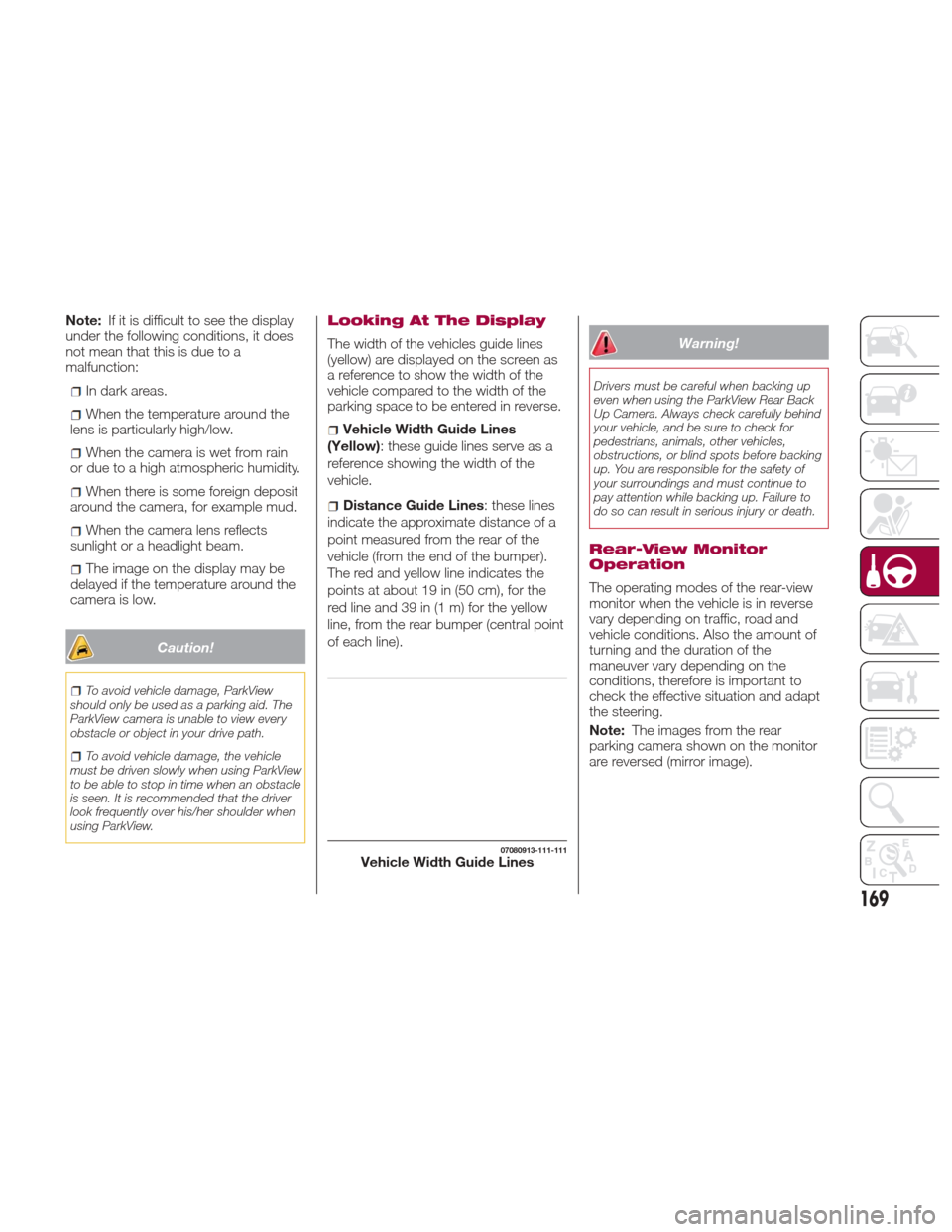
Looking At The Display
The width of the vehicles guide lines
(yellow) are displayed on the screen as
a reference to show the width of the
vehicle compared to the width of the
parking space to be entered in reverse.
Vehicle Width Guide Lines
(Yellow): these guide lines serve as a
reference showing the width of the
vehicle.
Distance Guide Lines : these lines
indicate the approximate distance of a
point measured from the rear of the
vehicle (from the end of the bumper).
The red and yellow line indicates the
pointsatabout19in(50cm),forthe
red line and 39 in (1 m) for the yellow
line, from the rear bumper (central point
of each line).
Warning!
Drivers must be careful when backing up
even when using the ParkView Rear Back
Up Camera. Always check carefully behind
your vehicle, and be sure to check for
pedestrians, animals, other vehicles,
obstructions, or blind spots before backing
up. You are responsible for the safety of
your surroundings and must continue to
pay attention while backing up. Failure to
do so can result in serious injury or death.
Rear-View Monitor
Operation
The operating modes of the rear-view
monitor when the vehicle is in reverse
vary depending on traffic, road and
vehicle conditions. Also the amount of
turning and the duration of the
maneuver vary depending on the
conditions, therefore is important to
check the effective situation and adapt
the steering.
Note: The images from the rear
parking camera shown on the monitor
are reversed (mirror image).
07080913-111-111Vehicle Width Guide Lines
169
Page 172 of 300
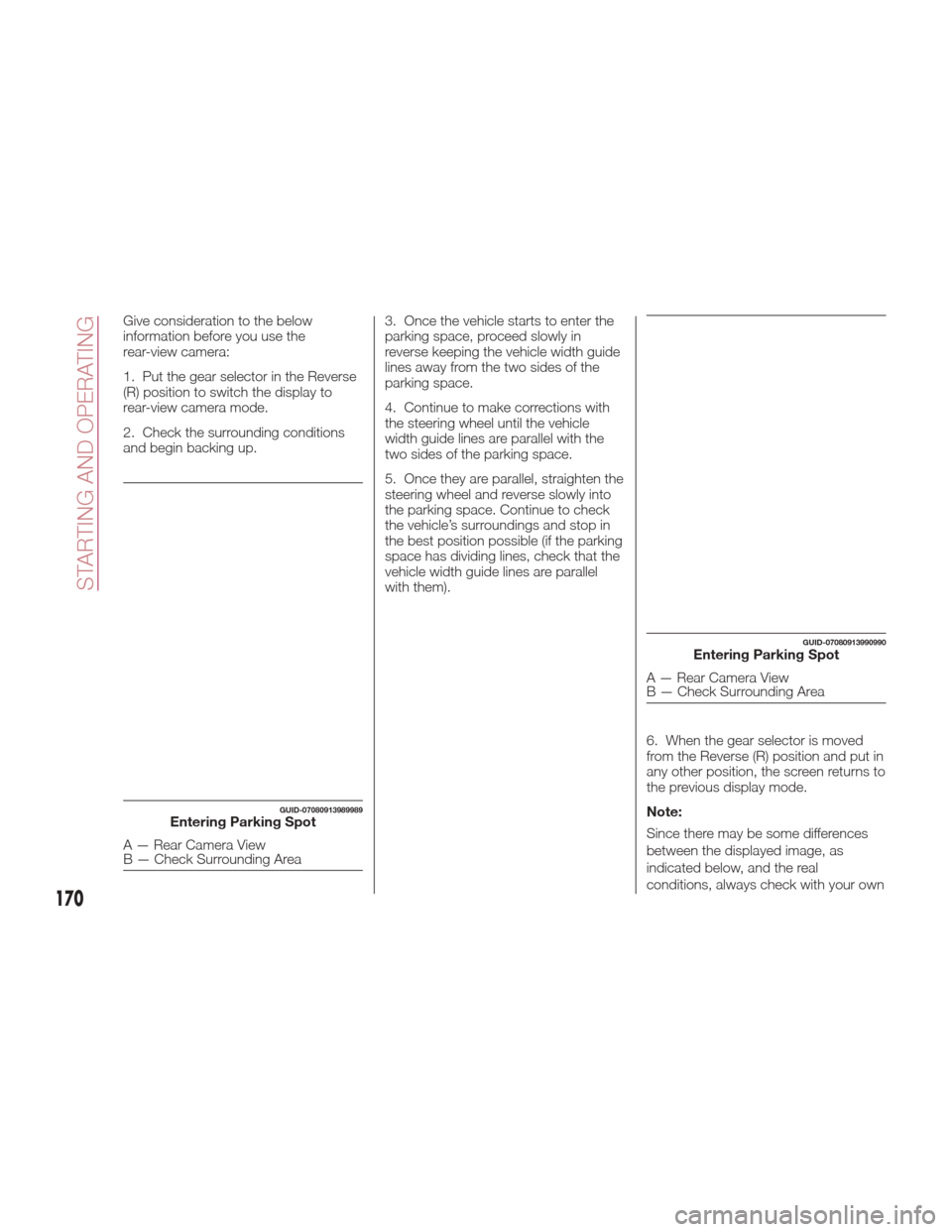
Give consideration to the below
information before you use the
rear-view camera:
1. Put the gear selector in the Reverse
(R) position to switch the display to
rear-view camera mode.
2. Check the surrounding conditions
and begin backing up.3. Once the vehicle starts to enter the
parking space, proceed slowly in
reverse keeping the vehicle width guide
lines away from the two sides of the
parking space.
4. Continue to make corrections with
the steering wheel until the vehicle
width guide lines are parallel with the
two sides of the parking space.
5. Once they are parallel, straighten the
steering wheel and reverse slowly into
the parking space. Continue to check
the vehicle’s surroundings and stop in
the best position possible (if the parking
space has dividing lines, check that the
vehicle width guide lines are parallel
with them).
6. When the gear selector is moved
from the Reverse (R) position and put in
any other position, the screen returns to
the previous display mode.
Note:
Since there may be some differences
between the displayed image, as
indicated below, and the real
conditions, always check with your own
GUID-07080913989989Entering Parking Spot
A — Rear Camera View
B — Check Surrounding Area
GUID-07080913990990Entering Parking Spot
A — Rear Camera View
B — Check Surrounding Area
170
STARTING AND OPERATING
Page 190 of 300
Light Bulbs
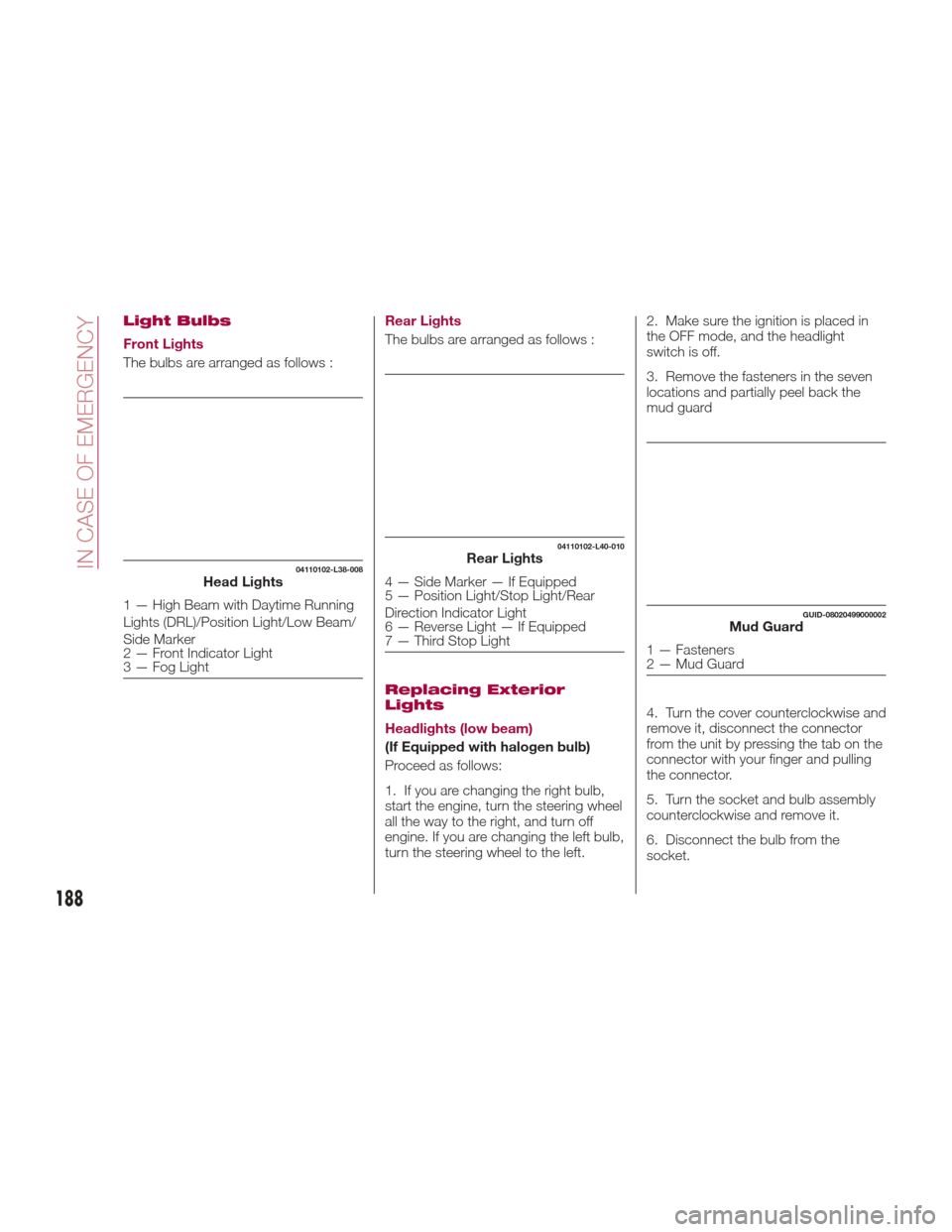
Front Lights
The bulbs are arranged as follows :Rear Lights
The bulbs are arranged as follows :
Replacing Exterior
Lights
Headlights (low beam)
(If Equipped with halogen bulb)
Proceed as follows:
1. If you are changing the right bulb,
start the engine, turn the steering wheel
all the way to the right, and turn off
engine. If you are changing the left bulb,
turn the steering wheel to the left.2. Make sure the ignition is placed in
the OFF mode, and the headlight
switch is off.
3. Remove the fasteners in the seven
locations and partially peel back the
mud guard
4. Turn the cover counterclockwise and
remove it, disconnect the connector
from the unit by pressing the tab on the
connector with your finger and pulling
the connector.
5. Turn the socket and bulb assembly
counterclockwise and remove it.
6. Disconnect the bulb from the
socket.
04110102-L38-008Head Lights
1 — High Beam with Daytime Running
Lights (DRL)/Position Light/Low Beam/
Side Marker
2 — Front Indicator Light
3 — Fog Light
04110102-L40-010Rear Lights
4 — Side Marker — If Equipped
5 — Position Light/Stop Light/Rear
Direction Indicator Light
6 — Reverse Light — If Equipped
7 — Third Stop Light
GUID-08020499000002Mud Guard
1 — Fasteners
2 — Mud Guard
188
IN CASE OF EMERGENCY
Page 191 of 300
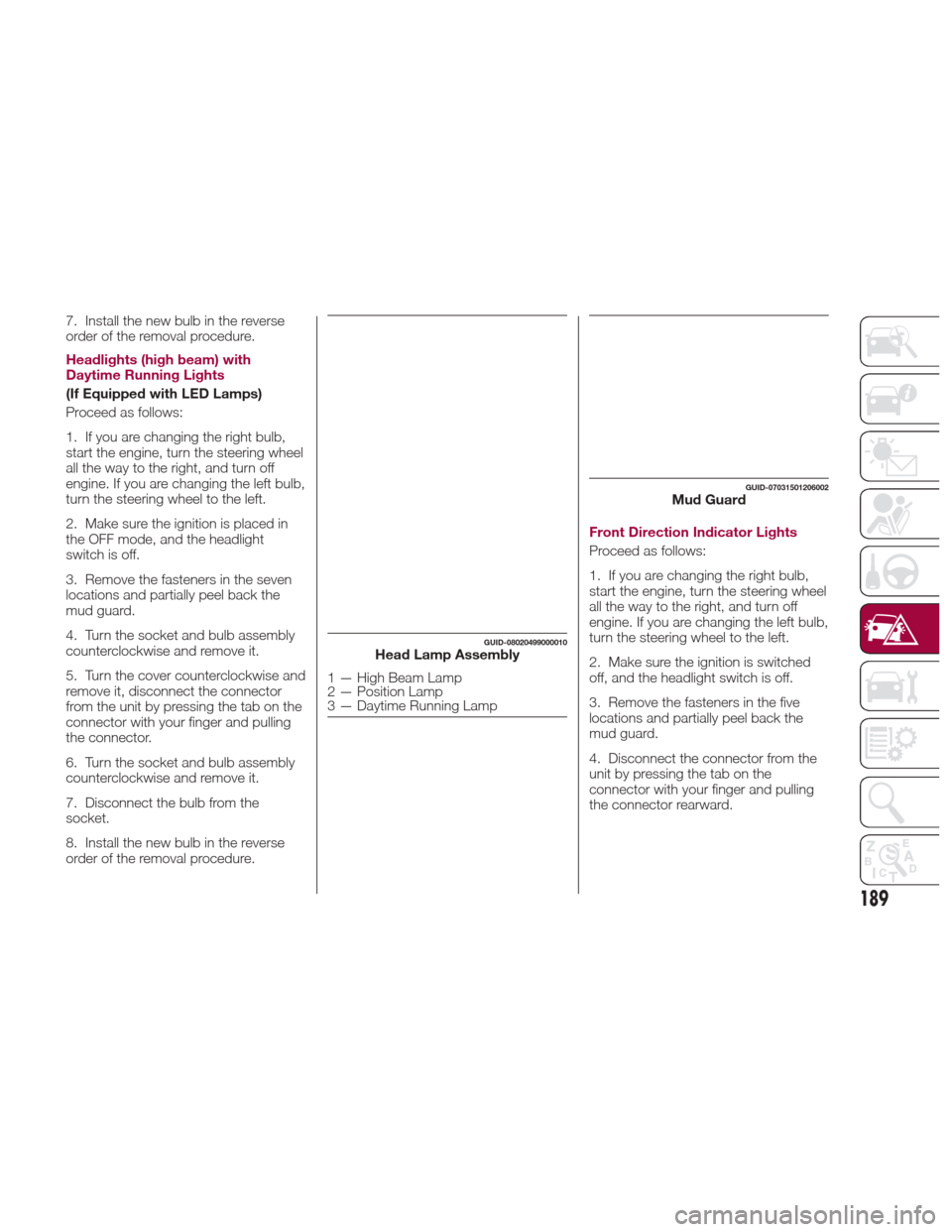
7. Install the new bulb in the reverse
order of the removal procedure.
Headlights (high beam) with
Daytime Running Lights
(If Equipped with LED Lamps)
Proceed as follows:
1. If you are changing the right bulb,
start the engine, turn the steering wheel
all the way to the right, and turn off
engine. If you are changing the left bulb,
turn the steering wheel to the left.
2. Make sure the ignition is placed in
the OFF mode, and the headlight
switch is off.
3. Remove the fasteners in the seven
locations and partially peel back the
mud guard.
4. Turn the socket and bulb assembly
counterclockwise and remove it.
5. Turn the cover counterclockwise and
remove it, disconnect the connector
from the unit by pressing the tab on the
connector with your finger and pulling
the connector.
6. Turn the socket and bulb assembly
counterclockwise and remove it.
7. Disconnect the bulb from the
socket.
8. Install the new bulb in the reverse
order of the removal procedure.Front Direction Indicator Lights
Proceed as follows:
1. If you are changing the right bulb,
start the engine, turn the steering wheel
all the way to the right, and turn off
engine. If you are changing the left bulb,
turn the steering wheel to the left.
2. Make sure the ignition is switched
off, and the headlight switch is off.
3. Remove the fasteners in the five
locations and partially peel back the
mud guard.
4. Disconnect the connector from the
unit by pressing the tab on the
connector with your finger and pulling
the connector rearward.
GUID-08020499000010Head Lamp Assembly
1 — High Beam Lamp
2 — Position Lamp
3 — Daytime Running Lamp
GUID-07031501206002Mud Guard
189
Page 192 of 300
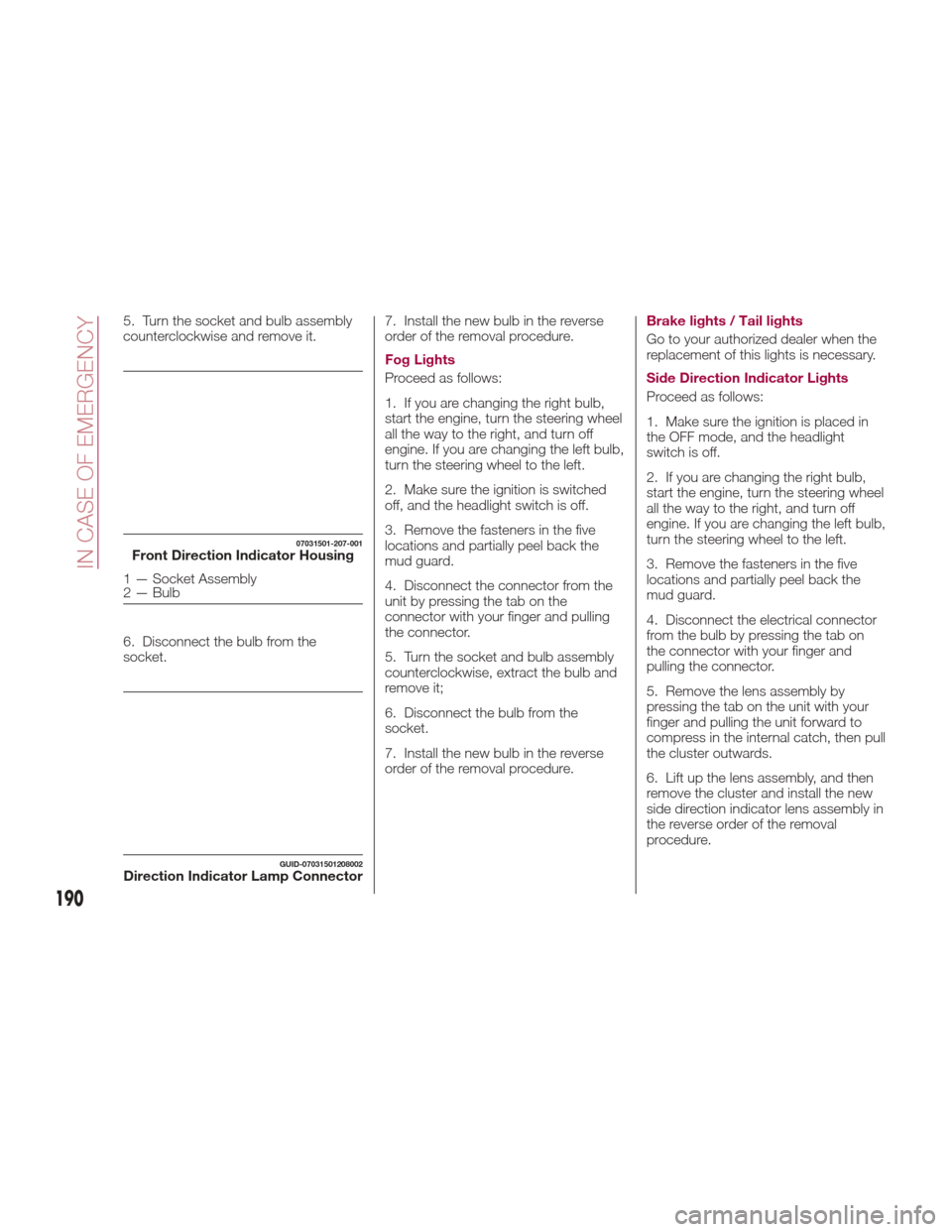
5. Turn the socket and bulb assembly
counterclockwise and remove it.
6. Disconnect the bulb from the
socket.7. Install the new bulb in the reverse
order of the removal procedure.
Fog Lights
Proceed as follows:
1. If you are changing the right bulb,
start the engine, turn the steering wheel
all the way to the right, and turn off
engine. If you are changing the left bulb,
turn the steering wheel to the left.
2. Make sure the ignition is switched
off, and the headlight switch is off.
3. Remove the fasteners in the five
locations and partially peel back the
mud guard.
4. Disconnect the connector from the
unit by pressing the tab on the
connector with your finger and pulling
the connector.
5. Turn the socket and bulb assembly
counterclockwise, extract the bulb and
remove it;
6. Disconnect the bulb from the
socket.
7. Install the new bulb in the reverse
order of the removal procedure.Brake lights / Tail lights
Go to your authorized dealer when the
replacement of this lights is necessary.
Side Direction Indicator Lights
Proceed as follows:
1. Make sure the ignition is placed in
the OFF mode, and the headlight
switch is off.
2. If you are changing the right bulb,
start the engine, turn the steering wheel
all the way to the right, and turn off
engine. If you are changing the left bulb,
turn the steering wheel to the left.
3. Remove the fasteners in the five
locations and partially peel back the
mud guard.
4. Disconnect the electrical connector
from the bulb by pressing the tab on
the connector with your finger and
pulling the connector.
5. Remove the lens assembly by
pressing the tab on the unit with your
finger and pulling the unit forward to
compress in the internal catch, then pull
the cluster outwards.
6. Lift up the lens assembly, and then
remove the cluster and install the new
side direction indicator lens assembly in
the reverse order of the removal
procedure.
07031501-207-001Front Direction Indicator Housing
1 — Socket Assembly
2 — Bulb
GUID-07031501208002Direction Indicator Lamp Connector
190
IN CASE OF EMERGENCY
Page 198 of 300
REPLACING FUSES
General Information
Warning!
When replacing a blown fuse, always
use an appropriate replacement fuse with
the same amp rating as the original fuse.
Never replace a fuse with another fuse of
higher amp rating. Never replace a blown
fuse with metal wires or any other material.
Failure to use proper fuses may result in
serious personal injury, fire and/or property
damage.
Before replacing a fuse, make sure that
the ignition is off and that all the other
services are switched off and/or
disengaged.
If the replaced fuse blows again, contact
an authorized dealer.
If a general protection fuse for safety
systems (air bag system, braking system),
power unit systems (engine system,
gearbox system) or steering system blows,
contact an authorized dealer.
Your vehicle's electrical system is
protected by fuses.
If any lights, accessories, or controls do
not work, inspect the appropriate circuit
protector. If a fuse has blown, the inside
element will be melted. If the same fuse
blows again, go to an Authorized Dealer
as soon as possible.
Fuse location
Fuses are grouped together in two fuse
boxes located in the interior on the left
side of the vehicle and under the hood.
Interior Fuses
If the electrical system does not work,
first inspect the fuses on the vehicle's
left side.
Proceed as follows:
1. Make sure the ignition is placed in
the OFF mode, and other switches are
turned off.
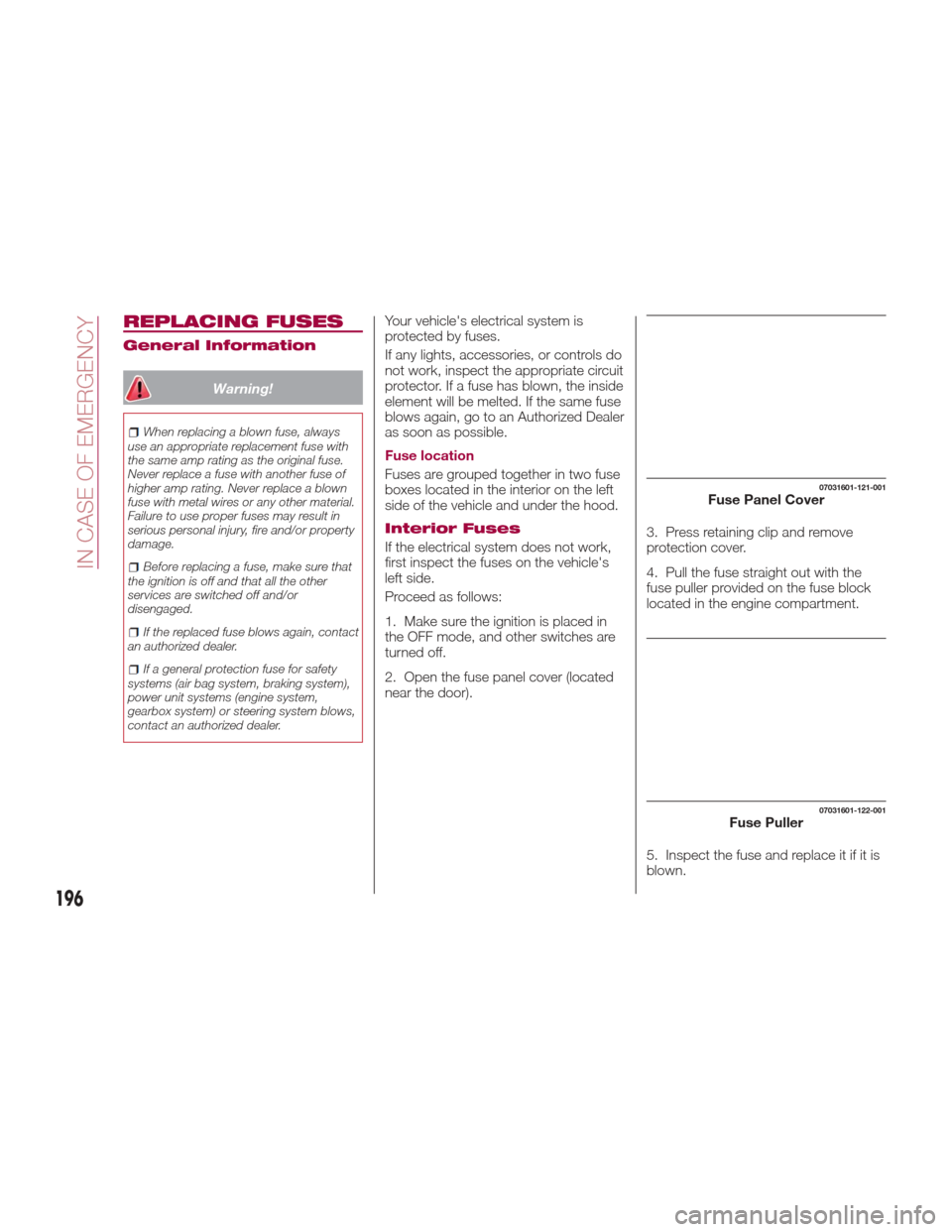
2. Open the fuse panel cover (located
near the door). 3. Press retaining clip and remove
protection cover.
4. Pull the fuse straight out with the
fuse puller provided on the fuse block
located in the engine compartment.
5. Inspect the fuse and replace it if it is
blown.
07031601-121-001Fuse Panel Cover
07031601-122-001Fuse Puller
196
IN CASE OF EMERGENCY
Page 202 of 300
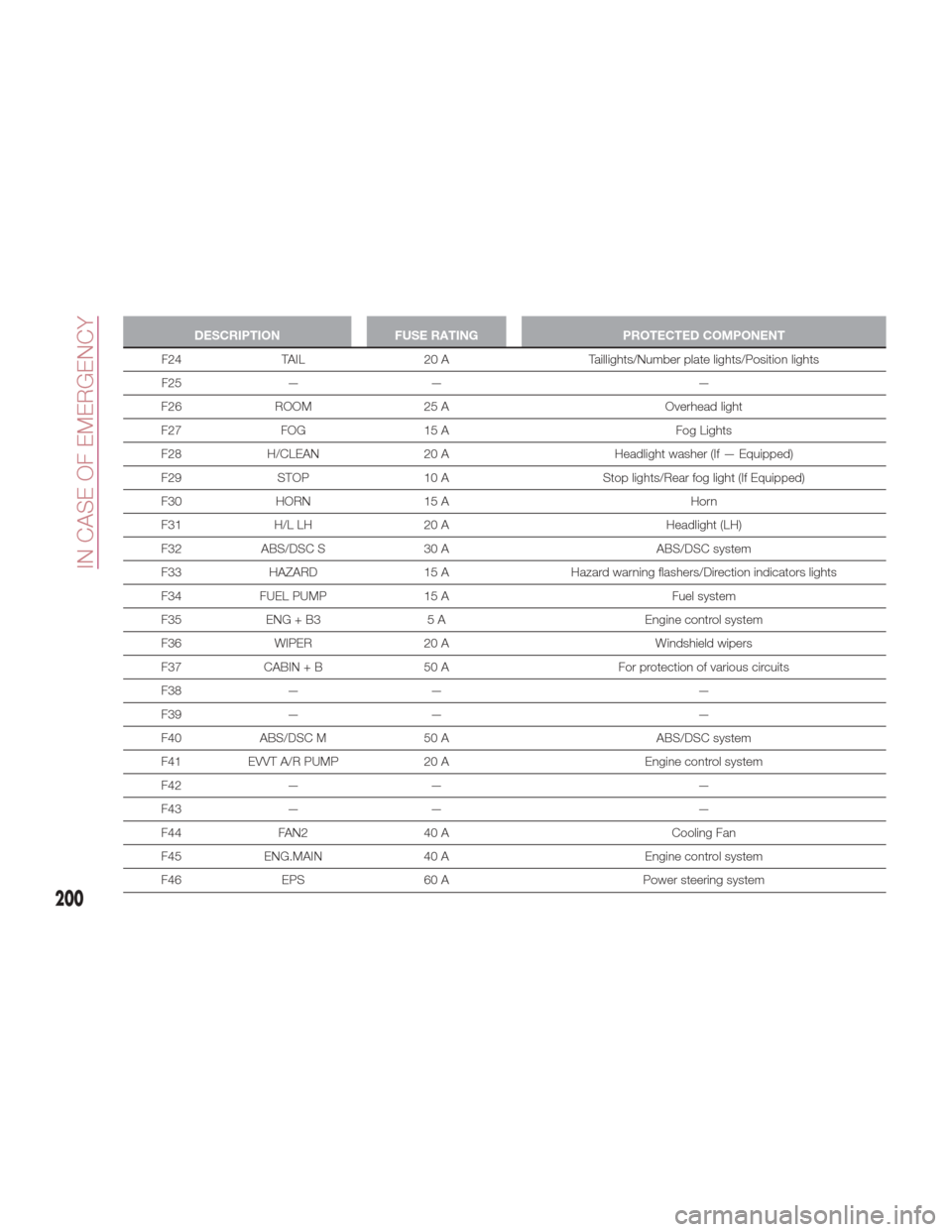
DESCRIPTIONFUSE RATING PROTECTED COMPONENT
F24 TAIL 20 A Taillights/Number plate lights/Position lights
F25
— — —
F26 ROOM 25 A Overhead light
F27 FOG 15 A Fog Lights
F28 H/CLEAN 20 A Headlight washer (If — Equipped)
F29 STOP 10 A Stop lights/Rear fog light (If Equipped)
F30 HORN 15 A Horn
F31 H/L LH 20 A Headlight (LH)
F32 ABS/DSC S 30 A ABS/DSC system
F33 HAZARD 15 AHazard warning flashers/Direction indicators lights
F34 FUEL PUMP 15 A Fuel system
F35 ENG + B3 5 A Engine control system
F36 WIPER 20 A Windshield wipers
F37 CABIN + B 50 A For protection of various circuits
F38 — — —
F39 — — —
F40 ABS/DSC M 50 A ABS/DSC system
F41 EVVT A/R PUMP 20 A Engine control system
F42 — — —
F43 — — —
F44 FAN2 40 A Cooling Fan
F45 ENG.MAIN 40 A Engine control system
F46 EPS 60 A Power steering system
200
IN CASE OF EMERGENCY
Page 215 of 300
Warning!
Never use the air compressor above
43.5 psi (3 Bar). Using the air compressor
at an inflation pressure above 3 Bar
(43.5 psi) continuously is dangerous. If the
air compressor overheats, hot air will be
exhausted and you could get burned.
Caution!
If the tire inflation pressure does not
increase, repair of the tire is not possible. If
the tire does not reach the specified tire
inflation pressure within 10 minutes, it may
have received extensive damage. In this
case, the repair using the tire service kit
was not successful.
Do not operate the air compressor for a
continuous 10 minutes or longer because
using it for long periods could cause a
malfunction.
13. Adhere the speed restriction sticker
to an area where it can be viewed easily
by the driver.
Warning!
Do not adhere the speed restriction sticker
to the padded area on the steering wheel.
Adhering the speed restriction sticker to
the padded area on the steering wheel is
dangerous because the air bag may not
operate (deploy) normally resulting in
serious injury. In addition, do not adhere
the sticker to areas where warning lights or
the speedometer cannot be viewed.
14. Adhere the repaired tire sticker to
the wheel of the flat tire.
15. When the tire inflates to the
specified tire inflation pressure, turn the
air compressor switch off, turn the
sleeve of the injection hose to the left,
and pull it out of the tire valve. 16. Remove the air compressor hose
from the injection valve of the bottle.
Then, install the injection hose to the
injection valve of the bottle to prevent
leakage of any remaining sealant.
Note:
The remaining sealant in the
hose may spray out when the hose is
removed. Remove the hose carefully
because you may not be able to
remove the sealant contacting clothing
or other objects.
17. Install the tire valve cap.
18. Place the tire service kit back into
its storage location.
19. Start driving immediately to spread
the sealant in the tire.
08020202-031-667Repaired Tire Sticker
08020202-031-668Install Injection Hose To Sealant Bottle
213
Page 219 of 300
13. Reinsert the valve core into the
valve and turn it clockwise to install.
Note:
The tire sealant cannot be reused.
If the tire sealant kit has been used, or
is expired, purchase new one at an
Authorized Dealer.
Do not throw away the empty tire
sealant bottle after use. Return the
empty tire sealant bottle to an
Authorized Dealer when replacing the
tire. The empty tire sealant bottle will
need to be used to extract and dispose
of the used sealant from the tire.
14. Install the injection hose to the tab
of the bottle to prevent leakage of any
remaining sealant.
15. Adhere the speed restriction sticker
to an area where it can be viewed easily
by the driver.
Warning!
Do not adhere the speed restriction sticker
to the padded area on the steering wheel.
Adhering the speed restriction sticker to
the padded area on the steering wheel is
dangerous because the air bag may not
operate (deploy) normally resulting in
serious injury. In addition, do not adhere
the sticker to areas where warning lights or
the speedometer cannot be viewed.
16. Pull out the air compressor hose
and the air compressor plug from the
air compressor.
17. Install the air compressor hose to
the tire valve. 18. Insert the air compressor plug into
the accessory socket inside the vehicle
and place the ignition to ACC.
19. Turn the air compressor switch on
and inflate the tire carefully to the
correct inflation pressure. For the
correct pressure, check the tire inflation
pressure label on the driver's door
frame.
Note:
When inserting the air
compressor plug into or removing it
from the accessory socket, make sure
that the air compressor switch is off.
When turning the air compressor on/off,
use the air compressor switch. Before
checking the tire inflation pressure using
the tire pressure gauge, turn the air
compressor switch off.
Caution!
If the tire inflation pressure does not
increase, repair of the tire is not possible. If
the tire does not reach the specified tire
inflation pressure within 10 minutes, it may
have received extensive damage. In this
case, the repair using the tire service kit
was not successful.
Do not operate the air compressor for a
continuous 10 minutes or longer because
using it for long periods could cause a
malfunction.
08020202-36A-004-high.jpgAir Compressor With Hose And Plug
2 — Air Compressor Hose
08020202-03A-00BAir Compressor Hose Into Valve
217