mirror FIAT 124 SPIDER ABARTH 2017 2.G User Guide
[x] Cancel search | Manufacturer: FIAT, Model Year: 2017, Model line: 124 SPIDER ABARTH, Model: FIAT 124 SPIDER ABARTH 2017 2.GPages: 292, PDF Size: 121.25 MB
Page 63 of 292
Operating The System
Press the programmed HomeLink
button to operate a programmed
device.
The code will continue being
transmitted for a maximum of
20 seconds.
Reprogramming The
System
To program a device to HomeLink using
a HomeLink button previously trained,
follow these steps:
1. Press and hold the desired
HomeLink button.DO NOTrelease the
button;
2. The indicator light will begin to flash
after 20 seconds. Without releasing the
HomeLink button, proceed with
“Programming” - step one.
Erasing Programmed
Homelink Buttons
To erase the existing programming from
all three operating channels, press and
hold the two outside buttons 1 and
3 on the auto-dimming mirror until the
HomeLink indicator light begins to flash
after approximately 10 seconds.
Verify that the programming has been
erased when you resell the vehicle.
INTERNAL
EQUIPMENT
Storage Compartments
Center Console
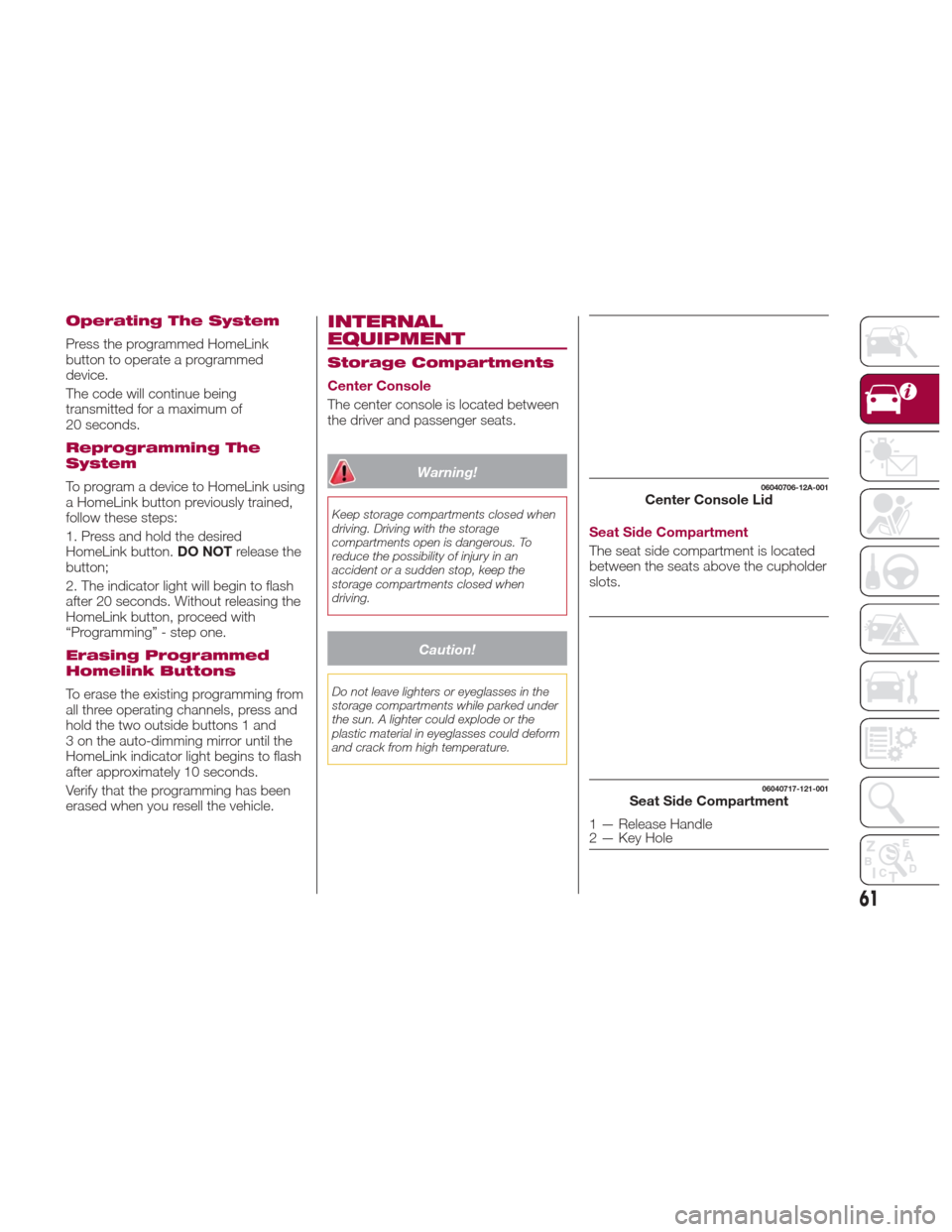
The center console is located between
the driver and passenger seats.
Warning!
Keep storage compartments closed when
driving. Driving with the storage
compartments open is dangerous. To
reduce the possibility of injury in an
accident or a sudden stop, keep the
storage compartments closed when
driving.
Caution!
Do not leave lighters or eyeglasses in the
storage compartments while parked under
the sun. A lighter could explode or the
plastic material in eyeglasses could deform
and crack from high temperature.
Seat Side Compartment
The seat side compartment is located
between the seats above the cupholder
slots.
06040706-12A-001Center Console Lid
06040717-121-001Seat Side Compartment
1 — Release Handle
2 — Key Hole
61
Page 64 of 292
To open, push the release handle down
to open the seat side compartment.
Insert the emergency key in the lock
and turn it clockwise to lock, counter
clockwise to unlock.
Note:When using the rear console
cup holders, remove any cups before
opening the seat side compartment. If
the seat side compartment is opened
with cups still in them, the lid will hit the
cups and cause the contents to spill.
Back Trim Storage Compartment
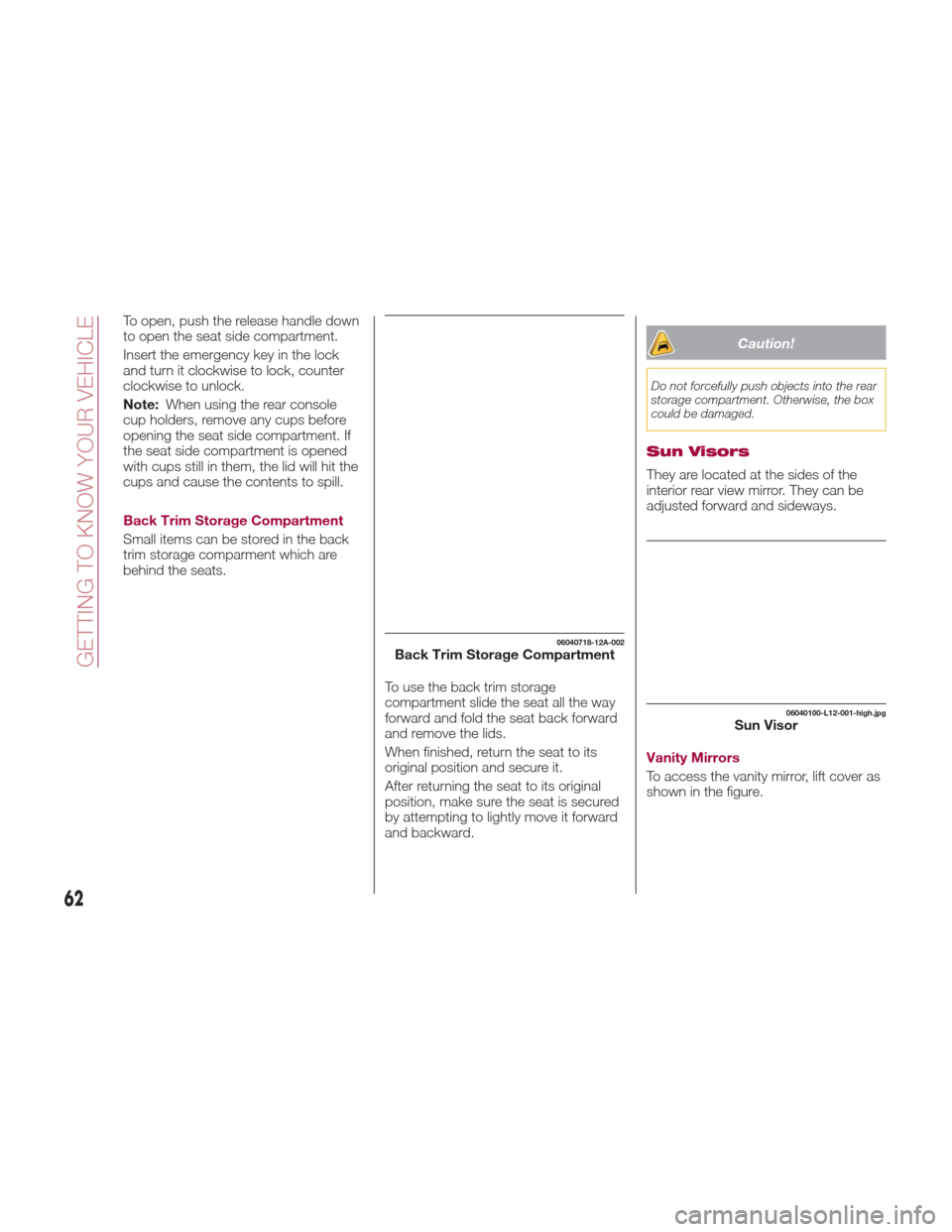
Small items can be stored in the back
trim storage comparment which are
behind the seats.
To use the back trim storage
compartment slide the seat all the way
forward and fold the seat back forward
and remove the lids.
When finished, return the seat to its
original position and secure it.
After returning the seat to its original
position, make sure the seat is secured
by attempting to lightly move it forward
and backward.
Caution!
Do not forcefully push objects into the rear
storage compartment. Otherwise, the box
could be damaged.
Sun Visors
They are located at the sides of the
interior rear view mirror. They can be
adjusted forward and sideways.
Vanity Mirrors
To access the vanity mirror, lift cover as
shown in the figure.
06040718-12A-002Back Trim Storage Compartment
06040100-L12-001-high.jpgSun Visor
62
GETTING TO KNOW YOUR VEHICLE
Page 115 of 292
Note:
When DSC is on and you attempt
to free the vehicle when it is stuck, or
drive it out of freshly fallen snow, the
TCS (part of the DSC system) will
activate. Depressing the accelerator
will not increase engine power and
freeing the vehicle may be difficult.
When this happens, turn off the
TCS/DSC.
If the TCS/DSC is off when the
engine is turned off, it automatically
activates when the ignition is placed in
the ON mode.
If the switch is pressed and held for
10 seconds or more, the switch
malfunction detection function
operates and the DSC system
activates automatically. The indicator
light turns off while the DSC system is
operative.
Warning!
Dynamic Stability Control (DSC) cannot
prevent the natural laws of physics from
acting on the vehicle, nor can it increase
the traction afforded by prevailing road
conditions. DSC cannot prevent accidents,
including those resulting from excessive
speed in turns, driving on very slippery
surfaces, or hydroplaning. DSC also
cannot prevent accidents resulting from
loss of vehicle control due to inappropriate
driver input for the conditions. Only a safe,
attentive, and skillful driver can prevent
accidents. The capabilities of an DSC
equipped vehicle must never be exploited
in a reckless or dangerous manner which
could jeopardize the user’s safety or the
safety of others.
Vehicle modifications, or failure to
properly maintain your vehicle, may change
the handling characteristics of your vehicle,
and may negatively affect the performance
of the DSC system. Changes to the
steering system, suspension, braking
system, tire type and size or wheel size
may adversely affect DSC performance.
Improperly inflated and unevenly worn tires
may also degrade DSC performance. Any
vehicle modification or poor vehicle
maintenance that reduces the effectiveness
of the DSC system can increase the risk of
loss of vehicle control, vehicle rollover,
personal injury and death.
AUXILIARY DRIVING
SYSTEMS
Blind Spot Monitoring
(BSM) System
The Blind Spot Monitoring (BSM)
system is designed to assist the driver
in checking the area to the rear of the
vehicle on both sides during lane
changes by alerting the driver to the
presence of vehicles approaching from
the rear in an adjacent lane.
The system detects vehicles
approaching from the rear while
traveling in the forward direction at a
speed of 18 mph (30 km/h) or faster
and turns on the warning lights
equipped on the door mirrors
depending on the conditions.
If the turn signal lever is operated to
signal a lane change in the direction in
which the warning light is illuminated,
the system warns the driver of a vehicle
in the detection area by flashing the
warning light and activating a beep
sound.
113
Page 117 of 292
Driving on steep slopes.
Crossing the summit of a hill or
mountain pass.
The turning radius is small (making a
sharp turn, turning at intersections).
When there is a difference in the
height between your driving lane and
the adjacent lane.
Directly after pushing the BSM
switch and the system becomes
operable.
If the road width is extremely narrow,
vehicles two lanes over may be
detected. The detection area of the
radar sensors (rear) is set according to
the road width of expressways.
The BSM warning lights may turn on in
reaction to stationary objects on the
road or the roadside such as guardrails,
tunnels, sidewalls, and parked vehicles.
A BSM warning lights may flash or the
warning beep may be activated several
times when making a turn at a city
intersection.
Turn off the BSM system while pulling a
trailer or while an accessory such as a
bicycle carrier is installed to the rear of
the vehicle. Otherwise, the radar’s
sound system waves will be blocked
causing the system to not operate
normally. In the following cases, it may be difficult
to view the illumination/flashing of the
BSM warning lights equipped on the
door mirrors:
Snow or ice is adhering to the door
mirrors.
The door glass is fogged or covered
in snow, frost or dirt.
The system switches to the Rear Cross
Traffic Alert function when the gear
selector is shifted to the REVERSE (R)
position.
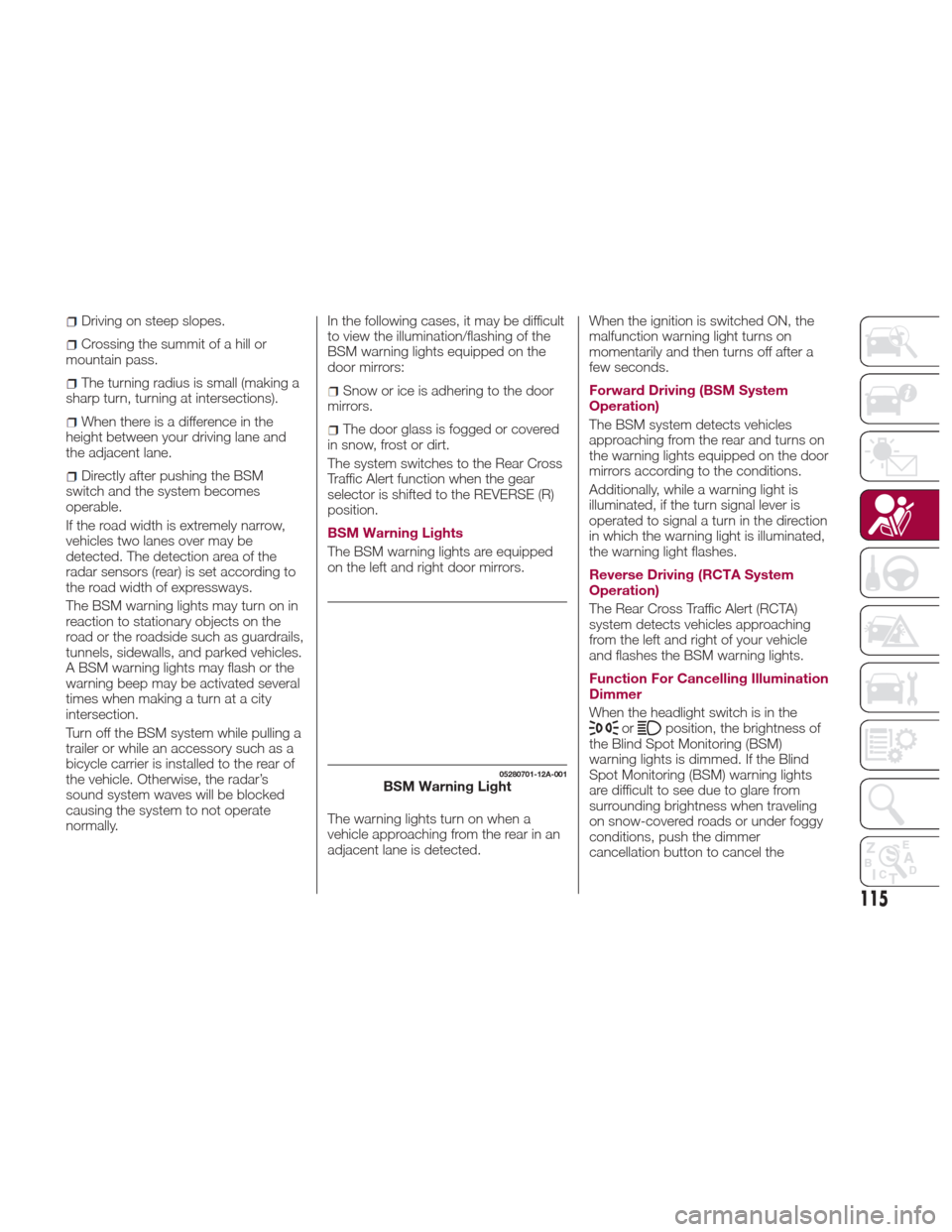
BSM Warning Lights
The BSM warning lights are equipped
on the left and right door mirrors.
The warning lights turn on when a
vehicle approaching from the rear in an
adjacent lane is detected. When the ignition is switched ON, the
malfunction warning light turns on
momentarily and then turns off after a
few seconds.
Forward Driving (BSM System
Operation)
The BSM system detects vehicles
approaching from the rear and turns on
the warning lights equipped on the door
mirrors according to the conditions.
Additionally, while a warning light is
illuminated, if the turn signal lever is
operated to signal a turn in the direction
in which the warning light is illuminated,
the warning light flashes.
Reverse Driving (RCTA System
Operation)
The Rear Cross Traffic Alert (RCTA)
system detects vehicles approaching
from the left and right of your vehicle
and flashes the BSM warning lights.
Function For Cancelling Illumination
Dimmer
When the headlight switch is in the
orposition, the brightness of
the Blind Spot Monitoring (BSM)
warning lights is dimmed. If the Blind
Spot Monitoring (BSM) warning lights
are difficult to see due to glare from
surrounding brightness when traveling
on snow-covered roads or under foggy
conditions, push the dimmer
cancellation button to cancel the
05280701-12A-001BSM Warning Light
115
Page 119 of 292
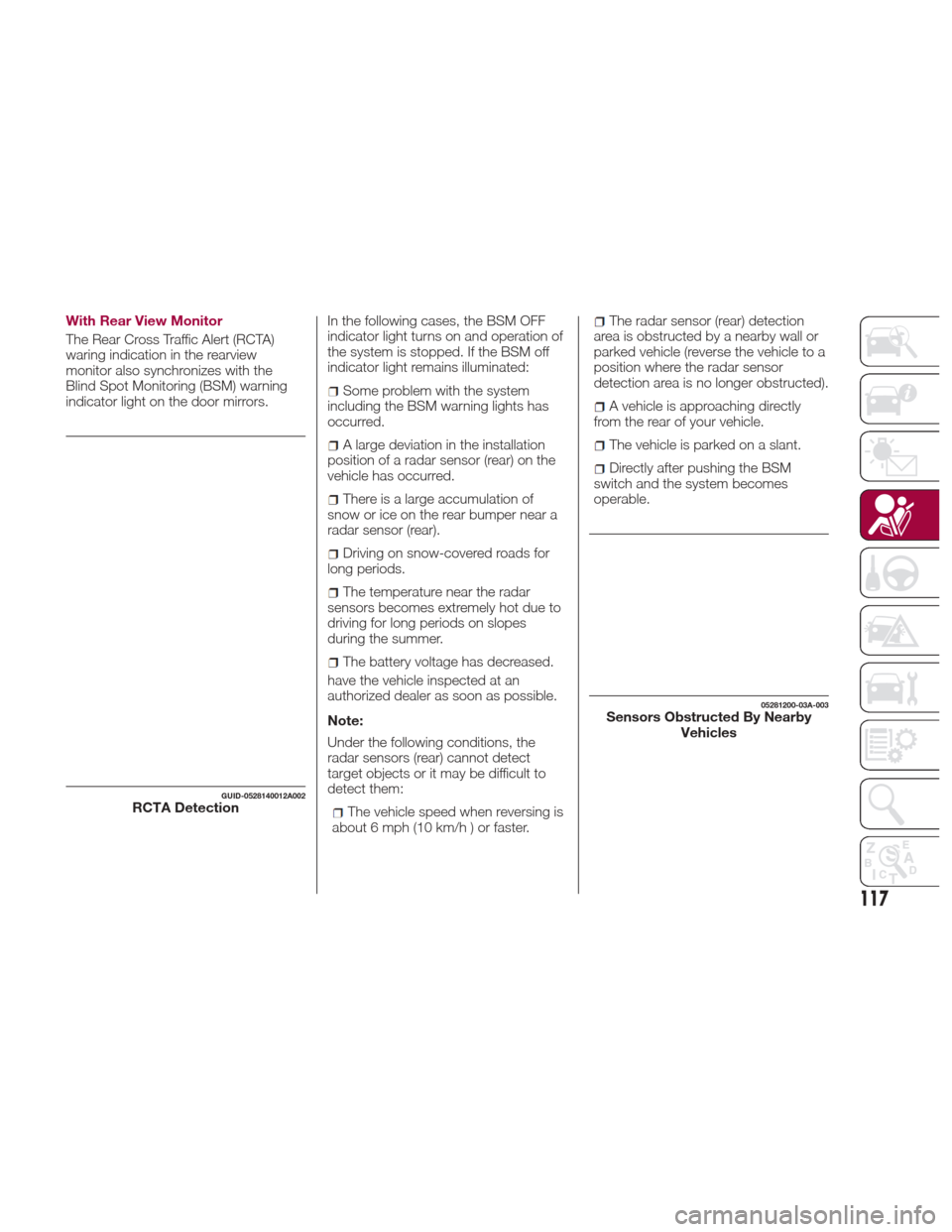
With Rear View Monitor
The Rear Cross Traffic Alert (RCTA)
waring indication in the rearview
monitor also synchronizes with the
Blind Spot Monitoring (BSM) warning
indicator light on the door mirrors.In the following cases, the BSM OFF
indicator light turns on and operation of
the system is stopped. If the BSM off
indicator light remains illuminated:
Some problem with the system
including the BSM warning lights has
occurred.
A large deviation in the installation
position of a radar sensor (rear) on the
vehicle has occurred.
There is a large accumulation of
snow or ice on the rear bumper near a
radar sensor (rear).
Driving on snow-covered roads for
long periods.
The temperature near the radar
sensors becomes extremely hot due to
driving for long periods on slopes
during the summer.
The battery voltage has decreased.
have the vehicle inspected at an
authorized dealer as soon as possible.
Note:
Under the following conditions, the
radar sensors (rear) cannot detect
target objects or it may be difficult to
detect them:
The vehicle speed when reversing is
about 6 mph (10 km/h ) or faster.
The radar sensor (rear) detection
area is obstructed by a nearby wall or
parked vehicle (reverse the vehicle to a
position where the radar sensor
detection area is no longer obstructed).
A vehicle is approaching directly
from the rear of your vehicle.
The vehicle is parked on a slant.
Directly after pushing the BSM
switch and the system becomes
operable.
GUID-0528140012A002RCTA Detection
05281200-03A-003Sensors Obstructed By Nearby Vehicles
117
Page 120 of 292
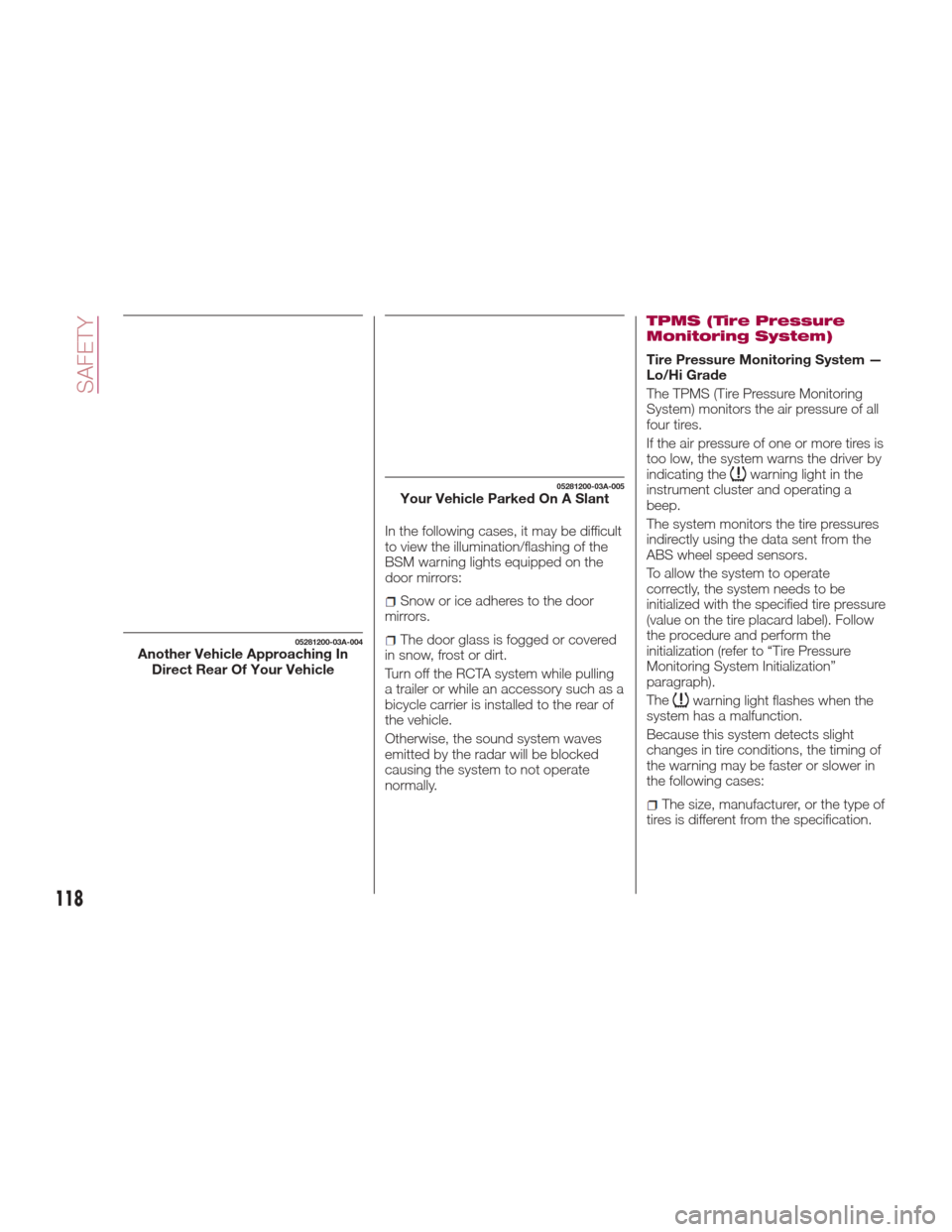
In the following cases, it may be difficult
to view the illumination/flashing of the
BSM warning lights equipped on the
door mirrors:
Snow or ice adheres to the door
mirrors.
The door glass is fogged or covered
in snow, frost or dirt.
Turn off the RCTA system while pulling
a trailer or while an accessory such as a
bicycle carrier is installed to the rear of
the vehicle.
Otherwise, the sound system waves
emitted by the radar will be blocked
causing the system to not operate
normally.
TPMS (Tire Pressure
Monitoring System)
Tire Pressure Monitoring System —
Lo/Hi Grade
The TPMS (Tire Pressure Monitoring
System) monitors the air pressure of all
four tires.
If the air pressure of one or more tires is
too low, the system warns the driver by
indicating the
warning light in the
instrument cluster and operating a
beep.
The system monitors the tire pressures
indirectly using the data sent from the
ABS wheel speed sensors.
To allow the system to operate
correctly, the system needs to be
initialized with the specified tire pressure
(value on the tire placard label). Follow
the procedure and perform the
initialization (refer to “Tire Pressure
Monitoring System Initialization”
paragraph).
The
warning light flashes when the
system has a malfunction.
Because this system detects slight
changes in tire conditions, the timing of
the warning may be faster or slower in
the following cases:
The size, manufacturer, or the type of
tires is different from the specification.
05281200-03A-004Another Vehicle Approaching In Direct Rear Of Your Vehicle
05281200-03A-005Your Vehicle Parked On A Slant
118
SAFETY
Page 150 of 292
STARTING THE
ENGINE
Starting The Engine
Before starting the engine, adjust the
seat, the interior rear view mirrors, the
door mirrors and fasten the seat belt
correctly.
Warning!
When leaving the vehicle, always
remove the key fob from the vehicle and
lock your vehicle.
Never leave children alone in a vehicle,
or with access to an unlocked vehicle.
Allowing children to be in a vehicle
unattended is dangerous for a number of
reasons. A child or others could be
seriously or fatally injured. Children should
be warned not to touch the parking brake,
brake pedal or the transmission gear
selector.
Do not leave the key fob in or near the
vehicle, or in a location accessible to
children, and do not leave the ignition of a
vehicle equipped with Advanced Keyless
Entry in the ACC or ON/RUN mode. A
child could operate power windows, other
controls, or move the vehicle.
Do not leave children or animals inside
parked vehicles in hot weather. Interior heat
build-up may cause serious injury or death.
Never press the accelerator pedal for
starting the engine.
Models Equipped With A
Manual Transmission
Proceed as follows:
1. Engage the parking brake and place
the gear selector in NEUTRAL.
2. Place the start button in the ACC
mode.
3. Fully depress the clutch pedal
without touching the accelerator.
4. Place the start button in the ON
mode, push and release it as soon as
the engine starts. If the engine does not
start within 10 seconds, push the start
button to OFF mode and wait for
10-15 seconds before repeating the
starting procedure.
Models Equipped With
An Automatic
Transmission
Proceed as follows:
1. Engage the parking brake and place
the gear selector to P (PARK) or N
(NEUTRAL).
2. Fully depress the brake pedal
without touching the accelerator.
3. Place the start button in the ACC
mode. 4. Place the start button in the ON
mode, push and release it as soon as
the engine starts. If the engine does not
start within 10 seconds, push the start
button to OFF mode and wait for
10-15 seconds before repeating the
starting procedure.
Cold Weather Operation
Regarding Cold Start Disable
When the ambient temperature is
extremely low, the engine may not
crank even when the engine starting
procedure is performed. At this time,
the Cold Start Disable Indicator light in
the instrument cluster flashes. However,
this does not indicate a problem.
Perform the necessary procedures (see
“Warning lights And Messages”
paragraph in “Getting To Know Your
Instrument Panel” chapter).
Regarding Ice Breaker
When the ambient temperature is low,
the start of cranking may be delayed
after engine starting procedure is
performed. At this time, the Cold Start
Disable Indicator light in the instrument
cluster illumintes. However, this does
not indicate a problem.
Refer to your authorized dealer
regarding other related parts which are
to be input such as function name,
operating scenario (condition) of each
function, indicator operation, and user
operation/procedure information.
148
STARTING AND OPERATING
Page 170 of 292
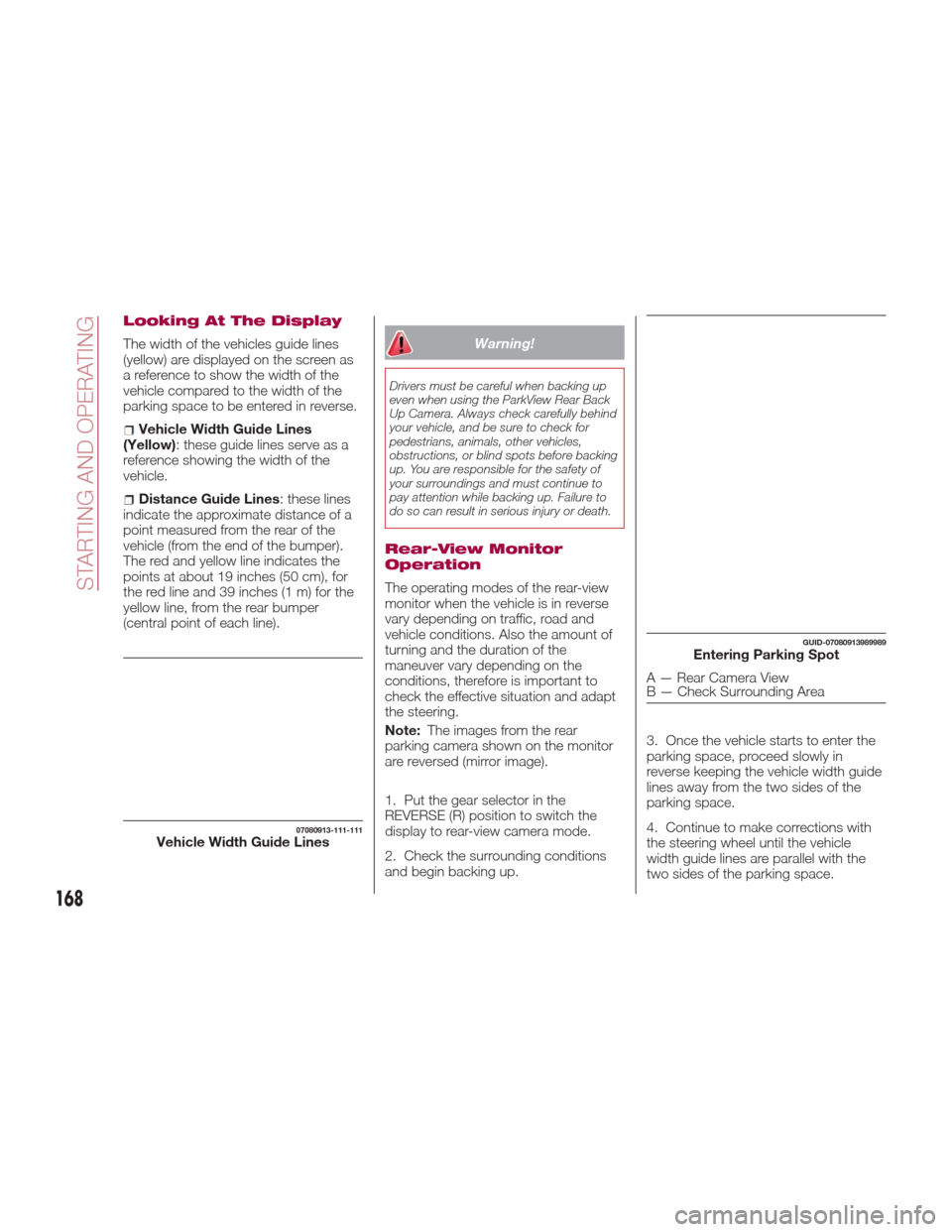
Looking At The Display
The width of the vehicles guide lines
(yellow) are displayed on the screen as
a reference to show the width of the
vehicle compared to the width of the
parking space to be entered in reverse.
Vehicle Width Guide Lines
(Yellow): these guide lines serve as a
reference showing the width of the
vehicle.
Distance Guide Lines : these lines
indicate the approximate distance of a
point measured from the rear of the
vehicle (from the end of the bumper).
The red and yellow line indicates the
points at about 19 inches (50 cm), for
the red line and 39 inches (1 m) for the
yellow line, from the rear bumper
(central point of each line).
Warning!
Drivers must be careful when backing up
even when using the ParkView Rear Back
Up Camera. Always check carefully behind
your vehicle, and be sure to check for
pedestrians, animals, other vehicles,
obstructions, or blind spots before backing
up. You are responsible for the safety of
your surroundings and must continue to
pay attention while backing up. Failure to
do so can result in serious injury or death.
Rear-View Monitor
Operation
The operating modes of the rear-view
monitor when the vehicle is in reverse
vary depending on traffic, road and
vehicle conditions. Also the amount of
turning and the duration of the
maneuver vary depending on the
conditions, therefore is important to
check the effective situation and adapt
the steering.
Note: The images from the rear
parking camera shown on the monitor
are reversed (mirror image).
1. Put the gear selector in the
REVERSE (R) position to switch the
display to rear-view camera mode.
2. Check the surrounding conditions
and begin backing up. 3. Once the vehicle starts to enter the
parking space, proceed slowly in
reverse keeping the vehicle width guide
lines away from the two sides of the
parking space.
4. Continue to make corrections with
the steering wheel until the vehicle
width guide lines are parallel with the
two sides of the parking space.
07080913-111-111Vehicle Width Guide Lines
GUID-07080913989989Entering Parking Spot
A — Rear Camera View
B — Check Surrounding Area
168
STARTING AND OPERATING
Page 181 of 292
Contact an Authorized Dealer to check
the following:
Have the proper ratio of antifreeze in
the radiator.
Inspect the battery and its leads.
Cold reduces battery capacity.
Use an engine oil appropriate for the
lowest ambient temperatures that the
vehicle will be driven in.
Inspect the ignition system for
damage and loose connections.
Use winter windshield washer fluid
that will not freeze.
Note:
Remove snow before driving. Snow
left on the windshield is dangerous as
it could obstruct vision.
Drive slowly. Braking performance
can be adversely affected if snow or
ice adheres to the brake components.
If this situation occurs, drive the vehicle
slowly, releasing the accelerator pedal
and lightly applying the brakes several
times until the brake performance
returns to normal.
Do not open or close the soft top when
the temperature is 41 °F (5 °C) or less.
The material of the soft top could be
damaged by freezing.
Do not apply excessive force to a
window scraper when removing ice or
frozen snow on the mirror glass and
windshield. Never use warm or hot water for
removing snow or ice from windows
and mirrors as it could result in the
glass cracking.
Snow Tires
If your vehicle is equipped with the tire
pressure monitoring system (vehicle
with run-flat tires), the system may not
function correctly when using tires with
steel wire reinforcement in the
sidewalls.
Use Snow Tires on all Four Wheels
:
Do not exceed the maximum
permissible speed for your snow tires or
legal speed limits.
When snow tires are used, select the
specified size and pressure.
Tire Chains
Check local regulations before using tire
chains.
If your vehicle is equipped with the
TPMS system, the system may not
function correctly when using tire
chains.
Install the chains on the rear tires only.
Do not use chains on the front tires.
Note:
Chains may affect handling.
Do not go faster than 30 mph
(50 km/h) or the chain manufacturer's
recommended limit, whichever is lower.
Drive carefully and avoid bumps,
holes, and sharp turns.
Avoid locked-wheel braking.
Do not use chains on roads that are
free of snow or ice. The tires and
chains could be damaged.
Chains may scratch or chip
aluminium wheels.
Warning!
Using tires of different size and type (M+S,
Snow) between front and rear axles can
cause unpredictable handling. You could
lose control and have a collision.
179
Page 203 of 292
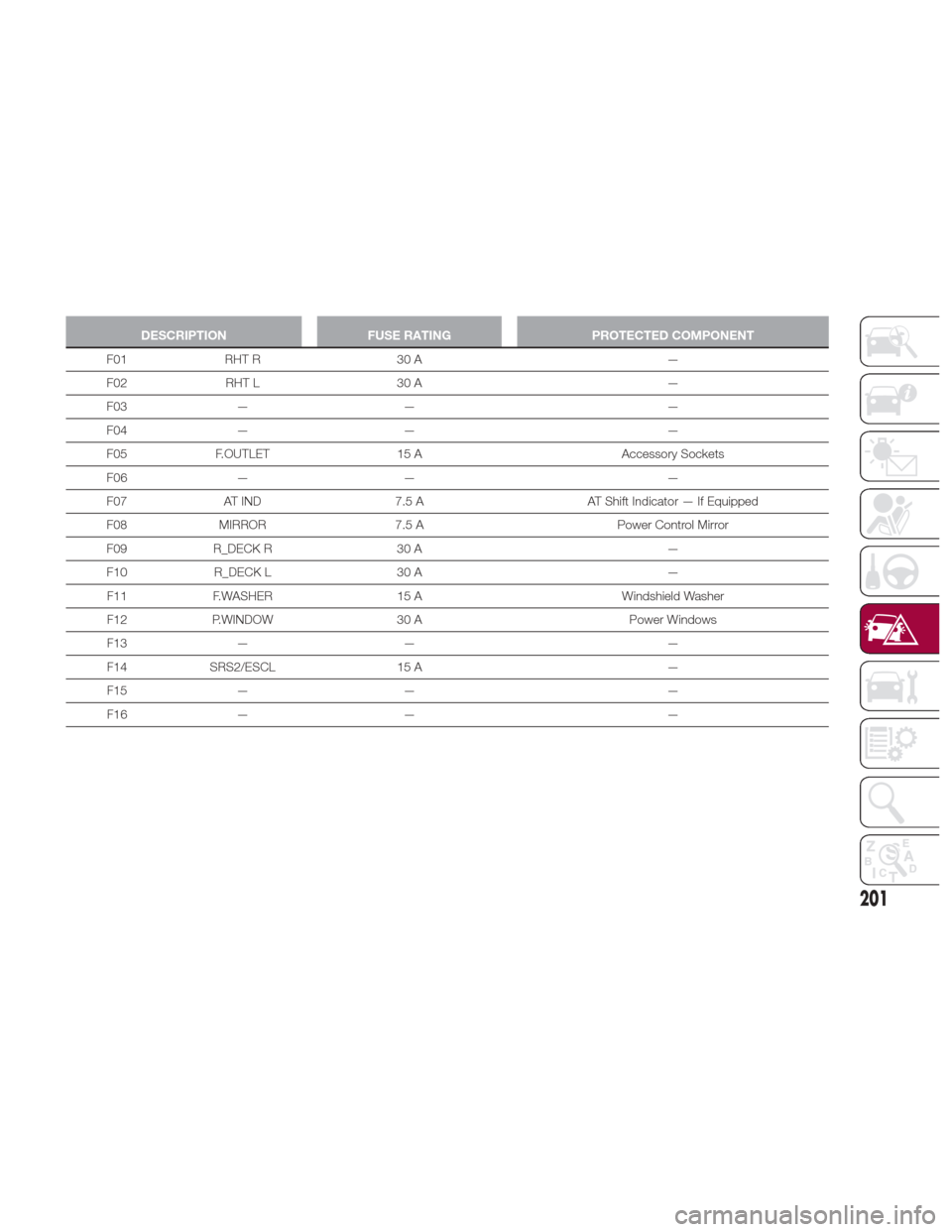
DESCRIPTIONFUSE RATINGPROTECTED COMPONENT
F01 RHT R 30 A —
F02
RHT L 30 A —
F03 — — —
F04 — — —
F05 F.OUTLET 15 A Accessory Sockets
F06 — — —
F07 AT IND 7.5 A AT Shift Indicator — If Equipped
F08 MIRROR 7.5 A Power Control Mirror
F09 R_DECK R 30 A —
F10 R_DECK L 30 A —
F11 F.WASHER 15 A Windshield Washer
F12 P.WINDOW 30 A Power Windows
F13 — — —
F14 SRS2/ESCL 15 A —
F15 — — —
F16 — — —
201