light FIAT 500 2017 2.G Owners Manual
[x] Cancel search | Manufacturer: FIAT, Model Year: 2017, Model line: 500, Model: FIAT 500 2017 2.GPages: 350, PDF Size: 3.01 MB
Page 271 of 350
Preparations For Jump-Start
The battery in your vehicle is located between the left
front headlight assembly and the left front wheel splash
shield.
WARNING!
•Take care to avoid the radiator cooling fan when-
ever the hood is raised. It can start anytime the
ignition switch is ON. You can be injured by
moving fan blades.
• Remove any metal jewelry such as rings, watch
bands and bracelets that could make an inadver-
tent electrical contact. You could be seriously
injured.
• Batteries contain sulfuric acid that can burn your
skin or eyes and generate hydrogen gas which is
flammable and explosive. Keep open flames or
sparks away from the battery.
1. Set the parking brake, shift the automatic transmis- sion into PARK and turn the ignition to LOCK.
2. Turn off the heater, radio, and all unnecessary elec- trical accessories.
3. Remove the protective cover over the positive (+)
battery post. To remove the cover, push the locking
tab and pull upward on the cover.
Battery Posts
1 — Positive (+) Post (Covered With Protective Cap)
2 — Negative (-) Post
6
WHAT TO DO IN EMERGENCIES 269
Page 282 of 350
ONBOARD DIAGNOSTIC SYSTEM — OBD II
Your vehicle is equipped with a sophisticated Onboard
Diagnostic system called OBD II. This system monitors
the performance of the emissions, engine, and auto-
matic transmission control systems. When these sys-
tems are operating properly, your vehicle will provide
excellent performance and fuel economy, as well as
engine emissions well within current government regu-
lations.
If any of these systems require service, the OBD II
system will turn on the Malfunction Indicator Light
(MIL). It will also store diagnostic codes and other
information to assist your service technician in making
repairs. Although your vehicle will usually be drivable
and not need towing, see your authorized dealer for
service as soon as possible.
CAUTION!
•Prolonged driving with the MIL on could cause
further damage to the emission control system. It
could also affect fuel economy and driveability.
(Continued)
CAUTION! (Continued)
The vehicle must be serviced before any emis-
sions tests can be performed.
• If the MIL is flashing while the engine is running,
severe catalytic converter damage and power loss
will soon occur. Immediate service is required.
Onboard Diagnostic System (OBD II)
Cybersecurity
Your vehicle is required to have an Onboard Diagnostic
system (OBD II) and a connection port to allow access to
information related to the performance of your emis-
sions controls. Authorized service technicians may need
to access this information to assist with the diagnosis
and service of your vehicle and emissions system.
WARNING!
• ONLY an authorized service technician should
connect equipment to the OBD II connection port
in order to diagnose or service your vehicle.
(Continued)
280 MAINTAINING YOUR VEHICLE
Page 283 of 350
WARNING!(Continued)
•If unauthorized equipment is connected to the
OBD II connection port, such as a driver-behavior
tracking device, it may:
• Be possible that vehicle systems, including
safety related systems, could be impaired or a
loss of vehicle control could occur that may
result in an accident involving serious injury or
death.
• Access, or allow others to access, information
stored in your vehicle systems, including per-
sonal information.
For further information, refer to “Cybersecurity” in the
“Understanding Your Instrument Panel” section.
EMISSIONS INSPECTION AND MAINTENANCE
PROGRAMS
In some localities, it may be a legal requirement to pass
an inspection of your vehicle’s emissions control sys-
tem. Failure to pass could prevent vehicle registration. For states that require an Inspection and Main-
tenance (I/M), this check verifies the “Malfunc-
tion Indicator Light (MIL)” is functioning and is
not on when the engine is running, and that the OBD II
system is ready for testing.
Normally, the OBD II system will be ready. The OBD II
system may notbe ready if your vehicle was recently
serviced, recently had a dead battery or a battery
replacement. If the OBD II system should be deter-
mined not ready for the I/M test, your vehicle may fail
the test.
Your vehicle has a simple ignition actuated test, which
you can use prior to going to the test station. To check
if your vehicle’s OBD II system is ready, you must do
the following:
1. Cycle the ignition switch to the ON position, but do not crank or start the engine.
7
MAINTAINING YOUR VEHICLE 281
Page 284 of 350
NOTE:If you crank or start the engine, you will have to
start this test over.
2. As soon as you cycle the ignition switch to the ON position, you will see the “Malfunction Indicator
Light (MIL)” symbol come on as part of a normal
bulb check.
3. Approximately 15 seconds later, one of two things will happen:
• The MIL will flash for about 10 seconds and then
return to being fully illuminated until you turn OFF
the ignition or start the engine. This means that your
vehicle’s OBD II system is not readyand you should
not proceed to the I/M station.
• The MIL will not flash at all and will remain fully
illuminated until you place the ignition in the off
position or start the engine. This means that your
vehicle’s OBD II system is readyand you can proceed
to the I/M station.
If your OBD II system is not ready,you should see your
authorized dealer or repair facility. If your vehicle was
recently serviced or had a battery failure or replace-
ment, you may need to do nothing more than drive
your vehicle as you normally would in order for your OBD II system to update. A recheck with the above test
routine may then indicate that the system is
now ready.
Regardless of whether your vehicle’s OBD II system is
ready or not, if the MIL is illuminated during normal
vehicle operation you should have your vehicle ser-
viced before going to the I/M station. The I/M station
can fail your vehicle because the MIL is on with the
engine running.
REPLACEMENT PARTS
Use of genuine parts for normal/scheduled mainte-
nance and repairs is highly recommended to ensure the
designed performance. Damage or failures caused by
the use of parts which are not quality-equivalent to
genuine parts for maintenance and repairs will not be
covered by the manufacturer ’s warranty.
DEALER SERVICE
Your authorized dealer has the qualified service person-
nel, special tools, and equipment to perform all service
operations in an expert manner. Service Manuals are
available which include detailed service information for
your vehicle. Refer to these Service Manuals before
attempting any procedure yourself.
282 MAINTAINING YOUR VEHICLE
Page 302 of 350
•Maintain engine coolant (antifreeze) concentration at
a minimum of 50% OAT coolant (conforming to
MS.90032) and distilled water for proper corrosion
protection of your engine which contains aluminum
components.
• Make sure that the coolant expansion bottle overflow
hoses are not kinked or obstructed.
• Keep the front of the radiator clean. If your vehicle is
equipped with air conditioning, keep the front of the
condenser clean.
• Do not change the thermostat for Summer or Winter
operation. If replacement is ever necessary, install
ONLY the correct type thermostat. Other designs
may result in unsatisfactory engine coolant (anti-
freeze) performance, poor gas mileage, and increased
emissions.
Brake System
In order to assure brake system performance, all brake
system components should be inspected periodically.
Refer to the “Maintenance Schedule” for the proper
maintenance intervals.
WARNING!
Riding the brakes can lead to brake failure and
possibly a collision. Driving with your foot resting
or riding on the brake pedal can result in abnor-
mally high brake temperatures, excessive lining
wear, and possible brake damage. Riding the
brakes may also reduce braking capacity in an
emergency.
Brake Master Cylinder
The fluid level in the master cylinder should be checked
when performing under hood services, or immediately
if the “Brake Warning Light” is on.
Be sure to clean the top of the master cylinder area
before removing the cap. If necessary, add fluid to bring
the fluid level up to the requirements described on the
brake fluid reservoir. Fluid level can be expected to fall
as the brake pads wear. The brake fluid level should be
checked when the pads are replaced. However, low
fluid level may be caused by a leak and a checkup may
be needed.
300 MAINTAINING YOUR VEHICLE
Page 309 of 350
WARNING!
Do not use volatile solvents for cleaning purposes.
Many are potentially flammable, and if used in
closed areas they may cause respiratory harm.
CAUTION!
Direct contact of air fresheners, insect repellents,
suntan lotions, or hand sanitizers to the plastic,
painted, or decorated surfaces of the interior may
cause permanent damage. Wipe away immediately.
CAUTION!
Damage caused by these type of products may not
be covered by your New Vehicle Limited Warranty.
CAUTION!
Do not use Alcohol and Alcohol-based and/or Ke-
ton based cleaning products to clean leather seats,
as damage to the seat may result.
Cleaning Headlights
Your vehicle has plastic headlights that are lighter and
less susceptible to stone breakage than glass headlights.
Plastic is not as scratch resistant as glass and therefore
different lens cleaning procedures must be followed.
To minimize the possibility of scratching the lenses and
reducing light output, avoid wiping with a dry cloth. To
remove road dirt, wash with a mild soap solution
followed by rinsing.
Do not use abrasive cleaning components, solvents,
steel wool or other aggressive material to clean the
lenses.
Glass Surfaces
All glass surfaces should be cleaned on a regular basis
with MOPAR Glass Cleaner, or any commercial
household-type glass cleaner. Never use an abrasive
type cleaner. Use caution when cleaning the inside rear
window equipped with electric defrosters or windows
equipped with radio antennas. Do not use scrapers or
other sharp instrument that may scratch the elements.
7
MAINTAINING YOUR VEHICLE 307
Page 313 of 350
WARNING!(Continued)
•If the replaced fuse blows again, contact an au-
thorized dealer.
• If a general protection fuse for safety systems (air
bag system, braking system), power unit systems
(engine system, gearbox system) or steering sys-
tem blows, contact an authorized dealer.
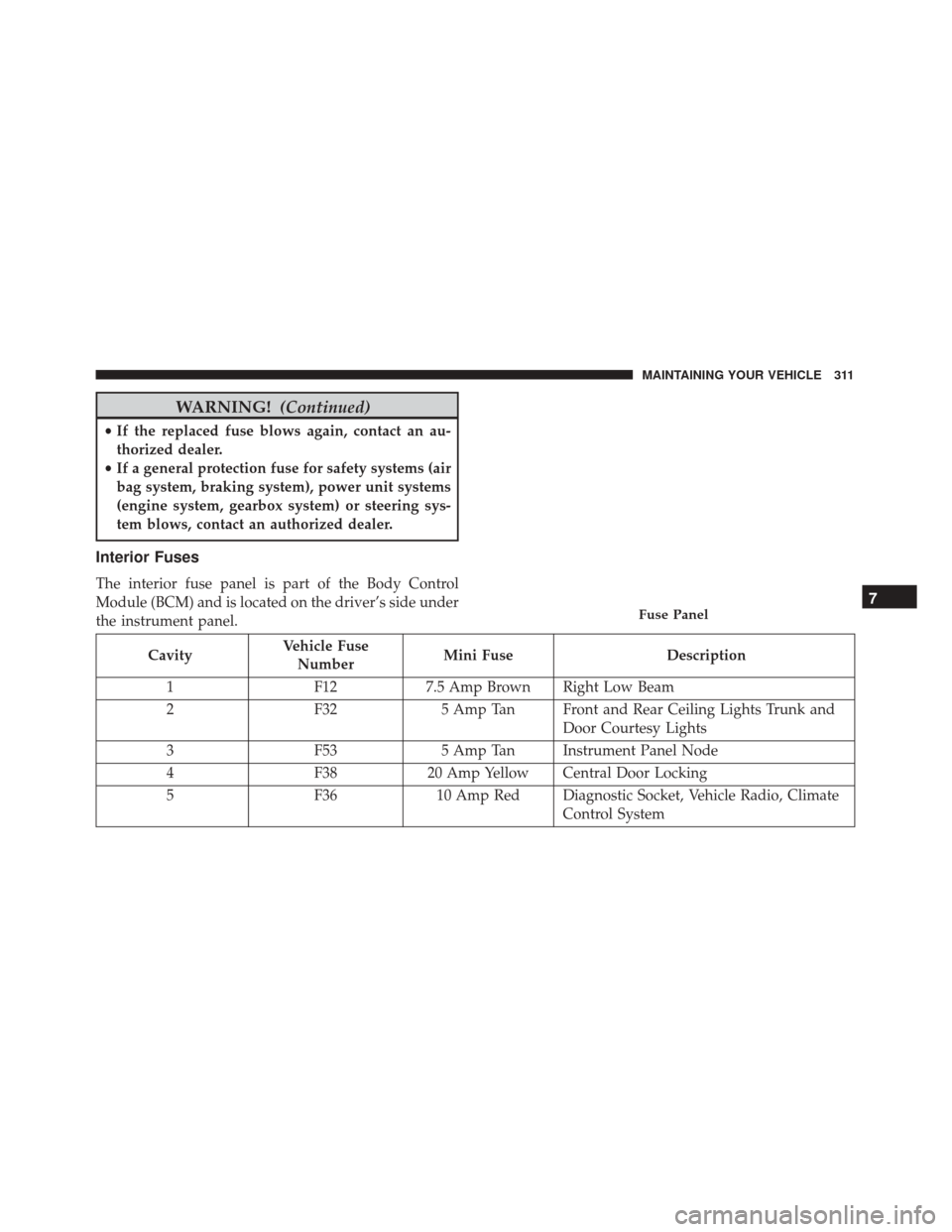
Interior Fuses
The interior fuse panel is part of the Body Control
Module (BCM) and is located on the driver’s side under
the instrument panel.
Cavity Vehicle Fuse
Number Mini Fuse
Description
1 F127.5 Amp Brown Right Low Beam
2 F325 Amp Tan Front and Rear Ceiling Lights Trunk and
Door Courtesy Lights
3 F535 Amp Tan Instrument Panel Node
4 F3820 Amp Yellow Central Door Locking
5 F3610 Amp Red Diagnostic Socket, Vehicle Radio, Climate
Control System
Fuse Panel7
MAINTAINING YOUR VEHICLE 311
Page 314 of 350
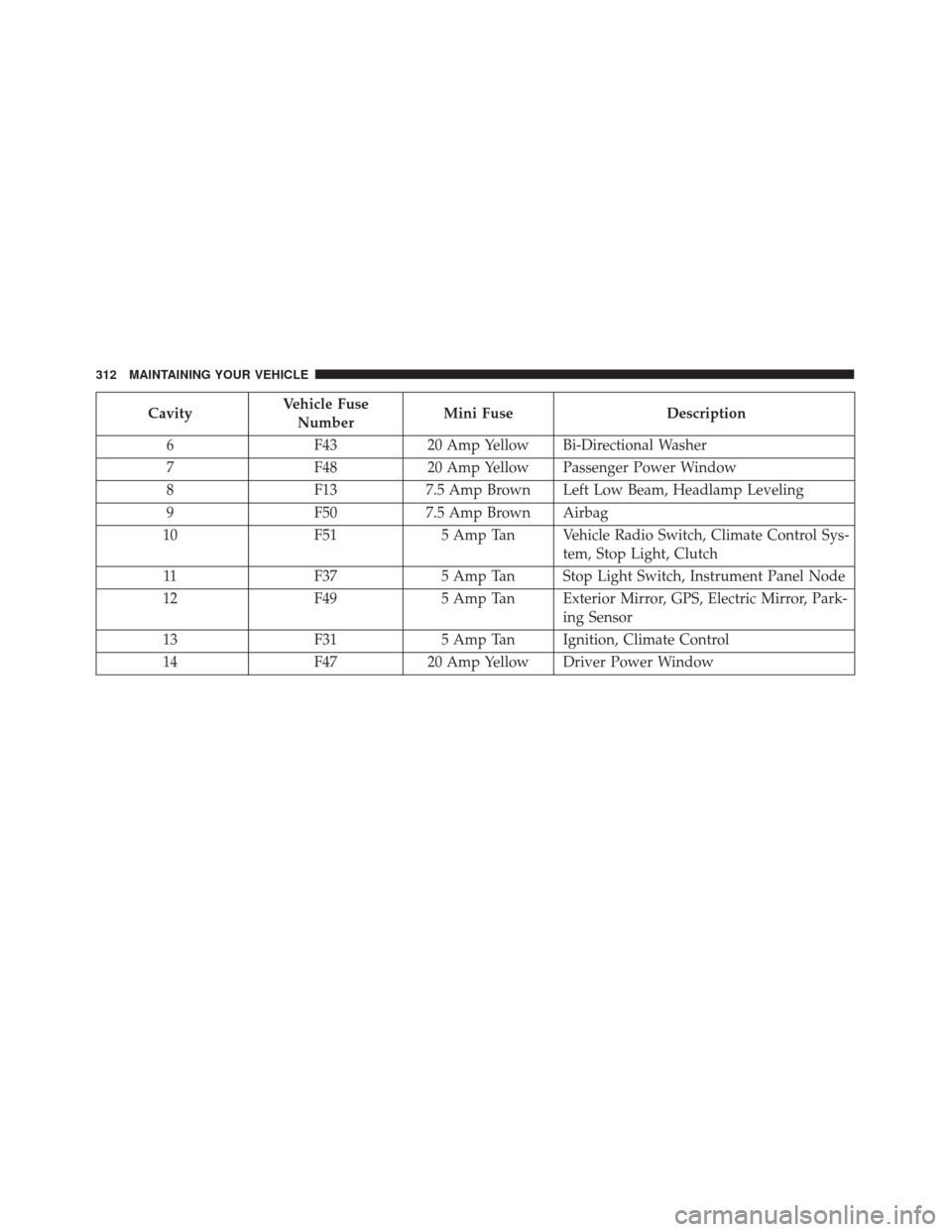
CavityVehicle Fuse
Number Mini Fuse
Description
6 F4320 Amp Yellow Bi-Directional Washer
7 F4820 Amp Yellow Passenger Power Window
8 F137.5 Amp Brown Left Low Beam, Headlamp Leveling
9 F507.5 Amp Brown Airbag
10 F515 Amp Tan Vehicle Radio Switch, Climate Control Sys-
tem, Stop Light, Clutch
11 F375 Amp Tan Stop Light Switch, Instrument Panel Node
12 F495 Amp Tan Exterior Mirror, GPS, Electric Mirror, Park-
ing Sensor
13 F315 Amp Tan Ignition, Climate Control
14 F4720 Amp Yellow Driver Power Window
312 MAINTAINING YOUR VEHICLE
Page 316 of 350
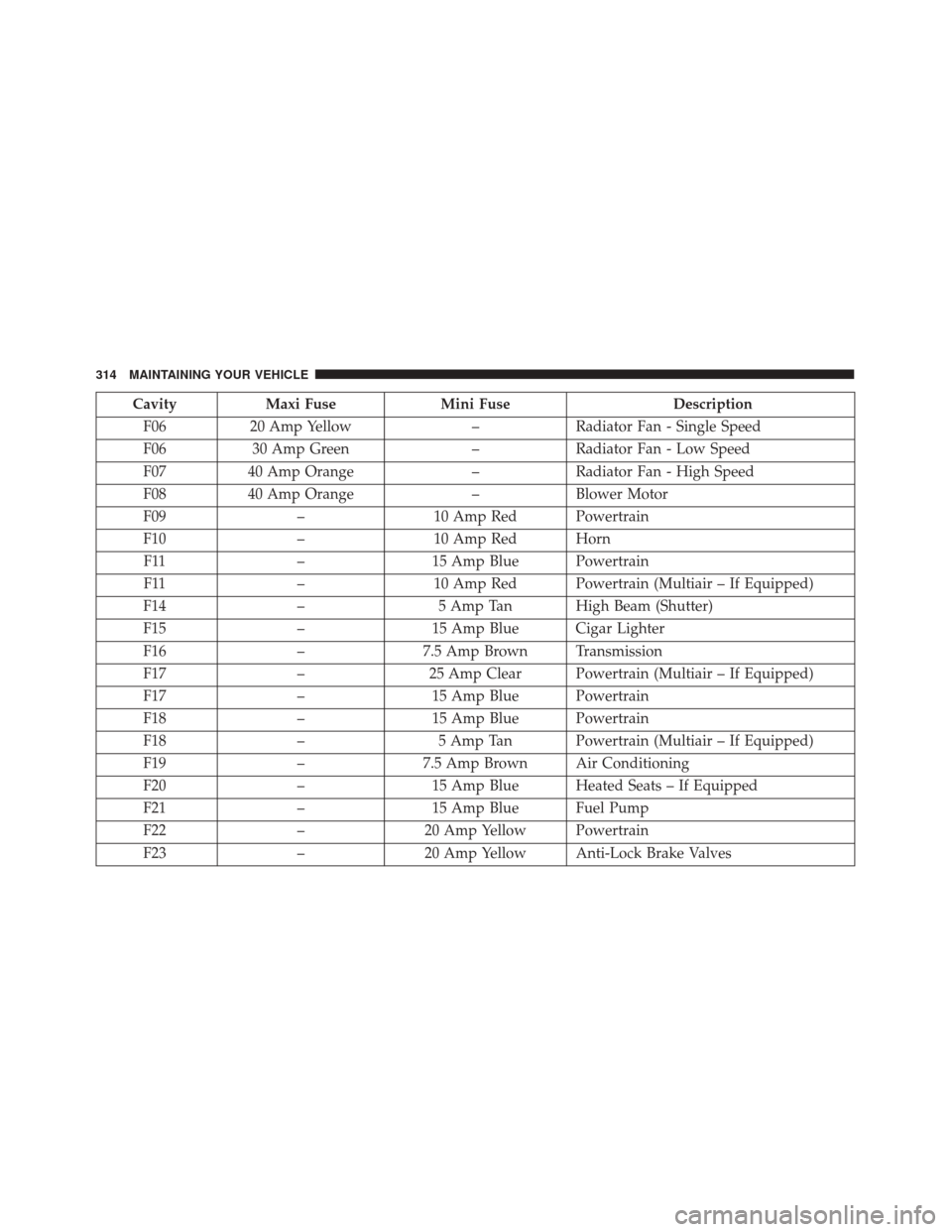
CavityMaxi Fuse Mini Fuse Description
F06 20 Amp Yellow –Radiator Fan - Single Speed
F06 30 Amp Green –Radiator Fan - Low Speed
F07 40 Amp Orange –Radiator Fan - High Speed
F08 40 Amp Orange –Blower Motor
F09 –10 Amp Red Powertrain
F10 –10 Amp Red Horn
F11 –15 Amp Blue Powertrain
F11 –10 Amp Red Powertrain (Multiair – If Equipped)
F14 –5 Amp Tan High Beam (Shutter)
F15 –15 Amp Blue Cigar Lighter
F16 –7.5 Amp Brown Transmission
F17 –25 Amp Clear Powertrain (Multiair – If Equipped)
F17 –15 Amp Blue Powertrain
F18 –15 Amp Blue Powertrain
F18 –5 Amp Tan Powertrain (Multiair – If Equipped)
F19 –7.5 Amp Brown Air Conditioning
F20 –15 Amp Blue Heated Seats – If Equipped
F21 –15 Amp Blue Fuel Pump
F22 –20 Amp Yellow Powertrain
F23 –20 Amp Yellow Anti-Lock Brake Valves
314 MAINTAINING YOUR VEHICLE
Page 319 of 350
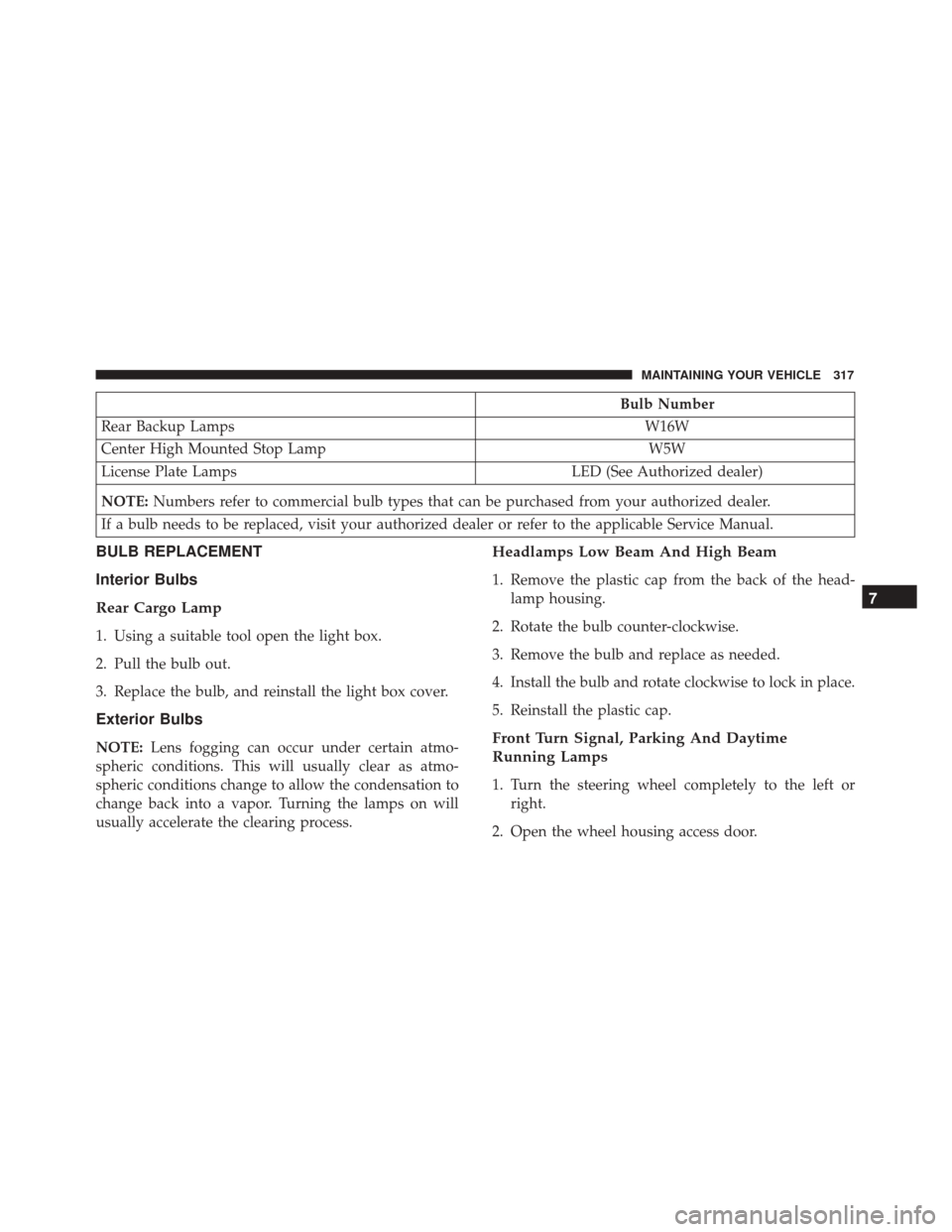
Bulb Number
Rear Backup Lamps W16W
Center High Mounted Stop Lamp W5W
License Plate Lamps LED (See Authorized dealer)
NOTE: Numbers refer to commercial bulb types that can be purchased from your authorized dealer.
If a bulb needs to be replaced, visit your authorized dealer or refer to the applicable Service Manual.
BULB REPLACEMENT
Interior Bulbs
Rear Cargo Lamp
1. Using a suitable tool open the light box.
2. Pull the bulb out.
3. Replace the bulb, and reinstall the light box cover.
Exterior Bulbs
NOTE: Lens fogging can occur under certain atmo-
spheric conditions. This will usually clear as atmo-
spheric conditions change to allow the condensation to
change back into a vapor. Turning the lamps on will
usually accelerate the clearing process.
Headlamps Low Beam And High Beam
1. Remove the plastic cap from the back of the head- lamp housing.
2. Rotate the bulb counter-clockwise.
3. Remove the bulb and replace as needed.
4. Install the bulb and rotate clockwise to lock in place.
5. Reinstall the plastic cap.
Front Turn Signal, Parking And Daytime
Running Lamps
1. Turn the steering wheel completely to the left or right.
2. Open the wheel housing access door.
7
MAINTAINING YOUR VEHICLE 317