instrument cluster FIAT 500 GUCCI 2012 2.G User Guide
[x] Cancel search | Manufacturer: FIAT, Model Year: 2012, Model line: 500 GUCCI, Model: FIAT 500 GUCCI 2012 2.GPages: 80, PDF Size: 1.87 MB
Page 3 of 80
INTRODUCTION/WELCOME
Welcome From Fiat.............2
CONTROLS AT A GLANCE
Driver Cockpit...............4
Instrument Cluster.............6
GETTING STARTED
Key Fo b...................8
Theft Alarm.................8
Power Door Locks.............8
Seat Belt...................9
Supplemental Restraint System (SRS) —
Air Bags...................9
Child Restraints...............10
Front Seats.................12
Rear Seats..................14
Tilt Steering Column............14
Heated Seats................15
OPERATING YOUR VEHICLE
Turn Signal/Lights/High Beam Lever.....16
Wiper/Washer Lever............17
Speed Control................18
Power Windows...............19
Manual Climate Controls..........20
Automatic Temperature Controls
(ATC)....................21
Rear Park Assist...............21
Sport Mode.................22
Manual Transmission.............22
Power Sunroof...............22
Power Convertible Top Operation.....23
Wind Buffeting...............24
Cold Weather Operation (Engine Block
Heater)...................25
ELECTRONICS
Your Vehicle's Sound System.........26
AM/FM Radio With CD Player And Sirius
XM™ Satellite Radio............28
BLUE&ME™ Hands-Free
Communication...............29
iPod®/USB/MP3 Control..........34
Electronic Vehicle Information
Center (EVIC)................35
Programmable Features...........35
Trip Button.................36
Power Outlet................37
UTILITY
Trailer Towing................38
Recreational Towing (Behind
Motorhome, Etc.)..............38
WHAT TO DO IN EMERGENCIES
24-Hour Roadside Assistance........39
Instrument Cluster Warning Lights.....39
If Your Engine Overheats..........42
Jacking And Tire Changing..........43
TIREFIT Kit.................49
Jump-Starting Procedure..........53
Shift Lever Override.............56
Towing A Disabled Vehicle..........56
Enhanced Accident Response System....57
Freeing A Stuck Vehicle...........58
Event Data Recorder (EDR).........59
MAINTAINING YOUR VEHICLE
Opening The Hood.............60
Engine Compartment............61
Fluids And Capacities............62
Maintenance Chart.............63
Fuses....................65
Tire Pressures................66
Wheel And Wheel Trim Care....... 67
Exterior Bulbs................67
CONSUMER ASSISTANCE
Fiat Customer Center............68
Assistance For The Hearing Impaired... 68
Publications Ordering............68
Reporting Safety Defects In The 50 United
States And Washington, D.C..........69
MOPAR ACCESSORIES
Authentic Accessories By MOPAR®.....70
INDEX.................. 71
FAQ(HowTo?)
Frequently Asked Questions.........73
TABLE OF CONTENTS
1
Page 7 of 80

A. Turn Signal/Lights Lever pg. 16
B. Instrument Cluster pg. 6
C. Electronic Vehicle Information Center (EVIC)
Display pg. 35
D. Electronic Vehicle Information Center (EVIC)
Controls pg. 35
E. Wiper/Washer Lever pg. 17
F. Audio System pg. 28G. SWITCH PANEL
− Sport Function pg. 22
− Hazard Switch
− Rear Defrost
H. Climate Controls pg. 20
I. Passenger Power Window Switch
J. Transmission Gear Selector K. Driver Power Window Switch
L. Speed Control pg. 18
M. Hood Release
N. BLUE&ME™ Hands-Free Communication
pg. 29
O. Door Handle/Power Door Locks
P. Power Mirror Switches
CONTROLS AT A GLANCE
5
Page 8 of 80
INSTRUMENT CLUSTER
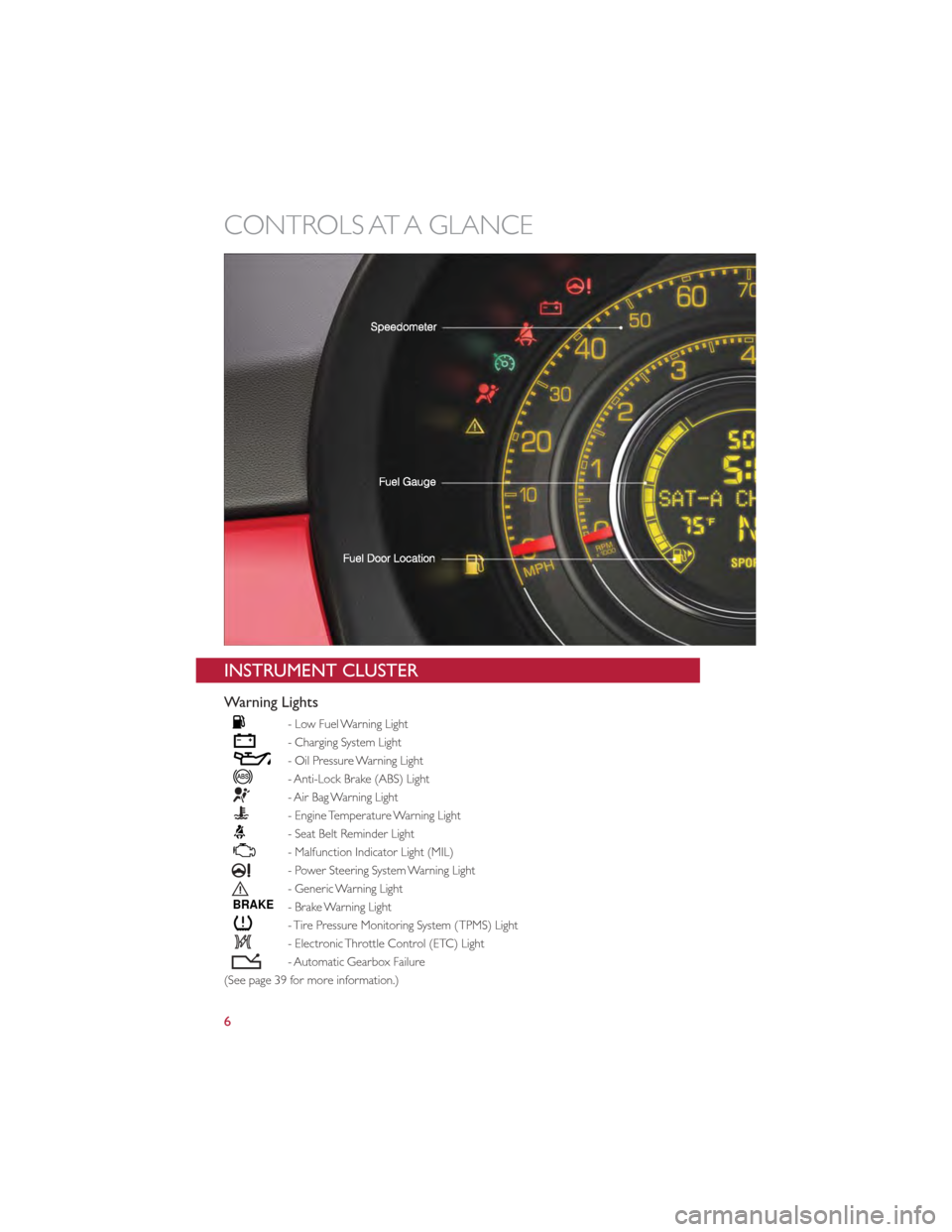
Warning Lights
- Low Fuel Warning Light
- Charging System Light
- Oil Pressure Warning Light
- Anti-Lock Brake (ABS) Light
- Air Bag Warning Light
- Engine Temperature Warning Light
- Seat Belt Reminder Light
- Malfunction Indicator Light (MIL)
- Power Steering System Warning Light
- Generic Warning Light
BRAKE- Brake Warning Light
- Tire Pressure Monitoring System (TPMS) Light
- Electronic Throttle Control (ETC) Light
- Automatic Gearbox Failure
(See page 39 for more information.)
CONTROLS AT A GLANCE
6
Page 20 of 80
Washer Operation
•Pull the lever toward you and hold for as long as spray is desired.
Rear Wiper
Rear Wiper Operation
•Rotate the end of the lever to activate the rear wiper.
Rear Washer Operation
• Push the lever forward and hold for as long as spray is desired.
SPEED CONTROL
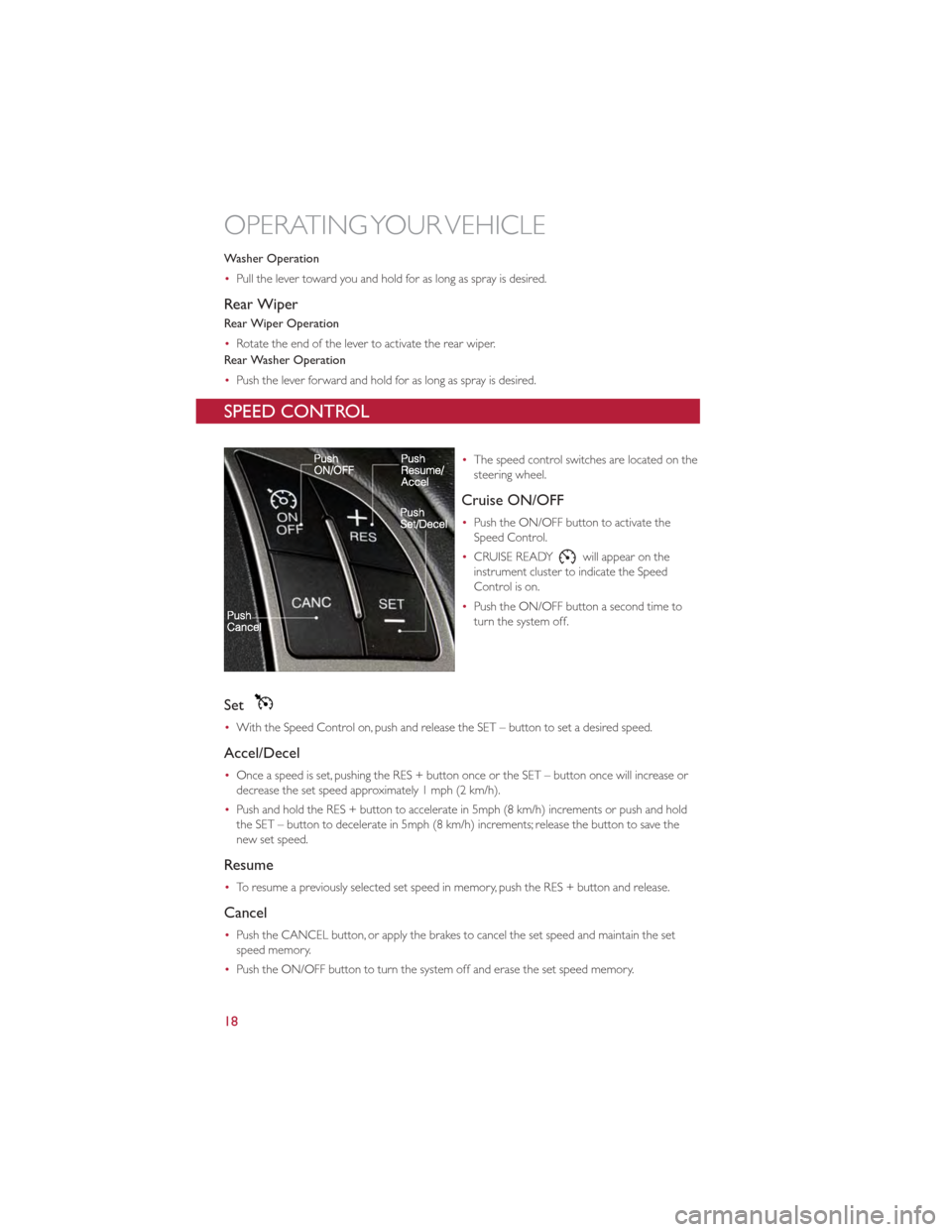
•The speed control switches are located on the
steering wheel.
Cruise ON/OFF
•Push the ON/OFF button to activate the
Speed Control.
• CRUISE READY
will appear on the
instrument cluster to indicate the Speed
Control is on.
• Push the ON/OFF button a second time to
turn the system off.
Set
•With the Speed Control on, push and release the SET – button to set a desired speed.
Accel/Decel
•Once a speed is set, pushing the RES + button once or the SET – button once will increase or
decrease the set speed approximately 1 mph (2 km/h).
• Push and hold the RES + button to accelerate in 5mph (8 km/h) increments or push and hold
the SET – button to decelerate in 5mph (8 km/h) increments; release the button to save the
new set speed.
Resume
•To resume a previously selected set speed in memory, push the RES + button and release.
Cancel
•Push the CANCEL button, or apply the brakes to cancel the set speed and maintain the set
speed memory.
• Push the ON/OFF button to turn the system off and erase the set speed memory.
OPERATING YOUR VEHICLE
18
Page 23 of 80
AUTOMATIC TEMPERATURE CONTROLS (ATC)
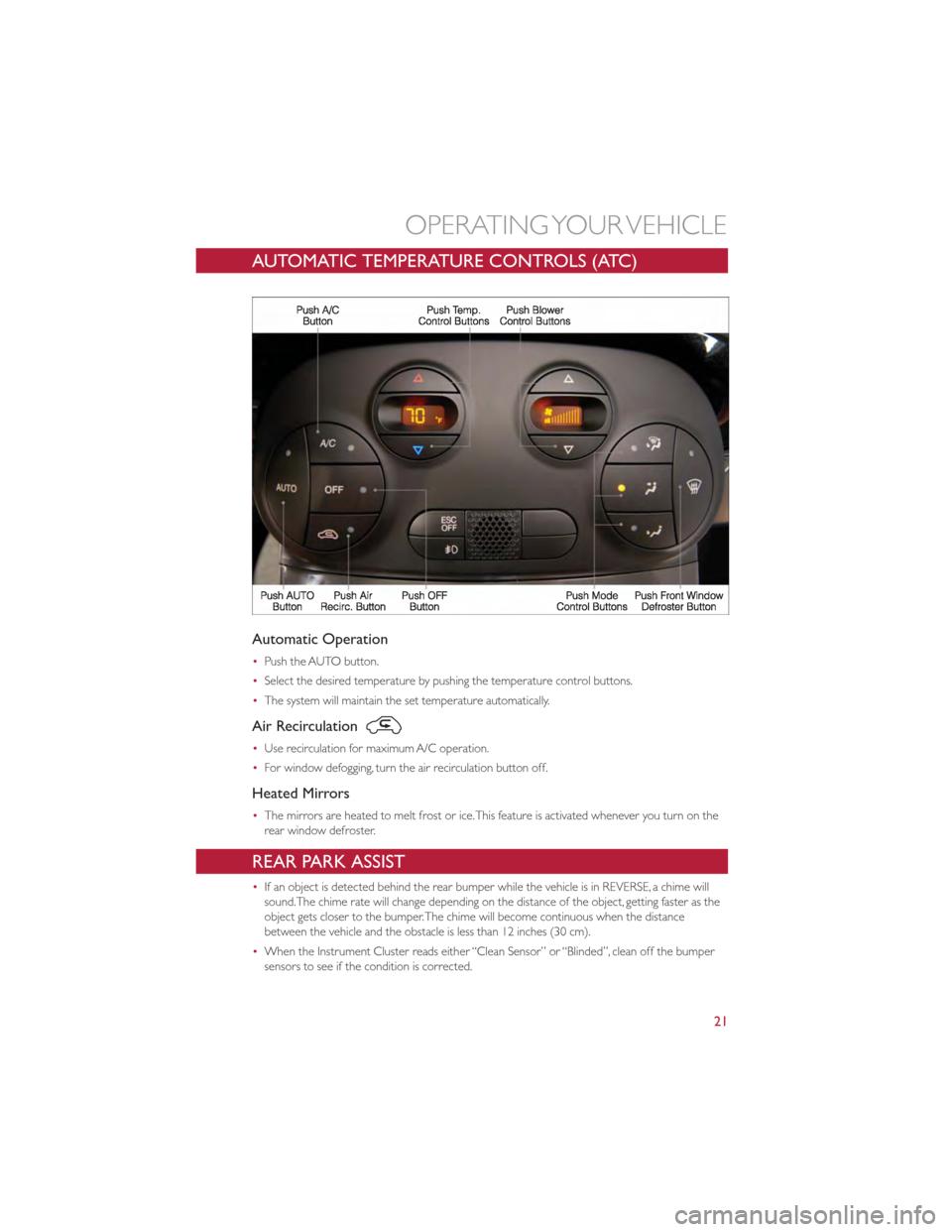
Automatic Operation
•Push the AUTO button.
• Select the desired temperature by pushing the temperature control buttons.
• The system will maintain the set temperature automatically.
Air Recirculation
•Use recirculation for maximum A/C operation.
• For window defogging, turn the air recirculation button off.
Heated Mirrors
•The mirrors are heated to melt frost or ice.This feature is activated whenever you turn on the
rear window defroster.
REAR PARK ASSIST
•If an object is detected behind the rear bumper while the vehicle is in REVERSE, a chime will
sound.The chime rate will change depending on the distance of the object, getting faster as the
object gets closer to the bumper.The chime will become continuous when the distance
between the vehicle and the obstacle is less than 12 inches (30 cm).
• When the Instrument Cluster reads either “Clean Sensor” or “Blinded”, clean off the bumper
sensors to see if the condition is corrected.
OPERATING YOUR VEHICLE
21
Page 24 of 80
SPORT MODE
•The Sport mode increases steering feedback to the driver with slight increases in effort and
throttle pedal-to-engine response. Changes to the transmission shift schedules for more
aggressive shifting will occur on automatic transmission versions.
• Sport driving mode is useful while driving on winding roads where more steering precision is
desired.
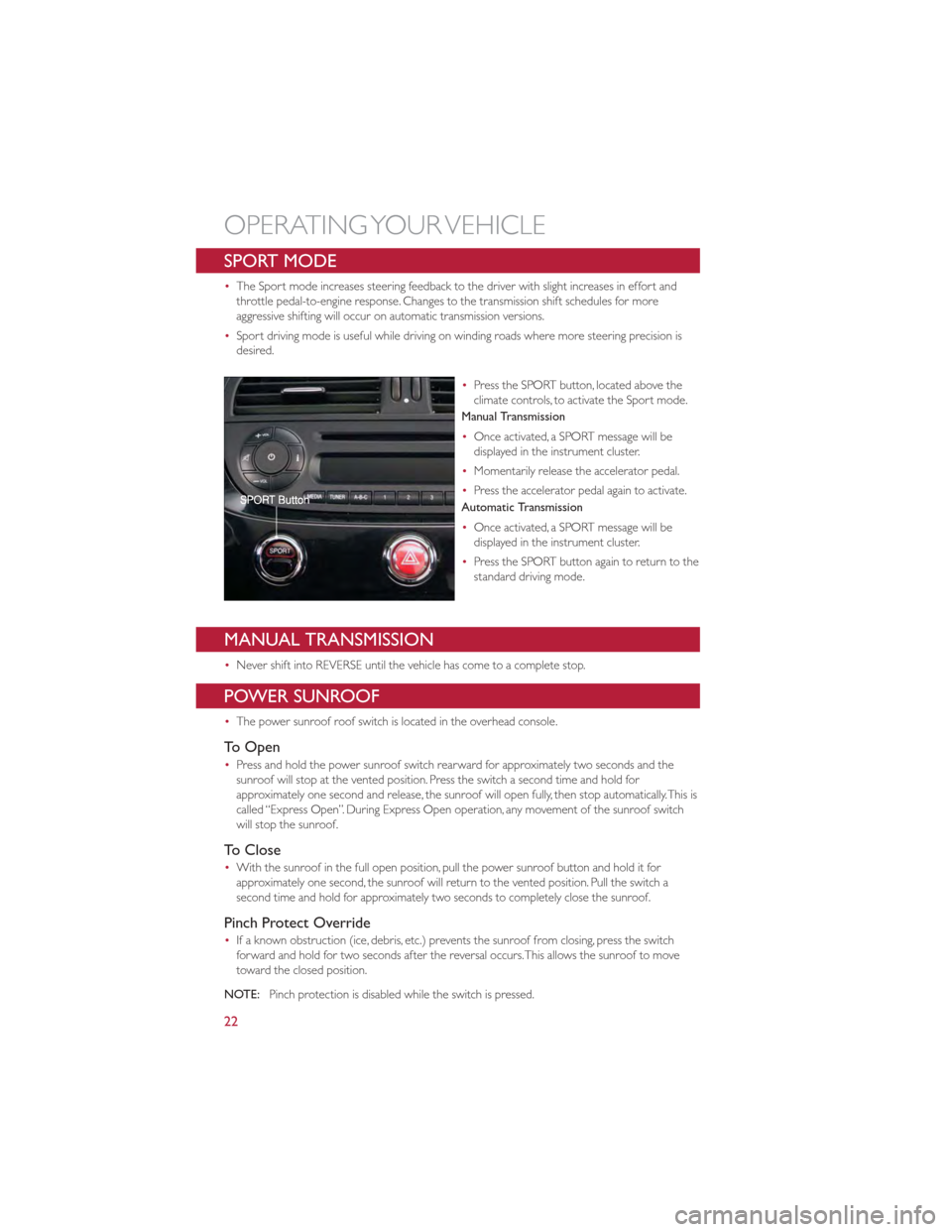
•Press the SPORT button, located above the
climate controls, to activate the Sport mode.
Manual Transmission
• Once activated, a SPORT message will be
displayed in the instrument cluster.
• Momentarily release the accelerator pedal.
• Press the accelerator pedal again to activate.
Automatic Transmission
• Once activated, a SPORT message will be
displayed in the instrument cluster.
• Press the SPORT button again to return to the
standard driving mode.
MANUAL TRANSMISSION
•Never shift into REVERSE until the vehicle has come to a complete stop.
POWER SUNROOF
•The power sunroof roof switch is located in the overhead console.
To Open
•Press and hold the power sunroof switch rearward for approximately two seconds and the
sunroof will stop at the vented position. Press the switch a second time and hold for
approximately one second and release, the sunroof will open fully, then stop automatically.This is
called “Express Open”. During Express Open operation, any movement of the sunroof switch
will stop the sunroof.
To Close
•With the sunroof in the full open position, pull the power sunroof button and hold it for
approximately one second, the sunroof will return to the vented position. Pull the switch a
second time and hold for approximately two seconds to completely close the sunroof.
Pinch Protect Override
•If a known obstruction (ice, debris, etc.) prevents the sunroof from closing, press the switch
forward and hold for two seconds after the reversal occurs.This allows the sunroof to move
toward the closed position.
NOTE: Pinch protection is disabled while the switch is pressed.
OPERATING YOUR VEHICLE
22
Page 27 of 80
COLD WEATHER OPERATION (Engine Block Heater)
Engine Block Heater
•To prevent possible engine damage while starting at low temperatures, this vehicle will inhibit
engine cranking when the ambient temperature is less than –22° F (–30° C) and the oil
temperature sensor reading indicates an engine block heater has not been used.An
externally-powered electric engine block heater is available as optional equipment or from your
authorized dealer.
• The message "plug in engine heater" will be displayed in the instrument cluster when the
ambient temperature is below 5° F (–15° C) at the time the engine is shut off as a reminder to
avoid possible crank delays at the next cold start.
If Engine Fails To Start
CAUTION!
•Use of the recommended SAE 5W-30 oil and adhering to the prescribed oil change
intervals is important to prevent engine damage and ensure satisfactory starting in
cold conditions.
• Do not attempt to push or tow your vehicle to get it started.Vehicles equipped with
an automatic transmission cannot be started this way. Unburned fuel could enter the
catalytic converter and once the engine has started, ignite and damage the converter
and vehicle.
• To prevent damage to the starter, do not continuously crank the engine for more
than 15 seconds at a time.Wait 10 to 15 seconds before trying again.
WARNING!
Never pour fuel or other flammable liquids into the throttle body air inlet opening in
an attempt to start the vehicle.This could result in a flash fire causing serious personal
injury.
OPERATING YOUR VEHICLE
25
Page 35 of 80
•If John Smith has several phone numbers but the “location” (i.e.: the type of phone number like
work, home, etc.) is missing, the system will display the selected contact and a list of related
phone numbers on the instrument cluster display.The hands-free phone system will ask if you
would like to call the phone number displayed.To respond with “yes”, say “Yes”, otherwise say
“No”. If this is the correct contact but the wrong number, say “Forward” or “Backward” to
navigate to the phone number you’d like to call.To call the displayed phone number, pronounce
“Call”.You can also scroll through the phone number list manually by pressing the buttons on the
back of the steering wheel until you find the required number.Then, press the PRESET UP/OK
button on the rear of the steering wheel to start the call.
• To end the phone call, press the PHONE HANG UP button on the steering wheel.
• Refer to the BLUE&ME™ User's Manual on the DVD for more details.
Media Player
•With the BLUE&ME™ media player you can play, via the car sound system, the digital audio files
stored on a USB device by simply connecting it to the USB port located in the glove box of the
car.
• The MEDIA PLAYER menu enables the following:
•Display tracks stored on your USB stick/iPod
®.
• Play audio files stored on your USB stick/iPod®.
How To Connect The USB Stick/iPod
®To BLUE&ME™
• To connect your USB stick/iPod®to BLUE&ME™, proceed as follows:
• Copy tracks on your USB stick/iPod®(BLUE&ME™ recognizes.wma,.mp3 and.wav,.aac formats
for audio files and.wpl and.m3u for playlists).
• USB devices without USB wire: just connect the USB stick/iPod
®(directly or by an extension
lead) to the USB port on the car.
• USB stick/iPod
®with USB wire: use the wire to connect the USB stick/iPod®to the USB port
on the car.
• Turn the ignition key to ON. BLUE&ME™ will start automatically to play your digital tracks
selecting them from the library built at the moment the USB stick/iPod
®is connected.
• If AUTOPLAY is set to “ON”, BLUE&ME™ will start playback automatically.
• Refer to the iPod
®/USB/MP3 CONTROL section in this manual and the BLUE&ME™ User's
Manual on the DVD for more details.
WARNING!
Operating certain parts of this system while driving can distract your attention away
from the road, and possibly cause an accident or other serious consequences; for this
reason certain functions shall be disabled by the BLUE&ME™ system until driving
conditions are secure and, if required, only when the car is stopped.
ELECTRONICS
33
Page 37 of 80
ELECTRONIC VEHICLE INFORMATION CENTER (EVIC)
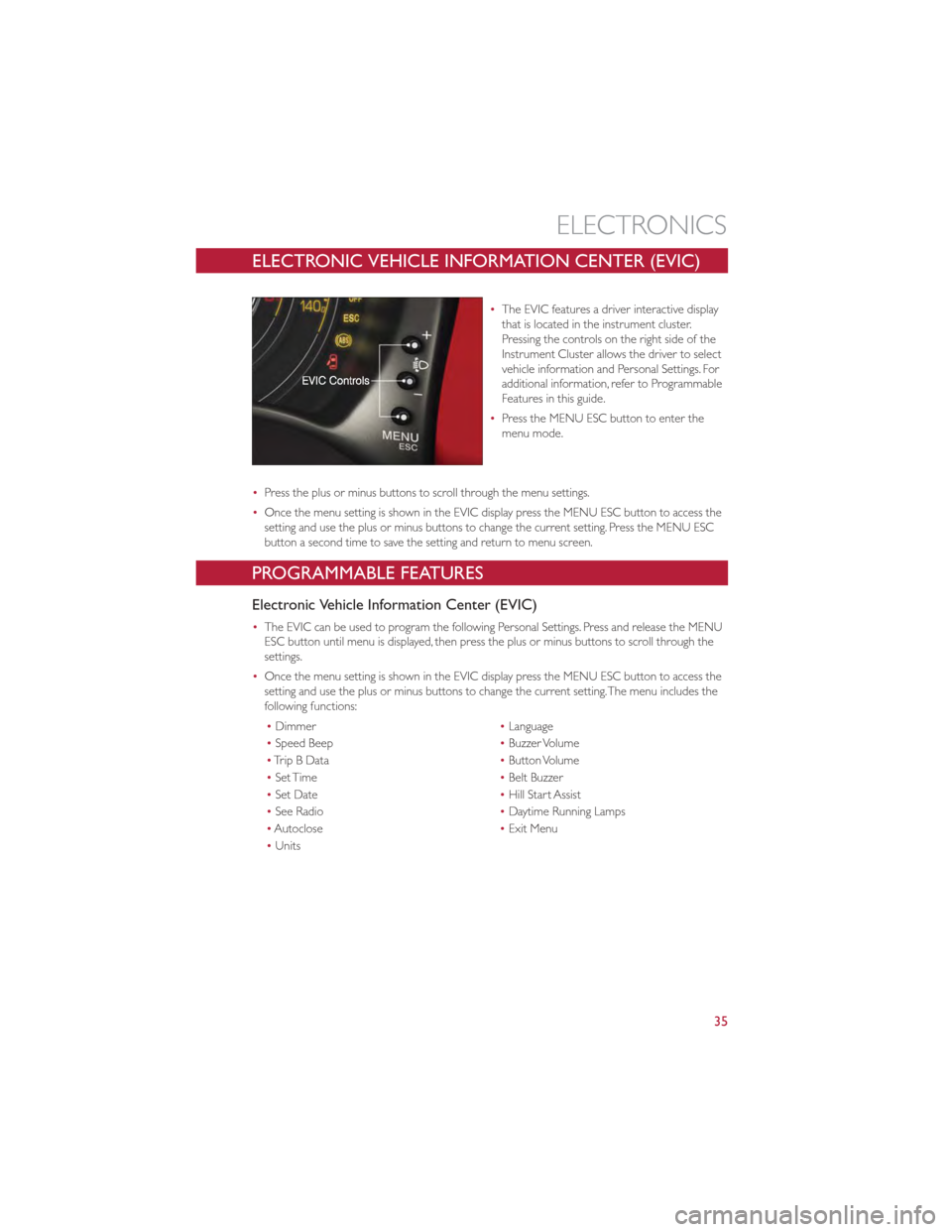
•The EVIC features a driver interactive display
that is located in the instrument cluster.
Pressing the controls on the right side of the
Instrument Cluster allows the driver to select
vehicle information and Personal Settings. For
additional information, refer to Programmable
Features in this guide.
• Press the MENU ESC button to enter the
menu mode.
• Press the plus or minus buttons to scroll through the menu settings.
• Once the menu setting is shown in the EVIC display press the MENU ESC button to access the
setting and use the plus or minus buttons to change the current setting. Press the MENU ESC
button a second time to save the setting and return to menu screen.
PROGRAMMABLE FEATURES
Electronic Vehicle Information Center (EVIC)
•The EVIC can be used to program the following Personal Settings. Press and release the MENU
ESC button until menu is displayed, then press the plus or minus buttons to scroll through the
settings.
• Once the menu setting is shown in the EVIC display press the MENU ESC button to access the
setting and use the plus or minus buttons to change the current setting.The menu includes the
following functions:
• Dimmer •Language
• Speed Beep •Buzzer Volume
• TripBData •Button Volume
• Set Time •Belt Buzzer
• Set Date •Hill Start Assist
• See Radio •Daytime Running Lamps
• Autoclose •Exit Menu
• Units
ELECTRONICS
35
Page 41 of 80
24-HOUR ROADSIDE ASSISTANCE
•If your FIAT 500 requires jump start assistance, out of gas/fuel delivery, tire service, lockout
service or towing due to a defect covered under the Basic Limited Warranty, dial toll-free
1-888-242-6342. See your Warranty booklet for further details.
• Provide your name, vehicle identification number and license plate number.
• Provide your location, including telephone number, from which you are calling.
• Briefly describe the nature of the problem and answer a few simple questions.
• You will be given the name of the service provider and an estimated time of arrival. If you feel
you are in an “unsafe situation”, please let us know.With your consent, we will contact local
police or safety authorities.
INSTRUMENT CLUSTER WARNING LIGHTS
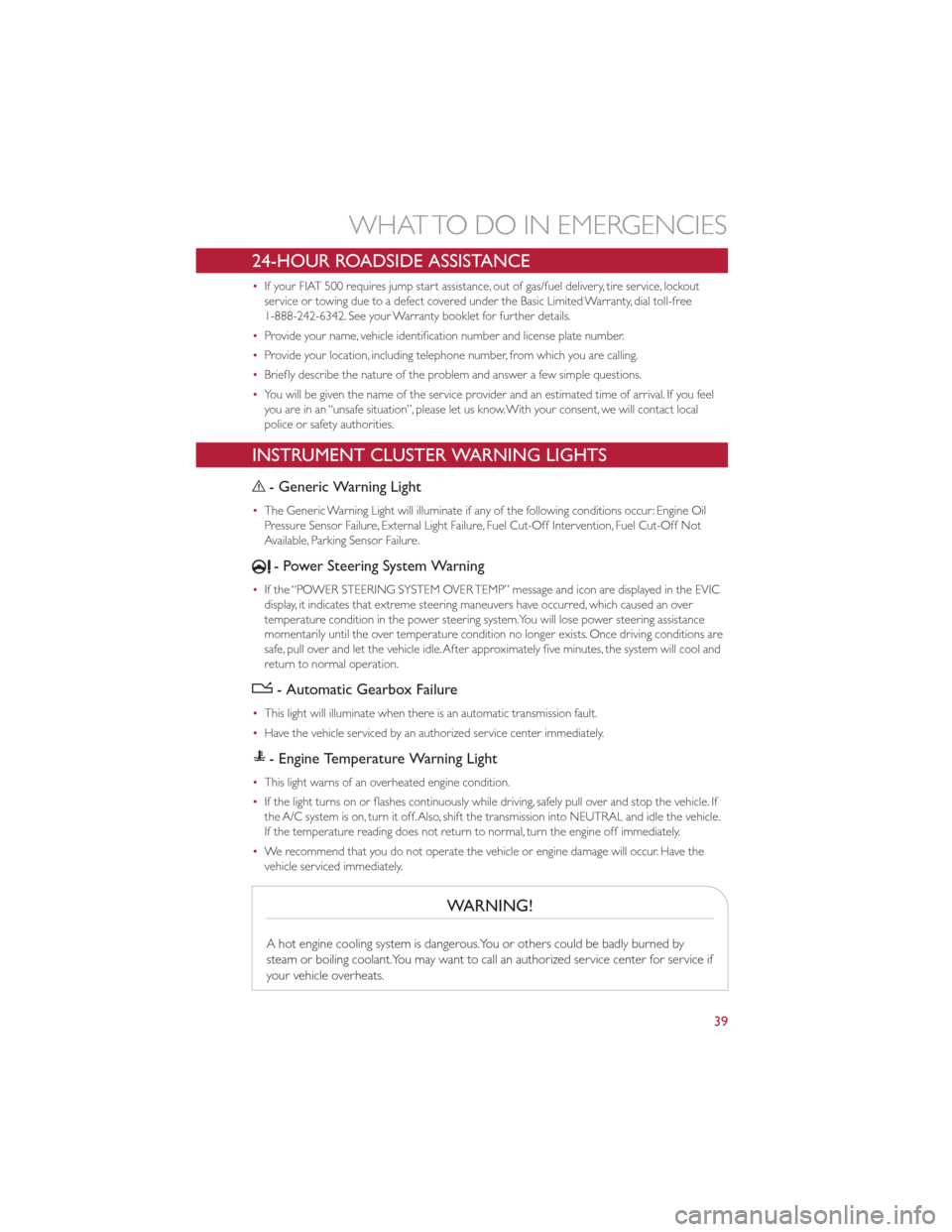
- Generic Warning Light
•The Generic Warning Light will illuminate if any of the following conditions occur: Engine Oil
Pressure Sensor Failure, External Light Failure, Fuel Cut-Off Intervention, Fuel Cut-Off Not
Available, Parking Sensor Failure.
- Power Steering System Warning
•If the “POWER STEERING SYSTEM OVER TEMP” message and icon are displayed in the EVIC
display, it indicates that extreme steering maneuvers have occurred, which caused an over
temperature condition in the power steering system.You will lose power steering assistance
momentarily until the over temperature condition no longer exists. Once driving conditions are
safe, pull over and let the vehicle idle.After approximately five minutes, the system will cool and
return to normal operation.
- Automatic Gearbox Failure
•This light will illuminate when there is an automatic transmission fault.
• Have the vehicle serviced by an authorized service center immediately.
- Engine Temperature Warning Light
•This light warns of an overheated engine condition.
• If the light turns on or flashes continuously while driving, safely pull over and stop the vehicle. If
the A/C system is on, turn it off.Also, shift the transmission into NEUTRAL and idle the vehicle.
If the temperature reading does not return to normal, turn the engine off immediately.
• We recommend that you do not operate the vehicle or engine damage will occur. Have the
vehicle serviced immediately.
WARNING!
A hot engine cooling system is dangerous.You or others could be badly burned by
steam or boiling coolant.You may want to call an authorized service center for service if
your vehicle overheats.
WHAT TO DO IN EMERGENCIES
39