instrument panel FIAT 500C 2013 2.G Owners Manual
[x] Cancel search | Manufacturer: FIAT, Model Year: 2013, Model line: 500C, Model: FIAT 500C 2013 2.GPages: 423, PDF Size: 9.86 MB
Page 215 of 423
NOTE:
•When in Defrost mode, the Recirculation button will
flash if pressed. This indicates that you can not
proceed to this mode due to fogging risk.
•When the Auto indicator is on and the Recirculation
indicator is off, the Recirculation is in AUTO mode. If
the Recirculation indicator is on, the Recirculation
setting is manual and Recirculation is on.
Automatic Operation
1. Press the AUTO button on the Automatic Temperature
Control (ATC) Panel, the indicator will illuminate
when on.
2. Next, adjust the temperature you would like the
system to maintain by adjusting the temperature con-
trol buttons. Once the desired temperature is dis-
played, the system will achieve and automatically
maintain that comfort level.
3. When the system is set up for your comfort level, it is
not necessary to change the settings. You will experi-
ence the greatest efficiency by simply allowing the
system to function automatically.
NOTE:
•It is not necessary to move the temperature settings for
cold or hot vehicles. The system automatically adjusts
the temperature, mode and fan speed to provide
comfort as quickly as possible.
•The temperature can be displayed in U.S. or Metric
units by selecting the US/M customer-programmable
feature. Refer to the “Electronic Vehicle Information
Center (EVIC) — Customer-Programmable Features”
in this section of the manual.
To provide you with maximum comfort in the Automatic
mode during cold start-ups, the blower fan will remain
4
UNDERSTANDING YOUR INSTRUMENT PANEL 213
Page 216 of 423
on low until the engine warms up. The blower will
increase in speed and transition into AUTO mode.
Manual Operation
This system offers a full complement of manual override
features.
NOTE:Each of these features operates independently
from each other. If any feature is controlled manually,
temperature control will continue to operate automati-
cally.
Blower Control
There are 12 fixed blower speeds. Use
the blower control up or down buttons
to regulate the amount of air forced
through the system in any mode you
select. The blower speed increases as
you press or hold the blower control
up button and decreases when you press or hold the
blower control down button.
The blower fan speed can be set to any fixed speed by
pressing the blower control up or down buttons. The fan
will now operate at a fixed speed until additional speeds
are selected. This allows the front occupants to control
the volume of air circulated in the vehicle and cancel the
AUTO mode.
The operator can also select the direction of the airflow
by selecting one of the following positions.
Panel Mode
Air comes from the outlets in the instrument
panel. Each of these outlets can be individually
adjusted to direct the flow of air. The air vanes of the
center outlets and outboard outlets can be moved up and
down or side to side to regulate airflow direction. There
is a shut off wheel located below the air vanes to shut off
or adjust the amount of airflow from these outlets.
214 UNDERSTANDING YOUR INSTRUMENT PANEL
Page 217 of 423
Floor Mode
Air comes from the floor outlets. A slight amount
of air is directed through the defrost and side
window demister outlets.
Bi-Level
Air is directed through the panel and floor outlets.
Press and release the Panel mode button and Floor
mode button to enter Bi-Level mode, the indicators
illuminate when ON. Performing this function will cause
the ATC to switch into manual mode.
Mix Mode
Air comes from the floor, defrost and side window
demister outlets. This mode works best in cold or
snowy conditions. It allows you to stay comfortable
while keeping the windshield clear.
Defrost Mode
Air comes from the windshield and side window
demister outlets. Use Defrost mode with maxi-
mum temperature settings for best windshield and side
window defrosting. When the defrost mode is selected,
the blower will automatically default to medium-high.
NOTE:While operating in the other modes, the system
will not automatically sense the presence of fog, mist or
ice on the windshield. Defrost mode must be manually
selected to clear the windshield and side glass.
Air Conditioning (A/C)
The Air Conditioning (A/C) button allows the operator
to manually activate or deactivate the air conditioning
system. When in A/C mode with the ATC set to a cool
temperature, dehumidified air flows through the air
4
UNDERSTANDING YOUR INSTRUMENT PANEL 215
Page 218 of 423
outlets. If Economy mode is desired, press the A/C
button to turn off the A/C mode in the ATC display and
deactivate the A/C system.
NOTE:
•If the system is in Mix or Defrost Mode, the A/C can
be turned off, but the A/C system shall remain active
to prevent fogging of the windows.
•If fog or mist appears on the windshield or side glass,
select Defrost mode and increase blower speed.
Recirculation Control
When outside air contains smoke, odors, or
high humidity, or if rapid cooling is desired,
you may wish to recirculate interior air by
pressing the RECIRCULATION control button.
Recirculation mode should only be used temporarily. The
recirculation LED will illuminate when this button is
selected. Push the button a second time to turn off the
Recirculation mode LED and allow outside air into the
vehicle.
NOTE:Automatic Temperature Controls (ATC) will au-
tomatically adjust the climate control settings to reduce
or eliminate window fogging on the front windshield.
When this occurs, recirculation will be unavailable.
Operating Tips
Window Fogging
Windows will fog on the inside when the humidity inside
the vehicle is high. This often occurs in mild or cool
temperatures when it’s rainy or humid. In most cases,
turning the air conditioning (pressing the A/C button) on
will clear the fog. Adjust the temperature control, air
direction, and blower speed to maintain comfort.
As the temperature gets colder, it may be necessary to
direct air onto the windshield. Adjust the temperature
216 UNDERSTANDING YOUR INSTRUMENT PANEL
Page 219 of 423
control and blower speed to maintain comfort. Higher
blower speeds will reduce fogging. Interior fogging on
the windshield can be quickly removed by selecting the
Defrost mode.
Regular cleaning of the inside of the windows with a
non-filming cleaning solution (vinegar and water works
very well) will help prevent contaminates (cigarette
smoke, perfumes, etc.) from sticking to the windows.
Contaminates increase the rate of window fogging.
Summer Operation
NOTE:In some cases during high temperature opera-
tion, the air conditioning system performance may be
reduced. This is to help protect the engine from overheat-
ing during the high load condition.
Your air conditioning system is also equipped with an
automatic recirculation system. When the system senses
a heavy load or high heat conditions, it may use Recir-
culation A/C mode to provide additional comfort while
in automatic mode.
Winter Operation
When operating the system during the winter months,
make sure the air intake, located directly in front of the
windshield, is free of ice, slush, snow, or other obstruc-
tions.
Vacation Storage
Anytime you store your vehicle, or keep it out of service
(i.e., vacation) for two weeks or more, run the air
conditioning system at idle for about five minutes in the
fresh air using the high blower setting. This will ensure
adequate system lubrication to minimize the possibility
of compressor damage when the air conditioning system
is started again.
4
UNDERSTANDING YOUR INSTRUMENT PANEL 217
Page 245 of 423
If the Steering icon is displayed and the “POWER STEER-
ING SYSTEM OVER TEMP” message is displayed on the
EVIC screen, they indicate that extreme steering maneu-
vers may have occurred which caused an over tempera-
ture condition in the power steering system. Once driv-
ing conditions are safe, pull over and let the vehicle idle
for a few moments until the icon and message turn off.
Refer to “Electronic Vehicle Information (EVIC)” in “Un-
derstanding Your Instrument Panel” for further informa-
tion.
If the Steering icon is displayed and the “SERVICE
POWER STEERING – ASSIST OFF” message is displayed
the EVIC screen, they indicate the vehicle needs to be
taken to an authorized studio for service. Refer to “Elec-
tronic Vehicle Information (EVIC)” in “Understanding
Your Instrument Panel” for further information.
NOTE:
•Even if the power steering assistance is no longer
operational, it is still possible to steer the vehicle.
Under these conditions there will be a substantial
increase in steering effort, especially at low speeds and
during parking maneuvers.
•If the condition persists, see your authorized studio for
service.5
STARTING AND OPERATING 243
Page 254 of 423
WARNING!
There may be situations on minor hills (i.e., less than
8%), with a loaded vehicle, or while pulling a trailer,
when the system will not activate and slight rolling may
occur. This could cause a collision with another vehicle
or object. Always remember the driver is responsible for
braking the vehicle.
Disabling/Enabling HSA
If you wish to turn the HSA system on or off, it can be done
using the Customer Programmable Features in the Elec-
tronic Vehicle Information Center (EVIC). Refer to “Elec-
tronic Vehicle Information Center (EVIC)” in “Understand-
ing Your Instrument Panel” for further information.
Electronic Stability Control (ESC)
This system enhances directional control and stability of
the vehicle under various driving conditions. ESC cor-
rects for oversteering or understeering of the vehicle by
applying the brake of the appropriate wheel to assist in
counteracting the oversteering or understeering condi-
tion. Engine power may also be reduced to help the
vehicle maintain the desired path. ESC uses sensors in
the vehicle to determine the vehicle path intended by the
driver and compares it to the actual path of the vehicle.
When the actual path does not match the intended path,
ESC applies the brake of the appropriate wheel to assist
in counteracting the oversteer or understeer condition.
•Oversteer - when the vehicle is turning more than
appropriate for the steering wheel position.
252 STARTING AND OPERATING
Page 287 of 423
Enhanced System– If Equipped
When the vehicle is equipped with an enhanced TPM
system, the driver can view text messages showing the
actual tire pressure value by position by selecting the tire
pressure menu command in the instrument cluster. Refer
to the instrument panel features section of the owners
manual.
General Information
This device complies with Part 15 of the FCC rules and
RSS 210 of Industry Canada. Operation is subject to the
following conditions:
•This device may not cause harmful interference.
•This device must accept any interference received,
including interference that may cause undesired op-
eration.
The tire pressure sensors are covered under one of the
following licenses:
United StatesMRXC4W4MA4
Canada2546A-C4W4MA4
(Single)
FUEL REQUIREMENTS
Your vehicle is designed to meet all emis-
sion regulations and provide satisfactory
fuel economy and performance when us-
ing high-quality unleaded gasoline having
an octane range of 87 to 91. The manufac-
turer recommends the use of 91 octane or higher for
optimum performance.
5
STARTING AND OPERATING 285
Page 299 of 423
HAZARD WARNING FLASHERS
The Hazard Warning flasher switch is located on the
instrument panel below the radio.
Press the switch to turn on the Hazard Warning
flashers. When the switch is activated, all direc-
tional turn signals will flash on and off to warn oncoming
traffic of an emergency. Press the switch a second time to
turn off the Hazard Warning flashers.
Do not use this emergency warning system when the
vehicle is in motion. Use it when your vehicle is disabled
and it is creating a safety hazard for other motorists.
If it is necessary to leave the vehicle to go for service, the
Hazard Warning flashers will continue to operate with
the ignition key removed and the vehicle locked.
NOTE:With extended use, the Hazard Warning flashers
may wear down your battery.
IF YOUR ENGINE OVERHEATS
In any of the following situations, you can reduce the
potential for overheating by taking the appropriate action.
•On the highways — slow down.
•In city traffic — while stopped, place the transmission
in NEUTRAL, but do not increase engine idle speed.
NOTE:There are steps that you can take to slow down
an impending overheat condition:
•If your air conditioner (A/C) is on, turn it off. The A/C
system adds heat to the engine cooling system and
turning the A/C off can help remove this heat.
•You can also turn the temperature control to maximum
heat, the mode control to floor and the blower control to
high. This allows the heater core to act as a supplement to
the radiator and aids in removing heat from the engine
cooling system.
6
WHAT TO DO IN EMERGENCIES 297
Page 332 of 423
•Turn on the interior lights, which remain on as long as
the battery has power or until the ignition key is
removed.
•Unlock the doors automatically.
After the event occurs, when the system is active, the
message#Fuel Cutoff See Handbook#is displayed.
Carefully check the vehicle for fuel leaks in the engine
compartment and on the ground near the engine com-
partment and fuel tank before resetting the system and
starting the engine.
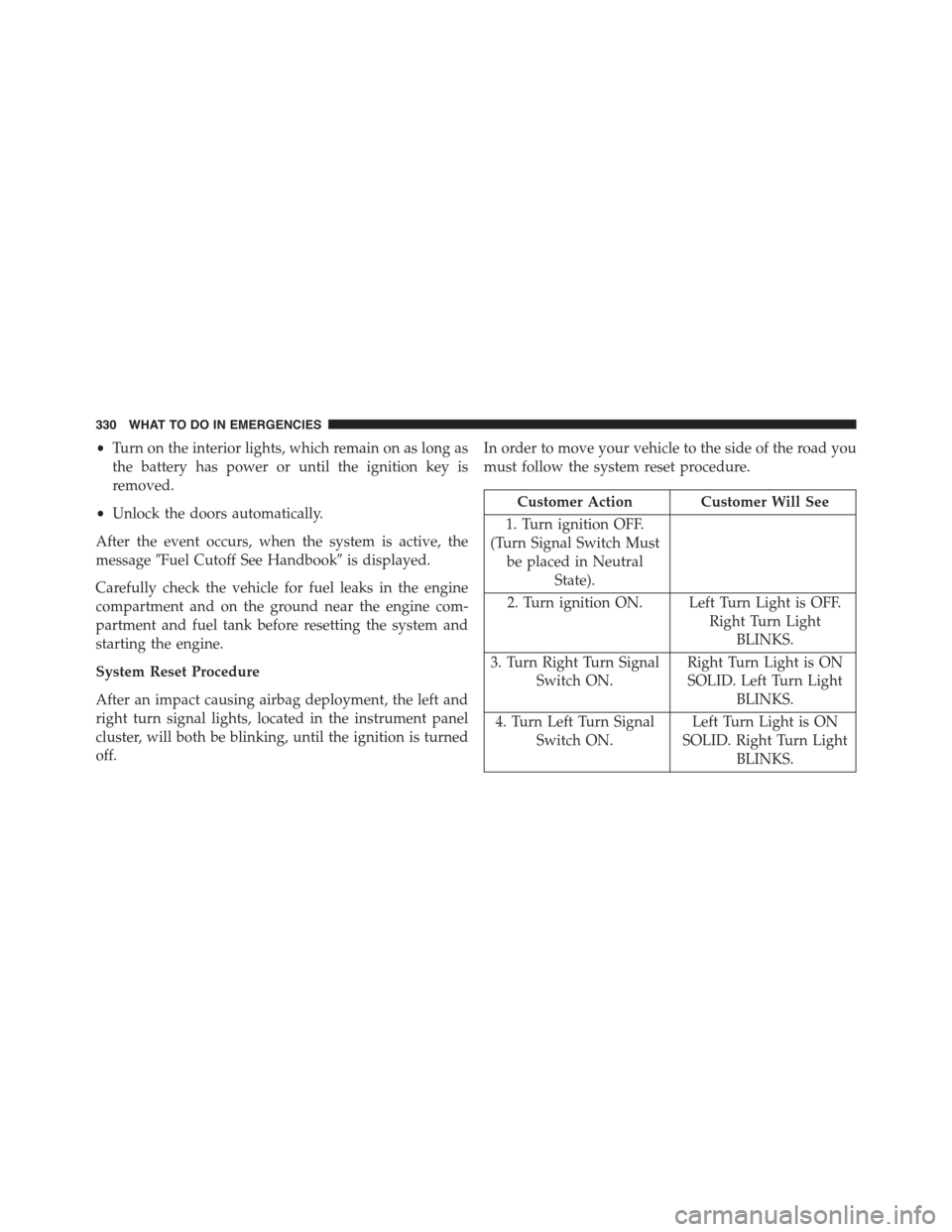
System Reset Procedure
After an impact causing airbag deployment, the left and
right turn signal lights, located in the instrument panel
cluster, will both be blinking, until the ignition is turned
off.
In order to move your vehicle to the side of the road you
must follow the system reset procedure.
Customer Action Customer Will See
1. Turn ignition OFF.
(Turn Signal Switch Must
be placed in Neutral
State).
2. Turn ignition ON. Left Turn Light is OFF.
Right Turn Light
BLINKS.
3. Turn Right Turn Signal
Switch ON.
Right Turn Light is ON
SOLID. Left Turn Light
BLINKS.
4. Turn Left Turn Signal
Switch ON.
Left Turn Light is ON
SOLID. Right Turn Light
BLINKS.
330 WHAT TO DO IN EMERGENCIES