ECU FIAT 500C 2013 2.G User Guide
[x] Cancel search | Manufacturer: FIAT, Model Year: 2013, Model line: 500C, Model: FIAT 500C 2013 2.GPages: 423, PDF Size: 9.86 MB
Page 84 of 423
WARNING!
Pedals that cannot move freely can cause loss of
vehicle control and increase the risk of serious per-
sonal injury.
•Always make sure that floor mats are properly
attached to the floor mat fasteners.
•Never place or install floor mats or other floor
coverings in the vehicle that cannot be properly
secured to prevent them from moving and interfer-
ing with the pedals or the ability to control the
vehicle.
•Never put floor mats or other floor coverings on top
of already installed floor mats. Additional floor
mats and other coverings will reduce the size of the
pedal area and interfere with the pedals.
(Continued)
WARNING!(Continued)
•Check mounting of mats on a regular basis. Always
properly reinstall and secure floor mats that have
been removed for cleaning.
•Always make sure that objects cannot fall into the
driver footwell while the vehicle is moving. Ob-
jects can become trapped under the brake pedal
and accelerator pedal causing a loss of vehicle
control.
•If required, mounting posts must be properly in-
stalled, if not equipped from the factory.
Failure to properly follow floor mat installation or
mounting can cause interference with the brake
pedal and accelerator pedal operation causing loss of
control of the vehicle.
82 THINGS TO KNOW BEFORE STARTING YOUR VEHICLE
Page 99 of 423
you are not required to train the voice recognition system
to recognize your voice. This implies that the system is
nearly equally performing with different persons, i.e.: the
voice recognition system is of the “speaker independent”
type.
With this system you can also play your favorite music
stored on USB device and select tracks and playback
modes with both voice commands or buttons on the
steering wheel.
This device complies with Part 15 of the FCC rules
subject to the following two conditions:
•This device may not cause harmful interference.
•This device must accept all interference received, includ-
ing interference that may cause undesired operation.
The Hands-Free Kit
The basic characteristic of this hands-free kit is voice
recognition with Bluetooth® wireless technology. With
this system you can make and receive calls safely and
securely by using either voice commands or buttons on
the steering wheel. This can be done under any driving
condition without ever having to take your eyes off the
road or remove your hands from the steering wheel, as
required by current laws.
Bluetooth® wireless technology enables wireless connec-
tion between your mobile phone and the hands-free kit
installed on your car.
To use the hands-free kit, you need a Bluetooth® wireless
technology enabled mobile phone. This hands-free kit
gives you the possibility of interacting vocally with your
mobile phone while driving, even if your mobile device
does not feature this capability. You can also interact with
your mobile phone manually and visually using the
steering wheel controls and the instrument panel multi-
function display.
3
UNDERSTANDING THE FEATURES OF YOUR VEHICLE 97
Page 104 of 423
•Playback Options— while playing tracks you can
select the following options: Play, Stop, Next track,
Previous track, Shuffle and Loop track.
NOTE:
•The media player does not support audio files com-
pressed with other formats and DRM (Digital Right
Management) protected audio files. Non-supported
audio files that may be present on the USB device will
be ignored.
•To use the media player, you have to simply connect
(directly or by an extension lead) your USB device to the
car USB port. After turning the ignition key to ON,
BLUE&ME™ will start building your media library. At
the end of this operation you can surf the complete library
and scroll its categories as required using the buttons on
the steering wheel or voice commands. BLUE&ME™ will
then play your selection via the car sound system.
WARNING!
•Operating certain parts of this system while driv-
ing can distract your attention away from the road,
and possibly cause an accident or other serious
consequences; for this reason certain functions
shall be disabled by the BLUE&ME™ system until
driving conditions are secure and, if required, only
when the car is stopped.
•Read and Follow Instructions: before using your
system, read and follow all instructions and safety
information provided in this “User ’s Guide”. Not
following precautions found in this User ’s Guide
can lead to an accident or other serious conse-
quences.
(Continued)
102 UNDERSTANDING THE FEATURES OF YOUR VEHICLE
Page 113 of 423

TO OPEN AND CLOSE THE HOOD
To open the hood, two latches must be released.
1. Pull the bottom of the RED hood release lever, located
on the left kick panel, rearward.
2. Rotate the safety catch under the front edge of the
hood, near the center, and raise the hood.
Lift the hood prop rod that clips to the right side (left side
when standing in front of the hood) of the engine
compartment. Place the hood prop rod in the hole of
hood hinge to secure the hood in the open position.
Hood Release Lever
Hood Safety Latch Location
3
UNDERSTANDING THE FEATURES OF YOUR VEHICLE 111
Page 114 of 423
In hot climates, the prop rod may be hot. Pick up the prop
rod at the foam on the end of the prop rod.
WARNING!
Be sure the hood is fully latched before driving your
vehicle. If the hood is not fully latched, it could open
when the vehicle is in motion and block your vision.
Failure to follow this warning could result in serious
injury or death.
CAUTION!
To prevent possible damage, do not slam the hood to
close it. Lower the hood until it is open 8 in (20 cm)
approximately and then drop it. This should secure
both latches. Never drive your vehicle unless the
hood is fully closed, with both latches engaged.
LIGHTS
Multifunction Lever
The multifunction lever, located on the left side of the
steering wheel, controls the operation of the headlights,
headlight beam selection, passing light and turn signals.
NOTE:The external lights can only be turned on with
the ignition in the ON/RUN position.
11 2 U N D E R S TA N D I N G T H E F E AT U R E S O F Y O U R V E H I C L E
Page 133 of 423
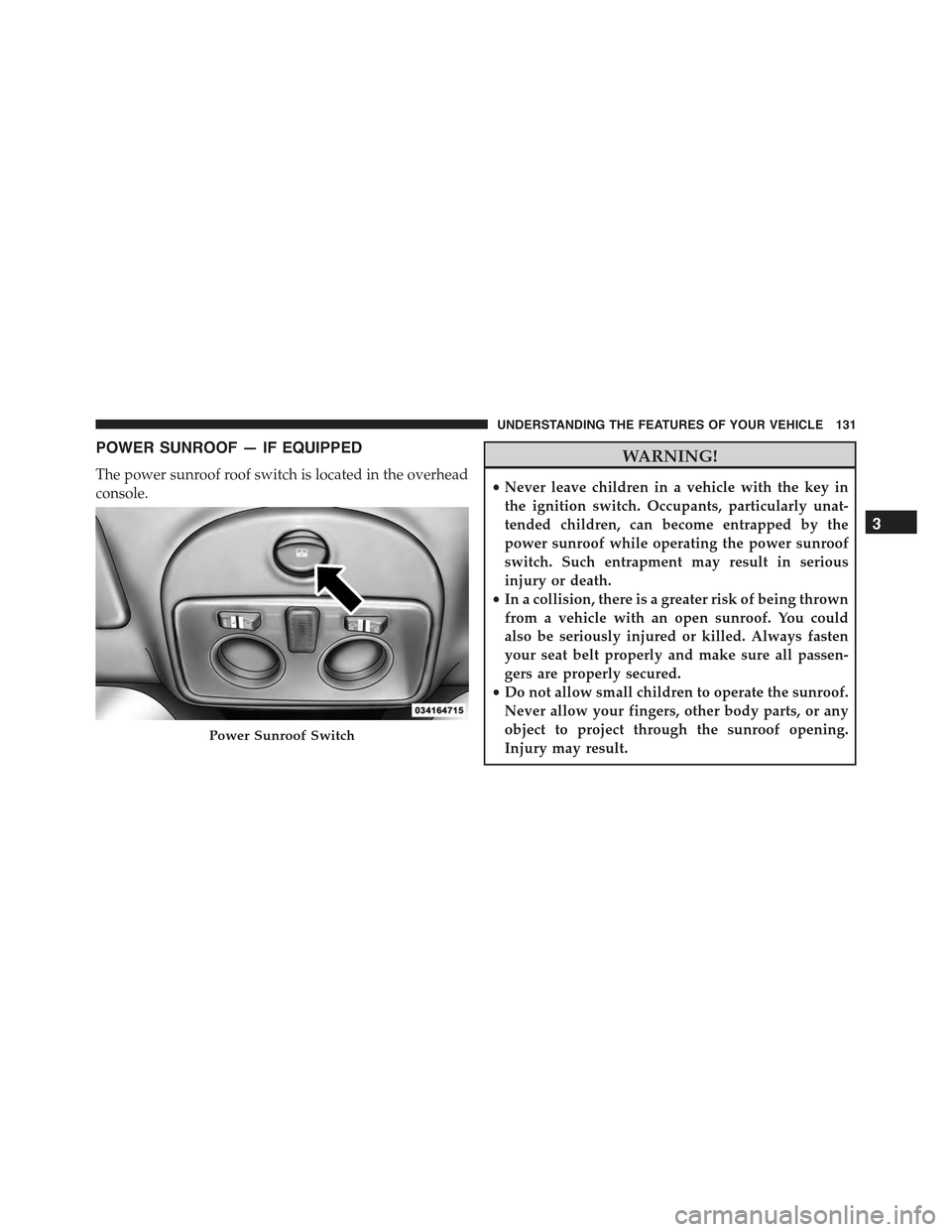
POWER SUNROOF — IF EQUIPPED
The power sunroof roof switch is located in the overhead
console.
WARNING!
•Never leave children in a vehicle with the key in
the ignition switch. Occupants, particularly unat-
tended children, can become entrapped by the
power sunroof while operating the power sunroof
switch. Such entrapment may result in serious
injury or death.
•In a collision, there is a greater risk of being thrown
from a vehicle with an open sunroof. You could
also be seriously injured or killed. Always fasten
your seat belt properly and make sure all passen-
gers are properly secured.
•Do not allow small children to operate the sunroof.
Never allow your fingers, other body parts, or any
object to project through the sunroof opening.
Injury may result.Power Sunroof Switch
3
UNDERSTANDING THE FEATURES OF YOUR VEHICLE 131
Page 159 of 423
is not functioning and that service is required. However,
the conventional brake system will continue to operate
normally if the BRAKE warning light is not on.
If the ABS light is on, the brake system should be serviced
as soon as possible to restore the benefits of Anti-Lock
brakes. If the ABS light does not turn on when the
ignition switch is turned to the ON/RUN position, have
the light inspected by an authorized studio.
24. Door Ajar
This light will turn on to indicate that one or
more doors or the trunk may be ajar.
25. Vehicle Security Light
If during starting, the key code is not correctly
recognized, the Vehicle Security Light comes
on in the instrument panel. In this case, turn
the key to OFF and then to ON/RUN; if it is
still locked, try again with the other keys that come with
the vehicle. Contact a Fiat studio if you still cannot start
the engine.
If with the engine running the warning light flashes,
this means that the car is not protected by the engine
inhibitor device. Contact Fiat studio to have all the keys
programmed.
26. Temperature Gauge
The temperature digital scale shows engine coolant tem-
perature. Any reading within the normal range indicates
that the engine cooling system is operating satisfactorily.
The gauge pointer will likely indicate a higher tempera-
ture when driving in hot weather, up mountain grades,
or when towing a trailer. It should not be allowed to
exceed the upper limits of the normal operating range.
4
UNDERSTANDING YOUR INSTRUMENT PANEL 157
Page 202 of 423
Display Information
When the CD player is operating, information will ap-
pear on the display with the following meaning:
•“Track 5” indicates the CD track number.
•“03:42” indicates the time elapsed since the start of the
track (if the relevant Menu function is activated).
Track Selection
Briefly press thebutton to play the previous CD
track and thebutton to play the next track. The
tracks are selected cyclically: the first track is selected
after the last track and vice versa.
If the track has been played for more than 3 seconds,
pressing thebutton, starts the track again from the
beginning. In this case, if you want to play the
previous track, press thebutton twice consecu-
tively.
Track Fast Forward/Rewind
Keep thebutton pressed down to fast forward the
selected track and keep thebutton pressed down to
fast rewind the track. The fast forward/rewind will
stop once the button is released.
Pause Function
To pause the CD player, press thebutton. The word-
ing “CD Pause” appears on the display.
To resume listening to the track, press thebutton
again.
CD MP3 Player
Introduction
This chapter describes the operation of the CD MP3
player.
200 UNDERSTANDING YOUR INSTRUMENT PANEL
Page 232 of 423
WARNING!(Continued)
•Unintended movement of a vehicle could injure
those in or near the vehicle. As with all vehicles,
you should never exit a vehicle while the engine is
running. Before exiting a vehicle, always apply the
parking brake, shift the transmission into PARK,
turn the engine OFF, and remove the ignition key.
Once the key is removed, the shift lever is locked in
PARK, securing the vehicle against unwanted
movement.
•When leaving the vehicle, always remove the igni-
tion key and lock your vehicle.
(Continued)
WARNING!(Continued)
•Never leave children alone in a vehicle, or with
access to an unlocked vehicle. Allowing children to
be in a vehicle unattended is dangerous for a
number of reasons. A child or others could be
seriously or fatally injured. Children should be
warned not to touch the parking brake, brake pedal
or the shift lever.
•Do not leave the key fob in or near the vehicle (or
in a location accessible to children), or in a location
accessible to children. A child could operate power
windows, other controls, or move the vehicle.
Key Ignition Park Interlock
This vehicle is equipped with a Key Ignition Park Inter-
lock which requires the shift lever to be placed in PARK
before the ignition switch can be turned to the OFF
position. The key can only be removed from the ignition
230 STARTING AND OPERATING
Page 235 of 423
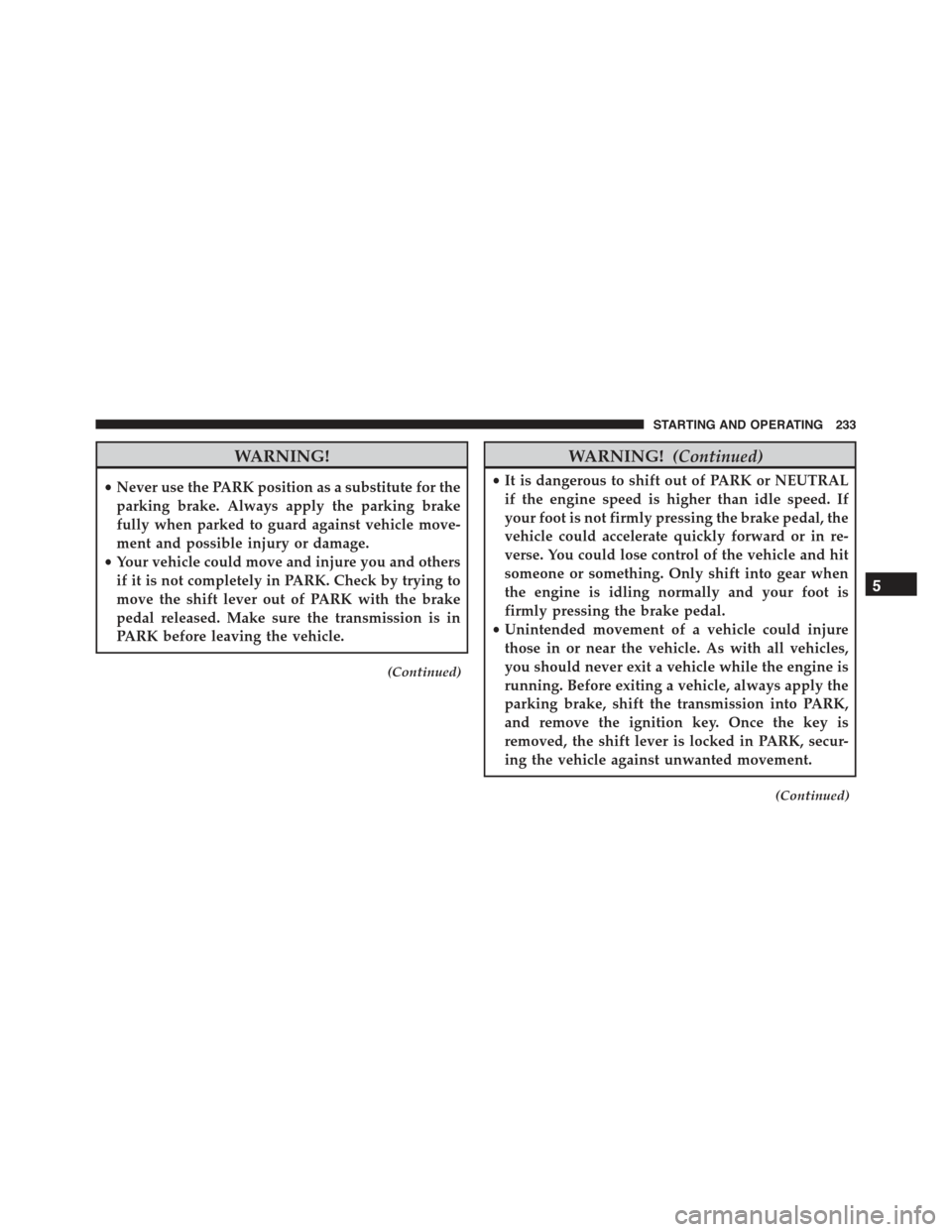
WARNING!
•Never use the PARK position as a substitute for the
parking brake. Always apply the parking brake
fully when parked to guard against vehicle move-
ment and possible injury or damage.
•Your vehicle could move and injure you and others
if it is not completely in PARK. Check by trying to
move the shift lever out of PARK with the brake
pedal released. Make sure the transmission is in
PARK before leaving the vehicle.
(Continued)
WARNING!(Continued)
•It is dangerous to shift out of PARK or NEUTRAL
if the engine speed is higher than idle speed. If
your foot is not firmly pressing the brake pedal, the
vehicle could accelerate quickly forward or in re-
verse. You could lose control of the vehicle and hit
someone or something. Only shift into gear when
the engine is idling normally and your foot is
firmly pressing the brake pedal.
•Unintended movement of a vehicle could injure
those in or near the vehicle. As with all vehicles,
you should never exit a vehicle while the engine is
running. Before exiting a vehicle, always apply the
parking brake, shift the transmission into PARK,
and remove the ignition key. Once the key is
removed, the shift lever is locked in PARK, secur-
ing the vehicle against unwanted movement.
(Continued)
5
STARTING AND OPERATING 233