change time FIAT 500C 2018 Owner's Manual
[x] Cancel search | Manufacturer: FIAT, Model Year: 2018, Model line: 500C, Model: FIAT 500C 2018Pages: 338, PDF Size: 4 MB
Page 300 of 338
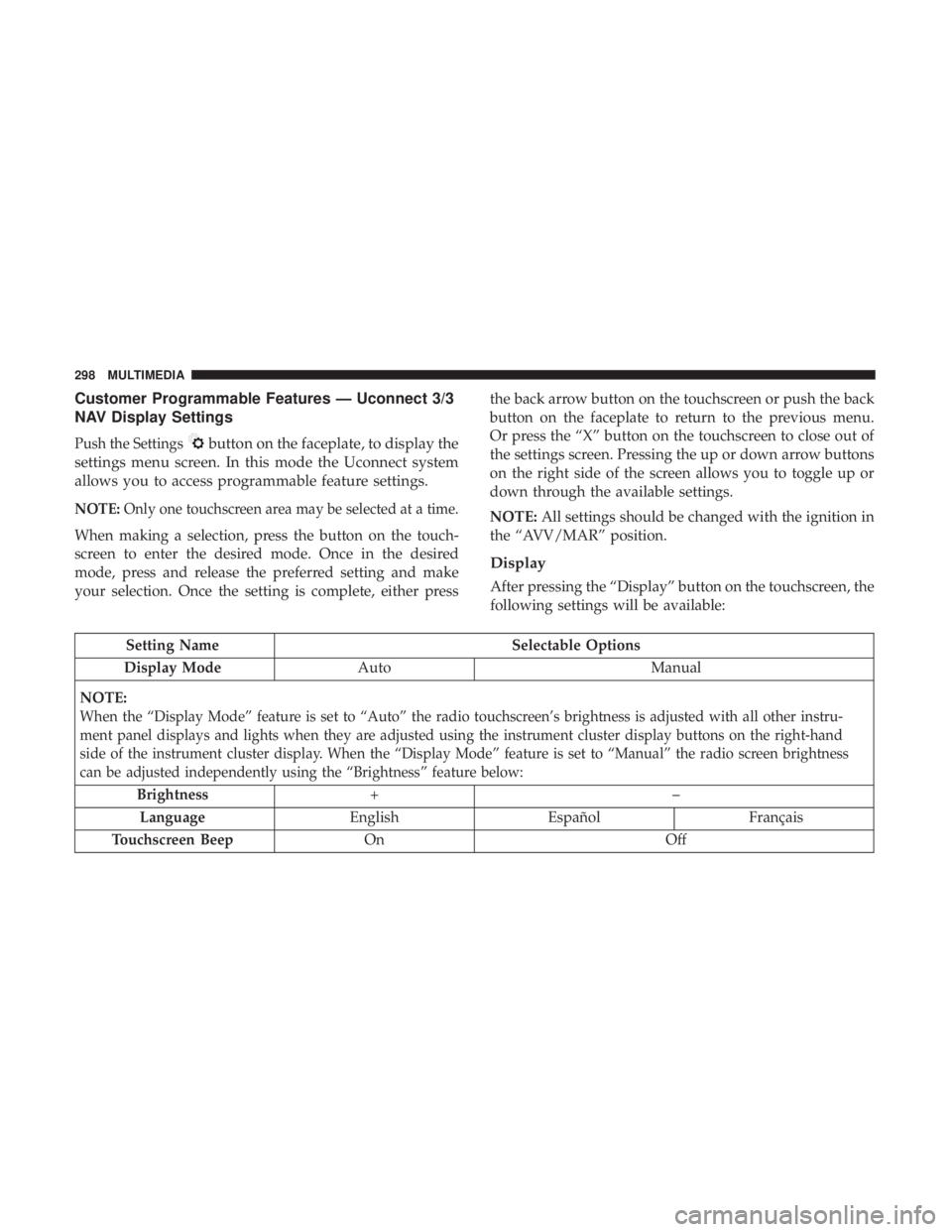
Customer Programmable Features — Uconnect 3/3
NAV Display Settings
Push the Settings button on the faceplate, to display the
settings menu screen. In this mode the Uconnect system
allows you to access programmable feature settings.
NOTE: Only one touchscreen area may be selected at a time.
When making a selection, press the button on the touch-
screen to enter the desired mode. Once in the desired
mode, press and release the preferred setting and make
your selection. Once the setting is complete, either press the back arrow button on the touchscreen or push the back
button on the faceplate to return to the previous menu.
Or press the “X” button on the touchscreen to close out of
the settings screen. Pressing the up or down arrow buttons
on the right side of the screen allows you to toggle up or
down through the available settings.
NOTE: All settings should be changed with the ignition in
the “AVV/MAR” position.
Display
After pressing the “Display” button on the touchscreen, the
following settings will be available:
Setting Name Selectable Options
Display Mode Auto Manual
NOTE:
When the “Display Mode” feature is set to “Auto” the radio touchscreen’s brightness is adjusted with all other instru-
ment panel displays and lights when they are adjusted using the instrument cluster display buttons on the right-hand
side of the instrument cluster display. When the “Display Mode” feature is set to “Manual” the radio screen brightness
can be adjusted independently using the “Brightness” feature below:
Brightness +–
Language English Español Français
Touchscreen Beep On Off298 MULTIMEDIA
Page 301 of 338
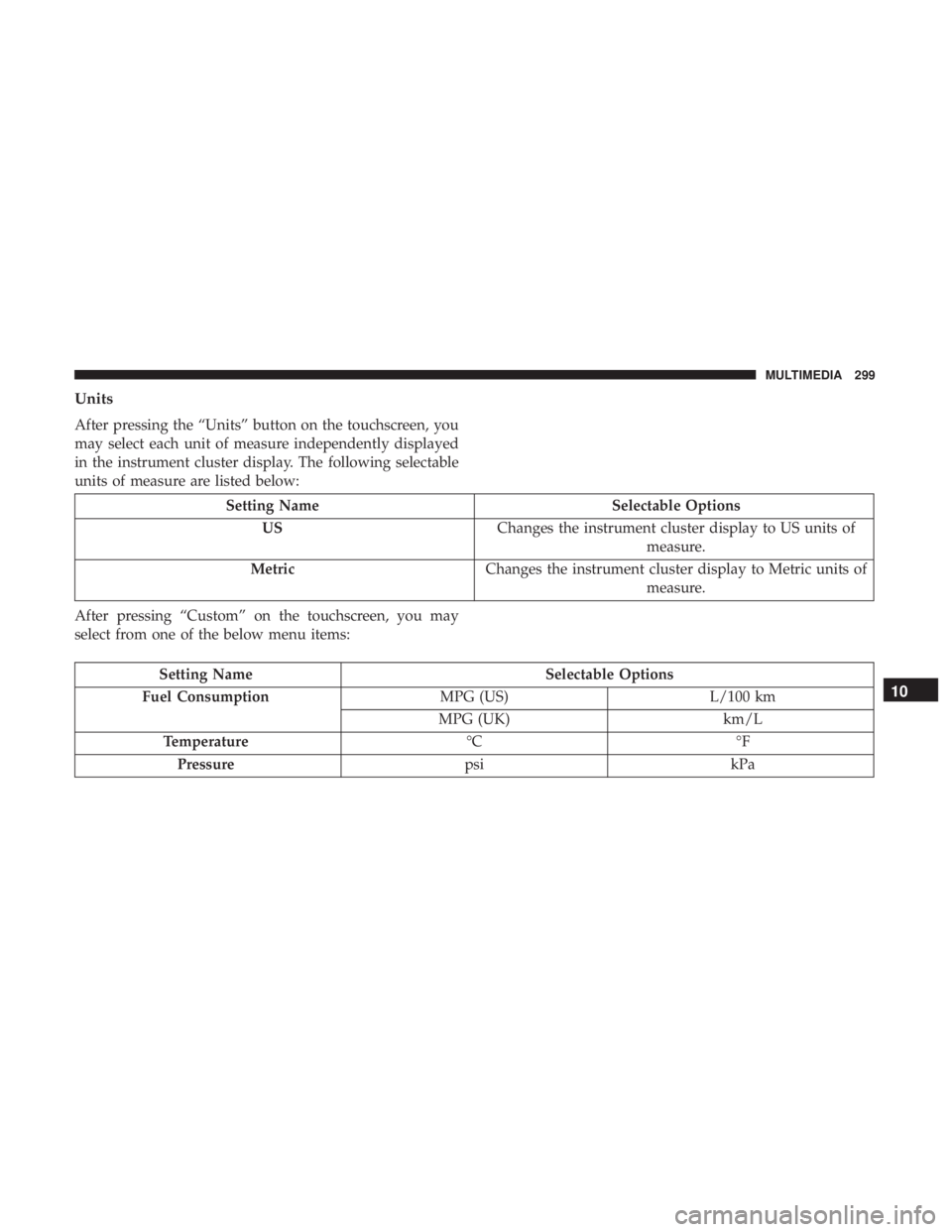
Units
After pressing the “Units” button on the touchscreen, you
may select each unit of measure independently displayed
in the instrument cluster display. The following selectable
units of measure are listed below:
Setting Name Selectable Options
US Changes the instrument cluster display to US units of
measure.
Metric Changes the instrument cluster display to Metric units of
measure.
After pressing “Custom” on the touchscreen, you may
select from one of the below menu items:
Setting Name Selectable Options
Fuel Consumption MPG (US) L/100 km
MPG (UK) km/L
Temperature °C °F
Pressure psi kPa 10 MULTIMEDIA 299
Page 305 of 338
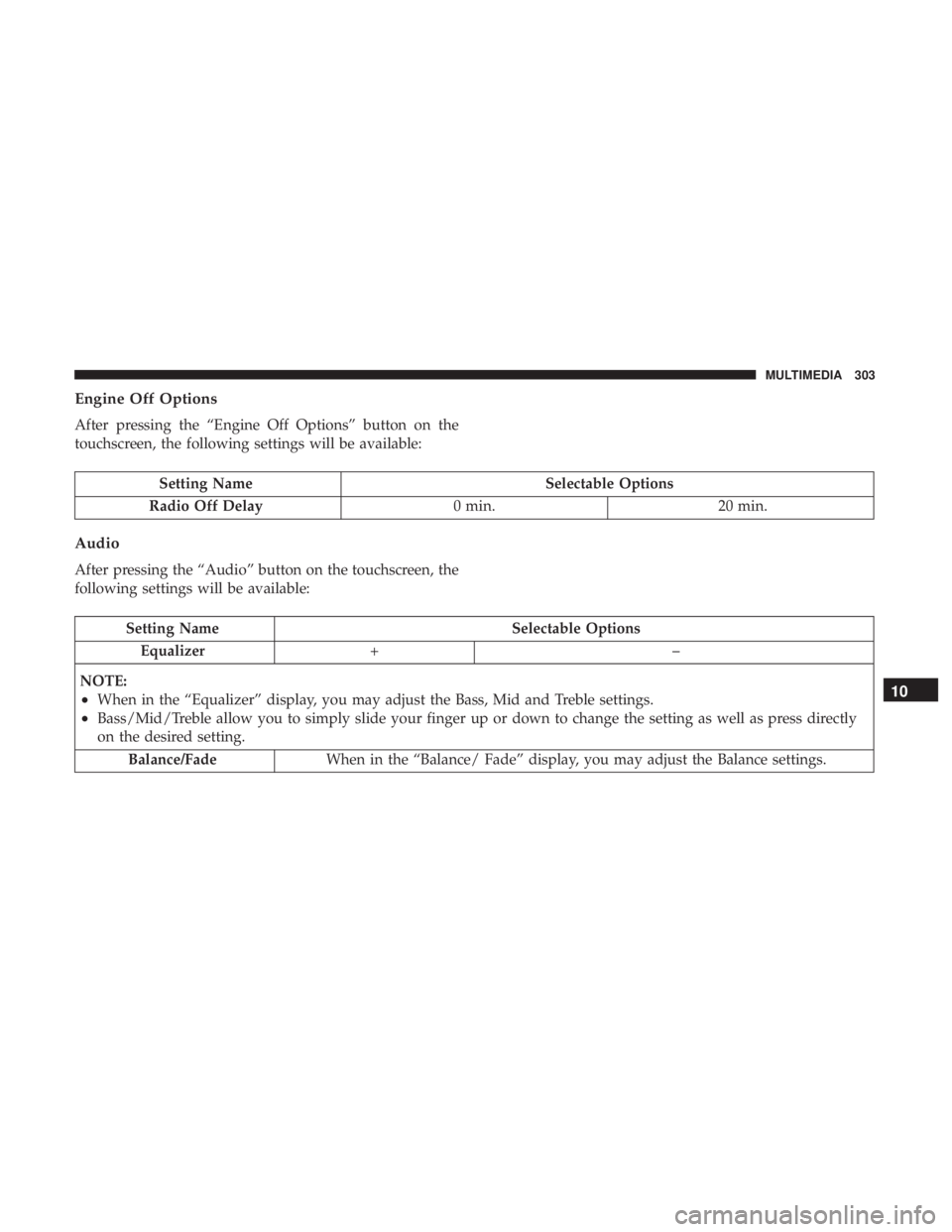
Engine Off Options
After pressing the “Engine Off Options” button on the
touchscreen, the following settings will be available:
Setting Name Selectable Options
Radio Off Delay 0 min. 20 min.
Audio
After pressing the “Audio” button on the touchscreen, the
following settings will be available:
Setting Name Selectable Options
Equalizer +–
NOTE:
• When in the “Equalizer” display, you may adjust the Bass, Mid and Treble settings.
• Bass/Mid/Treble allow you to simply slide your finger up or down to change the setting as well as press directly
on the desired setting.
Balance/Fade When in the “Balance/ Fade” display, you may adjust the Balance settings. 10 MULTIMEDIA 303
Page 310 of 338
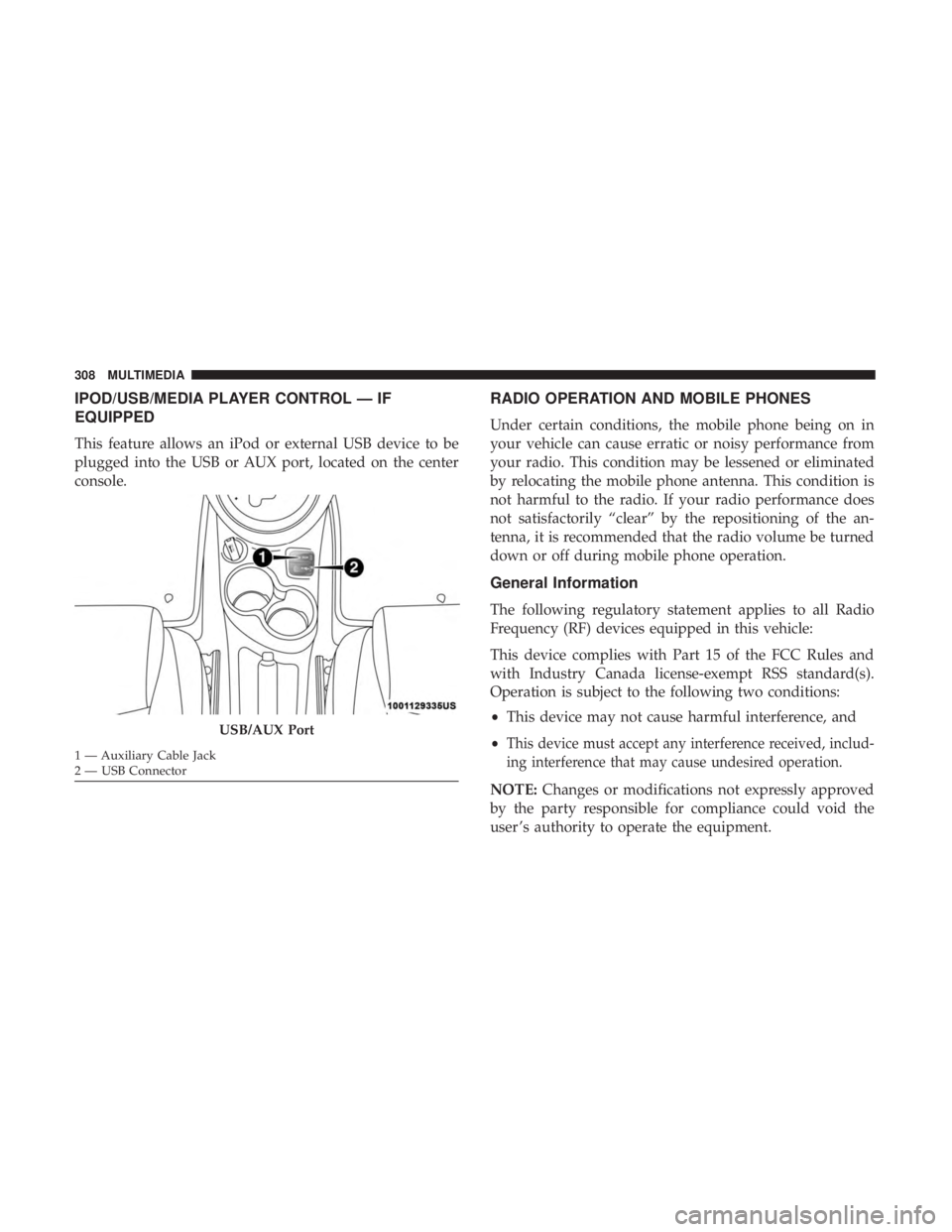
IPOD/USB/MEDIA PLAYER CONTROL — IF
EQUIPPED
This feature allows an iPod or external USB device to be
plugged into the USB or AUX port, located on the center
console. RADIO OPERATION AND MOBILE PHONES
Under certain conditions, the mobile phone being on in
your vehicle can cause erratic or noisy performance from
your radio. This condition may be lessened or eliminated
by relocating the mobile phone antenna. This condition is
not harmful to the radio. If your radio performance does
not satisfactorily “clear” by the repositioning of the an-
tenna, it is recommended that the radio volume be turned
down or off during mobile phone operation.
General Information
The following regulatory statement applies to all Radio
Frequency (RF) devices equipped in this vehicle:
This device complies with Part 15 of the FCC Rules and
with Industry Canada license-exempt RSS standard(s).
Operation is subject to the following two conditions:
• This device may not cause harmful interference, and
• This device must accept any interference received, includ-
ing interference that may cause undesired operation.
NOTE: Changes or modifications not expressly approved
by the party responsible for compliance could void the
user ’s authority to operate the equipment.USB/AUX Port1 — Auxiliary Cable Jack
2 — USB Connector308 MULTIMEDIA
Page 313 of 338
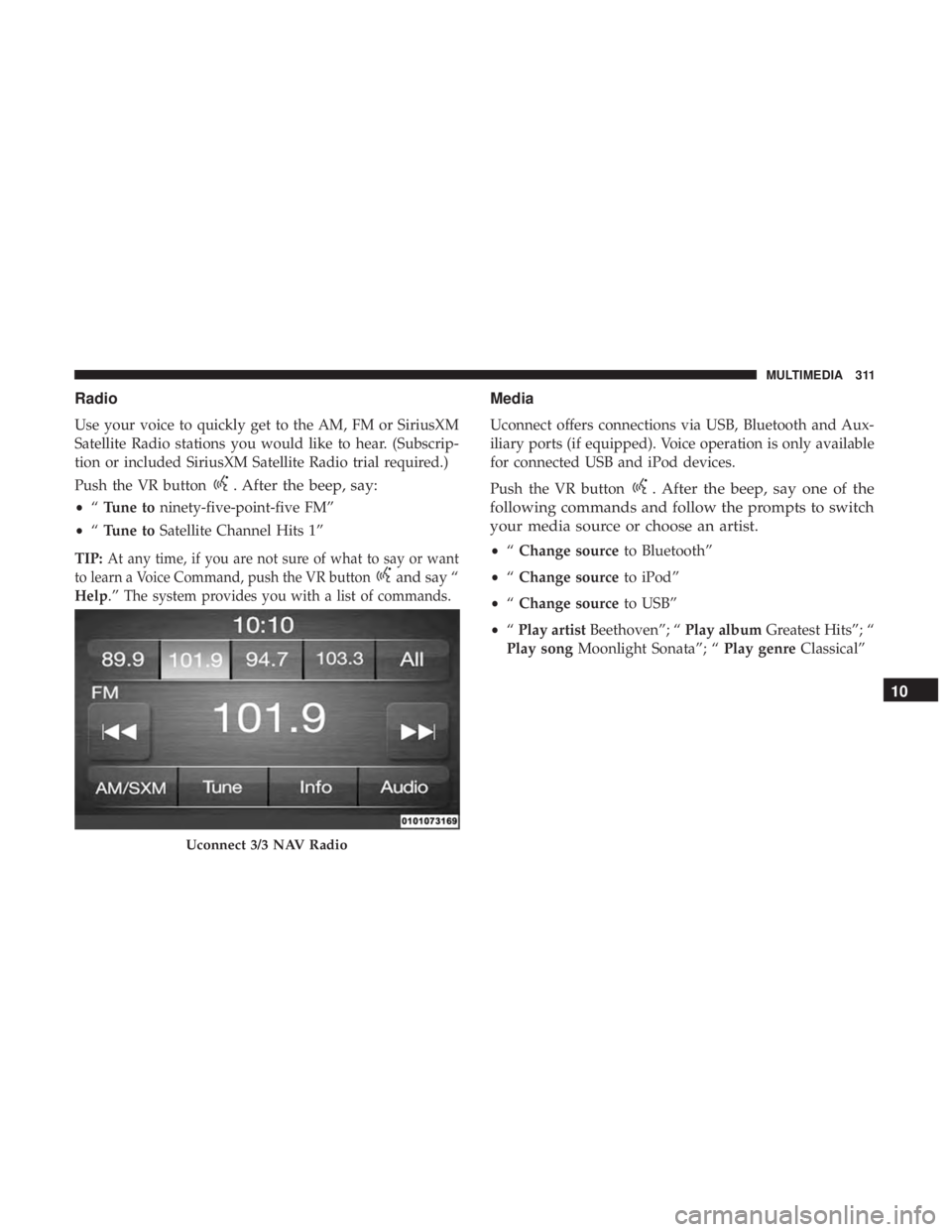
Radio
Use your voice to quickly get to the AM, FM or SiriusXM
Satellite Radio stations you would like to hear. (Subscrip-
tion or included SiriusXM Satellite Radio trial required.)
Push the VR button . After the beep, say:
• “ Tune to ninety-five-point-five FM”
• “ Tune to Satellite Channel Hits 1”
TIP: At any time, if you are not sure of what to say or want
to learn a Voice Command, push the VR button and say “
Help .” The system provides you with a list of commands. Media
Uconnect offers connections via USB, Bluetooth and Aux-
iliary ports (if equipped). Voice operation is only available
for connected USB and iPod devices.
Push the VR button . After the beep, say one of the
following commands and follow the prompts to switch
your media source or choose an artist.
• “ Change source to Bluetooth”
• “ Change source to iPod”
• “ Change source to USB”
• “ Play artist Beethoven”; “ Play album Greatest Hits”; “
Play song Moonlight Sonata”; “ Play genre Classical”
Uconnect 3/3 NAV Radio 10 MULTIMEDIA 311
Page 315 of 338
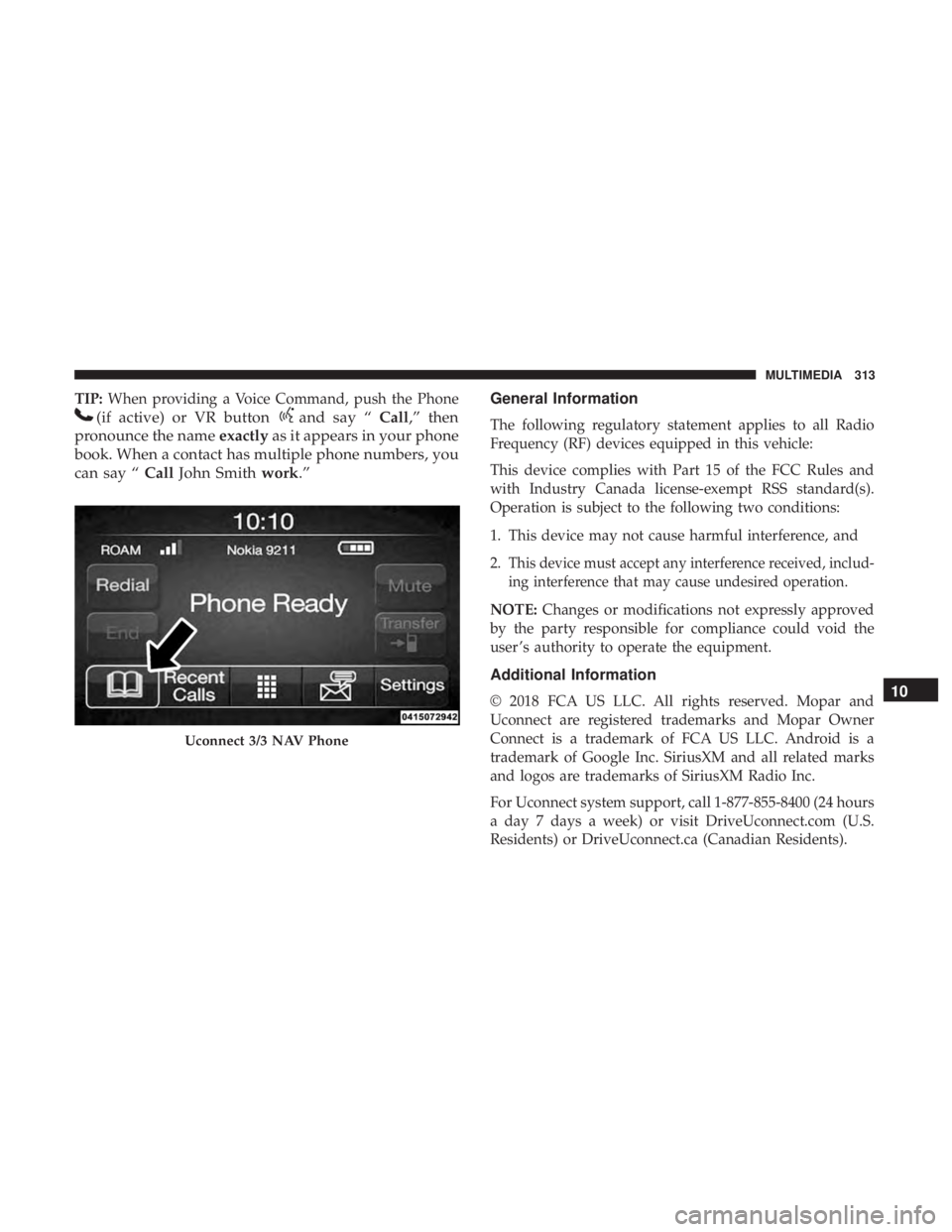
TIP: When providing a Voice Command, push the Phone
(if active) or VR button and say “ Call ,” then
pronounce the name exactly as it appears in your phone
book. When a contact has multiple phone numbers, you
can say “ Call John Smith work .” General Information
The following regulatory statement applies to all Radio
Frequency (RF) devices equipped in this vehicle:
This device complies with Part 15 of the FCC Rules and
with Industry Canada license-exempt RSS standard(s).
Operation is subject to the following two conditions:
1. This device may not cause harmful interference, and
2. This device must accept any interference received, includ-
ing interference that may cause undesired operation.
NOTE: Changes or modifications not expressly approved
by the party responsible for compliance could void the
user ’s authority to operate the equipment.
Additional Information
© 2018 FCA US LLC. All rights reserved. Mopar and
Uconnect are registered trademarks and Mopar Owner
Connect is a trademark of FCA US LLC. Android is a
trademark of Google Inc. SiriusXM and all related marks
and logos are trademarks of SiriusXM Radio Inc.
For Uconnect system support, call 1-877-855-8400 (24 hours
a day 7 days a week) or visit DriveUconnect.com (U.S.
Residents) or DriveUconnect.ca (Canadian Residents).Uconnect 3/3 NAV Phone
10 MULTIMEDIA 313
Page 329 of 338
Ignition ..................................19
Switch .................................19
Immobilizer (Sentry Key) ......................21
Instrument Cluster
Descriptions .............................94
Display ................................79
Instrument Cluster ........................72
Instrument Panel Lens Cleaning ............... .282
Interior Appearance Care .................... .281
Interior Lighting ............................40
Introduction ................................4
iPod/USB/MP3 Control ..................... .308
Jack Operation ........................... .255
Jump Starting ............................ .220
Key Fob
Programming Additional Key Fobs ......... .18, 21
Key Fob Programming (Remote Keyless Entry) ......18
Key-In Reminder ............................21
Keys ....................................16
Replacement .............................21
Sentry (Immobilizer) .......................21
Lane Change And Turn Signals .................37 Lane Change Assist ...................... .37, 40
Lap/Shoulder Belts .........................116
Latches ................................. .157
Hood ..................................63
Lead Free Gasoline ........................ .287
Leaks, Fluid ............................. .157
Life Of Tires ............................. .267
Liftgate ..................................65
Liftgate (Sedan) .............................65
Light Bulbs .......................... .157, 197
Lights ............................... .38, 157
AirBag......................... .84, 124, 155
Brake Assist Warning ..................... .105
Brake Warning ...........................84
Bulb Replacement ....................... .197
Cruise .................................94
Daytime Running .........................37
Dimmer Switch, Headlight ...................37
Engine Temperature Warning .................86
Exterior .............................. .157
Headlights ..............................37
High Beam ..............................38
High Beam/Low Beam Select .................37
Instrument Cluster ........................37
Lights On Reminder .......................37 12 INDEX 327