wheel FIAT 500C 2018 Owner's Guide
[x] Cancel search | Manufacturer: FIAT, Model Year: 2018, Model line: 500C, Model: FIAT 500C 2018Pages: 338, PDF Size: 4 MB
Page 138 of 338
Customer Action Customer Will See
NOTE: Each step MUST
BE held for at least two
seconds
12. Turn ignition MAR/
ACC/ON/RUN. (Entire
sequence needs to be
completed within one
minute or sequence will
need to be repeated). System is now reset and
the engine may be started.
Turn hazard flashers OFF
(Manually).
If a reset procedure step is not completed within 60 seconds,
then the turn signal lights will blink and the reset procedure
must be performed again in order to be successful.
Maintaining Your Air Bag System
WARNING!• Modifications to any part of the air bag system could
cause it to fail when you need it. You could be
injured if the air bag system is not there to protect (Continued) WARNING! (Continued)you. Do not modify the components or wiring, in-
cluding adding any kind of badges or stickers to the
steering wheel hub trim cover or the upper passenger
side of the instrument panel. Do not modify the front
bumper, vehicle body structure, or add aftermarket
side steps or running boards.
• It is dangerous to try to repair any part of the air bag
system yourself. Be sure to tell anyone who works on
your vehicle that it has an air bag system.
• Do not attempt to modify any part of your air bag
system. The air bag may inflate accidentally or may
not function properly if modifications are made.
Take your vehicle to an authorized dealer for any air
bag system service. If your seat, including your trim
cover and cushion, needs to be serviced in any way
(including removal or loosening/tightening of seat
attachment bolts), take the vehicle to an authorized
dealer. Only manufacturer approved seat accessories
may be used. If it is necessary to modify the air bag
system for persons with disabilities, contact an au-
thorized dealer.136 SAFETY
Page 159 of 338
WARNING! (Continued)• ALWAYS make sure objects cannot fall or slide into
the driver ’s side floor area when the vehicle is
moving. Objects can become trapped under accelera-
tor, brake, or clutch pedals and could cause a loss of
vehicle control.
• NEVER place any objects under the floor mat (e.g.,
towels, keys, etc.). These objects could change the
position of the floor mat and may cause interference
with the accelerator, brake, or clutch pedals.
• If the vehicle carpet has been removed and re-
installed, always properly attach carpet to the floor
and check the floor mat fasteners are secure to the
vehicle carpet. Fully depress each pedal to check for
interference with the accelerator, brake, or clutch
pedals then re-install the floor mats.
• It is recommended to only use mild soap and water
to clean your floor mats. After cleaning, always check
your floor mat has been properly installed and is
secured to your vehicle using the floor mat fasteners
by lightly pulling mat. Periodic Safety Checks You Should Make Outside
The Vehicle
Tires
Examine tires for excessive tread wear and uneven wear
patterns. Check for stones, nails, glass, or other objects
lodged in the tread or sidewall. Inspect the tread for cuts
and cracks. Inspect sidewalls for cuts, cracks, and bulges.
Check the wheel nuts for tightness. Check the tires (includ-
ing spare) for proper cold inflation pressure.
Lights
Have someone observe the operation of brake lights and
exterior lights while you work the controls. Check turn
signal and high beam indicator lights on the instrument
panel.
Door Latches
Check for proper closing, latching, and locking.
Fluid Leaks
Check area under the vehicle after overnight parking for fuel,
coolant, oil, or other fluid leaks. Also, if gasoline fumes are
detected or if fuel, or brake fluid leaks are suspected. The
cause should be located and corrected immediately. 5 SAFETY 157
Page 166 of 338
PARKING BRAKE
Before leaving the vehicle, make sure that the parking
brake is fully applied. Also, be certain to leave the manual
transmission in REVERSE or first gear.
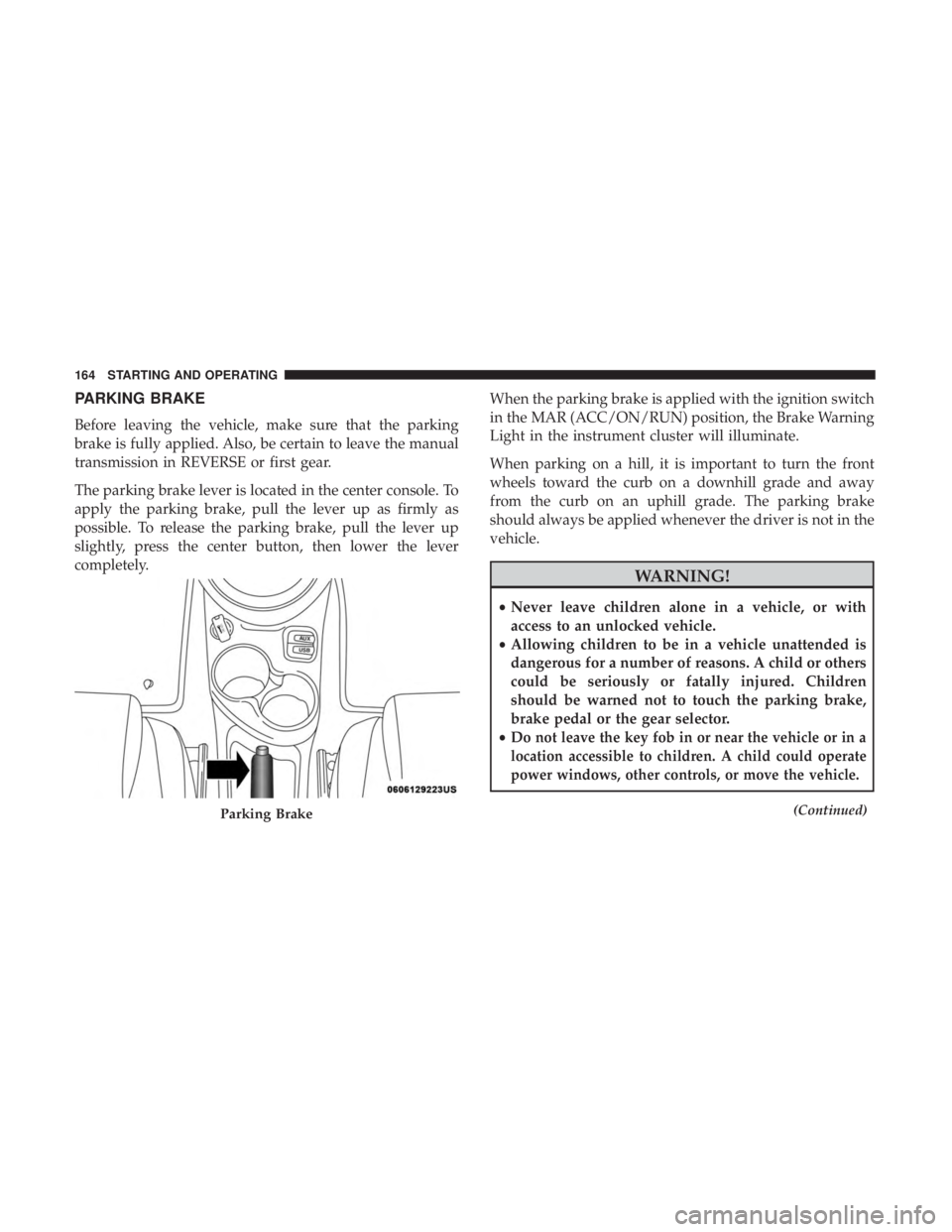
The parking brake lever is located in the center console. To
apply the parking brake, pull the lever up as firmly as
possible. To release the parking brake, pull the lever up
slightly, press the center button, then lower the lever
completely. When the parking brake is applied with the ignition switch
in the MAR (ACC/ON/RUN) position, the Brake Warning
Light in the instrument cluster will illuminate.
When parking on a hill, it is important to turn the front
wheels toward the curb on a downhill grade and away
from the curb on an uphill grade. The parking brake
should always be applied whenever the driver is not in the
vehicle.
WARNING!• Never leave children alone in a vehicle, or with
access to an unlocked vehicle.
• Allowing children to be in a vehicle unattended is
dangerous for a number of reasons. A child or others
could be seriously or fatally injured. Children
should be warned not to touch the parking brake,
brake pedal or the gear selector.
• D o not leave the key fob in or near the vehicle or in a
location accessible to children. A child could operate
power windows, other controls, or move the vehicle. (Continued)
Parking Brake164 STARTING AND OPERATING
Page 173 of 338
When parking on a level surface, you may shift the
transmission into PARK first, and then apply the parking
brake.
When parking on a hill, apply the parking brake before
shifting the transmission to PARK, otherwise the load on
the transmission locking mechanism may make it difficult
to move the gear selector out of PARK. As an added
precaution, turn the front wheels toward the curb on a
downhill grade and away from the curb on an uphill grade.
When exiting the vehicle, always:
• Apply the parking brake.
• Shift the transmission into PARK.
• Turn the engine OFF.
• Remove the ignition key.
WARNING!• Never use the PARK position as a substitute for the
parking brake. Always apply the parking brake fully
when exiting the vehicle to guard against vehicle
movement and possible injury or damage. (Continued) WARNING! (Continued)• Your vehicle could move and injure you and others if
it is not in PARK. Check by trying to move the gear
selector out of PARK with the brake pedal released.
Make sure the transmission is in PARK before exit-
ing the vehicle.
• It is dangerous to shift out of PARK or NEUTRAL if
the engine speed is higher than idle speed. If your
foot is not firmly pressing the brake pedal, the
vehicle could accelerate quickly forward or in re-
verse. You could lose control of the vehicle and hit
someone or something. Only shift into gear when the
engine is idling normally and your foot is firmly
pressing the brake pedal.
• Unintended movement of a vehicle could injure
those in or near the vehicle. As with all vehicles, you
should never exit a vehicle while the engine is
running. Before exiting a vehicle always come to a
complete stop, then apply the parking brake, shift
the transmission into PARK, turn the engine OFF,
and remove the ignition key. Once the key is re-
moved, the transmission is locked in PARK, securing
the vehicle against unwanted movement. (Continued) 6STARTING AND OPERATING 171
Page 177 of 338
NOTE: In AutoStick mode, the transmission will only shift
up or down when the driver moves the gear selector
rearward (+) or forward (-), except as described below.
• The transmission will automatically upshift when nec-
essary to prevent engine over-speed.
• The transmission will automatically downshift as the
vehicle slows (to prevent engine lugging) and will
display the current gear.
• The transmission will automatically downshift to first
gear when coming to a stop. After a stop, the driver
should manually upshift (+) the transmission as the
vehicle is accelerated.
• You can start out (from a stop) in first, second, or third
gear. Starting out in second or third gear can be helpful
in snow or icy conditions. To select second or third gear
after the vehicle is brought to a stop, tap the gear selector
rearward (+) once or twice.
• The system will ignore shift commands that would
cause engine lugging or overspeed. An audible beep will
sound if an inappropriate gear is requested. • Avoid using speed control when AutoStick is engaged
because the transmission will not shift automatically.
• Transmission shifting will be more noticeable when
AutoStick is enabled.
• The system may revert to automatic shift mode if a fault
or overheat condition is detected.
To disengage AutoStick mode, return the gear selector to
the DRIVE position. You can shift in or out of the AutoStick
position at any time without taking your foot off the
accelerator pedal.
WARNING!Do not downshift for additional engine braking on a
slippery surface. The drive wheels could lose their grip
and the vehicle could skid, causing a collision or
personal injury. 6STARTING AND OPERATING 175
Page 180 of 338
SPEED CONTROL
When engaged, the Speed Control takes over accelerator
operations at speeds greater than 25 mph (40 km/h).
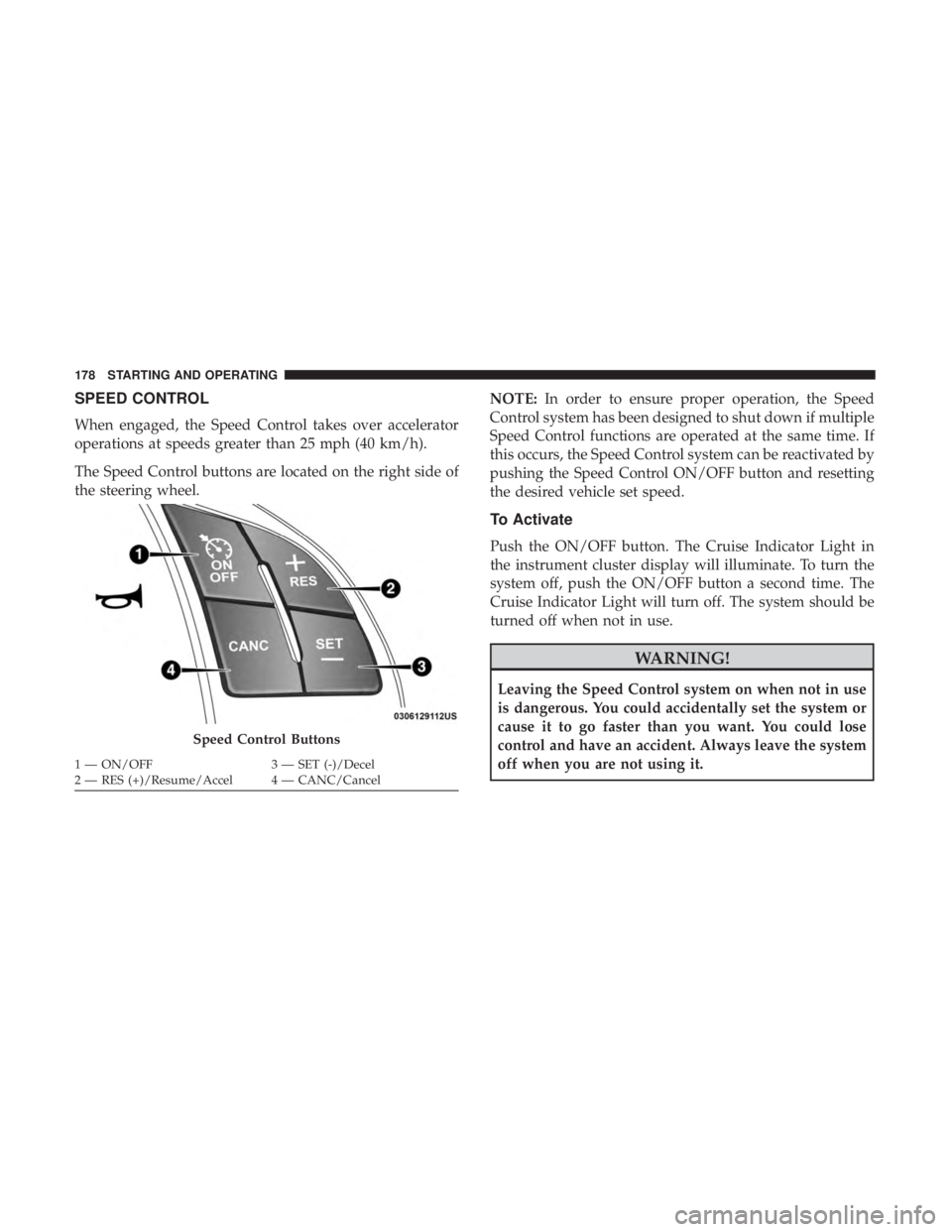
The Speed Control buttons are located on the right side of
the steering wheel. NOTE: In order to ensure proper operation, the Speed
Control system has been designed to shut down if multiple
Speed Control functions are operated at the same time. If
this occurs, the Speed Control system can be reactivated by
pushing the Speed Control ON/OFF button and resetting
the desired vehicle set speed.
To Activate
Push the ON/OFF button. The Cruise Indicator Light in
the instrument cluster display will illuminate. To turn the
system off, push the ON/OFF button a second time. The
Cruise Indicator Light will turn off. The system should be
turned off when not in use.
WARNING!Leaving the Speed Control system on when not in use
is dangerous. You could accidentally set the system or
cause it to go faster than you want. You could lose
control and have an accident. Always leave the system
off when you are not using it.Speed Control Buttons1 — ON/OFF 3 — SET (-)/Decel
2 — RES (+)/Resume/Accel 4 — CANC/Cancel178 STARTING AND OPERATING
Page 187 of 338
PARKVIEW REAR BACK UP CAMERA
Your vehicle is equipped with the ParkView Rear Back Up
Camera that allows you to see an on-screen image of the
rear surroundings of your vehicle whenever the gear
selector is put into REVERSE. The image will be displayed
in the touchscreen display along with a caution note to
“check entire surroundings” across the top of the screen.
After five seconds, this note will disappear. The ParkView
camera is located on the rear of the vehicle above the rear
license plate.
When the vehicle is shifted out of REVERSE, the rear
camera mode is exited and the last selected touchscreen
appears again.
If your vehicle is equipped with the Camera Delay feature
and it is turned on, the rear camera image will be displayed
for up to ten seconds after the vehicle is shifted out of
REVERSE unless one of the following conditions occurs:
• The vehicle speed exceeds 8 mph (13 km/h).
• The gear selector is moved to PARK.
• The soft button “Image defeat [X]” to disable the image
is pressed. When enabled, active guidelines are overlaid on the image to
illustrate the width of the vehicle and its projected backup
path based on the steering wheel position. A dashed center
line overlay indicates the center of the vehicle to assist with
parking.
Different colored zones indicate the distance to the rear of
the vehicle.
The following table shows the approximate distances for
each zone:
Zone Distance To The Rear Of
The Vehicle
Red 0 - 1 ft (0 - 30 cm)
Yellow 1 ft - 3 ft (30 cm - 1 m)
Green 3 ft or greater
(1 m or greater)
WARNING!Drivers must be careful when backing up even when
using the ParkView Rear Back Up Camera. Always
check carefully behind your vehicle, and be sure to (Continued) 6STARTING AND OPERATING 185
Page 190 of 338
VEHICLE LOADING
Certification Label
As required by National Highway Traffic Safety Adminis-
tration regulations, your vehicle has a certification label
affixed to the driver’s side door or pillar.
This label contains the month and year of manufacture,
Gross Vehicle Weight Rating (GVWR), Gross Axle Weight
Rating (GAWR) front and rear, and Vehicle Identification
Number (VIN). A Month-Day-Hour (MDH) number is
included on this label and indicates the Month, Day and
Hour of manufacture. The bar code that appears on the
bottom of the label is your VIN.
Gross Vehicle Weight Rating (GVWR)
The GVWR is the total permissible weight of your vehicle
including driver, passengers, vehicle, options and cargo.
The label also specifies maximum capacities of front and
rear axle systems (GAWR). Total load must be limited so
GVWR and front and rear GAWR are not exceeded.
Payload
The payload of a vehicle is defined as the allowable load
weight a truck can carry, including the weight of the driver,
all passengers, options and cargo. Gross Axle Weight Rating (GAWR)
The GAWR is the maximum permissible load on the front
and rear axles. The load must be distributed in the cargo
area so that the GAWR of each axle is not exceeded.
Each axle GAWR is determined by the components in the
system with the lowest load carrying capacity (axle,
springs, tires or wheels). Heavier axles or suspension
components sometimes specified by purchasers for in-
creased durability does not necessarily increase the vehi-
cle’s GVWR.
Tire Size
The tire size on the Vehicle Certification Label represents
the actual tire size on your vehicle. Replacement tires must
be equal to the load capacity of this tire size.
Rim Size
This is the rim size that is appropriate for the tire size
listed.
Inflation Pressure
This is the cold tire inflation pressure for your vehicle for
all loading conditions up to full GAWR.188 STARTING AND OPERATING
Page 192 of 338
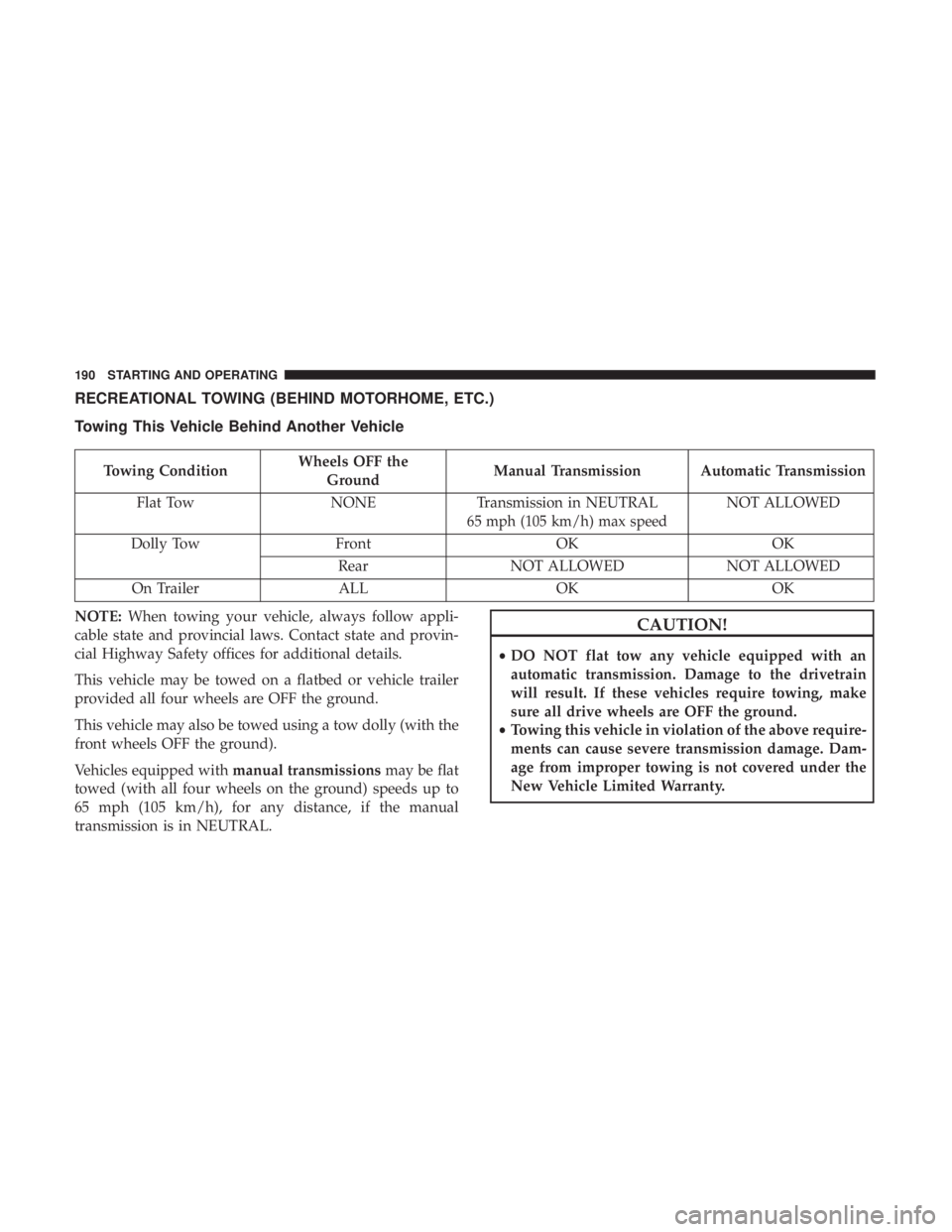
RECREATIONAL TOWING (BEHIND MOTORHOME, ETC.)
Towing This Vehicle Behind Another Vehicle
Towing Condition Wheels OFF the
Ground Manual Transmission Automatic Transmission
Flat Tow NONE Transmission in NEUTRAL
65 mph (105 km/h) max speed NOT ALLOWED
Dolly Tow Front OK OK
Rear NOT ALLOWED NOT ALLOWED
On Trailer ALL OK OK
NOTE: When towing your vehicle, always follow appli-
cable state and provincial laws. Contact state and provin-
cial Highway Safety offices for additional details.
This vehicle may be towed on a flatbed or vehicle trailer
provided all four wheels are OFF the ground.
This vehicle may also be towed using a tow dolly (with the
front wheels OFF the ground).
Vehicles equipped with manual transmissions may be flat
towed (with all four wheels on the ground) speeds up to
65 mph (105 km/h), for any distance, if the manual
transmission is in NEUTRAL. CAUTION!• DO NOT flat tow any vehicle equipped with an
automatic transmission. Damage to the drivetrain
will result. If these vehicles require towing, make
sure all drive wheels are OFF the ground.
• Towing this vehicle in violation of the above require-
ments can cause severe transmission damage. Dam-
age from improper towing is not covered under the
New Vehicle Limited Warranty.190 STARTING AND OPERATING
Page 193 of 338
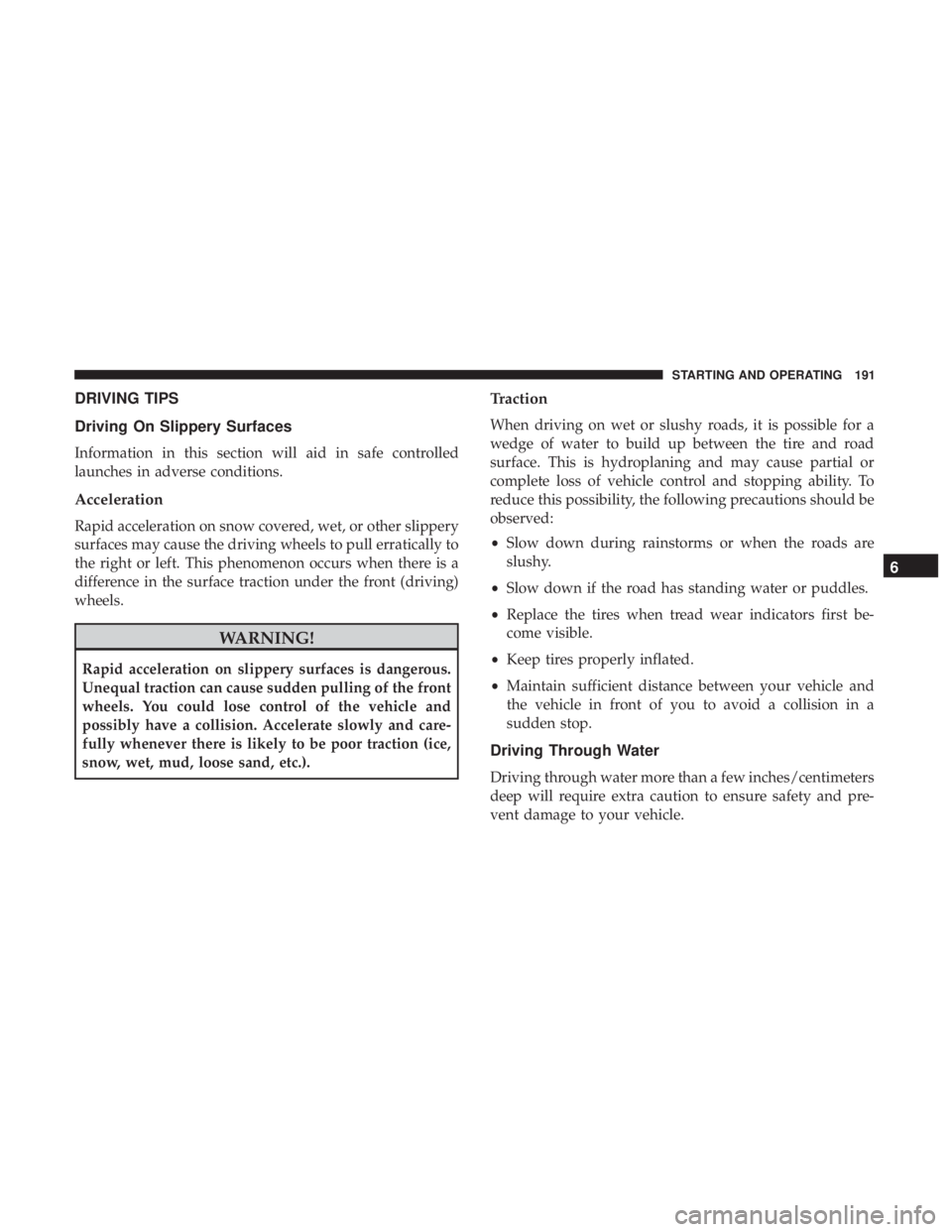
DRIVING TIPS
Driving On Slippery Surfaces
Information in this section will aid in safe controlled
launches in adverse conditions.
Acceleration
Rapid acceleration on snow covered, wet, or other slippery
surfaces may cause the driving wheels to pull erratically to
the right or left. This phenomenon occurs when there is a
difference in the surface traction under the front (driving)
wheels.
WARNING!Rapid acceleration on slippery surfaces is dangerous.
Unequal traction can cause sudden pulling of the front
wheels. You could lose control of the vehicle and
possibly have a collision. Accelerate slowly and care-
fully whenever there is likely to be poor traction (ice,
snow, wet, mud, loose sand, etc.). Traction
When driving on wet or slushy roads, it is possible for a
wedge of water to build up between the tire and road
surface. This is hydroplaning and may cause partial or
complete loss of vehicle control and stopping ability. To
reduce this possibility, the following precautions should be
observed:
• Slow down during rainstorms or when the roads are
slushy.
• Slow down if the road has standing water or puddles.
• Replace the tires when tread wear indicators first be-
come visible.
• Keep tires properly inflated.
• Maintain sufficient distance between your vehicle and
the vehicle in front of you to avoid a collision in a
sudden stop.
Driving Through Water
Driving through water more than a few inches/centimeters
deep will require extra caution to ensure safety and pre-
vent damage to your vehicle. 6STARTING AND OPERATING 191