instrument cluster FIAT 500C 2019 User Guide
[x] Cancel search | Manufacturer: FIAT, Model Year: 2019, Model line: 500C, Model: FIAT 500C 2019Pages: 332, PDF Size: 3.17 MB
Page 83 of 332
•“Sport Mode” — Gas Pedal Percentage Gauge: This
gauge shows what percent the gas pedal is currently
depressed at.
• “Sport Mode” — The active instrument cluster display
screen will change to the G-Force screen.
• “Sport Turbo Mode” — This gauge shows the Turbo
boost during acceleration.
• “Turbo Pressure Gauge” — This gauge shows the level
of turbo pressure.
NOTE: Different trips may have different values even if the
same driving style is maintained. Some factors that may
impact the calculated index value are:
•Traffic conditions
• Trip duration
• Temperature (engine and ambient)
6. Instrument Cluster Display
• The instrument cluster display features a driver-
interactive display. Refer to “Instrument Cluster Dis-
play” in “Getting To Know Your Instrument Panel” for
further information.INSTRUMENT CLUSTER DISPLAY
Your vehicle may be equipped with an instrument cluster
display, which offers useful information to the driver. With
the ignition in the STOP/OFF mode, opening/closing of a
door will activate the display for viewing, and display the
total miles, or kilometers, in the odometer. Your instrument
cluster display is designed to display important informa-
tion about your vehicle’s systems and features. Using a
driver interactive display located on the instrument panel,
your instrument cluster display can show you how sys-
tems are working and give you warnings when they aren’t.
The steering wheel mounted controls allow you to scroll
through and enter the main menus and submenus. You can
access the specific information you want and make selec-
tions and adjustments.
4
GETTING TO KNOW YOUR INSTRUMENT PANEL 81
Page 84 of 332
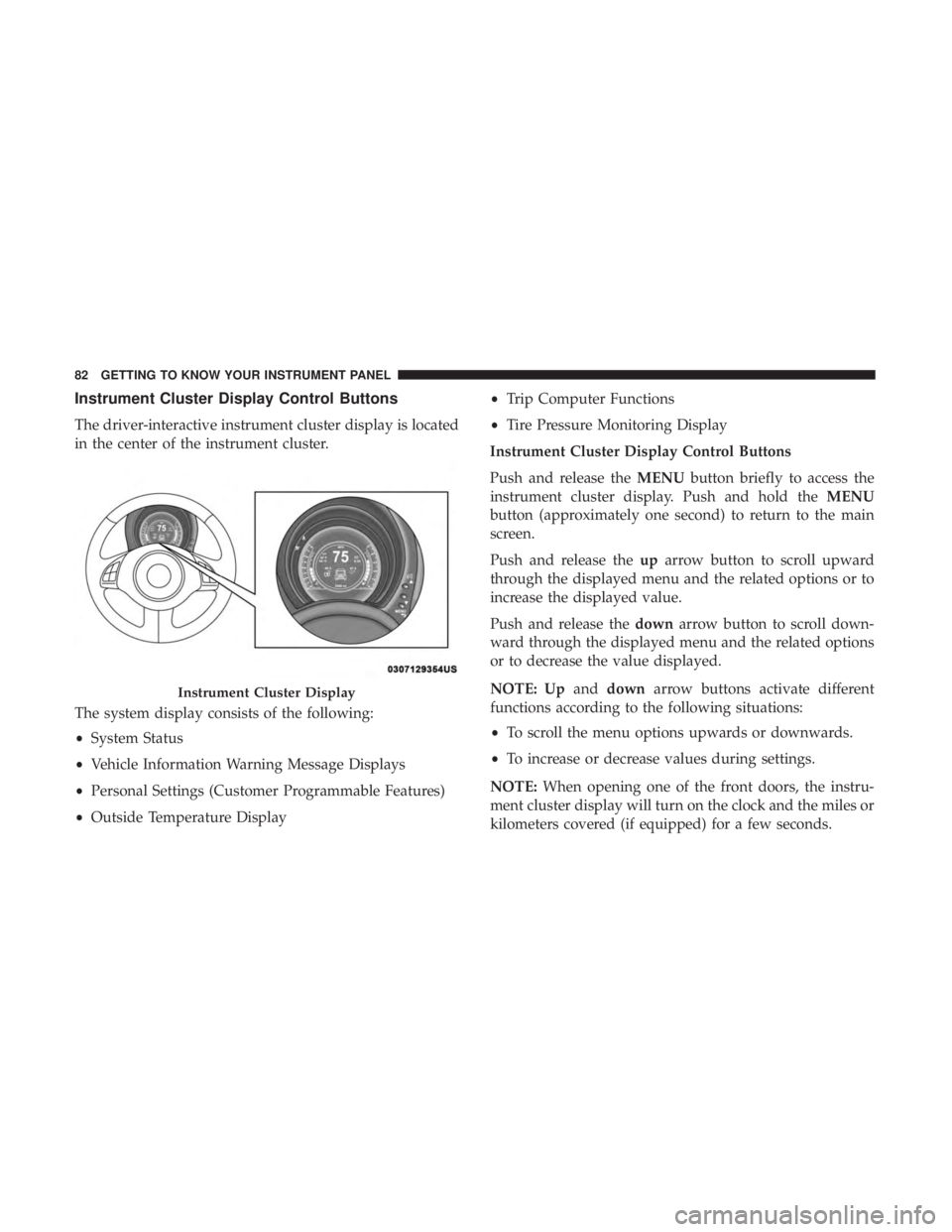
Instrument Cluster Display Control Buttons
The driver-interactive instrument cluster display is located
in the center of the instrument cluster.
The system display consists of the following:
•System Status
• Vehicle Information Warning Message Displays
• Personal Settings (Customer Programmable Features)
• Outside Temperature Display •
Trip Computer Functions
• Tire Pressure Monitoring Display
Instrument Cluster Display Control Buttons
Push and release the MENUbutton briefly to access the
instrument cluster display. Push and hold the MENU
button (approximately one second) to return to the main
screen.
Push and release the uparrow button to scroll upward
through the displayed menu and the related options or to
increase the displayed value.
Push and release the downarrow button to scroll down-
ward through the displayed menu and the related options
or to decrease the value displayed.
NOTE: Up anddown arrow buttons activate different
functions according to the following situations:
• To scroll the menu options upwards or downwards.
• To increase or decrease values during settings.
NOTE: When opening one of the front doors, the instru-
ment cluster display will turn on the clock and the miles or
kilometers covered (if equipped) for a few seconds.
Instrument Cluster Display
82 GETTING TO KNOW YOUR INSTRUMENT PANEL
Page 85 of 332
Instrument Cluster Display Setup Menu
The menu comprises a series of functions arranged in a
cycle. Push and release theupand down arrow buttons to
access the different options and settings (setup).
The setup menu can be activated by pushing the MENU
button. A single push on the upordown arrow button will
scroll through the setup menu options. The menu includes
the following functions:
• Buzzer Volume
• Service — If Equipped
• Headlight Adjustment — If Equipped
• Trip B Data
• Audio Repetition — If Equipped
• Navigation Repetition — If Equipped
Selecting An Option Of The Main Menu Without Sub-
menu
1. Briefly push and release the MENUbutton to select the
main menu option to set.
2. Push and release the upordown arrow button (by
single pushes) to select the new setting. 3. Briefly push and release the
MENUbutton to store the
new setting and go back to the main menu option
previously selected.
Selecting An Option Of The Main Menu With Submenu
1. Briefly push and release the MENUbutton to display
the first submenu option.
2. Push and release the upordown arrow button (by
single pushes) to scroll through all the submenu options.
3. Briefly push and release the MENUbutton to select the
displayed submenu option and to open the relevant
setup menu.
4. Push and release the upordown arrow button (by
single pushes) to select the new setting for this submenu
option.
5. Briefly push and release the MENUbutton to store the
new setting and go back to the previously selected
submenu option.
6. Push and hold the MENUbutton to return to the main
menu (short hold) or the main screen (longer hold).
4
GETTING TO KNOW YOUR INSTRUMENT PANEL 83
Page 86 of 332
Oil Change Reset
Your vehicle is equipped with an engine oil change indi-
cator system. The “Change Engine Oil” message will
appear in the instrument cluster display for approximately
5 seconds after a single chime has sounded to indicate the
next scheduled oil change interval. The engine oil change
indicator system is duty cycle based, which means the
engine oil change interval may fluctuate, dependent upon
your personal driving style.
Unless reset, this message will continue to display each
time the ignition is placed in the MAR (ACC/ON/RUN)
position. To turn off the message temporarily, push and
release the MENU button. To reset the oil change indicator
system (after performing the scheduled maintenance), refer
to the following procedure.
1. Place the ignition in the MAR (ACC/ON/RUN) posi-tion. (Do not start the engine.)
2. Fully push the accelerator pedal slowly, three times within 10 seconds.
3. Turn the ignition switch to the OFF position.
NOTE: If the indicator message illuminates when you
start the vehicle, the oil change indicator system did not
reset. If necessary, repeat this procedure.
TRIP COMPUTER
The Trip Computer is located in the instrument cluster. It
displays trip information such as: trip information, range,
fuel consumption, average speed, and travel time.
Trip Button
The TRIP button, located on the right steering column
stalk, can be used to display and to reset the previously
described values.
• A short button push displays the different values.
• A long button push resets the system and starts a new
trip.
Trip Functions
Both trip functions are resettable (reset — start of new trip).
“Trip A” can be used to display the figures relating to:
• Trip Distance A
• Average Fuel Consumption
• Average Speed A
• Travel Time A (Driving Time)
84 GETTING TO KNOW YOUR INSTRUMENT PANEL
Page 91 of 332
— Liftgate Open Warning Light
This indicator will illuminate when the liftgate is open/
ajar/not fully closed.
— Oil Pressure Warning Light
This warning light will illuminate to indicate low engine
oil pressure. If the light turns on while driving, stop the
vehicle, shut off the engine as soon as possible, and contact
an authorized dealer. A chime will sound when this light
turns on.
Do not operate the vehicle until the cause is corrected. This
light does not indicate how much oil is in the engine. The
engine oil level must be checked under the hood.
— Seat Belt Reminder Warning Light
This warning light indicates when the driver or passenger
seat belt is unbuckled. When the ignition is first placed in
the ON/RUN or ACC/ON/RUN position and if the
driver ’s seat belt is unbuckled, a chime will sound and the
light will turn on. When driving, if the driver or front
passenger seat belt remains unbuckled, the Seat Belt Re-
minder Light will flash or remain on continuously and a
chime will sound.Refer to “Occupant Restraint Systems” in “Safety” for
further information.
— Transmission Fault Warning Light
This light will illuminate (together with a message in the
instrument cluster display and a buzzer) to indicate a
transmission fault. Contact an authorized dealer if the
message remains after restarting the engine.
Yellow Warning Lights
— Anti-Lock Brake (ABS) Warning Light
This warning light monitors the Anti-Lock Brake System
(ABS). The light will turn on when the ignition is placed in
the ON/RUN or ACC/ON/RUN position and may stay on
for as long as four seconds.
If the ABS light remains on or turns on while driving, then
the Anti-Lock portion of the brake system is not function-
ing and service is required as soon as possible. However,
the conventional brake system will continue to operate
normally, assuming the Brake Warning Light is not also on.
If the ABS light does not turn on when the ignition is
placed in the ON/RUN or ACC/ON/RUN position, have
the brake system inspected by an authorized dealer.
4
GETTING TO KNOW YOUR INSTRUMENT PANEL 89
Page 92 of 332
— Electronic Stability Control (ESC) Warning
Light — If Equipped
The “ESC Indicator Light” in the instrument cluster will
come on when the ignition is placed in the ON/RUN or
MAR (ACC/ON/RUN) position, and when ESC is acti-
vated. It should turn off with the engine running. If the
“ESC Indicator Light” comes on continuously with the
engine running, a malfunction has been detected in the
ESC system. If this light remains on after several ignition
cycles, and the vehicle has been driven several miles
(kilometers) at speeds greater than 30 mph (48 km/h), see
your authorized dealer as soon as possible to have the
problem diagnosed and corrected.
• The “ESC Off Indicator Light” and the “ESC Indicator
Light” come on momentarily each time the ignition is
placed in the ON/RUN or MAR (ACC/ON/RUN)
position.
• Each time the ignition is turned to ON/RUN or MAR
(ACC/ON/RUN), the ESC system will be on, even if it
was turned off previously.
• The ESC system will make buzzing or clicking sounds
when it is active. This is normal; the sounds will stop
when ESC becomes inactive. •
This light will come on when the vehicle is in an ESC
event.— Electronic Stability Control (ESC) Off Warning
Light — If Equipped
This light indicates the Electronic Stability Control (ESC) is
off.
Each time the ignition is turned to ON/RUN or ACC/ON/
RUN, the ESC system will be on, even if it was turned off
previously.
— External Light Failure Indicator Light —
If Equipped
The External Light Failure Indicator will come on when a
failure to one of the following lights is detected:
• Direction Indicators
• Backup Lights
• Parking Lights
• Daytime Running Lights
• License Plate Lights
90 GETTING TO KNOW YOUR INSTRUMENT PANEL
Page 97 of 332
— Rear Defrost Light
This indicator will illuminate when the rear window
defroster is on. The rear window defroster automatically
turns off after 20 minutes.
CAUTION!
Failure to follow these cautions can cause damage to
the heating elements:
•Use care when washing the inside of the rear win-
dow. Do not use abrasive window cleaners on the
interior surface of the window. Use a soft cloth and a
mild washing solution, wiping parallel to the heat-
ing elements. Labels can be peeled off after soaking
with warm water.
•
Do not use scrapers, sharp instruments, or abrasive
window cleaners on the interior surface of the window.
• Keep all objects a safe distance from the window.
— Oil Change Required Indicator Light
This indicator light will illuminate to indicate that an oil
change is required. To reset the oil change indicator system,
refer to “Oil Change Reset” in “Instrument Cluster Dis-
play.”
Green Indicator Lights
— Cruise Control Set Indicator Light —
If Equipped
This indicator light will illuminate when the cruise control
is set to the desired speed. Refer to “Speed Control” in
“Starting And Operating” for further information.
— Front Fog Indicator Light — If Equipped
This indicator light will illuminate when the front fog
lights are on.
— Park/Headlight On Indicator Light
This indicator light will illuminate when the park lights or
headlights are turned on.
— Turn Signal Indicator Lights
When the left or right turn signal is activated, the turn
signal indicator will flash independently and the corre-
sponding exterior turn signal lamps will flash. Turn signals
can be activated when the multifunction lever is moved
down (left) or up (right).
4
GETTING TO KNOW YOUR INSTRUMENT PANEL 95
Page 107 of 332
ESC Operating Modes
The ESC system has two available operating modes.
Full On
This is the normal operating mode for ESC. Whenever the
vehicle is started, the ESC system will be in On mode. This
mode should be used for most driving situations. ESC
should only be turned to Partial Off for specific reasons as
noted below.
Partial Off
This mode is entered by momentarily pushing the ESC Off
switch. This mode is intended to be used if the vehicle is in
deep snow, sand or gravel conditions and more wheel spin
than ESC would normally allow is required to gain trac-
tion.
To turn ESC on again, momentarily pushing the switch
again. This will restore the normal ESC On mode of
operation.NOTE:
To improve the vehicle’s traction when driving
with snow chains, or starting off in deep snow, sand or
gravel, it may be desirable to switch to the Partial Off mode
by pushing the switch. Once the situation requiring ESC to
be switched to the Partial Off mode is overcome, turn ESC
back on by momentarily pushing the switch. This may be
done while the vehicle is in motion.
WARNING!
When in “Partial Off” mode, the TCS functionality of
ESC (except for the limited slip feature described in
the TCS section) has been disabled and the “ESC Off
Indicator Light” will be illuminated. When in “Partial
Off” mode, the engine power reduction of TCS is
disabled, and the enhanced vehicle stability offered by
the ESC system is reduced.
ESC Activation/Malfunction Indicator Light And
ESC OFF Indicator Light
The ESC Activation/Malfunction Indicator Light
in the instrument cluster will come on when the
ignition switch is turned to the MAR (ACC/ON/
RUN) position for four seconds. If the ESC
5
SAFETY 105
Page 108 of 332
Activation/Malfunction Indicator Light comes on continu-
ously with the engine running, a malfunction has been
detected in the ESC system. If this light remains on after
several ignition cycles, and the vehicle has been driven
several miles (kilometers) at speeds greater than 30 mph
(48 km/h), see your authorized dealer as soon as possible
to have the problem diagnosed and corrected.
The ESC Activation/Malfunction Indicator Light (located
in the instrument cluster) starts to flash as soon as the tires
lose traction and the ESC system becomes active. The ESC
Activation/Malfunction Indicator Light also flashes when
TCS is active. If the ESC Activation/Malfunction Indicator
Light begins to flash during acceleration, ease up on the
accelerator and apply as little throttle as possible. Be sure to
adapt your speed and driving to the prevailing road
conditions.
NOTE:
•The ESC Activation/Malfunction Indicator Light and
the ESC OFF Indicator Light come on momentarily each
time the ignition switch is turned ON. •
Each time the ignition is turned ON, the ESC system will
be ON even if it was turned off previously.
The ESC OFF Indicator Light indicates the Elec-
tronic Stability Control (ESC) is partially off.
AUXILIARY DRIVING SYSTEMS
Tire Pressure Monitoring System (TPMS)
The Tire Pressure Monitor System (TPMS) will warn the
driver of a low tire pressure based on the vehicle recom-
mended cold tire pressure.
The tire pressure will vary with temperature by about 1 psi
(7 kPa) for every 12°F (6.5°C). This means that when the
outside temperature decreases, the tire pressure will de-
crease. Tire pressure should always be set based on cold
inflation tire pressure. This is defined as the tire pressure
after the vehicle has not been driven for at least three
hours, or driven less than 1 mile (1.6 km) after a three hour
period. The cold tire inflation pressure must not exceed the
maximum inflation pressure molded into the tire sidewall.
Refer to “Tires – General Information” in “Servicing And
Maintenace” for information on how to properly inflate the
106 SAFETY
Page 110 of 332
CAUTION!(Continued)
your vehicle to an authorized dealership to have your
sensor function checked.
• After inspecting or adjusting the tire pressure, al-
ways reinstall the valve stem cap. This will prevent
moisture and dirt from entering the valve stem,
which could damage the Tire Pressure Monitoring
Sensor.
NOTE:
• The TPMS is not intended to replace normal tire care and
maintenance, or to provide warning of a tire failure or
condition.
• The TPMS should not be used as a tire pressure gauge
while adjusting your tire pressure.
• Driving on a significantly under-inflated tire causes the
tire to overheat and can lead to tire failure. Under-
inflation also reduces fuel efficiency and tire tread life,
and may affect the vehicle’s handling and stopping
ability.
• The TPMS is not a substitute for proper tire mainte-
nance, and it is the driver ’s responsibility to maintain
correct tire pressure using an accurate tire gauge, even if under-inflation has not reached the level to trigger
illumination of the Tire Pressure Monitoring System
Warning Light.
•
Seasonal temperature changes will affect tire pressure, and
the TPMS will monitor the actual tire pressure in the tire.
TPM System With Comfort Cluster
This is the TPMS warning indicator located in the
instrument cluster.
The TPMS uses wireless technology with wheel rim
mounted electronic sensors to monitor tire pressure levels.
Sensors, mounted to each wheel as part of the valve stem,
transmit tire pressure readings to the Receiver Module.
NOTE: It is particularly important for you to check the tire
pressure in all of the tires on your vehicle regularly and to
maintain the proper pressure.
The TPMS consists of the following components:
• Receiver Module
• Four Tire Pressure Monitoring Sensors
• Tire Pressure Monitoring System Warning Light
• Text Message Display
108 SAFETY