ad blue FIAT 500E 2014 2.G Owner's Manual
[x] Cancel search | Manufacturer: FIAT, Model Year: 2014, Model line: 500E, Model: FIAT 500E 2014 2.GPages: 92, PDF Size: 3.24 MB
Page 53 of 92
iPod®/USB/MP3 CONTROL
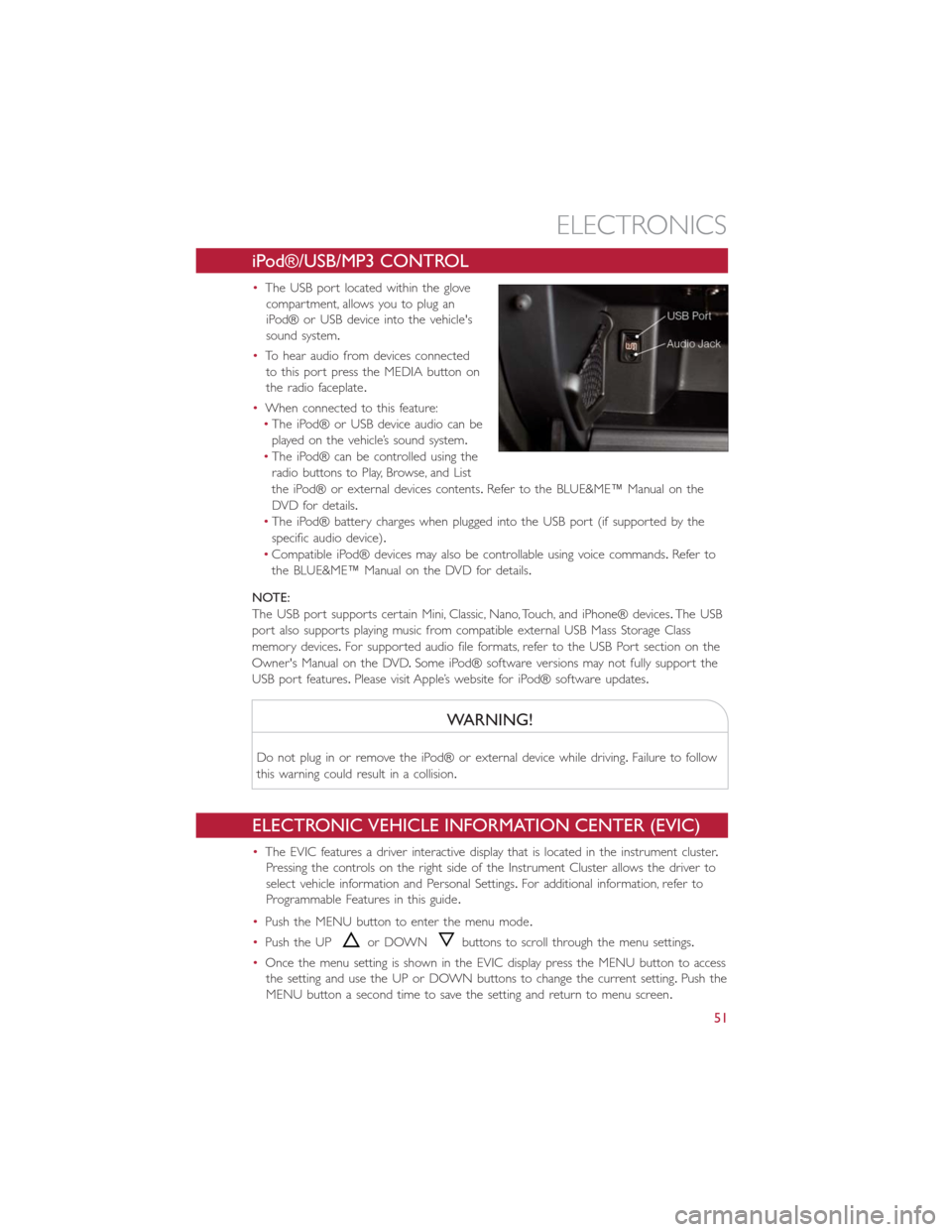
•The USB port located within the glove
compartment, allows you to plug an
iPod® or USB device into the vehicle's
sound system.
•To hear audio from devices connected
to this port press the MEDIA button on
the radio faceplate.
•When connected to this feature:
•The iPod® or USB device audio can be
played on the vehicle’s sound system.
•The iPod® can be controlled using the
radio buttons to Play, Browse, and List
the iPod® or external devices contents.Refer to the BLUE&ME™ Manual on the
DVD for details.
•The iPod® battery charges when plugged into the USB port (if supported by the
specific audio device).
•Compatible iPod® devices may also be controllable using voice commands.Refer to
the BLUE&ME™ Manual on the DVD for details.
NOTE:
The USB port supports certain Mini, Classic, Nano, Touch, and iPhone® devices.The USB
port also supports playing music from compatible external USB Mass Storage Class
memory devices.For supported audio file formats, refer to the USB Port section on the
Owner's Manual on the DVD.Some iPod® software versions may not fully support the
USB port features.Please visit Apple’s website for iPod® software updates.
WARNING!
Do not plug in or remove the iPod® or external device while driving.Failure to follow
this warning could result in a collision.
ELECTRONIC VEHICLE INFORMATION CENTER (EVIC)
•The EVIC features a driver interactive display that is located in the instrument cluster.
Pressing the controls on the right side of the Instrument Cluster allows the driver to
select vehicle information and Personal Settings.For additional information, refer to
Programmable Features in this guide.
•Push the MENU button to enter the menu mode.
•Push the UP
or DOWNbuttons to scroll through the menu settings.
•Once the menu setting is shown in the EVIC display press the MENU button to access
the setting and use the UP or DOWN buttons to change the current setting.Push the
MENU button a second time to save the setting and return to menu screen.
ELECTRONICS
51
Page 80 of 92
Power Distribution Center #1
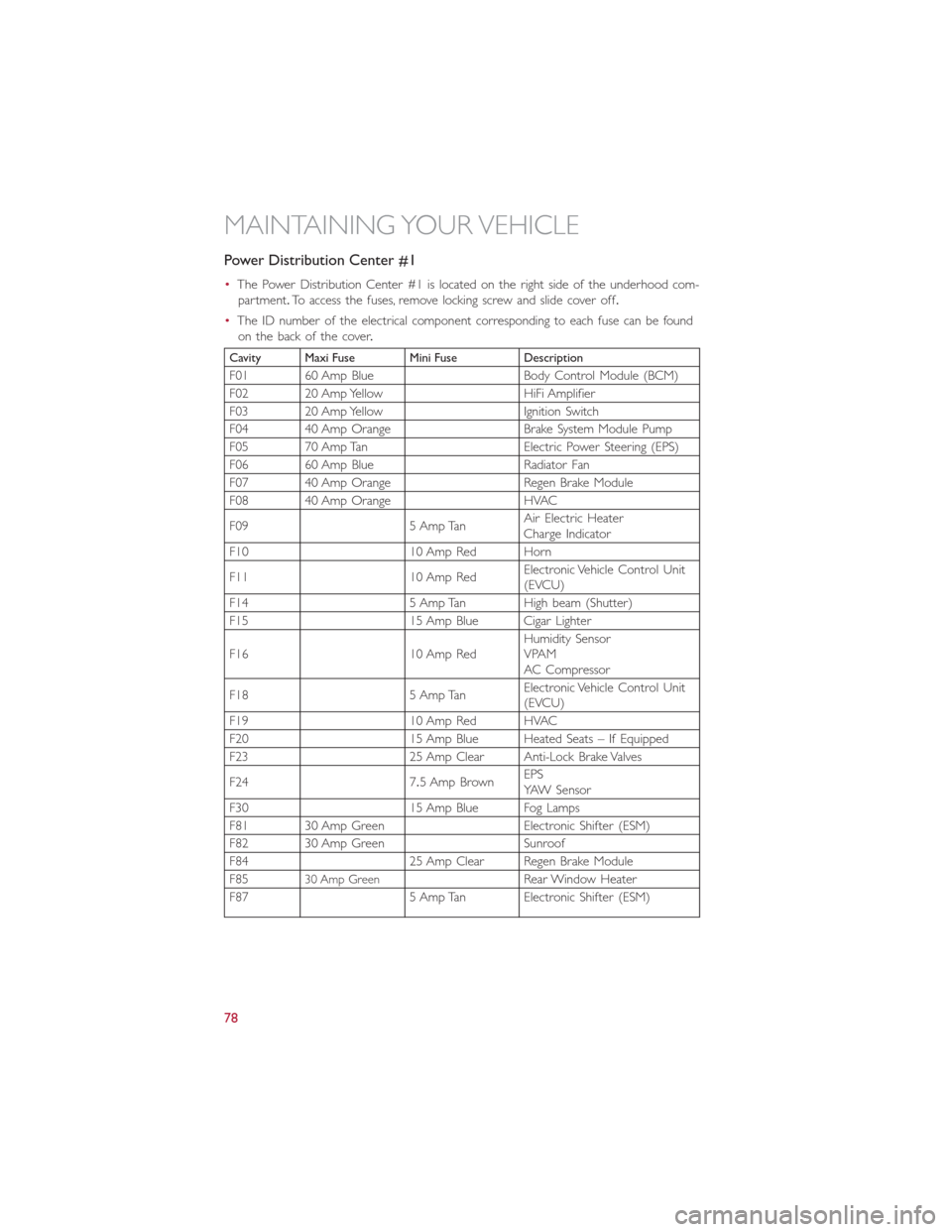
•The Power Distribution Center #1 is located on the right side of the underhood com-
partment.To access the fuses, remove locking screw and slide cover off.
•The ID number of the electrical component corresponding to each fuse can be found
on the back of the cover.
Cavity Maxi Fuse Mini Fuse Description
F01 60 Amp Blue Body Control Module (BCM)
F02 20 Amp Yellow HiFi Amplifier
F03 20 Amp Yellow Ignition Switch
F04 40 Amp Orange Brake System Module Pump
F05 70 Amp Tan Electric Power Steering (EPS)
F06 60 Amp Blue Radiator Fan
F07 40 Amp Orange Regen Brake Module
F08 40 Amp Orange HVAC
F09 5 Amp TanAir Electric Heater
Charge Indicator
F10 10 Amp Red Horn
F11 10 Amp RedElectronic Vehicle Control Unit
(EVCU)
F14 5 Amp Tan High beam (Shutter)
F15 15 Amp Blue Cigar Lighter
F16 10 Amp RedHumidity Sensor
VPAM
AC Compressor
F18 5 Amp TanElectronic Vehicle Control Unit
(EVCU)
F19 10 Amp Red HVAC
F20 15 Amp Blue Heated Seats – If Equipped
F23 25 Amp Clear Anti-Lock Brake Valves
F24 7.5 Amp BrownEPS
YAW Sensor
F30 15 Amp Blue Fog Lamps
F81 30 Amp Green Electronic Shifter (ESM)
F82 30 Amp Green Sunroof
F84 25 Amp Clear Regen Brake Module
F85
30 Amp GreenRear Window Heater
F87 5 Amp Tan Electronic Shifter (ESM)
MAINTAINING YOUR VEHICLE
78
Page 81 of 92
Power Distribution Center (PDC) #2
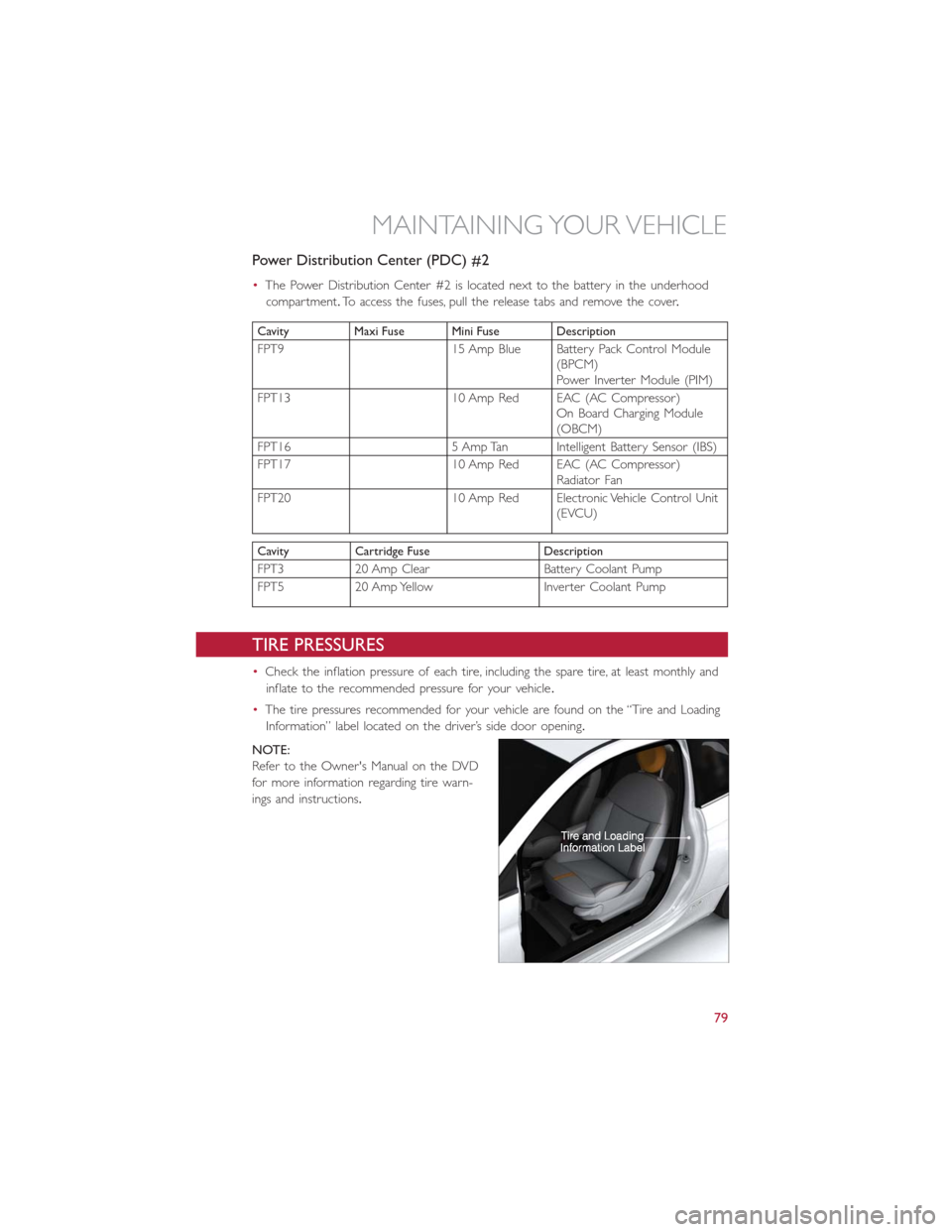
•The Power Distribution Center #2 is located next to the battery in the underhood
compartment.To access the fuses, pull the release tabs and remove the cover.
Cavity Maxi Fuse Mini Fuse Description
FPT9 15 Amp Blue Battery Pack Control Module
(BPCM)
Power Inverter Module (PIM)
FPT13 10 Amp Red EAC (AC Compressor)
On Board Charging Module
(OBCM)
FPT16 5 Amp Tan Intelligent Battery Sensor (IBS)
FPT17 10 Amp Red EAC (AC Compressor)
Radiator Fan
FPT20 10 Amp Red Electronic Vehicle Control Unit
(EVCU)
Cavity Cartridge Fuse Description
FPT3 20 Amp Clear Battery Coolant Pump
FPT5 20 Amp Yellow Inverter Coolant Pump
TIRE PRESSURES
•Check the inflation pressure of each tire, including the spare tire, at least monthly and
inflate to the recommended pressure for your vehicle.
•The tire pressures recommended for your vehicle are found on the “Tire and Loading
Information” label located on the driver’s side door opening.
NOTE:
Refer to the Owner's Manual on the DVD
for more information regarding tire warn-
ings and instructions.
MAINTAINING YOUR VEHICLE
79
Page 87 of 92
FAQ’s
GETTING STARTED
•How do I charge my vehicle? pg.16
•How do I install my LATCH Equipped Child Seat? pg.24
•How do I fold down my rear seat? pg.30
ELECTRONICS
•What Sound System do I have? pg.42
•How do I set the general settings? pg.51
•How do I set the presets on my radio? pg.45
•How do I connect my portable media player/iPod/MP3? pg.51
•How do I pair my cell phone via Bluetooth® with the BLUE&ME™ Hands-Free
Communication System? pg.48
WHAT TO DO IN EMERGENCIES
•What do I do if my TPMS warning light is blinking? pg.57
•How do I Jump-Start my vehicle? pg.65
MAINTAINING YOUR VEHICLE
•Where is my underhood fuse block located? pg.77
•Where is my interior fuse block located? pg.77
•What should my tire pressure be set at? pg.79
FREQUENTLY ASKED QUESTIONS
85
Page 88 of 92
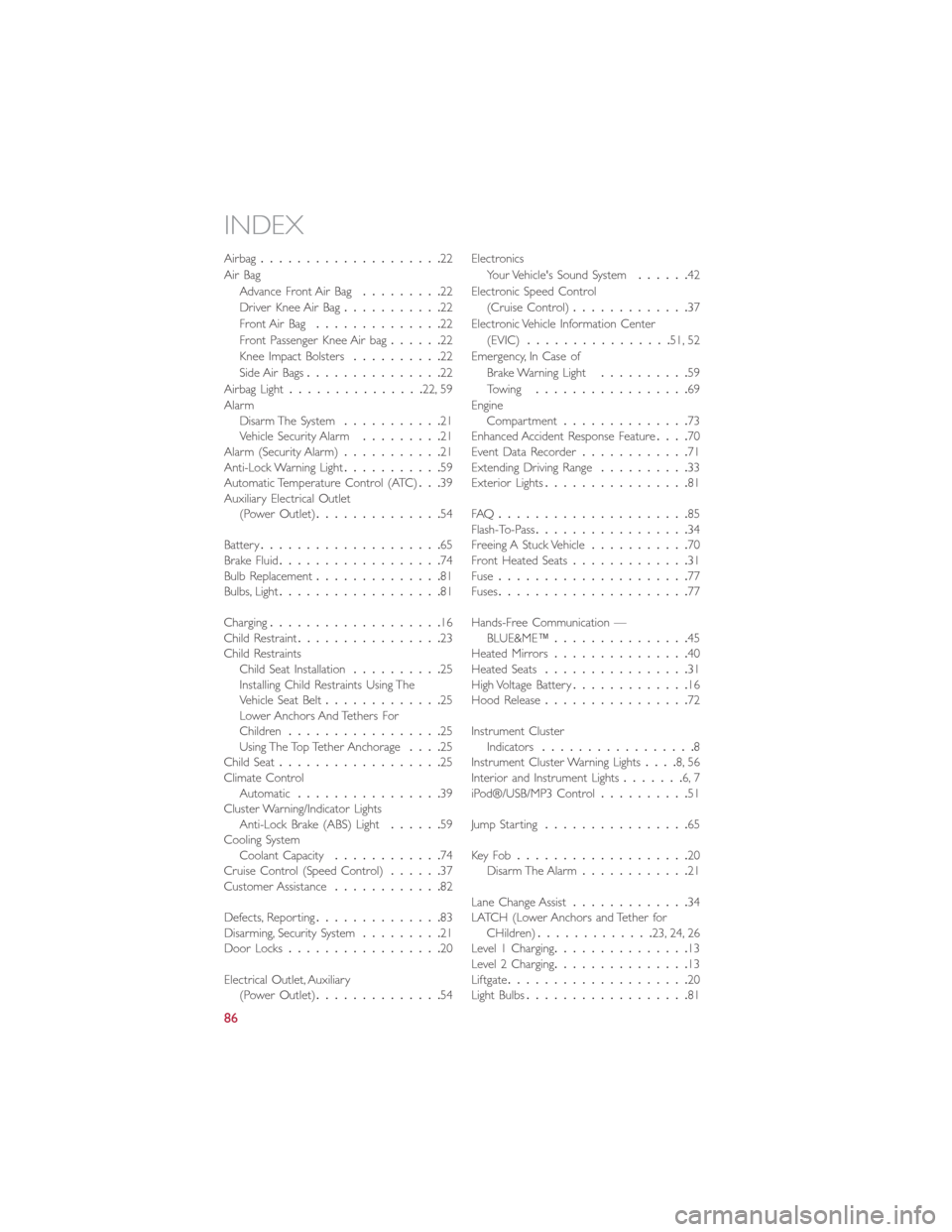
Airbag....................22
Air Bag
Advance Front Air Bag.........22
Driver Knee Air Bag...........22
Front Air Bag..............22
Front Passenger Knee Air bag......22
Knee Impact Bolsters..........22
Side Air Bags...............22
Airbag Light...............22, 59
Alarm
Disarm The System...........21
Vehicle Security Alarm.........21
Alarm (Security Alarm)...........21
Anti-Lock Warning Light...........59
Automatic Temperature Control (ATC)...39
Auxiliary Electrical Outlet
(Power Outlet)..............54
Battery....................65
Brake Fluid..................74
Bulb Replacement..............81
Bulbs, Light..................81
Charging...................16
Child Restraint................23
Child Restraints
Child Seat Installation..........25
Installing Child Restraints Using The
Vehicle Seat Belt.............25
Lower Anchors And Tethers For
Children.................25
Using The Top Tether Anchorage....25
Child Seat..................25
Climate Control
Automatic................39
Cluster Warning/Indicator Lights
Anti-Lock Brake (ABS) Light......59
Cooling System
Coolant Capacity............74
Cruise Control (Speed Control)......37
Customer Assistance............82
Defects, Reporting..............83
Disarming, Security System
.........21
Door Locks.................20
Electrical Outlet, Auxiliary
(Power Outlet)..............54Electronics
Your Vehicle's Sound System......42
Electronic Speed Control
(Cruise Control).............37
Electronic Vehicle Information Center
(EVIC)................51, 52
Emergency, In Case of
Brake Warning Light..........59
Towing.................69
Engine
Compartment..............73
Enhanced Accident Response Feature....70
Event Data Recorder............71
Extending Driving Range..........33
Exterior Lights................81
FAQ.....................85
Flash-To-Pass.................34
Freeing A Stuck Vehicle...........70
Front Heated Seats.............31
Fuse.....................77
Fuses.....................77
Hands-Free Communication —
BLUE&ME™...............45
Heated Mirrors...............40
Heated Seats................31
High Voltage Battery.............16
Hood Release................72
Instrument Cluster
Indicators.................8
Instrument Cluster Warning Lights....8, 56
Interior and Instrument Lights.......6, 7
iPod®/USB/MP3 Control..........51
Jump Starting................65
Key Fo b...................20
Disarm The Alarm............21
Lane Change Assist
.............34
LATCH (Lower Anchors and Tether for
CHildren).............23, 24, 26
Level 1 Charging...............13
Level 2 Charging...............13
Liftgate....................20
Light Bulbs..................81
INDEX
86