light FIAT 500L 2017 2.G Owners Manual
[x] Cancel search | Manufacturer: FIAT, Model Year: 2017, Model line: 500L, Model: FIAT 500L 2017 2.GPages: 370, PDF Size: 3.56 MB
Page 287 of 370
8. Install the wheel bolts with the threaded end of thewheel bolt toward the wheel. Lightly tighten the
wheel bolts.
WARNING!
•To avoid the risk of forcing the vehicle off the
jack, do not tighten the lug nuts fully until the
vehicle has been lowered. Failure to follow this
warning may result in personal injury.
• To avoid possible personal injury, handle the
wheel covers with care to avoid contact with any
sharp edges.
9. Lower the vehicle to the ground by turning the jack handle counterclockwise.
10. Finish tightening the wheel bolts. Push down on the wrench while at the end of the handle for increased
leverage. Tighten the wheel bolts in a star pattern
until each wheel bolt has been tightened twice.
Refer to Torque Specifications in this section for
proper lug nut torque. If in doubt about the correct
tightness, have them checked with a torque wrench
by your authorized dealer or at a service station. 11. Stow the jack, tools and flat tire.
WARNING!
A loose tire or jack thrown forward in a collision or
hard stop could endanger the occupants of the
vehicle. Always stow the jack parts and the spare
tire in the places provided. Have the deflated (flat)
tire repaired or replaced immediately.
Spare Tire Stowage
Rotate the jack wrench tool on the winch drive nut
clockwise (the flat tire must not be connected to the
winch) until effort becomes heavy and an audible click
is heard indicating the winch is properly stowed.
Cover the flat tire with the Emergency Spare Tire Bag
and stow the flat tire into the trunk.
CAUTION!
The winch mechanism is designed for use with the
jack wrench extension tool only. Use of air wrench
or power tool may damage the winch.
6
WHAT TO DO IN EMERGENCIES 285
Page 302 of 370
ONBOARD DIAGNOSTIC SYSTEM — OBD II
Your vehicle is equipped with a sophisticated onboard
diagnostic system called OBD II. This system monitors
the performance of the emissions, engine, and transmis-
sion control systems. When these systems are operating
properly, your vehicle will provide excellent perfor-
mance and fuel economy, as well as engine emissions
well within current government regulations.
If any of these systems require service, the OBD II
system will turn on the “Malfunction Indicator Light
(MIL)”. It will also store diagnostic codes and other
information to assist your service technician in making
repairs. Although your vehicle will usually be drivable
and not need towing, see your authorized dealer for
service as soon as possible.
CAUTION!
•Prolonged driving with the MIL on could cause
further damage to the emission control system. It
could also affect fuel economy and driveability.
The vehicle must be serviced before any emis-
sions tests can be performed.
• If the MIL is flashing while the engine is running,
severe catalytic converter damage and power loss
will soon occur. Immediate service is required.
Onboard Diagnostic System (OBD II)
Cybersecurity
Your vehicle is required to have an Onboard Diagnostic
system (OBD II) and a connection port to allow access to
information related to the performance of your emis-
sions controls. Authorized service technicians may need
to access this information to assist with the diagnosis
and service of your vehicle and emissions system.
300 MAINTAINING YOUR VEHICLE
Page 320 of 370
If an examination of your engine compartment shows
no evidence of radiator or hose leaks, the vehicle may
be safely driven. The vapor will soon dissipate.
•Do not overfill the coolant expansion bottle.
• Check the coolant freeze point in the radiator and in
the coolant expansion bottle. If engine coolant (anti-
freeze) needs to be added, the contents of the coolant
expansion bottle must also be protected against freez-
ing.
• If frequent engine coolant (antifreeze) additions are
required, the cooling system should be pressure
tested for leaks.
• Maintain engine coolant (antifreeze) concentration at
a minimum of 50% OAT coolant (conforming to
MS.90032) and distilled water for proper corrosion
protection of your engine which contains aluminum
components.
• Keep the front of the radiator clean. If your vehicle is
equipped with air conditioning, keep the front of the
condenser clean.
• Do not change the thermostat for Summer or Winter
operation. If replacement is ever necessary, install
ONLY the correct type thermostat. Other designs may result in unsatisfactory engine coolant (anti-
freeze) performance, poor gas mileage, and increased
emissions.
Brake System
In order to assure brake system performance, all brake
system components should be inspected periodically.
Refer to the “Maintenance Schedule” for the proper
maintenance intervals.
WARNING!
Riding the brakes can lead to brake failure and
possibly a collision. Driving with your foot resting
or riding on the brake pedal can result in abnor-
mally high brake temperatures, excessive lining
wear, and possible brake damage. Riding the
brakes may also reduce braking capacity in an
emergency.
Brake Master Cylinder
The fluid level in the master cylinder should be checked
when performing under hood services, or immediately
if the “Brake Warning Light” is on.
318 MAINTAINING YOUR VEHICLE
Page 327 of 370
Interior Care
Use MOPAR Total Clean to clean fabric upholstery and
carpeting.
Use MOPAR Total Clean to clean vinyl upholstery.
MOPAR Total Clean is specifically recommended for
leather upholstery.
Your leather upholstery can be best preserved by regular
cleaning with a damp soft cloth. Small particles of dirt can
act as an abrasive and damage the leather upholstery and
should be removed promptly with a damp cloth. Stub-
born soils can be removed easily with a soft cloth and
MOPAR Total Clean. Care should be taken to avoid
soaking your leather upholstery with any liquid. Please
do not use polishes, oils, cleaning fluids, solvents, deter-
gents, or ammonia-based cleaners to clean your leather
upholstery. Application of a leather conditioner is not
required to maintain the original condition.
WARNING!
Do not use volatile solvents for cleaning purposes.
Many are potentially flammable, and if used in
closed areas they may cause respiratory harm.
CAUTION!
Direct contact of air fresheners, insect repellents,
suntan lotions, or hand sanitizers to the plastic,
painted, or decorated surfaces of the interior may
cause permanent damage. Wipe away immediately.
CAUTION!
Damage caused by these type of products may not
be covered by your New Vehicle Limited Warranty.
CAUTION!
Do not use Alcohol and Alcohol-based and/or Ke-
ton based cleaning products to clean leather seats,
as damage to the seat may result.
Cleaning Headlights
Your vehicle has plastic headlights that are lighter and
less susceptible to stone breakage than glass headlights.
Plastic is not as scratch resistant as glass and therefore
different lens cleaning procedures must be followed.
7
MAINTAINING YOUR VEHICLE 325
Page 328 of 370
To minimize the possibility of scratching the lenses and
reducing light output, avoid wiping with a dry cloth. To
remove road dirt, wash with a mild soap solution
followed by rinsing.
Do not use abrasive cleaning components, solvents,
steel wool or other aggressive material to clean the
lenses.
Glass Surfaces
All glass surfaces should be cleaned on a regular basis
with MOPAR Glass Cleaner, or any commercial
household-type glass cleaner. Never use an abrasive
type cleaner. Use caution when cleaning the inside rear
window equipped with electric defrosters or windows
equipped with radio antennas. Do not use scrapers or
other sharp instrument that may scratch the elements.
When cleaning the rear view mirror, spray cleaner on
the towel or cloth that you are using. Do not spray
cleaner directly on the mirror.
Instrument Panel Cover
The instrument panel cover has a low glare surface
which minimizes reflections on the windshield. Do notuse protectants or other products which may cause
undesirable reflections. Use soap and warm water to
restore the low glare surface.
Instrument Panel Bezels
CAUTION!
When installing hanging air fresheners in your
vehicle, read the installation instructions carefully.
Some air fresheners will damage the finish of
painted or decorated parts if allowed to directly
contact any surface.
Cleaning Plastic Instrument Cluster Lenses
The lenses in front of the instruments in this vehicle are
molded in clear plastic. When cleaning the lenses, care
must be taken to avoid scratching the plastic.
1. Clean with a wet soft cloth. A mild soap solution
may be used, but do not use high alcohol content or
abrasive cleaners. If soap is used, wipe clean with a
clean damp cloth.
2. Dry with a soft cloth.
326 MAINTAINING YOUR VEHICLE
Page 333 of 370
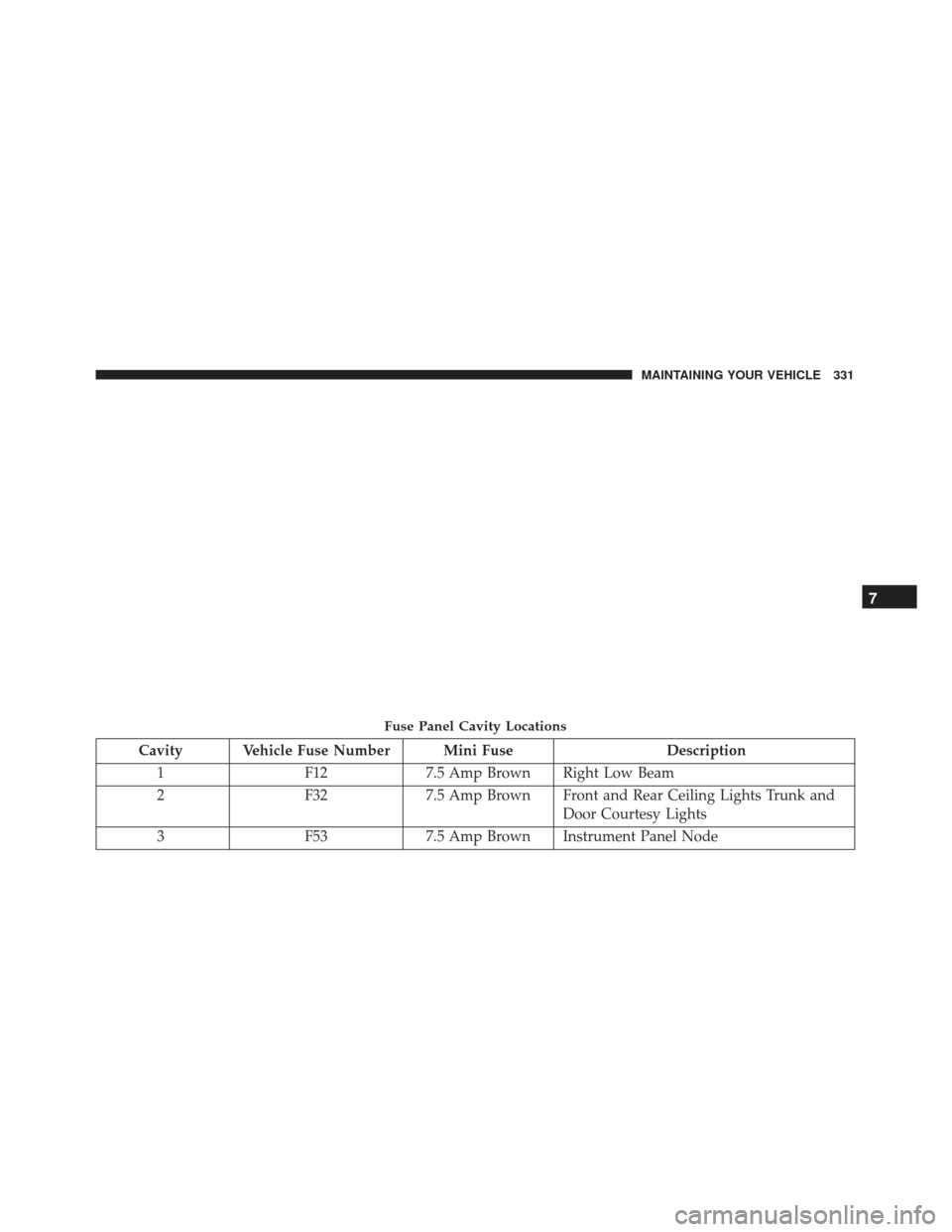
Cavity Vehicle Fuse Number Mini FuseDescription
1 F127.5 Amp Brown Right Low Beam
2 F327.5 Amp Brown Front and Rear Ceiling Lights Trunk and
Door Courtesy Lights
3 F537.5 Amp Brown Instrument Panel Node
Fuse Panel Cavity Locations
7
MAINTAINING YOUR VEHICLE 331
Page 334 of 370
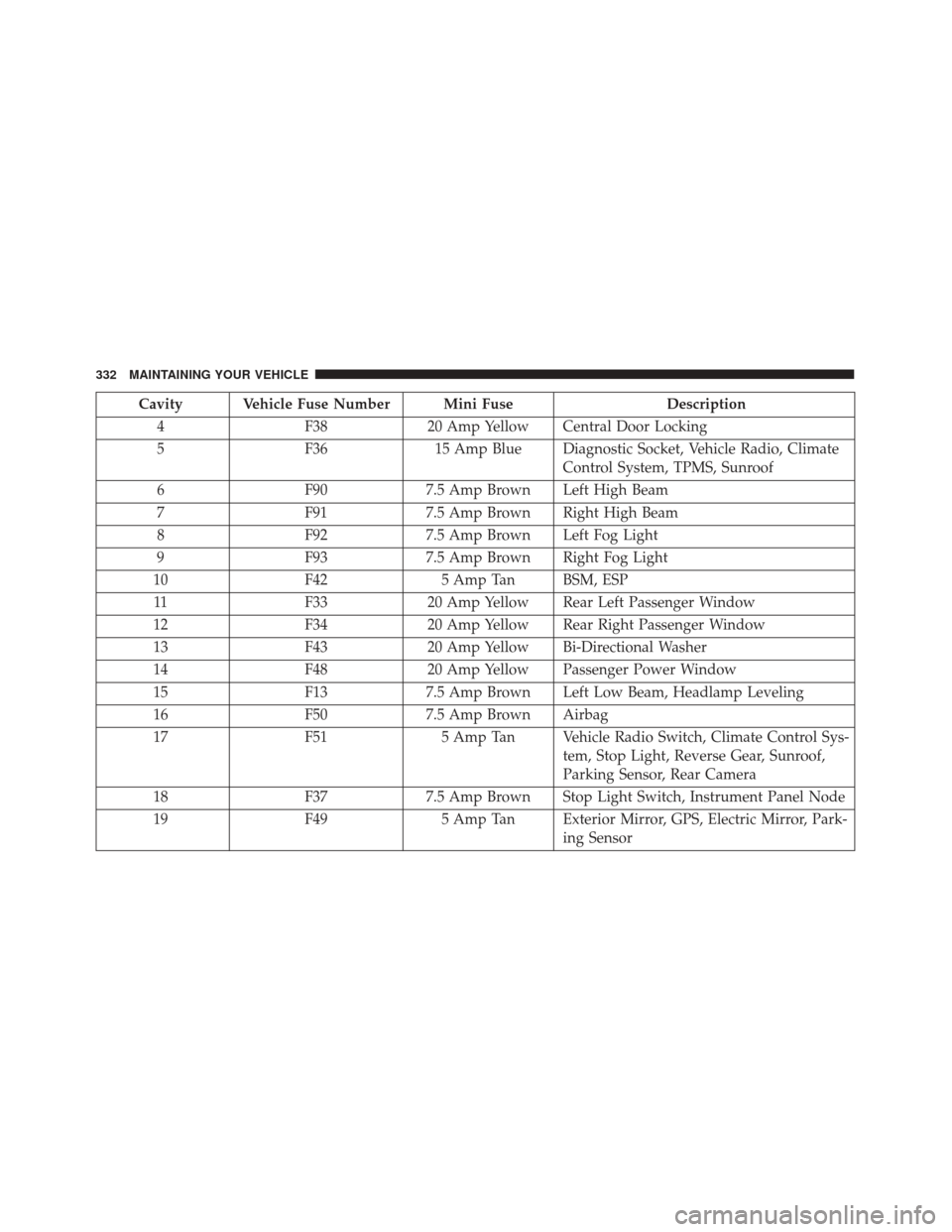
Cavity Vehicle Fuse Number Mini FuseDescription
4 F3820 Amp Yellow Central Door Locking
5 F3615 Amp Blue Diagnostic Socket, Vehicle Radio, Climate
Control System, TPMS, Sunroof
6 F907.5 Amp Brown Left High Beam
7 F917.5 Amp Brown Right High Beam
8 F927.5 Amp Brown Left Fog Light
9 F937.5 Amp Brown Right Fog Light
10 F425 Amp Tan BSM, ESP
11 F3320 Amp Yellow Rear Left Passenger Window
12 F3420 Amp Yellow Rear Right Passenger Window
13 F4320 Amp Yellow Bi-Directional Washer
14 F4820 Amp Yellow Passenger Power Window
15 F137.5 Amp Brown Left Low Beam, Headlamp Leveling
16 F507.5 Amp Brown Airbag
17 F515 Amp Tan Vehicle Radio Switch, Climate Control Sys-
tem, Stop Light, Reverse Gear, Sunroof,
Parking Sensor, Rear Camera
18 F377.5 Amp Brown Stop Light Switch, Instrument Panel Node
19 F495 Amp Tan Exterior Mirror, GPS, Electric Mirror, Park-
ing Sensor
332 MAINTAINING YOUR VEHICLE
Page 340 of 370
6. Reinstall the plastic cap.
Front Turn Signal, Parking And Daytime
Running Lamps
1. Turn front wheels inboard to access upper cover inwheel liner.
2. Open the upper cover on the front of the wheel liner.
3. Remove the cap from the back of the lower headlamp housing. 4. Rotate the bulb counterclockwise and remove.
5. Install the bulb into socket, and rotate bulb/socket
clockwise into lamp locking it in place.
6. Reinstall the plastic cap and close the cover on the wheel liner.
Front Fog Lamps
To replace the front fog lights, see your authorized
dealer.
Front, Rear Roof Lamps
1. Remove two screw and remove the lamp assembly.
2. Remove the socket bulb by turning counterclock-wise.
3. Remove bulb and replace as needed.
4. Reinstall the bulb socket and rotate clockwise to lock in place.
5. Reinstall lamp.Headlamp Sealing Cap Installation
338 MAINTAINING YOUR VEHICLE
Page 341 of 370
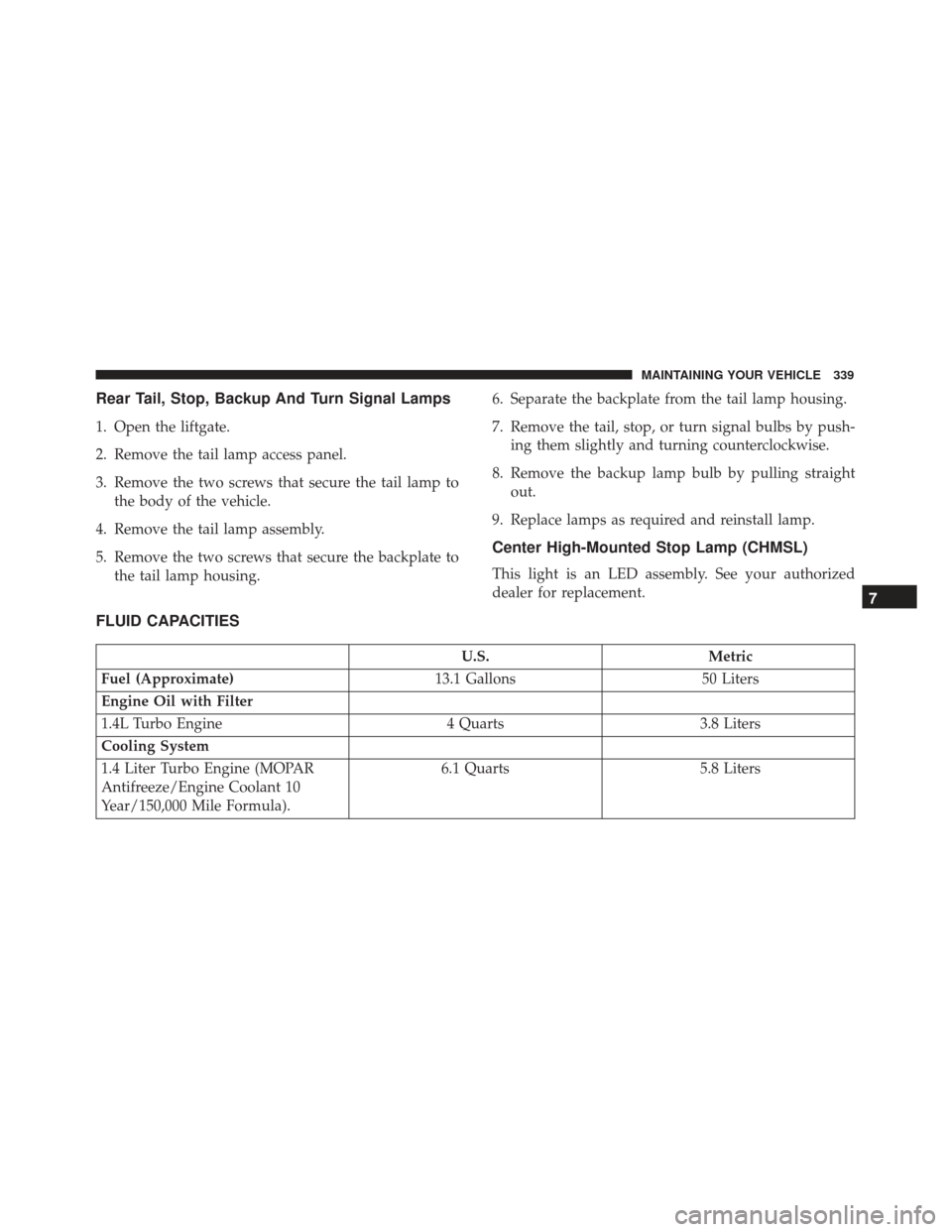
Rear Tail, Stop, Backup And Turn Signal Lamps
1. Open the liftgate.
2. Remove the tail lamp access panel.
3. Remove the two screws that secure the tail lamp tothe body of the vehicle.
4. Remove the tail lamp assembly.
5. Remove the two screws that secure the backplate to the tail lamp housing. 6. Separate the backplate from the tail lamp housing.
7. Remove the tail, stop, or turn signal bulbs by push-
ing them slightly and turning counterclockwise.
8. Remove the backup lamp bulb by pulling straight out.
9. Replace lamps as required and reinstall lamp.
Center High-Mounted Stop Lamp (CHMSL)
This light is an LED assembly. See your authorized
dealer for replacement.
FLUID CAPACITIES
U.S. Metric
Fuel (Approximate) 13.1 Gallons50 Liters
Engine Oil with Filter
1.4L Turbo Engine 4 Quarts3.8 Liters
Cooling System
1.4 Liter Turbo Engine (MOPAR
Antifreeze/Engine Coolant 10
Year/150,000 Mile Formula). 6.1 Quarts
5.8 Liters
7
MAINTAINING YOUR VEHICLE 339
Page 346 of 370
MAINTENANCE SCHEDULE
Your vehicle is equipped with an automatic oil change
indicator system. The oil change indicator system will
remind you that it is time to take your vehicle in for
scheduled maintenance.
Based on engine operation conditions, the oil change
indicator message will illuminate in the instrument
cluster. This means that service is required for your
vehicle. Operating conditions such as frequent short-
trips, trailer tow and extremely hot or cold ambient
temperatures will influence when the “Change Oil” or
“Oil Change Required” message is displayed. Severe
Operating Conditions can cause the change oil message
to illuminate as early as 3,500 miles (5,600 km) since last
reset. Have your vehicle serviced as soon as possible,
within the next 500 miles (805 km).
Your authorized dealer will reset the oil change indica-
tor message after completing the scheduled oil change.
If a scheduled oil change is performed by someone
other than your authorized dealer, the message can be
reset by referring to the steps described under “Instru-
ment Cluster Display” in “Understanding Your Instru-
ment Panel” for further information.NOTE:
Under no circumstances should oil change
intervals exceed 10,000 miles (16,000 km), twelve
months or 350 hours of engine run time, whichever
comes first. The 350 hours of engine run or idle time is
generally only a concern for fleet customers.
Severe Duty All Models
Change Engine Oil at 4,000 miles (6,500 km) if the
vehicle is operated in a dusty and off road environment
or is operated predominately at idle or only very low
engine RPM’s. This type of vehicle use is considered
Severe Duty.
Once A Month Or Before A Long Trip:
• Check engine oil level.
• Check windshield washer fluid level.
• Check the tire inflation pressures and look for un-
usual wear or damage.
• Check the fluid levels of the coolant reservoir, and
brake master cylinder reservoir, and fill as needed.
• Check function of all interior and exterior lights.
344 MAINTENANCE SCHEDULES