door lock FIAT 500L 2017 2.G User Guide
[x] Cancel search | Manufacturer: FIAT, Model Year: 2017, Model line: 500L, Model: FIAT 500L 2017 2.GPages: 370, PDF Size: 3.56 MB
Page 23 of 370
Doors Lock With One Or More Doors Open
It is possible to lock the vehicle using the Remote
Keyless Entry, internal button, or external key fob. The
vehicle can also be locked if one or more doors are open.
At lock command request, LED is switched ON. At
closing of the last door, the vehicle maintains the central
locking status if key is not inserted in Ignition Device,
otherwise the vehicle will be unlocked and the LED will
be switched OFF.
NOTE:If the key is not inserted in the ignition switch,
but is inside the vehicle, the system does not recognize
the presence of the key and after the closing of last door,
the vehicle remains locked.
Auto — Relocking (Only For Rear Doors)
With the vehicle locked and all doors closed (LED ON),
if a passenger opens one of the rear doors (LED OFF), as
soon as the door is closed, it will be locked again (LED
ON).
Child-Protection Door Lock System — Rear
Doors
To provide a safer environment for small children
riding in the rear seats, the rear doors are equipped with
Child-Protection Door Lock system.
To Engage Or Disengage The Child-Protection
Door Lock System
1. Open the rear door.
2. Insert the tip of the key into the lock and rotate clockwise to the lock position or counter clockwise to
unlock position.
3. Repeat steps 1 and 2 for the opposite rear door.
WARNING!
Avoid trapping anyone in a vehicle in a collision.
Remember that the rear doors can only be opened
from the outside when the Child-Protection locks
are engaged (locked).
NOTE: For emergency exit from the rear seats when the
Child-Protection Door Lock System is engaged, unlock
the doors using the central unlock button, roll down the
window and open the door using the exterior handle.
2
THINGS TO KNOW BEFORE STARTING YOUR VEHICLE 21
Page 24 of 370
POWER WINDOWS
Power Window Switches
The power window controls are located on the driver’s
door trim panel. There is a single switch on the front
passenger door, which operate the front passenger
window and a single switch on each rear door that
operates the rear passenger door window. The window
controls will operate only when the ignition switch is in
the ON/RUN position.NOTE:
The power window switches will remain active
for up to three minutes after the ignition switch is
cycled to the OFF position. Opening either front door
will cancel this feature.
WARNING!
Never leave children unattended in a vehicle, and
do not let children play with power windows. Do
not leave the key fob in or near the vehicle, or in a
location accessible to children. Occupants, particu-
larly unattended children, can become entrapped
by the windows while operating the power window
switches. Such entrapment may result in serious
injury or death.
Auto-Down
The window switches have an Auto-Down feature.
Push the window switch for approximately one second,
release, and the window will go down automatically. To
cancel the Auto-Down movement, operate the switch in
either the up or down direction and release the switch.
Power Switch Panel
1 — Driver And Passenger Front Window Switches
2 — Window Lockout Switch
3 — Driver And Passenger Rear Window Switches 22 THINGS TO KNOW BEFORE STARTING YOUR VEHICLE
Page 48 of 370
Enhanced Accident Response System
In the event of an impact, if the communication net-
work remains intact, and the power remains intact,
depending on the nature of the event, the ORC will
determine whether to have the Enhanced Accident
Response System perform the following functions:
•Cut off fuel to the engine.
• Flash hazard lights as long as the battery has power
or until the hazard light button is pressed. The
hazard lights can be deactivated by pressing the
hazard light button.
• Turn on the interior lights, which remain on as long
as the battery has power or for 15 minutes from the
intervention of the Enhanced Accident Response
System.
• Unlock the power door locks.
Enhanced Accident Response System Reset
Procedure
After the event occurs, when the system is active, a
message regarding fuel cutoff is displayed. Turn the
ignition switch from ignition AVV/START or MAR/ ACC/ON/RUN to ignition STOP/OFF/LOCK. Care-
fully check the vehicle for fuel leaks in the engine
compartment and on the ground near the engine com-
partment and fuel tank before resetting the system and
starting the engine.
Depending on the nature of the event the left and right
turn signal lights, located in the instrument panel, may
both be blinking and will continue to blink. In order to
move your vehicle to the side of the road, you must
follow the system reset procedure.
Customer Action Customer Will See
NOTE: Each step MUST BE held for at least 2 sec-
onds
1. Turn ignition STOP/
OFF/LOCK. (Turn Sig-
nal Must be placed in
Neutral State).
2. Turn ignition MAR/
ACC/ON/RUN. Right turn light BLINKS.
Left turn light is OFF.
3. Turn right turn signal
switch ON. Right turn light is ON
SOLID.
Left turn light BLINKS.
46 THINGS TO KNOW BEFORE STARTING YOUR VEHICLE
Page 72 of 370
bulges. Check the wheel bolts for tightness. Check the
tires (including spare) for proper cold inflation pres-
sure.
Lights
Have someone observe the operation of brake lights
and exterior lights while you work the controls. Check
turn signal and high beam indicator lights on the
instrument panel.
Door Latches
Check for proper closing, latching, and locking.
Fluid Leaks
Check area under vehicle after overnight parking for
fuel, engine coolant, oil, or other fluid leaks. Also, if
gasoline fumes are detected or if fuel, power steering
fluid (if equipped), or brake fluid leaks are suspected.
The cause should be located and corrected immediately.
70 THINGS TO KNOW BEFORE STARTING YOUR VEHICLE
Page 79 of 370
Folding Mirrors
The exterior mirrors are hinged to allow the mirror to
pivot forward or rearward to help avoid damage. The
mirror has three detent positions: full forward, normal
and full rearward.
Heated Mirrors — If Equipped
These mirrors are heated to melt frost or ice. This
feature can be activated whenever you turn on
the rear window defroster.
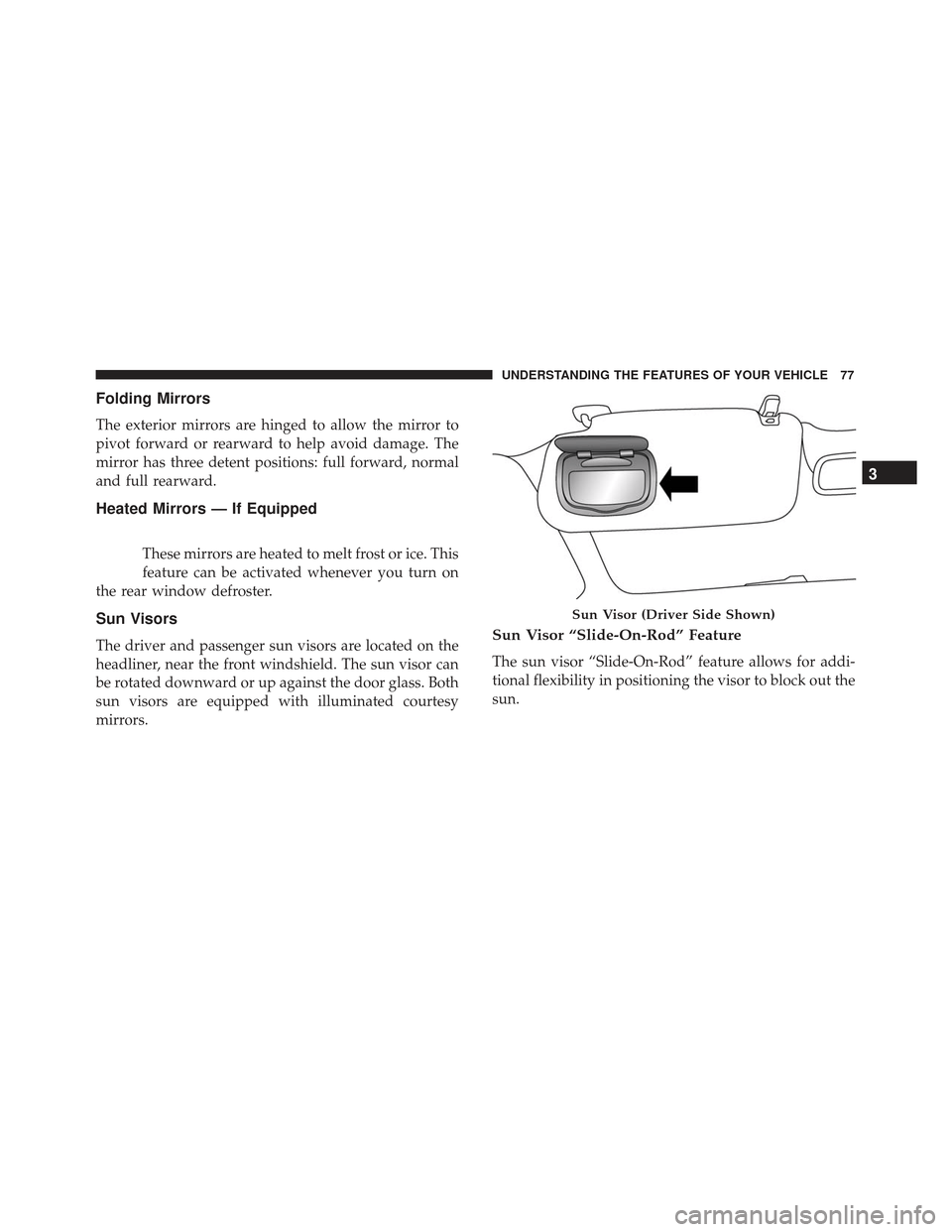
Sun Visors
The driver and passenger sun visors are located on the
headliner, near the front windshield. The sun visor can
be rotated downward or up against the door glass. Both
sun visors are equipped with illuminated courtesy
mirrors.Sun Visor “Slide-On-Rod” Feature
The sun visor “Slide-On-Rod” feature allows for addi-
tional flexibility in positioning the visor to block out the
sun.
Sun Visor (Driver Side Shown)
3
UNDERSTANDING THE FEATURES OF YOUR VEHICLE 77
Page 94 of 370
Parking Lights
To turn on the parking lights, remove the key
or turn the ignition to OFF/LOCK position
and turn on the headlights.
NOTE: If the parking lights are left on and the key is in
the stop position with the door open, an audible chime
will sound and a message will show in the Instrument
Cluster Display. The chime will stop as soon as the
lights are switched off.
Turn Signals
Move the multifunction lever up or down and the
arrows on each side of the instrument cluster display
will flash to show proper operation of the front and rear
turn signal lights.
NOTE: If either light remains on and does not flash, or
there is a very fast flash rate, check for a defective
outside light bulb. If an indicator fails to light when the
lever is moved, it would suggest that the indicator bulb
is defective.
Lane Change Assist
Tap the lever up or down once, without moving beyond
the detent, and the turn signal (right or left) will flash
five times then automatically turn off.
Follow Me Home/Headlight Delay
When this feature is selected the driver can choose to
have the headlights remain on for a preset period of
time.
Activation
Remove the key or turn the ignition to the STOP
(OFF/LOCK) position, and pull the multifunction lever
toward the steering wheel, within two minutes. Each
time the lever is pulled, the activation of the lights will
be extended by 30 seconds. The activation of the lights
can be extended to a maximum of 210 seconds.
Deactivation
Pull the multifunction lever toward the steering wheel
and hold it for more than two seconds.
92 UNDERSTANDING THE FEATURES OF YOUR VEHICLE
Page 97 of 370
The switches on the left and right sides of the overhead
console controls the map or reading function of the
lights. Push the switch to the right to turn on the right
light and push the switch to the left to turn on the left
light.
CAUTION!
Before getting out of the vehicle be sure that the
switch is in the center position or that the lights are
off to avoid draining the battery.
Interior Light Timing (Center Position)
There are four different modes of operation that can be
activated in this position:
•When one door is opened a three minute timer is
activated.
• When the key is removed from the ignition (within
two minutes of the ignition being turned off), a 10
second timer is activated.
• When the doors are unlocked with the key fob a 10
second timer is activated.
• When the doors are locked with the key fob the lights
will turn off.
Interior Light Timing (On/Right Position)
•When all doors are closed a 15 minute timer is
activated.
NOTE: The timer is deactivated when the key is moved
into the ON/RUN position.Map/Reading Light Switches
3
UNDERSTANDING THE FEATURES OF YOUR VEHICLE 95
Page 117 of 370
NOTE:•If the indicator light stays on constantly, program-
ming is complete and the garage door/device
should activate when the HomeLink button is
pushed.
• To program the two remaining HomeLink buttons,
repeat each step for each remaining button. DO
NOT erase the channels.
If you unplugged the garage door opener/device for
programming, plug it back in at this time.
Reprogramming A Single HomeLink Button
(Canadian/Gate Operator)
To reprogram a channel that has been previously
trained, follow these steps:
1. Cycle the ignition to the ON/RUN position.
NOTE: For vehicles equipped with Keyless Enter-N-
Go, place the ignition in the RUN position with the
engine ON. Make sure while programming HomeLink
with the engine ON that your vehicle is outside of your
garage, or that the garage door remains open at all
times. 2. Push and hold the desired HomeLink button until
the indicator light begins to flash after 20 seconds.
Do not release the button.
3. Without releasing the button, proceed with
“Canadian/Gate Operator Programming” step 2 and
follow all remaining steps.
Using HomeLink
To operate, switch the ignition to the ON/RUN position
and the press and release the programmed HomeLink
button. Activation will now occur for the programmed
device (i.e., garage door opener, gate operator, security
system, entry door lock, home/office lighting, etc.,).
The hand-held transmitter of the device may also be
used at any time. If the ignition is switched to the OFF
position, HomeLink will remain active for three min-
utes. During this time, if the vehicle is locked,
HomeLink is disabled.
Security
It is advised to erase all channels before you sell or turn
in your vehicle.
To do this, push and hold the two outside buttons for 20
seconds until the red indicator flashes.
3
UNDERSTANDING THE FEATURES OF YOUR VEHICLE 115
Page 154 of 370
INSTRUMENT CLUSTER DISPLAY
Your vehicle may be equipped with an instrument
cluster display, which offers useful information to the
driver. With the ignition in the STOP/OFF position (and
the key removed, for vehicles with mechanical key),
opening/closing of a door will activate the display for
viewing, and display the total miles or kilometers in the
odometer. Your instrument cluster display is designed
to display important information about your vehicle’s
systems and features. Using a driver interactive display
located on the instrument panel, your instrument clus-
ter display can show you how systems are working and
give you warnings when they aren’t. The steering wheel
mounted controls allow you to scroll through and enter
the main menus and submenus. You can access the
specific information you want and make selections and
adjustments.
Instrument Cluster Display Control Buttons
The instrument cluster display control buttons are lo-
cated on the instrument panel below the radio.Push and release the
MENUbutton briefly to access the
menu and/or go to next screen or to confirm the
required menu option. Push and hold the MENU
button (approximately one second) to return to the
main screen.
Push and release the up
button to scroll upward
through the displayed menu and the related options
or to increase the displayed value.
Push and release the downbutton to scroll down-
ward through the displayed menu and the related
options or to decrease the value displayed.
NOTE: upand downbuttons activate differ-
ent functions according to the following situations:
• To scroll the menu options upwards or downwards.
• To increase or decrease values during settings.
NOTE: When opening one of the front doors, the
instrument cluster display will turn on the clock, the
external temperature and the miles or kilometers cov-
ered for a few seconds.
152 UNDERSTANDING YOUR INSTRUMENT PANEL
Page 165 of 370
Autoclose
With this function active, the doors will automatically
lock at when the vehicle’s speed exceeds 15 mph
(24 km/h).
To change the setting proceed as follows:
1. Briefly push and release theMENUbutton. Push the
up
or downbutton to highlight Autoclose.
Push and release the MENUbutton to enter
Autoclose MENU.
2. Push and release the upordownbutton for
setting.
3. Briefly push and release the MENUbutton to go
back to the menu screen, or push and hold the
MENU button (approximately one second) to go
back to the main screen without storing the settings.
Units (Set Units)
This function may be used to set the measurement unit
in three submenus: “Distance,” “Temperature” and
“Fuel Economy, and Tire Pressure.” To set the required unit, proceed as follows:
1. Briefly push and release the
MENUbutton. Push and
release the up
ordownbutton to highlight
Units. Push and release the MENUbutton to enter
Units MENU.
2. Push and release the upordownbutton to
navigate the three sub-menus.
3. Select the required sub-menu and then briefly push and release the MENUbutton.
4. When accessing the “Distance” submenu, briefly push and release the MENUbutton. Either “mi” or
“km” will appear on the display (according to the
previous setting).
5. Push and release the up
ordownbutton for
setting.
6. Briefly push and release the MENUbutton to return
to the sub-menu.
7. When accessing the “Fuel Economy” submenu, briefly push and release the MENUbutton. Either
“mpg,” “km/l ” or “l/100km” will appear on the
display (according to the previous setting).
4
UNDERSTANDING YOUR INSTRUMENT PANEL 163