lock FIAT 500L 2017 2.G Owner's Guide
[x] Cancel search | Manufacturer: FIAT, Model Year: 2017, Model line: 500L, Model: FIAT 500L 2017 2.GPages: 370, PDF Size: 3.56 MB
Page 94 of 370
Parking Lights
To turn on the parking lights, remove the key
or turn the ignition to OFF/LOCK position
and turn on the headlights.
NOTE: If the parking lights are left on and the key is in
the stop position with the door open, an audible chime
will sound and a message will show in the Instrument
Cluster Display. The chime will stop as soon as the
lights are switched off.
Turn Signals
Move the multifunction lever up or down and the
arrows on each side of the instrument cluster display
will flash to show proper operation of the front and rear
turn signal lights.
NOTE: If either light remains on and does not flash, or
there is a very fast flash rate, check for a defective
outside light bulb. If an indicator fails to light when the
lever is moved, it would suggest that the indicator bulb
is defective.
Lane Change Assist
Tap the lever up or down once, without moving beyond
the detent, and the turn signal (right or left) will flash
five times then automatically turn off.
Follow Me Home/Headlight Delay
When this feature is selected the driver can choose to
have the headlights remain on for a preset period of
time.
Activation
Remove the key or turn the ignition to the STOP
(OFF/LOCK) position, and pull the multifunction lever
toward the steering wheel, within two minutes. Each
time the lever is pulled, the activation of the lights will
be extended by 30 seconds. The activation of the lights
can be extended to a maximum of 210 seconds.
Deactivation
Pull the multifunction lever toward the steering wheel
and hold it for more than two seconds.
92 UNDERSTANDING THE FEATURES OF YOUR VEHICLE
Page 97 of 370
The switches on the left and right sides of the overhead
console controls the map or reading function of the
lights. Push the switch to the right to turn on the right
light and push the switch to the left to turn on the left
light.
CAUTION!
Before getting out of the vehicle be sure that the
switch is in the center position or that the lights are
off to avoid draining the battery.
Interior Light Timing (Center Position)
There are four different modes of operation that can be
activated in this position:
•When one door is opened a three minute timer is
activated.
• When the key is removed from the ignition (within
two minutes of the ignition being turned off), a 10
second timer is activated.
• When the doors are unlocked with the key fob a 10
second timer is activated.
• When the doors are locked with the key fob the lights
will turn off.
Interior Light Timing (On/Right Position)
•When all doors are closed a 15 minute timer is
activated.
NOTE: The timer is deactivated when the key is moved
into the ON/RUN position.Map/Reading Light Switches
3
UNDERSTANDING THE FEATURES OF YOUR VEHICLE 95
Page 101 of 370
Pushing the windshield wiper lever forward activates
the rear window washer. Keep the windshield wiper
lever pushed for more than half a second to activate the
rear window wiper as well. Releasing the windshield
wiper lever will activate the smart washing function, as
described for the windscreen wiper.
Deactivation
The function stops when the windshield wiper lever is
released.TILT/TELESCOPING STEERING COLUMN
This feature allows you to tilt the steering column
upward or downward. It also allows you to lengthen or
shorten the steering column. The tilt/telescoping con-
trol handle is located on the steering column, below the
turn signal lever.
To unlock the steering column, pull the control handle
down. To tilt the steering column, move the steering
wheel upward or downward as desired. To lengthen or
shorten the steering column, pull the steering wheel
outward or push it inward as desired. To lock the
Rear Window Washer OperationTilt/Telescoping Control Handle
3
UNDERSTANDING THE FEATURES OF YOUR VEHICLE 99
Page 102 of 370
steering column in position, push the control handle up
until fully engaged.
WARNING!
Do not adjust the steering column while driving.
Adjusting the steering column while driving or
driving with the steering column unlocked, could
cause the driver to lose control of the vehicle.
Failure to follow this warning may result in serious
injury or death.
ELECTRONIC SPEED CONTROL
When engaged, the Electronic Speed Control takes over
accelerator operations at speeds greater than 25 mph
(40 km/h).
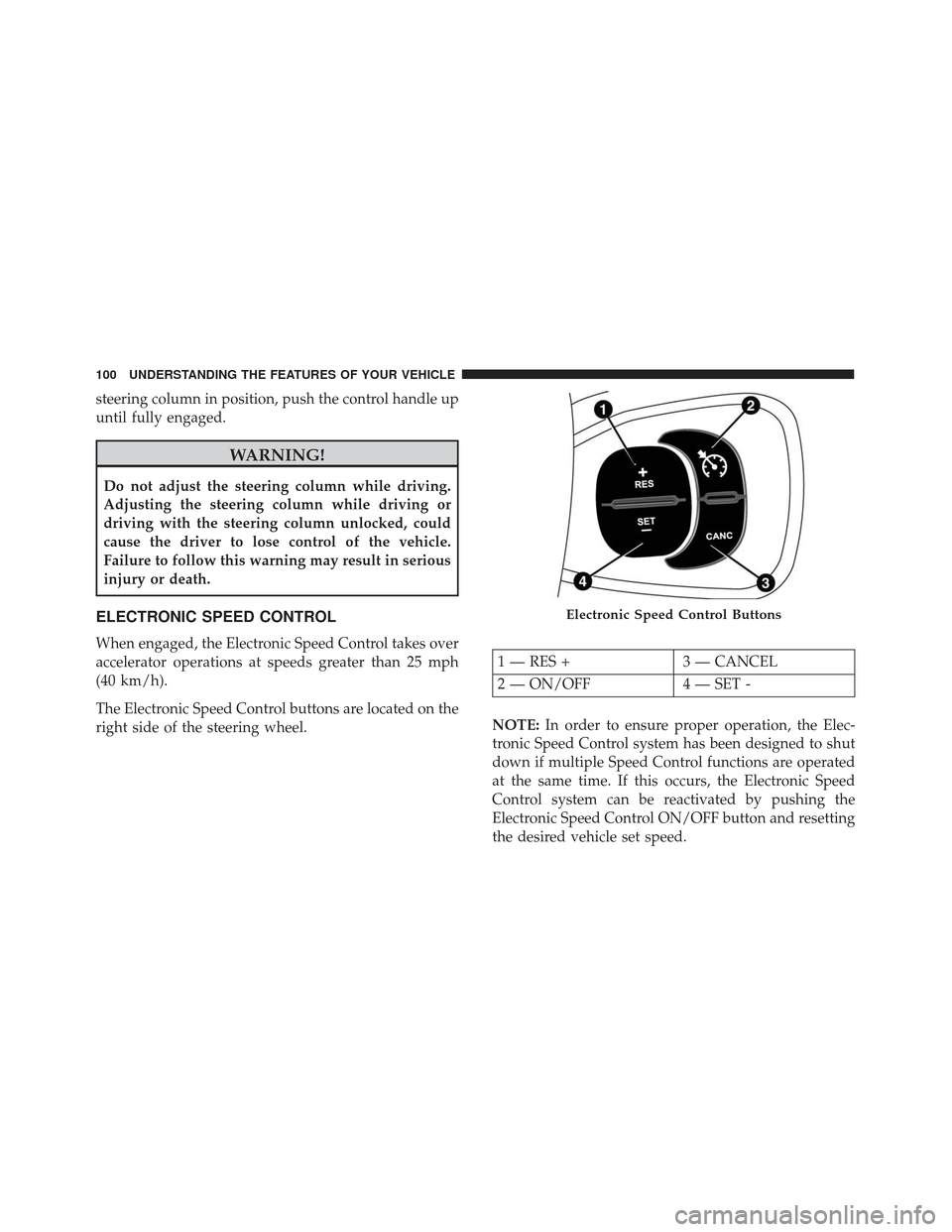
The Electronic Speed Control buttons are located on the
right side of the steering wheel.NOTE:
In order to ensure proper operation, the Elec-
tronic Speed Control system has been designed to shut
down if multiple Speed Control functions are operated
at the same time. If this occurs, the Electronic Speed
Control system can be reactivated by pushing the
Electronic Speed Control ON/OFF button and resetting
the desired vehicle set speed.
Electronic Speed Control Buttons
1 — RES + 3 — CANCEL
2 — ON/OFF 4 — SET -
100 UNDERSTANDING THE FEATURES OF YOUR VEHICLE
Page 117 of 370
NOTE:•If the indicator light stays on constantly, program-
ming is complete and the garage door/device
should activate when the HomeLink button is
pushed.
• To program the two remaining HomeLink buttons,
repeat each step for each remaining button. DO
NOT erase the channels.
If you unplugged the garage door opener/device for
programming, plug it back in at this time.
Reprogramming A Single HomeLink Button
(Canadian/Gate Operator)
To reprogram a channel that has been previously
trained, follow these steps:
1. Cycle the ignition to the ON/RUN position.
NOTE: For vehicles equipped with Keyless Enter-N-
Go, place the ignition in the RUN position with the
engine ON. Make sure while programming HomeLink
with the engine ON that your vehicle is outside of your
garage, or that the garage door remains open at all
times. 2. Push and hold the desired HomeLink button until
the indicator light begins to flash after 20 seconds.
Do not release the button.
3. Without releasing the button, proceed with
“Canadian/Gate Operator Programming” step 2 and
follow all remaining steps.
Using HomeLink
To operate, switch the ignition to the ON/RUN position
and the press and release the programmed HomeLink
button. Activation will now occur for the programmed
device (i.e., garage door opener, gate operator, security
system, entry door lock, home/office lighting, etc.,).
The hand-held transmitter of the device may also be
used at any time. If the ignition is switched to the OFF
position, HomeLink will remain active for three min-
utes. During this time, if the vehicle is locked,
HomeLink is disabled.
Security
It is advised to erase all channels before you sell or turn
in your vehicle.
To do this, push and hold the two outside buttons for 20
seconds until the red indicator flashes.
3
UNDERSTANDING THE FEATURES OF YOUR VEHICLE 115
Page 120 of 370
WARNING!
•Never leave children alone in a vehicle, or with
access to an unlocked vehicle. Never leave the key
fob in or near the vehicle or in a location acces-
sible to children. Occupants, particularly unat-
tended children, can become entrapped by the
power sunroof while operating the power sunroof
switch. Such entrapment may result in serious
injury or death.
• In a collision, there is greater risk of being thrown
from a vehicle with an open sunroof. You could
also be seriously injured or killed. Always fasten
your seat belt properly and make sure all passen-
gers are properly secured too.
• Do not allow small children to operate the sun-
roof. Never allow your fingers, other body parts,
or any object to project through the sunroof
opening. Injury may result.
To Open
Pull the power sunroof switch for approximately one
second and the sunroof will stop at the vented position. Pull the power sunroof switch a second time for ap-
proximately one second and release, the sunroof will
open fully, then stop automatically. This is called “Ex-
press Open”.
NOTE:
During Express Open operation, any movement
of the sunroof switch will stop the sunroof.
To Close
With the sunroof in the full open position, pull and hold
the power sunroof switch for approximately one sec-
ond.
NOTE: During Express close any movement of the
sunroof switch will stop the sunroof.
Wind Buffeting
Wind buffeting can be described as the perception of
pressure on the ears or a helicopter-type sound in the
ears. Your vehicle may exhibit wind buffeting with the
windows down, or the sunroof (if equipped) in certain
open or partially open positions. This is a normal
occurrence and can be minimized. If the buffeting
occurs with the rear windows open, open the front and
rear windows together to minimize the buffeting. If the
118 UNDERSTANDING THE FEATURES OF YOUR VEHICLE
Page 125 of 370
REAR CARGO STORAGE FEATURES
This vehicle features a load platform which can be
adjusted to three different heights, permitting modular
luggage compartment volume:
•Position 1 (platform completely lowered) permits
maximum luggage compartment capacity.
• Position 2 (platform at threshold level) permits a
level load threshold to facilitate loading/unloading
of objects in the luggage compartment. It also allows
the space underneath to be used as a additional
compartment for stowing objects which are more
fragile or small.
• Position 3 (platform completely raised) in conjunc-
tion with the lowering of the rear seat and front
passenger side seat backrests, permits long objects to
be loaded. It is advisable to use this position only for
the actual period in which the objects are trans-
ported, then return the platform to position 1 or 2.
Tilt of cargo floor
The cargo floor can also be arranged at an angle (tilted
toward the rear seat backs), in order to facilitate access
to the area below the luggage compartment. In this
position also the plan guarantees the correct locking of any objects present inside the cargo area, avoiding that
they move in the event of sudden braking.
CAUTION!
The dimension of the cargo floor permit a maxi-
mum capacity of a distributed weight of 154 lbs
(70kg) (if positioned at threshold level) or 88 lbs
(40 kg) (if positioned at raised level) do not add
objects with a higher weight.
Tilt Floor Feature
3
UNDERSTANDING THE FEATURES OF YOUR VEHICLE 123
Page 139 of 370
Red Telltale Indicator Lights
Brake Warning Light
Red TelltaleLight What It Means
English
Metric
Brake Warning Light
This light monitors various brake functions, including brake fluid level and parking brake
application. If the brake light turns on it may indicate that the parking brake is applied, that
the brake fluid level is low, or that there is a problem with the anti-lock brake system reser-
voir.
If the light remains on when the parking brake has been disengaged, and the fluid level is
at the full mark on the master cylinder reservoir, it indicates a possible brake hydraulic sys-
tem malfunction or that a problem with the Brake Booster has been detected by the Anti-
Lock Brake System (ABS) / Electronic Stability Control (ESC) system. In this case, the light
will remain on until the condition has been corrected. If the problem is related to the Brake
Booster, the ABS pump will run when applying the brake, and a brake pedal pulsation may
be felt during each stop.
NOTE:
Brake Warning Light may illuminate due to excessive wear to brake pads.
The dual brake system provides a reserve braking
capacity in the event of a failure to a portion of the
hydraulic system. A leak in either half of the dual brake
system is indicated by the Brake Warning Light, which
will turn on when the brake fluid level in the master
cylinder has dropped below a specified level. The light will remain on until the cause is corrected.
NOTE:
The light may flash momentarily during sharp
cornering maneuvers, which change fluid level condi-
tions. The vehicle should have service performed, and
the brake fluid level checked.4
UNDERSTANDING YOUR INSTRUMENT PANEL 137
Page 140 of 370
If brake failure is indicated, immediate repair is neces-
sary.
WARNING!
Driving a vehicle with the red brake light on is
dangerous. Part of the brake system may have
failed. It will take longer to stop the vehicle. You
could have a collision. Have the vehicle checked
immediately.
Vehicles equipped with the Anti-Lock Brake System
(ABS) are also equipped with Electronic Brake Force
Distribution (EBD).
CAUTION!
In the event of an EBD failure, the Brake Warning
Light will turn on along with the ABS Light.
Immediate repair to the ABS system is required. Operation of the Brake Warning Light can be checked
by placing the ignition in the ON/RUN position. The
light should illuminate for approximately two seconds.
The light should then turn off unless the parking brake
is applied or a brake fault is detected. If the light does
not illuminate, have the light inspected by an autho-
rized dealer.
The light also will turn on when the parking brake is
applied with the ignition placed in the ON/RUN posi-
tion.
NOTE:
This light shows only that the parking brake is
applied. It does not show the degree of brake applica-
tion.
138 UNDERSTANDING YOUR INSTRUMENT PANEL
Page 144 of 370
Anti-Lock Brake (ABS) Indicator Light
Yellow TelltaleLight What It Means
Anti-Lock Brake (ABS) Indicator Light
After the ignition is turned on, the Anti-Lock Brake System (ABS) light illuminates to indi-
cate function check at vehicle startup. If the light remains on after startup or comes on and
stays on at road speeds, it may indicate that the ABS has detected a malfunction or has be-
come inoperative. The system reverts to standard non-anti-lock brakes.
If both the Brake Warning Light and the ABS Warning Light are on, see an authorized
dealer immediately. Refer to “Anti-Lock Brake System” in “Starting And Operating” for fur-
ther information.
142 UNDERSTANDING YOUR INSTRUMENT PANEL