sign FIAT 500L 2017 2.G Owner's Guide
[x] Cancel search | Manufacturer: FIAT, Model Year: 2017, Model line: 500L, Model: FIAT 500L 2017 2.GPages: 370, PDF Size: 3.56 MB
Page 115 of 370
2.Place the hand-held transmitter 1 to 3 inches (3 to 8 cm)
away from the HomeLink button you wish to program
while keeping the HomeLink indicator light in view.
3. Push and hold the Homelink button you want toprogram while you push and hold the hand-held
transmitter button.
4. Continue to hold both buttons and observe the indicator light. The Homelink indicator will flash
slowly and then rapidly after HomeLink has re-
ceived the frequency signal from the hand-held
transmitter. Release both buttons after the indicator
light changes from slow to rapid.
5. Push and hold the programmed HomeLink button and observe the indicator light.
• If the indicator light stays on constantly, program-
ming is complete and the garage door/device
should activate when the HomeLink button is
pushed.
• To program the two remaining HomeLink buttons,
repeat each step for each remaining button. DO
NOT erase the channels.
Reprogramming A Single HomeLink Button
(Non-Rolling Code)
To reprogram a channel that has been previously
trained, follow these steps:
1. Cycle the ignition to the ON/RUN position.
NOTE: For vehicles equipped with Keyless Enter-N-
Go, place the ignition in the RUN position with the
engine ON. Make sure while programming HomeLink
with the engine ON that your vehicle is outside of your
garage, or that the garage door remains open at all
times.
2. Push and hold the desired HomeLink button until the indicator light begins to flash after 20 seconds.
Do not release the button.
3. Without releasing the button, proceed with “Pro-
gramming A Non-Rolling Code” step 2 and follow
all remaining steps.
3
UNDERSTANDING THE FEATURES OF YOUR VEHICLE 113
Page 116 of 370
Canadian/Gate Operator Programming
For programming transmitters in Canada/United
States that require the transmitter signals to “time-out”
after several seconds of transmission:
Canadian radio frequency laws require transmitter sig-
nals to time-out (or quit) after several seconds of
transmission, which may not be long enough for
HomeLink to pick up the signal during programming.
Similar to this Canadian law, some U.S. gate operators
are designed to time-out in the same manner.
It may be helpful to unplug the device during the
cycling process to prevent possible overheating of the
garage door or gate motor.
1. Cycle the ignition to the ON/RUN position.
NOTE:For vehicles equipped with Keyless Enter-N-
Go, place the ignition in the RUN position with the
engine ON. Make sure while programming HomeLink
with the engine ON that your vehicle is outside of your
garage, or that the garage door remains open at all
times. 2. Place the hand-held transmitter 1 to 3 inches (3 to 8
cm) away from the HomeLink button you wish to
program while keeping the HomeLink indicator
light in view.
3. Continue to push and hold the HomeLink button while you push and release (“cycle”) your hand-held
transmitter every two seconds until HomeLink has
successfully accepted the frequency signal. The indi-
cator light will flash slowly and then rapidly when
fully trained.
4. Watch for the HomeLink indicator to change flash rates. When it changes, it is programmed. It may take
up to 30 seconds or longer in rare cases. The garage
door may open and close while you are program-
ming.
5. Push and hold the programmed HomeLink button and observe the indicator light.
114 UNDERSTANDING THE FEATURES OF YOUR VEHICLE
Page 119 of 370
General Information
This device complies with FCC rules Part 15 and
Industry Canada RSS-210. Operation is subject to the
following two conditions:
1. This device may not cause harmful interference, and
2. This device must accept any interference received,including interference that may cause undesired
operation.
NOTE:
• The transmitter has been tested and it complies with
FCC and IC rules. Changes or modifications not
expressly approved by the party responsible for
compliance could void the user ’s authority to oper-
ate the device.
• The term IC before the certification/registration
number only signifies that Industry Canada technical
specifications were met.
POWER SUNROOF — IF EQUIPPED
The sunroof has two glass panels (the front one is
operational and the rear one fixed) and is equipped
with an electrically operated sun blind. The power sunroof and the power sun blind can be
operated only with the ignition key turned to the MAR
position.
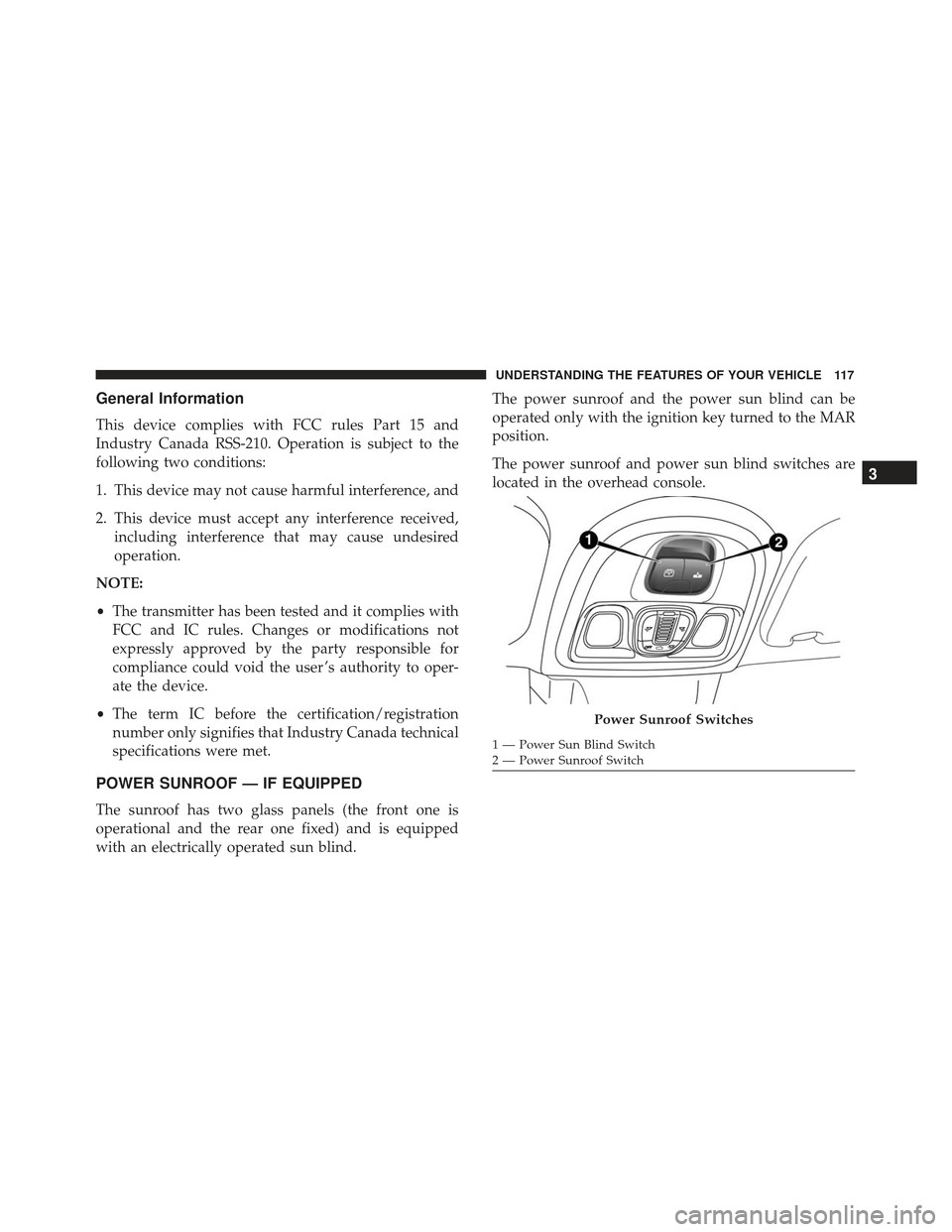
The power sunroof and power sun blind switches are
located in the overhead console.
Power Sunroof Switches
1 — Power Sun Blind Switch
2 — Power Sunroof Switch
3
UNDERSTANDING THE FEATURES OF YOUR VEHICLE 117
Page 130 of 370
defroster automatically turns off after approximately 20
minutes. To manually shut the defroster off, push the
button a second time.
NOTE:To prevent excessive battery drain, use the rear
window defroster only when the engine is operating.
CAUTION!
Failure to follow these cautions can cause damage
to the heating elements:
• Use care when washing the inside of the rear
window. Do not use abrasive window cleaners on
the interior surface of the window. Use a soft
cloth and a mild washing solution, wiping paral-
lel to the heating elements. Labels can be peeled
off after soaking with warm water.
• Do not use scrapers, sharp instruments, or abra-
sive window cleaners on the interior surface of
the window.
• Keep all objects a safe distance from the window.
ROOF LUGGAGE RACK-IF EQUIPPED
The crossbars and siderails are designed to carry the
weight on vehicles equipped with a luggage rack. The
load must not exceed 110 lbs (50 kg), and should be
uniformly distributed over the luggage rack crossbars.
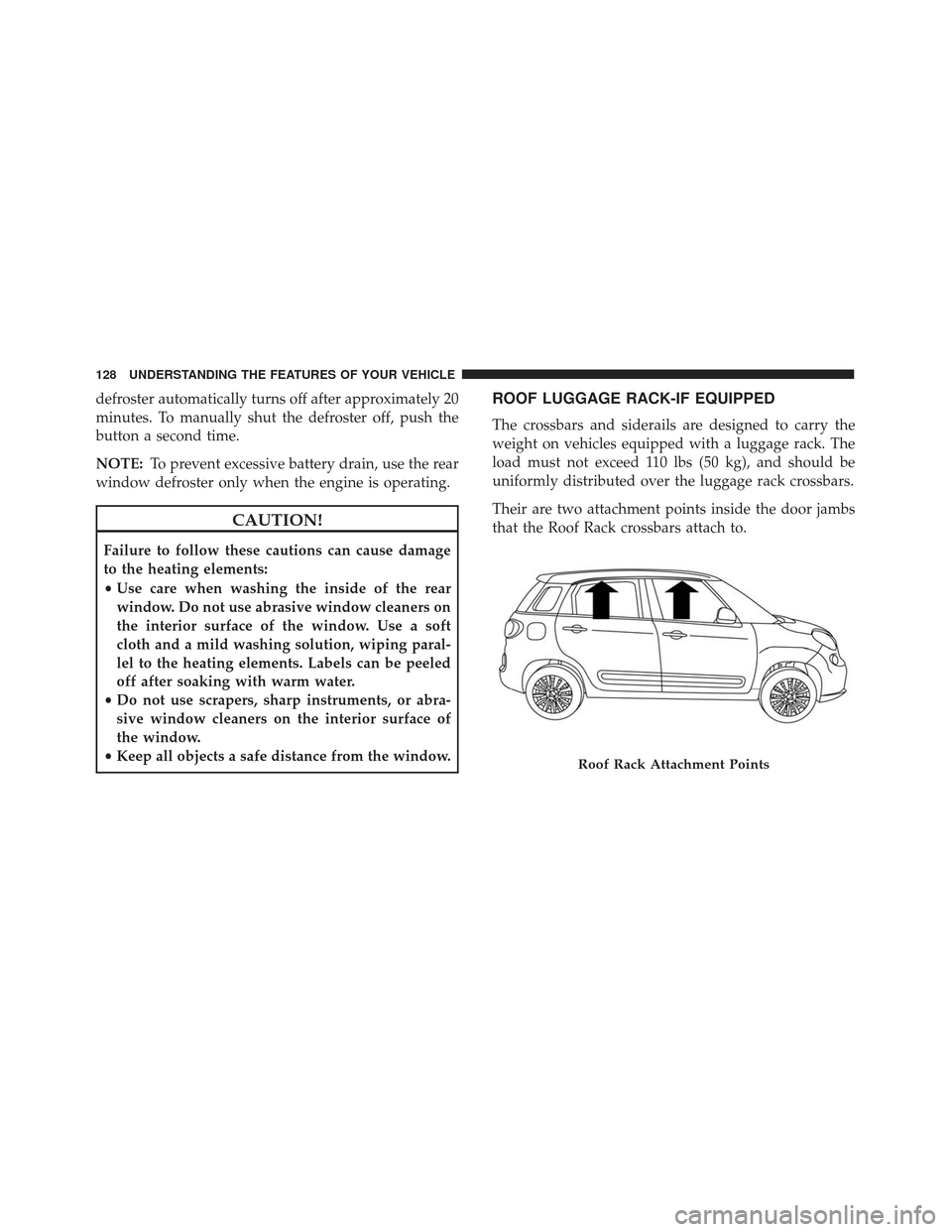
Their are two attachment points inside the door jambs
that the Roof Rack crossbars attach to.
Roof Rack Attachment Points
128 UNDERSTANDING THE FEATURES OF YOUR VEHICLE
Page 138 of 370
4. Tachometer•Indicates the engine speed in revolutions per min-
ute (RPM x 1000).
5. Instrument Cluster Display •The instrument cluster display shows messages
when the appropriate conditions exist. Refer to
“Instrument Cluster Display” in “Understanding
Your Instrument Panel” for further information.WARNING AND INDICATOR LIGHTS
The warning / indicator lights switch on in the instru-
ment panel together with a dedicated message and/or
acoustic signal when applicable. These indications are
indicative and precautionary and as such must not be
considered as exhaustive and/or alternative to the
information contained in the Owner ’s Manual, which
you are advised to read carefully in all cases. Always
refer to the information in this chapter in the event of a
failure indication.
All active telltales will display first if applicable. The
system check menu may appear different based upon
equipment options and current vehicle status. Some
telltales are optional and may not appear.
136 UNDERSTANDING YOUR INSTRUMENT PANEL
Page 150 of 370
As an added safety feature, your vehicle has been
equipped with a Tire Pressure Monitoring System
(TPMS) that illuminates a low tire pressure telltale
when one or more of your tires is significantly under-
inflated. Accordingly, when the low tire pressure telltale
illuminates, you should stop and check your tires as
soon as possible and inflate them to the proper pres-
sure. Driving on a significantly under-inflated tire
causes the tire to overheat and can lead to tire failure.
Under-inflation also reduces fuel efficiency and tire
tread life, and may affect the vehicle’s handling and
stopping ability.
Please note that the TPMS is not a substitute for proper
tire maintenance, and it is the driver ’s responsibility to
maintain correct tire pressure, even if under-inflation
has not reached the level to trigger illumination of the
TPMS low tire pressure telltale.
Your vehicle has also been equipped with a TPMS
malfunction indicator to indicate when the system is
not operating properly. The TPMS malfunction indica-
tor is combined with the low tire pressure telltale. When
the system detects a malfunction, the telltale will flash
for approximately one minute and then remain continu-
ously illuminated. This sequence will continue uponsubsequent vehicle start-ups as long as the malfunction
exists. When the malfunction indicator is illuminated,
the system may not be able to detect or signal low tire
pressure as intended. TPMS malfunctions may occur for
a variety of reasons, including the installation of re-
placement or alternate tires or wheels on the vehicle
that prevent the TPMS from functioning properly. Al-
ways check the TPMS malfunction telltale after replac-
ing one or more tires or wheels on your vehicle, to
ensure that the replacement or alternate tires and
wheels allow the TPMS to continue to function prop-
erly.
CAUTION!
The TPMS has been optimized for the original
equipment tires and wheels. TPMS pressures and
warning have been established for the tire size
equipped on your vehicle. Undesirable system op-
eration or sensor damage may result when using
replacement equipment that is not of the same size,
type, and/or style. Aftermarket wheels can cause
sensor damage. Using aftermarket tire sealants may
cause the Tire Pressure Monitoring System (TPMS)
(Continued)
148 UNDERSTANDING YOUR INSTRUMENT PANEL
Page 152 of 370
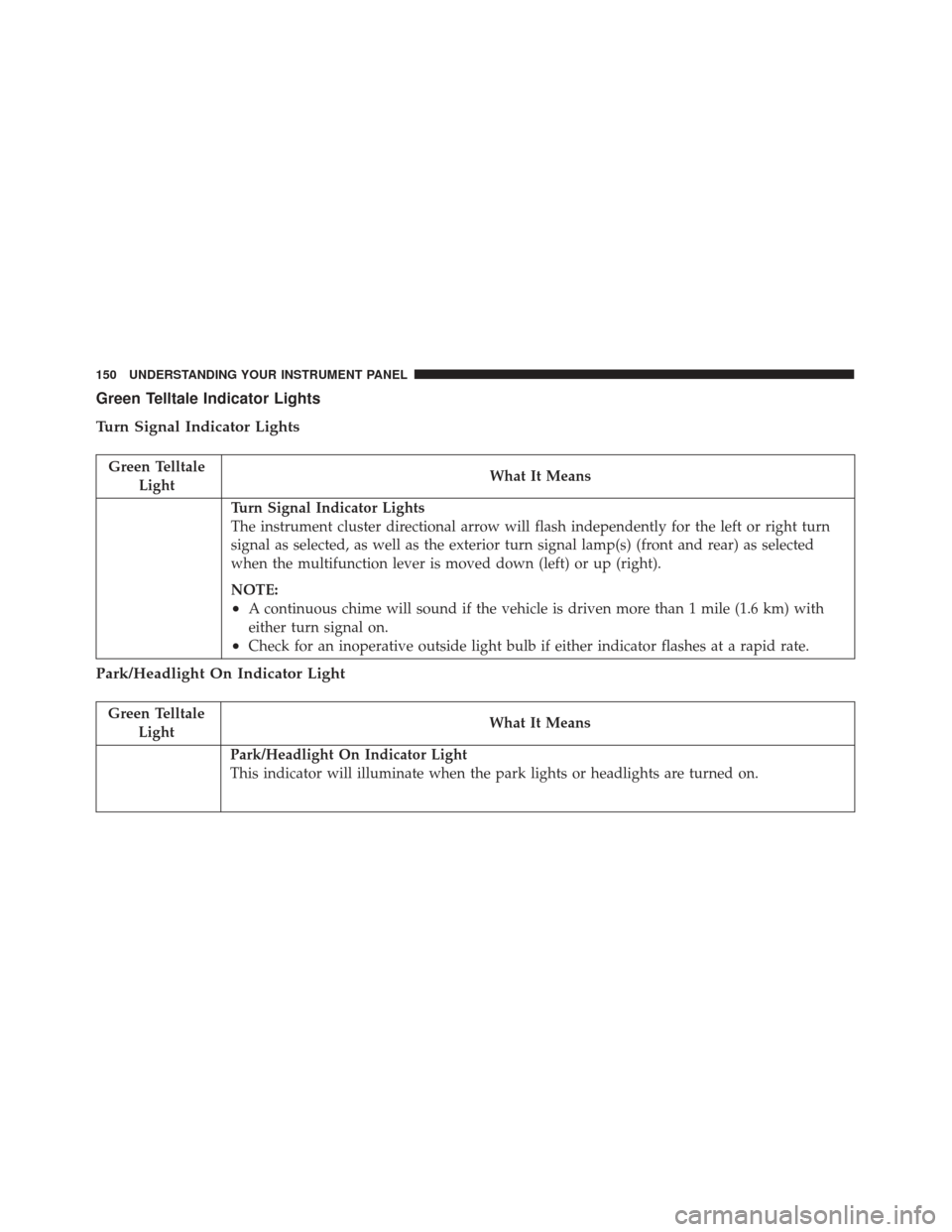
Green Telltale Indicator Lights
Turn Signal Indicator Lights
Green TelltaleLight What It Means
Turn Signal Indicator Lights
The instrument cluster directional arrow will flash independently for the left or right turn
signal as selected, as well as the exterior turn signal lamp(s) (front and rear) as selected
when the multifunction lever is moved down (left) or up (right).
NOTE:
•A continuous chime will sound if the vehicle is driven more than 1 mile (1.6 km) with
either turn signal on.
•Check for an inoperative outside light bulb if either indicator flashes at a rapid rate.
Park/Headlight On Indicator Light
Green Telltale
Light What It Means
Park/Headlight On Indicator Light
This indicator will illuminate when the park lights or headlights are turned on.
150 UNDERSTANDING YOUR INSTRUMENT PANEL
Page 154 of 370
INSTRUMENT CLUSTER DISPLAY
Your vehicle may be equipped with an instrument
cluster display, which offers useful information to the
driver. With the ignition in the STOP/OFF position (and
the key removed, for vehicles with mechanical key),
opening/closing of a door will activate the display for
viewing, and display the total miles or kilometers in the
odometer. Your instrument cluster display is designed
to display important information about your vehicle’s
systems and features. Using a driver interactive display
located on the instrument panel, your instrument clus-
ter display can show you how systems are working and
give you warnings when they aren’t. The steering wheel
mounted controls allow you to scroll through and enter
the main menus and submenus. You can access the
specific information you want and make selections and
adjustments.
Instrument Cluster Display Control Buttons
The instrument cluster display control buttons are lo-
cated on the instrument panel below the radio.Push and release the
MENUbutton briefly to access the
menu and/or go to next screen or to confirm the
required menu option. Push and hold the MENU
button (approximately one second) to return to the
main screen.
Push and release the up
button to scroll upward
through the displayed menu and the related options
or to increase the displayed value.
Push and release the downbutton to scroll down-
ward through the displayed menu and the related
options or to decrease the value displayed.
NOTE: upand downbuttons activate differ-
ent functions according to the following situations:
• To scroll the menu options upwards or downwards.
• To increase or decrease values during settings.
NOTE: When opening one of the front doors, the
instrument cluster display will turn on the clock, the
external temperature and the miles or kilometers cov-
ered for a few seconds.
152 UNDERSTANDING YOUR INSTRUMENT PANEL
Page 178 of 370
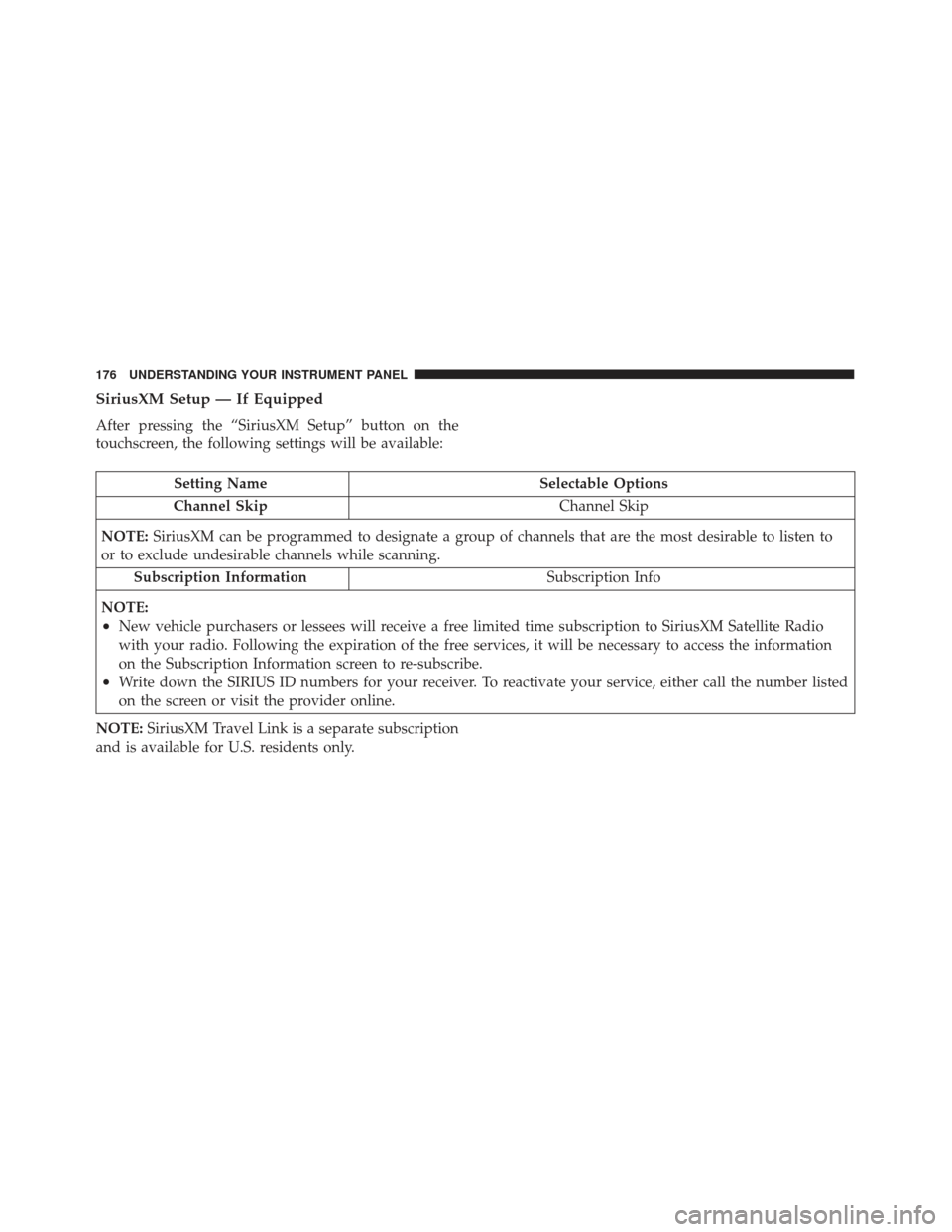
SiriusXM Setup — If Equipped
After pressing the “SiriusXM Setup” button on the
touchscreen, the following settings will be available:
Setting NameSelectable Options
Channel Skip Channel Skip
NOTE: SiriusXM can be programmed to designate a group of channels that are the most desirable to listen to
or to exclude undesirable channels while scanning.
Subscription Information Subscription Info
NOTE:
•New vehicle purchasers or lessees will receive a free limited time subscription to SiriusXM Satellite Radio
with your radio. Following the expiration of the free services, it will be necessary to access the information
on the Subscription Information screen to re-subscribe.
•Write down the SIRIUS ID numbers for your receiver. To reactivate your service, either call the number listed
on the screen or visit the provider online.
NOTE: SiriusXM Travel Link is a separate subscription
and is available for U.S. residents only.
176 UNDERSTANDING YOUR INSTRUMENT PANEL
Page 180 of 370
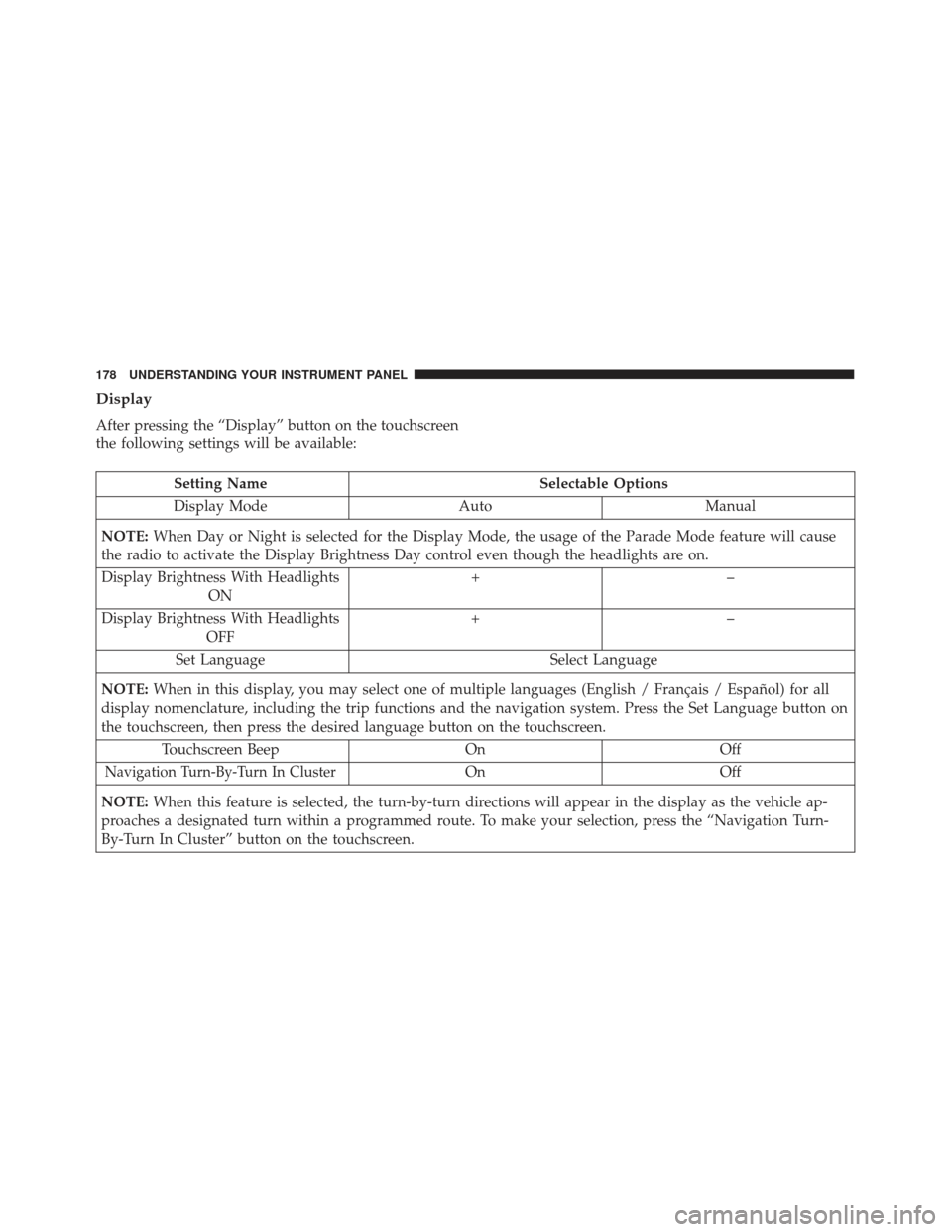
Display
After pressing the “Display” button on the touchscreen
the following settings will be available:
Setting NameSelectable Options
Display Mode AutoManual
NOTE: When Day or Night is selected for the Display Mode, the usage of the Parade Mode feature will cause
the radio to activate the Display Brightness Day control even though the headlights are on.
Display Brightness With Headlights ON +–
Display Brightness With Headlights OFF +–
Set Language Select Language
NOTE: When in this display, you may select one of multiple languages (English / Français / Español) for all
display nomenclature, including the trip functions and the navigation system. Press the Set Language button on
the touchscreen, then press the desired language button on the touchscreen.
Touchscreen Beep OnOff
Navigation Turn-By-Turn In ClusterOnOff
NOTE: When this feature is selected, the turn-by-turn directions will appear in the display as the vehicle ap-
proaches a designated turn within a programmed route. To make your selection, press the “Navigation Turn-
By-Turn In Cluster” button on the touchscreen.
178 UNDERSTANDING YOUR INSTRUMENT PANEL