sign FIAT 500L 2017 2.G Service Manual
[x] Cancel search | Manufacturer: FIAT, Model Year: 2017, Model line: 500L, Model: FIAT 500L 2017 2.GPages: 370, PDF Size: 3.56 MB
Page 183 of 370
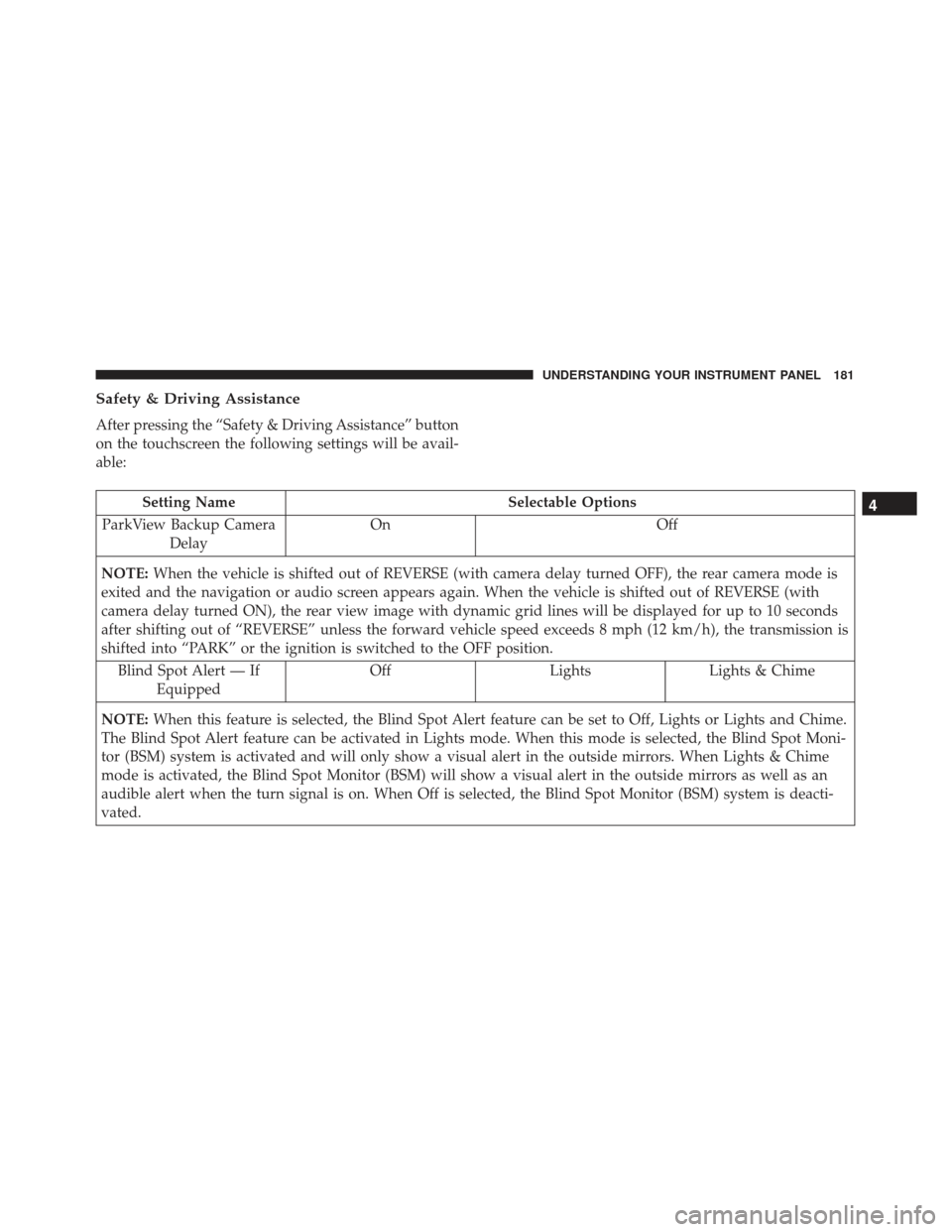
Safety & Driving Assistance
After pressing the “Safety & Driving Assistance” button
on the touchscreen the following settings will be avail-
able:
Setting NameSelectable Options
ParkView Backup Camera Delay On
Off
NOTE: When the vehicle is shifted out of REVERSE (with camera delay turned OFF), the rear camera mode is
exited and the navigation or audio screen appears again. When the vehicle is shifted out of REVERSE (with
camera delay turned ON), the rear view image with dynamic grid lines will be displayed for up to 10 seconds
after shifting out of “REVERSE” unless the forward vehicle speed exceeds 8 mph (12 km/h), the transmission is
shifted into “PARK” or the ignition is switched to the OFF position.
Blind Spot Alert — If Equipped Off
LightsLights & Chime
NOTE: When this feature is selected, the Blind Spot Alert feature can be set to Off, Lights or Lights and Chime.
The Blind Spot Alert feature can be activated in Lights mode. When this mode is selected, the Blind Spot Moni-
tor (BSM) system is activated and will only show a visual alert in the outside mirrors. When Lights & Chime
mode is activated, the Blind Spot Monitor (BSM) will show a visual alert in the outside mirrors as well as an
audible alert when the turn signal is on. When Off is selected, the Blind Spot Monitor (BSM) system is deacti-
vated.4
UNDERSTANDING YOUR INSTRUMENT PANEL 181
Page 185 of 370
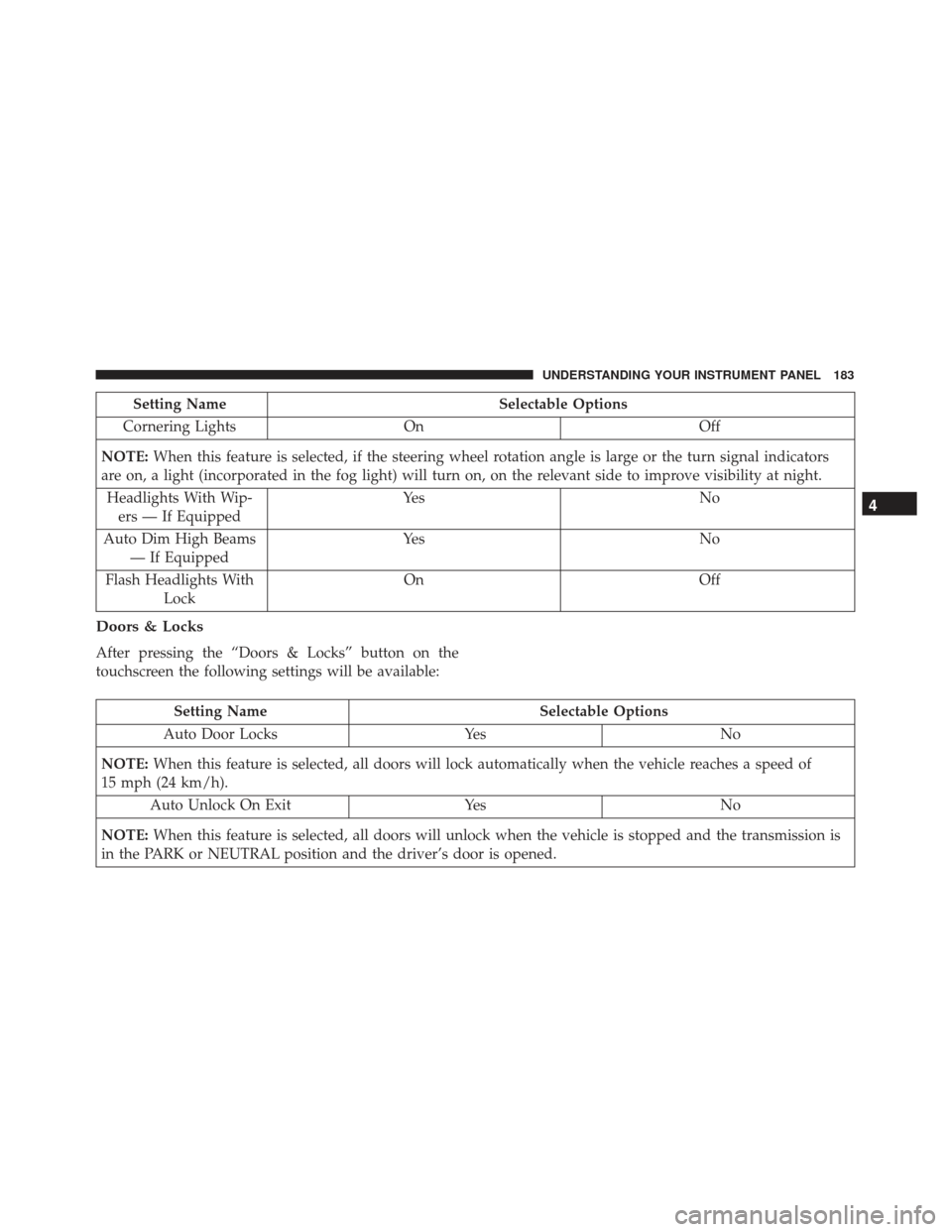
Setting NameSelectable Options
Cornering Lights On Off
NOTE: When this feature is selected, if the steering wheel rotation angle is large or the turn signal indicators
are on, a light (incorporated in the fog light) will turn on, on the relevant side to improve visibility at night.
Headlights With Wip- ers — If Equipped Ye s
N o
Auto Dim High Beams — If Equipped Ye s
N o
Flash Headlights With Lock On
Off
Doors & Locks
After pressing the “Doors & Locks” button on the
touchscreen the following settings will be available:
Setting Name Selectable Options
Auto Door Locks YesNo
NOTE: When this feature is selected, all doors will lock automatically when the vehicle reaches a speed of
15 mph (24 km/h).
Auto Unlock On Exit YesNo
NOTE: When this feature is selected, all doors will unlock when the vehicle is stopped and the transmission is
in the PARK or NEUTRAL position and the driver’s door is opened.
4
UNDERSTANDING YOUR INSTRUMENT PANEL 183
Page 191 of 370
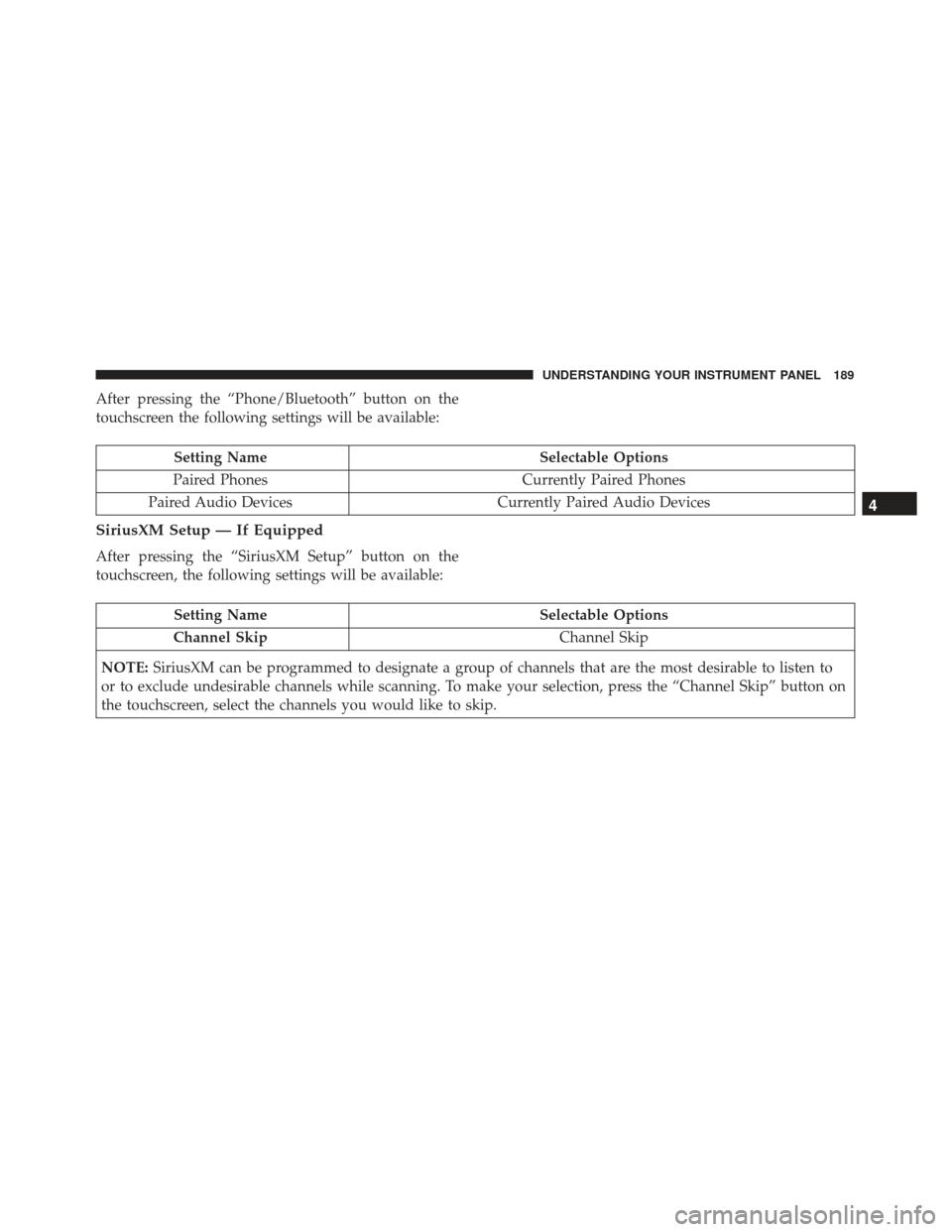
After pressing the “Phone/Bluetooth” button on the
touchscreen the following settings will be available:
Setting NameSelectable Options
Paired Phones Currently Paired Phones
Paired Audio Devices Currently Paired Audio Devices
SiriusXM Setup — If Equipped
After pressing the “SiriusXM Setup” button on the
touchscreen, the following settings will be available:
Setting Name Selectable Options
Channel Skip Channel Skip
NOTE: SiriusXM can be programmed to designate a group of channels that are the most desirable to listen to
or to exclude undesirable channels while scanning. To make your selection, press the “Channel Skip” button on
the touchscreen, select the channels you would like to skip.
4
UNDERSTANDING YOUR INSTRUMENT PANEL 189
Page 199 of 370
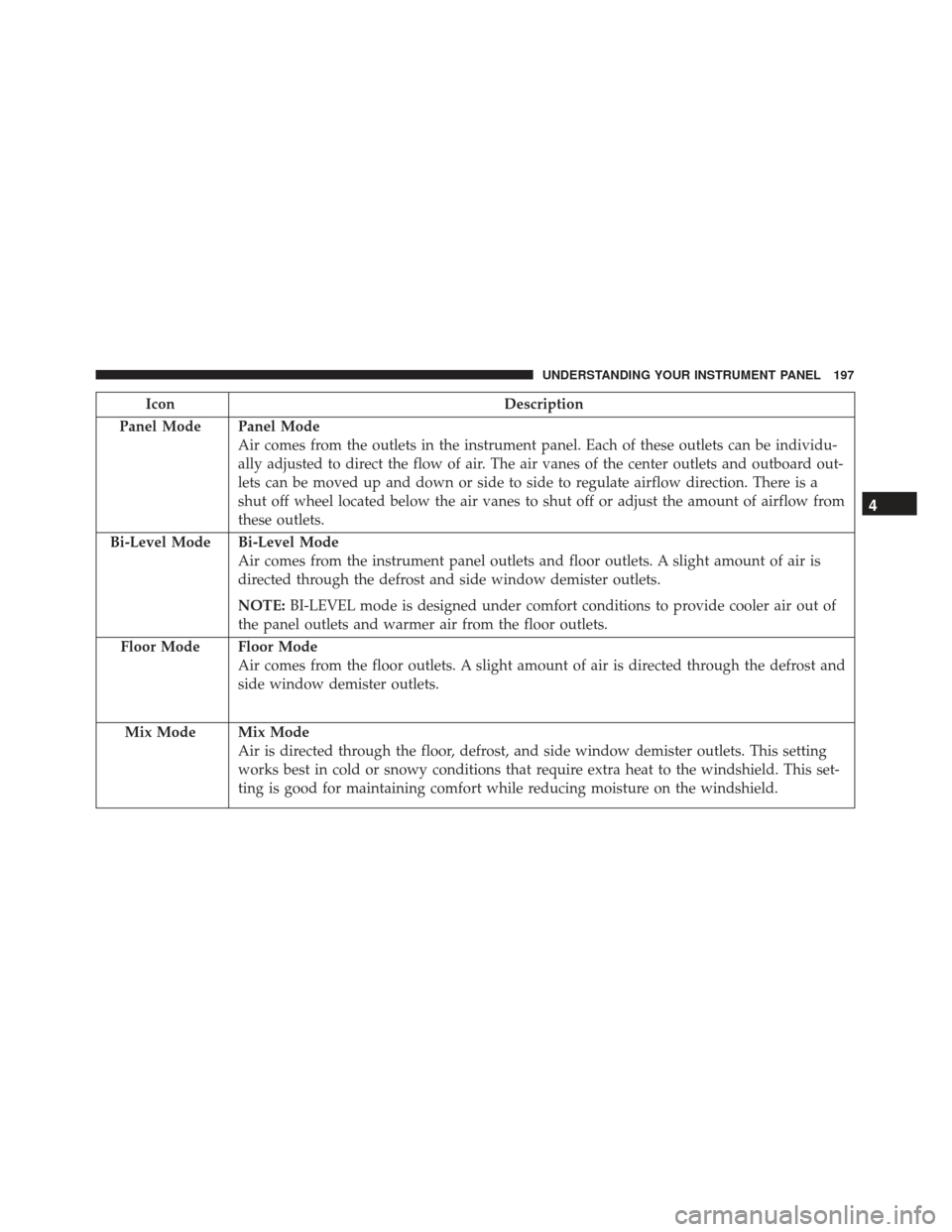
IconDescription
Panel Mode
Panel Mode
Air comes from the outlets in the instrument panel. Each of these outlets can be individu-
ally adjusted to direct the flow of air. The air vanes of the center outlets and outboard out-
lets can be moved up and down or side to side to regulate airflow direction. There is a
shut off wheel located below the air vanes to shut off or adjust the amount of airflow from
these outlets.
Bi-Level Mode
Bi-Level Mode
Air comes from the instrument panel outlets and floor outlets. A slight amount of air is
directed through the defrost and side window demister outlets.
NOTE: BI-LEVEL mode is designed under comfort conditions to provide cooler air out of
the panel outlets and warmer air from the floor outlets.
Floor Mode
Floor Mode
Air comes from the floor outlets. A slight amount of air is directed through the defrost and
side window demister outlets.
Mix Mode
Mix Mode
Air is directed through the floor, defrost, and side window demister outlets. This setting
works best in cold or snowy conditions that require extra heat to the windshield. This set-
ting is good for maintaining comfort while reducing moisture on the windshield.
4
UNDERSTANDING YOUR INSTRUMENT PANEL 197
Page 204 of 370
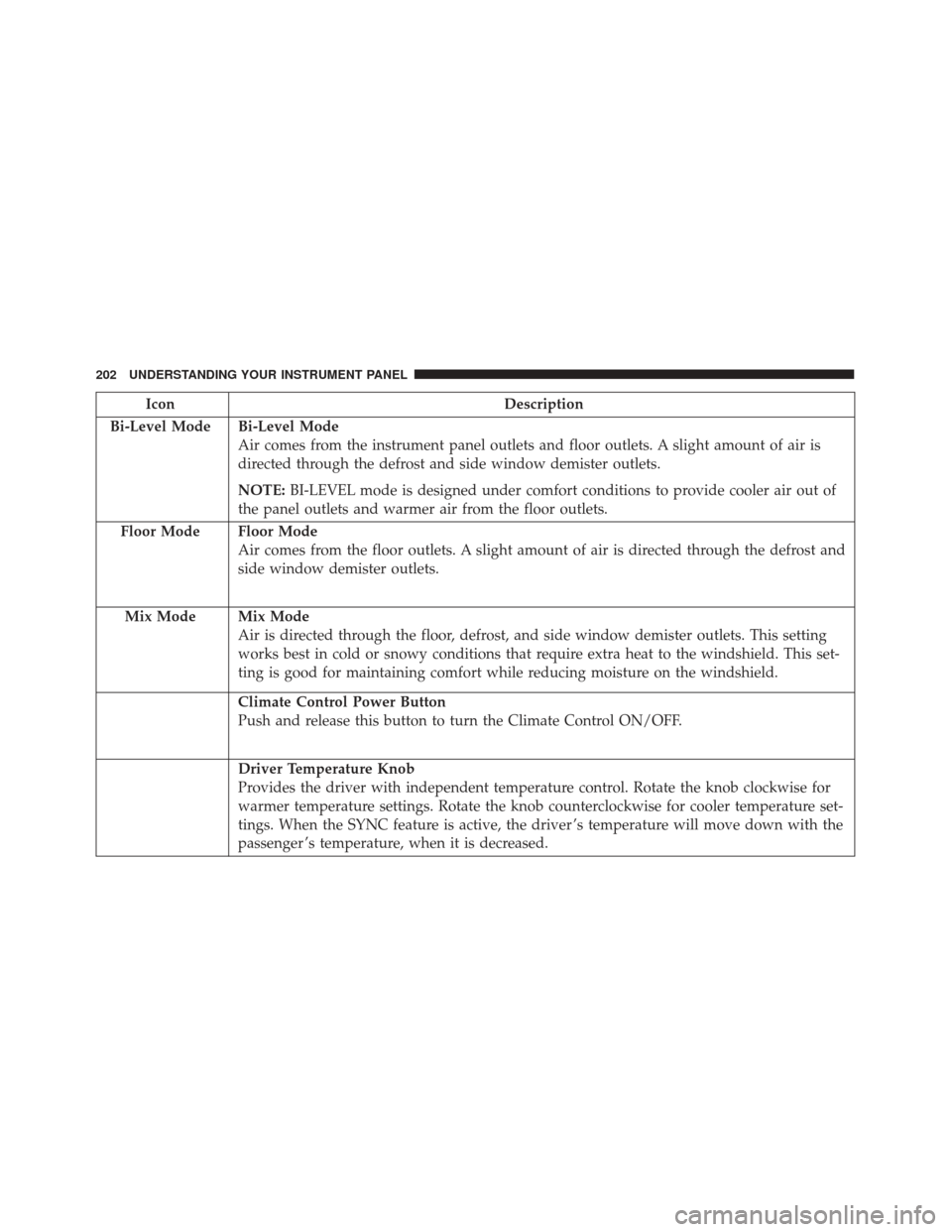
IconDescription
Bi-Level Mode
Bi-Level Mode
Air comes from the instrument panel outlets and floor outlets. A slight amount of air is
directed through the defrost and side window demister outlets.
NOTE: BI-LEVEL mode is designed under comfort conditions to provide cooler air out of
the panel outlets and warmer air from the floor outlets.
Floor Mode
Floor Mode
Air comes from the floor outlets. A slight amount of air is directed through the defrost and
side window demister outlets.
Mix Mode
Mix Mode
Air is directed through the floor, defrost, and side window demister outlets. This setting
works best in cold or snowy conditions that require extra heat to the windshield. This set-
ting is good for maintaining comfort while reducing moisture on the windshield.
Climate Control Power Button
Push and release this button to turn the Climate Control ON/OFF.
Driver Temperature Knob
Provides the driver with independent temperature control. Rotate the knob clockwise for
warmer temperature settings. Rotate the knob counterclockwise for cooler temperature set-
tings. When the SYNC feature is active, the driver ’s temperature will move down with the
passenger ’s temperature, when it is decreased.
202 UNDERSTANDING YOUR INSTRUMENT PANEL
Page 216 of 370
General Information
This device complies with FCC rules Part 15 and
Industry Canada RSS-210. Operation is subject to the
following two conditions:
1. This device may not cause harmful interference.
2. This device must accept any interference that may bereceived including interference that may cause un-
desired operation.
NOTE:
• The transmitter has been tested and it complies with
FCC and IC rules. Changes or modifications not
expressly approved by the party responsible for
compliance could void the user ’s authority to oper-
ate the device.
• The term IC before the certification/registration
number only signifies that Industry Canada technical
specifications were met.
Additional Information
© 2016 FCA US LLC. All rights reserved. Mopar and
Uconnect are registered trademarks and Mopar Owner
Connect is a trademark of FCA US LLC. Android is a
trademark of Google Inc. SiriusXM and all related
marks and logos are trademarks of SiriusXM Radio Inc.
Uconnect System Support:
•U.S. residents call 1-877-855-8400 (24 hours a day 7
days a week) or visit DriveUconnect.com
• Canadian residents call 1-800-465-2001 (English) or
1-800-387-9983 (French) or visit DriveUconnect.ca
• Mon. – Fri., 8:00 am – 8:00 pm, ET
• Sat., 9:00 am – 5:00 pm, ET
• Sun., Closed
214 UNDERSTANDING YOUR INSTRUMENT PANEL
Page 232 of 370
CAUTION!(Continued)
•Do not exceed 5 mph (8 km/h) when driving
through standing water. This will minimize wave
effects.
• Driving through standing water may cause dam-
age to your vehicle’s drivetrain components. Al-
ways inspect your vehicle’s fluids (i.e., engine oil,
transmission, axle, etc.) for signs of contamination
(i.e., fluid that is milky or foamy in appearance)
after driving through standing water. Do not
continue to operate the vehicle if any fluid ap-
pears contaminated, as this may result in further
damage. Such damage is not covered by the New
Vehicle Limited Warranty.
• Getting water inside your vehicle’s engine can
cause it to lock up and stall out, and cause serious
internal damage to the engine. Such damage is
not covered by the New Vehicle Limited War-
ranty.
ELECTRIC POWER STEERING
This only operates with the key turned to MAR/ON
and the engine started. The steering allows the force
required at the steering wheel to be adjusted to suit
driving conditions.
NOTE: When turning the ignition key quickly, full
power steering functionality can be achieved after a few
seconds.
PARKING BRAKE
Before leaving the vehicle, make sure that the parking
brake is fully applied.
The parking brake lever is located in the center console.
To apply the parking brake, pull the lever up as firmly
as possible. To release the parking brake, pull the lever
up slightly, push the side button with your thumb, then
lower the lever completely.
230 STARTING AND OPERATING
Page 234 of 370
CAUTION!(Continued)
is indicated. Have the brake system serviced by an
authorized dealer immediately.
BRAKE SYSTEM
Your vehicle is equipped with dual hydraulic brake
systems. If either of the two hydraulic systems loses
normal capability, the remaining system will still func-
tion. However, there will be some loss of overall brak-
ing effectiveness. You may notice increased pedal travel
during application, greater pedal force required to slow
or stop, and potential activation of the “Brake System
Warning Light”.
In the event power assist is lost for any reason (i.e.,
repeated brake applications with the engine off), the
brakes will still function. However, the effort required
to brake the vehicle will be much greater than that
required with the power system operating.
ELECTRONIC BRAKE CONTROL SYSTEM
Your vehicle is equipped with a advanced electronic
brake control system that includes the Anti-Lock Brake
System (ABS), Brake Assist System (BAS), Traction
Control System (TCS), Hill Start Assist (HSA), Dynamic Steering Torque (DST), and Electronic Stability Control
(ESC). All systems work together to enhance vehicle
stability and control in various driving conditions and
are commonly referred to as ESC.
Four-Wheel Anti-Lock Brake System (ABS)
The Four-Wheel ABS is designed to aid the driver in
maintaining vehicle control under adverse braking con-
ditions. The system operates with a separate computer
to modulate hydraulic pressure, to prevent wheel
lock-up and to help avoid skidding on slippery sur-
faces.
The system’s pump motor runs during an ABS stop to
provide regulated hydraulic pressure. The pump motor
makes a low humming noise during operation, which is
normal.
The ABS includes an amber ABS Warning Light. When
the light is illuminated, the ABS is not functioning. The
system reverts to standard non-anti-lock brakes. Turn-
ing the ignition Off and On again may reset the ABS if
the fault detected was only momentary.
232 STARTING AND OPERATING
Page 235 of 370
WARNING!
•Pumping the Anti-Lock Brakes will diminish
their effectiveness and may lead to a collision.
Pumping makes the stopping distance longer. Just
press firmly on your brake pedal when you need
to slow down or stop.
• The Anti-Lock Brake System (ABS) cannot pre-
vent the natural laws of physics from acting on
the vehicle, nor can it increase braking or steering
efficiency beyond that afforded by the condition
of the vehicle brakes and tires or the traction
afforded.
• The ABS cannot prevent collisions, including
those resulting from excessive speed in turns,
following another vehicle too closely, or hydro-
planing.
• The capabilities of an ABS-equipped vehicle
must never be exploited in a reckless or danger-
ous manner, which could jeopardize the user’s
safety or the safety of others.
When you are in a severe braking condition involving
the use of the ABS, you will experience some pedal drop
as the vehicle comes to a stop. This is the result of the
system reverting to the base brake system. Engagement of the ABS may be accompanied by a
pulsing sensation. You may also hear a clicking noise.
These occurrences are normal and indicate that the
system is functioning properly.
Brake Assist System (BAS)
The BAS is designed to optimize the vehicle’s braking
capability during emergency braking maneuvers. The
system detects an emergency braking situation by sensing
the rate and amount of brake application and then applies
optimum pressure to the brakes. This can help reduce
braking distances. The BAS complements the Anti-Lock
Brake System (ABS). Applying the brakes very quickly
results in the best BAS assistance. To receive the benefit of
the system, you must apply
continuousbraking pressure
during the stopping sequence (do not “pump” the
brakes). Do not reduce brake pedal pressure unless
braking is no longer desired. Once the brake pedal is
released, the BAS is deactivated.
WARNING!
• The Brake Assist System (BAS) cannot prevent
the natural laws of physics from acting on the
(Continued)
5
STARTING AND OPERATING 233
Page 236 of 370
WARNING!(Continued)
vehicle, nor can it increase the traction afforded
by prevailing road conditions.
• The BAS cannot prevent collisions, including
those resulting from excessive speed in turns,
driving on very slippery surfaces, or hydroplan-
ing.
• The capabilities of a BAS-equipped vehicle must
never be exploited in a reckless or dangerous
manner which could jeopardize the user ’s safety
or the safety of others.
Traction Control System (TCS)
The Traction Control System (TCS) monitors the
amount of wheel spin of each of the driven wheels. If
wheel spin is detected, brake pressure is applied to the
slipping wheel(s) and engine power is reduced to
provide enhanced acceleration and stability. A feature of
the TCS system, Brake Limited Differential (BLD), func-
tions similar to a limited slip differential and controls
the wheel spin across a driven axle. If one wheel on a
driven axle is spinning faster than the other, the system
will apply the brake of the spinning wheel. This will
allow more engine torque to be applied to the wheel that is not spinning. This feature remains active even if
TCS and ESC are in the Partial Off mode or Full Off
mode. Refer to “Electronic Stability Control (ESC)” in
this section for further information.
Hill Start Assist (HSA)
The HSA system is designed to assist the driver when
starting a vehicle from a stop on a hill. HSA will
maintain the level of brake pressure the driver applied
for a short period of time after the driver takes his foot
off the brake pedal. If the driver does not apply the
throttle during this short period of time, the system will
release brake pressure and the vehicle will roll down
the hill. The system will release brake pressure in
proportion to the amount of throttle applied as the
vehicle starts to move in the intended direction of
travel.
HSA Activation Criteria
The following criteria must be met in order for HSA to
activate:
•
Vehicle must be stopped.
• Vehicle must be on a 5% grade or greater hill.
234 STARTING AND OPERATING