clock FIAT 500L LIVING 2014 2.G User Guide
[x] Cancel search | Manufacturer: FIAT, Model Year: 2014, Model line: 500L LIVING, Model: FIAT 500L LIVING 2014 2.GPages: 420, PDF Size: 9.77 MB
Page 216 of 420
REPLACING EXTERIOR BULBSFor the type of bulb and power rating, see “Changing
a bulb" paragraph.
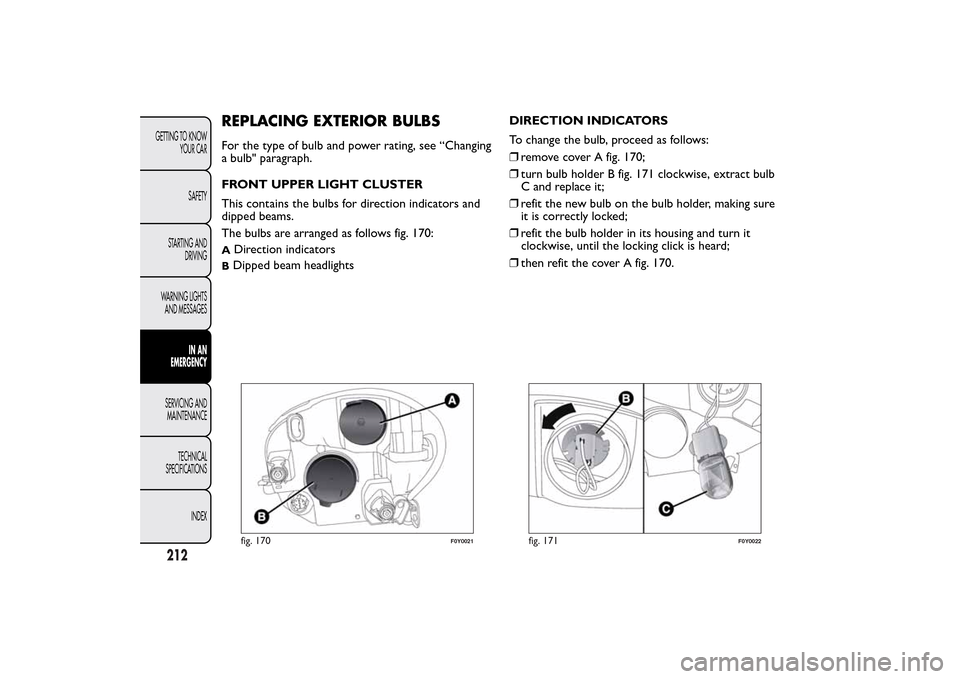
FRONT UPPER LIGHT CLUSTER
This contains the bulbs for direction indicators and
dipped beams.
The bulbs are arranged as follows fig. 170:A
Direction indicators
BDipped beam headlightsDIRECTION INDICATORS
To change the bulb, proceed as follows:
❒remove cover A fig. 170;
❒turn bulb holder B fig. 171 clockwise, extract bulb
C and replace it;
❒refit the new bulb on the bulb holder, making sure
it is correctly locked;
❒refit the bulb holder in its housing and turn it
clockwise, until the locking click is heard;
❒then refit the cover A fig. 170.fig. 170
F0Y0021
fig. 171
F0Y0022
212GETTING TO KNOW
YOUR CAR
SAFETY
STARTING AND
DRIVING
WARNING LIGHTS
AND MESSAGES
IN AN
EMERGENCY
SERVICING AND
MAINTENANCE
TECHNICAL
SPECIFICATIONS
INDEX
Page 219 of 420
SIDE LIGHTS/DAYTIME RUNNING LIGHTS
(DRL)
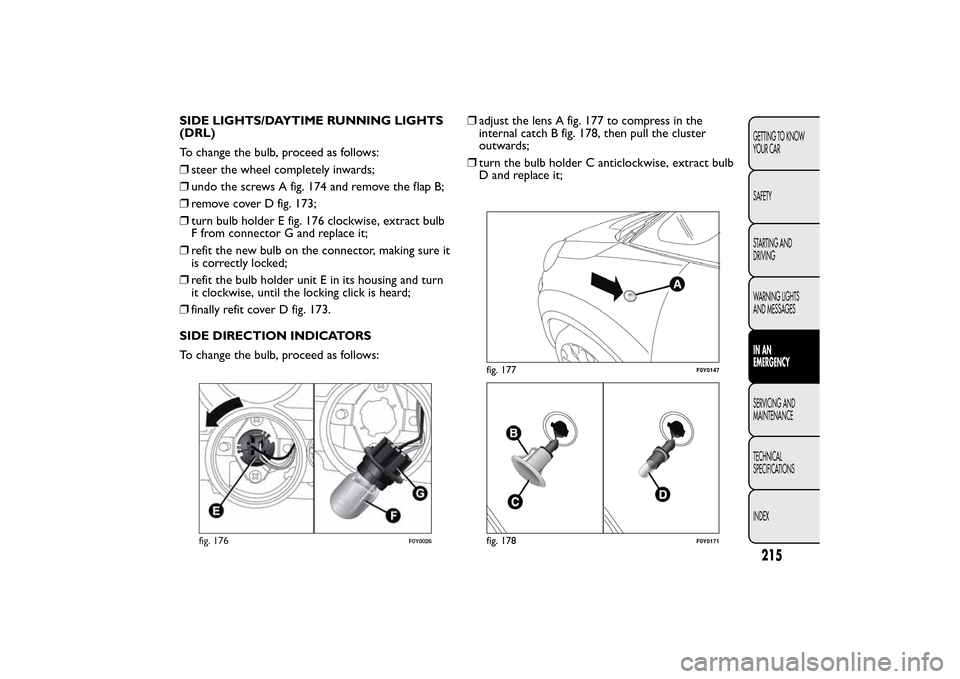
To change the bulb, proceed as follows:
❒steer the wheel completely inwards;
❒undo the screws A fig. 174 and remove the flap B;
❒remove cover D fig. 173;
❒turn bulb holder E fig. 176 clockwise, extract bulb
F from connector G and replace it;
❒refit the new bulb on the connector, making sure it
is correctly locked;
❒refit the bulb holder unit E in its housing and turn
it clockwise, until the locking click is heard;
❒finally refit cover D fig. 173.
SIDE DIRECTION INDICATORS
To change the bulb, proceed as follows:❒adjust the lens A fig. 177 to compress in the
internal catch B fig. 178, then pull the cluster
outwards;
❒turn the bulb holder C anticlockwise, extract bulb
D and replace it;
fig. 176
F0Y0026
fig. 177
F0Y0147
fig. 178
F0Y0171
215GETTING TO KNOW
YOUR CAR
SAFETY
STARTING AND
DRIVING
WARNING LIGHTS
AND MESSAGESIN AN
EMERGENCYSERVICING AND
MAINTENANCE
TECHNICAL
SPECIFICATIONS
INDEX
Page 220 of 420
❒refit the bulb holder C in the lens A and turn it
clockwise;
❒refit the cluster making sure that the internal catch
B clips into position.
FOG LIGHTS
(for versions/markets, where provided)
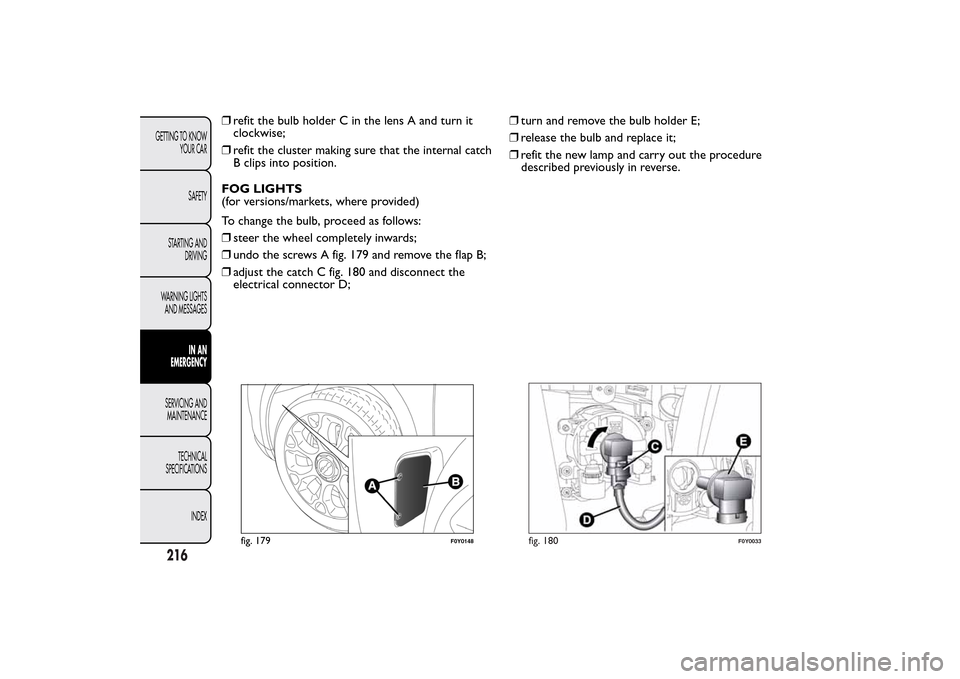
To change the bulb, proceed as follows:
❒steer the wheel completely inwards;
❒undo the screws A fig. 179 and remove the flap B;
❒adjust the catch C fig. 180 and disconnect the
electrical connector D;❒turn and remove the bulb holder E;
❒release the bulb and replace it;
❒refit the new lamp and carry out the procedure
described previously in reverse.
fig. 179
F0Y0148
fig. 180
F0Y0033
216GETTING TO KNOW
YOUR CAR
SAFETY
STARTING AND
DRIVING
WARNING LIGHTS
AND MESSAGES
IN AN
EMERGENCY
SERVICING AND
MAINTENANCE
TECHNICAL
SPECIFICATIONS
INDEX
Page 223 of 420
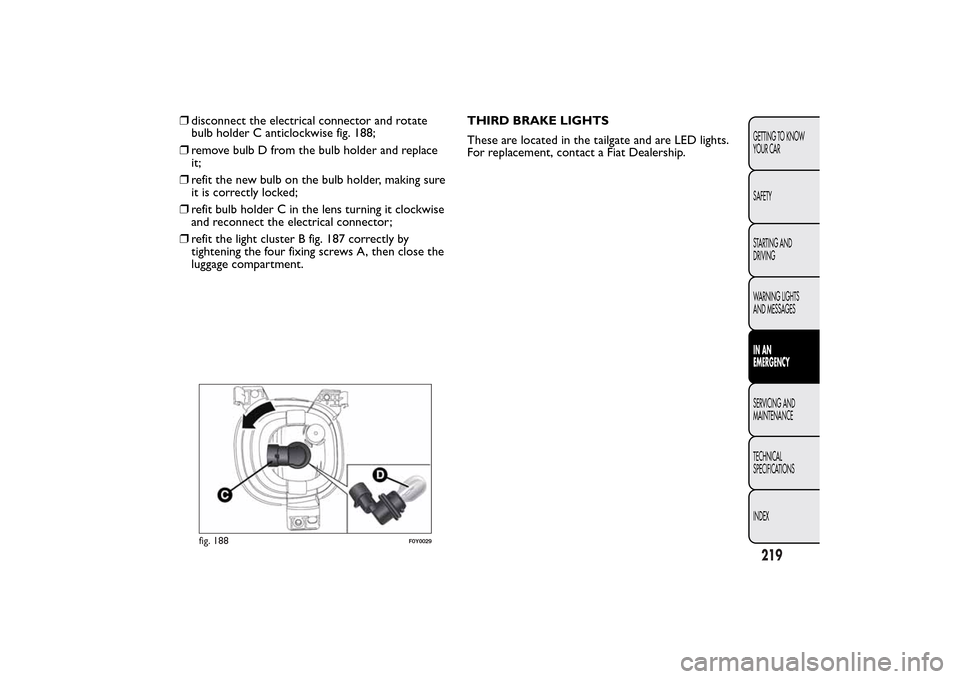
❒disconnect the electrical connector and rotate
bulb holder C anticlockwise fig. 188;
❒remove bulb D from the bulb holder and replace
it;
❒refit the new bulb on the bulb holder, making sure
it is correctly locked;
❒refit bulb holder C in the lens turning it clockwise
and reconnect the electrical connector;
❒refit the light cluster B fig. 187 correctly by
tightening the four fixing screws A, then close the
luggage compartment.THIRD BRAKE LIGHTS
These are located in the tailgate and are LED lights.
For replacement, contact a Fiat Dealership.
fig. 188
F0Y0029
219GETTING TO KNOW
YOUR CAR
SAFETY
STARTING AND
DRIVING
WARNING LIGHTS
AND MESSAGESIN AN
EMERGENCYSERVICING AND
MAINTENANCE
TECHNICAL
SPECIFICATIONS
INDEX
Page 231 of 420
FUSE LOCATION
Engine compartment fuse box
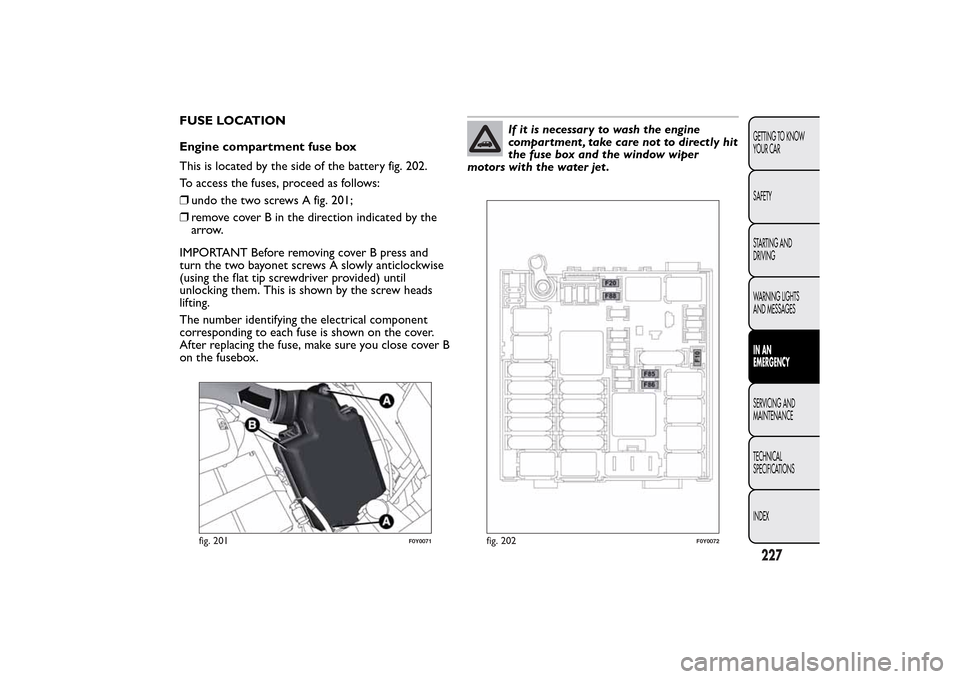
This is located by the side of the battery fig. 202.
To access the fuses, proceed as follows:
❒undo the two screws A fig. 201;
❒remove cover B in the direction indicated by the
arrow.
IMPORTANT Before removing cover B press and
turn the two bayonet screws A slowly anticlockwise
(using the flat tip screwdriver provided) until
unlocking them. This is shown by the screw heads
lifting.
The number identifying the electrical component
corresponding to each fuse is shown on the cover.
After replacing the fuse, make sure you close cover B
on the fusebox.
If it is necessary to wash the engine
compartment , take care not to directly hit
the fuse box and the window wiper
motors with the water jet .
fig. 201
F0Y0071
fig. 202
F0Y0072
227GETTING TO KNOW
YOUR CAR
SAFETY
STARTING AND
DRIVING
WARNING LIGHTS
AND MESSAGESIN AN
EMERGENCYSERVICING AND
MAINTENANCE
TECHNICAL
SPECIFICATIONS
INDEX
Page 324 of 420
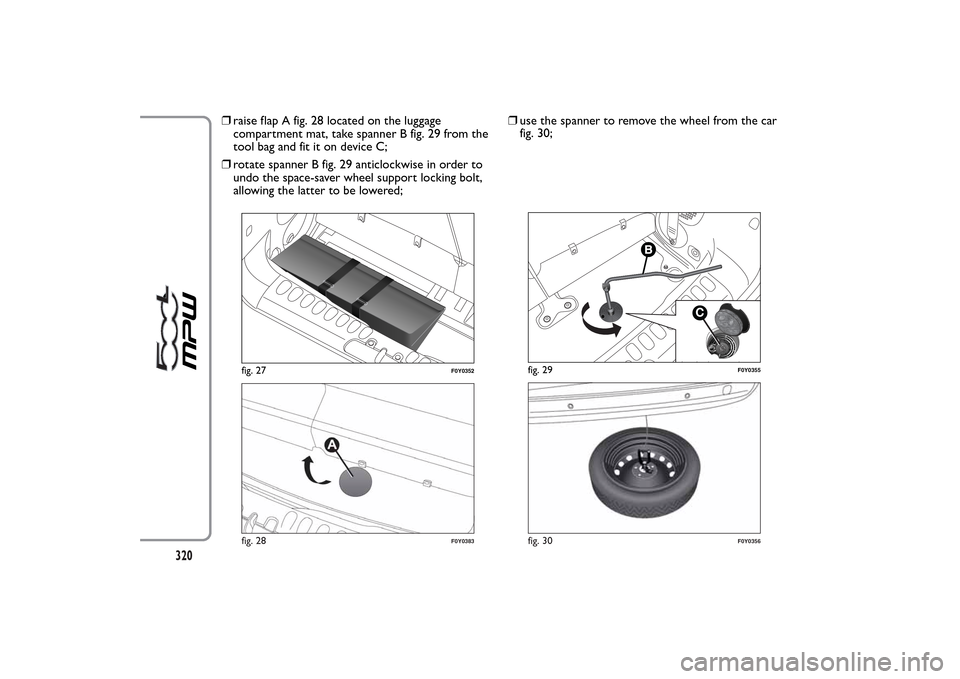
❒raise flap A fig. 28 located on the luggage
compartment mat, take spanner B fig. 29 from the
tool bag and fit it on device C;
❒rotate spanner B fig. 29 anticlockwise in order to
undo the space-saver wheel support locking bolt,
allowing the latter to be lowered;❒use the spanner to remove the wheel from the car
fig. 30;
fig. 27
F0Y0352
fig. 28
F0Y0383
C
fig. 29
F0Y0355
fig. 30
F0Y0356
320
Page 327 of 420
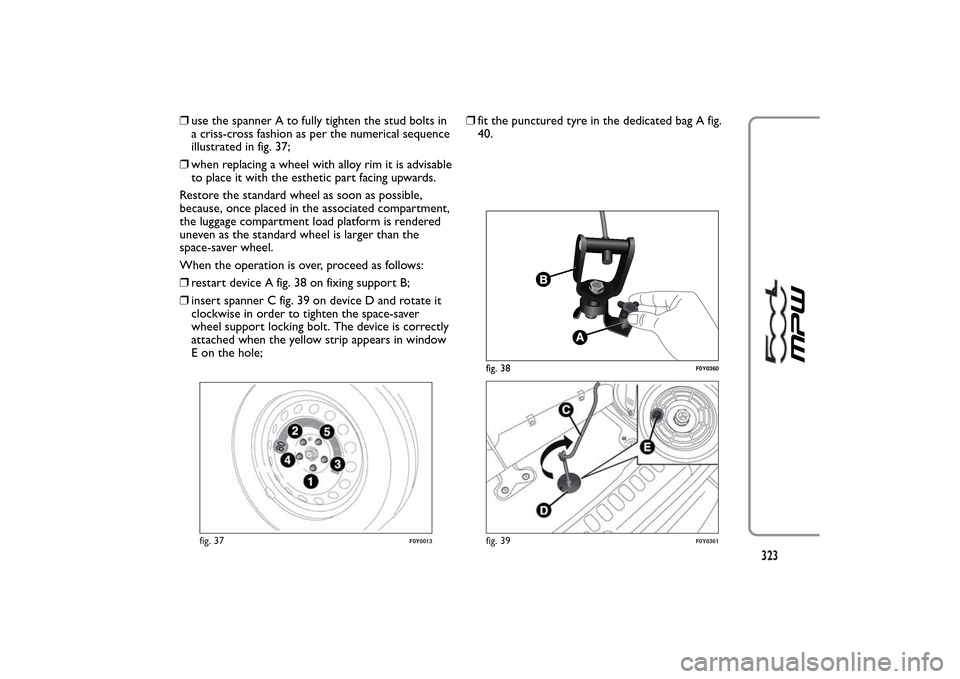
❒use the spanner A to fully tighten the stud bolts in
a criss-cross fashion as per the numerical sequence
illustrated in fig. 37;
❒when replacing a wheel with alloy rim it is advisable
to place it with the esthetic part facing upwards.
Restore the standard wheel as soon as possible,
because, once placed in the associated compartment,
the luggage compartment load platform is rendered
uneven as the standard wheel is larger than the
space-saver wheel.
When the operation is over, proceed as follows:
❒restart device A fig. 38 on fixing support B;
❒insert spanner C fig. 39 on device D and rotate it
clockwise in order to tighten the space-saver
wheel support locking bolt. The device is correctly
attached when the yellow strip appears in window
E on the hole;❒fit the punctured tyre in the dedicated bag A fig.
40.
fig. 37
F0Y0013
fig. 38
F0Y0360
fig. 39
F0Y0361
323
Page 352 of 420
MAKING A PHONE CALL.................................................375
MANAGING AN INCOMING CALL ..............................376
MAKING A SECOND PHONE CALL .............................377
MANAGING TWO PHONE CALLS ................................377
ENDING A CALL..................................................................377
REDIALLING ..........................................................................377
CONTINUING A PHONE CALL .....................................377
ACTIVATION/DEACTIVATION OF THE
MICROPHONE ......................................................................377
TRANSFERRING A CALL...................................................378
SMS MESSAGE READER......................................................378
"MORE" MODE ........................................................................378
TRIP COMPUTER .................................................................378
CLOCK ....................................................................................379eco:Drive .................................................................................379
SETTINGS ...............................................................................381
VOICE COMMANDS ............................................................385
USE OF THE VOICE COMMANDS .................................385
USE OF STEERING WHEEL CONTROLS TO
ACTIVATE VOICE COMMANDS .....................................385
VOICE SESSION STATUS....................................................386
MULTIPLE CHOICE..............................................................386
GLOBAL VOICE COMMANDS.........................................387
PHONE VOICE COMMANDS ..........................................388
RADIO AM/FM/DAB VOICE COMMANDS ..................39
MEDIA VOICE COMMANDS ............................................394
CUSTOMER SERVICE NUMBER LIST ................................397
348
2
Page 363 of 420
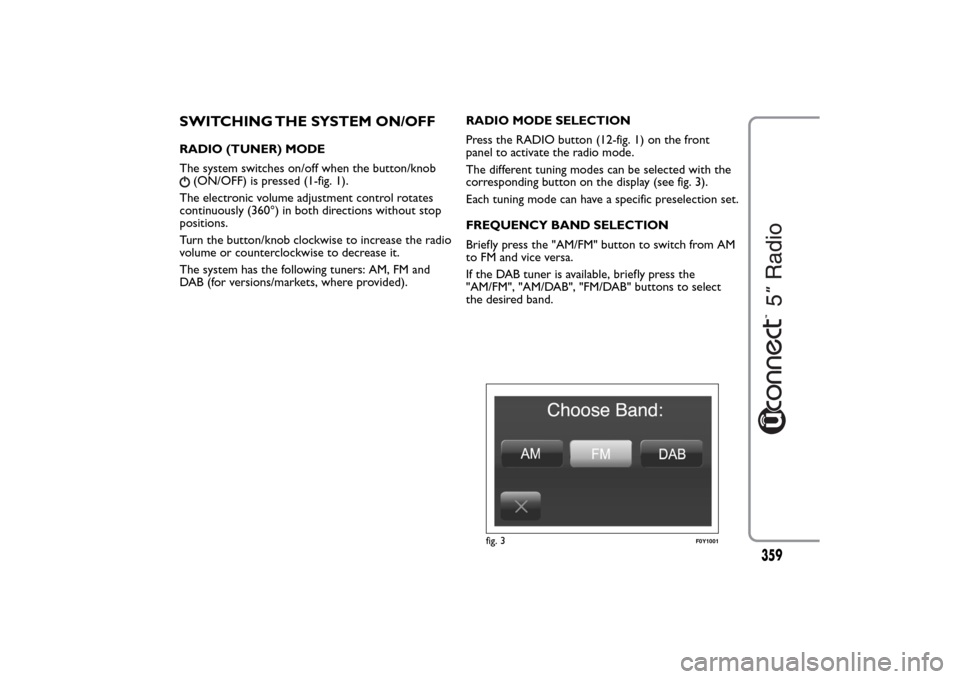
SWITCHING THE SYSTEM ON/OFFRADIO (TUNER) MODE
The system switches on/off when the button/knob
(ON/OFF) is pressed (1-fig. 1).
The electronic volume adjustment control rotates
continuously (360°) in both directions without stop
positions.
Turn the button/knob clockwise to increase the radio
volume or counterclockwise to decrease it.
The system has the following tuners: AM, FM and
DAB (for versions/markets, where provided).RADIO MODE SELECTION
Press the RADIO button (12-fig. 1) on the front
panel to activate the radio mode.
The different tuning modes can be selected with the
corresponding button on the display (see fig. 3).
Each tuning mode can have a specific preselection set.
FREQUENCY BAND SELECTION
Briefly press the "AM/FM" button to switch from AM
to FM and vice versa.
If the DAB tuner is available, briefly press the
"AM/FM", "AM/DAB", "FM/DAB" buttons to select
the desired band.
fig. 3
F0Y1001
359
Page 370 of 420
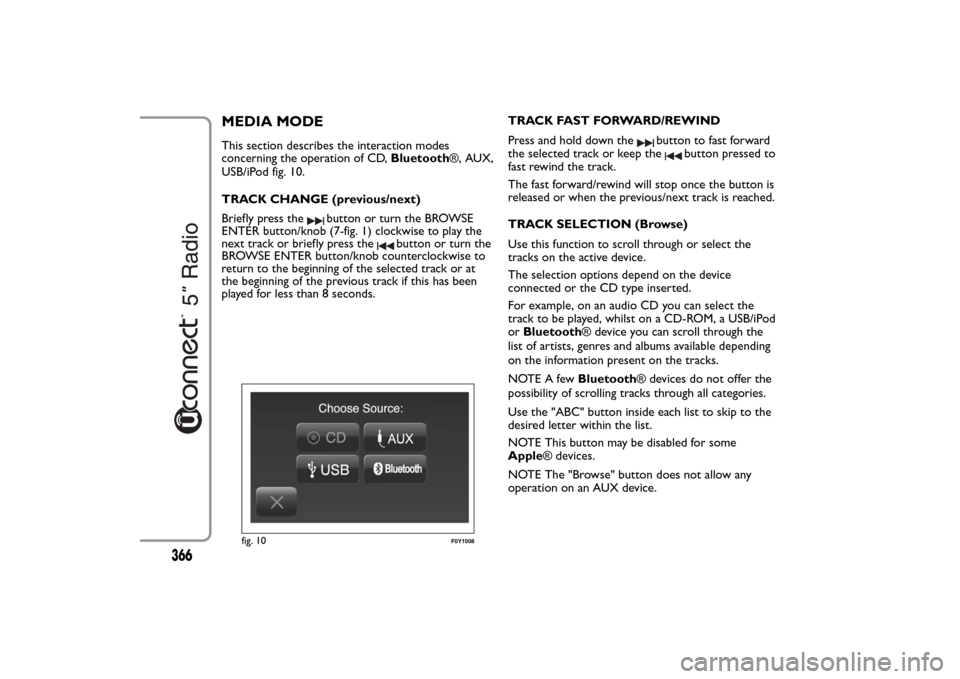
MEDIA MODEThis section describes the interaction modes
concerning the operation of CD,Bluetooth®, AUX,
USB/iPod fig. 10.
TRACK CHANGE (previous/next)
Briefly press the
button or turn the BROWSE
ENTER button/knob (7-fig. 1) clockwise to play the
next track or briefly press the
button or turn the
BROWSE ENTER button/knob counterclockwise to
return to the beginning of the selected track or at
the beginning of the previous track if this has been
played for less than 8 seconds.TRACK FAST FORWARD/REWIND
Press and hold down the
button to fast forward
the selected track or keep the
button pressed to
fast rewind the track.
The fast forward/rewind will stop once the button is
released or when the previous/next track is reached.
TRACK SELECTION (Browse)
Use this function to scroll through or select the
tracks on the active device.
The selection options depend on the device
connected or the CD type inserted.
For example, on an audio CD you can select the
track to be played, whilst on a CD-ROM, a USB/iPod
orBluetooth® device you can scroll through the
list of artists, genres and albums available depending
on the information present on the tracks.
NOTE A fewBluetooth® devices do not offer the
possibility of scrolling tracks through all categories.
Use the "ABC" button inside each list to skip to the
desired letter within the list.
NOTE This button may be disabled for some
Apple® devices.
NOTE The "Browse" button does not allow any
operation on an AUX device.
fig. 10
F0Y1008
366