ESP FIAT 500L LIVING 2014 2.G Service Manual
[x] Cancel search | Manufacturer: FIAT, Model Year: 2014, Model line: 500L LIVING, Model: FIAT 500L LIVING 2014 2.GPages: 420, PDF Size: 9.77 MB
Page 318 of 420
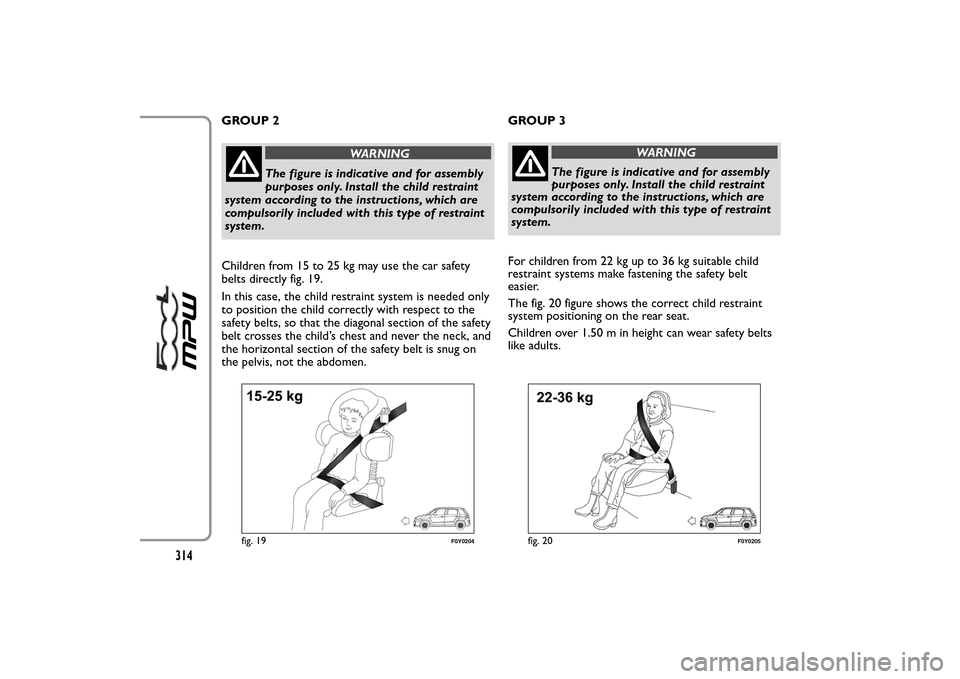
GROUP 2
WARNING
The figure is indicative and for assembly
purposes only. Install the child restraint
system according to the instructions, which are
compulsorily included with this type of restraint
system.
Children from 15 to 25 kg may use the car safety
belts directly fig. 19.
In this case, the child restraint system is needed only
to position the child correctly with respect to the
safety belts, so that the diagonal section of the safety
belt crosses the child’s chest and never the neck, and
the horizontal section of the safety belt is snug on
the pelvis, not the abdomen.GROUP 3
WARNING
The figure is indicative and for assembly
purposes only. Install the child restraint
system according to the instructions, which are
compulsorily included with this type of restraint
system.
For children from 22 kg up to 36 kg suitable child
restraint systems make fastening the safety belt
easier.
The fig. 20 figure shows the correct child restraint
system positioning on the rear seat.
Children over 1.50 m in height can wear safety belts
like adults.
fig. 19
F0Y0204
fig. 20
F0Y0205
314
Page 322 of 420
WARNING
Alert other drivers that the car is
stationary in compliance with local
regulations: hazard warning lights, warning
triangle, etc . Any passengers on board should
leave the car, especially if it is heavily laden.
Passengers should stay away from on-coming
traffic while the wheel is being changed. If you
are on a slope or uneven surface, place the
wedge provided under the wheels (see the
instructions on the next pages).
WARNING
The vehicle's driving characteristics will
be modified with the space-saver wheel
fitted. Avoid violent acceleration and braking,
abrupt steering and fast cornering.The overall
duration of the space-saver wheel is of about
3000 km, after which the relevant tyre must be
replaced with another one of the same type.
Never install a standard tyre on a rim that is
designed for use with a space-saver wheel. Have
the wheel repaired and refitted as soon as
possible. Using two or more small space-saver
wheels at the same time is forbidden. Do not
grease the threads of the stud bolts before
fitting them: they might slip out .
WARNING
The jack shall only be used for raising
the car model it has been supplied with.
Never use the jack for other purposes, such as
raising other car models. Never use the jack for
repair operations under the vehicle. Incorrectly
positioning of the jack may cause the car to fall.
Do not use the jack for loads higher than the
one shown on its label.The space-saver wheel
cannot be fitted with snow chains. If a front
(drive) tyre is punctured and chains are needed,
use a standard wheel from the rear axle and
install the space-saver wheel on the rear axle. In
this way, with two normal drive wheels at the
front axle, it is possible to use snow chains.
WARNING
Incorrectly fitting the wheel cap may
cause it to fall off when the vehicle is in
motion. Never tamper with the inflation valve.
Never introduce tools of any kind between rim
and tyre. Check tyre and space-saver wheel
pressures regularly, complying with the values
given in the “Wheels” paragraph.
318
Page 334 of 420
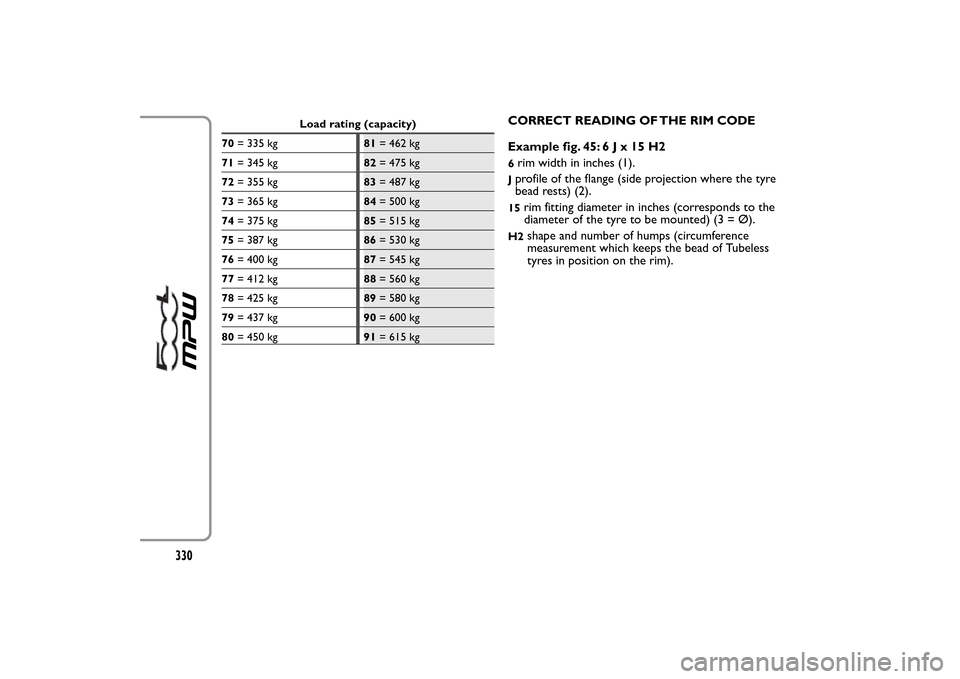
Load rating (capacity)
70= 335 kg81= 462 kg
71= 345 kg82= 475 kg
72= 355 kg83= 487 kg
73= 365 kg84= 500 kg
74= 375 kg85= 515 kg
75= 387 kg86= 530 kg
76= 400 kg87= 545 kg
77= 412 kg88= 560 kg
78= 425 kg89= 580 kg
79= 437 kg90= 600 kg
80= 450 kg91= 615 kg
CORRECT READING OF THE RIM CODE
Example fig. 45:6Jx15H26rim width in inches (1).Jprofile of the flange (side projection where the tyre
bead rests) (2).15
rim fitting diameter in inches (corresponds to the
diameter of the tyre to be mounted) (3 = Ø).
H2
shape and number of humps (circumference
measurement which keeps the bead of Tubeless
tyres in position on the rim).
330
Page 343 of 420
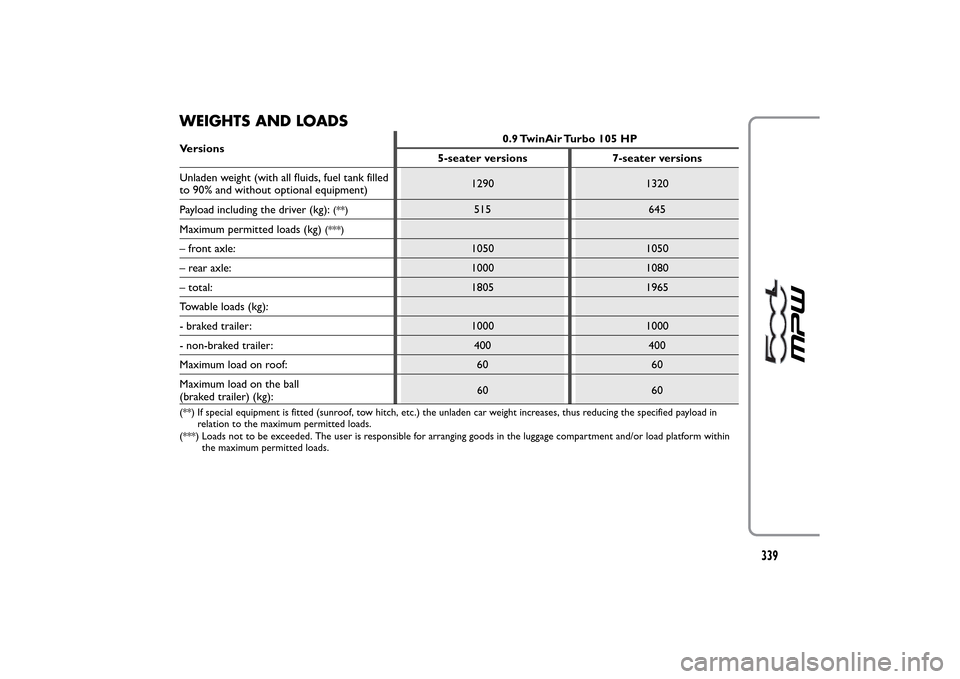
WEIGHTS AND LOADSVersions0.9 TwinAir Turbo 105 HP
5-seater versions 7-seater versions
Unladen weight (with all fluids, fuel tank filled
to 90% and without optional equipment)1290 1320
Payload including the driver (kg):
(**)
515 645
Maximum permitted loads (kg)
(***)
– front axle: 1050 1050
– rear axle: 1000 1080
– total: 1805 1965
Towable loads (kg):
- braked trailer: 1000 1000
- non-braked trailer: 400 400
Maximum load on roof: 60 60
Maximum load on the ball
(braked trailer) (kg):60 60(**) If special equipment is fitted (sunroof, tow hitch, etc.) the unladen car weight increases, thus reducing the specified payload in
relation to the maximum permitted loads.
(***) Loads not to be exceeded. The user is responsible for arranging goods in the luggage compartment and/or load platform within
the maximum permitted loads.
339
Page 344 of 420
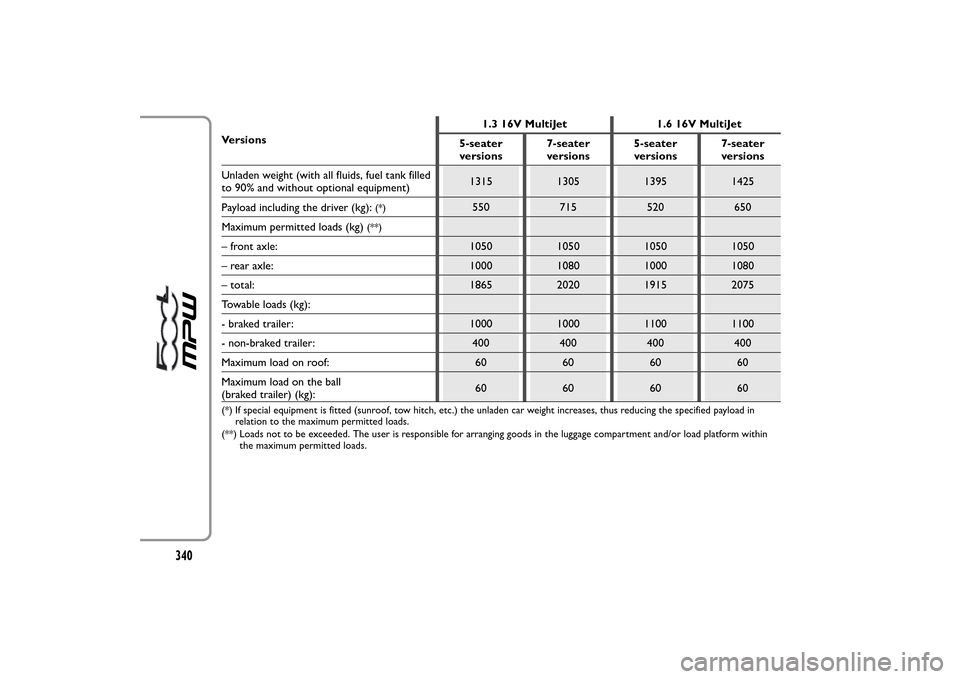
Versions1.3 16V MultiJet 1.6 16V MultiJet
5-seater
versions7-seater
versions5-seater
versions7-seater
versions
Unladen weight (with all fluids, fuel tank filled
to 90% and without optional equipment)1315 1305 1395 1425
Payload including the driver (kg):
(*)
550 715 520 650
Maximum permitted loads (kg)
(**)
– front axle: 1050 1050 1050 1050
– rear axle: 1000 1080 1000 1080
– total: 1865 2020 1915 2075
Towable loads (kg):
- braked trailer: 1000 1000 1100 1100
- non-braked trailer: 400 400 400 400
Maximum load on roof: 60 60 60 60
Maximum load on the ball
(braked trailer) (kg):60 60 60 60(*) If special equipment is fitted (sunroof, tow hitch, etc.) the unladen car weight increases, thus reducing the specified payload in
relation to the maximum permitted loads.
(**) Loads not to be exceeded. The user is responsible for arranging goods in the luggage compartment and/or load platform within
the maximum permitted loads.
340
Page 356 of 420
MULTIMEDIA DEVICES: SUPPORTED
AUDIO FILES AND FORMATS
For CD, USB and iPod sources the system can play
files with the following extensions and formats:
❒.MP3 (32 – 320Kbps);
❒. WAV ;
❒.WMA (5 – 320Kbps) mono and stereo;
❒.AAC (8 – 96KHz) mono and stereo;
❒.M4A (8 – 96KHz) mono and stereo;
❒.M4B (8 – 96KHz) mono and stereo;
❒.MP4 (8 – 96KHz) mono and stereo.
For all sources (CD, AUX, iPod andBluetooth®),
the system can also play the following Playlist
formats:
❒.M3U
❒.WPL
NOTE It makes no difference whether the suffixes
are written in capital or small letters.NOTES ON TRADEMARKS
iPod, iTunes and iPhone are registered trademarks of
Apple Inc.
All other trademarks are the property of their
respective owners.
Apple is not responsible for the operation of this
device and of its conformity with the safety rules and
standards.The DAB/DAB+/DMB Digital Radio function has
been certified according to the specifications of
"ARD" white sticker, for Class A - Audio services.
ARD is a trademark of the Associazione per la
Radiofonia Digitale in Italia.
352
Page 357 of 420
EXTERNAL AUDIO SOURCES
Other electronic devices (e.g. iPod, PDA, etc...) can
be used on the car.
Some of them can however cause electromagnetic
interference. Disconnect these devices if the system
performance worsens.
NOTE The system supports only FAT32-formatted
USB devices. The system does not support devices
with a capacity higher than 64 Gb.
ANTI-THEFT PROTECTION
uconnect™ is equipped with an anti-theft
protection system based on the exchange of
information with the electronic control unit (Body
Computer) on the car.
This guarantees maximum safety and prevents the
secret code from being entered after the power
supply has been disconnected.
If the check has a positive outcome, the system will
start to function, whereas if the comparison codes
are not the same or if the electronic control unit
(Body Computer) is replaced, the system will ask the
user to enter the secret code according to the
procedure described in the paragraph below.Entering the secret code
When the system is switched on, if the code is
requested, the display will show "Please enter Anti-
Theft Code" followed by the video page showing a
keypad to enter the secret code.
The secret code is made up of four digits, from 1 to
9: to insert the first number of the code press the
corresponding key on the display. Enter the other
code digits in the same way.
After entering the fourth figure,uconnect™ begins
operating.
If an incorrect code is entered, the system displays
"Incorrect Code. Please Try Again" to notify the user
of the need to enter the correct code.
After the 3 available attempts to enter the code, the
system displays "Incorrect Code. Radio locked. Please
wait 30 minutes": the waiting time is displayed. Once
the text has disappeared you can start the code
entering procedure again.
353
Page 363 of 420
SWITCHING THE SYSTEM ON/OFFRADIO (TUNER) MODE
The system switches on/off when the button/knob
(ON/OFF) is pressed (1-fig. 1).
The electronic volume adjustment control rotates
continuously (360°) in both directions without stop
positions.
Turn the button/knob clockwise to increase the radio
volume or counterclockwise to decrease it.
The system has the following tuners: AM, FM and
DAB (for versions/markets, where provided).RADIO MODE SELECTION
Press the RADIO button (12-fig. 1) on the front
panel to activate the radio mode.
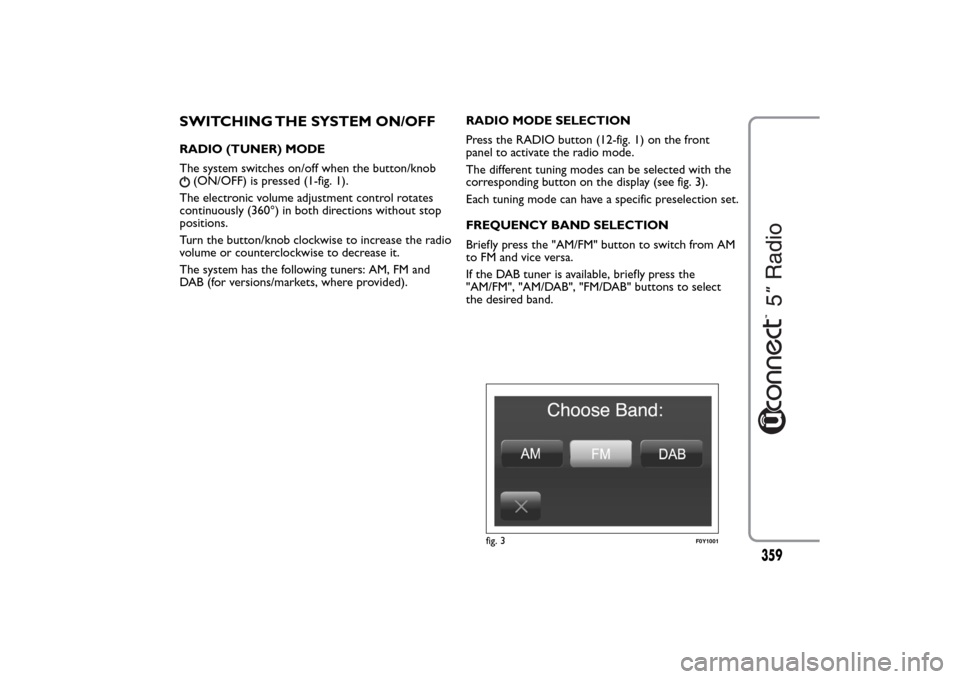
The different tuning modes can be selected with the
corresponding button on the display (see fig. 3).
Each tuning mode can have a specific preselection set.
FREQUENCY BAND SELECTION
Briefly press the "AM/FM" button to switch from AM
to FM and vice versa.
If the DAB tuner is available, briefly press the
"AM/FM", "AM/DAB", "FM/DAB" buttons to select
the desired band.
fig. 3
F0Y1001
359
Page 367 of 420
SETTING THE PRESELECTIONS
Preselections are available in all system modes and
are activated by touching one of the preselection
buttons located at the top of the display.
To store the radio station being listened to, press and
hold down the button corresponding to the desired
preset until a confirmation acoustic signal is heard.
The system can store up to 12 radio station in each
mode: 4 radio stations are displayed at the top.
Press the "All" button on the display to show all the
radio stations stored in the frequency band selected.AUDIO
To enter the "Audio" menu, press the SETTINGS
button (10-fig. 1) on the front panel, scroll the menu
then select and press the "Audio" item on the display.
The following adjustments can be carried out using
the "Audio" menu:
❒"Equalizer" (for versions/markets, where provided);
❒"Balance/Fade" (left/right and front/rear balance
adjustment);
❒"Volume/Speed" (excluding versions with Hi-Fi
system) speed-dependent automatic volume
adjustment;
❒"Loudness" (for versions/markets, where provided);
❒"Auto-On Radio";
❒"Radio Off Delay".
To exit the "Audio" menu, press the
/Done button.
NOTE When a setting is changed, thebutton is
replaced with the word "Done".
363
Page 374 of 420
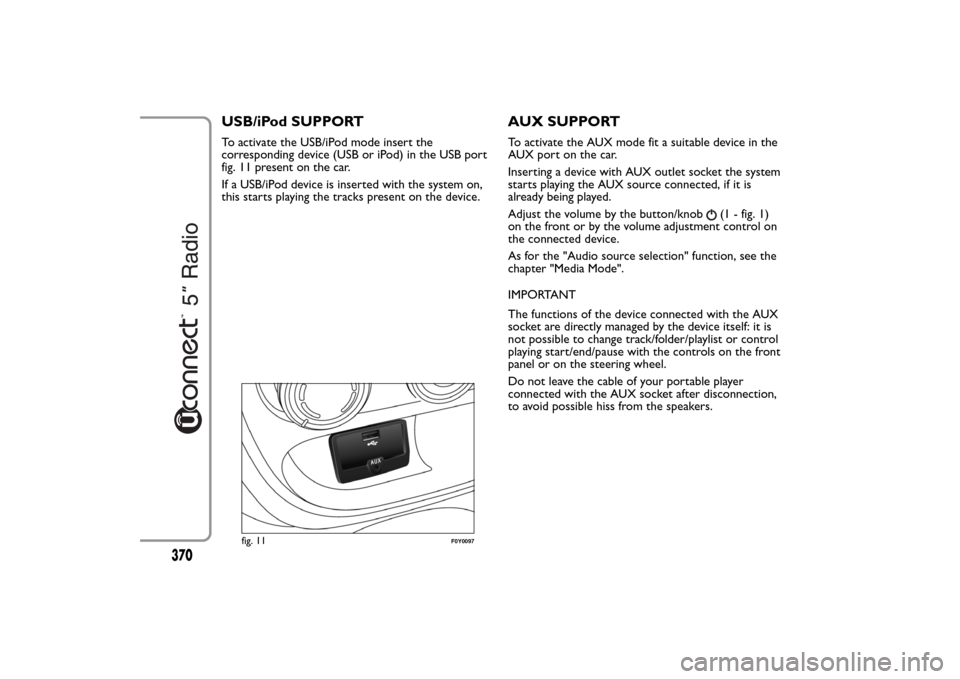
USB/iPod SUPPORTTo activate the USB/iPod mode insert the
corresponding device (USB or iPod) in the USB port
fig. 11 present on the car.
If a USB/iPod device is inserted with the system on,
this starts playing the tracks present on the device.
AUX SUPPORTTo activate the AUX mode fit a suitable device in the
AUX port on the car.
Inserting a device with AUX outlet socket the system
starts playing the AUX source connected, if it is
already being played.
Adjust the volume by the button/knob
(1 - fig. 1)
on the front or by the volume adjustment control on
the connected device.
As for the "Audio source selection" function, see the
chapter "Media Mode".
IMPORTANT
The functions of the device connected with the AUX
socket are directly managed by the device itself: it is
not possible to change track/folder/playlist or control
playing start/end/pause with the controls on the front
panel or on the steering wheel.
Do not leave the cable of your portable player
connected with the AUX socket after disconnection,
to avoid possible hiss from the speakers.
fig. 11
F0Y0097
370