phone FIAT 500L LIVING 2014 2.G Owners Manual
[x] Cancel search | Manufacturer: FIAT, Model Year: 2014, Model line: 500L LIVING, Model: FIAT 500L LIVING 2014 2.GPages: 420, PDF Size: 9.77 MB
Page 137 of 420
RADIO TRANSMITTERS AND MOBILE
PHONES
Radio transmitter equipment (vehicle mobile phones,
CB radios etc.) cannot be used inside the car unless
a separate aerial is mounted externally.
IMPORTANT The use of these devices inside the
passenger compartment (without an external aerial)
may cause the electrical systems to malfunction.
This could compromise the safety of the car in
addition to constituting a potential hazard for
passengers' health.
In addition, transmission and reception of these
devices may be negatively affected by the shielding
effect of the car body. As far as the use of
EC-approved mobile phones is concerned (GSM,
GPRS, UMTS), follow the usage instructions provided
by the mobile phone manufacturer.
PARKING SENSORS(for versions/markets, where provided)
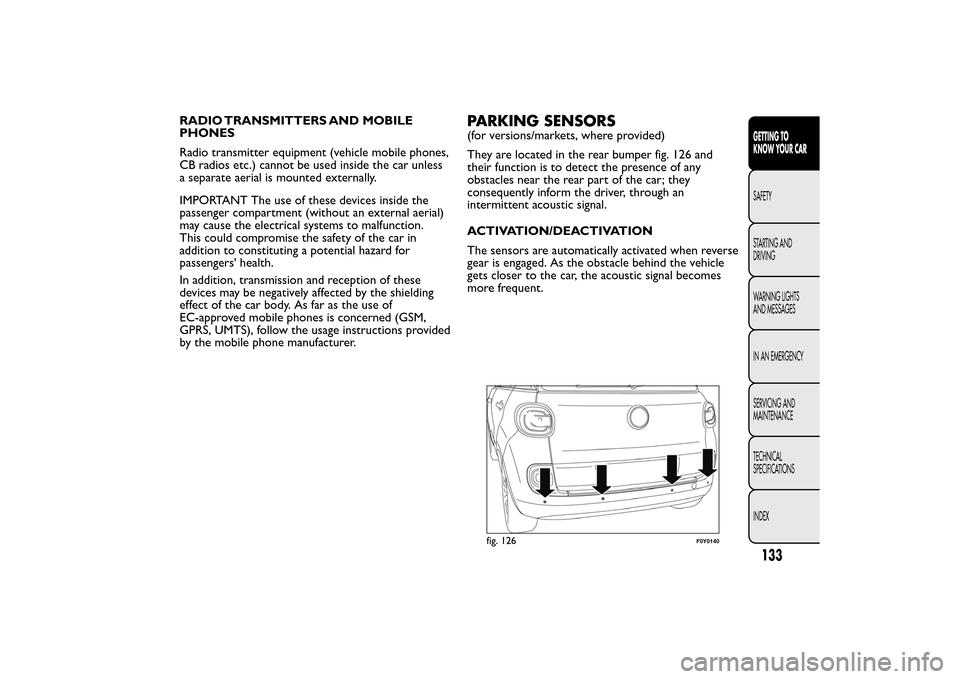
They are located in the rear bumper fig. 126 and
their function is to detect the presence of any
obstacles near the rear part of the car; they
consequently inform the driver, through an
intermittent acoustic signal.
ACTIVATION/DEACTIVATION
The sensors are automatically activated when reverse
gear is engaged. As the obstacle behind the vehicle
gets closer to the car, the acoustic signal becomes
more frequent.
fig. 126
F0Y0140
133GETTING TO
KNOW YOUR CARSAFETY
STARTING AND
DRIVING
WARNING LIGHTS
AND MESSAGES
IN AN EMERGENCY
SERVICING AND
MAINTENANCE
TECHNICAL
SPECIFICATIONS
INDEX
Page 143 of 420
IMPORTANT
WARNING
Do not apply any object/plug to the end
of the filler which is not provided for
the car.The use of non-compliant objects/plugs
could cause a pressure increase inside the
tank, resulting in dangerous situations.
WARNING
Do not bring naked flames or lit
cigarettes near to the fuel filler: fire risk.
Keep your face away from the fuel filler to
prevent breathing in harmful vapours.IMPORTANT If the filler compartment is washed
with a high pressure jet, keep it at a distance of
at least 20 cm.
WARNING
Do not use a mobile phone near the
refuelling pump: risk of fire.
139GETTING TO
KNOW YOUR CARSAFETY
STARTING AND
DRIVING
WARNING LIGHTS
AND MESSAGES
IN AN EMERGENCY
SERVICING AND
MAINTENANCE
TECHNICAL
SPECIFICATIONS
INDEX
Page 165 of 420
AIRBAGThe car is equipped with front airbags for driver and
passenger, driver's knee bag (for versions/markets,
where provided), seat-mounted side airbags for
driver's and passenger pelvis-chest-shoulder
protection (for versions/markets, where provided),
and window airbags for protecting the heads of front
and rear outer occupants.
The location of the airbags on the car is marked by
the writing "AIRBAG" in the middle of the steering
wheel, on the dashboard, on the side trim or on
a label placed next to the airbag deployment area.
FRONT AIRBAGS
The front driver/passenger airbags and the driver's
knee bag (for versions/markets, where provided)
protect the front seat occupants in the event of
frontal impacts of medium/high severity, by placing
the bag between the occupant and the steering
wheel or dashboard.
Therefore non-deployment in other types of impacts
(side impacts, rear shunts, roll-overs, etc.) does not
indicate a system malfunction.
Front (driver and passenger) airbags are not a
replacement for, but are complementary to, the seat
belts, which you are recommended to always wear,
as specified by law in Europe and most non-European
countries.
In the event of impact, those not wearing a seat belt
are projected forwards and may come into contactwith the bag which is still inflating. The protection
offered by the bag is compromised in these
circumstances.
Front airbags may not activate in the following
situations:
❒frontal impacts against highly deformable objects
not involving the front surface of the car (e.g.
wing collision against guard rail, etc.);
❒underride impacts with other vehicles or wedging
under protective barriers (e.g. trucks or guard
rails).
Failure to activate in the conditions described above
is due to the fact that they may not provide any
additional protection compared with seat belts, so
their activation would be inappropriate.
In these cases, non-deployment of the airbag does
not necessarily indicate a system malfunction.
WARNING
Do not apply stickers or other objects
on the steering wheel, on the dashboard
in the passenger airbag area, on roof side trims
or on the seats. Never put objects (e.g. mobile
phones) on the passenger side of the dashboard
since they could interfere with correct inflation
of the passenger airbag and also cause serious
injur y to the passengers.
161GETTING TO KNOW
YOUR CARSAFETYSTARTING AND
DRIVING
WARNING LIGHTS
AND MESSAGES
IN AN EMERGENCY
SERVICING AND
MAINTENANCE
TECHNICAL
SPECIFICATIONS
INDEX
Page 200 of 420
IN AN EMERGENCY
In an emergency we recommend that you call the free-phone number found on the Warranty
Booklet.You can also go to the www.fiat.com website to find your nearest Fiat Dealership.STARTING THE ENGINEContact to a Fiat Dealership immediately if
instrument panel warning light
comes on
constantly.
JUMP STARTING
If the battery is flat, the engine may be started using
an auxiliary battery with the same capacity or a
little higher than the flat one.Proceed as follows to start the car:
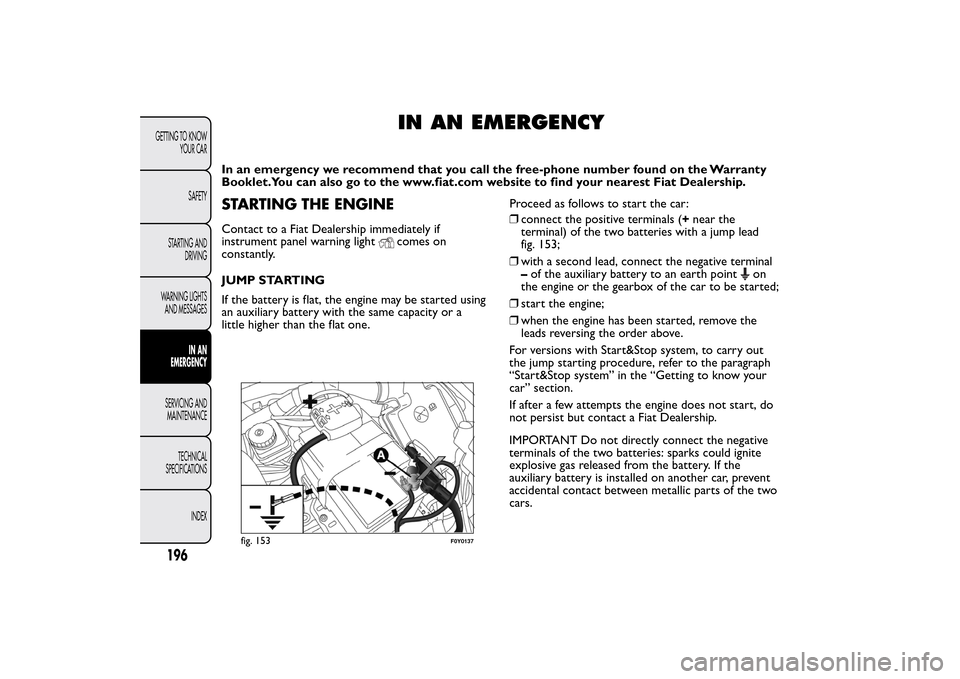
❒connect the positive terminals (+near the
terminal) of the two batteries with a jump lead
fig. 153;
❒with a second lead, connect the negative terminal
–of the auxiliary battery to an earth point
on
the engine or the gearbox of the car to be started;
❒start the engine;
❒when the engine has been started, remove the
leads reversing the order above.
For versions with Start&Stop system, to carry out
the jump starting procedure, refer to the paragraph
“Start&Stop system” in the “Getting to know your
car” section.
If after a few attempts the engine does not start, do
not persist but contact a Fiat Dealership.
IMPORTANT Do not directly connect the negative
terminals of the two batteries: sparks could ignite
explosive gas released from the battery. If the
auxiliary battery is installed on another car, prevent
accidental contact between metallic parts of the two
cars.
fig. 153
F0Y0137
196GETTING TO KNOW
YOUR CAR
SAFETY
STARTING AND
DRIVING
WARNING LIGHTS
AND MESSAGES
IN AN
EMERGENCY
SERVICING AND
MAINTENANCE
TECHNICAL
SPECIFICATIONS
INDEX
Page 258 of 420
Incorrect installation of electrical and
electronic devices may cause severe
damage to your car. After purchasing your
car, if you wish to install any accessories
(anti-theft , car phone, etc .), contact a Fiat
Dealership, which will suggest the most
appropriate devices for your vehicle, and will,
most importantly, advise you if a higher capacity
battery needs to be installed.Batteries contain substances which are
very dangerous for the environment . For
battery replacement , contact a Fiat
Dealership.
WARNING
If the car will be unused for an extended
period of time in extremely cold
weather conditions, remove the battery and
store it in a heated area to prevent it from
freezing.
WARNING
Always wear appropriate goggles when
working on or near the battery.
BRAKESThe car is equipped with 4 mechanical wear
detection systems for brake pads: one for each wheel
assembly.
When the brake linings are about to wear out,
pressing the brake pedal, a light hiss is heard: this
indication lasts around 100 km (depending on the
driving style and the route type).
In these circumstances it is still possible, proceeding
with caution, to carry on driving.
In any case, contact a Fiat Dealership as soon as
possible to have the worn brake pads replaced.
254GETTING TO KNOW
YOUR CAR
SAFETY
STARTING AND
DRIVING
WARNING LIGHTS
AND MESSAGES
IN AN EMERGENCYSERVICING AND
MAINTENANCE
TECHNICAL
SPECIFICATIONS
INDEX
Page 351 of 420
TABLE OF CONTENTS
INTRODUCTION ...................................................................349
TIPS, CONTROLS AND GENERAL INFORMATION ...350
TIPS ...........................................................................................350
MULTIMEDIA DEVICES: SUPPORTED AUDIO FILES
AND FORMATS.....................................................................352
NOTES ON TRADEMARKS...............................................352
EXTERNAL AUDIO SOURCES .........................................352
ANTI-THEFT PROTECTION .............................................353
SOFTWARE UPDATES ........................................................354
TECHNICAL SPECIFICATIONS........................................354
QUICK GUIDE .........................................................................355
CONTROLS ON FRONT PANEL ....................................355
FRONT PANEL CONTROL SUMMARY TABLE............356
STEERING WHEEL CONTROLS ........................................357
DESCRIPTION .......................................................................357
STEERING WHEEL CONTROL SUMMARY TABLE ....358
SWITCHING THE SYSTEM ON/OFF ................................359
RADIO (TUNER) MODE ....................................................359
RADIO MODE SELECTION ..............................................359
FREQUENCY BAND SELECTION...................................359
DISPLAYED INFORMATION .............................................360
RADIO STATION SELECTION .........................................360
PREVIOUS/NEXT RADIO STATION SEARCH ............361
PREVIOUS/NEXT RADIO STATION FAST SEARCH ..361
AM/FM RADIO STATION TUNING ................................361
DAB RADIO ...........................................................................362
SETTING THE PRESELECTIONS .....................................363
AUDIO .....................................................................................363
MEDIA MODE ..........................................................................366
TRACK CHANGE (previous/next) ...................................366TRACK FAST FORWARD/REWIND ...............................366
TRACK SELECTION (Browse) ..........................................366
AUDIO SOURCE SELECTION..........................................367
TRACK INFORMATION DISPLAY ...................................367
RANDOM TRACK REPRODUCTION ...........................367
TRACK REPETITION...........................................................367
CD PLAYER ...............................................................................368
LOADING/EJECTING A CD ..............................................368
Bluetooth
® SOURCE.........................................................369
PAIRING ABluetooth
® AUDIO DEVICE .................369
USB/iPod SUPPORT.................................................................370
AUX SUPPORT.........................................................................370
PHONE MODE ........................................................................371
PHONE MODE ACTIVATION ..........................................371
MAIN FUNCTIONS .............................................................371
DISPLAYED INFORMATION .............................................371
PAIRING A MOBILE PHONE.............................................372
STORING NAMES/NUMBERS IN THE MOBILE
PHONE PHONEBOOK ......................................................372
CONNECTION/DISCONNECTION OF A MOBILE
PHONE OR A
Bluetooth
® AUDIO DEVICE ...........373
DELETION OF A MOBILE PHONE OR A
Bluetooth
® AUDIO DEVICE ........................................373
SETTING A MOBILE PHONE OR A
Bluetooth
®
AUDIO DEVICE AS FAVOURITE .....................................374
DELETION OF PHONE DATA
(PHONEBOOK AND RECENT CALLS) ........................374
TRANSMISSION OF PHONE DATA
(PHONEBOOK AND RECENT CALLS) ........................374
347
Page 352 of 420
MAKING A PHONE CALL.................................................375
MANAGING AN INCOMING CALL ..............................376
MAKING A SECOND PHONE CALL .............................377
MANAGING TWO PHONE CALLS ................................377
ENDING A CALL..................................................................377
REDIALLING ..........................................................................377
CONTINUING A PHONE CALL .....................................377
ACTIVATION/DEACTIVATION OF THE
MICROPHONE ......................................................................377
TRANSFERRING A CALL...................................................378
SMS MESSAGE READER......................................................378
"MORE" MODE ........................................................................378
TRIP COMPUTER .................................................................378
CLOCK ....................................................................................379eco:Drive .................................................................................379
SETTINGS ...............................................................................381
VOICE COMMANDS ............................................................385
USE OF THE VOICE COMMANDS .................................385
USE OF STEERING WHEEL CONTROLS TO
ACTIVATE VOICE COMMANDS .....................................385
VOICE SESSION STATUS....................................................386
MULTIPLE CHOICE..............................................................386
GLOBAL VOICE COMMANDS.........................................387
PHONE VOICE COMMANDS ..........................................388
RADIO AM/FM/DAB VOICE COMMANDS ..................39
MEDIA VOICE COMMANDS ............................................394
CUSTOMER SERVICE NUMBER LIST ................................397
348
2
Page 356 of 420
MULTIMEDIA DEVICES: SUPPORTED
AUDIO FILES AND FORMATS
For CD, USB and iPod sources the system can play
files with the following extensions and formats:
❒.MP3 (32 – 320Kbps);
❒. WAV ;
❒.WMA (5 – 320Kbps) mono and stereo;
❒.AAC (8 – 96KHz) mono and stereo;
❒.M4A (8 – 96KHz) mono and stereo;
❒.M4B (8 – 96KHz) mono and stereo;
❒.MP4 (8 – 96KHz) mono and stereo.
For all sources (CD, AUX, iPod andBluetooth®),
the system can also play the following Playlist
formats:
❒.M3U
❒.WPL
NOTE It makes no difference whether the suffixes
are written in capital or small letters.NOTES ON TRADEMARKS
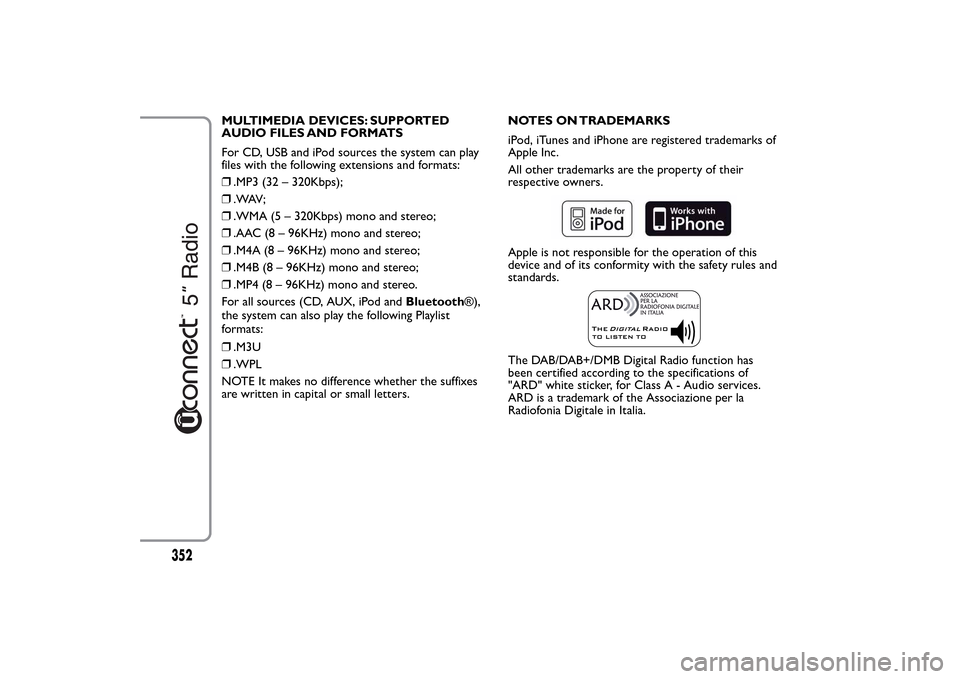
iPod, iTunes and iPhone are registered trademarks of
Apple Inc.
All other trademarks are the property of their
respective owners.
Apple is not responsible for the operation of this
device and of its conformity with the safety rules and
standards.The DAB/DAB+/DMB Digital Radio function has
been certified according to the specifications of
"ARD" white sticker, for Class A - Audio services.
ARD is a trademark of the Associazione per la
Radiofonia Digitale in Italia.
352
Page 360 of 420
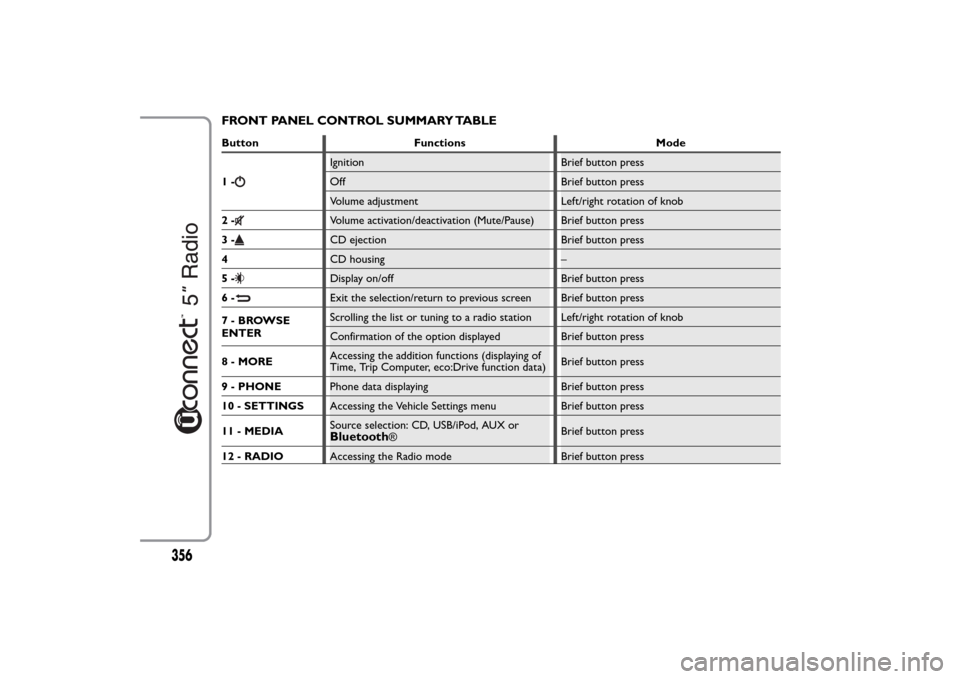
FRONT PANEL CONTROL SUMMARY TABLEButton Functions Mode
1-
Ignition Brief button press
Off Brief button press
Volume adjustment Left/right rotation of knob
2-Volume activation/deactivation (Mute/Pause) Brief button press
3-CD ejection Brief button press
4CD housing –
5-Display on/off Brief button press
6-Exit the selection/return to previous screen Brief button press
7-BROWSE
ENTERScrolling the list or tuning to a radio station Left/right rotation of knob
Confirmation of the option displayed Brief button press
8 - MOREAccessing the addition functions (displaying of
Time, Trip Computer, eco:Drive function data)Brief button press
9 - PHONEPhone data displaying Brief button press
10 - SETTINGSAccessing the Vehicle Settings menu Brief button press
11 - MEDIASource selection: CD, USB/iPod, AUX orBluetooth
®Brief button press
12 - RADIOAccessing the Radio mode Brief button press
356
Page 362 of 420
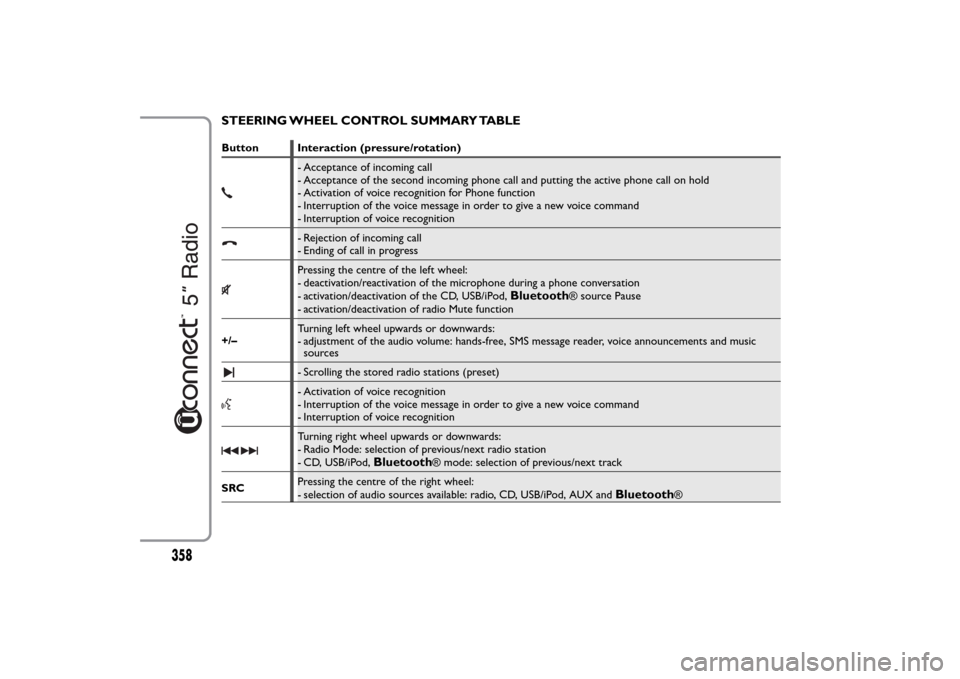
STEERING WHEEL CONTROL SUMMARY TABLEButton Interaction (pressure/rotation)
- Acceptance of incoming call
- Acceptance of the second incoming phone call and putting the active phone call on hold
- Activation of voice recognition for Phone function
- Interruption of the voice message in order to give a new voice command
- Interruption of voice recognition- Rejection of incoming call
- Ending of call in progressPressing the centre of the left wheel:
- deactivation/reactivation of the microphone during a phone conversation
- activation/deactivation of the CD, USB/iPod,
Bluetooth
® source Pause
- activation/deactivation of radio Mute function
+/–Turning left wheel upwards or downwards:
- adjustment of the audio volume: hands-free, SMS message reader, voice announcements and music
sources
- Scrolling the stored radio stations (preset)- Activation of voice recognition
- Interruption of the voice message in order to give a new voice command
- Interruption of voice recognitionTurning right wheel upwards or downwards:
- Radio Mode: selection of previous/next radio station
- CD, USB/iPod,
Bluetooth
® mode: selection of previous/next track
SRCPressing the centre of the right wheel:
- selection of audio sources available: radio, CD, USB/iPod, AUX and
Bluetooth
®
358