buttons FIAT 500L LIVING 2017 2.G User Guide
[x] Cancel search | Manufacturer: FIAT, Model Year: 2017, Model line: 500L LIVING, Model: FIAT 500L LIVING 2017 2.GPages: 240, PDF Size: 5.26 MB
Page 216 of 240
❒search forUconnect™on theBlue-
tooth® audio device (during the pairing
stage a screen is displayed showing the
progress of the operation);
❒when requested by the audio device,
enter the PIN code shown on the
system display or confirm on the device
the PIN displayed;
❒if the pairing procedure is completed
successfully, a screen is displayed.
Answer "Yes" to the question to pair the
Bluetooth® audio device as favourite
(the device will have priority over all
other devices to be paired subse-
quently). If "No" is selected, the priority
is determined according to the order of
pairing. The last device connected will
have the highest priority;
❒an audio device can also be paired
by pressing the PHONE button on
the front panel and by selecting
"Settings" or, from the "Settings" menu,
selecting "Phone/Bluetooth".
IMPORTANT If theBluetooth® con-
nection between mobile phone and
system is lost, consult the mobile
phone owner's handbook.PHONE MODE
Phone mode activation: press the
PHONE button on the front panel.
The buttons on the display can be used
to:
❒compose the phone number (using
the graphic keypad on the display);
❒display and call the contacts on the
mobile phone phonebook;
❒display and call contacts from the
registers of previous calls;
❒pair up to 10 phones/audio devices
to make access and connection easier
and quicker;
❒transfer calls from the system to the
mobile phone and vice versa and
deactivate the microphone audio for
private conversations.
The mobile phone audio is transmitted
through the car’s audio system; the
system automatically mutes the radio
when the Phone function is used.
Pairing a mobile phone
Proceed as follows:
❒activate theBluetooth® function on
the mobile phone;
❒press the PHONE button (9-fig. 1) on
the front panel;
❒if no phone is paired with the system
yet, the display shows a dedicated
screen;❒select "Yes" to start the pairing
procedure then search for the
uconnect™device on the mobile
phone (if "No" is selected, the Phone
main screen is displayed);
❒when prompted by the mobile
phone, use its keyboard to enter the
PIN code shown on the system display
or confirm on the mobile phone the
PIN displayed;
❒from the "Phone" screen you can
always pair a mobile phone pressing
the "Settings" button: press the "Add
Device" button and proceed as
described above;
❒during the pairing stage a screen is
displayed showing the progress of
the operation;
❒when the pairing procedure is
completed successfully, a screen is
displayed: answer "Yes" to the question
to pair the mobile phone as favourite
(the mobile phone will have priority over
all other mobile phones that will be
paired subsequently). If no other
devices are paired, the system will
consider the first associated device as
favourite.
Proceed as follows:
❒activate theBluetooth® function on
the mobile phone;
❒press the PHONE button on the front
panel;
214
MULTIMEDIA
Page 225 of 240
DASHBOARD
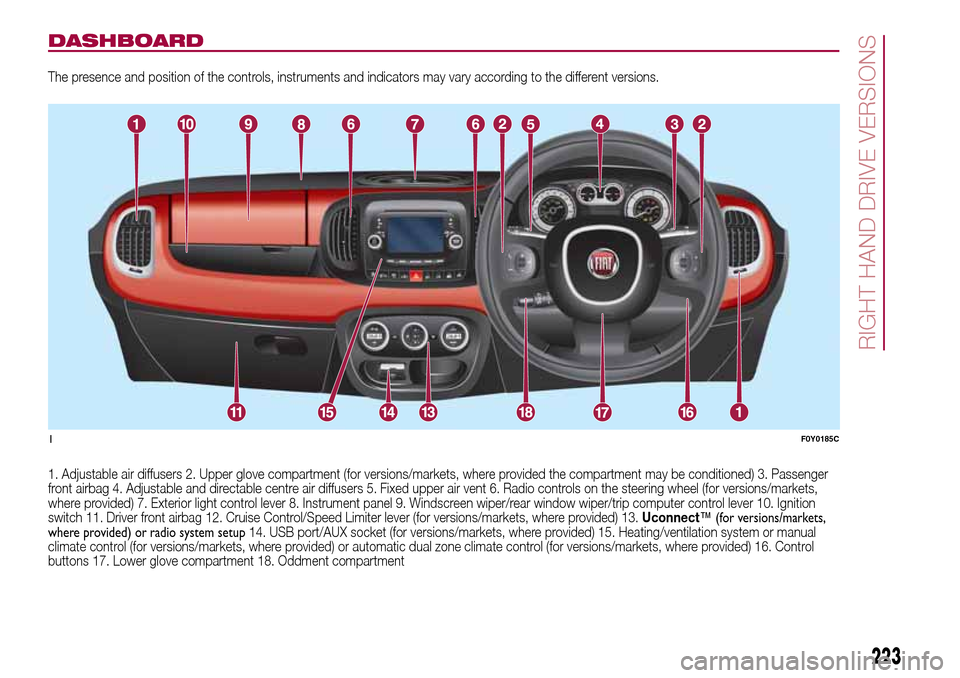
The presence and position of the controls, instruments and indicators may vary according to the different versions.
1. Adjustable air diffusers 2. Upper glove compartment (for versions/markets, where provided the compartment may be conditioned) 3. Passenger
front airbag 4. Adjustable and directable centre air diffusers 5. Fixed upper air vent 6. Radio controls on the steering wheel (for versions/markets,
where provided) 7. Exterior light control lever 8. Instrument panel 9. Windscreen wiper/rear window wiper/trip computer control lever 10. Ignition
switch 11. Driver front airbag 12. Cruise Control/Speed Limiter lever (for versions/markets, where provided) 13.Uconnect™ (for versions/markets,
where provided) or radio system setup14. USB port/AUX socket (for versions/markets, where provided) 15. Heating/ventilation system or manual
climate control (for versions/markets, where provided) or automatic dual zone climate control (for versions/markets, where provided) 16. Control
buttons 17. Lower glove compartment 18. Oddment compartment
1F0Y0185C
223
RIGHT HAND DRIVE VERSIONS
Page 236 of 240
INDEX
3
rd brake light (changing bulbs)..... 121
ABS (system) ................................ 65
Active safety systems ..................... 65
ASR (system) ................................. 65
Automatic dual-zone climate
control system ............................. 18
Battery (recharging)....................... 153
Bodywork (cleaning and
maintenance) ............................... 157
Bonnet ........................................... 31
Bulb (replacement) ......................... 115
Cargo Magic Space ...................... 30
Checking levels .............................. 145
Child protection systems ................ 76
City Brake Control - Collision
Mitigation System......................... 68
Climate control system ................... 16
CO2 emissions............................... 200
Control buttons .............................. 42
Control panel and on-board
instruments .................................. 40
Cornering lights .............................. 20
Cruise Control (constant speed
regulator)...................................... 99
Dashboard.................................... 7
Daytime running lights (DRL) .......... 19
Dimensions .................................... 174Dipped headlights (bulb
replacement) ................................ 118
Direction indicators (bulb
replacement) ................................ 118
Direction indicators ........................ 20
Display ........................................... 42
Doors ............................................. 26
Driving assistance systems ............ 67
DST (system).................................. 66
Dualdrive (electric power
steering) ....................................... 32
Dusk sensor ................................... 20
Electric sun roof ............................ 24
Electric windows ............................ 28
Engine compartment...................... 145
ERM (system) ................................. 66
ESC (system) ................................. 65
Exterior lights ................................. 19
Fiat CODE (system) ....................... 8
Fixed glass roof .............................. 23
Fix&Go Automatic kit...................... 113
Flashing ......................................... 20
Fluids and lubricants ...................... 193
Fog lights (bulb replacement) ......... 120
Follow Me Home (device) ............... 21
Front airbags .................................. 86
Front seats ..................................... 11
Fuel consumption .......................... 195
Fuel cut-off system......................... 129
Fuses (replacement) ....................... 122
Gear Shift Indicator (system) ......... 42
Handbrake.................................... 94
Hazard warning lights..................... 109
Head restraints............................... 13
Heating and ventilation ................... 16
Hill Holder (system) ........................ 65
Identification data .......................... 160
Ignition device ................................ 10
Important information and
recommendations ........................ 222
iTPMS ............................................ 69
Jump starting ................................ 128
"Lane Change" function ................ 20
Lifting the vehicle .......................... 156
Luggage compartment................... 29
Main beam headlights (bulb
replacement) ................................ 118
Main beam headlights .................... 20
Manual climate control system ....... 17
Multifunction display....................... 42
Number plate lights (bulb
replacement) ................................ 121
Occupant protection systems ....... 71
On-board instruments
– multifunction display .................. 40
– reconfigurable multifunction
display....................................... 41
Parking sensors ............................ 101
INDEX