ESP FIAT 500X 2014 2.G User Guide
[x] Cancel search | Manufacturer: FIAT, Model Year: 2014, Model line: 500X, Model: FIAT 500X 2014 2.GPages: 476, PDF Size: 5.32 MB
Page 67 of 476
Mode Of Operation
Three selectable modes of operation are available in the
Uconnect System. Refer to “Uconnect Settings” in
“Multimedia” for further information.
Blind Spot Alert Lights Only
When operating in Blind Spot Alert mode, the BSM
system will provide a visual alert in the appropriate
side view mirror based on a detected object. However,
when the system is operating in Rear Cross Path (RCP)
mode, the system will respond with both visual and
audible alerts when a detected object is present. When-
ever an audible alert is requested, the radio is muted.
Blind Spot Alert Lights/Chime
When operating in Blind Spot Alert Lights/Chime
mode, the BSM system will provide a visual alert in the
appropriate side view mirror based on a detected object.
If the turn signal is then activated, and it corresponds to
an alert present on that side of the vehicle, an audible
chime will also be sounded. Whenever a turn signal and
detected object are present on the same side at the same
time, both the visual and audible alerts will be issued.
In addition to the audible alert, the radio (if on) will also
be muted.NOTE:
Whenever an audible alert is requested by the
BSM system, the radio is also muted.
When the system is in RCP, the system will respond
with both visual and audible alerts when a detected
object is present. Whenever an audible alert is re-
quested, the radio is also muted. Turn/hazard signal
status is ignored; the RCP state always requests the
chime.
Blind Spot Alert Off
When the BSM system is turned off, there will be no
visual or audible alerts from either the BSM or RCP
systems.
NOTE: The BSM system will store the current operating
mode when the vehicle is shut off. Each time the vehicle
is started the previously stored mode will be recalled
and used.
4
GETTING TO KNOW YOUR VEHICLE 65
Page 78 of 476
If the lever is pulled while the wipers are in the off
position, the wipers will operate for several wipe cycles,
then turn off.
WARNING!
Sudden loss of visibility through the windshield
could lead to a collision. You might not see other
vehicles or other obstacles. To avoid sudden icing of
the windshield during freezing weather, warm the
windshield with the defroster before and during
windshield washer use.
Mist
Use this feature when weather conditions make occa-
sional usage of the wipers necessary. Push the lever
upward to the MIST position and release for a single
wiping cycle.
NOTE: The mist feature does not activate the washer
pump; therefore, no washer fluid will be sprayed on the
windshield. The wash function must be used in order to
spray the windshield with washer fluid.
Rain Sensor — If Equipped
This feature senses moisture on the windshield and
automatically activates the wipers for the driver. The
feature is especially useful for road splash or overspray
from the windshield washers of the vehicle ahead.
Rotate the end of the multifunction lever to one of two
settings to activate this feature.
The sensitivity of the system can be adjusted with the
multifunction lever. Wiper delay position one is the
least sensitive, and wiper delay position two is the most
sensitive. Setting one should be used for normal rain
conditions, and can be used if the driver desires less
Rain Sensor Location
76 GETTING TO KNOW YOUR VEHICLE
Page 91 of 476
IconDescription
Rear Defrost Button
Push the Rear Defrost button to turn on the rear window defroster and the heated outside
mirrors (if equipped). An indicator will illuminate when the rear window defroster is on.
The rear window defroster automatically turns OFF after 20 minutes.
Passenger Temperature Knob
Provides the passenger with independent temperature control. Rotate the adjustment knob
to set desired temperature shown in the Temperature Display. The set temperature is
shown on the display. Turning the control knob completely in one direction or the other
activates the HI (maximum heating) or LO (maximum cooling) functions shown in the dis-
play, respectively. To deactivate these functions, turn the temperature knob to the desired
temperature.
NOTE:Rotating the Passenger Temperature Control knob while in Sync mode will auto-
matically exit Sync.
Blower Control Knob
Blower control is used to regulate the amount of air forced through the climate system. Ad-
justing the blower will cause the automatic mode to change to manual operation. The
speeds can be selected by rotating the Blower Control adjustment knob.
Windshield Mode
Windshield Mode
Air comes from the outlets directed at the windshield meant for defrosting, and side win-
dow demisting. This setting works best in cold or snowy conditions that require extra heat
to the windshield.
4
GETTING TO KNOW YOUR VEHICLE 89
Page 93 of 476
IconDescription
Mix Mode
Mix Mode
Mix Mode is obtained by pressing both the Windshield Mode button and the Floor Mode
button, activating them both. Air is directed through the floor, defrost, and side window
demister outlets. This setting works best in cold or snowy conditions that require extra
heat to the windshield. This setting is good for maintaining comfort while reducing mois-
ture on the windshield.
Climate Control Power Button
Press and release this button to turn the Climate Control on/off.
Driver Temperature Knob
Provides the driver with independent temperature control. Rotate the adjustment knob to
set desired temperature shown in the Temperature Display. Rotate fully counterclockwise
for maximum A/C (LO). The set temperature is shown on the display. Turning the control
knob completely in one direction or the other activates the HI (maximum heating) or LO
(maximum cooling) functions shown in the display, respectively. To deactivate these func-
tions, turn the temperature knob to the desired temperature.
4
GETTING TO KNOW YOUR VEHICLE 91
Page 111 of 476
CAUTION!
The load floor must be arranged in a central posi-
tion with respect to cargo area.
Displacement Load Floor
To position the load from the lower to the upper
position, proceed as follows:
1. Grasp the load floor handle and lift up the load floor.
2. Correctly place the load floor on the side panel guides and on the rear cross member. Access To Tire Service Kit Or Spare Tire
To access the Tire Service Kit or spare tire and container
carrier, proceed as follows:
1. Grasp the load floor handle and remove the floor.
2. Pull the tab and lift up on the carpet.
Anchoring Of The Load
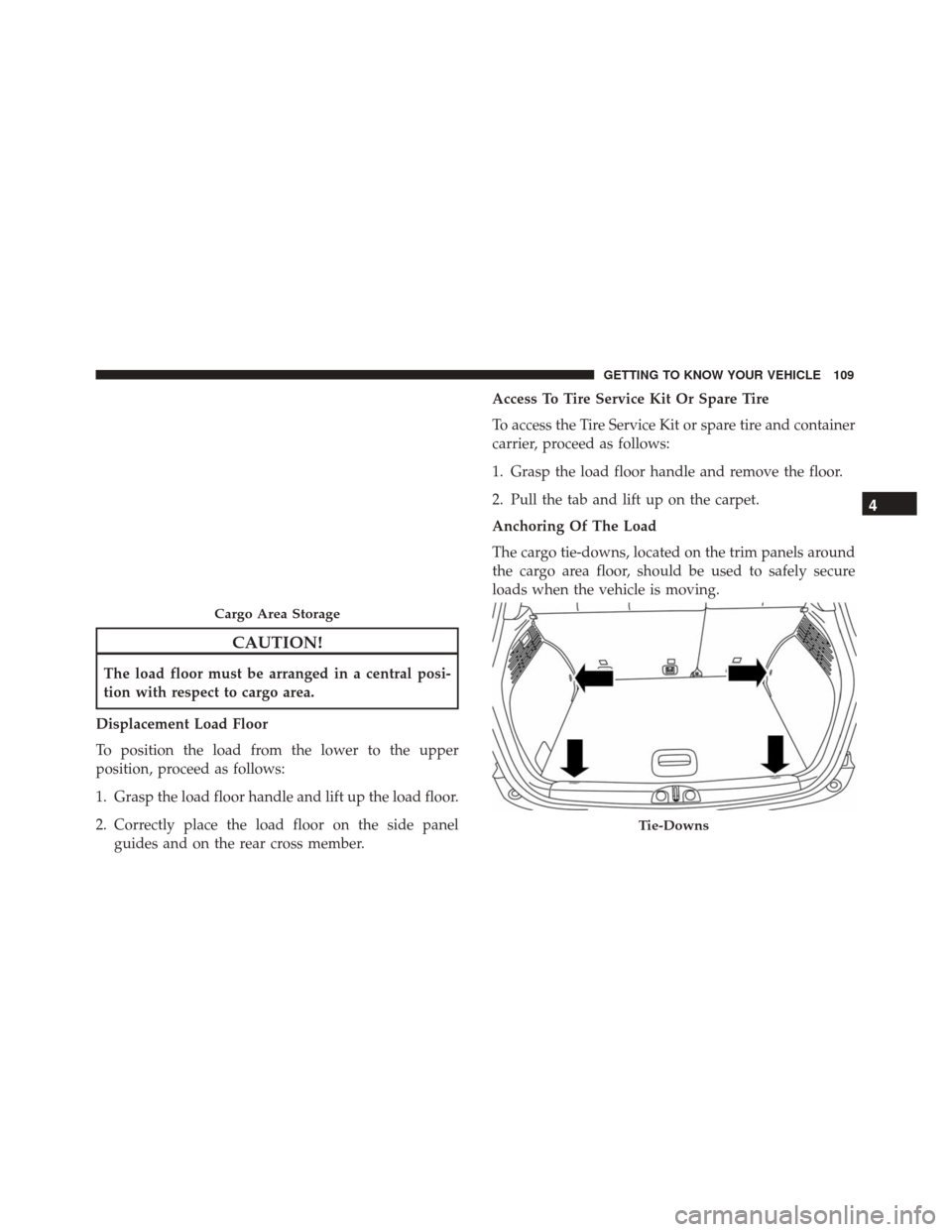
The cargo tie-downs, located on the trim panels around
the cargo area floor, should be used to safely secure
loads when the vehicle is moving.
Cargo Area Storage
Tie-Downs
4
GETTING TO KNOW YOUR VEHICLE 109
Page 120 of 476
WARNING!
Roof rack cargo must be securely tied down before
driving your vehicle. Improperly secured loads may
fall off the vehicle, particularly at high speeds,
resulting in personal injury or property damage.
Follow the Roof Luggage Rack warnings and cau-
tions when carrying cargo on your roof rack.
CAUTION!
•To avoid damage to the Roof Luggage Rack and
vehicle, do not exceed the maximum roof rack
load capacity. Always distribute heavy loads as
(Continued)
CAUTION! (Continued)
evenly as possible and secure the load appropri-
ately.
• Long loads, which extend over the windshield,
such as wood panels or surfboards, should be
secured to both the front and rear of the vehicle.
• Place a blanket or other protection between the
surface of the roof and the load.
• Travel at reduced speeds and turn corners care-
fully when carrying large or heavy loads on the
roof rack. Wind forces, due to natural causes or
nearby truck traffic, can add sudden upward
loads. This is especially true on large flat loads
and may result in damage to the cargo or your
vehicle.
118 GETTING TO KNOW YOUR VEHICLE
Page 146 of 476
Tire Pressure Monitoring System (TPMS) Warning Light
Yellow TelltaleLight What It Means
Tire Pressure Monitoring System (TPMS) Warning Light
The warning light switches on and a message is displayed to indicate that the tire pressure
is lower than the recommended value and/or that slow pressure loss is occurring. In these
cases, optimal tire duration and fuel consumption may not be guaranteed.
Should one or more tires be in the condition mentioned above, the display will show the
indications corresponding to each tire in sequence.
CAUTION!
Do not continue driving with one or more flat tires
as handling may be compromised. Stop the vehicle,
avoiding sharp braking and steering. Repair imme-
diately using the dedicated tire repair kit and con-
tact your authorized dealer as soon as possible.
Each tire, including the spare (if provided), should be
checked monthly when cold and inflated to the inflation
pressure recommended by the vehicle manufacturer on
the vehicle placard or tire inflation pressure label. (If
your vehicle has tires of a different size than the size indicated on the vehicle placard or tire inflation pres-
sure label, you should determine the proper tire infla-
tion pressure for those tires.)
As an added safety feature, your vehicle has been
equipped with a tire pressure monitoring system
(TPMS) that illuminates a low tire pressure telltale
when one or more of your tires is significantly under-
inflated. Accordingly, when the low tire pressure telltale
illuminates, you should stop and check your tires as
soon as possible, and inflate them to the proper pres-
sure. Driving on a significantly under-inflated tire
causes the tire to overheat and can lead to tire failure.
144 GETTING TO KNOW YOUR INSTRUMENT PANEL
Page 147 of 476
Under-inflation also reduces fuel efficiency and tire
tread life, and may affect the vehicle’s handling and
stopping ability.
Please note that the TPMS is not a substitute for proper
tire maintenance, and it is the driver ’s responsibility to
maintain correct tire pressure, even if under-inflation
has not reached the level to trigger illumination of the
TPMS low tire pressure telltale.
Your vehicle has also been equipped with a TPMS
malfunction indicator to indicate when the system is
not operating properly. The TPMS malfunction indica-
tor is combined with the low tire pressure telltale. When
the system detects a malfunction, the telltale will flash
for approximately one minute and then remain continu-
ously illuminated. This sequence will continue upon
subsequent vehicle start-ups as long as the malfunction
exists. When the malfunction indicator is illuminated,
the system may not be able to detect or signal low tire
pressure as intended. TPMS malfunctions may occur for
a variety of reasons, including the installation of re-
placement or alternate tires or wheels on the vehicle
that prevent the TPMS from functioning properly. Al-
ways check the TPMS malfunction telltale after replac-
ing one or more tires or wheels on your vehicle toensure that the replacement or alternate tires and
wheels allow the TPMS to continue to function prop-
erly.
CAUTION!
The TPMS has been optimized for the original
equipment tires and wheels. TPMS pressures and
warning have been established for the tire size
equipped on your vehicle. Undesirable system op-
eration or sensor damage may result when using
replacement equipment that is not of the same size,
type, and/or style. Aftermarket wheels can cause
sensor damage. Using aftermarket tire sealants may
cause the Tire Pressure Monitoring System (TPMS)
sensor to become inoperable. After using an after-
market tire sealant it is recommended that you take
your vehicle to an authorized dealer to have your
sensor function checked.
5
GETTING TO KNOW YOUR INSTRUMENT PANEL 145
Page 160 of 476
•Driver door must be closed.
• The vehicle must be on a sufficient grade.
• The gear selection must match vehicle uphill direc-
tion (i.e., vehicle facing uphill is in forward gear;
vehicle backing uphill is in REVERSE gear).
• HSA will work in REVERSE gear and all forward
gears. The system will not activate if the transmission
is in PARK or NEUTRAL. For vehicles equipped with
a manual transmission, if the clutch is pressed, HSA
will remain active.
WARNING!
There may be situations where the Hill Start Assist
(HSA) will not activate and slight rolling may occur,
such as on minor hills or with a loaded vehicle, or
while pulling a trailer. HSA is not a substitute for
active driving involvement. It is always the driver ’s
responsibility to be attentive to distance to other
vehicles, people, and objects, and most importantly
brake operation to ensure safe operation of the
vehicle under all road conditions. Your complete
(Continued)
WARNING! (Continued)
attention is always required while driving to main-
tain safe control of your vehicle. Failure to follow
these warnings can result in a collision or serious
personal injury.
Disabling And Enabling HSA
This feature can be turned on or turned off. To change
the current setting, proceed as follows:
•For vehicles equipped with the instrument cluster
display, refer to “Instrument Cluster Display” in
“Getting To Know Your Instrument Panel” for fur-
ther information.
• If disabling HSA using Uconnect Settings, refer to
“Uconnect Settings” in the “Multimedia” section for
further information.
For vehicles not equipped with the instrument cluster
display, perform the following steps:
1. Center the steering wheel (front wheels pointing straight forward).
2. Shift the transmission into PARK.
3. Apply the parking brake.
158 SAFETY
Page 163 of 476
WARNING!(Continued)
inflated and unevenly worn tires may also de-
grade ESC performance. Any vehicle modifica-
tion or poor vehicle maintenance that reduces the
effectiveness of the ESC system can increase the
risk of loss of vehicle control, vehicle rollover,
personal injury and death.
Electronic Roll Mitigation (ERM)
This system anticipates the potential for wheel lift by
monitoring the driver ’s steering wheel input and the
speed of the vehicle. When ERM determines that the
rate of change of the steering wheel angle and vehicle’s
speed are sufficient to potentially cause wheel lift, it
then applies the appropriate brake and may also reduce
engine power to lessen the chance that wheel lift will
occur. ERM can only reduce the chance of wheel lift
occurring during severe or evasive driving maneuvers;
it cannot prevent wheel lift due to other factors, such as
road conditions, leaving the roadway, or striking objects
or other vehicles. NOTE:
ERM is disabled anytime the ESC is in “Full
Off” mode (if equipped). Refer to “Electronic Stability
Control (ESC)” in this section for a complete explana-
tion of the available ESC modes.
WARNING!
Many factors, such as vehicle loading, road condi-
tions and driving conditions, influence the chance
that wheel lift or rollover may occur. ERM cannot
prevent all wheel lift or roll overs, especially those
that involve leaving the roadway or striking objects
or other vehicles. The capabilities of an ERM-
equipped vehicle must never be exploited in a
reckless or dangerous manner which could jeopar-
dize the user’s safety or the safety of others.
Dynamic Steering Torque (DST)
Dynamic Steering Torque is a feature of the ESC and
EPS modules that provides torque at the steering wheel
for certain driving conditions in which the ESC module
is detecting vehicle instability. The torque that the
steering wheel receives is only meant to help the driver
realize optimal steering behavior in order to reach/
6
SAFETY 161