ESP FIAT 500X 2014 2.G Workshop Manual
[x] Cancel search | Manufacturer: FIAT, Model Year: 2014, Model line: 500X, Model: FIAT 500X 2014 2.GPages: 476, PDF Size: 5.32 MB
Page 419 of 476
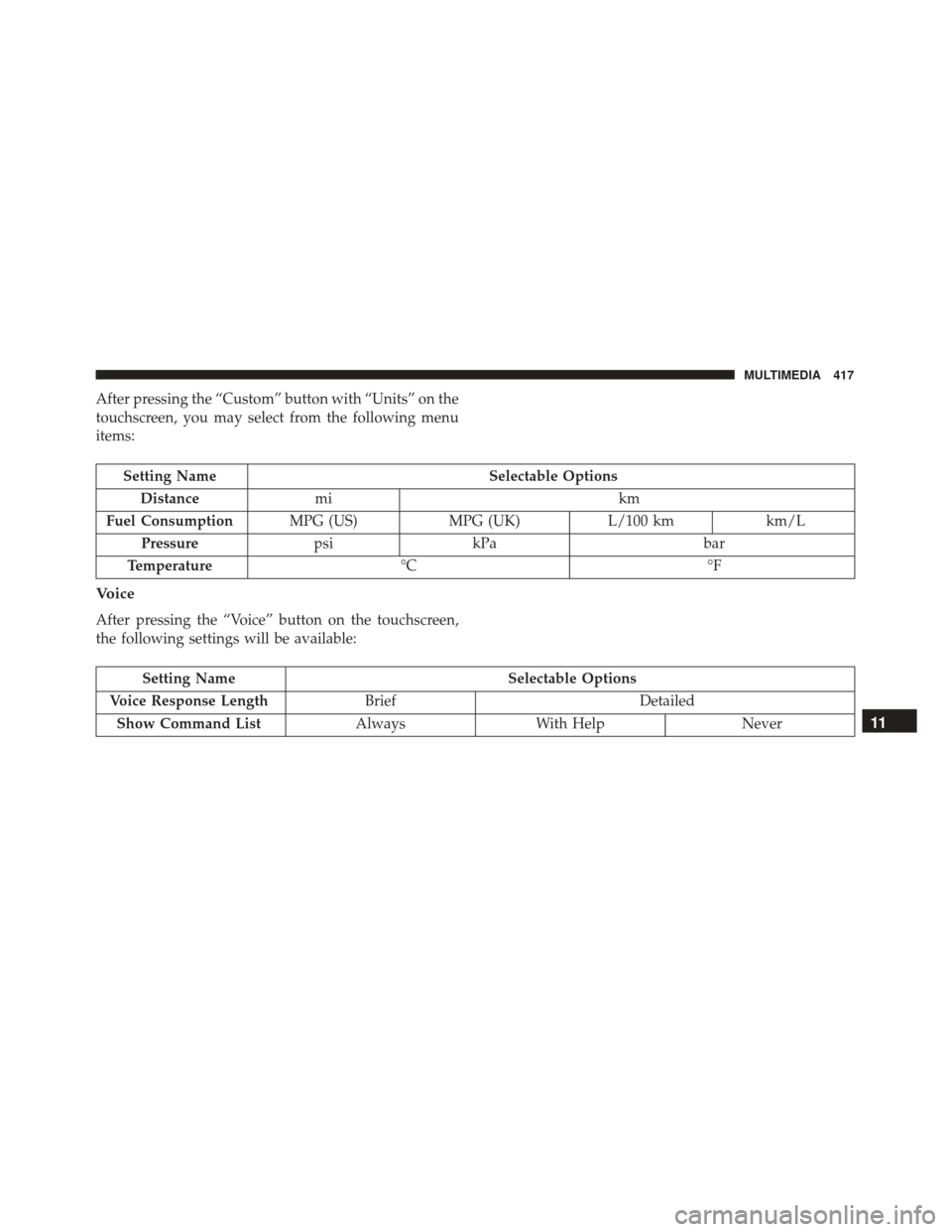
After pressing the “Custom” button with “Units” on the
touchscreen, you may select from the following menu
items:
Setting NameSelectable Options
Distance mi km
Fuel Consumption MPG (US)MPG (UK)L/100 kmkm/L
Pressure psikPa bar
Temperature °C °F
Voice
After pressing the “Voice” button on the touchscreen,
the following settings will be available:
Setting Name Selectable Options
Voice Response Length Brief Detailed
Show Command List AlwaysWith Help Never
11
MULTIMEDIA 417
Page 420 of 476
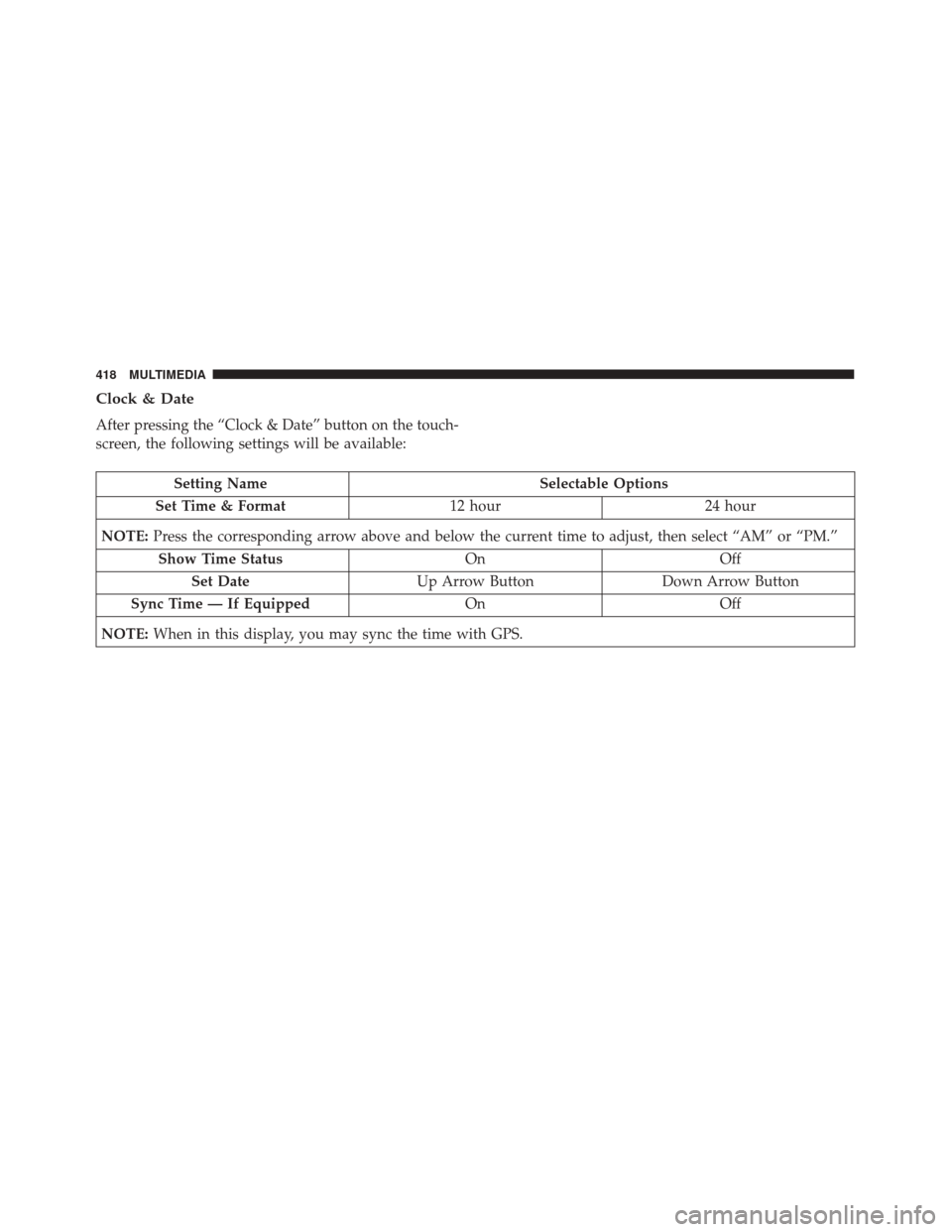
Clock & Date
After pressing the “Clock & Date” button on the touch-
screen, the following settings will be available:
Setting NameSelectable Options
Set Time & Format 12 hour24 hour
NOTE: Press the corresponding arrow above and below the current time to adjust, then select “AM” or “PM.”
Show Time Status OnOff
Set Date Up Arrow Button Down Arrow Button
Sync Time — If Equipped OnOff
NOTE: When in this display, you may sync the time with GPS.
418 MULTIMEDIA
Page 433 of 476
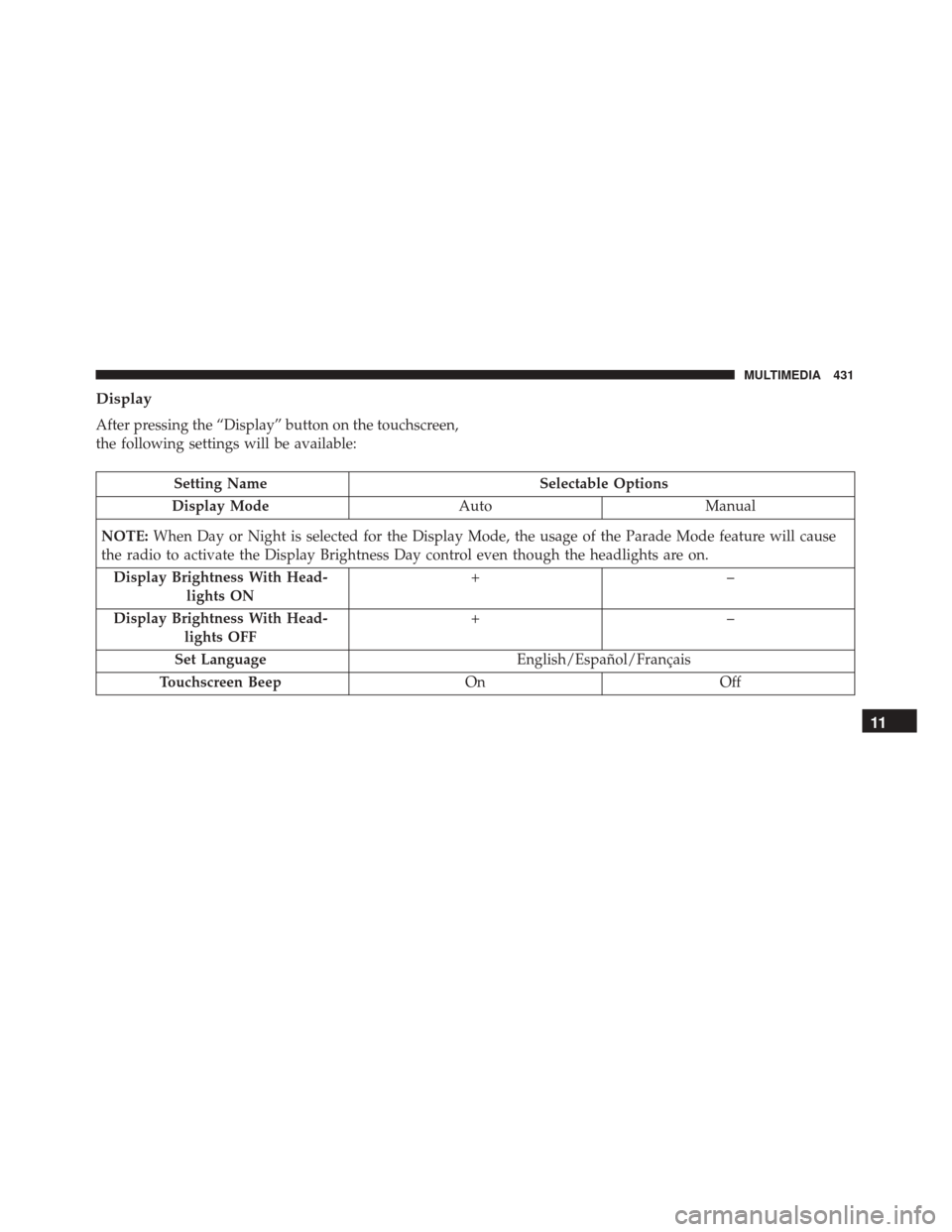
Display
After pressing the “Display” button on the touchscreen,
the following settings will be available:
Setting NameSelectable Options
Display Mode AutoManual
NOTE: When Day or Night is selected for the Display Mode, the usage of the Parade Mode feature will cause
the radio to activate the Display Brightness Day control even though the headlights are on.
Display Brightness With Head- lights ON +–
Display Brightness With Head- lights OFF +–
Set Language English/Español/Français
Touchscreen Beep OnOff
11
MULTIMEDIA 431
Page 435 of 476
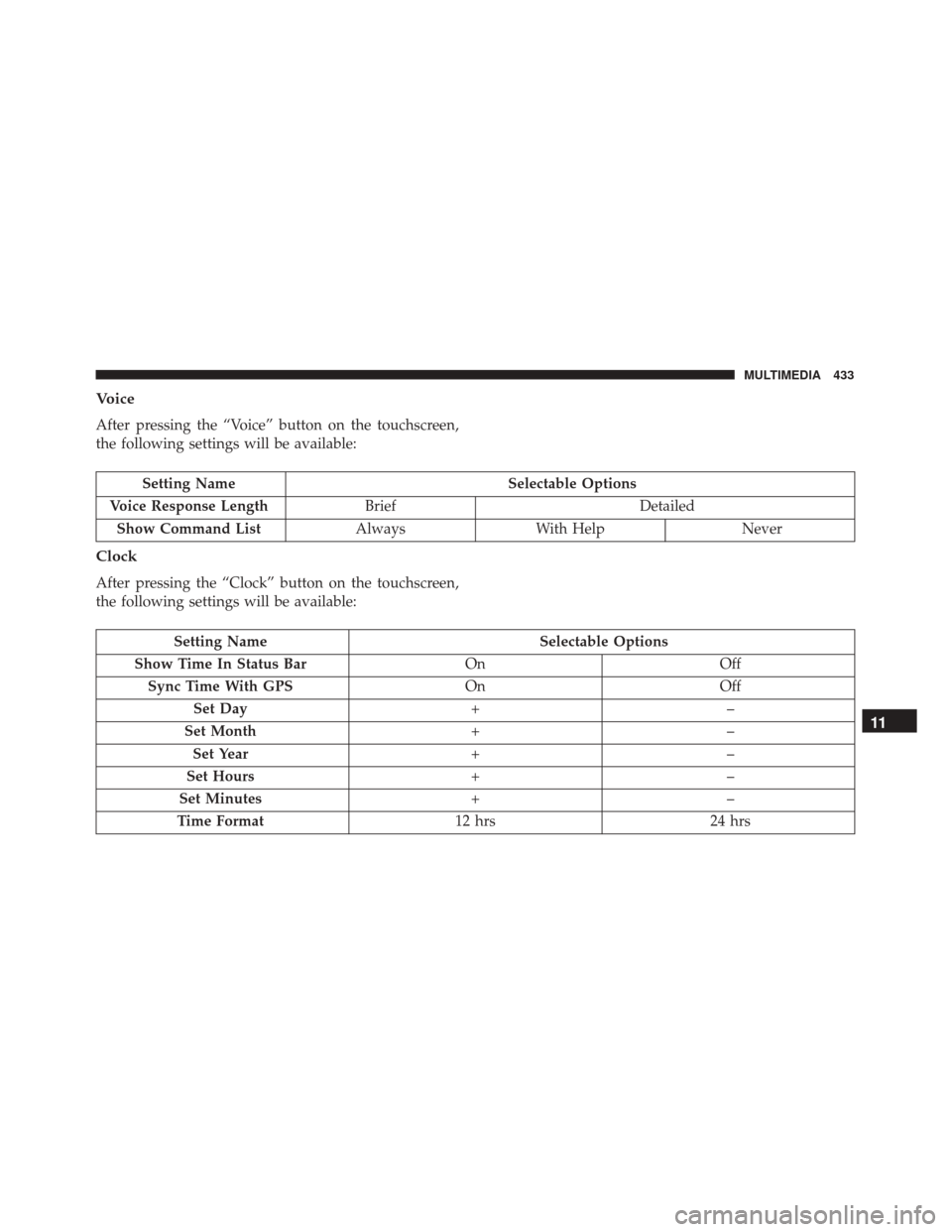
Voice
After pressing the “Voice” button on the touchscreen,
the following settings will be available:
Setting NameSelectable Options
Voice Response Length Brief Detailed
Show Command List AlwaysWith Help Never
Clock
After pressing the “Clock” button on the touchscreen,
the following settings will be available:
Setting Name Selectable Options
Show Time In Status Bar OnOff
Sync Time With GPS OnOff
Set Day +–
Set Month +–
Set Year +–
Set Hours +–
Set Minutes +–
Time Format 12 hrs24 hrs
11
MULTIMEDIA 433
Page 457 of 476
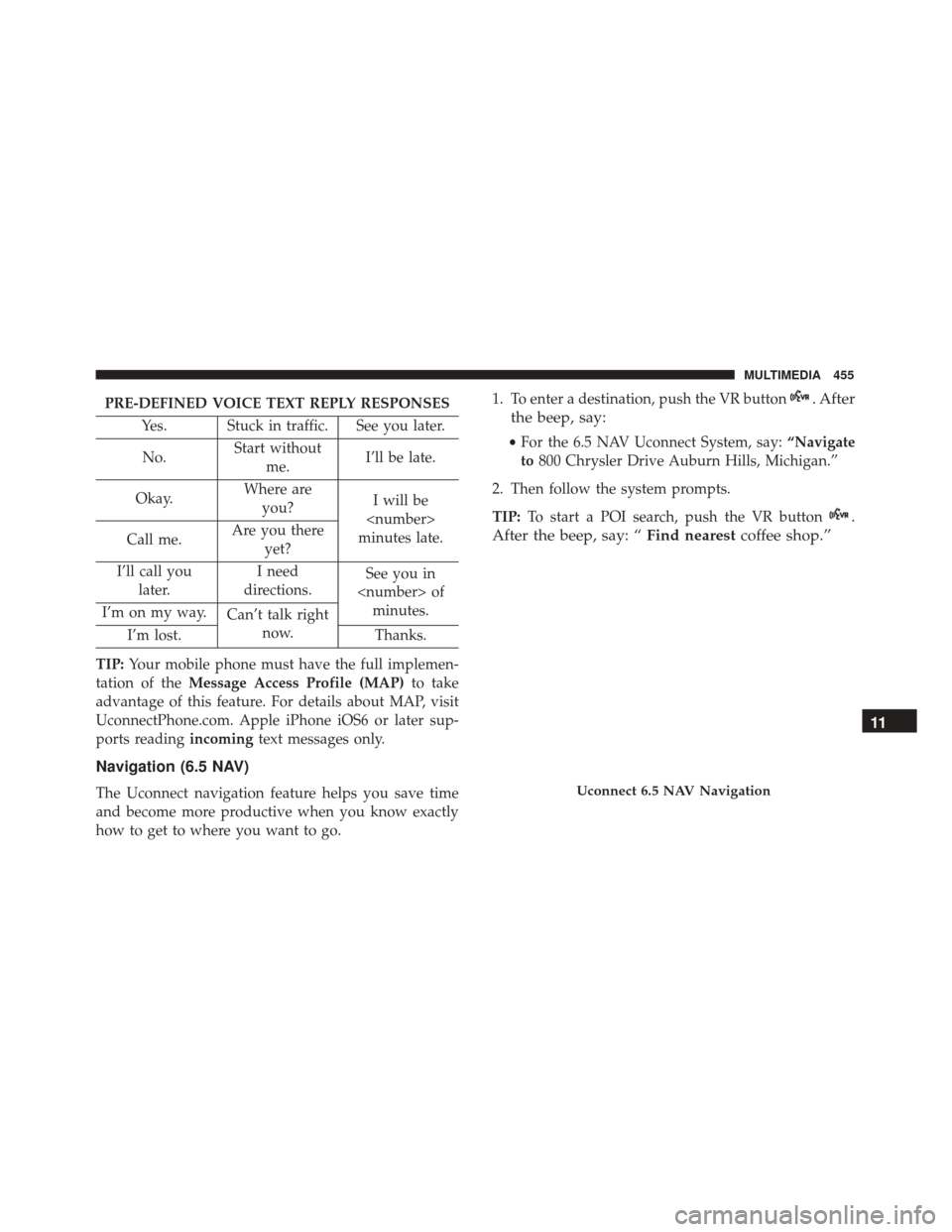
PRE-DEFINED VOICE TEXT REPLY RESPONSESYes. Stuck in traffic. See you later.
No. Start without
me. I’ll be late.
Okay. Where are
you? I will be
minutes late.
Call me. Are you there
yet?
I’ll call you later. I need
directions. See you in
I’m on my way. Can’t talk right
now.
I’m lost. Thanks.
TIP: Your mobile phone must have the full implemen-
tation of the Message Access Profile (MAP) to take
advantage of this feature. For details about MAP, visit
UconnectPhone.com. Apple iPhone iOS6 or later sup-
ports reading incomingtext messages only.
Navigation (6.5 NAV)
The Uconnect navigation feature helps you save time
and become more productive when you know exactly
how to get to where you want to go. 1. To enter a destination, push the VR button
. After
the beep, say:
• For the 6.5 NAV Uconnect System, say: “Navigate
to 800 Chrysler Drive Auburn Hills, Michigan.”
2. Then follow the system prompts.
TIP: To start a POI search, push the VR button
.
After the beep, say: “ Find nearestcoffee shop.”
Uconnect 6.5 NAV Navigation
11
MULTIMEDIA 455
Page 458 of 476
Siri Eyes Free — If Equipped
Siri lets you use your voice to send text messages, select
media, place phone calls and much more. Siri uses your
natural language to understand what you mean and
will respond back to confirm your requests. The system
is designed to keep your eyes on the road and your
hands on the wheel by letting Siri help you perform
useful tasks.
To enable Siri push and hold, then release the Uconnect
Voice Recognition (VR) button on the steering wheel.
After you hear a double beep you can ask Siri to play
podcasts and music, get directions, read text messages
and many other useful requests.Getting Started
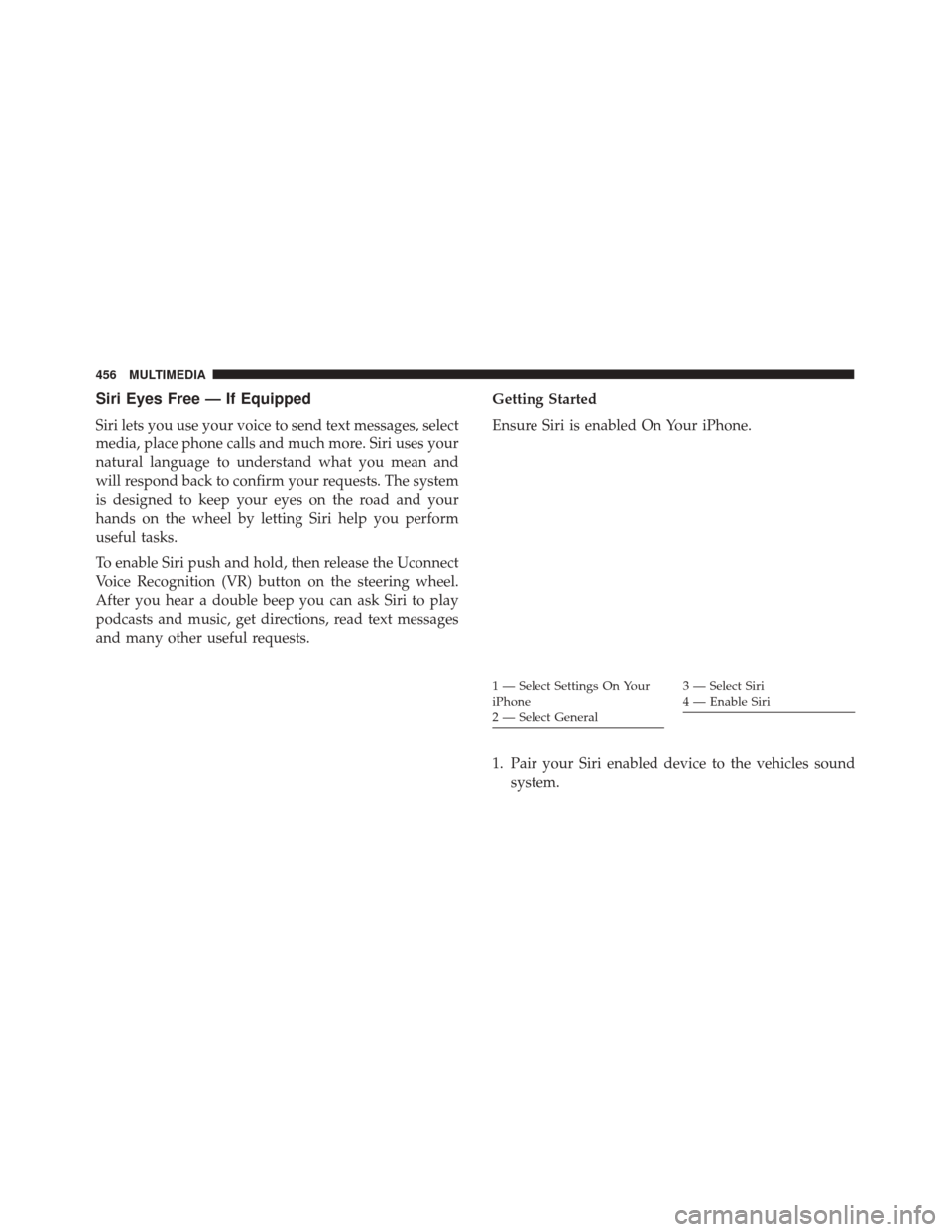
Ensure Siri is enabled On Your iPhone.
1. Pair your Siri enabled device to the vehicles sound
system.
1 — Select Settings On Your
iPhone
2 — Select General3 — Select Siri
4 — Enable Siri
456 MULTIMEDIA
Page 460 of 476
General Information
This device complies with FCC rules Part 15 and
Industry Canada RSS-210. Operation is subject to the
following two conditions:
1. This device may not cause harmful interference.
2. This device must accept any interference that may bereceived including interference that may cause un-
desired operation.
NOTE:
• The transmitter has been tested and it complies with
FCC and IC rules. Changes or modifications not
expressly approved by the party responsible for
compliance could void the user ’s authority to oper-
ate the device.
• The term IC before the certification/registration
number only signifies that Industry Canada technical
specifications were met.
Additional Information
© 2016 FCA US LLC. All rights reserved. Mopar and
Uconnect are registered trademarks and Mopar Owner
Connect is a trademark of FCA US LLC. Android is a
trademark of Google Inc. SiriusXM and all related
marks and logos are trademarks of SiriusXM Radio Inc.
Uconnect System Support:
• U.S. residents call 1-877-855-8400 (24 hours a day 7
days a week) or visit DriveUconnect.com
• Canadian residents call 1-800-465-2001 (English) or
1-800-387-9983 (French) or visit DriveUconnect.ca
• Mon. – Fri., 8:00 am – 8:00 pm, ET
• Sat., 9:00 am – 5:00 pm, ET
• Sun., Closed
458 MULTIMEDIA
Page 462 of 476
About Your Brakes...................... .154
Adding Engine Coolant (Antifreeze) ...........366
Adding Fuel ........................... .265
Adding Washer Fluid .....................362
Additives, Fuel ......................... .264
AirBag .............................. .176
Advance Front Air Bag ..................176
Air Bag Operation .....................178
Enhanced Accident Response ..............340
Event Data Recorder (EDR) ...............340
FrontAirBag ........................ .176
If A Deployment Occurs .................184
Knee Impact Bolsters ....................179
Maintaining Your Air Bag System ...........187
Redundant Air Bag Warning Light ..........176
Side Air Bags ........................ .179
Transporting Pets ..................... .205
Air Bag Light ....................... .132, 207
Air Bag Maintenance ..................... .187
Air Cleaner, Engine (Engine Air Cleaner Filter) . . .357
Air Conditioner Maintenance ................358
Air Conditioning Filter ..................96, 359
Air Conditioning, Operating Tips ..............95
Air Conditioning Refrigerant .............358, 359
Air Conditioning System ................94, 358 Air Pressure, Tires
....................... .390
Alarm Arm The System .......................34
Alarm (Security Alarm) ....................139
All Wheel Drive (AWD) ....................238
Alterations/Modifications, Vehicle ..............6
Antifreeze (Engine Coolant) ..............365, 407
Disposal ............................ .367
Anti-Lock Brake System (ABS) ...............155
Anti-Lock Warning Light ...............147, 148
Appearance Care ....................... .372
Assist, Hill Start ........................ .157
Audio Systems (Radio) ....................445
Automatic
Headlights ......................67
Automatic Temperature Control (ATC) ..........94
Automatic Transmission .............226, 371, 372
Adding Fluid ..................... .372, 409
Fluid And Filter Changes .................372
Fluid Change ........................ .372
Fluid Level Check ..................... .372
Fluid Type ....................... .371, 409
Special Additives ..................... .371
Auxiliary Electrical Outlet (Power Outlet) .......112
Auxiliary Power Outlet ....................112
Axle Fluid ............................ .409
460 INDEX
Page 465 of 476
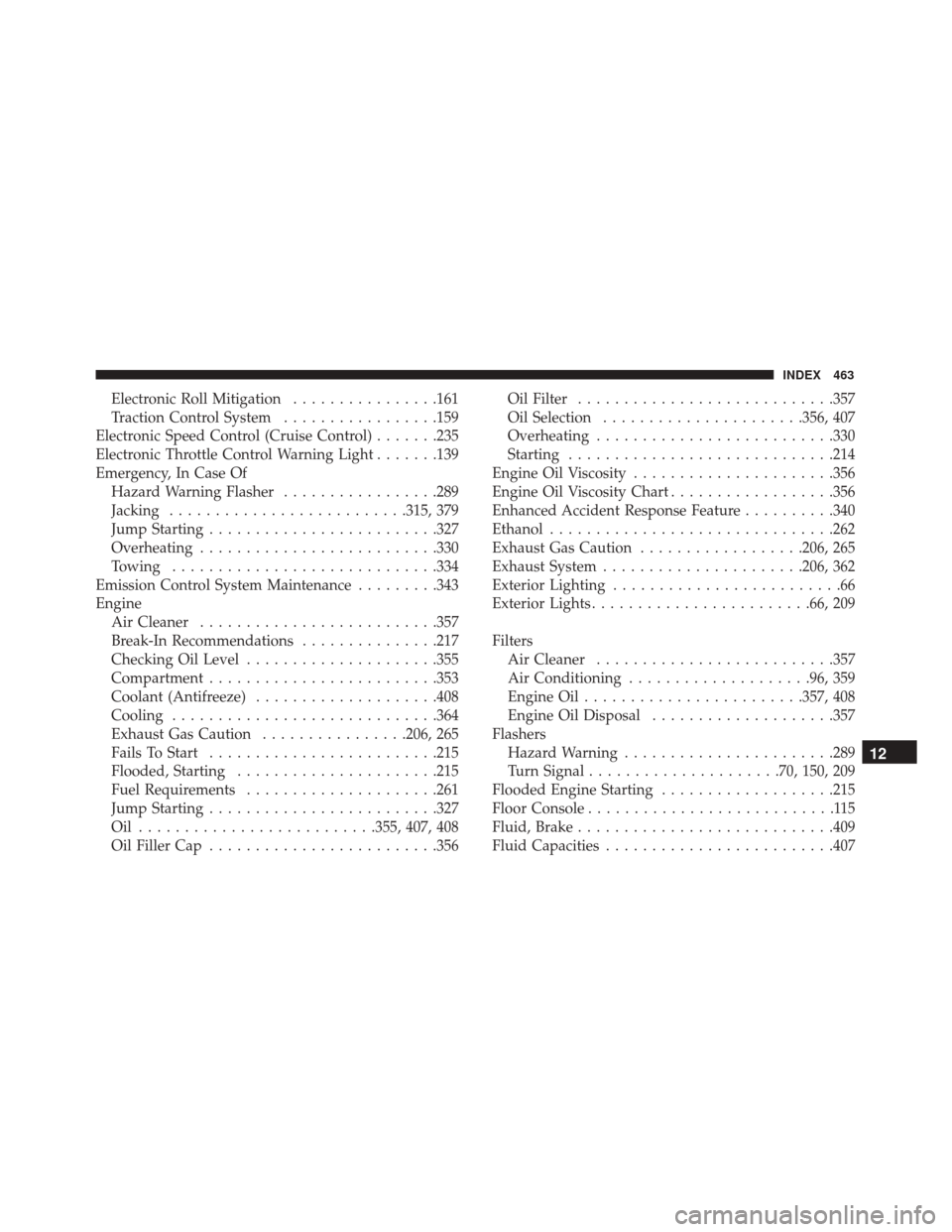
Electronic Roll Mitigation................161
Traction Control System .................159
Electronic Speed Control (Cruise Control) .......235
Electronic Throttle Control Warning Light .......139
Emergency, In Case Of Hazard Warning Flasher .................289
Jacking ......................... .315, 379
Jump Starting ........................ .327
Overheating ......................... .330
Towing ............................ .334
Emission Control System Maintenance .........343
Engine Air Cleaner ......................... .357
Break-In Recommendations ...............217
Checking Oil Level .....................355
Compartment ........................ .353
Coolant (Antifreeze) ....................408
Cooling ............................ .364
Exhaust Gas Caution ................206, 265
Fails To Start ........................ .215
Flooded, Starting ..................... .215
Fuel Requirements .....................261
Jump Starting ........................ .327
Oil ......................... .355, 407, 408
Oil Filler Cap ........................ .356Oil Filter
........................... .357
Oil Selection ..................... .356, 407
Overheating ......................... .330
Starting ............................ .214
Engine Oil Viscosity ..................... .356
Engine Oil Viscosity Chart ..................356
Enhanced Accident Response Feature ..........340
Ethanol .............................. .262
Exhaust Gas Caution ..................206, 265
Exhaust System ..................... .206, 362
Exterior Lighting .........................66
Exterior
Lights ....................... .66, 209
Filters Air Cleaner ......................... .357
Air Conditioning ....................96, 359
Engine Oil ....................... .357, 408
Engine Oil Disposal ....................357
Flashers Hazard Warning ...................... .289
Turn Signal .....................70, 150, 209
Flooded Engine Starting ...................215
Floor Console ...........................115
Fluid, Brake ........................... .409
Fluid Capacities ........................ .407
12
INDEX 463