display FIAT 500X 2014 2.G Repair Manual
[x] Cancel search | Manufacturer: FIAT, Model Year: 2014, Model line: 500X, Model: FIAT 500X 2014 2.GPages: 476, PDF Size: 5.32 MB
Page 428 of 476
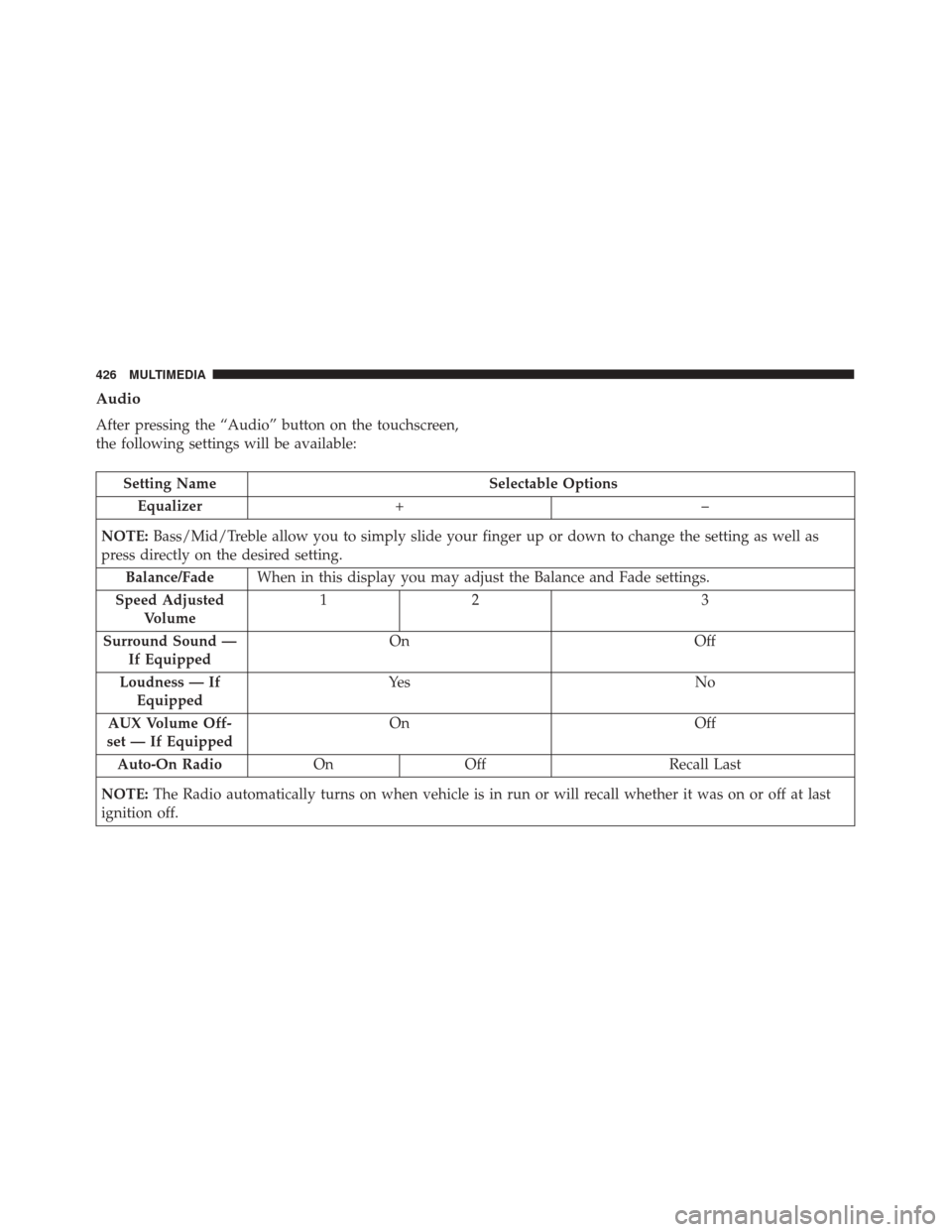
Audio
After pressing the “Audio” button on the touchscreen,
the following settings will be available:
Setting NameSelectable Options
Equalizer +–
NOTE: Bass/Mid/Treble allow you to simply slide your finger up or down to change the setting as well as
press directly on the desired setting.
Balance/Fade When in this display you may adjust the Balance and Fade settings.
Speed Adjusted Volume 12
3
Surround Sound — If Equipped On
Off
Loudness — If Equipped Ye s
N o
AUX Volume Off-
set — If Equipped On
Off
Auto-On Radio OnOff Recall Last
NOTE: The Radio automatically turns on when vehicle is in run or will recall whether it was on or off at last
ignition off.
426 MULTIMEDIA
Page 432 of 476
Customer Programmable Features — Uconnect
6.5 NAV Settings
Press the Settings button to display the menu setting
screen. In this mode the Uconnect system allows you to
access programmable features that may be equipped
such as Display, Clock, Safety & Driving Assistance,
Lights, Doors & Locks, Engine Off Options, Audio,
Phone/Bluetooth, SiriusXM Setup, Restore Settings De-
faults, Clear Personal Data and System Information.
NOTE:
•Only one touchscreen area may be selected at a time.
• Depending on the vehicles options, feature settings
may vary. When making a selection, press the button on the
touchscreen to enter the desired mode. Once in the
desired mode, press and release the preferred setting
and make your selection. Once the setting is complete,
either press the Back Arrow button on the touchscreen
to return to the previous menu, or press the “X” button
on the touchscreen to close out of the settings screen.
Pressing the Up or Down Arrow button on the right
side of the screen will allow you to toggle up or down
through the available settings.
430 MULTIMEDIA
Page 433 of 476
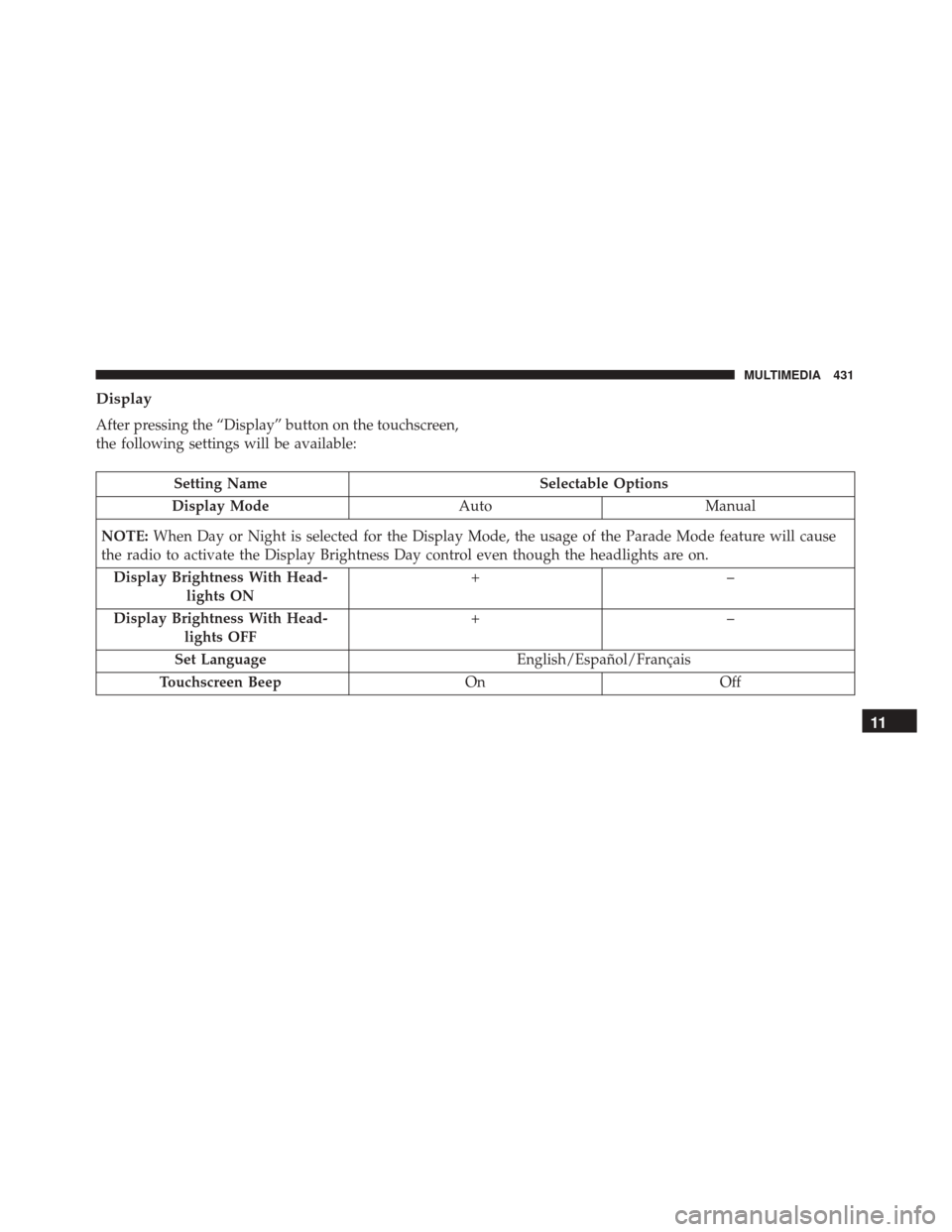
Display
After pressing the “Display” button on the touchscreen,
the following settings will be available:
Setting NameSelectable Options
Display Mode AutoManual
NOTE: When Day or Night is selected for the Display Mode, the usage of the Parade Mode feature will cause
the radio to activate the Display Brightness Day control even though the headlights are on.
Display Brightness With Head- lights ON +–
Display Brightness With Head- lights OFF +–
Set Language English/Español/Français
Touchscreen Beep OnOff
11
MULTIMEDIA 431
Page 434 of 476
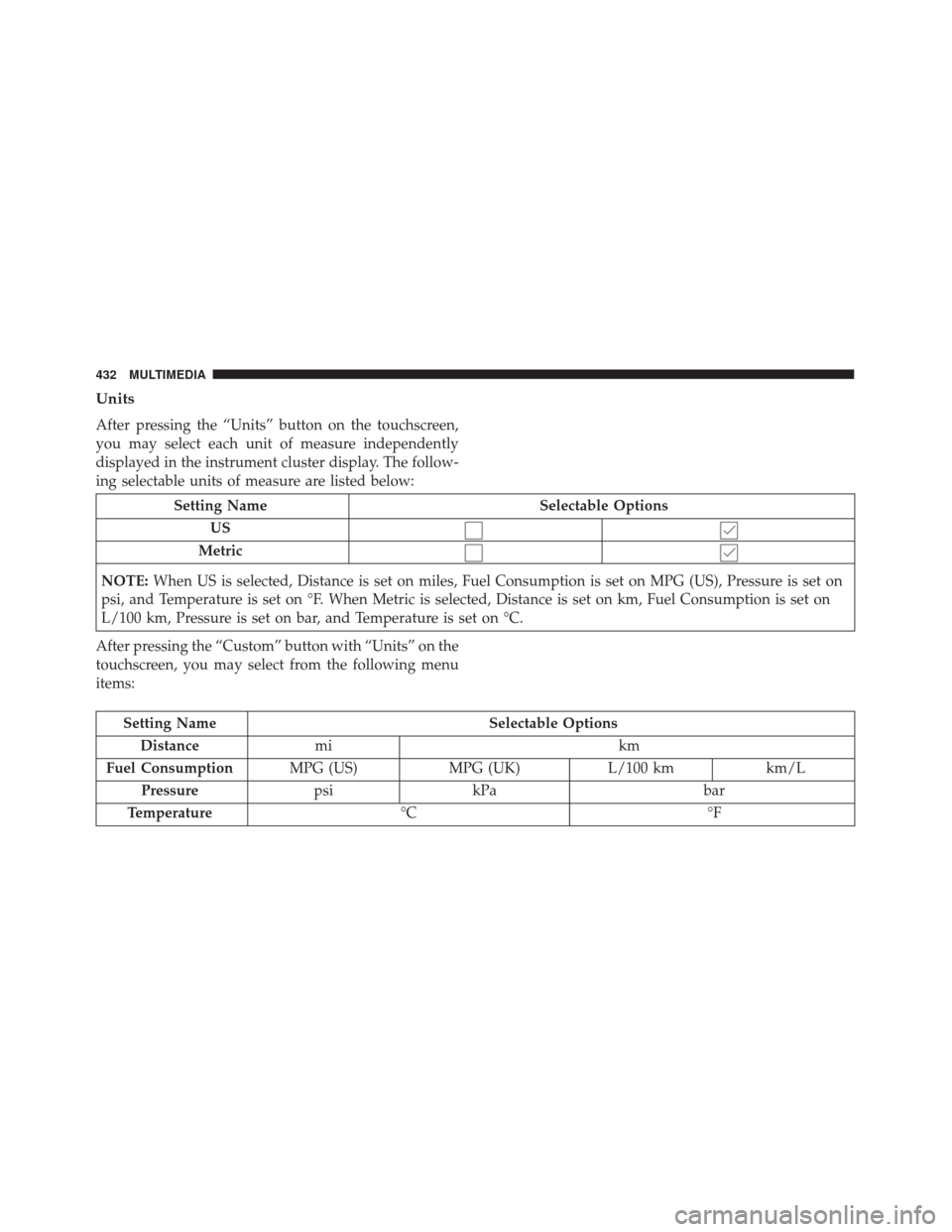
Units
After pressing the “Units” button on the touchscreen,
you may select each unit of measure independently
displayed in the instrument cluster display. The follow-
ing selectable units of measure are listed below:
Setting NameSelectable Options
US
Metric
NOTE: When US is selected, Distance is set on miles, Fuel Consumption is set on MPG (US), Pressure is set on
psi, and Temperature is set on °F. When Metric is selected, Distance is set on km, Fuel Consumption is set on
L/100 km, Pressure is set on bar, and Temperature is set on °C.
After pressing the “Custom” button with “Units” on the
touchscreen, you may select from the following menu
items:
Setting Name Selectable Options
Distance mi km
Fuel Consumption MPG (US)MPG (UK)L/100 kmkm/L
Pressure psikPa bar
Temperature °C °F
432 MULTIMEDIA
Page 437 of 476
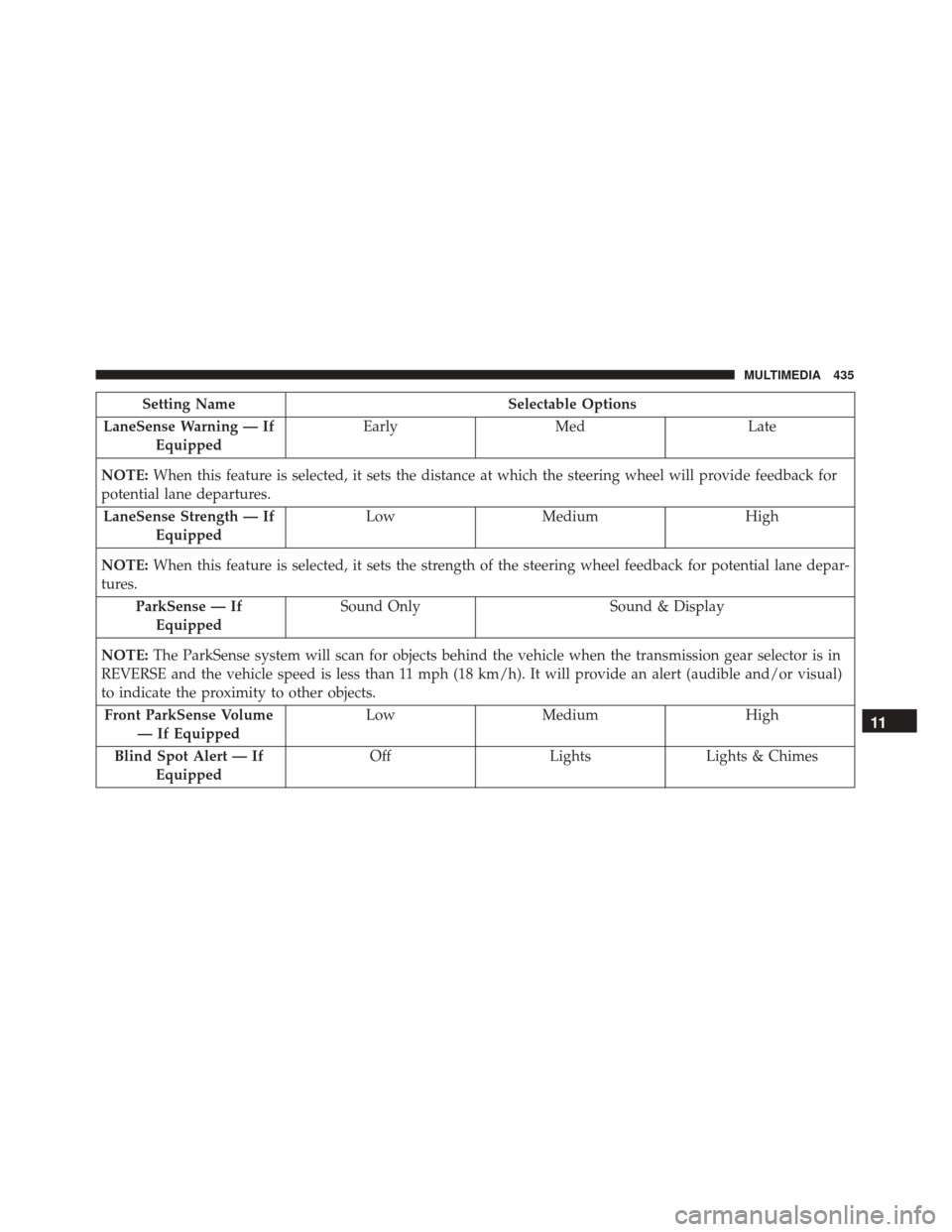
Setting NameSelectable Options
LaneSense Warning — If Equipped Early
Med Late
NOTE: When this feature is selected, it sets the distance at which the steering wheel will provide feedback for
potential lane departures.
LaneSense Strength — If Equipped Low
Medium High
NOTE: When this feature is selected, it sets the strength of the steering wheel feedback for potential lane depar-
tures.
ParkSense — IfEquipped Sound Only
Sound & Display
NOTE: The ParkSense system will scan for objects behind the vehicle when the transmission gear selector is in
REVERSE and the vehicle speed is less than 11 mph (18 km/h). It will provide an alert (audible and/or visual)
to indicate the proximity to other objects.
Front ParkSense Volume — If Equipped Low
Medium High
Blind Spot Alert — If Equipped Off
LightsLights & Chimes
11
MULTIMEDIA 435
Page 438 of 476
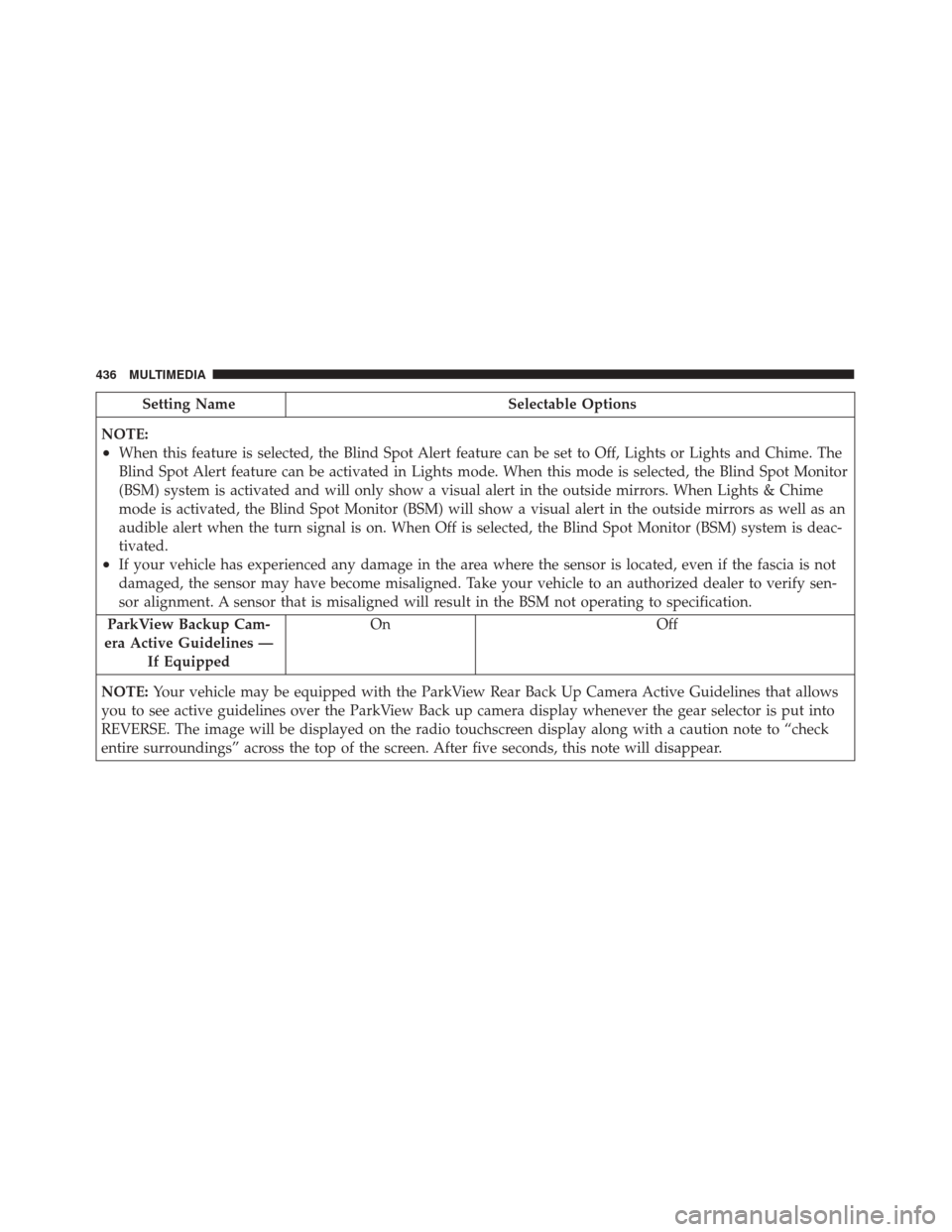
Setting NameSelectable Options
NOTE:
•When this feature is selected, the Blind Spot Alert feature can be set to Off, Lights or Lights and Chime. The
Blind Spot Alert feature can be activated in Lights mode. When this mode is selected, the Blind Spot Monitor
(BSM) system is activated and will only show a visual alert in the outside mirrors. When Lights & Chime
mode is activated, the Blind Spot Monitor (BSM) will show a visual alert in the outside mirrors as well as an
audible alert when the turn signal is on. When Off is selected, the Blind Spot Monitor (BSM) system is deac-
tivated.
•If your vehicle has experienced any damage in the area where the sensor is located, even if the fascia is not
damaged, the sensor may have become misaligned. Take your vehicle to an authorized dealer to verify sen-
sor alignment. A sensor that is misaligned will result in the BSM not operating to specification.
ParkView Backup Cam-
era Active Guidelines — If Equipped On Off
NOTE: Your vehicle may be equipped with the ParkView Rear Back Up Camera Active Guidelines that allows
you to see active guidelines over the ParkView Back up camera display whenever the gear selector is put into
REVERSE. The image will be displayed on the radio touchscreen display along with a caution note to “check
entire surroundings” across the top of the screen. After five seconds, this note will disappear.
436 MULTIMEDIA
Page 439 of 476
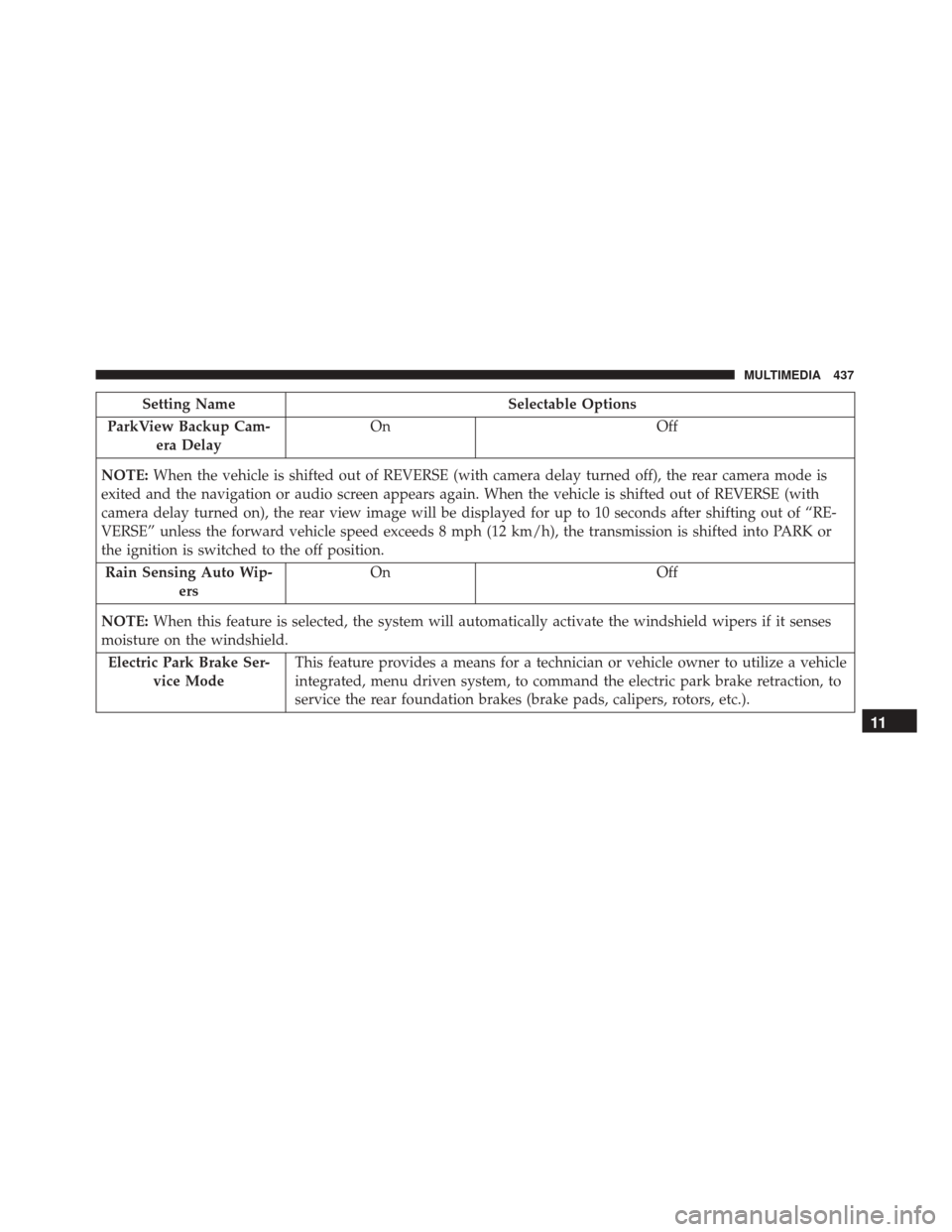
Setting NameSelectable Options
ParkView Backup Cam- era Delay On
Off
NOTE: When the vehicle is shifted out of REVERSE (with camera delay turned off), the rear camera mode is
exited and the navigation or audio screen appears again. When the vehicle is shifted out of REVERSE (with
camera delay turned on), the rear view image will be displayed for up to 10 seconds after shifting out of “RE-
VERSE” unless the forward vehicle speed exceeds 8 mph (12 km/h), the transmission is shifted into PARK or
the ignition is switched to the off position.
Rain Sensing Auto Wip- ers On
Off
NOTE: When this feature is selected, the system will automatically activate the windshield wipers if it senses
moisture on the windshield.
Electric Park Brake Ser- vice Mode This feature provides a means for a technician or vehicle owner to utilize a vehicle
integrated, menu driven system, to command the electric park brake retraction, to
service the rear foundation brakes (brake pads, calipers, rotors, etc.).
11
MULTIMEDIA 437
Page 443 of 476
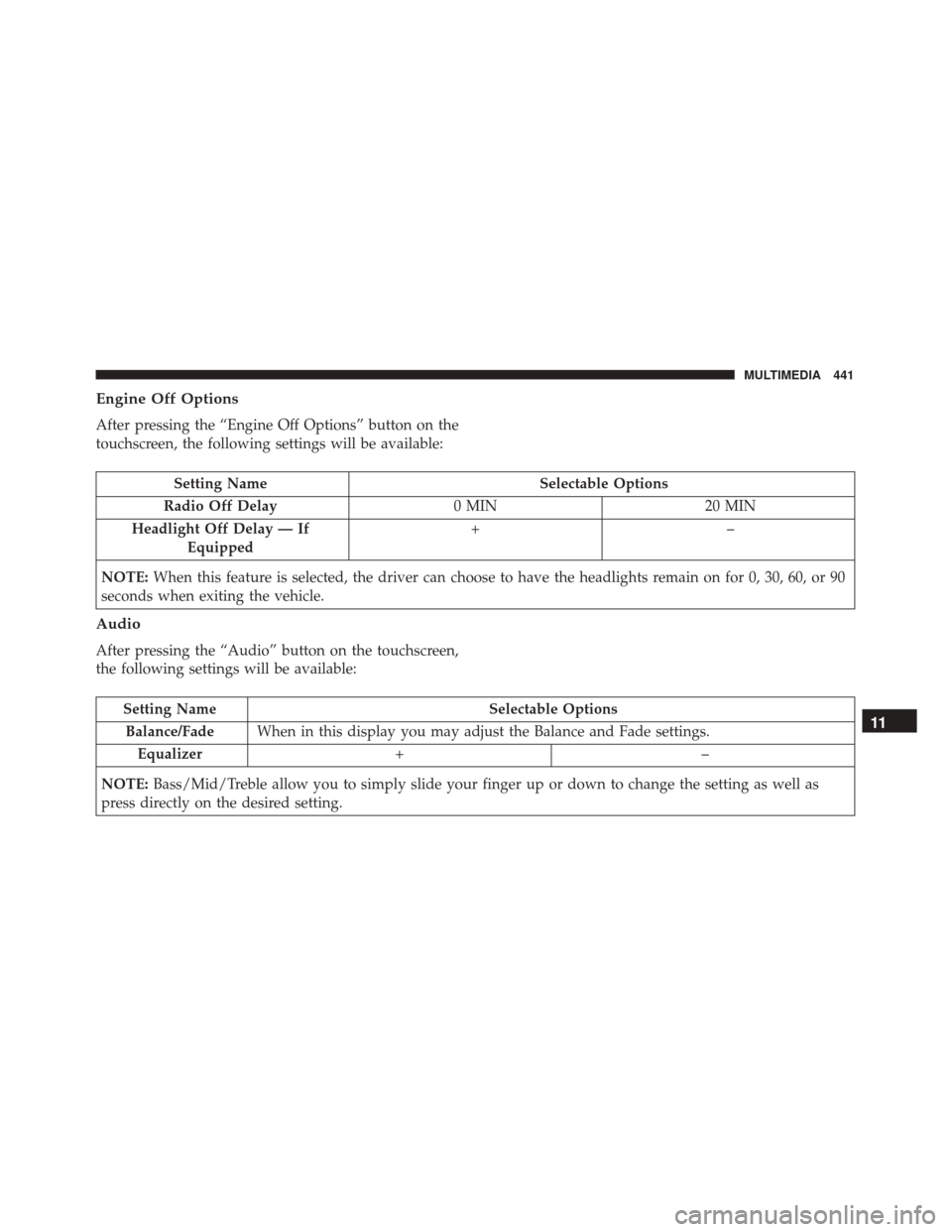
Engine Off Options
After pressing the “Engine Off Options” button on the
touchscreen, the following settings will be available:
Setting NameSelectable Options
Radio Off Delay 0 MIN20 MIN
Headlight Off Delay — If Equipped +–
NOTE: When this feature is selected, the driver can choose to have the headlights remain on for 0, 30, 60, or 90
seconds when exiting the vehicle.
Audio
After pressing the “Audio” button on the touchscreen,
the following settings will be available:
Setting Name Selectable Options
Balance/Fade When in this display you may adjust the Balance and Fade settings.
Equalizer +–
NOTE: Bass/Mid/Treble allow you to simply slide your finger up or down to change the setting as well as
press directly on the desired setting.11
MULTIMEDIA 441
Page 446 of 476
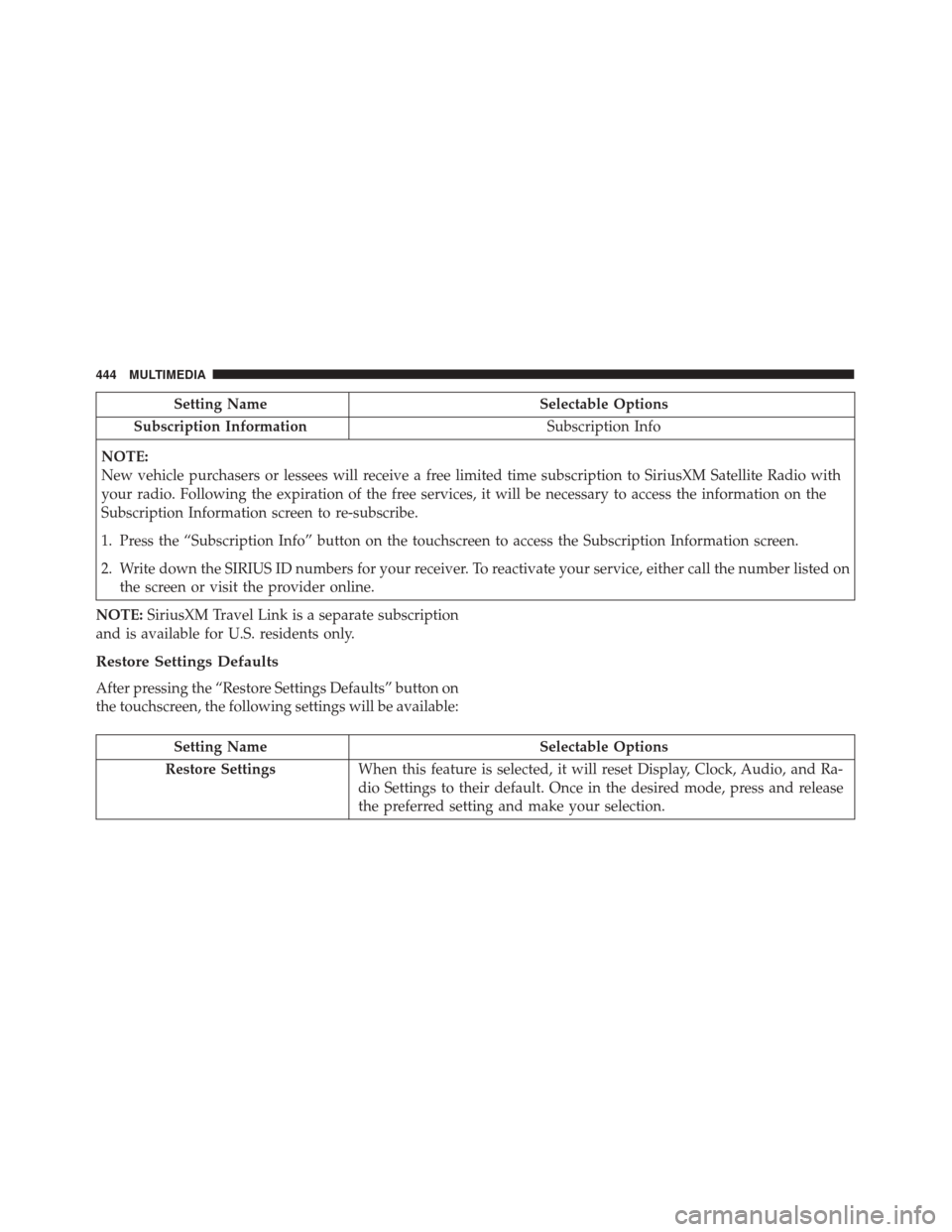
Setting NameSelectable Options
Subscription Information Subscription Info
NOTE:
New vehicle purchasers or lessees will receive a free limited time subscription to SiriusXM Satellite Radio with
your radio. Following the expiration of the free services, it will be necessary to access the information on the
Subscription Information screen to re-subscribe.
1. Press the “Subscription Info” button on the touchscreen to access the Subscription Information screen.
2. Write down the SIRIUS ID numbers for your receiver. To reactivate your service, either call the number listed on the screen or visit the provider online.
NOTE: SiriusXM Travel Link is a separate subscription
and is available for U.S. residents only.
Restore Settings Defaults
After pressing the “Restore Settings Defaults” button on
the touchscreen, the following settings will be available:
Setting Name Selectable Options
Restore Settings When this feature is selected, it will reset Display, Clock, Audio, and Ra-
dio Settings to their default. Once in the desired mode, press and release
the preferred setting and make your selection.
444 MULTIMEDIA
Page 451 of 476
VOICE RECOGNITION QUICK TIPS
Introducing Uconnect
Start using Uconnect Voice Recognition with these
helpful quick tips. It provides the key Voice Commands
and tips you need to know to control your Uconnect 5.0
or 6.5 NAV system.
Key Features:
•Five-inch Color Touchscreen Display with AM/FM/
USB/Bluetooth
• Bluetooth with integrated voice control Key Features:
•
6.5-inch Color Touchscreen Display with AM/FM/
USB/SD Card/Bluetooth
• Bluetooth with integrated voice control
• GPS navigation (if equipped)
Uconnect 5.0
Uconnect 6.5 NAV
11
MULTIMEDIA 449