service FIAT 500X 2015 2.G User Guide
[x] Cancel search | Manufacturer: FIAT, Model Year: 2015, Model line: 500X, Model: FIAT 500X 2015 2.GPages: 240, PDF Size: 10.72 MB
Page 212 of 240
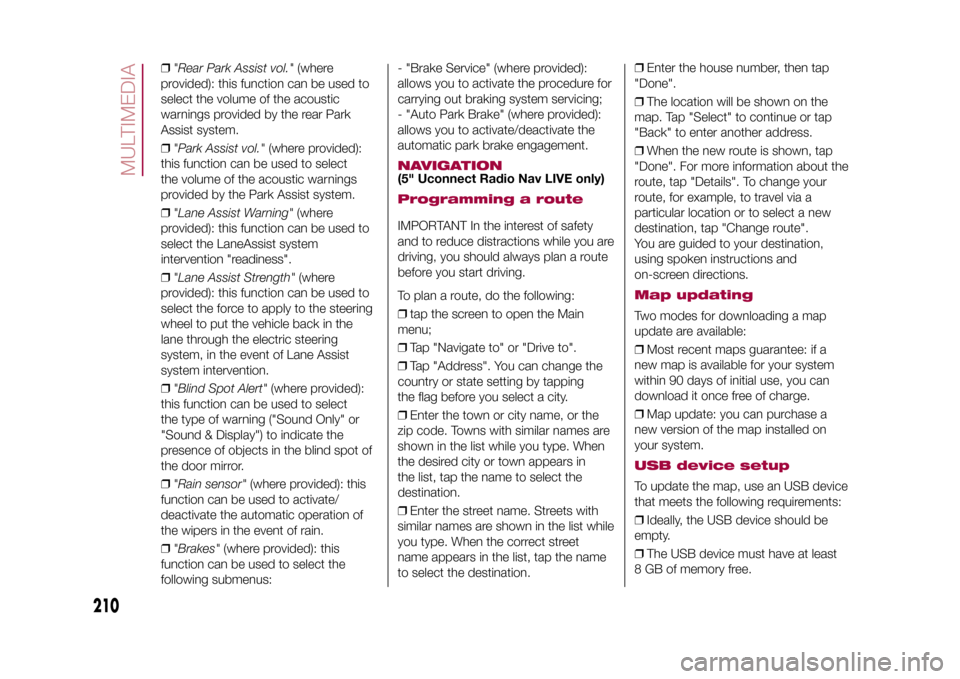
❒"Rear Park Assist vol."(where
provided): this function can be used to
select the volume of the acoustic
warnings provided by the rear Park
Assist system.
❒"Park Assist vol."(where provided):
this function can be used to select
the volume of the acoustic warnings
provided by the Park Assist system.
❒"Lane Assist Warning"(where
provided): this function can be used to
select the LaneAssist system
intervention "readiness".
❒"Lane Assist Strength"(where
provided): this function can be used to
select the force to apply to the steering
wheel to put the vehicle back in the
lane through the electric steering
system, in the event of Lane Assist
system intervention.
❒"Blind Spot Alert"(where provided):
this function can be used to select
the type of warning ("Sound Only" or
"Sound & Display") to indicate the
presence of objects in the blind spot of
the door mirror.
❒"Rain sensor"(where provided): this
function can be used to activate/
deactivate the automatic operation of
the wipers in the event of rain.
❒"Brakes"(where provided): this
function can be used to select the
following submenus:- "Brake Service" (where provided):
allows you to activate the procedure for
carrying out braking system servicing;
- "Auto Park Brake" (where provided):
allows you to activate/deactivate the
automatic park brake engagement.
NAVIGATION(5" Uconnect Radio Nav LIVE only)Programming a routeIMPORTANT In the interest of safety
and to reduce distractions while you are
driving, you should always plan a route
before you start driving.
To plan a route, do the following:
❒tap the screen to open the Main
menu;
❒Tap "Navigate to" or "Drive to".
❒Tap "Address". You can change the
country or state setting by tapping
the flag before you select a city.
❒Enter the town or city name, or the
zip code. Towns with similar names are
shown in the list while you type. When
the desired city or town appears in
the list, tap the name to select the
destination.
❒Enter the street name. Streets with
similar names are shown in the list while
you type. When the correct street
name appears in the list, tap the name
to select the destination.❒Enter the house number, then tap
"Done".
❒The location will be shown on the
map. Tap "Select" to continue or tap
"Back" to enter another address.
❒When the new route is shown, tap
"Done". For more information about the
route, tap "Details". To change your
route, for example, to travel via a
particular location or to select a new
destination, tap "Change route".
You are guided to your destination,
using spoken instructions and
on-screen directions.
Map updatingTwo modes for downloading a map
update are available:
❒Most recent maps guarantee: if a
new map is available for your system
within 90 days of initial use, you can
download it once free of charge.
❒Map update: you can purchase a
new version of the map installed on
your system.USB device setupTo update the map, use an USB device
that meets the following requirements:
❒Ideally, the USB device should be
empty.
❒The USB device must have at least
8 GB of memory free.
210
MULTIMEDIA
15-12-2014 8:23 Pagina 210
Page 217 of 240
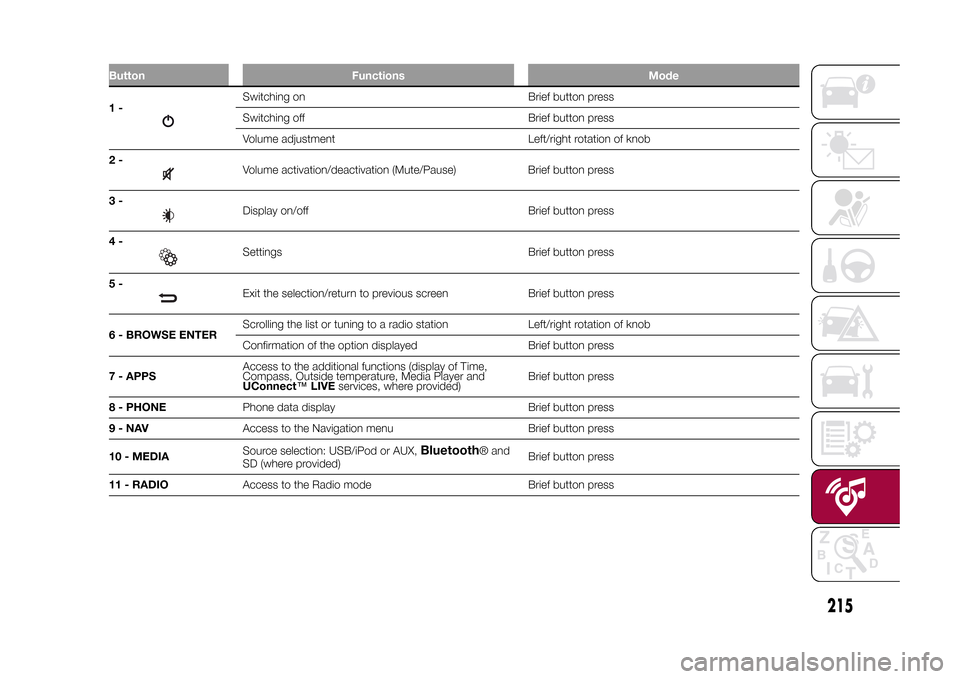
Button Functions Mode1-
Switching on Brief button press
Switching off Brief button press
Volume adjustment Left/right rotation of knob
2-Volume activation/deactivation (Mute/Pause) Brief button press
3-Display on/off Brief button press
4-Settings Brief button press
5-Exit the selection/return to previous screen Brief button press
6 - BROWSE ENTERScrolling the list or tuning to a radio station Left/right rotation of knob
Confirmation of the option displayed Brief button press
7 - APPSAccess to the additional functions (display of Time,
Compass, Outside temperature, Media Player and
UConnect™LIVEservices, where provided)Brief button press
8 - PHONEPhone data display Brief button press
9-NAVAccess to the Navigation menu Brief button press
10 - MEDIASource selection: USB/iPod or AUX,
Bluetooth
® and
SD (where provided)Brief button press
11 - RADIOAccess to the Radio mode Brief button press
.
215
15-12-2014 8:23 Pagina 215
Page 225 of 240
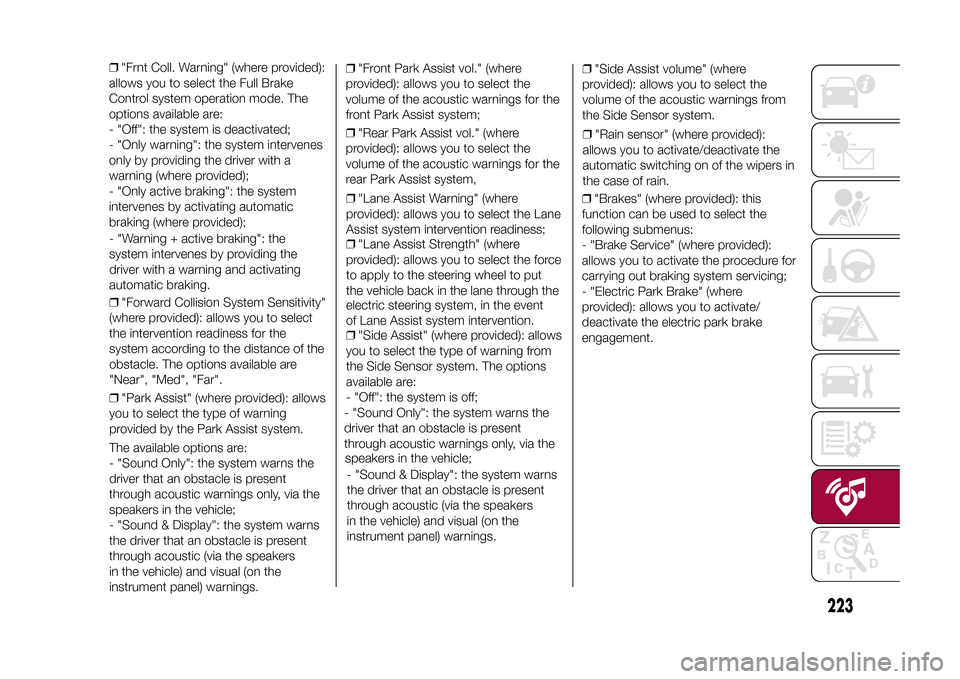
❒"Frnt Coll. Warning" (where provided):
allows you to select the Full Brake
Control system operation mode. The
options available are:
- "Off": the system is deactivated;
- "Only warning": the system intervenes
only by providing the driver with a
warning (where provided);
- "Only active braking": the system
intervenes by activating automatic
braking (where provided);
- "Warning + active braking": the
system intervenes by providing the
driver with a warning and activating
automatic braking.
❒"Forward Collision System Sensitivity"
(where provided): allows you to select
the intervention readiness for the
system according to the distance of the
obstacle. The options available are
"Near", "Med", "Far".
❒"Park Assist" (where provided): allows
you to select the type of warning
provided by the Park Assist system.
The available options are:
- "Sound Only": the system warns the
driver that an obstacle is present
through acoustic warnings only, via the
speakers in the vehicle;
- "Sound & Display": the system warns
the driver that an obstacle is present
through acoustic (via the speakers
in the vehicle) and visual (on the
instrument panel) warnings.❒"Front Park Assist vol." (where
provided): allows you to select the
volume of the acoustic warnings for the
front Park Assist system;
❒"Rear Park Assist vol." (where
provided): allows you to select the
volume of the acoustic warnings for the
rear Park Assist system,
❒"Lane Assist Warning" (where
provided): allows you to select the Lane
Assist system intervention readiness;
❒"Lane Assist Strength" (where
provided): allows you to select the force
to apply to the steering wheel to put
the vehicle back in the lane through the
electric steering system, in the event
of Lane Assist system intervention.
❒"Side Assist" (where provided): allows
you to select the type of warning from
the Side Sensor system. The options
available are:
- "Off": the system is off;
- "Sound Only": the system warns the
driver that an obstacle is present
through acoustic warnings only, via the
speakers in the vehicle;
- "Sound & Display": the system warns
the driver that an obstacle is present
through acoustic (via the speakers
in the vehicle) and visual (on the
instrument panel) warnings.❒"Side Assist volume" (where
provided): allows you to select the
volume of the acoustic warnings from
the Side Sensor system.
❒"Rain sensor" (where provided):
allows you to activate/deactivate the
automatic switching on of the wipers in
the case of rain.
223
15-12-2014 8:23 Pagina 223
❒"Brakes" (where provided): this
function can be used to select the
following submenus:
- "Brake Service" (where provided):
allows you to activate the procedure for
carrying out braking system servicing;
- "Electric Park Brake" (where
provided): allows you to activate/
deactivate the electric park brake
engagement.
Page 238 of 240
SBR (Seat Belt Reminder)
system ......................................... 77
Scheduled servicing ....................... 145
Scheduled Servicing Plan ....... 146-149
Seat belts....................................... 75
Seats ............................................. 15
Servicing procedures ..................... 164
Side bags....................................... 96
Side direction indicators (bulb
replacement) ................................ 126
Side lights/daytime running lights
(DRL) (bulb replacement) .............. 125
Single-colour display ...................... 39
Snow chains .................................. 167
Speed Limiter................................. 108
SRS (supplementary restraint
system) ........................................ 92
Starting the engine ......................... 100
Start&Stop system ......................... 107
Steering lock .................................. 10
Steering wheel ............................... 19
Supplies ......................................... 182
Symbols......................................... 3
TC (system)................................... 63
Technical specifications .................. 173
The keys ........................................ 8
Third brake lights (bulb
replacement) ................................ 127
Towing the vehicle .......................... 142
Towing trailers ................................ 117
Trip Computer ................................ 43
TSC (system) ................................. 64
Tyres (inflation pressure) ................. 177V
ehicle changes/alterations........... 3
W
arning lights and messages ....... 44
Weights.......................................... 180
Wheels and tyres ........................... 167
Window bag .................................. 96
Windows (cleaning) ........................ 169
Windscreen/rear window wiper ...... 25
Windscreen wiper
– replacing wiper blades............... 165
Windscreen wiper/washer .............. 25
– Smart washing function ............. 25
INDEX
FCA Italy S.p.A. - MOPAR
- Technical Services - ServiceEngineering
Largo Senatore G. Agnelli, 3 - 10040
Volvera - Torino (Italia)
Print no. 603.99.7 - 0 /201 5 -
Edition 07 2 2
Page 239 of 240

We really know your car because we invented, designed and built it: we r\
eally know every single detail. At Fiat Service authorised workshops you can find technicians directly trained by us,
offering quality and professionalism for all service operations.
Fiat workshops are always close to you for the regular servicing operati\
ons, season checks and practical recommendations by our experts.
With Original Parts distributed by MOPAR
®, you maintain the reliability, comfort
and performance features that you bought your new car for over time.
Always ask for Genuine Parts for the components used on our cars; we rec\
ommend them because
they come from our steady commitment in research and development of high\
ly innovative technologies. For all these reasons: rely on Genuine Parts, because they are the only ones designed
by FCA for your car.
SAFETY:
BRAKING SYSTEMENVIRONMENT: PARTICULATE FILTERS, CLIMATE CONTROL MAINTENANCECOMFORT: SUSPENSION
AND WINDSCREEN WIPERS PERFORMANCE: SPARK PLUGS, INJECTORS AND BATTERIESLINEACCESSORI
ROOF RACK BARS, WHEEL RIMS
WHY CHOOSING GENUINE PARTS
This Owner Handbook is intended to show the vehicle's operating conditio\
ns.
For the enthusiast user who wants to have insights, curiosities and deta\
iled information about the characteristics and function s
of the vehicle, Fiat gives the opportunity to consult a dedicated sectio\
n which is available in electronic format.
ONLINE VEHICLE OWNER HANDBOOK
The following symbol is reported within the text of the Owner Handbook, next to the subjects \
for which details are provided.
Go to the www.mopar.eu/owner
website and access your personal area.
The “Maintenance and care” page includes all the information about\
your vehicle and the link to access eLUM, where you will find
all the details of the Owner Handbook.
The eLUM website is free and will allow you, among many other things, to easily c\
onsult the on-board documents
of all the other vehicles of the Group.
Have a nice reading and happy motoring!
Cop 500X LUM GB_500 UM ITA 28/10/14 08.12 Pagina 2