ignition FIAT 500X 2015 2.G Owner's Manual
[x] Cancel search | Manufacturer: FIAT, Model Year: 2015, Model line: 500X, Model: FIAT 500X 2015 2.GPages: 240, PDF Size: 10.72 MB
Page 36 of 240
WARNING
22)When leaving the vehicle, always
remove the key (where present) from the
ignition to avoid the risk of injury due to
accidental operation of the sun roof.
Improper use of the roof can be
dangerous. Before and during operation,
always check that nobody is at risk of
being injured by the moving sun roof or by
objects getting caught or hit by it.
WARNING
11)Do not open the sun roof if a roof rack
or crossbars are fitted. Do not open the
sun roof if there is snow or ice on it: you
may damage it.
BONNETOPENINGProceed as follows:
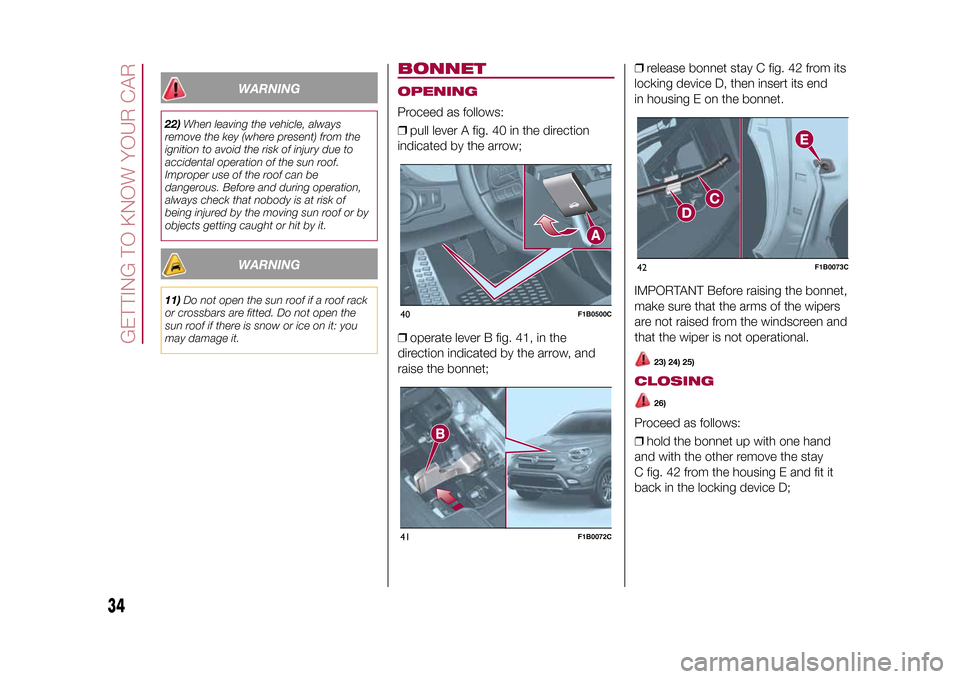
❒pull lever A fig. 40 in the direction
indicated by the arrow;
❒operate lever B fig. 41, in the
direction indicated by the arrow, and
raise the bonnet;❒release bonnet stay C fig. 42 from its
locking device D, then insert its end
in housing E on the bonnet.
IMPORTANT Before raising the bonnet,
make sure that the arms of the wipers
are not raised from the windscreen and
that the wiper is not operational.
23) 24) 25)
CLOSING
26)
Proceed as follows:
❒hold the bonnet up with one hand
and with the other remove the stay
C fig. 42 from the housing E and fit it
back in the locking device D;
40
F1B0500C
41
F1B0072C
42
F1B0073C
34
GETTING TO KNOW YOUR CAR
15-12-2014 8:23 Pagina 34
Page 45 of 240
TRIP COMPUTERThe "Trip computer" is used to display
information on vehicle operation when
the ignition device is at MAR.
This function is characterised by two
separate memories, called "Trip A" and
"Trip B", where the vehicle's "complete
missions" (journeys) are recorded in a
reciprocally independent manner.
“Trip A” and “Trip B” are used to display
the values relating to:
❒Distance travelled
❒Average consumption
❒Average speed
❒Trip time (driving time)
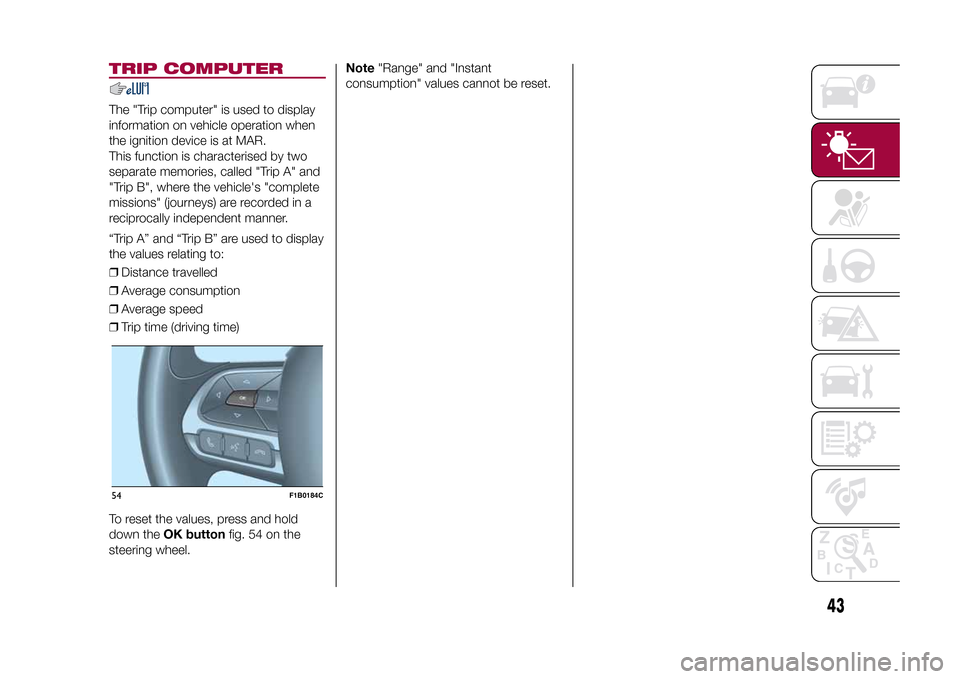
To reset the values, press and hold
down theOK buttonfig. 54 on the
steering wheel.Note"Range" and "Instant
consumption" values cannot be reset.54
F1B0184C
43
15-12-2014 8:23 Pagina 43
Page 47 of 240
Warning light What it means
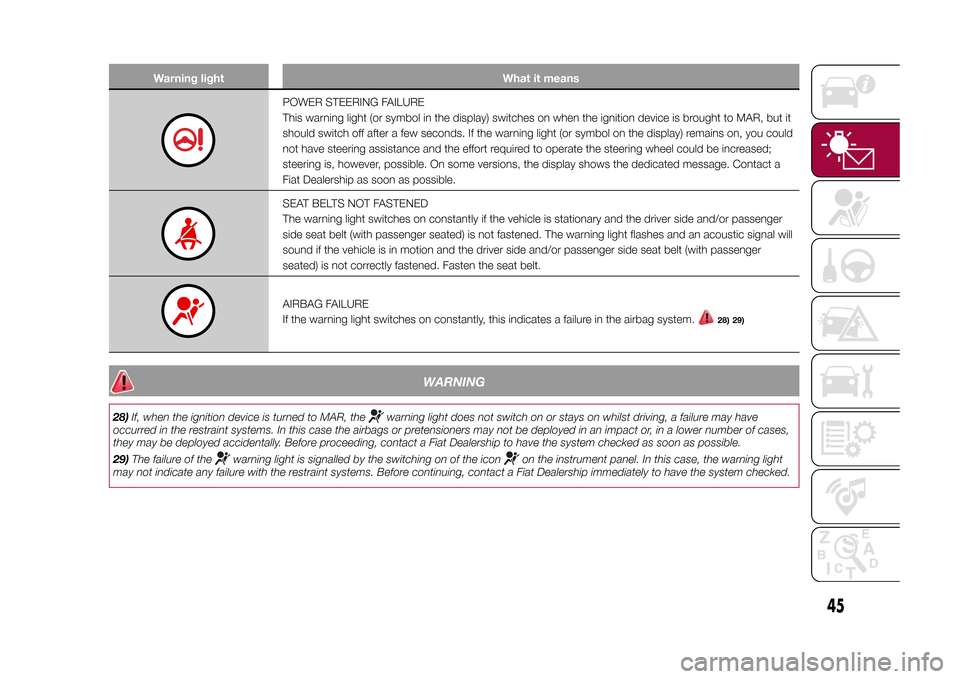
POWER STEERING FAILURE
This warning light (or symbol in the display) switches on when the ignition device is brought to MAR, but it
should switch off after a few seconds. If the warning light (or symbol on the display) remains on, you could
not have steering assistance and the effort required to operate the steering wheel could be increased;
steering is, however, possible. On some versions, the display shows the dedicated message. Contact a
Fiat Dealership as soon as possible.SEAT BELTS NOT FASTENED
The warning light switches on constantly if the vehicle is stationary and the driver side and/or passenger
side seat belt (with passenger seated) is not fastened. The warning light flashes and an acoustic signal will
sound if the vehicle is in motion and the driver side and/or passenger side seat belt (with passenger
seated) is not correctly fastened. Fasten the seat belt.AIRBAG FAILURE
If the warning light switches on constantly, this indicates a failure in the airbag system.
28) 29)
WARNING
28)If, when the ignition device is turned to MAR, the
warning light does not switch on or stays on whilst driving, a failure may have
occurred in the restraint systems. In this case the airbags or pretensioners may not be deployed in an impact or, in a lower number of cases,
they may be deployed accidentally. Before proceeding, contact a Fiat Dealership to have the system checked as soon as possible.
29)The failure of the
warning light is signalled by the switching on of the icon
on the instrument panel. In this case, the warning light
may not indicate any failure with the restraint systems. Before continuing, contact a Fiat Dealership immediately to have the system checked.
45
15-12-2014 8:23 Pagina 45
Page 51 of 240
Warning light What it means
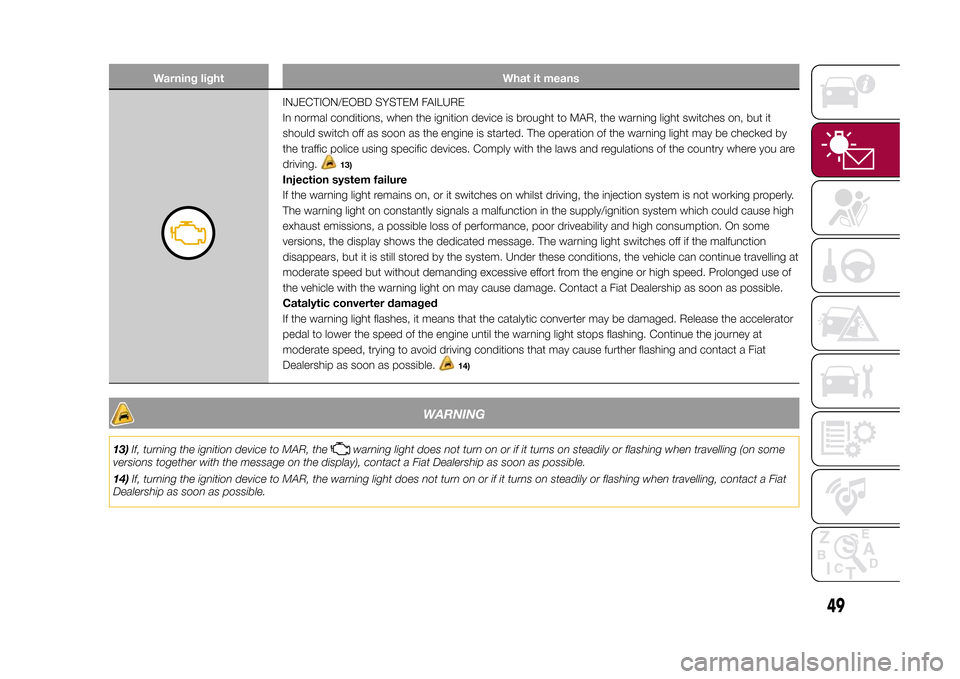
INJECTION/EOBD SYSTEM FAILURE
In normal conditions, when the ignition device is brought to MAR, the warning light switches on, but it
should switch off as soon as the engine is started. The operation of the warning light may be checked by
the traffic police using specific devices. Comply with the laws and regulations of the country where you are
driving.
13)
Injection system failure
If the warning light remains on, or it switches on whilst driving, the injection system is not working properly.
The warning light on constantly signals a malfunction in the supply/ignition system which could cause high
exhaust emissions, a possible loss of performance, poor driveability and high consumption. On some
versions, the display shows the dedicated message. The warning light switches off if the malfunction
disappears, but it is still stored by the system. Under these conditions, the vehicle can continue travelling at
moderate speed but without demanding excessive effort from the engine or high speed. Prolonged use of
the vehicle with the warning light on may cause damage. Contact a Fiat Dealership as soon as possible.
Catalytic converter damaged
If the warning light flashes, it means that the catalytic converter may be damaged. Release the accelerator
pedal to lower the speed of the engine until the warning light stops flashing. Continue the journey at
moderate speed, trying to avoid driving conditions that may cause further flashing and contact a Fiat
Dealership as soon as possible.
14)
WARNING
13)If, turning the ignition device to MAR, the
warning light does not turn on or if it turns on steadily or flashing when travelling (on some
versions together with the message on the display), contact a Fiat Dealership as soon as possible.
14)If, turning the ignition device to MAR, the warning light does not turn on or if it turns on steadily or flashing when travelling, contact a Fiat
Dealership as soon as possible.
49
15-12-2014 8:23 Pagina 49
Page 52 of 240
Warning light What it means
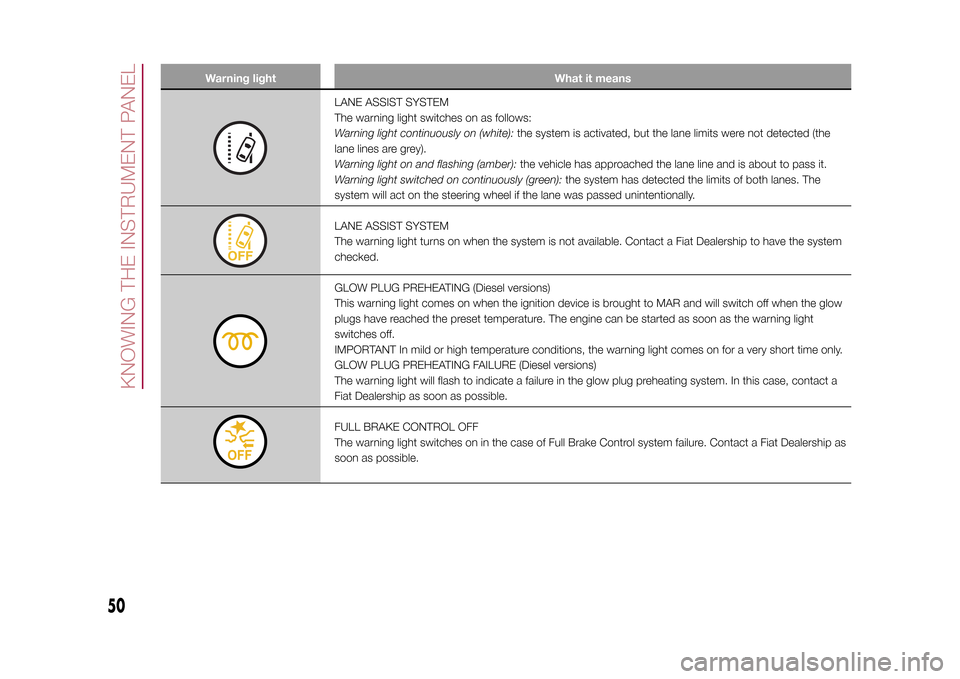
LANE ASSIST SYSTEM
The warning light switches on as follows:
Warning light continuously on (white):the system is activated, but the lane limits were not detected (the
lane lines are grey).
Warning light on and flashing (amber):the vehicle has approached the lane line and is about to pass it.
Warning light switched on continuously (green):the system has detected the limits of both lanes. The
system will act on the steering wheel if the lane was passed unintentionally.LANE ASSIST SYSTEM
The warning light turns on when the system is not available. Contact a Fiat Dealership to have the system
checked.GLOW PLUG PREHEATING (Diesel versions)
This warning light comes on when the ignition device is brought to MAR and will switch off when the glow
plugs have reached the preset temperature. The engine can be started as soon as the warning light
switches off.
IMPORTANT In mild or high temperature conditions, the warning light comes on for a very short time only.
GLOW PLUG PREHEATING FAILURE (Diesel versions)
The warning light will flash to indicate a failure in the glow plug preheating system. In this case, contact a
Fiat Dealership as soon as possible.FULL BRAKE CONTROL OFF
The warning light switches on in the case of Full Brake Control system failure. Contact a Fiat Dealership as
soon as possible.
50
KNOWING THE INSTRUMENT PANEL
15-12-2014 8:23 Pagina 50
Page 53 of 240
Warning light What it means
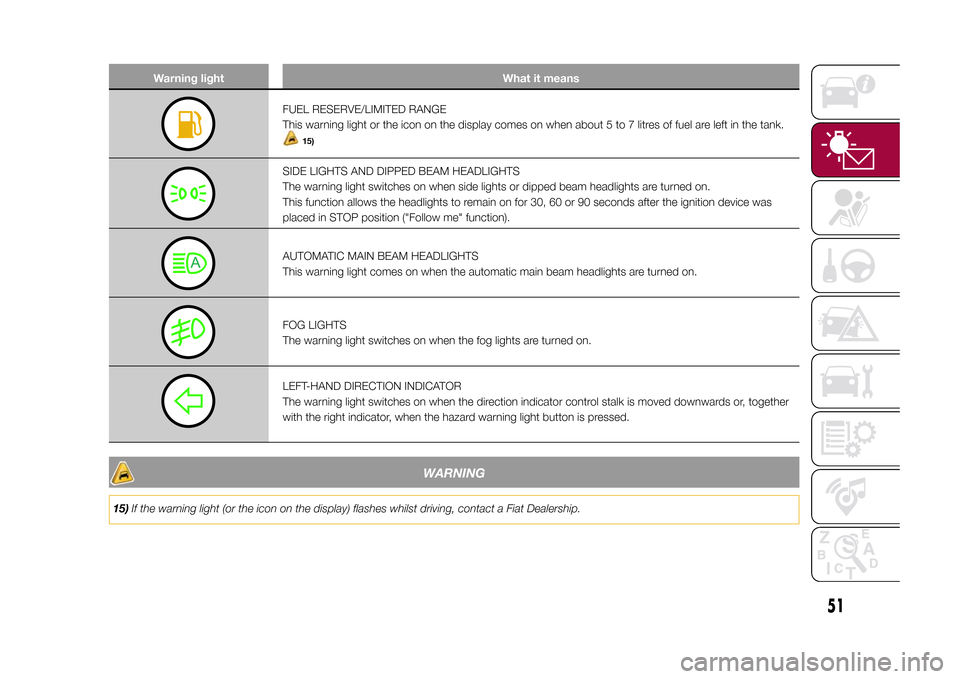
FUEL RESERVE/LIMITED RANGE
This warning light or the icon on the display comes on when about 5 to 7 litres of fuel are left in the tank.
15)
SIDE LIGHTS AND DIPPED BEAM HEADLIGHTS
The warning light switches on when side lights or dipped beam headlights are turned on.
This function allows the headlights to remain on for 30, 60 or 90 seconds after the ignition device was
placed in STOP position ("Follow me" function).AUTOMATIC MAIN BEAM HEADLIGHTS
This warning light comes on when the automatic main beam headlights are turned on.FOG LIGHTS
The warning light switches on when the fog lights are turned on.LEFT-HAND DIRECTION INDICATOR
The warning light switches on when the direction indicator control stalk is moved downwards or, together
with the right indicator, when the hazard warning light button is pressed.
WARNING
15)If the warning light (or the icon on the display) flashes whilst driving, contact a Fiat Dealership.
51
15-12-2014 8:23 Pagina 51
Page 58 of 240
Symbol What it means
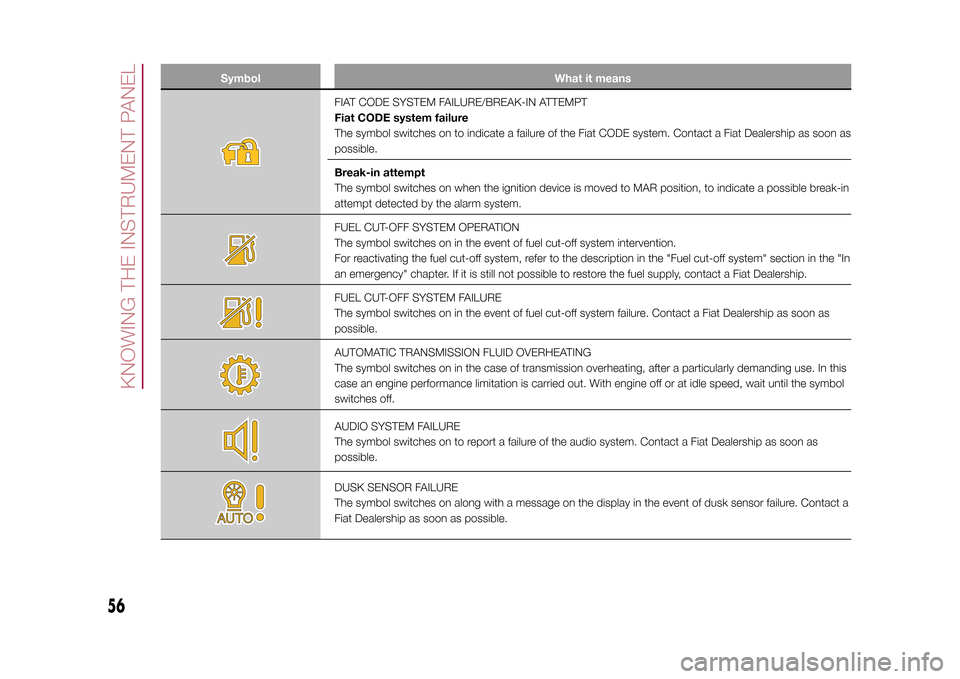
FIAT CODE SYSTEM FAILURE/BREAK-IN ATTEMPT
Fiat CODE system failure
The symbol switches on to indicate a failure of the Fiat CODE system. Contact a Fiat Dealership as soon as
possible.
Break-in attempt
The symbol switches on when the ignition device is moved to MAR position, to indicate a possible break-in
attempt detected by the alarm system.FUEL CUT-OFF SYSTEM OPERATION
The symbol switches on in the event of fuel cut-off system intervention.
For reactivating the fuel cut-off system, refer to the description in the "Fuel cut-off system" section in the "In
an emergency" chapter. If it is still not possible to restore the fuel supply, contact a Fiat Dealership.FUEL CUT-OFF SYSTEM FAILURE
The symbol switches on in the event of fuel cut-off system failure. Contact a Fiat Dealership as soon as
possible.AUTOMATIC TRANSMISSION FLUID OVERHEATING
The symbol switches on in the case of transmission overheating, after a particularly demanding use. In this
case an engine performance limitation is carried out. With engine off or at idle speed, wait until the symbol
switches off.AUDIO SYSTEM FAILURE
The symbol switches on to report a failure of the audio system. Contact a Fiat Dealership as soon as
possible.DUSK SENSOR FAILURE
The symbol switches on along with a message on the display in the event of dusk sensor failure. Contact a
Fiat Dealership as soon as possible.
56
KNOWING THE INSTRUMENT PANEL
15-12-2014 8:23 Pagina 56
Page 62 of 240
Symbol What it means
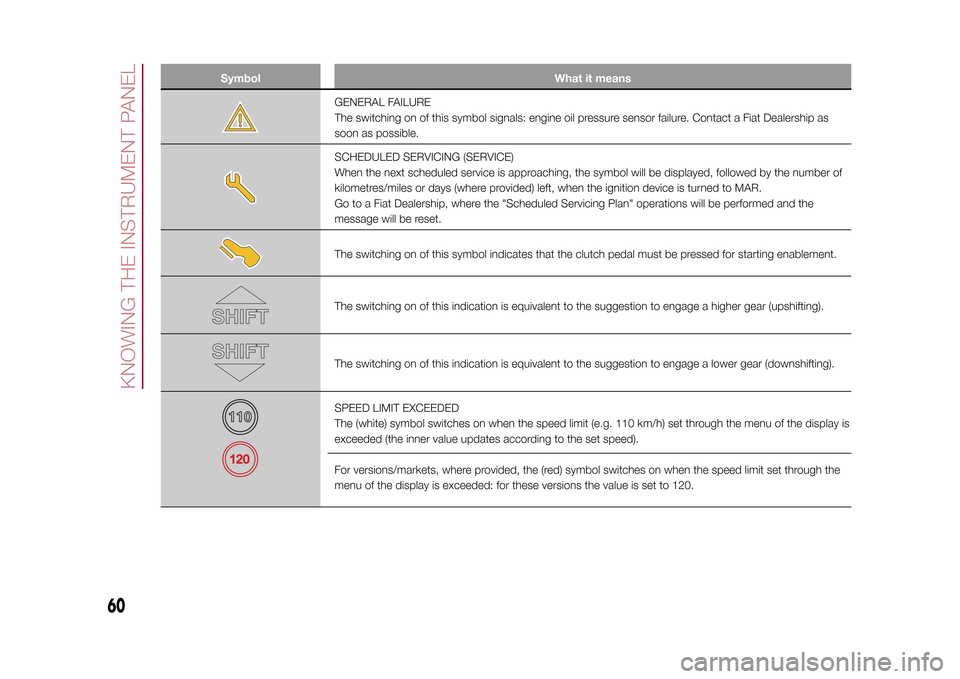
GENERAL FAILURE
The switching on of this symbol signals: engine oil pressure sensor failure. Contact a Fiat Dealership as
soon as possible.SCHEDULED SERVICING (SERVICE)
When the next scheduled service is approaching, the symbol will be displayed, followed by the number of
kilometres/miles or days (where provided) left, when the ignition device is turned to MAR.
Go to a Fiat Dealership, where the "Scheduled Servicing Plan" operations will be performed and the
message will be reset.The switching on of this symbol indicates that the clutch pedal must be pressed for starting enablement.The switching on of this indication is equivalent to the suggestion to engage a higher gear (upshifting).The switching on of this indication is equivalent to the suggestion to engage a lower gear (downshifting).SPEED LIMIT EXCEEDED
The (white) symbol switches on when the speed limit (e.g. 110 km/h) set through the menu of the display is
exceeded (the inner value updates according to the set speed).
For versions/markets, where provided, the (red) symbol switches on when the speed limit set through the
menu of the display is exceeded: for these versions the value is set to 120.
60
KNOWING THE INSTRUMENT PANEL
15-12-2014 8:23 Pagina 60
Page 71 of 240
In the event of an imminent collision the
system intervenes by automatically
braking the vehicle to prevent the crash
or reduce its effects.
The system provides the driver with
acoustic and visual signals through
specific messages on the instrument
panel display.
The system may lightly brake to warn
the driver if a possible frontal accident
is detected (limited braking). Signals
and limited braking are intended to
allow the driver to react promptly,
in order to prevent or reduce the effects
of a potential accident.In situations with the risk of collision, if
the system detects no intervention
by the driver, it provides automatic
braking to help slow the vehicle and
mitigate the potential frontal collision
(automatic braking). If intervention
by the driver on the brake pedal
is detected but not deemed sufficient,
the system may intervene in order to
improve the reaction of the braking
system, therefore reducing vehicle
speed further (additional assistance in
braking stage).
Versions equipped with Start&Stop
system: at the end of the automatic
braking, the Start&Stop system will
activate as described in paragraph
"Start&Stop system" of the "Starting
and driving" chapter.
Versions with manual gearbox:at
the end of the automatic braking the
engine may stall and turn off, unless the
driver presses the clutch pedal.
Versions with automatic
transmission: at the end of the
braking, the latest stored gear
is engaged: the vehicle may therefore
restart after a few seconds from the
automatic stop.IMPORTANT Both on versions
equipped with manual gearbox and on
those with automatic transmission, after
the vehicle is stopped the brake
calipers may be locked for about 2
seconds for safety reasons. Make sure
you press the brake pedal if the vehicle
moves slightly forwards.
Activation/deactivationThe Full Brake Control system can be
deactivated (and then reactivated)
via theUconnect™system (see the
description in the dedicated
supplement).
The system can be deactivated even
with the ignition device at MAR.
IMPORTANT The system status can be
changed with vehicle at a standstill
only.
The Full Brake Control system can be
set to three activation levels through the
Uconnect™system:
❒System active: the system (if active),
in addition to the visual and acoustic
warnings, provides limited braking,
automatic braking and additional
assistance in braking stage, where the
driver does not brake sufficiently in
the event of a potential frontal impact;
58
F1B0096C
69
15-12-2014 8:23 Pagina 69
Page 72 of 240
❒System partially active: the system (if
active) does not provide limited braking,
but guarantees automatic braking or
additional assistance in braking stage,
where the driver does not brake at all or
not sufficiently in the event of a
potential frontal impact. The visual and
acoustic warnings are deactivated,
and will not be provided;
❒System deactivated: the system
does not provide visual and acoustic
warnings, limited braking, automatic
braking or additional assistance in
braking stage. The system will therefore
provide no indication of a possible
accident.Activation/deactivationIf the Full Brake Control system has
been correctly activated with the
Uconnect™system, this will be active
each time the engine is started.
Following a deactivation, the system will
not warn the driver about the possible
collision with the preceding vehicle,
regardless of the setting selected with
theUconnect™system.
The system deactivation status will not
be stored when the engine is switched
off: if the system is deactivated when
the engine is switched off, it will be
active when it is next started.This function is not active at a speed
lower than 7 km/h or higher than 200
km/h.
The system is only active if:
❒it is correctly activated via the
Uconnect™system;
❒the ignition device is at MAR;
❒the vehicle speed is between 7 and
200 km/h;
❒the front seat belts are fastened.
Changing the system sensitivityThe sensitivity of the system can be
changed through theUconnect™
system menu, choosing from one of the
following three options: "Near", "Med"
or "Far". See the description in the
Uconnect™supplement for how to
change the settings.
The pre-set option is "Med". With this
setting, the system warns the driver
of a possible collision with the vehicle in
front when that vehicle is at a standard
distance, between that of the other
two settings.With the system sensitivity set to "Far",
the system will warn the driver of a
possible collision with the vehicle in
front when that vehicle is at a greater
distance, thus providing the possibility
of acting on the brakes more lightly and
gradually. This setting provides the
drivers with the maximum possible
reaction time to prevent a potential
accident.
With the option set to "Near", the
system will warn the driver of a possible
collision with the vehicle in front when
that vehicle is close. This setting offers
the driver a lower reaction time
compared to the "Med" and "Far"
settings, in the event of a potential
collision, but permits more dynamic
driving of the vehicle.
The system sensitivity setting is kept in
the memory when the engine is
switched off.
System limited operation signalIf the dedicated message is displayed,
a condition limiting the system
operation may have occurred. The
possible reasons of this limitation are
something blocking the camera view or
a fault.
If an obstruction is signalled, clean the
area of the windscreen indicated in
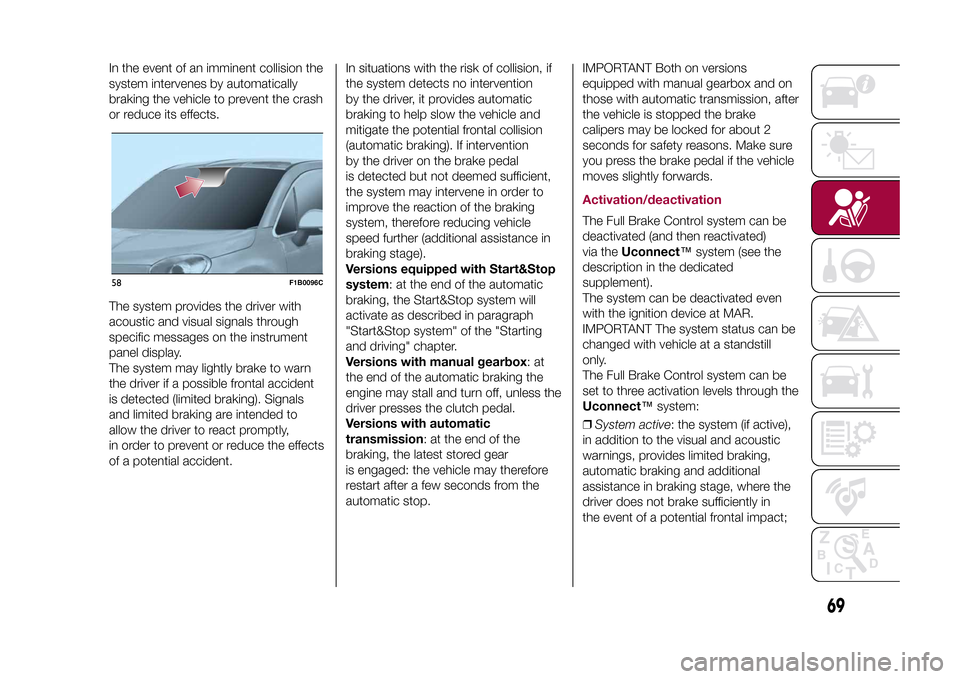
fig. 58 and check that the message has
disappeared.
70
SAFETY
15-12-2014 8:23 Pagina 70