display FIAT 500X 2015 2.G Workshop Manual
[x] Cancel search | Manufacturer: FIAT, Model Year: 2015, Model line: 500X, Model: FIAT 500X 2015 2.GPages: 240, PDF Size: 10.72 MB
Page 142 of 240
FUEL CUT-OFF
SYSTEMDESCRIPTIONThis intervenes in the case of an impact
causing:
❒the interruption of the fuel supply with
the engine consequently switching off;
❒the automatic unlocking of the doors;
❒turning on of the lights inside the
vehicle;
❒deactivation of climate control system
ventilation;
❒switching on of the hazard warning
lights (to deactivate the lights press the
button on the dashboard).
On some versions, the intervention of
the system is indicated by a message
shown on the display. In the same way,
a dedicated message on the display
warns the driver if system operation is
compromised.
IMPORTANT Carefully check the vehicle
for fuel leaks, for instance in the engine
compartment, under the vehicle or
near the tank area. After a collision,
bring the ignition device to STOP to
prevent the battery from running down.
FUEL CUT-OFF SYSTEM
RESETTo restore correct operation of the
vehicle, carry out the following
procedure (this procedure must be
started and completed within less than
1 minute):
152)
Operations to be carried out
With direction indicator lever in neutral
position, bring the ignition device to STOP
Bring the ignition device to MAR
Activate the right direction indicator
Activate the left direction indicator
Activate the right direction indicator
Activate the left direction indicator
Deactivate the left direction indicator
Bring the ignition device to STOP
Bring the ignition device to MAR
WARNING
152)If, after an impact, you smell fuel or
notice leaks from the fuel system, do
not reactivate the system to avoid the risk
of fire.
AUTOMATIC
TRANSMISSION
GEAR LEVER
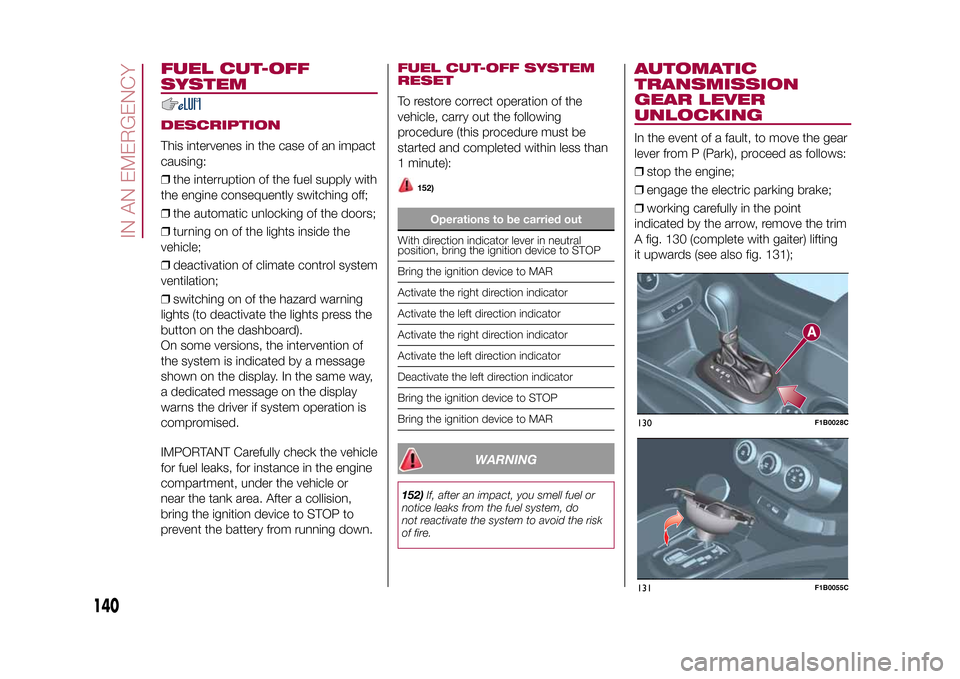
UNLOCKINGIn the event of a fault, to move the gear
lever from P (Park), proceed as follows:
❒stop the engine;
❒engage the electric parking brake;
❒working carefully in the point
indicated by the arrow, remove the trim
A fig. 130 (complete with gaiter) lifting
it upwards (see also fig. 131);130
F1B0028C
131
F1B0055C
140
IN AN EMERGENCY
15-12-2014 8:23 Pagina 140
Page 163 of 240
BATTERY
164) 165) 166)63)6)
The battery does not require the
electrolyte to be topped up with distilled
water.
A periodic check carried out at a Fiat
Dealership is, however, necessary
to check efficiency.Replacing the batteryIf necessary, replace the battery with
another original battery with the same
specifications. Follow the battery
Manufacturer’s instructions for
maintenance.USEFUL ADVICE FOR
EXTENDING THE LIFE OF
YOUR BATTERY
Useful advice for extending the life
of your batteryTo avoid draining your battery and
make it last longer, observe the
following instructions:
❒when you park the vehicle, ensure
that the doors, tailgate and bonnet are
closed properly, to prevent any lights
from remaining on inside the passenger
compartment;❒switch off all roof lights inside the
vehicle: the vehicle is however
equipped with a system which switches
all interior lights off automatically;
❒do not keep accessories (e.g. radio,
hazard warning lights, etc.) switched on
for a long time when the engine is not
running;
❒before performing any operation on
the electrical system, disconnect the
negative battery cable.
If, after purchasing the vehicle, you wish
to install electrical accessories which
require permanent electrical supply (e.g.
alarm, etc.) or accessories which
influence the electrical supply
requirements, contact a Fiat Dealership,
whose qualified staff will evaluate the
overall electrical consumption.
64)
IMPORTANT After the battery is
disconnected, the steering must be
initialised. The
warning light on the
instrument panel (or symbol on the
display) switches on to indicate this. To
carry out this procedure, simply turn
the steering wheel all the way from one
end to the other or drive in a straight
line for about a hundred metres.IMPORTANT If the charge level remains
under 50% for a long time, the battery
is damaged by sulphation, reducing
its capacity and efficiency at start-up.
The battery is also more prone to the
risk of freezing (at temperatures of
-10°C). Refer to the "Vehicle inactivity"
paragraph in "Starting and driving"
chapter if the vehicle is left parked for a
long time.
WARNING
156)Never smoke when performing
operations in the engine compartment.
Flammable gases and fumes may be
present and risk igniting.
157)Be very careful when working in the
engine compartment when the engine
is hot: you may get burned.
158)If the engine oil is being topped up,
wait for the engine to cool down before
loosening the filler plug, particularly for
vehicles with aluminium plug (where
provided). CAUTION: risk of burns!
159)The cooling system is pressurised. If
the cap needs replacing, do so with
another original or the effectiveness of the
system may be compromised. Do not
remove the cap from the reservoir when
the engine is hot: danger of scalding.
161
15-12-2014 8:23 Pagina 161
Page 193 of 240
TIPS, CONTROLS
AND GENERAL
INFORMATIONROAD SAFETYLearn how to use the various system
functions before setting off.
Read the instructions for the system
carefully before setting off.
181) 182)
RECEPTION CONDITIONSReception conditions change
constantly while driving. Reception may
be interfered with by the presence of
mountains, buildings or bridges,
especially when you are far away from
the broadcaster.
IMPORTANT The volume may be
increased when receiving traffic alerts
and news.CARE AND
MAINTENANCEObserve the following precautions to
ensure the system is fully operational:
❒the display lens should not come into
contact with pointed or rigid objects
which could damage its surface; use a
soft, dry anti-static cloth to clean and
do not press.
❒never use alcohol, petrols and
derivatives to clean the display lens.❒prevent any liquid from entering the
system: this could damage it beyond
repair.
78) 79)
ANTI-THEFT
PROTECTIONThe system is equipped with an
anti-theft protection system based on
the exchange of information with the
electronic control unit (Body Computer)
on the vehicle.
This guarantees maximum safety and
prevents the secret code from being
entered after the power supply has
been disconnected.
If the check has a positive outcome, the
system will start to operate, whereas if
the comparison codes are not the
same or if the electronic control unit
(Body Computer) is replaced, the
system will ask the user to enter the
secret code according to the procedure
described in the paragraph below.Entering the secret code(Uconnect™Radio Nav 6.5" excluded)
When the system is switched on, if the
code is requested, the display will
show "Please enter Anti-Theft Code"
followed by the video page showing
a keypad to enter the secret code.The secret code is made up of four
digits, from 0 to 9: to insert the first digit
of the code, turn the "BROWSE
ENTER" right knob and press
to confirm.
After inserting the fourth digit, move the
cursor to "OK" and press the
"BROWSE ENTER" right knob: the
system will start to operate.
If an incorrect code is entered, the
system displays "Incorrect Code" to
notify the user of the need to enter the
correct code.
After the 3 available attempts to enter
the code, the system displays
"Incorrect Code. Radio locked. Wait for
30 minutes". Once the text has
disappeared you can start the code
entering procedure again.
Vehicle radio passport(Uconnect™Radio Nav 6.5" excluded)
This document certifies ownership of
the system. The vehicle radio passport
shows the system model, serial number
and secret code.
In the case of loss of the vehicle radio
passport, contact the Fiat Dealership,
taking an ID document and the vehicle
ownership documents.
191
15-12-2014 8:23 Pagina 191
Page 194 of 240
IMPORTANT Keep the vehicle radio
passport in a safe place so that you
can give the information to the relevant
authorities if the system is stolen.IMPORTANTLook at the screen only when it is
necessary and safe. If you need to look
at the screen for a long time, pull over
to a safe place so as not to be
distracted while driving.
Immediately stop using the system in
the event of a fault. Otherwise the
system might be damaged. Contact a
Fiat Dealership as soon as possible
to have the system repaired.
WARNING
181)Follow the safety rules below:
otherwise serious injuries may occur to the
occupants or the system may be
damaged.
182)If the volume is too loud this can be
dangerous. Adjust the volume so that
you can still hear background noises (e.g.
horns, ambulances, police vehicles, etc.).
WARNING
78)Only clean the front panel and the
display lens with a soft, clean, dry,
anti-static cloth. Cleaning and polishing
products may damage the surface. Never
use alcohol, petrols and derivatives.79)Do not use the display as a base for
supports with suction pads or adhesives
for external navigators or smartphones
or similar devices.
192
MULTIMEDIA
15-12-2014 8:23 Pagina 192
Page 196 of 240
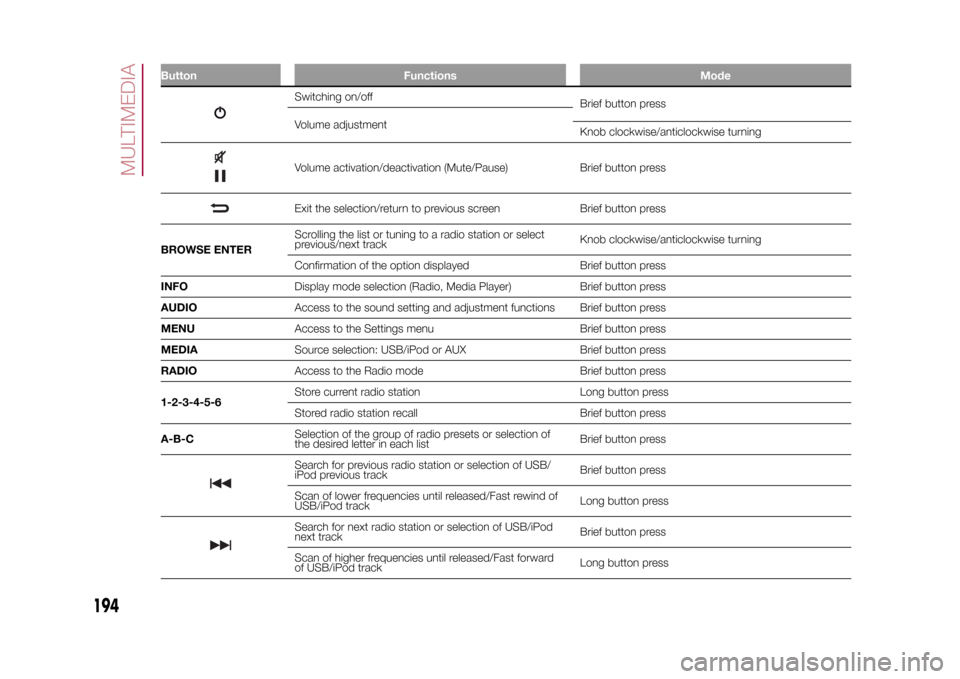
Button Functions Mode
Switching on/off
Brief button press
Volume adjustment
Knob clockwise/anticlockwise turningVolume activation/deactivation (Mute/Pause) Brief button pressExit the selection/return to previous screen Brief button press
BROWSE ENTERScrolling the list or tuning to a radio station or select
previous/next trackKnob clockwise/anticlockwise turning
Confirmation of the option displayed Brief button press
INFODisplay mode selection (Radio, Media Player) Brief button press
AUDIOAccess to the sound setting and adjustment functions Brief button press
MENUAccess to the Settings menu Brief button press
MEDIASource selection: USB/iPod or AUX Brief button press
RADIOAccess to the Radio mode Brief button press
1-2-3-4-5-6Store current radio station Long button press
Stored radio station recall Brief button press
A-B-CSelection of the group of radio presets or selection of
the desired letter in each listBrief button pressSearch for previous radio station or selection of USB/
iPod previous trackBrief button press
Scan of lower frequencies until released/Fast rewind of
USB/iPod trackLong button pressSearch for next radio station or selection of USB/iPod
next trackBrief button press
Scan of higher frequencies until released/Fast forward
of USB/iPod trackLong button press
194
MULTIMEDIA
15-12-2014 8:23 Pagina 194
Page 199 of 240
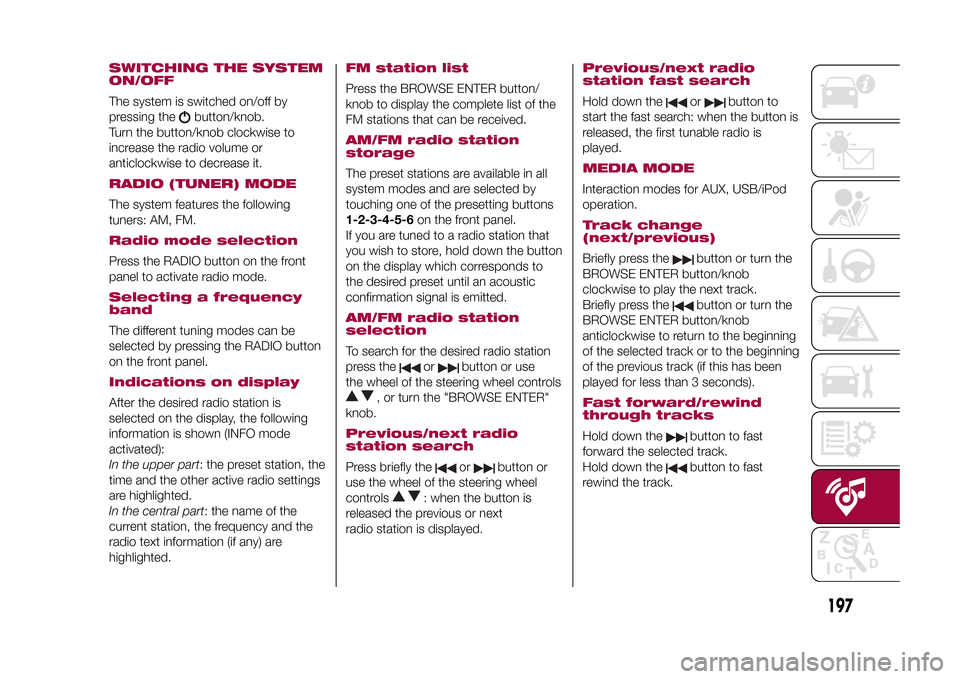
SWITCHING THE SYSTEM
ON/OFFThe system is switched on/off by
pressing the
button/knob.
Turn the button/knob clockwise to
increase the radio volume or
anticlockwise to decrease it.
RADIO (TUNER) MODEThe system features the following
tuners: AM, FM.Radio mode selectionPress the RADIO button on the front
panel to activate radio mode.Selecting a frequency
bandThe different tuning modes can be
selected by pressing the RADIO button
on the front panel.Indications on displayAfter the desired radio station is
selected on the display, the following
information is shown (INFO mode
activated):
In the upper part: the preset station, the
time and the other active radio settings
are highlighted.
In the central part: the name of the
current station, the frequency and the
radio text information (if any) are
highlighted.
FM station listPress the BROWSE ENTER button/
knob to display the complete list of the
FM stations that can be received.AM/FM radio station
storageThe preset stations are available in all
system modes and are selected by
touching one of the presetting buttons
1-2-3-4-5-6on the front panel.
If you are tuned to a radio station that
you wish to store, hold down the button
on the display which corresponds to
the desired preset until an acoustic
confirmation signal is emitted.AM/FM radio station
selectionTo search for the desired radio station
press the
or
button or use
the wheel of the steering wheel controls
, or turn the "BROWSE ENTER"
knob.
Previous/next radio
station searchPress briefly the
or
button or
use the wheel of the steering wheel
controls
: when the button is
released the previous or next
radio station is displayed.
Previous/next radio
station fast searchHold down the
or
button to
start the fast search: when the button is
released, the first tunable radio is
played.
MEDIA MODEInteraction modes for AUX, USB/iPod
operation.Track change
(next/previous)Briefly press the
button or turn the
BROWSE ENTER button/knob
clockwise to play the next track.
Briefly press thebutton or turn the
BROWSE ENTER button/knob
anticlockwise to return to the beginning
of the selected track or to the beginning
of the previous track (if this has been
played for less than 3 seconds).
Fast forward/rewind
through tracksHold down the
button to fast
forward the selected track.
Hold down thebutton to fast
rewind the track.
197
15-12-2014 8:23 Pagina 197
Page 200 of 240
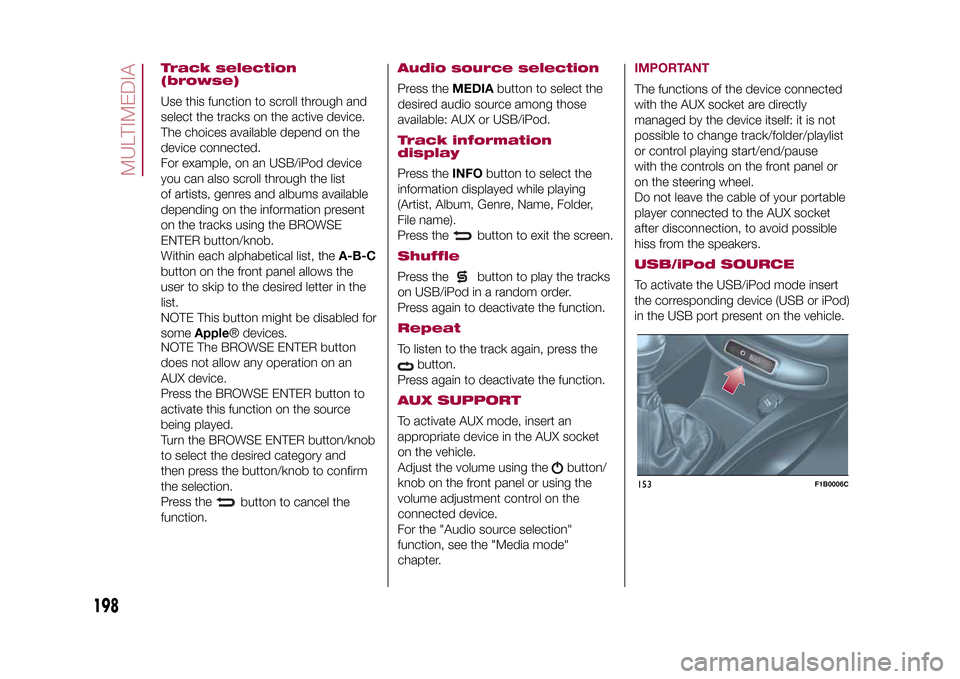
Track selection
(browse)Use this function to scroll through and
select the tracks on the active device.
The choices available depend on the
device connected.
For example, on an USB/iPod device
you can also scroll through the list
of artists, genres and albums available
depending on the information present
on the tracks using the BROWSE
ENTER button/knob.
Within each alphabetical list, theA-B-C
button on the front panel allows the
user to skip to the desired letter in the
list.
NOTE This button might be disabled for
someApple® devices.
NOTE The BROWSE ENTER button
does not allow any operation on an
AUX device.
Press the BROWSE ENTER button to
activate this function on the source
being played.
Turn the BROWSE ENTER button/knob
to select the desired category and
then press the button/knob to confirm
the selection.
Press the
button to cancel the
function.
Audio source selectionPress theMEDIAbutton to select the
desired audio source among those
available: AUX or USB/iPod.Track information
displayPress theINFObutton to select the
information displayed while playing
(Artist, Album, Genre, Name, Folder,
File name).
Press the
button to exit the screen.
ShufflePress the
button to play the tracks
on USB/iPod in a random order.
Press again to deactivate the function.
RepeatTo listen to the track again, press the
button.
Press again to deactivate the function.
AUX SUPPORTTo activate AUX mode, insert an
appropriate device in the AUX socket
on the vehicle.
Adjust the volume using the
button/
knob on the front panel or using the
volume adjustment control on the
connected device.
For the "Audio source selection"
function, see the "Media mode"
chapter.
IMPORTANTThe functions of the device connected
with the AUX socket are directly
managed by the device itself: it is not
possible to change track/folder/playlist
or control playing start/end/pause
with the controls on the front panel or
on the steering wheel.
Do not leave the cable of your portable
player connected to the AUX socket
after disconnection, to avoid possible
hiss from the speakers.USB/iPod SOURCETo activate the USB/iPod mode insert
the corresponding device (USB or iPod)
in the USB port present on the vehicle.153
F1B0006C
198
MULTIMEDIA
15-12-2014 8:23 Pagina 198
Page 201 of 240
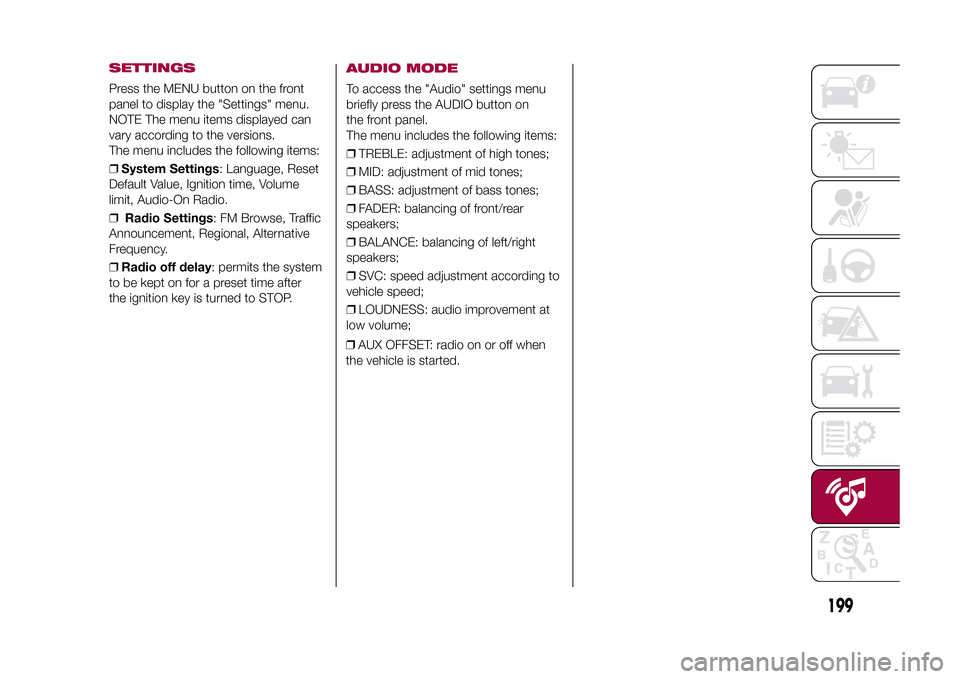
SETTINGSPress the MENU button on the front
panel to display the "Settings" menu.
NOTE The menu items displayed can
vary according to the versions.
The menu includes the following items:
❒System Settings: Language, Reset
Default Value, Ignition time, Volume
limit, Audio-On Radio.
❒Radio Settings: FM Browse, Traffic
Announcement, Regional, Alternative
Frequency.
❒Radio off delay: permits the system
to be kept on for a preset time after
the ignition key is turned to STOP.
AUDIO MODETo access the "Audio" settings menu
briefly press the AUDIO button on
the front panel.
The menu includes the following items:
❒TREBLE: adjustment of high tones;
❒MID: adjustment of mid tones;
❒BASS: adjustment of bass tones;
❒FADER: balancing of front/rear
speakers;
❒BALANCE: balancing of left/right
speakers;
❒SVC: speed adjustment according to
vehicle speed;
❒LOUDNESS: audio improvement at
low volume;
❒AUX OFFSET: radio on or off when
the vehicle is started.
199
15-12-2014 8:23 Pagina 199
Page 203 of 240
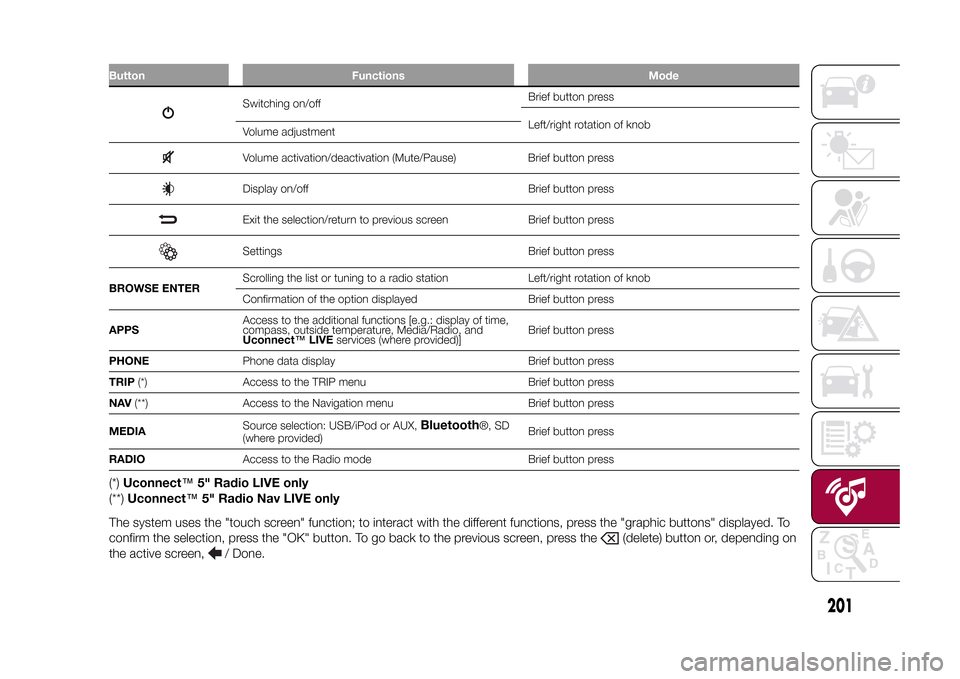
Button Functions Mode
Switching on/offBrief button press
Left/right rotation of knob
Volume adjustmentVolume activation/deactivation (Mute/Pause) Brief button pressDisplay on/off Brief button pressExit the selection/return to previous screen Brief button pressSettings Brief button press
BROWSE ENTERScrolling the list or tuning to a radio station Left/right rotation of knob
Confirmation of the option displayed Brief button press
APPSAccess to the additional functions [e.g.: display of time,
compass, outside temperature, Media/Radio, and
Uconnect™LIVEservices (where provided)]Brief button press
PHONEPhone data display Brief button press
TRIP(*) Access to the TRIP menu Brief button press
NAV(**) Access to the Navigation menu Brief button press
MEDIASource selection: USB/iPod or AUX,
Bluetooth
®, SD
(where provided)Brief button press
RADIOAccess to the Radio mode Brief button press
(*)Uconnect™5" Radio LIVE only
(**)Uconnect™5" Radio Nav LIVE only
The system uses the "touch screen" function; to interact with the different functions, press the "graphic buttons" displayed. To
confirm the selection, press the "OK" button. To go back to the previous screen, press the
(delete) button or, depending on
the active screen,
/ Done.
.
201
15-12-2014 8:23 Pagina 201
Page 206 of 240
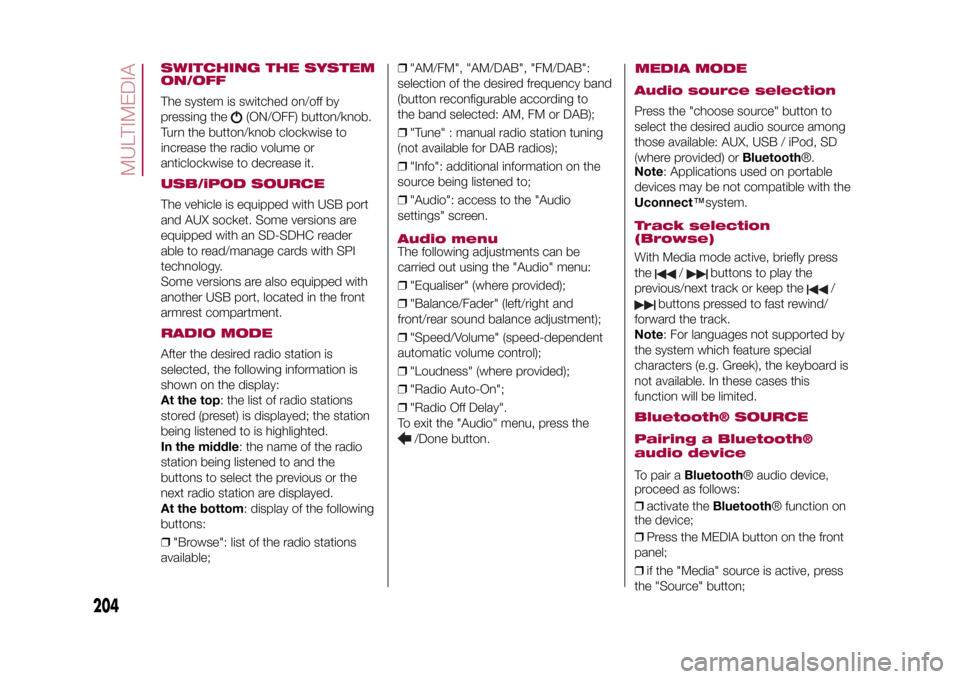
SWITCHING THE SYSTEM
ON/OFFThe system is switched on/off by
pressing the
(ON/OFF) button/knob.
Turn the button/knob clockwise to
increase the radio volume or
anticlockwise to decrease it.
USB/iPOD SOURCEThe vehicle is equipped with USB port
and AUX socket. Some versions are
equipped with an SD-SDHC reader
able to read/manage cards with SPI
technology.
Some versions are also equipped with
another USB port, located in the front
armrest compartment.RADIO MODEAfter the desired radio station is
selected, the following information is
shown on the display:
At the top: the list of radio stations
stored (preset) is displayed; the station
being listened to is highlighted.
In the middle: the name of the radio
station being listened to and the
buttons to select the previous or the
next radio station are displayed.
At the bottom: display of the following
buttons:
❒"Browse": list of the radio stations
available;❒"AM/FM", "AM/DAB", "FM/DAB":
selection of the desired frequency band
(button reconfigurable according to
the band selected: AM, FM or DAB);
❒"Tune" : manual radio station tuning
(not available for DAB radios);
❒"Info": additional information on the
source being listened to;
❒"Audio": access to the "Audio
settings" screen.
Audio menuThe following adjustments can be
carried out using the "Audio" menu:
❒"Equaliser" (where provided);
❒"Balance/Fader" (left/right and
front/rear sound balance adjustment);
❒"Speed/Volume" (speed-dependent
automatic volume control);
❒"Loudness" (where provided);
❒"Radio Auto-On";
❒"Radio Off Delay".
To exit the "Audio" menu, press the
/Done button.
MEDIA MODE
Audio source selectionPress the "choose source" button to
select the desired audio source among
those available: AUX, USB / iPod, SD
(where provided) orBluetooth®.
Note: Applications used on portable
devices may be not compatible with the
Uconnect™system.Track selection
(Browse)With Media mode active, briefly press
the
/
buttons to play the
previous/next track or keep the
/
buttons pressed to fast rewind/
forward the track.
Note: For languages not supported by
the system which feature special
characters (e.g. Greek), the keyboard is
not available. In these cases this
function will be limited.
Bluetooth® SOURCE
Pairing a Bluetooth®
audio deviceTo pair aBluetooth® audio device,
proceed as follows:
❒activate theBluetooth® function on
the device;
❒Press the MEDIA button on the front
panel;
❒if the "Media" source is active, press
the "Source" button;
204
MULTIMEDIA
15-12-2014 8:23 Pagina 204