Parking lights FIAT 500X 2015 2.G Owners Manual
[x] Cancel search | Manufacturer: FIAT, Model Year: 2015, Model line: 500X, Model: FIAT 500X 2015 2.GPages: 240, PDF Size: 10.72 MB
Page 10 of 240
THE KEYSKEY WITH REMOTE
CONTROL
1)1)
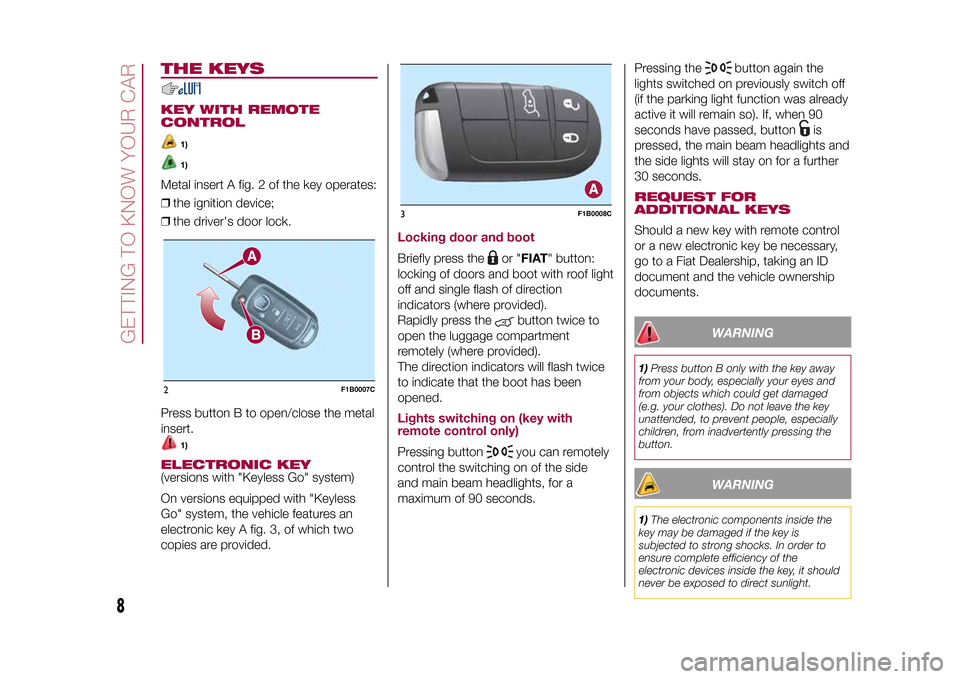
Metal insert A fig. 2 of the key operates:
❒the ignition device;
❒the driver's door lock.
Press button B to open/close the metal
insert.
1)
ELECTRONIC KEY(versions with "Keyless Go" system)
On versions equipped with "Keyless
Go" system, the vehicle features an
electronic key A fig. 3, of which two
copies are provided.
Locking door and bootBriefly press the
or "FIAT" button:
locking of doors and boot with roof light
off and single flash of direction
indicators (where provided).
Rapidly press the
button twice to
open the luggage compartment
remotely (where provided).
The direction indicators will flash twice
to indicate that the boot has been
opened.
Lights switching on (key with
remote control only)Pressing button
you can remotely
control the switching on of the side
and main beam headlights, for a
maximum of 90 seconds.Pressing the
button again the
lights switched on previously switch off
(if the parking light function was already
active it will remain so). If, when 90
seconds have passed, button
is
pressed, the main beam headlights and
the side lights will stay on for a further
30 seconds.
REQUEST FOR
ADDITIONAL KEYSShould a new key with remote control
or a new electronic key be necessary,
go to a Fiat Dealership, taking an ID
document and the vehicle ownership
documents.
WARNING
1)Press button B only with the key away
from your body, especially your eyes and
from objects which could get damaged
(e.g. your clothes). Do not leave the key
unattended, to prevent people, especially
children, from inadvertently pressing the
button.
WARNING
1)The electronic components inside the
key may be damaged if the key is
subjected to strong shocks. In order to
ensure complete efficiency of the
electronic devices inside the key, it should
never be exposed to direct sunlight.
2
F1B0007C
3
F1B0008C
8
GETTING TO KNOW YOUR CAR
15-12-2014 8:23 Pagina 8
Page 23 of 240
WARNING
17)As the driver's door mirror is curved, it
may slightly alter the perception of
distance.
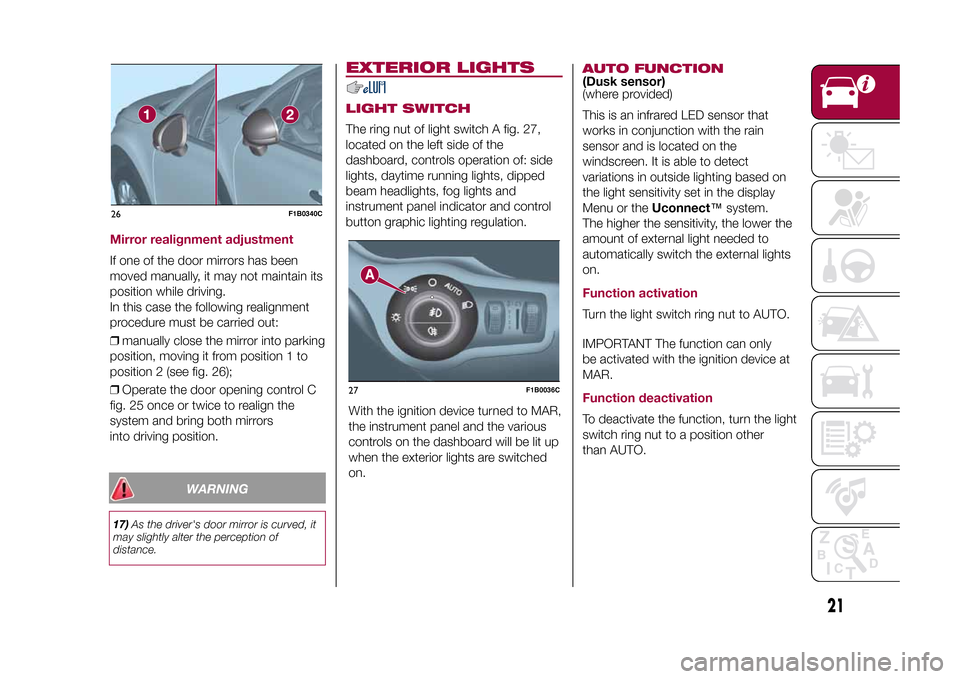
EXTERIOR LIGHTSLIGHT SWITCHThe ring nut of light switch A fig. 27,
located on the left side of the
dashboard, controls operation of: side
lights, daytime running lights, dipped
beam headlights, fog lights and
instrument panel indicator and control
button graphic lighting regulation.
With the ignition device turned to MAR,
the instrument panel and the various
controls on the dashboard will be lit up
when the exterior lights are switched
on.
AUTO FUNCTION(Dusk sensor)
(where provided)
This is an infrared LED sensor that
works in conjunction with the rain
sensor and is located on the
windscreen. It is able to detect
variations in outside lighting based on
the light sensitivity set in the display
Menu or theUconnect™system.
The higher the sensitivity, the lower the
amount of external light needed to
automatically switch the external lights
on.Function activationTurn the light switch ring nut to AUTO.
IMPORTANT The function can only
be activated with the ignition device at
MAR.Function deactivationTo deactivate the function, turn the light
switch ring nut to a position other
than AUTO.
26
F1B0340C
27
F1B0036C
21
15-12-2014 8:23 Pagina 21
Mirror realignment adjustmentIf one of the door mirrors has been
moved manually, it may not maintain its
position while driving.
In this case the following realignment
procedure must be carried out:
❒manually close the mirror into parking
position, moving it from position 1 to
position 2 (see fig. 26);
❒Operate the door opening control C
fig. 25 once or twice to realign the
system and bring both mirrors
into driving position.
Page 24 of 240
DIPPED BEAM
HEADLIGHTSTurn the light switch ring nut to
:
side lights, dipped beam headlights and
instrument panel will light up; the
warning light will come on on the
latter.
DAYTIME RUNNING
LIGHTS (DRL)"Daytime Running Lights"
18) 19)
With the ignition device turned to MAR
and the light switch ring nut turned to
positionOthe daytime running lights
are automatically activated (the other
lights and interior lighting remain off).FOG LIGHTS(where provided)
Press the
button to turn on the fog
lights with side lights and dipped beam
headlights on.
When the fog lights are on, the side
lights and number plate lights are also
on, while the daytime running lights
are off.
Press the button again or turn the
switch ring nut toOin order to switch it
off.
REAR FOG LIGHTThe button that controls switching on
and off of the rear fog light is integrated
into the light switch.
Press the
button to turn on the rear
fog light with side lights and fog lights
on.
PARKING LIGHTSThese lights can be switched on with
ignition device at STOP or with key
removed, by moving the light switch
ring nut to positionOand then to
position
, the switch will go back
to positionO.
The
warning light switches on in
the instrument panel.
HEADLIGHTS OFF TIMER
(Follow me home)
ActivationWith headlights on, bring the ignition
device to STOP.
Within 45 seconds, turn the light switch
ring nut toO: the set timing starts.DeactivationThis function is deactivated by
switching on the headlights, the side
lights or bringing the ignition device to
MAR.
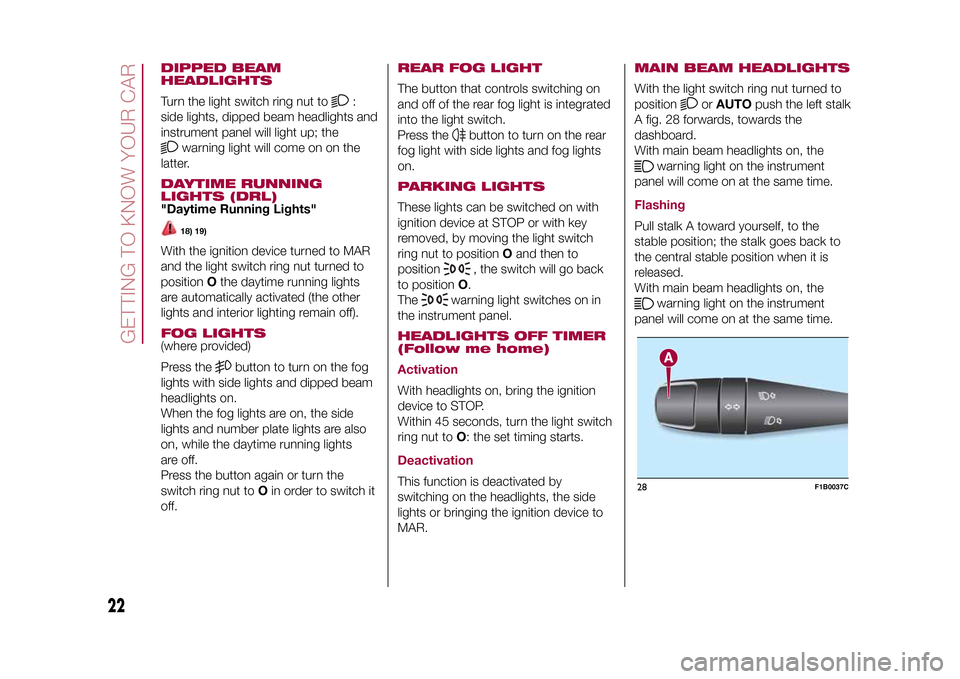
MAIN BEAM HEADLIGHTSWith the light switch ring nut turned to
position
orAUTOpush the left stalk
A fig. 28 forwards, towards the
dashboard.
With main beam headlights on, the
warning light on the instrument
panel will come on at the same time.
FlashingPull stalk A toward yourself, to the
stable position; the stalk goes back to
the central stable position when it is
released.
With main beam headlights on, the
warning light on the instrument
panel will come on at the same time.
28
F1B0037C
22
GETTING TO KNOW YOUR CAR
15-12-2014 8:23 Pagina 22
Page 25 of 240
Automatic main beam headlights(where provided)
In order not to disturb other road users,
the main beam headlights are
automatically deactivated when
approaching vehicles travelling in the
opposite direction or when following a
vehicle travelling in the same direction.
This function can be set through the
display menu (see the instructions
in the "Display" paragraph, "Knowing
the instrument panel" chapter); the light
switch ring nut must be turned to
AUTO to activate.
The function is activated by pushing the
stalk toward the dashboard (stable
position); the
warning light comes
on in the instrument panel. The
warning light will also come on in
the instrument panel with main beam
headlights on. If the vehicle is turned off
with the setting described previously,
the automatic main beam headlight
function will need a new resetting: bring
back the stalk in the centre position
and then press it again towards the
instrument panel.
When the speed is higher than 40 km/h
and the function is active, if the stalk
is brought again to the stable central
position the function deactivates and
the main beam headlights turn off.When the speed is lower than 15 km/h
and the function is active, the system
automatically switches the main beam
headlights off.
If the stalk is moved from the stable
central position and pushed again
towards the dashboard in the stable
position, this is interpreted as a request
for fixed main beam headlights: the
warning light comes on in the
instrument panel and the main beam
headlights turn on until vehicle speed
exceeds 40 km/h again. When this
threshold is exceeded the function
activates again automatically and the
warning light comes on again
in the instrument panel.
To deactivate this function, rotate the
light switch ring nut to the
position.
DIRECTION INDICATORSBring left stalk A fig. 28 to the (stable)
position:
upwards: activates the right direction
indicator;
downwards: activates the left direction
indicator.
The
or
warning light respectively
will flash on the instrument panel.
The direction indicators switch
off automatically when the steering
wheel is straightened or when the
daytime running lights (DRL)/parking
lights are activated.
"Lane Change" functionIf you wish to signal a lane change while
running, place the left stalk in the
unstable position for less than half a
second.
The direction indicator on the side
selected will flash five times and then
switch off automatically.HEADLIGHT ALIGNMENT
ADJUSTMENT
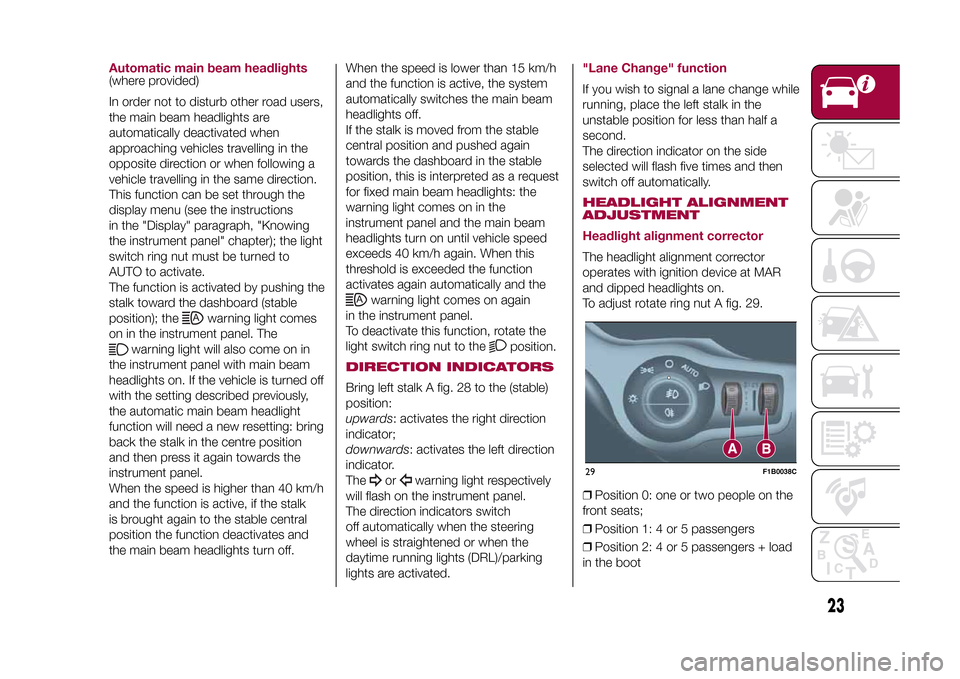
Headlight alignment correctorThe headlight alignment corrector
operates with ignition device at MAR
and dipped headlights on.
To adjust rotate ring nut A fig. 29.
❒Position 0: one or two people on the
front seats;
❒Position 1: 4 or 5 passengers
❒Position 2: 4 or 5 passengers + load
in the boot29
F1B0038C
23
15-12-2014 8:23 Pagina 23
Page 46 of 240
WARNING LIGHTS AND MESSAGESIMPORTANT The warning light switches on in the instrument panel together with a dedicated message and/or acoustic signal
when applicable. These indications are indicative and precautionary and as such must not be considered as exhaustive and/or
alternative to the information contained in the Owner Handbook, which you are advised to read carefully in all cases. Always
refer to the information in this chapter in the event of a failure indication.
IMPORTANT Failure indications displayed are divided into two categories: serious and less serious failures. Serious failures are
indicated by a repeated and prolonged warning "cycle". Less serious failures are indicated by a warning "cycle" with a shorter
duration. The display cycle of both categories can be interrupted. The instrument panel warning light will stay on until the cause
of the failure is eliminated.
Warning light What it means
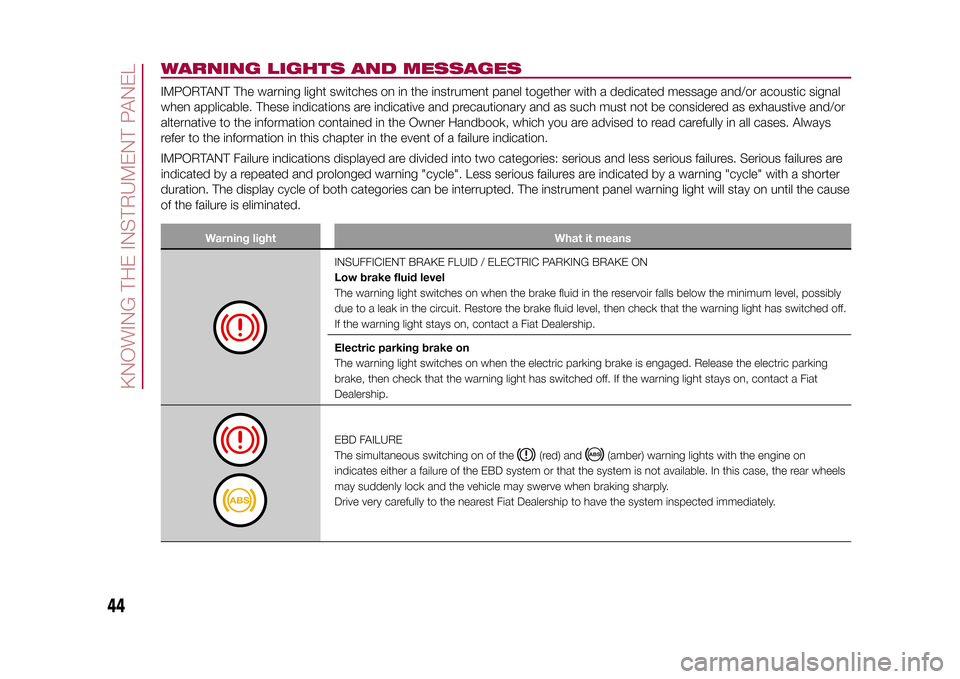
INSUFFICIENT BRAKE FLUID / ELECTRIC PARKING BRAKE ON
Low brake fluid level
The warning light switches on when the brake fluid in the reservoir falls below the minimum level, possibly
due to a leak in the circuit. Restore the brake fluid level, then check that the warning light has switched off.
If the warning light stays on, contact a Fiat Dealership.
Electric parking brake on
The warning light switches on when the electric parking brake is engaged. Release the electric parking
brake, then check that the warning light has switched off. If the warning light stays on, contact a Fiat
Dealership.EBD FAILURE
The simultaneous switching on of the
(red) and
(amber) warning lights with the engine on
indicates either a failure of the EBD system or that the system is not available. In this case, the rear wheels
may suddenly lock and the vehicle may swerve when braking sharply.
Drive very carefully to the nearest Fiat Dealership to have the system inspected immediately.
44
KNOWING THE INSTRUMENT PANEL
15-12-2014 8:23 Pagina 44
Page 57 of 240
Symbol What it means
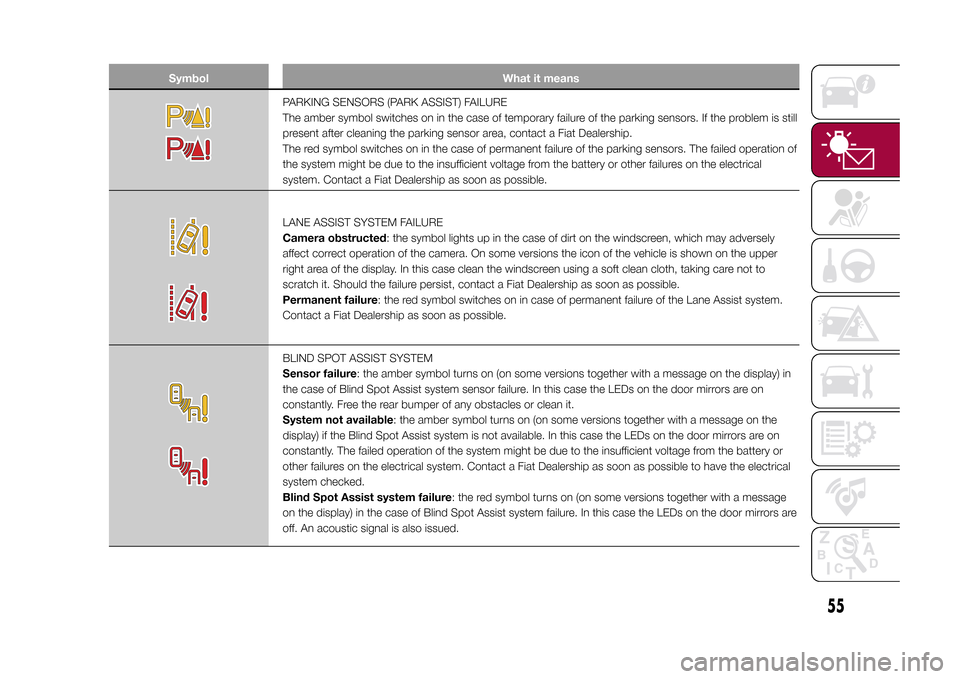
PARKING SENSORS (PARK ASSIST) FAILURE
The amber symbol switches on in the case of temporary failure of the parking sensors. If the problem is still
present after cleaning the parking sensor area, contact a Fiat Dealership.
The red symbol switches on in the case of permanent failure of the parking sensors. The failed operation of
the system might be due to the insufficient voltage from the battery or other failures on the electrical
system. Contact a Fiat Dealership as soon as possible.LANE ASSIST SYSTEM FAILURE
Camera obstructed: the symbol lights up in the case of dirt on the windscreen, which may adversely
affect correct operation of the camera. On some versions the icon of the vehicle is shown on the upper
right area of the display. In this case clean the windscreen using a soft clean cloth, taking care not to
scratch it. Should the failure persist, contact a Fiat Dealership as soon as possible.
Permanent failure: the red symbol switches on in case of permanent failure of the Lane Assist system.
Contact a Fiat Dealership as soon as possible.BLIND SPOT ASSIST SYSTEM
Sensor failure: the amber symbol turns on (on some versions together with a message on the display) in
the case of Blind Spot Assist system sensor failure. In this case the LEDs on the door mirrors are on
constantly. Free the rear bumper of any obstacles or clean it.
System not available: the amber symbol turns on (on some versions together with a message on the
display) if the Blind Spot Assist system is not available. In this case the LEDs on the door mirrors are on
constantly. The failed operation of the system might be due to the insufficient voltage from the battery or
other failures on the electrical system. Contact a Fiat Dealership as soon as possible to have the electrical
system checked.
Blind Spot Assist system failure: the red symbol turns on (on some versions together with a message
on the display) in the case of Blind Spot Assist system failure. In this case the LEDs on the door mirrors are
off. An acoustic signal is also issued.
55
15-12-2014 8:23 Pagina 55
Page 59 of 240
Symbol What it means
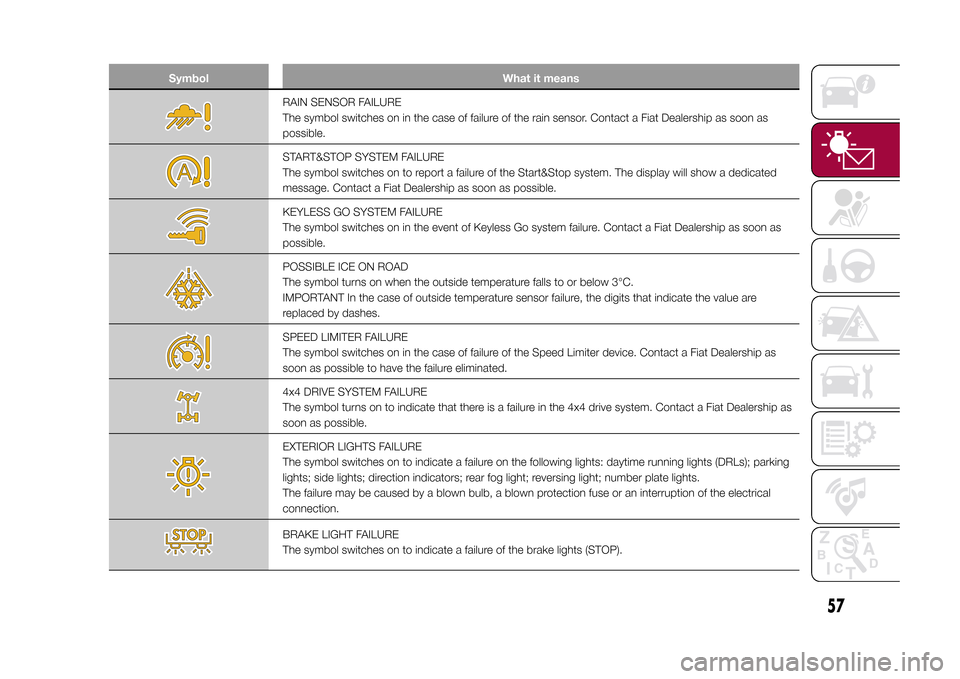
RAIN SENSOR FAILURE
The symbol switches on in the case of failure of the rain sensor. Contact a Fiat Dealership as soon as
possible.START&STOP SYSTEM FAILURE
The symbol switches on to report a failure of the Start&Stop system. The display will show a dedicated
message. Contact a Fiat Dealership as soon as possible.KEYLESS GO SYSTEM FAILURE
The symbol switches on in the event of Keyless Go system failure. Contact a Fiat Dealership as soon as
possible.POSSIBLE ICE ON ROAD
The symbol turns on when the outside temperature falls to or below 3°C.
IMPORTANT In the case of outside temperature sensor failure, the digits that indicate the value are
replaced by dashes.SPEED LIMITER FAILURE
The symbol switches on in the case of failure of the Speed Limiter device. Contact a Fiat Dealership as
soon as possible to have the failure eliminated.4x4 DRIVE SYSTEM FAILURE
The symbol turns on to indicate that there is a failure in the 4x4 drive system. Contact a Fiat Dealership as
soon as possible.EXTERIOR LIGHTS FAILURE
The symbol switches on to indicate a failure on the following lights: daytime running lights (DRLs); parking
lights; side lights; direction indicators; rear fog light; reversing light; number plate lights.
The failure may be caused by a blown bulb, a blown protection fuse or an interruption of the electrical
connection.BRAKE LIGHT FAILURE
The symbol switches on to indicate a failure of the brake lights (STOP).
57
15-12-2014 8:23 Pagina 57
Page 69 of 240

SensorsThe sensors are activated when any
forward gear is engaged at a speed
higher than about 10 km/h, or when
reverse is engaged.
The sensors are temporarily
deactivated with vehicle at a standstill
and the gear lever in position P (Park
- versions with automatic transmission),
or with vehicle at a standstill and
electric parking brake engaged
(versions with manual gearbox).
The detection area of the system
covers about a lane on both sides of
the vehicle (around 3 metres).
This area begins from the door mirror
and extends for about 6 metres
towards the rear part of the vehicle.
When the sensors are active the system
monitors the detection areas on both
sides of the vehicle and warns the
driver about the possible presence of
vehicles in these areas.
While driving the system monitors the
detection area from three different input
points (side, rear and front) to check
whether a signal needs to be sent
to the driver. The system can detect the
presence of a vehicle in one of these
three areas.IMPORTANT The system does not
signal the presence of fixed objects
(e.g. safety barriers, poles, walls, etc.).
However, in some circumstances,
the system may activate in the
presence of these objects. This is
normal and does not indicate a system
malfunction.
IMPORTANT The system does not
warn the driver about the presence of
vehicles coming from the opposite
direction, in the adjacent lanes.
57)
ImportantIf a trailer is hitched to the vehicle, the
system must be manually deactivated
using the relevant menu, in order to
avoid false warnings.
For the system to operate correctly, the
rear bumper area where the radar
sensors are located must stay free from
snow, ice and dirt gathered from the
road surface.
Do not cover the rear bumper area
where the radar sensors are located
with any object (e.g. adhesives, bike
rack, etc.).
Rear viewThe system detects vehicles coming
from the rear part of your vehicle on
both sides and entering the rear
detection area with a difference in
speed of less than 50 km/h with
respect to your vehicle.Overtaking vehiclesIf another vehicle is overtaken slowly
(with a difference in speed of less than
about 25 km/h) and this stays in the
blind spot for about 1.5 seconds, the
warning light on the door mirror of
the corresponding side lights up.
If the difference in speed between the
two vehicles is greater than about
25 km/h, the warning light does not
light up.RCP (Rear Cross Path detection)
systemThis system helps the driver during
reverse manoeuvres in the case of
reduced visibility.
The RCP system monitors the rear
detection areas on both sides of the
vehicle, to detect objects moving
towards the sides of the vehicle at a
minimum speed between about 1 km/h
and 3 km/h and objects moving at a
maximum speed of 35 km/h, as
generally happens in parking areas.
67
15-12-2014 8:23 Pagina 67
Page 74 of 240
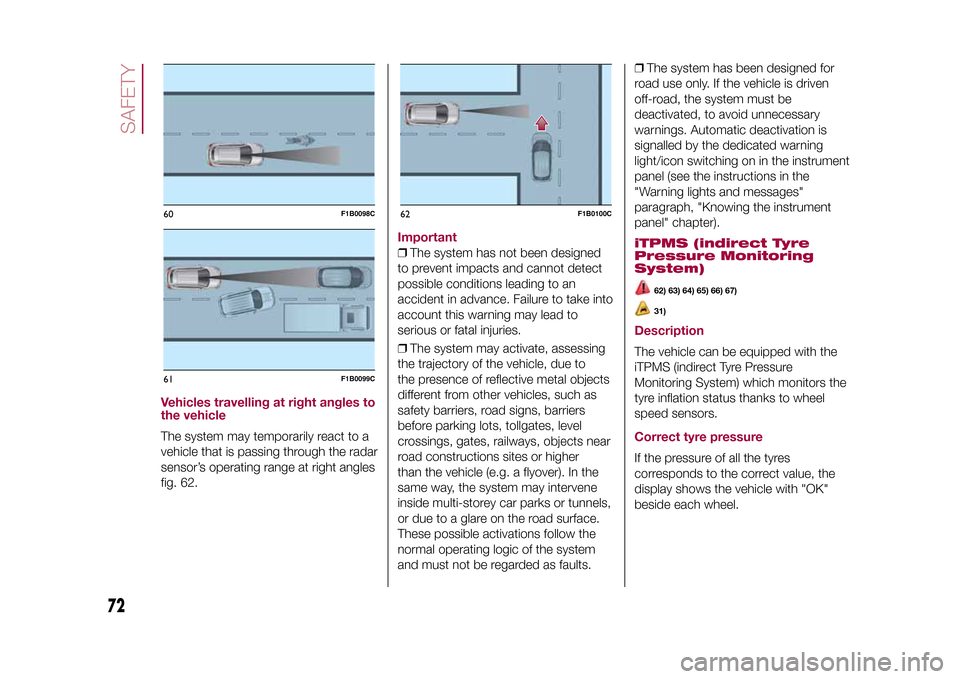
Vehicles travelling at right angles to
the vehicleThe system may temporarily react to a
vehicle that is passing through the radar
sensor’s operating range at right angles
fig. 62.
Important❒The system has not been designed
to prevent impacts and cannot detect
possible conditions leading to an
accident in advance. Failure to take into
account this warning may lead to
serious or fatal injuries.
❒The system may activate, assessing
the trajectory of the vehicle, due to
the presence of reflective metal objects
different from other vehicles, such as
safety barriers, road signs, barriers
before parking lots, tollgates, level
crossings, gates, railways, objects near
road constructions sites or higher
than the vehicle (e.g. a flyover). In the
same way, the system may intervene
inside multi-storey car parks or tunnels,
or due to a glare on the road surface.
These possible activations follow the
normal operating logic of the system
and must not be regarded as faults.❒The system has been designed for
road use only. If the vehicle is driven
off-road, the system must be
deactivated, to avoid unnecessary
warnings. Automatic deactivation is
signalled by the dedicated warning
light/icon switching on in the instrument
panel (see the instructions in the
"Warning lights and messages"
paragraph, "Knowing the instrument
panel" chapter).
iTPMS (indirect Tyre
Pressure Monitoring
System)
62) 63) 64) 65) 66) 67)31)
DescriptionThe vehicle can be equipped with the
iTPMS (indirect Tyre Pressure
Monitoring System) which monitors the
tyre inflation status thanks to wheel
speed sensors.Correct tyre pressureIf the pressure of all the tyres
corresponds to the correct value, the
display shows the vehicle with "OK"
beside each wheel.
60
F1B0098C
61
F1B0099C
62
F1B0100C
72
SAFETY
15-12-2014 8:23 Pagina 72
Page 76 of 240
58)The system is an aid for the driver, who
must always pay full attention while driving.
The responsibility always rests with the
driver, who must take into account the
traffic conditions in order to drive in
complete safety. The driver must always
maintain a safe distance from the vehicle in
front.
59)If the driver depresses the brake pedal
fully or carries out a fast steering during
system operation, the automatic braking
function may stop (e.g. to allow a possible
manoeuvre to avoid the obstacle).
60)The system intervenes on vehicles
travelling in the same lane. People, animals
and things (e.g. pushchairs) are not taken
into consideration.
61)If the vehicle must be placed on a roller
bench for maintenance interventions or if
it is washed in an automatic roller washing
tunnel with an obstacle in the front part
(e.g. another vehicle, a wall or another
obstacle), the system may detect its
presence and activate. In this case the
system must be deactivated through the
settings of theUconnect™system.
62)If the system signals a pressure
decrease on a specific tyre, it is
recommended to check the pressure on all
four tyres.
63)iTPMS does not relieve the driver from
the obligation to check the tyre pressure
every month; it is not to be considered
a system to replace maintenance or a
safety system.64)Tyre pressure must be checked with
tyres cold. Should it become necessary for
whatever reason to check pressure with
warm tyres, do not reduce pressure even if
it is higher than the prescribed value,
rather repeat the check when tyres are
cold.
65)The iTPMS cannot indicate sudden tyre
pressure drops (e.g. if a tyre bursts). In
this case, stop the vehicle, braking with
caution and avoiding abrupt steering.
66)The system only warns that the tyre
pressure is low: it is not able to inflate
them.
67)Insufficient tyre inflation increases fuel
consumption, reduces the tread duration
and may affect the capacity to drive safely.
WARNING
22)The system may have limited or absent
operation due to weather conditions such
as: heavy rain, hail, thick fog, heavy snow.
23)The section of the bumper before
the sensor must not be covered with
adhesives, auxiliary headlights or any other
object.
24)System intervention might be
unexpected or delayed when other vehicles
transport loads projecting from the side,
above or from the rear, with respect to the
normal size of the vehicle.
25)Operation can be adversely affected by
any structural change made to the vehicle,
such as a modification to the front
geometry, tyre change, or a heavier load
than the standard load of the vehicle.26)Incorrect repairs made on the front part
of the vehicle (e.g. bumper, chassis) may
alter the position of the radar sensor,
and adversely affect its operation. Go to a
Fiat Dealership for any operation of this
type.
27)Do not tamper with nor carry out any
intervention on the radar sensor or on
the camera on the windscreen. In the event
of a sensor failure, contact a Fiat
Dealership.
28)When towing a trailer (with modules
installed after purchasing the vehicle),
a vehicle or during loading manoeuvres on
a vehicle transporter (or in vehicle for
transport), the system must be deactivated
via theUconnect™system.
29)Do not wash with high-pressure jets in
the bumper lower area: in particular do
not operate on the system's electrical
connector.
30)Be careful in the case of repairs and
new paintings in the area around the
sensor (panel covering the sensor on the
left side of the bumper). In the event of
a frontal impact the sensor may
automatically deactivate and display a
warning to indicate that the sensor needs
to be repaired. Even without a malfunction
warning, deactivate the system operation
if you think that the position of the radar
sensor has changed (e.g. due to
low-speed frontal impact as during parking
manoeuvres). In these cases, go to a Fiat
Dealership to have the radar sensor
realigned or replaced.
74
SAFETY
15-12-2014 8:23 Pagina 74