engine FIAT 500X 2022 User Guide
[x] Cancel search | Manufacturer: FIAT, Model Year: 2022, Model line: 500X, Model: FIAT 500X 2022Pages: 312, PDF Size: 13.26 MB
Page 21 of 312

GETTING TO KNOW YOUR VEHICLE19
HOW TO USE REMOTE START
Push and release the Remote Start button on the
key fob twice within five seconds. The vehicle
doors will lock, the parking lights will flash, and the
horn will chirp twice (if programmed). Then the
engine will start and the vehicle will remain in the
Remote Start mode for a 15 minute cycle. Pushing
the Remote Start button a third time shuts the
engine off.
With Remote Start, the engine will only run for
15 minutes.
If an engine fault is present or fuel level is low,
the vehicle will start and then shut down in 10
seconds.
The parking lights will turn on and remain on
during Remote Start mode.
For security, power window and power sunroof
operation (if equipped) are disabled when the
vehicle is in the Remote Start mode.
The ignition must be placed in the ON/RUN posi -
tion before the Remote Start sequence can be
repeated for a third cycle. All of the following conditions must be met before
the engine will remote start:
Gear Selector in PARK
Doors closed
Hood closed
Liftgate closed
Hazard switch off
Brake switch inactive (brake pedal not pressed)
Battery at an acceptable charge level
PANIC button not pushed
System not disabled from previous Remote
Start event
Vehicle Security Light flashing
Ignition in OFF position
Fuel level meets minimum requirement
Vehicle Security system is not signaling an intru
-
sion
Malfunction Indicator Light (MIL) is not illumi -
nated
TO EXIT REMOTE START MODE
To drive the vehicle after starting the Remote Start
system, push and release the START/STOP ignition
button while pressing the brake pedal prior to the
end of the 15 minute cycle.
The Remote Start system will turn the engine off
with another push and release of the Remote Start
button on the key fob, or if the engine is allowed to
run for the entire 15 minute cycle. Once the
ignition is placed in the ON/RUN position, the
climate controls will resume the previously set
operations (temperature, blower control, etc.).
NOTE:
For vehicles equipped with the Keyless
Enter ‘n Go™ — Passive Entry feature, the
WARNING!
Do not start or run an engine in a closed
garage or confined area. Exhaust gas contains
Carbon Monoxide (CO) which is odorless and
colorless. Carbon Monoxide is poisonous and
can cause serious injury or death when
inhaled.
Keep key fobs away from children. Operation
of the Remote Start system, windows, door
locks or other controls could cause serious
injury or death.
2
22_FD_OM_EN_USC_t.book Page 19
Page 31 of 312
GETTING TO KNOW YOUR VEHICLE29
(Continued)
Adjusting The Seat Up Or Down
The height of the seats can be adjusted up or down
by using the power seat switch. The seat will move
in the direction of the switch. Release the switch
when the desired position is reached.
Tilting The Seat Up Or Down
The angle of the seat cushion can be adjusted up
or down using the power seat switch. The front of
the seat cushion will move in the direction of the
switch. Release the switch when the desired
position has been reached.
Reclining The Seatback
Push the seat recliner switch forward or rearward.
The seatback will move in the direction of the
switch. Release the switch when the desired
position has been reached.
Power Lumbar — If Equipped
Vehicles equipped with power driver or passenger
seats may also be equipped with power lumbar.
The power lumbar switch is located on the
outboard side of the power seat. Push the switch
forward to increase the lumbar support. Push the
switch rearward to decrease the lumbar support.
Pushing upward or downward on the switch will
raise and lower the position of the support.
HEATED SEATS — IF EQUIPPED
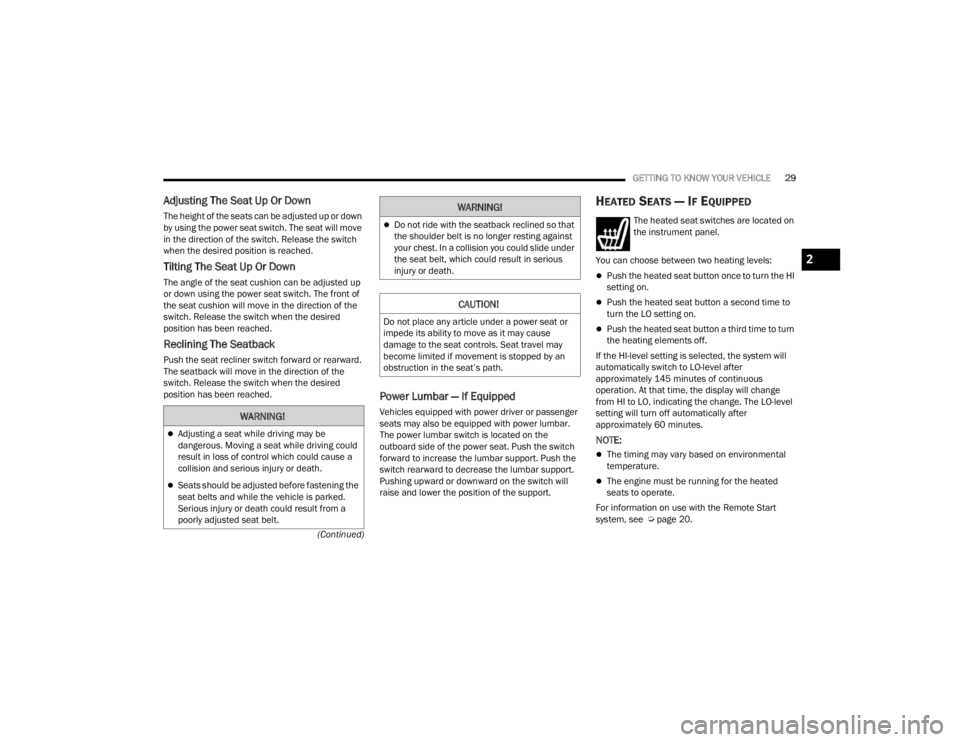
The heated seat switches are located on
the instrument panel.
You can choose between two heating levels:
Push the heated seat button once to turn the HI
setting on.
Push the heated seat button a second time to
turn the LO setting on.
Push the heated seat button a third time to turn
the heating elements off.
If the HI-level setting is selected, the system will
automatically switch to LO-level after
approximately 145 minutes of continuous
operation. At that time, the display will change
from HI to LO, indicating the change. The LO-level
setting will turn off automatically after
approximately 60 minutes.
NOTE:
The timing may vary based on environmental
temperature.
The engine must be running for the heated
seats to operate.
For information on use with the Remote Start
system, see Ú page 20.
WARNING!
Adjusting a seat while driving may be
dangerous. Moving a seat while driving could
result in loss of control which could cause a
collision and serious injury or death.
Seats should be adjusted before fastening the
seat belts and while the vehicle is parked.
Serious injury or death could result from a
poorly adjusted seat belt.
Do not ride with the seatback reclined so that
the shoulder belt is no longer resting against
your chest. In a collision you could slide under
the seat belt, which could result in serious
injury or death.
CAUTION!
Do not place any article under a power seat or
impede its ability to move as it may cause
damage to the seat controls. Seat travel may
become limited if movement is stopped by an
obstruction in the seat’s path.
WARNING!
2
22_FD_OM_EN_USC_t.book Page 29
Page 50 of 312

48GETTING TO KNOW YOUR VEHICLE
Climate Control OFF
To turn the Climate Controls off, turn the
blower control knob to the OFF (O)
position.
AUTOMATIC TEMPERATURE CONTROL
(ATC)
Automatic Operation
1. Push the AUTO button on the front ATC panel
and the word “AUTO” will illuminate in the
front ATC display, along with two
temperatures for the driver and front
passenger. The system will then automat -
ically regulate the amount of airflow.
2. Adjust the temperature you would like the system to maintain, by adjusting the driver,
and passenger temperatures. Once the
desired temperature is displayed, the system
will achieve and automatically maintain that
comfort level.
3. When the system is set up for your comfort level, it is not necessary to change the
settings. You will experience the greatest
efficiency by simply allowing the system to
function automatically.
NOTE:It is not necessary to move the temperature
settings. The system automatically adjusts the
temperature, mode, and fan speed to provide
comfort as quickly as possible.
To provide you with maximum comfort in the
automatic mode, during cold start-ups, the blower
fan will remain on low until the engine warms up.
The fan will engage immediately if the Defrost
mode is selected, or by changing the front blower
knob setting.
Manual Operation Override
This system offers a full complement of manual
override features. The AUTO symbol in the front
ATC display will be turned off when the system is
being used in the manual mode.
CLIMATE VOICE RECOGNITION
Adjust vehicle temperatures hands-free and keep
everyone comfortable while you keep moving
ahead. (If vehicle is equipped with climate control.)
Push the VR button . After the beep, say one of
the following commands:
“Set the driver temperature to 70 degrees ”
“Set the passenger temperature to 70 degrees ”Did You Know:
Voice Command for Climate may
only be used to adjust the interior temperature of
your vehicle. Voice Command will not work to
adjust the heated seats or steering wheel if
equipped.
OPERATING TIPS
Refer to the chart at the end of this section for
suggested control settings for various weather
conditions.
Summer Operation
The engine cooling system must be protected with
a high-quality antifreeze coolant to provide proper
corrosion protection and to protect against engine
overheating. OAT coolant (conforming to
MS.90032) is recommended.
Winter Operation
To ensure the best possible heater and defroster
performance, make sure the engine cooling
system is functioning properly and the proper
amount, type, and concentration of coolant is
used. Use of the Air Recirculation mode during
Winter months is not recommended, because it
may cause window fogging.
22_FD_OM_EN_USC_t.book Page 48
Page 52 of 312
50GETTING TO KNOW YOUR VEHICLE
Climate Control System Compressor
Push the A/C Control button to activate/deactivate
the compressor (activation is indicated by the LED
on the button turning on).
The system remembers that the compressor has
been turned off, even after the engine has
stopped.
Pushing the A/C button will stop AUTO mode (AUTO
LED will turn off). To restore automatic control of
compressor, push the AUTO button again.
NOTE:With the compressor off, air cannot be introduced
to the passenger compartment with a temperature
lower than the outside temperature. Under certain
environmental conditions, windows could fog
rapidly since the air is not dehumidified.
Operating Tips Chart
INTERIOR STORAGE AND EQUIPMENT
STORAGE
Glove Compartments
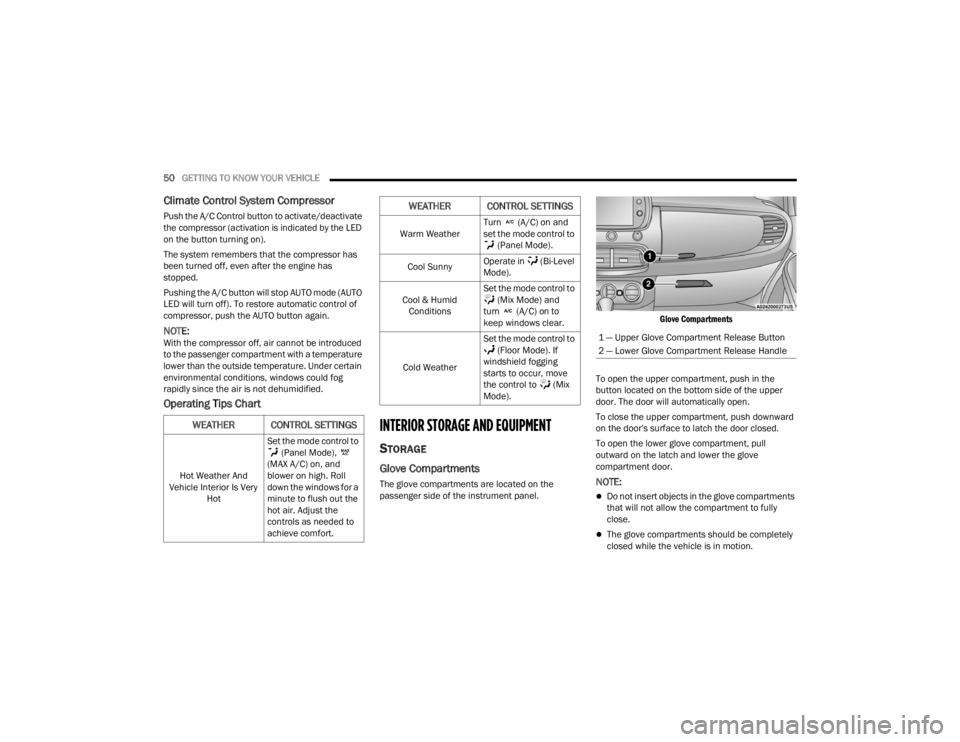
The glove compartments are located on the
passenger side of the instrument panel.
Glove Compartments
To open the upper compartment, push in the
button located on the bottom side of the upper
door. The door will automatically open.
To close the upper compartment, push downward
on the door's surface to latch the door closed.
To open the lower glove compartment, pull
outward on the latch and lower the glove
compartment door.NOTE:
Do not insert objects in the glove compartments
that will not allow the compartment to fully
close.
The glove compartments should be completely
closed while the vehicle is in motion.
WEATHER CONTROL SETTINGS
Hot Weather And
Vehicle Interior Is Very Hot Set the mode control to
(Panel Mode),
(MAX A/C) on, and
blower on high. Roll
down the windows for a
minute to flush out the
hot air. Adjust the
controls as needed to
achieve comfort.
Warm Weather Turn (A/C) on and
set the mode control to
(Panel Mode).
Cool Sunny Operate in (Bi-Level
Mode).
Cool & Humid Conditions Set the mode control to
(Mix Mode) and
turn (A/C) on to
keep windows clear.
Cold Weather Set the mode control to
(Floor Mode). If
windshield fogging
starts to occur, move
the control to (Mix
Mode).
WEATHER CONTROL SETTINGS
1 — Upper Glove Compartment Release Button
2 — Lower Glove Compartment Release Handle
22_FD_OM_EN_USC_t.book Page 50
Page 54 of 312
52GETTING TO KNOW YOUR VEHICLE
POWER OUTLETS
There is one 12 Volt (13 Amp) power outlet in this
vehicle, located under the climate controls. This
power outlet can power mobile phones, electronics
and other low power devices.
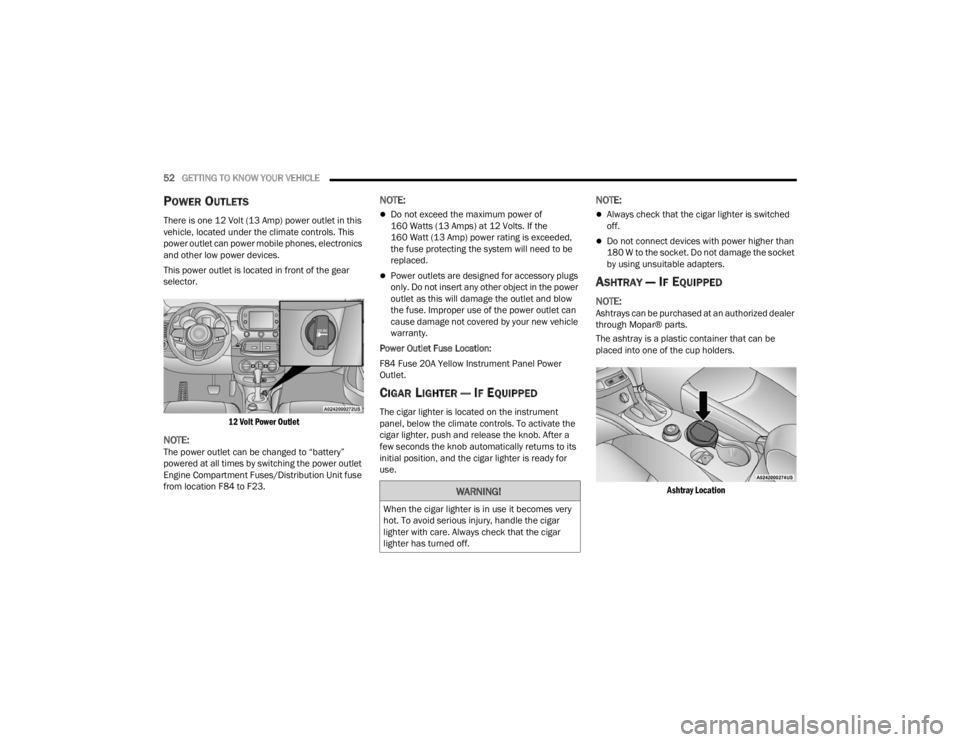
This power outlet is located in front of the gear
selector.
12 Volt Power Outlet
NOTE:The power outlet can be changed to “battery”
powered at all times by switching the power outlet
Engine Compartment Fuses/Distribution Unit fuse
from location F84 to F23.
NOTE:
Do not exceed the maximum power of
160 Watts (13 Amps) at 12 Volts. If the
160 Watt (13 Amp) power rating is exceeded,
the fuse protecting the system will need to be
replaced.
Power outlets are designed for accessory plugs
only. Do not insert any other object in the power
outlet as this will damage the outlet and blow
the fuse. Improper use of the power outlet can
cause damage not covered by your new vehicle
warranty.
Power Outlet Fuse Location:
F84 Fuse 20A Yellow Instrument Panel Power
Outlet.
CIGAR LIGHTER — IF EQUIPPED
The cigar lighter is located on the instrument
panel, below the climate controls. To activate the
cigar lighter, push and release the knob. After a
few seconds the knob automatically returns to its
initial position, and the cigar lighter is ready for
use.
NOTE:
Always check that the cigar lighter is switched
off.
Do not connect devices with power higher than
180 W to the socket. Do not damage the socket
by using unsuitable adapters.
ASHTRAY — IF EQUIPPED
NOTE:Ashtrays can be purchased at an authorized dealer
through Mopar® parts.
The ashtray is a plastic container that can be
placed into one of the cup holders.
Ashtray Location
WARNING!
When the cigar lighter is in use it becomes very
hot. To avoid serious injury, handle the cigar
lighter with care. Always check that the cigar
lighter has turned off.
22_FD_OM_EN_USC_t.book Page 52
Page 60 of 312
58GETTING TO KNOW YOUR VEHICLE
CLOSING THE POWER ROOF
Express Mode
Push the close switch and release it within one-half
second. The power roof will close fully and stop
automatically. This is called “Express Close”.
During Express Close operation, any movement of
the switch will stop the power roof.
Manual Mode
To close the power roof manually, push and hold
the close switch. The power roof will move forward
and automatically stop at the fully closed position.
Any release of the switch will stop the movement.
The power roof will remain in a partially closed
position until the switch is pushed and held again.
If the power roof switch fails, the sunroof can be
operated manually. See, Úpage 56 for further
information.
POWER ROOF MAINTENANCE
Use only a non-abrasive cleaner and a soft cloth to
clean the window glass. For important information
on cleaning and caring for your vehicle
Ú page 286.
IGNITION OFF OPERATION
The power sliding roof switch can remain active in
Accessory Delay for up to approximately
10 minutes after the vehicle’s ignition is placed to the OFF position. Opening either front door will
cancel this feature.
NOTE:Ignition Off timing is programmable through the
Uconnect system Ú
page 123.
RELEARN PROCEDURE
For vehicles equipped with a power sliding roof,
there is a relearn procedure that allows you to
calibrate the power roof when the “Express Mode”
stops working. To reset the power sliding roof,
follow these steps:
1. Place the ignition in the RUN position, and
start the vehicle.
NOTE:The engine must be running to perform the relearn
procedure.
2. Ensure the power sliding roof is in the fully closed position.
3. Push and hold the open/close switch for 10 seconds. This will put the power sliding roof
into calibration mode.
4. Continue holding down the close button while the top goes fully open and then back to fully
close. 5. Once the power sliding roof has stopped in the
fully closed position, release the open/close
switch. The power sliding roof is now reset and
ready to use.
NOTE:If the open/close switch is released anytime during
the relearning process, the relearn may not be
complete, and the procedure must be repeated.
HOOD
TO OPEN THE HOOD
To open the hood, two latches must be released.
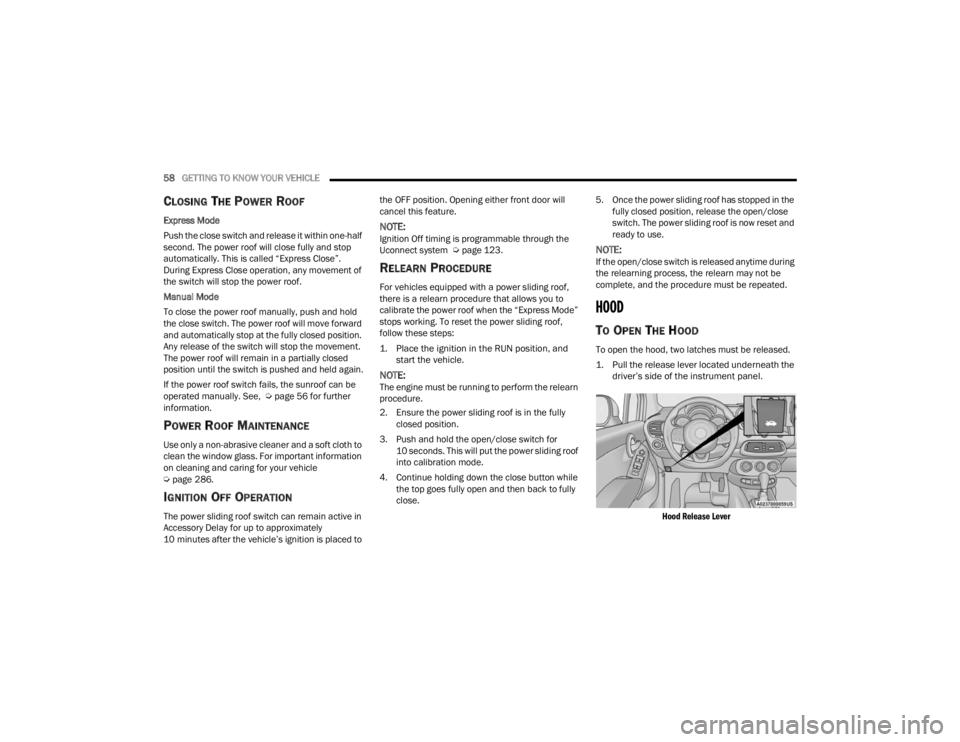
1. Pull the release lever located underneath the driver’s side of the instrument panel.
Hood Release Lever
22_FD_OM_EN_USC_t.book Page 58
Page 61 of 312

GETTING TO KNOW YOUR VEHICLE59
2. Move to the outside of the vehicle and push the safety latch release lever toward the
passenger side of the vehicle. The hood
release lever is located behind the center front
edge of the hood.
Safety Latch Release Lever Location
3. Remove the support rod from the locking tab and insert it into the seat located on the
underside of the hood. Be sure the rod is
locked into position.
Hood Prop System
TO CLOSE THE HOOD
1. Hold up the hood with one hand and with the
other hand remove the support rod from its
seat and reinsert it into the locking tab.
2. Lower the hood to approximately 12 inches (30 cm) from the engine compartment and
drop it. Make sure that the hood is completely
closed.
1 — Locking Tab
2 — Support Rod
3 — Support Rod Seat
WARNING!
Be sure the hood is fully latched before driving
your vehicle. If the hood is not fully latched, it
could open when the vehicle is in motion and
block your vision. Failure to follow this warning
could result in serious injury or death.
CAUTION!
To prevent possible damage, do not slam the
hood to close it. Lower hood to approximately
12 inches (30 cm) and drop the hood to close.
Make sure hood is fully closed for both latches.
Never drive vehicle unless hood is fully closed,
with both latches engaged.
2
22_FD_OM_EN_USC_t.book Page 59
Page 66 of 312
64GETTING TO KNOW YOUR INSTRUMENT PANEL
INSTRUMENT CLUSTER DESCRIPTIONS
1. Speedometer
Indicates the speed of the car.
2. Fuel Level Gauge
The fuel gauge in the instrument panel indi -
cates the amount of fuel left in the tank.
The light comes on, together with a chime
and the display of a message in the instru -
ment cluster display, when the gas tank has
1.5 to 2 gallons (5 to 7 liters) of fuel
remaining.
3. Instrument Cluster Display
The vehicle can be equipped with multi
functional instrument cluster display which
offers useful information to the driver.
With the ignition in the OFF position (and
the key removed, for vehicles with a
mechanical key), opening/closing of a door
will activate the instrument cluster display
for viewing, and display the total miles or
kilometers in the odometer.
4. Engine Coolant Temperature
The temperature gauge on the instrument
panel displays the temperature of the
engine coolant and starts providing indica -
tions when the coolant temperature
exceeds approximately 122°F (50°C). In the normal use of the car, the temperature
gauge can move in different directions
based on the use of the car. The light comes
on, together with a chime and the display of
a message in the instrument cluster display,
to indicate an excessive increase in the
temperature of the engine coolant. Stop the
engine and contact an authorized dealer.
5. Tachometer
Indicates the engine speed in Revolutions
Per Minute (RPM x 1000).
INSTRUMENT CLUSTER DISPLAY
The vehicle is equipped with multi functional
instrument cluster display which offers useful
information to the driver. With the ignition in the
OFF position (and the key removed, for vehicles
with a mechanical key), opening/closing of a door
will activate the instrument cluster display for
viewing, and display the total miles or kilometers in
the odometer. The instrument cluster display is
designed to display important information about
the vehicle’s systems and features. Using a driver
interactive display located on the instrument
panel, your instrument cluster display can show
you how systems are working and give you
warnings when they aren’t. The steering wheel
mounted controls allow you to scroll through and enter the main menus and submenus. You can
access the specific information you want and
make selections and adjustments.
INSTRUMENT CLUSTER DISPLAY
C
ONTROL BUTTONS
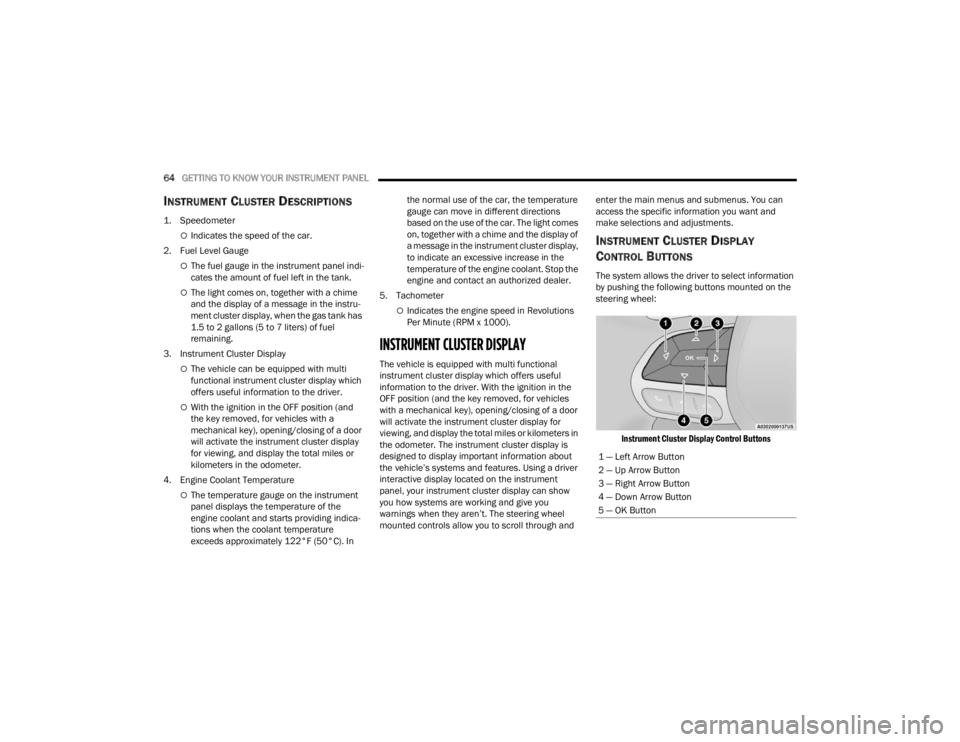
The system allows the driver to select information
by pushing the following buttons mounted on the
steering wheel:
Instrument Cluster Display Control Buttons
1 — Left Arrow Button
2 — Up Arrow Button
3 — Right Arrow Button
4 — Down Arrow Button
5 — OK Button
22_FD_OM_EN_USC_t.book Page 64
Page 67 of 312

GETTING TO KNOW YOUR INSTRUMENT PANEL65
The instrument cluster display features a driver
interactive display that is located in the instrument
cluster. Pushing the controls on the left side of the
steering wheel allows the driver to select vehicle
information and Personal Settings.
Push the back/left arrow button to access
the information screens or submenu screens of
a main menu item.
Push the up arrow button to scroll upward
through the main menus and submenus
(Speedometer, Trip, Drive Mode Selector,
Vehicle Info, Driver Assist, Audio, Phone, Naviga -
tion, Messages, Settings).
Push the right arrow button to access the
information screens or submenu screens of a
main menu item.
Push the down arrow button to scroll down -
ward through the main menu and submenus
(Speedometer, Trip, Drive Mode Selector,
Vehicle Info, Driver Assist, Audio, Phone, Naviga -
tion, Messages, Settings).
Push the OK button to access/select the infor -
mation screens or submenu screens of a main
menu item. Push and hold the OK button for two
seconds to reset displayed/selected features
that can be reset.
ENGINE OIL CHANGE RESET —
I
F EQUIPPED
Your vehicle may be equipped with an engine oil
change indicator system. The “Change Engine Oil”
message will display in the instrument cluster
display. The engine oil change indicator system is
duty cycle based, which means the engine oil
change interval may fluctuate, dependent upon
your personal driving style.
Unless reset, this message will continue to display
each time you turn the ignition switch to the ON/
RUN position. To reset the oil change indicator
system (after performing the scheduled
maintenance), refer to the following procedure.
1. Turn the ignition switch to the ON position (do
not start the engine).
2. Fully push the accelerator pedal slowly, three times, within 10 seconds.
3. Turn the ignition switch to the OFF position.
NOTE:If the indicator message illuminates when you start
the vehicle, the oil change indicator system did not
reset. If necessary, repeat this procedure.
INSTRUMENT CLUSTER DISPLAY MAIN
M
ENU
The Main Menu is composed of several options
that can be selected using the control buttons
above.
NOTE:
The display mode of the menu items varies
depending on the type of display.
For some items, a submenu is provided.
In the Uconnect system, some items on the
menu are not shown on the instrument cluster
display Ú page 64.
Instrument Cluster Display Menu/
Submenu Items
The Menu is composed of the following items:
Speedometer
Trip
Instantaneous Info
Trip A
Trip B
Drive Mode Selector — If Equipped
Auto Mode
Sport Mode
All Weather Mode
3
22_FD_OM_EN_USC_t.book Page 65
Page 68 of 312

66GETTING TO KNOW YOUR INSTRUMENT PANEL
Vehicle Info
Tire Pressure
Oil Temperature
Battery Voltage
Driver Assist
Lane Departure Warning
Adaptive Cruise Control
Stop/Start — If Equipped
Audio
Phone
Navigation
Messages
Settings
Display
Units
Clock and Date
Security
Safety & Assistance
Lights
Doors & Locks
Engine OFF Procedure — If Equipped
Speedometer
View and change the speedometer scale from mph
to km/h (km/h to mph).
Trip
This instrument cluster display menu item allows
you to view and select information about the "Trip
Computer”:
Instantaneous info
View the distance to empty (miles or km).
View the instantaneous consumption (mpg,
or l/100km or km/l).
Trip A
View Trip A distance (miles or km).
View travel time A (hours/minutes/
seconds).
View average consumption A (mpg, or
l/100km or km/l).
View average speed A (mph or km/h).
Trip B
View Trip B distance (miles or km).
View travel time B (hours/minutes/
seconds).
View average consumption B (mpg, or
l/100km or km/l).
View average speed B (mph or km/h).
Drive Mode Selector
This instrument cluster display menu/submenu
items allows you to view and select information
about the "Drive Mode".
Vehicle Info
Push and release the up or down arrow
button until "Vehicle Info" is highlighted in the
instrument cluster display. Push and release the
right arrow button and Coolant Temp will be
displayed. Push the right or left arrow button
to scroll through the following information displays:
Tire pressure
View the information relating to the Tire
Pressure Monitoring System (TPMS) (if
equipped).
Oil Temperature
View the engine oil temperature.
Battery Voltage
View the voltage value (state of charge) of
the battery.
22_FD_OM_EN_USC_t.book Page 66