lock FIAT 500X 2022 Owner's Manual
[x] Cancel search | Manufacturer: FIAT, Model Year: 2022, Model line: 500X, Model: FIAT 500X 2022Pages: 312, PDF Size: 13.26 MB
Page 44 of 312
42GETTING TO KNOW YOUR VEHICLE
(Continued)
in the intermittent position, no wipe cycle is
performed for safety reasons. This temporary
inhibition avoids accidental activations of the
wiping (e.g. during the hand washing of the
windshield, blocking the blades in ice/snow
conditions).
The user can activate the Rain Sensing Wipers in
three ways:
Moving the lever from the O (off) position to the
intermittent positions.
One Mist command actuation.
The vehicle speed exceeds 3 mph (5 km/h) and
the rain sensor detects the presence of rain.
REAR WINDOW WIPER/WASHER
The rear wiper/washer controls are located on the
windshield wiper lever on the right side of the
steering column. The rear wiper/washer is
operated by rotating a switch, located at the
middle of the lever.
NOTE:If the front wiper is moving and the vehicle is
shifted in REVERSE, the rear wiper will perform one
round up to clean the rear window. Rotate the center portion of the lever
upward to the first detent for intermittent
operation and to the second detent for
continuous rear wiper operation. To use the washer, push the lever
forward and hold while spray is desired. If
the lever is pushed while in the
intermittent setting, the wiper will turn on
and operate for several wipe cycles after the end of
the lever is released, and then resume the
intermittent interval previously selected.
NOTE:As a protective measure, the pump will stop if the
switch is held for more than 30 seconds. Once the
lever is released, the pump will resume normal
operation.
If the lever is pushed while the wiper is in the off
position, the wiper will operate for several wipe
cycles, then turn off.
If the rear wiper is operating when the ignition is
placed in the OFF position, the wiper will
automatically return to the “park” position.WINDSHIELD WIPER DE-ICER —
I
F EQUIPPED
Your vehicle may be equipped with a Windshield
Wiper De-Icer feature that may be activated under
the following conditions:
Activation By Rear Defrost — The Windshield
Wiper De-Icer will be activated automatically
when the rear defrost is turned on and the
ambient temperature is below 40°F (4.4°C).
Activation By Remote Start Operation — When
Remote Start is active and the outside ambient
temperature is less than 40°F (4.4°C), the
Windshield Wiper De-Icer will activate. Exiting
Remote Start will resume its previous operation.
If the Windshield Wiper De-Icer was active, the
timer and operation will continue.CAUTION!
Failure to follow these cautions can cause
damage to the heating elements:
Use care when washing the inside of the rear
window. Do not use abrasive window cleaners
on the interior surface of the window. Use a
soft cloth and a mild washing solution, wiping
parallel to the heating elements. Labels can
be peeled off after soaking with warm water.
Do not use scrapers, sharp instruments, or
abrasive window cleaners on the interior
surface of the window.
Keep all objects a safe distance from the
window.
CAUTION!
22_FD_OM_EN_USC_t.book Page 42
Page 45 of 312
GETTING TO KNOW YOUR VEHICLE43
CLIMATE CONTROLS
The Climate Control system allows you to regulate
the temperature, air flow, and direction of air
circulating throughout the vehicle. The controls are
located on the touchscreen (if equipped) and on
the instrument panel below the radio.
AUTOMATIC CLIMATE CONTROL
D
ESCRIPTIONS AND FUNCTIONS
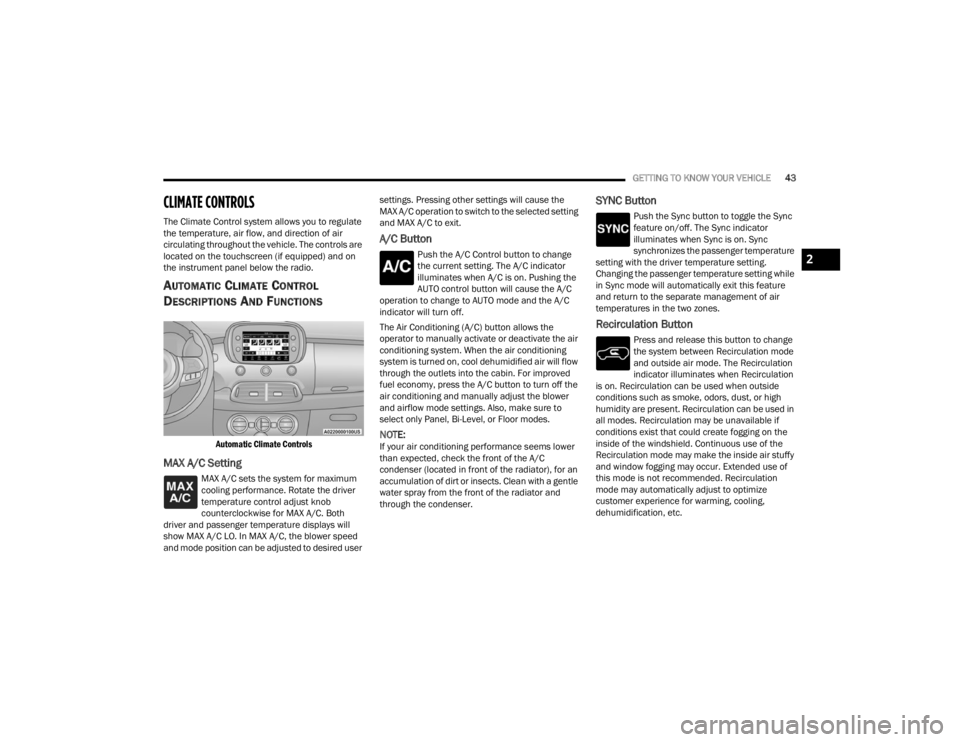
Automatic Climate Controls
MAX A/C Setting
MAX A/C sets the system for maximum
cooling performance. Rotate the driver
temperature control adjust knob
counterclockwise for MAX A/C. Both
driver and passenger temperature displays will
show MAX A/C LO. In MAX A/C, the blower speed
and mode position can be adjusted to desired user settings. Pressing other settings will cause the
MAX A/C operation to switch to the selected setting
and MAX A/C to exit.
A/C Button
Push the A/C Control button to change
the current setting. The A/C indicator
illuminates when A/C is on. Pushing the
AUTO control button will cause the A/C
operation to change to AUTO mode and the A/C
indicator will turn off.
The Air Conditioning (A/C) button allows the
operator to manually activate or deactivate the air
conditioning system. When the air conditioning
system is turned on, cool dehumidified air will flow
through the outlets into the cabin. For improved
fuel economy, press the A/C button to turn off the
air conditioning and manually adjust the blower
and airflow mode settings. Also, make sure to
select only Panel, Bi-Level, or Floor modes.
NOTE:If your air conditioning performance seems lower
than expected, check the front of the A/C
condenser (located in front of the radiator), for an
accumulation of dirt or insects. Clean with a gentle
water spray from the front of the radiator and
through the condenser.
SYNC Button
Push the Sync button to toggle the Sync
feature on/off. The Sync indicator
illuminates when Sync is on. Sync
synchronizes the passenger temperature
setting with the driver temperature setting.
Changing the passenger temperature setting while
in Sync mode will automatically exit this feature
and return to the separate management of air
temperatures in the two zones.
Recirculation Button
Press and release this button to change
the system between Recirculation mode
and outside air mode. The Recirculation
indicator illuminates when Recirculation
is on. Recirculation can be used when outside
conditions such as smoke, odors, dust, or high
humidity are present. Recirculation can be used in
all modes. Recirculation may be unavailable if
conditions exist that could create fogging on the
inside of the windshield. Continuous use of the
Recirculation mode may make the inside air stuffy
and window fogging may occur. Extended use of
this mode is not recommended. Recirculation
mode may automatically adjust to optimize
customer experience for warming, cooling,
dehumidification, etc.
2
22_FD_OM_EN_USC_t.book Page 43
Page 46 of 312
44GETTING TO KNOW YOUR VEHICLE
In cold weather, use of Recirculation mode may
lead to excessive window fogging. The
Recirculation feature may be unavailable if
conditions exist that could create fogging on the
inside of the windshield.
AUTO Button
Set your desired temperature and press
AUTO. AUTO will achieve and maintain
your desired temperature by
automatically adjusting the blower speed
and air distribution. AUTO mode is highly
recommended for efficiency. Air Conditioning (A/C)
may be active during AUTO operation to improve
performance. Push the button on the faceplate to
turn AUTO on. The AUTO indicator illuminates when
AUTO is on. Toggling this function will cause the
system to switch between manual mode and
automatic mode Ú page 48.
MAX Defrost Button
Push the MAX Defrost button to change
the current airflow setting to Defrost
mode. The MAX Defrost indicator
illuminates when MAX Defrost is on.
Performing this function will cause the automatic
climate controls to change to manual mode. The
blower speed increases to full (all LEDs on) when
MAX Defrost mode is selected, the air conditioning
compressor is turned on (LED on), both driver and
passenger temperature controls are set to (HI),
defrost mode is selected (LED on), rear defroster is turned on (LED on) and the air recirculation is
turned off (LED off). If the MAX Defrost mode is
turned off, the climate system will return to the
previous setting.
Rear Defrost Button
Push the Rear Defrost button to turn on
the rear window defroster and the heated
outside mirrors (if equipped). The Rear
Defrost indicator illuminates when the
rear window defroster is on. The rear window
defroster automatically turns off after 20 minutes.
Driver And Passenger Temperature Knobs
The passenger temperature knob provides the
passenger with independent temperature control.
The driver temperature knob provides the driver
with independent temperature control. Rotate the
adjustment knob to set the desired temperature.
Rotating the temperature knob clockwise
increases the temperature.
Rotating the temperature knob
counterclockwise decreases the
temperature.
The set temperature is shown on the display.
Turning the temperature knob completely in one
direction or the other activates the HI (maximum
heating) or LO (maximum cooling) functions shown
in the display, respectively. Rotate the driver
temperature knob fully counterclockwise for
maximum A/C (LO).
To deactivate these functions, turn the
temperature knob to the desired temperature.
NOTE:Rotating the passenger temperature control knob
while in Sync mode will automatically exit Sync.
CAUTION!
Failure to follow these cautions can cause
damage to the heating elements:
Use care when washing the inside of the rear
window. Do not use abrasive window cleaners
on the interior surface of the window. Use a
soft cloth and a mild washing solution, wiping
parallel to the heating elements. Labels can
be peeled off after soaking with warm water.
Do not use scrapers, sharp instruments, or
abrasive window cleaners on the interior
surface of the window.
Keep all objects a safe distance from the
window.
22_FD_OM_EN_USC_t.book Page 44
Page 49 of 312
GETTING TO KNOW YOUR VEHICLE47
illuminates when the rear window defroster is on.
The rear window defroster automatically turns off
after 20 minutes.
Temperature Control
Temperature Control regulates the temperature of
the air forced through the climate system. The temperature increases as you turn
the temperature control knob clockwise. The temperature decreases as you turn
the temperature control knob
counterclockwise.
Blower Control
Blower Control regulates the amount of
air forced through the climate control
system. There are seven blower speeds
available. The blower speed increases as
you turn the blower control knob clockwise from
the lowest blower setting. The blower speed
decreases as you turn the blower control knob
counterclockwise.
Mode Control
Turn the mode control knob to adjust
airflow distribution. The airflow
distribution mode can be adjusted so air
comes from the instrument panel
outlets, floor outlets, defrost outlets and demist
outlets.
Panel Mode
Air comes from the outlets in the
instrument panel. Each of these outlets
can be individually adjusted to direct the
flow of air. The air vanes of the center
outlets and outboard outlets can be moved up and
down or side to side to regulate airflow direction.
There is a shut-off wheel located below the air
vanes to shut-off or adjust the amount of airflow
from these outlets.
Bi-Level Mode
Air comes from the instrument panel
outlets and floor outlets. A slight amount
of air is directed through the defrost and
side window demister outlets.
NOTE:Bi-Level mode is designed under comfort condi -
tions to provide cooler air out of the panel outlets
and warmer air from the floor outlets.
Floor Mode
Air comes from the floor outlets. A slight
amount of air is directed through the
defrost and side window demister
outlets.
Mix Mode
Air comes from the floor, defrost, and
side window demister outlets. This
setting works best in cold or snowy
conditions that require extra heat to the
windshield. This setting is good for maintaining
comfort while reducing moisture on the
windshield.
CAUTION!
Failure to follow these cautions can cause
damage to the heating elements:
Use care when washing the inside of the rear
window. Do not use abrasive window cleaners
on the interior surface of the window. Use a
soft cloth and a mild washing solution, wiping
parallel to the heating elements. Labels can
be peeled off after soaking with warm water.
Do not use scrapers, sharp instruments, or
abrasive window cleaners on the interior
surface of the window.
Keep all objects a safe distance from the
window.
2
22_FD_OM_EN_USC_t.book Page 47
Page 56 of 312
54GETTING TO KNOW YOUR VEHICLE
Auto-Up Feature With Anti-Pinch Protection
Lift the window switch up for a short period of time
and release; the window will go up automatically.
To stop the window from going all the way up
during the Auto-Up operation, pull up or push down
on the switch briefly.
To close the window part way, lift the window
switch briefly and release it when you want the
window to stop.
If the window runs into any obstacle during
auto-closure, it will reverse direction and then go
back down. Remove the obstacle and use the
window switch again to close the window.
NOTE:Any impact due to rough road conditions may
trigger the auto-reverse function unexpectedly
during auto-closure. If this happens, pull the switch
lightly and hold to close the window manually.
Reset Auto-Up
Should the Auto-Up feature be interrupted and
stop working, the feature will need to be reset. To
reset Auto-Up:
1. Pull the window switch up to close the window completely and continue to hold the switch up
for an additional two seconds after the
window is closed.
2. Push the window switch down firmly to open the window completely and continue to hold
the switch down for an additional two seconds
after the window is fully open.
NOTE:All doors must be closed before beginning the
Auto-Up reset procedure.
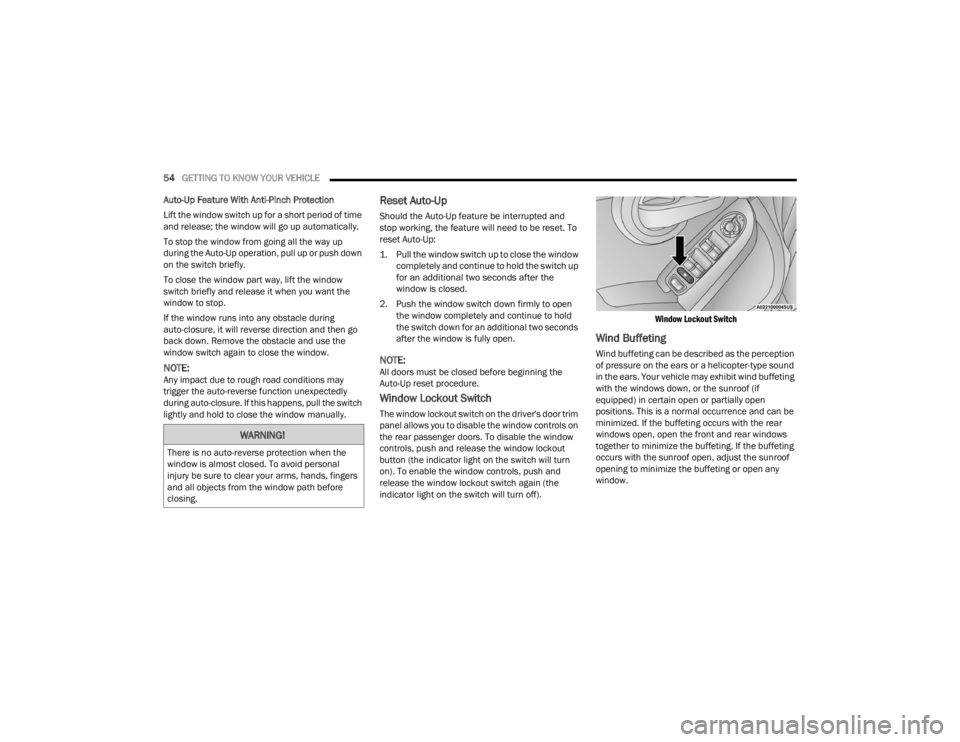
Window Lockout Switch
The window lockout switch on the driver's door trim
panel allows you to disable the window controls on
the rear passenger doors. To disable the window
controls, push and release the window lockout
button (the indicator light on the switch will turn
on). To enable the window controls, push and
release the window lockout switch again (the
indicator light on the switch will turn off).
Window Lockout Switch
Wind Buffeting
Wind buffeting can be described as the perception
of pressure on the ears or a helicopter-type sound
in the ears. Your vehicle may exhibit wind buffeting
with the windows down, or the sunroof (if
equipped) in certain open or partially open
positions. This is a normal occurrence and can be
minimized. If the buffeting occurs with the rear
windows open, open the front and rear windows
together to minimize the buffeting. If the buffeting
occurs with the sunroof open, adjust the sunroof
opening to minimize the buffeting or open any
window.
WARNING!
There is no auto-reverse protection when the
window is almost closed. To avoid personal
injury be sure to clear your arms, hands, fingers
and all objects from the window path before
closing.
22_FD_OM_EN_USC_t.book Page 54
Page 57 of 312
GETTING TO KNOW YOUR VEHICLE55
SUNROOF — IF EQUIPPED
The sunroof has two glass panels (the front one is
operational and the rear one fixed) and is
equipped with two manual operated sunshades,
front and rear.
The power sunroof can be operated only when the
ignition is placed in ON/RUN.
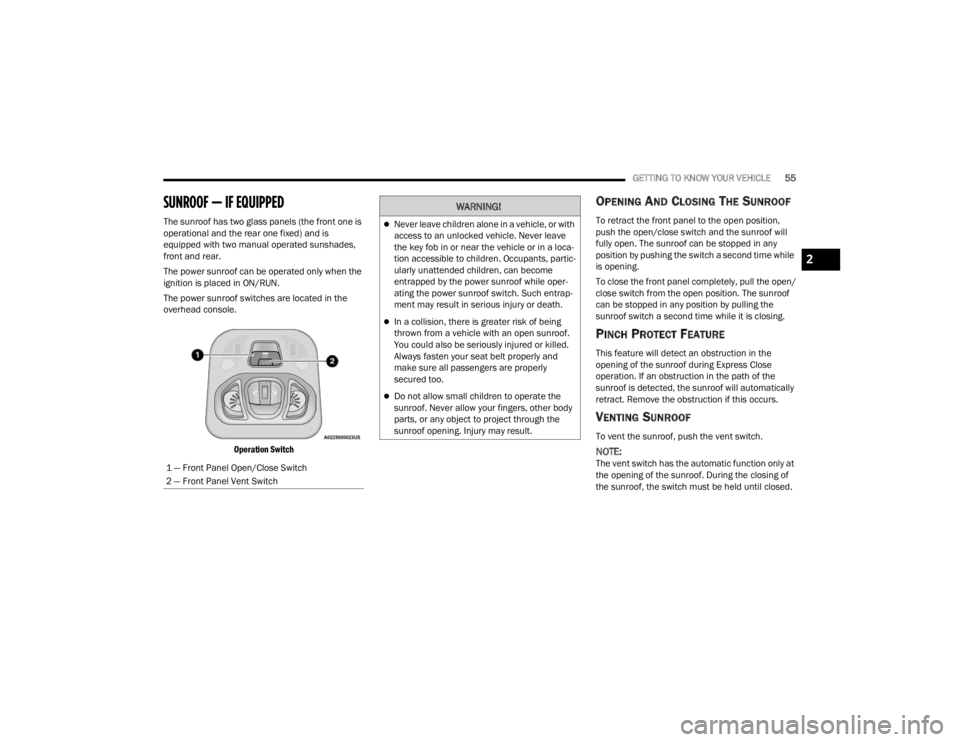
The power sunroof switches are located in the
overhead console.
Operation Switch
OPENING AND CLOSING THE SUNROOF
To retract the front panel to the open position,
push the open/close switch and the sunroof will
fully open. The sunroof can be stopped in any
position by pushing the switch a second time while
is opening.
To close the front panel completely, pull the open/
close switch from the open position. The sunroof
can be stopped in any position by pulling the
sunroof switch a second time while it is closing.
PINCH PROTECT FEATURE
This feature will detect an obstruction in the
opening of the sunroof during Express Close
operation. If an obstruction in the path of the
sunroof is detected, the sunroof will automatically
retract. Remove the obstruction if this occurs.
VENTING SUNROOF
To vent the sunroof, push the vent switch.
NOTE:The vent switch has the automatic function only at
the opening of the sunroof. During the closing of
the sunroof, the switch must be held until closed.
1 — Front Panel Open/Close Switch
2 — Front Panel Vent Switch
WARNING!
Never leave children alone in a vehicle, or with
access to an unlocked vehicle. Never leave
the key fob in or near the vehicle or in a loca
-
tion accessible to children. Occupants, partic -
ularly unattended children, can become
entrapped by the power sunroof while oper -
ating the power sunroof switch. Such entrap -
ment may result in serious injury or death.
In a collision, there is greater risk of being
thrown from a vehicle with an open sunroof.
You could also be seriously injured or killed.
Always fasten your seat belt properly and
make sure all passengers are properly
secured too.
Do not allow small children to operate the
sunroof. Never allow your fingers, other body
parts, or any object to project through the
sunroof opening. Injury may result.
2
22_FD_OM_EN_USC_t.book Page 55
Page 58 of 312
56GETTING TO KNOW YOUR VEHICLE
SUN SHADE
The two sun shades are manually operated and
can be adjusted in any position.
SUNROOF MAINTENANCE
Use only a non-abrasive cleaner and a soft cloth to
clean the glass panel. Periodically check for and
clear out any debris that may have collected in the
tracks.
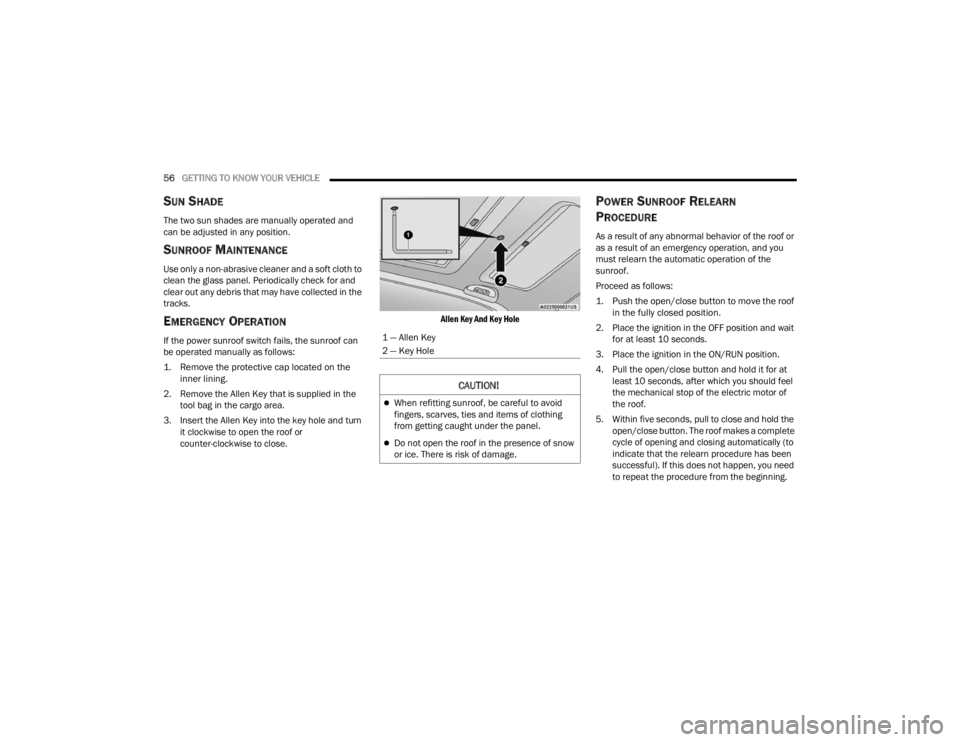
EMERGENCY OPERATION
If the power sunroof switch fails, the sunroof can
be operated manually as follows:
1. Remove the protective cap located on the
inner lining.
2. Remove the Allen Key that is supplied in the tool bag in the cargo area.
3. Insert the Allen Key into the key hole and turn it clockwise to open the roof or
counter-clockwise to close.
Allen Key And Key Hole
POWER SUNROOF RELEARN
P
ROCEDURE
As a result of any abnormal behavior of the roof or
as a result of an emergency operation, and you
must relearn the automatic operation of the
sunroof.
Proceed as follows:
1. Push the open/close button to move the roof
in the fully closed position.
2. Place the ignition in the OFF position and wait for at least 10 seconds.
3. Place the ignition in the ON/RUN position.
4. Pull the open/close button and hold it for at least 10 seconds, after which you should feel
the mechanical stop of the electric motor of
the roof.
5. Within five seconds, pull to close and hold the open/close button. The roof makes a complete
cycle of opening and closing automatically (to
indicate that the relearn procedure has been
successful). If this does not happen, you need
to repeat the procedure from the beginning.
1 — Allen Key
2 — Key Hole
CAUTION!
When refitting sunroof, be careful to avoid
fingers, scarves, ties and items of clothing
from getting caught under the panel.
Do not open the roof in the presence of snow
or ice. There is risk of damage.
22_FD_OM_EN_USC_t.book Page 56
Page 59 of 312
GETTING TO KNOW YOUR VEHICLE57
POWER FOLDING ROOF — IF EQUIPPED
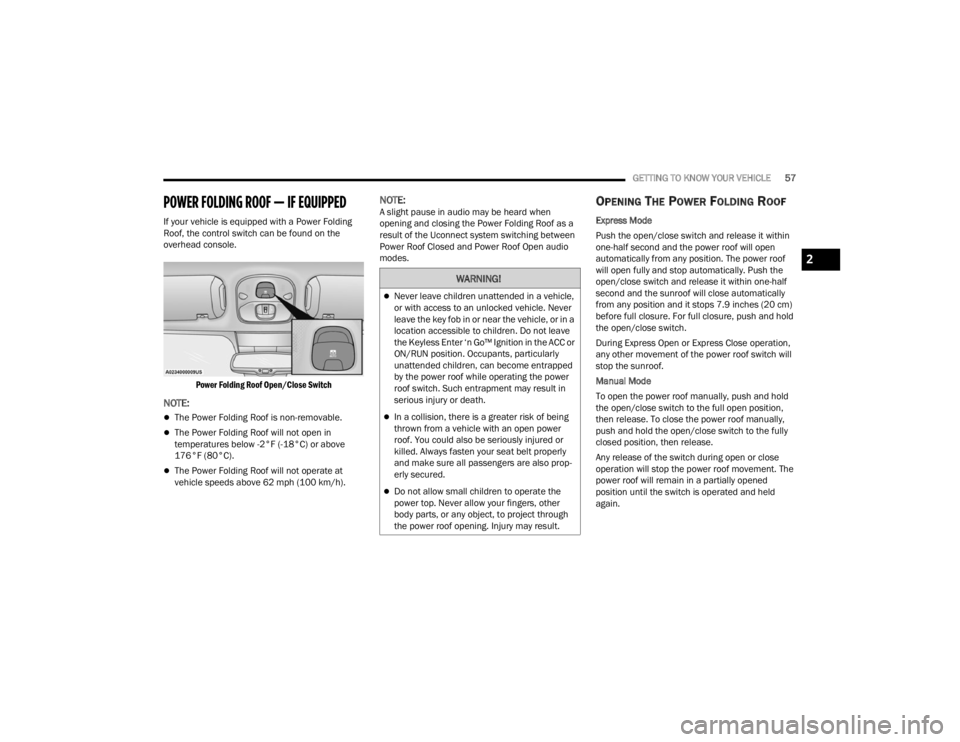
If your vehicle is equipped with a Power Folding
Roof, the control switch can be found on the
overhead console.
Power Folding Roof Open/Close Switch
NOTE:
The Power Folding Roof is non-removable.
The Power Folding Roof will not open in
temperatures below -2°F (-18°C) or above
176°F (80°C).
The Power Folding Roof will not operate at
vehicle speeds above 62 mph (100 km/h).
NOTE:A slight pause in audio may be heard when
opening and closing the Power Folding Roof as a
result of the Uconnect system switching between
Power Roof Closed and Power Roof Open audio
modes.OPENING THE POWER FOLDING ROOF
Express Mode
Push the open/close switch and release it within
one-half second and the power roof will open
automatically from any position. The power roof
will open fully and stop automatically. Push the
open/close switch and release it within one-half
second and the sunroof will close automatically
from any position and it stops 7.9 inches (20 cm)
before full closure. For full closure, push and hold
the open/close switch.
During Express Open or Express Close operation,
any other movement of the power roof switch will
stop the sunroof.
Manual Mode
To open the power roof manually, push and hold
the open/close switch to the full open position,
then release. To close the power roof manually,
push and hold the open/close switch to the fully
closed position, then release.
Any release of the switch during open or close
operation will stop the power roof movement. The
power roof will remain in a partially opened
position until the switch is operated and held
again.
WARNING!
Never leave children unattended in a vehicle,
or with access to an unlocked vehicle. Never
leave the key fob in or near the vehicle, or in a
location accessible to children. Do not leave
the Keyless Enter ‘n Go™ Ignition in the ACC or
ON/RUN position. Occupants, particularly
unattended children, can become entrapped
by the power roof while operating the power
roof switch. Such entrapment may result in
serious injury or death.
In a collision, there is a greater risk of being
thrown from a vehicle with an open power
roof. You could also be seriously injured or
killed. Always fasten your seat belt properly
and make sure all passengers are also prop -
erly secured.
Do not allow small children to operate the
power top. Never allow your fingers, other
body parts, or any object, to project through
the power roof opening. Injury may result.
2
22_FD_OM_EN_USC_t.book Page 57
Page 61 of 312

GETTING TO KNOW YOUR VEHICLE59
2. Move to the outside of the vehicle and push the safety latch release lever toward the
passenger side of the vehicle. The hood
release lever is located behind the center front
edge of the hood.
Safety Latch Release Lever Location
3. Remove the support rod from the locking tab and insert it into the seat located on the
underside of the hood. Be sure the rod is
locked into position.
Hood Prop System
TO CLOSE THE HOOD
1. Hold up the hood with one hand and with the
other hand remove the support rod from its
seat and reinsert it into the locking tab.
2. Lower the hood to approximately 12 inches (30 cm) from the engine compartment and
drop it. Make sure that the hood is completely
closed.
1 — Locking Tab
2 — Support Rod
3 — Support Rod Seat
WARNING!
Be sure the hood is fully latched before driving
your vehicle. If the hood is not fully latched, it
could open when the vehicle is in motion and
block your vision. Failure to follow this warning
could result in serious injury or death.
CAUTION!
To prevent possible damage, do not slam the
hood to close it. Lower hood to approximately
12 inches (30 cm) and drop the hood to close.
Make sure hood is fully closed for both latches.
Never drive vehicle unless hood is fully closed,
with both latches engaged.
2
22_FD_OM_EN_USC_t.book Page 59
Page 62 of 312
60GETTING TO KNOW YOUR VEHICLE
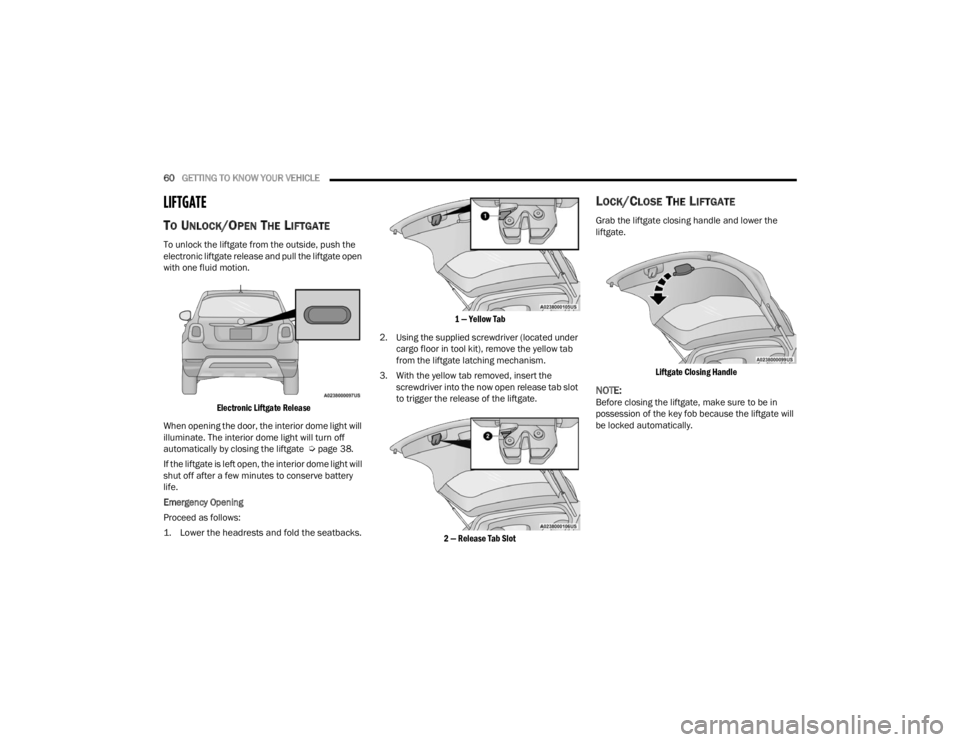
LIFTGATE
TO UNLOCK/OPEN THE LIFTGATE
To unlock the liftgate from the outside, push the
electronic liftgate release and pull the liftgate open
with one fluid motion.
Electronic Liftgate Release
When opening the door, the interior dome light will
illuminate. The interior dome light will turn off
automatically by closing the liftgate Ú page 38.
If the liftgate is left open, the interior dome light will
shut off after a few minutes to conserve battery
life.
Emergency Opening
Proceed as follows:
1. Lower the headrests and fold the seatbacks.
1 — Yellow Tab
2. Using the supplied screwdriver (located under cargo floor in tool kit), remove the yellow tab
from the liftgate latching mechanism.
3. With the yellow tab removed, insert the screwdriver into the now open release tab slot
to trigger the release of the liftgate.
2 — Release Tab Slot
LOCK/CLOSE THE LIFTGATE
Grab the liftgate closing handle and lower the
liftgate.
Liftgate Closing Handle
NOTE:Before closing the liftgate, make sure to be in
possession of the key fob because the liftgate will
be locked automatically.
22_FD_OM_EN_USC_t.book Page 60