start stop button FIAT 500X 2022 Owner's Manual
[x] Cancel search | Manufacturer: FIAT, Model Year: 2022, Model line: 500X, Model: FIAT 500X 2022Pages: 312, PDF Size: 13.26 MB
Page 134 of 312

132MULTIMEDIA
Doors & Locks
After pressing the Doors & Locks button on the touchscreen, the following settings will be available:
NOTE:Depending on the vehicle’s options, feature settings may vary.
Setting Name Description
Auto Door Locks When this feature is selected, all doors will lock automatically when the
vehicle reaches a speed of 15 mph (24 km/h).
Auto Unlock On Exit When the Auto Unlock On Exit feature is selected, all doors will unlock when
the vehicle is stopped and the transmission is in the PARK or NEUTRAL
position and the driver's door is opened.
Flash Lights With Lock This setting will allow you to turn the flash lights with lock on or off.
Sound Horn With Lock This setting will allow you to set the Sound Horn With Lock feature “Off”, “1st
Press”, or “2nd Press”.
Sound Horn With Remote Start This setting will allow you to turn horn with remote start on or off.
Keyless Entry This feature allows you to lock and unlock the vehicle’s door(s) without having
to press the key fob lock or unlock button.
Remote Door Unlock
When “Driver” is programmed, only the driver’s door will unlock on the first
push of the key fob Unlock button; you must push the key fob Unlock button
twice to unlock the passengers’ doors. When “All” is programmed, all of the
doors will unlock on the first press of the key fob Unlock button.
If “All” is programmed, all doors will unlock no matter which Passive
Entry-equipped door handle is grasped. If “Driver” is programmed, only the
driver’s door will unlock when the driver’s door is grabbed. Touching the
handle more than once will only result in the driver’s door unlocking. If the
driver’s door is opened, the interior door lock/unlock switch can be used to
unlock all doors (or use key fob).
22_FD_OM_EN_USC_t.book Page 132
Page 144 of 312
142MULTIMEDIA
RADIO MODE
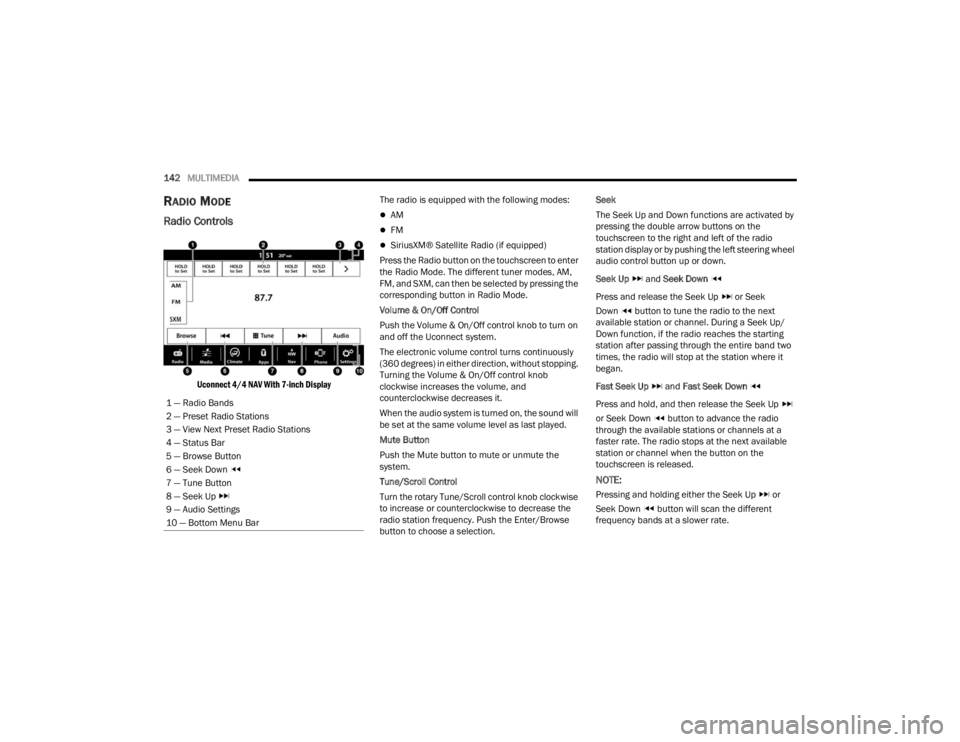
Radio Controls
Uconnect 4/4 NAV With 7-inch Display
The radio is equipped with the following modes:
AM
FM
SiriusXM® Satellite Radio (if equipped)
Press the Radio button on the touchscreen to enter
the Radio Mode. The different tuner modes, AM,
FM, and SXM, can then be selected by pressing the
corresponding button in Radio Mode.
Volume & On/Off Control
Push the Volume & On/Off control knob to turn on
and off the Uconnect system.
The electronic volume control turns continuously
(360 degrees) in either direction, without stopping.
Turning the Volume & On/Off control knob
clockwise increases the volume, and
counterclockwise decreases it.
When the audio system is turned on, the sound will
be set at the same volume level as last played.
Mute Button
Push the Mute button to mute or unmute the
system.
Tune/Scroll Control
Turn the rotary Tune/Scroll control knob clockwise
to increase or counterclockwise to decrease the
radio station frequency. Push the Enter/Browse
button to choose a selection. Seek
The Seek Up and Down functions are activated by
pressing the double arrow buttons on the
touchscreen to the right and left of the radio
station display or by pushing the left steering wheel
audio control button up or down.
Seek Up
and Seek Down
Press and release the Seek Up or Seek
Down button to tune the radio to the next
available station or channel. During a Seek Up/
Down function, if the radio reaches the starting
station after passing through the entire band two
times, the radio will stop at the station where it
began.
Fast Seek Up and Fast Seek Down
Press and hold, and then release the Seek Up
or Seek Down button to advance the radio
through the available stations or channels at a
faster rate. The radio stops at the next available
station or channel when the button on the
touchscreen is released.
NOTE:
Pressing and holding either the Seek Up or
Seek Down button will scan the different
frequency bands at a slower rate.
1 — Radio Bands
2 — Preset Radio Stations
3 — View Next Preset Radio Stations
4 — Status Bar
5 — Browse Button
6 — Seek Down
7 — Tune Button
8 — Seek Up
9 — Audio Settings
10 — Bottom Menu Bar
22_FD_OM_EN_USC_t.book Page 142
Page 170 of 312
168MULTIMEDIA
NAVIGATING A ROUTE
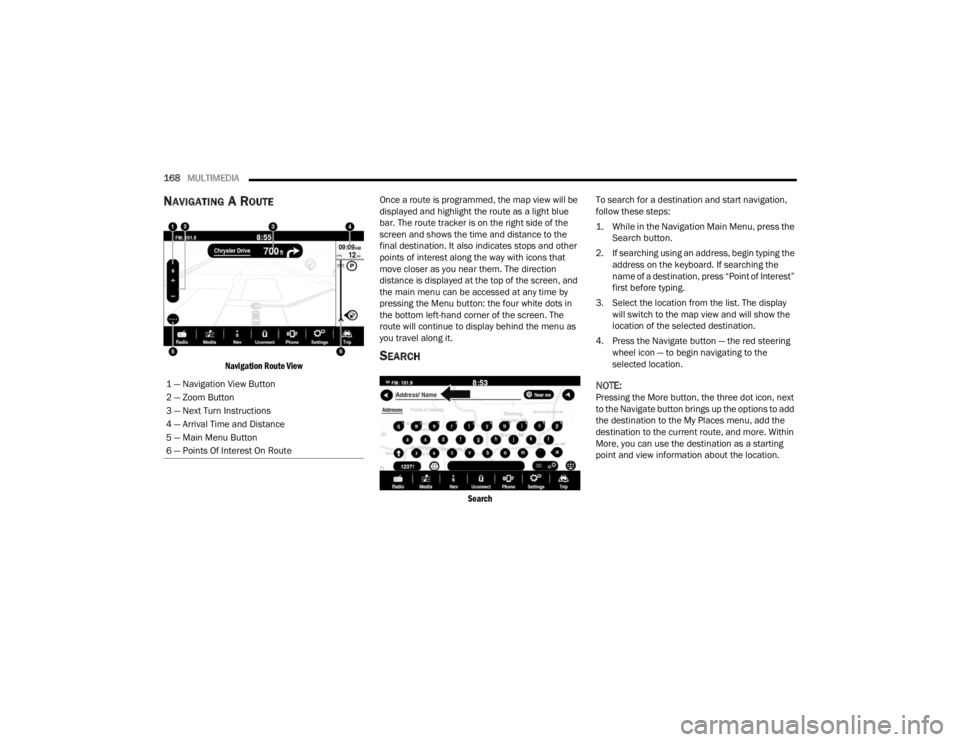
Navigation Route View
Once a route is programmed, the map view will be
displayed and highlight the route as a light blue
bar. The route tracker is on the right side of the
screen and shows the time and distance to the
final destination. It also indicates stops and other
points of interest along the way with icons that
move closer as you near them. The direction
distance is displayed at the top of the screen, and
the main menu can be accessed at any time by
pressing the Menu button: the four white dots in
the bottom left-hand corner of the screen. The
route will continue to display behind the menu as
you travel along it.SEARCH
Search
To search for a destination and start navigation,
follow these steps:
1. While in the Navigation Main Menu, press the
Search button.
2. If searching using an address, begin typing the address on the keyboard. If searching the
name of a destination, press “Point of Interest”
first before typing.
3. Select the location from the list. The display will switch to the map view and will show the
location of the selected destination.
4. Press the Navigate button — the red steering wheel icon — to begin navigating to the
selected location.
NOTE:Pressing the More button, the three dot icon, next
to the Navigate button brings up the options to add
the destination to the My Places menu, add the
destination to the current route, and more. Within
More, you can use the destination as a starting
point and view information about the location.
1 — Navigation View Button
2 — Zoom Button
3 — Next Turn Instructions
4 — Arrival Time and Distance
5 — Main Menu Button
6 — Points Of Interest On Route
22_FD_OM_EN_USC_t.book Page 168
Page 179 of 312
SAFETY177
ESC Operation Modes
To disable ESC and other active safety systems,
follow the instruction below.
There are two operation modes of active safety
systems on the vehicle:
ESC On
Partial Off ESC On
All active safety systems are enabled. This is the
normal operating mode when driving a vehicle.
This mode should be used in most driving
conditions. The system will be in "ESC On" mode
every time the engine is started
NOTE:You are advised to select "Partial Off " mode only
for specific driving requirements.
Partial Off
By pressing the ESC OFF button located below the
radio screen when driving, the intervention of the
ESC and TCS systems is limited to braking action
on the single wheels.
The other systems remain enabled. Activation of
this mode is indicated by the warning lamp on the
instrument panel switching on (if equipped,
together with a message on the display).
To restore "ESC On" operating mode, press the
button below the radio screen again.
"ESC On" mode will automatically reactivate every
time the engine is started.
NOTE:When traveling on snowy roads with snow chains,
it may be helpful to activate "Partial Off" mode: in
these conditions, you can obtain better traction by
slipping the drive wheels.
Hill Start Assist (HSA)
HSA is designed to mitigate roll back from a
complete stop while on an incline. If the driver
releases the brake while stopped on an incline,
HSA will continue to hold the brake pressure for a
short period. If the driver does not apply the
throttle before this time expires, the system will
release brake pressure and the vehicle will roll
down the hill as normal.
The following conditions must be met in order for
HSA to activate:
The feature must be enabled.
The vehicle must be stopped.
The parking brake must be off.
The driver door must be closed.
The vehicle must be on a sufficient grade.
Vehicle modifications, or failure to properly
maintain your vehicle, may change the
handling characteristics of your vehicle, and
may negatively affect the performance of the
ESC system. Changes to the steering system,
suspension, braking system, tire type and size
or wheel size may adversely affect ESC perfor
-
mance. Improperly inflated and unevenly worn
tires may also degrade ESC performance. Any
vehicle modification or poor vehicle mainte -
nance that reduces the effectiveness of the
ESC system can increase the risk of loss of
vehicle control, vehicle rollover, personal
injury and death.
WARNING!WARNING!
When in “Partial Off” mode, the TCS functionality
of ESC, except for the limited slip feature
described in the Traction Control System (TCS)
section, has been disabled and the ESC OFF
Indicator Light will be illuminated. When in
“Partial Off” mode, the engine power reduction
feature of TCS is disabled, and the enhanced
vehicle stability offered by the ESC system is
reduced.
6
22_FD_OM_EN_USC_t.book Page 177
Page 233 of 312
IN CASE OF EMERGENCY231
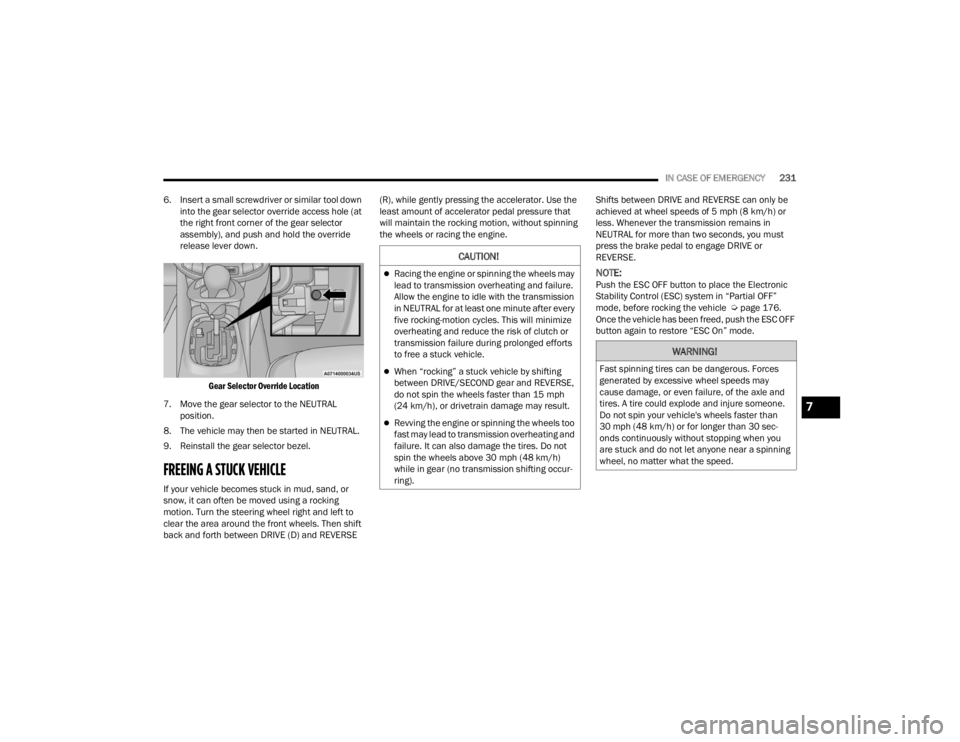
6. Insert a small screwdriver or similar tool down into the gear selector override access hole (at
the right front corner of the gear selector
assembly), and push and hold the override
release lever down.
Gear Selector Override Location
7. Move the gear selector to the NEUTRAL position.
8. The vehicle may then be started in NEUTRAL.
9. Reinstall the gear selector bezel.
FREEING A STUCK VEHICLE
If your vehicle becomes stuck in mud, sand, or
snow, it can often be moved using a rocking
motion. Turn the steering wheel right and left to
clear the area around the front wheels. Then shift
back and forth between DRIVE (D) and REVERSE (R), while gently pressing the accelerator. Use the
least amount of accelerator pedal pressure that
will maintain the rocking motion, without spinning
the wheels or racing the engine.
Shifts between DRIVE and REVERSE can only be
achieved at wheel speeds of 5 mph (8 km/h) or
less. Whenever the transmission remains in
NEUTRAL for more than two seconds, you must
press the brake pedal to engage DRIVE or
REVERSE.
NOTE:Push the ESC OFF button to place the Electronic
Stability Control (ESC) system in “Partial OFF”
mode, before rocking the vehicle Ú
page 176.
Once the vehicle has been freed, push the ESC OFF
button again to restore “ESC On” mode.
CAUTION!
Racing the engine or spinning the wheels may
lead to transmission overheating and failure.
Allow the engine to idle with the transmission
in NEUTRAL for at least one minute after every
five rocking-motion cycles. This will minimize
overheating and reduce the risk of clutch or
transmission failure during prolonged efforts
to free a stuck vehicle.
When “rocking” a stuck vehicle by shifting
between DRIVE/SECOND gear and REVERSE,
do not spin the wheels faster than 15 mph
(24 km/h), or drivetrain damage may result.
Revving the engine or spinning the wheels too
fast may lead to transmission overheating and
failure. It can also damage the tires. Do not
spin the wheels above 30 mph (48 km/h)
while in gear (no transmission shifting occur -
ring).
WARNING!
Fast spinning tires can be dangerous. Forces
generated by excessive wheel speeds may
cause damage, or even failure, of the axle and
tires. A tire could explode and injure someone.
Do not spin your vehicle's wheels faster than
30 mph (48 km/h) or for longer than 30 sec -
onds continuously without stopping when you
are stuck and do not let anyone near a spinning
wheel, no matter what the speed.
7
22_FD_OM_EN_USC_t.book Page 231