bumper FIAT 500X 2022 Owners Manual
[x] Cancel search | Manufacturer: FIAT, Model Year: 2022, Model line: 500X, Model: FIAT 500X 2022Pages: 312, PDF Size: 13.26 MB
Page 104 of 312
102STARTING AND OPERATING
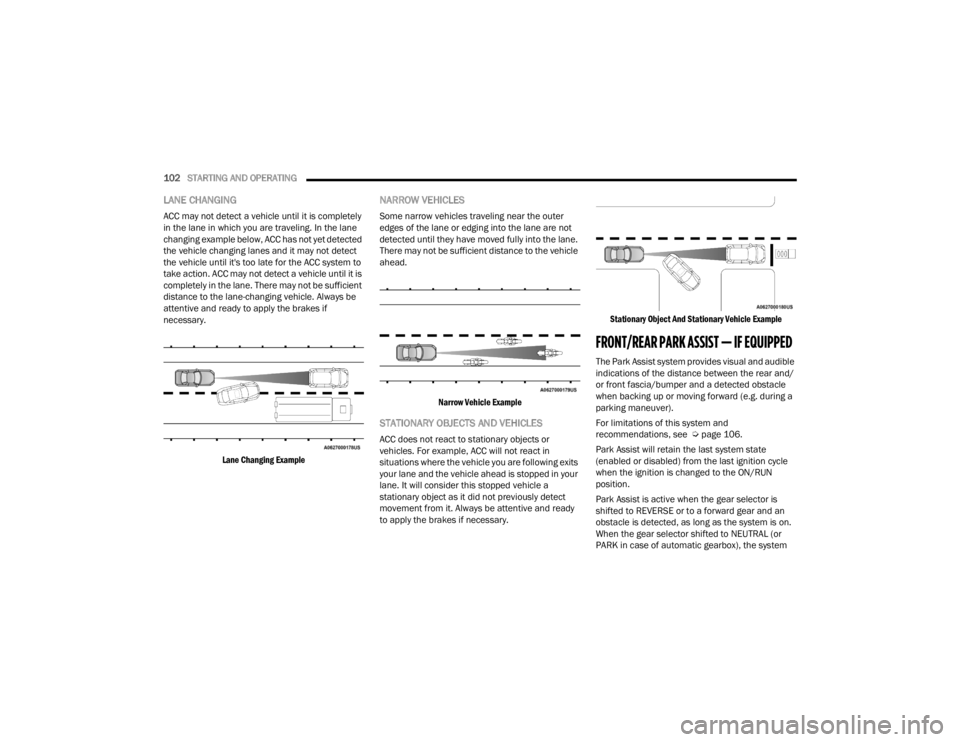
LANE CHANGING
ACC may not detect a vehicle until it is completely
in the lane in which you are traveling. In the lane
changing example below, ACC has not yet detected
the vehicle changing lanes and it may not detect
the vehicle until it's too late for the ACC system to
take action. ACC may not detect a vehicle until it is
completely in the lane. There may not be sufficient
distance to the lane-changing vehicle. Always be
attentive and ready to apply the brakes if
necessary.
Lane Changing Example
NARROW VEHICLES
Some narrow vehicles traveling near the outer
edges of the lane or edging into the lane are not
detected until they have moved fully into the lane.
There may not be sufficient distance to the vehicle
ahead.
Narrow Vehicle Example
STATIONARY OBJECTS AND VEHICLES
ACC does not react to stationary objects or
vehicles. For example, ACC will not react in
situations where the vehicle you are following exits
your lane and the vehicle ahead is stopped in your
lane. It will consider this stopped vehicle a
stationary object as it did not previously detect
movement from it. Always be attentive and ready
to apply the brakes if necessary.
Stationary Object And Stationary Vehicle Example
FRONT/REAR PARK ASSIST — IF EQUIPPED
The Park Assist system provides visual and audible
indications of the distance between the rear and/
or front fascia/bumper and a detected obstacle
when backing up or moving forward (e.g. during a
parking maneuver).
For limitations of this system and
recommendations, see Ú
page 106.
Park Assist will retain the last system state
(enabled or disabled) from the last ignition cycle
when the ignition is changed to the ON/RUN
position.
Park Assist is active when the gear selector is
shifted to REVERSE or to a forward gear and an
obstacle is detected, as long as the system is on.
When the gear selector shifted to NEUTRAL (or
PARK in case of automatic gearbox), the system
22_FD_OM_EN_USC_t.book Page 102
Page 105 of 312

STARTING AND OPERATING103
becomes inactive. When the vehicle is moving
forward, the system will remain active until the
vehicle speed remains below approximately
11 mph (18 km/h). Reducing the speed
approximately below 9 mph (15 km/h), the system
will come back active. When the vehicle is moving
in REVERSE, the system will remain active as long
as the speed remains below the maximum
operating speed of 7 mph (11 km/h). When the
maximum speed limit is exceeded, the system is
disabled and the Park Assist switch LED will
illuminate. The system will become active again if
the vehicle speed reduces below approximately
6 mph (9 km/h).
PARK ASSIST SENSORS
The four Park Assist sensors, located in the rear
fascia/bumper, monitor the area behind the
vehicle that is within the sensors’ field of view. The
sensors can detect obstacles from approximately
12 inches (30 cm) up to 59 inches (150 cm) from
the rear fascia/bumper in the horizontal direction,
depending on the location, type and orientation of
the obstacle. The four Park Assist sensors, located in the front
fascia/bumper (if equipped), monitor the area in
front of the vehicle that is within the sensors’ field
of view. The sensors can detect obstacles from
approximately 12 inches (30 cm) up to 39 inches
(100 cm) from the front fascia/bumper in the
horizontal direction, depending on the location,
type and orientation of the obstacle.
PARK ASSIST WARNING DISPLAY
The Park Assist Warning screen will only be
displayed if “Sound and Display” is selected from
the Uconnect system Ú page 123.
The Park Assist Warning screen is located within
the instrument cluster display. It provides visual
warnings to indicate the distance between the rear
fascia/bumper and/or front fascia/bumper and
the detected obstacle Ú page 64.
PARK ASSIST DISPLAY
The Park Assist warning screen will be displayed
when an obstacle is detected while the vehicle is in
DRIVE or REVERSE, as long as the vehicle speed is
below 7 mph (11 km/h) when in REVERSE and
below 11 mph (18 km/h) when in DRIVE. When the
vehicle is in REVERSE, the Park Assist warning
screen will always be displayed.
The system will indicate a detected obstacle by
showing a single arc in the left and/or right front or
rear regions based on the object’s distance and
location relative to the vehicle.
If an object is detected in the left and/or right front
or rear region, the display will show a single arc in
the left and/or right front or rear region and the
system will produce a tone. As the vehicle moves
closer to the object, the display will show the single
arc moving closer to the vehicle and the tone will
change from a single 1/2 second tone to slow, to
fast, to continuous.
4
22_FD_OM_EN_USC_t.book Page 103
Page 108 of 312

106STARTING AND OPERATING
Front Park Assist Audible Alerts
Park Assist will turn off the Front Park Assist
audible alert (chime) after approximately three
seconds when an obstacle has been detected, the
vehicle is stationary, and brake pedal is applied. If
the obstacle has been detected within less than
12 inches (30 cm), then the Park Assist will not
turn off the Front Park Assist audible alert.
Adjustable Chime Volume Settings
Front and Rear chime volume settings can be
selected from the Customer-Programmable
Features section of the Uconnect system
Ú page 123.
If the Uconnect system is equipped, chime volume
settings will not be accessible from the instrument
cluster display.
The chime volume settings include low, medium,
and high.
Park Assist will retain its last known configuration
state through ignition cycles.
ENABLING AND DISABLING PARK
A
SSIST
Park Assist can be enabled and disabled
with the Park Assist switch, located on
the switch panel below the Uconnect
display. When the Park Assist switch is pushed to disable
the system, the instrument cluster display will
show the “Park Assist Disabled” message for
approximately five seconds Ú
page 64.
The Park Assist switch LED will be on when the
Park Assist system is disabled or requires service.
The Park Assist switch LED will be off when the
system is enabled. If the Park Assist switch is
pushed, and the system requires service, the Park
Assist switch LED will blink momentarily, and then
the LED will be on.
SERVICE THE PARK ASSIST SYSTEM
During vehicle start up, when the Park Assist System
has detected a faulted condition, the instrument
cluster display will actuate a single chime, once per
ignition cycle, and it will show the "PARK ASSIST
UNAVAILABLE WIPE REAR SENSORS", "PARK ASSIST
UNAVAILABLE WIPE FRONT SENSORS", or the "PARK
ASSIST UNAVAILABLE SERVICE REQUIRED" message
for five seconds.
If "PARK ASSIST UNAVAILABLE WIPE REAR
SENSORS" or "PARK ASSIST UNAVAILABLE WIPE
FRONT SENSORS" appears in the instrument
cluster display make sure the outer surface and
the underside of the rear fascia/bumper and/or
front fascia/bumper is clean and clear of snow,
ice, mud, dirt or other obstruction and then cycle
the ignition. If the message continues to appear
see an authorized dealer. If the "PARK ASSIST UNAVAILABLE SERVICE
REQUIRED" message appears in the instrument
cluster display, see an authorized dealer.
CLEANING THE PARK ASSIST SYSTEM
Clean the Park Assist sensors with water, car wash
soap and a soft cloth. Do not use rough or hard
cloths. Do not scratch or poke the sensors.
Otherwise, you could damage the sensors.
PARK ASSIST SYSTEM USAGE
P
RECAUTIONS
NOTE:
Ensure that the outer surface and the underside
of the front and rear fascia/bumper are clean
and clear of snow, ice, mud, dirt or other
obstruction to keep the Park Assist system oper -
ating properly.
Jackhammers, large trucks, and other vibra -
tions could affect the performance of Rear Park
Assist.
Clean the Park Assist sensors regularly, taking
care not to scratch or damage them. The
sensors must not be covered with ice, snow,
slush, mud, dirt or debris. Failure to do so can
result in the system not working properly. The
Park Assist system might not detect an obstacle
22_FD_OM_EN_USC_t.book Page 106
Page 109 of 312

STARTING AND OPERATING107
(Continued)
(Continued)
behind the fascia/bumper, or it could provide a
false indication that an obstacle is behind the
fascia/bumper.
Objects such as bicycle carriers, etc., must not
be placed within 12 inches (30 cm) from the
rear fascia/bumper while driving the vehicle.
Failure to do so can result in the system misin
-
terpreting a close object as a sensor problem,
causing a failure indication to be displayed in
the instrument cluster. If it is necessary to keep the trailer hitch and hitch
ball assembly mounted for a long period, it is
possible to filter out the trailer hitch and hitch ball
assembly presence within the sensor’s field of
view. The filtering operation must be performed
only by an authorized dealer.
WARNING!
Drivers must be careful when backing up even
when using Park Assist. Always check carefully
behind your vehicle, look behind you, and be
sure to check for pedestrians, animals, other
vehicles, obstructions, and blind spots before
backing up. You are responsible for safety and
must continue to pay attention to your
surroundings. Failure to do so can result in
serious injury or death.
Before using Park Assist, it is strongly recom
-
mended that the ball mount and hitch ball
assembly be disconnected from the vehicle
when the vehicle is not used for towing. Failure
to do so can result in injury or damage to vehi -
cles or obstacles because the hitch ball will be
much closer to the obstacle than the rear fascia
when the vehicle sounds the continuous tone.
Also, the sensors could detect the ball mount
and hitch ball assembly, depending on its size
and shape, giving a false indication that an
obstacle is behind the vehicle.
CAUTION!
Park Assist is only a parking aid and it is
unable to recognize every obstacle, including
small obstacles. Parking curbs might be
temporarily detected or not detected at all.
Obstacles located above or below the sensors
will not be detected when they are in close
proximity.
WARNING!
The vehicle must be driven slowly when using
Park Assist in order to be able to stop in time
when an obstacle is detected. It is recom -
mended that the driver looks over his/her
shoulder when using Park Assist.
CAUTION!
4
22_FD_OM_EN_USC_t.book Page 107
Page 118 of 312
116STARTING AND OPERATING
(Continued)
(Continued)
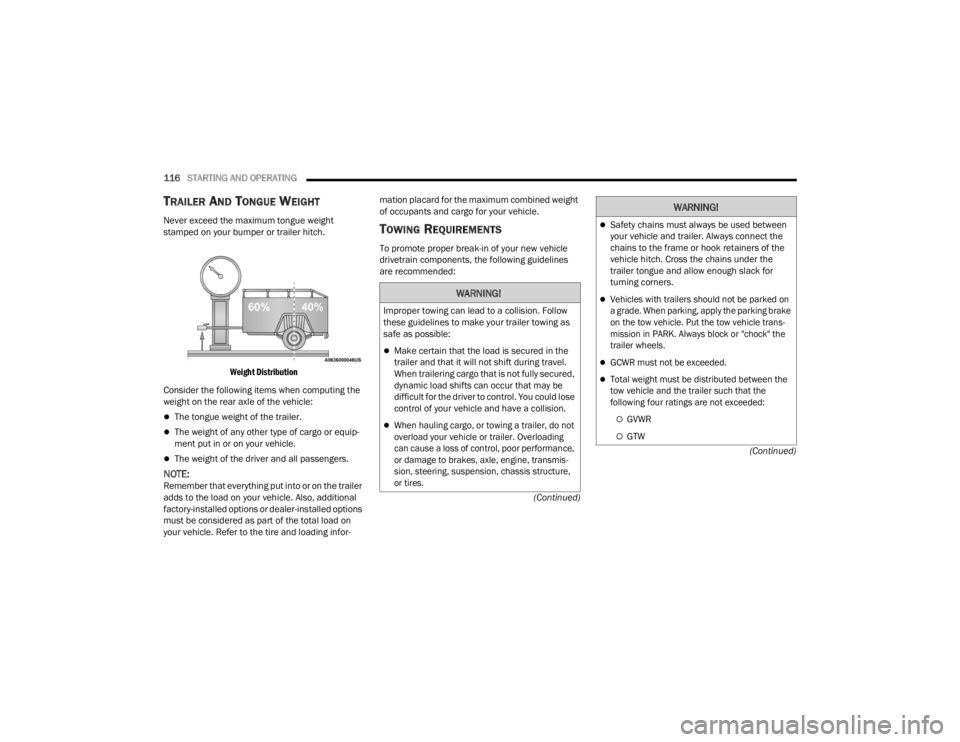
TRAILER AND TONGUE WEIGHT
Never exceed the maximum tongue weight
stamped on your bumper or trailer hitch.
Weight Distribution
Consider the following items when computing the
weight on the rear axle of the vehicle:
The tongue weight of the trailer.
The weight of any other type of cargo or equip -
ment put in or on your vehicle.
The weight of the driver and all passengers.
NOTE:Remember that everything put into or on the trailer
adds to the load on your vehicle. Also, additional
factory-installed options or dealer-installed options
must be considered as part of the total load on
your vehicle. Refer to the tire and loading infor -mation placard for the maximum combined weight
of occupants and cargo for your vehicle.
TOWING REQUIREMENTS
To promote proper break-in of your new vehicle
drivetrain components, the following guidelines
are recommended:
WARNING!
Improper towing can lead to a collision. Follow
these guidelines to make your trailer towing as
safe as possible:
Make certain that the load is secured in the
trailer and that it will not shift during travel.
When trailering cargo that is not fully secured,
dynamic load shifts can occur that may be
difficult for the driver to control. You could lose
control of your vehicle and have a collision.
When hauling cargo, or towing a trailer, do not
overload your vehicle or trailer. Overloading
can cause a loss of control, poor performance,
or damage to brakes, axle, engine, transmis
-
sion, steering, suspension, chassis structure,
or tires.
Safety chains must always be used between
your vehicle and trailer. Always connect the
chains to the frame or hook retainers of the
vehicle hitch. Cross the chains under the
trailer tongue and allow enough slack for
turning corners.
Vehicles with trailers should not be parked on
a grade. When parking, apply the parking brake
on the tow vehicle. Put the tow vehicle trans -
mission in PARK. Always block or "chock" the
trailer wheels.
GCWR must not be exceeded.
Total weight must be distributed between the
tow vehicle and the trailer such that the
following four ratings are not exceeded:
GVWR
GTW
WARNING!
22_FD_OM_EN_USC_t.book Page 116
Page 131 of 312

MULTIMEDIA129
Blind Spot Assist When the Blind Spot Assist feature is selected, the Blind Spot Monitor (BSM)
system is activated and shows a visual alert in the outside mirrors, or it shows
a visual alert in the outside mirrors and sounds an audible alert when the turn
signal is on. When “Off” is selected, the BSM system is deactivated. If your
vehicle has experienced any damage in the area where the sensor is located,
even if the fascia/bumper is not damaged, the sensor may have become
misaligned. Take your vehicle to an authorized dealer to verify sensor
alignment. A sensor that is misaligned results in the BSM not operating to
specification.
Rear View Camera Delay The Rear View Camera Delay setting determines whether or not the screen
displays the rear view image with dynamic grid lines for up to 10 seconds after
the vehicle is shifted out of REVERSE. This delay is canceled if the vehicle’s
speed exceeds 8 mph (13 km/h), the transmission is shifted into PARK, or the
ignition is switched to the OFF position.
Active Rear View Camera Guidelines The Active Rear View Camera Guidelines feature overlays the Rear View
Camera image with active, or dynamic, grid lines to help illustrate the width of
the vehicle and its projected backup path, based on the steering wheel
position when the option is checked. A dashed center line overlay indicates
the center of the vehicle to assist with parking or aligning to a hitch/receiver.
Rain Sensing Wipers This setting will allow you to turn the rain sensing wipers on or off.
Setting NameDescription
5
22_FD_OM_EN_USC_t.book Page 129
Page 180 of 312
178SAFETY
The gear selection must match vehicle uphill
direction (i.e., vehicle facing uphill is in forward
gear; vehicle backing uphill is in REVERSE gear).
HSA will work in REVERSE gear and all forward
gears. The system will not activate if the trans -
mission is in PARK or NEUTRAL. For vehicles
equipped with a manual transmission, if the
clutch is pressed, HSA will remain active.
Disabling And Enabling HSA
This feature can be turned on or turned off. To
change the current settings in the instrument
cluster display see Ú page 64.
Traction Control System (TCS)
The TCS monitors the amount of wheel spin of
each of the driven wheels. If wheel spin is
detected, the TCS may apply brake pressure to the
spinning wheel(s) and/or reduce vehicle power to
provide enhanced acceleration and stability. A
feature of the TCS, Brake Limited Differential (BLD)
functions similarly to a limited slip differential and
controls the wheel spin across a driven axle. If one
wheel on a driven axle is spinning faster than the
other, the system will apply the brake of the
spinning wheel. This will allow more vehicle torque
to be applied to the wheel that is not spinning. BLD
may remain enabled even if TCS and ESC are in
reduced modes.
AUXILIARY DRIVING SYSTEMS
BLIND SPOT MONITORING (BS M) —
I
F EQUIPPED
BSM uses two radar sensors, located inside the
rear fascia/bumper, to detect highway licensable
vehicles (automobiles, trucks, motorcycles, etc.)
that enter the blind spot zones from the rear/front/
side of the vehicle.
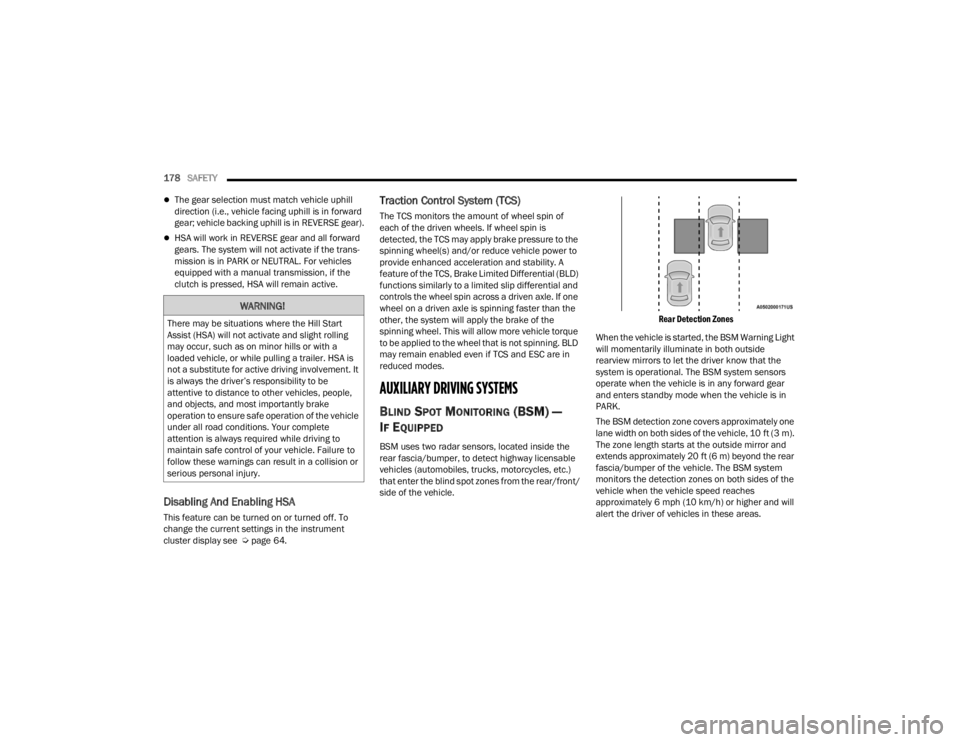
Rear Detection Zones
When the vehicle is started, the BSM Warning Light
will momentarily illuminate in both outside
rearview mirrors to let the driver know that the
system is operational. The BSM system sensors
operate when the vehicle is in any forward gear
and enters standby mode when the vehicle is in
PARK.
The BSM detection zone covers approximately one
lane width on both sides of the vehicle, 10 ft (3 m).
The zone length starts at the outside mirror and
extends approximately 20 ft (6 m) beyond the rear
fascia/bumper of the vehicle. The BSM system
monitors the detection zones on both sides of the
vehicle when the vehicle speed reaches
approximately 6 mph (10 km/h) or higher and will
alert the driver of vehicles in these areas.
WARNING!
There may be situations where the Hill Start
Assist (HSA) will not activate and slight rolling
may occur, such as on minor hills or with a
loaded vehicle, or while pulling a trailer. HSA is
not a substitute for active driving involvement. It
is always the driver’s responsibility to be
attentive to distance to other vehicles, people,
and objects, and most importantly brake
operation to ensure safe operation of the vehicle
under all road conditions. Your complete
attention is always required while driving to
maintain safe control of your vehicle. Failure to
follow these warnings can result in a collision or
serious personal injury.
22_FD_OM_EN_USC_t.book Page 178
Page 181 of 312
SAFETY179
NOTE:
The BSM system DOES NOT alert the driver
about rapidly approaching vehicles that are
outside the detection zones.
If a trailer is connected to the vehicle, it is neces -
sary to deactivate BSM system manually by
settings menu to avoid a misdetection
Ú page 123.
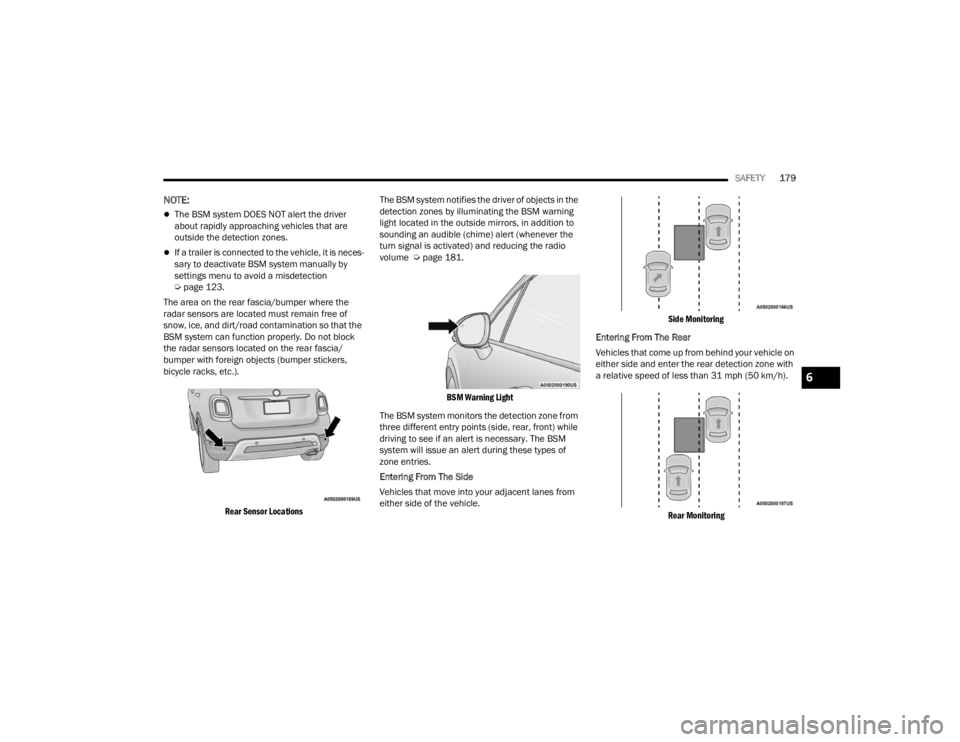
The area on the rear fascia/bumper where the
radar sensors are located must remain free of
snow, ice, and dirt/road contamination so that the
BSM system can function properly. Do not block
the radar sensors located on the rear fascia/
bumper with foreign objects (bumper stickers,
bicycle racks, etc.).
Rear Sensor Locations
The BSM system notifies the driver of objects in the
detection zones by illuminating the BSM warning
light located in the outside mirrors, in addition to
sounding an audible (chime) alert (whenever the
turn signal is activated) and reducing the radio
volume Ú
page 181.
BSM Warning Light
The BSM system monitors the detection zone from
three different entry points (side, rear, front) while
driving to see if an alert is necessary. The BSM
system will issue an alert during these types of
zone entries.
Entering From The Side
Vehicles that move into your adjacent lanes from
either side of the vehicle.
Side Monitoring
Entering From The Rear
Vehicles that come up from behind your vehicle on
either side and enter the rear detection zone with
a relative speed of less than 31 mph (50 km/h).
Rear Monitoring
6
22_FD_OM_EN_USC_t.book Page 179
Page 184 of 312

182SAFETY
NOTE:The BSM system will store the current operating
mode when the vehicle is shut off. Each time the
vehicle is started the previously stored mode will
be recalled and used.
Blind Spot Monitoring Fault Warnings
Blinded Sensor
In the case of a blinded sensor:
BSM Mirror Warning Lights are turned on contin -
uously.
An instrument cluster message will display
“Blind Spot Monitoring Unavailable - Wipe Rear
Bumper Corners.”
NOTE:The rear fascia/bumper must be clean and free of
any obstructing debris.
System Not Available
In the case of the system being temporarily
unavailable:
BSM Mirror Warning Lights are turned on contin -
uously.
An instrument cluster message will display
“Blind Spot Monitoring Temporarily Unavail -
able.” In the case of the system being completely
unavailable:
A chime will turn on.
An instrument cluster message will display
“Blind Spot Monitoring Unavailable - Service
Required.”
NOTE:The vehicle must be taken to the nearest autho
-
rized dealer for service.
FULL BRAKE CONTROL SYSTEM WITH
M
ITIGATION
The Full Brake Control system with Mitigation
provides the driver with audible warnings (through
the radio), visual warnings (within the instrument
cluster display), and may apply a brake jerk to warn
the driver when it detects a potential frontal
collision. The warnings and limited braking are
intended to provide the driver with enough time to
react, avoid or mitigate the potential collision.
NOTE:
The Full Brake Control system monitors the
information from the forward looking sensors as
well as the Electronic Brake Controller (EBC), to
calculate the probability of a forward collision.
When the system determines that a forward
collision is probable, the driver will be provided with audible and visual warnings and may
provide a brake jerk warning.
If the driver does not take action based upon
these progressive warnings, then the system
will provide a limited level of active braking to
help slow the vehicle and mitigate the potential
forward collision. If the driver reacts to the warn
-
ings by braking and the system determines that
the driver intends to avoid the collision by
braking but has not applied sufficient brake
force, the system will compensate and provide
additional brake force as required.
After the end of the intervention of automatic
braking, the transmission may remain in last gear
stored; therefore the car could lurch forward, once
the brakes release a few seconds later. If the Full
Brake Control system event stops the vehicle
completely, the system will hold the vehicle at
standstill for two seconds and then release the
brakes.
If a Full Brake Control system event begins at a
speed below 26 mph (42 km/h), the system may
provide the maximum braking possible to mitigate
the potential forward collision. If the Full Brake
Control system event stops the vehicle completely,
the system will hold the vehicle at standstill for two
seconds and then release the brakes.
22_FD_OM_EN_USC_t.book Page 182
Page 186 of 312

184SAFETY
By changing the option to "Near", the system will
warn the driver of a possible accident with the
vehicle ahead of it when the latter is a reduced
distance. This setting offers a reaction time to the
driver lower than the settings "Medium" and "Far",
in the case of a potential accident, which will
provide a more dynamic driving experience.
The setting of the sensitivity of the system is
maintained in memory when the engine is
switched off.
Full Brake Control System Limited Warning
If the instrument cluster display reads “Brake
Control Limited Functionality” or “Brake Control
Limited Functionality Clean Front Windshield”
momentarily, there may be a condition that limits
Full Brake Control system functionality. Although
the vehicle is still drivable under normal
conditions, the active braking may not be fully
available. Once the condition that limited the
system performance is no longer present, the
system will return to its full performance state. If
the problem persists, see an authorized dealer.
Service Full Brake Control System Warning
If the system turns off, and the instrument cluster
display displays “Service Brake Control”.
This indicates there is an internal system fault.
Although the vehicle is still drivable under normal
conditions, have the system checked by an
authorized dealer. “Brake Control Front Radar Sensor Temporarily
Blocked” Warning
The “Brake Control Front Radar Sensor
Temporarily Blocked” warning will display when
conditions temporarily limit system performance.
This most often occurs at times of poor visibility,
such as in snow or heavy rain. The system may also
become temporarily blinded due to obstructions,
such as mud, dirt or ice. In these cases, the
instrument cluster display will display “Brake
Control Front Radar Sensor Temporarily Blocked”
and the system will deactivate.
The “Brake Control Front Radar Sensor
Temporarily Blocked” message can sometimes be
displayed while driving in highly reflective areas
(i.e. tunnels with reflective tiles, or ice and snow).
The system will recover after the vehicle has left
these areas. Under rare conditions, when the radar
is not tracking any vehicles or objects in its path
this warning may temporarily occur.
If weather conditions are not a factor, the driver
should examine the sensor. It may require cleaning
or removal of an obstruction. The sensor is located
behind the lower grille. In absence of visible
obstructions on the fascia/bumper, it could be
necessary to wipe off the radar directly on the
surface, after having the radar cover removed. It’s
recommended that an authorized dealer performs
this operation.
NOTE:
If the “Brake Control Front Radar Sensor Tempo
-
rarily Blocked” message occurs frequently (e.g.
more than once on every trip) without any snow,
rain, mud, or other obstruction, have the radar
sensor realigned at an authorized dealer.
Installing a snow plow, front-end protector, an
aftermarket grille or modifying the grille is not
recommended. Doing so may block the sensor
and inhibit Full Brake Control system operation.
Precautions While Driving With Full Brake
Control System
In certain driving conditions, such as:
Driving in the vicinity of a curve
Small vehicles and/or not aligned to the lane
Lane changing of other vehicles
Passing of vehicles in an oncoming intersection
The intervention of the system could be
unexpected or delayed. The driver must therefore
always pay particular attention, while maintaining
control of the car to drive in complete safety.
22_FD_OM_EN_USC_t.book Page 184