lock FIAT BRAVO 2007 2.G User Guide
[x] Cancel search | Manufacturer: FIAT, Model Year: 2007, Model line: BRAVO, Model: FIAT BRAVO 2007 2.GPages: 246, PDF Size: 3.75 MB
Page 20 of 246
19
SAFETY
DEVICES
CORRECT USE
OF THE CAR
WARNING
LIGHTS AND
MESSAGES
IN AN
EMERGENCY
CAR
MAINTENANCE
TECHNICAL
SPECIFICATIONS
INDEX
DASHBOARD
AND CONTROLS
IGNITION SWITCH
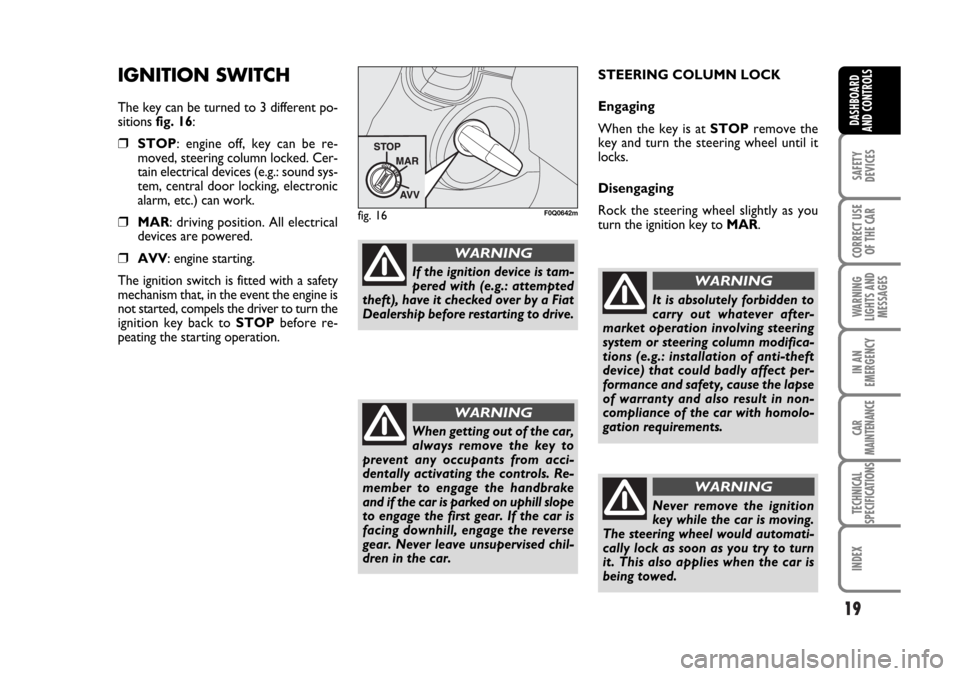
The key can be turned to 3 different po-
sitions fig. 16:
❒STOP: engine off, key can be re-
moved, steering column locked. Cer-
tain electrical devices (e.g.: sound sys-
tem, central door locking, electronic
alarm, etc.) can work.
❒MAR: driving position. All electrical
devices are powered.
❒AVV: engine starting.
The ignition switch is fitted with a safety
mechanism that, in the event the engine is
not started, compels the driver to turn the
ignition key back to STOPbefore re-
peating the starting operation.STEERING COLUMN LOCK
Engaging
When the key is at STOPremove the
key and turn the steering wheel until it
locks.
Disengaging
Rock the steering wheel slightly as you
turn the ignition key to MAR.
fig. 16F0Q0642m
If the ignition device is tam-
pered with (e.g.: attempted
theft), have it checked over by a Fiat
Dealership before restarting to drive.
WARNING
When getting out of the car,
always remove the key to
prevent any occupants from acci-
dentally activating the controls. Re-
member to engage the handbrake
and if the car is parked on uphill slope
to engage the first gear. If the car is
facing downhill, engage the reverse
gear. Never leave unsupervised chil-
dren in the car.
WARNING
It is absolutely forbidden to
carry out whatever after-
market operation involving steering
system or steering column modifica-
tions (e.g.: installation of anti-theft
device) that could badly affect per-
formance and safety, cause the lapse
of warranty and also result in non-
compliance of the car with homolo-
gation requirements.
WARNING
Never remove the ignition
key while the car is moving.
The steering wheel would automati-
cally lock as soon as you try to turn
it. This also applies when the car is
being towed.
WARNING
001-022 BRAVO GB 10-05-2007 8:57 Pagina 19
Page 23 of 246
22
SAFETY
DEVICES
CORRECT USE
OF THE CAR
WARNING
LIGHTS AND
MESSAGES
IN AN
EMERGENCY
CAR
MAINTENANCE
TECHNICAL
SPECIFICATIONS
INDEX
DASHBOARD
AND CONTROLS
MULTIFUNCTION
DISPLAY
(where provided)
Your car is fitted with the multifunction
display that shows all the useful informa-
tion necessary when driving.
INFORMATION ON
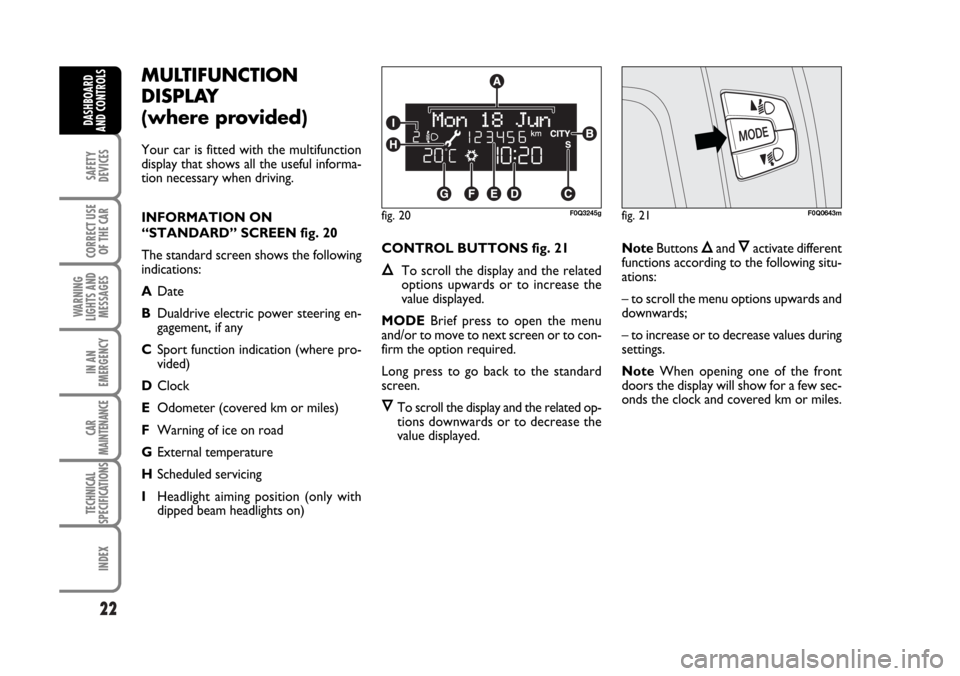
“STANDARD” SCREEN fig. 20
The standard screen shows the following
indications:
ADate
BDualdrive electric power steering en-
gagement, if any
CSport function indication (where pro-
vided)
DClock
EOdometer (covered km or miles)
FWarning of ice on road
GExternal temperature
HScheduled servicing
IHeadlight aiming position (only with
dipped beam headlights on)CONTROL BUTTONS fig. 21
ÕTo scroll the display and the related
options upwards or to increase the
value displayed.
MODEBrief press to open the menu
and/or to move to next screen or to con-
firm the option required.
Long press to go back to the standard
screen.
ÔTo scroll the display and the related op-
tions downwards or to decrease the
value displayed.NoteButtons
Õand Ôactivate different
functions according to the following situ-
ations:
– to scroll the menu options upwards and
downwards;
– to increase or to decrease values during
settings.
NoteWhen opening one of the front
doors the display will show for a few sec-
onds the clock and covered km or miles.
fig. 20F0Q3245gfig. 21F0Q0643m
001-022 BRAVO GB 10-05-2007 8:57 Pagina 22
Page 24 of 246
23
SAFETY
DEVICES
CORRECT USE
OF THE CAR
WARNING
LIGHTS AND
MESSAGES
IN AN
EMERGENCY
CAR
MAINTENANCE
TECHNICAL
SPECIFICATIONS
INDEX
DASHBOARD
AND CONTROLS
RECONFIGURABLE
MULTIFUNCTION
DISPLAY
(where provided)
The car can be provided with the recon-
figurable multifunction display that shows
useful information, according to the pre-
vious settings made, necessary when dri-
ving.
INFORMATION ON
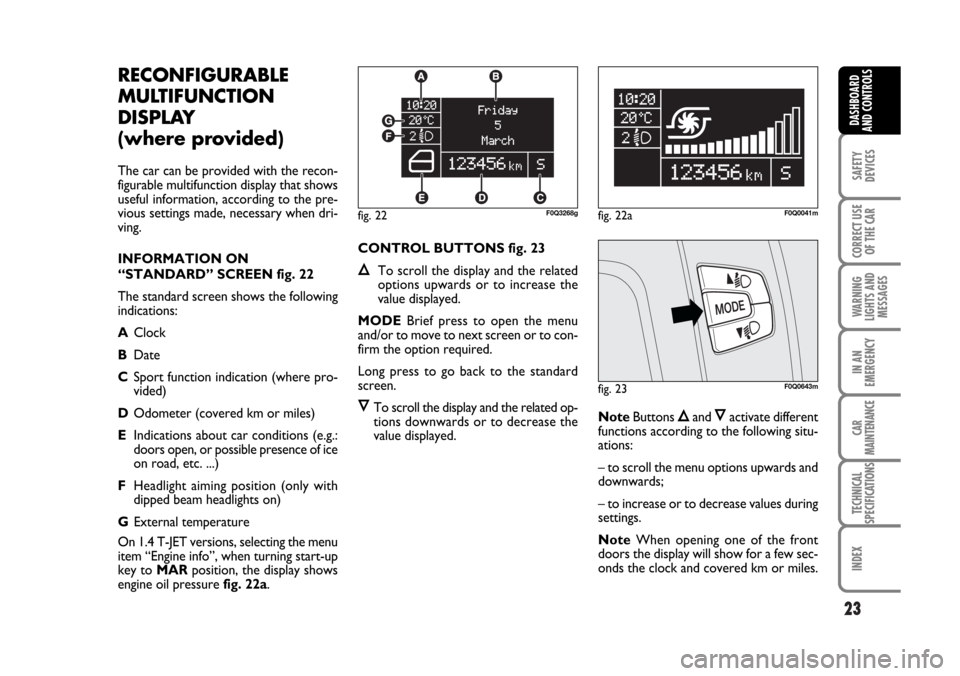
“STANDARD” SCREEN fig. 22
The standard screen shows the following
indications:
AClock
BDate
CSport function indication (where pro-
vided)
DOdometer (covered km or miles)
EIndications about car conditions (e.g.:
doors open, or possible presence of ice
on road, etc. ...)
FHeadlight aiming position (only with
dipped beam headlights on)
GExternal temperature
On 1.4 T-JET versions, selecting the menu
item “Engine info”, when turning start-up
key to MARposition, the display shows
engine oil pressure fig. 22a.CONTROL BUTTONS fig. 23
ÕTo scroll the display and the related
options upwards or to increase the
value displayed.
MODEBrief press to open the menu
and/or to move to next screen or to con-
firm the option required.
Long press to go back to the standard
screen.
ÔTo scroll the display and the related op-
tions downwards or to decrease the
value displayed.NoteButtons Õand Ôactivate different
functions according to the following situ-
ations:
– to scroll the menu options upwards and
downwards;
– to increase or to decrease values during
settings.
NoteWhen opening one of the front
doors the display will show for a few sec-
onds the clock and covered km or miles.
fig. 23F0Q0643m
fig. 22F0Q3268gfig. 22aF0Q0041m
023-036 BRAVO GB 10-05-2007 10:05 Pagina 23
Page 29 of 246

28
SAFETY
DEVICES
CORRECT USE
OF THE CAR
WARNING
LIGHTS AND
MESSAGES
IN AN
EMERGENCY
CAR
MAINTENANCE
TECHNICAL
SPECIFICATIONS
INDEX
DASHBOARD
AND CONTROLS
Headl. sensor
(Automatic headlight sensor
sensitivity adjustment)
(where provided)
With this function it is possible to adjust
the light sensor sensitivity according to 3
levels (level 1 = min. level, level 2 = av-
erage level, level 3 = max. level); the high-
er the sensitivity is, the lower is the ex-
ternal light intensity required to switch on
the lights.
To set the light level required, proceed as
follows:
– briefly press button MODE, the previ-
ously set level will flash on the display;
– press button
Õor Ôto select the re-
quired level;
– briefly press button MODEto go back
to the menu screen or press the button
for long to go back to the standard screen
without storing settings.Trip B data (Trip On/Off)
Through this option it is possible to acti-
vate (On) or deactivate (Off) the Trip B
(partial trip).
For further information see “Trip com-
puter”.
For activation / deactivation, proceed as
follows:
– briefly press button MODE: On or Off
will flash on the display according to pre-
vious setting;
– press button
Õor Ôto select the re-
quired level;
– briefly press button MODEto go back
to the menu screen or press the button
for long to go back to the standard screen
without storing settings.Set time (Setting the clock)
This function enables to set the clock
through two sub-menus: “Time” and
“Mode”.
Proceed as follows:
– briefly press button MODE, the display
will show the two submenus “Time” and
“Mode”;
– press button
Õor Ôto scroll the two
submenus;
– select the required submenu and then
press briefly MODE;
– if selecting “Time”: briefly press button
MODE, “hours” will flash on the display;
– press button
Õor Ôfor setting;
– press button MODE, “minutes” will
flash on the display;
– press button
Õor Ôfor setting.
023-036 BRAVO GB 10-05-2007 10:05 Pagina 28
Page 31 of 246

30
SAFETY
DEVICES
CORRECT USE
OF THE CAR
WARNING
LIGHTS AND
MESSAGES
IN AN
EMERGENCY
CAR
MAINTENANCE
TECHNICAL
SPECIFICATIONS
INDEX
DASHBOARD
AND CONTROLS
See radio (Audio repetition)
With this function the display repeats in-
formation relevant to the sound system.
– Radio: selected radio station frequency
or RDS message, automatic tuning acti-
vation or AutoSTore;
– audio CD, MP3 CD: track number;
– CD Changer: CD number and track
number;
To activate (On) or to deactivate (Off)
sound system info displaying proceed as
follows:
– briefly press button MODE: On or Off
will flash on the display according to pre-
vious setting;
– press button
Õor Ôto select the re-
quired level;
– briefly press button MODEto go back
to the menu screen or press the button
for long to go back to the standard screen
without storing settings.Autoclose (Automatic central
door locking when travelling)
When activated (On), this function locks
automatically the doors when the car
speed exceeds 20 km/h.
To activate or to deactivate this function
proceed as follows:
– briefly press button MODEto display
the submenu;
– briefly press button MODE: On or Off
will flash on the display according to pre-
vious setting;
– press button
Õor Ôto select the re-
quired level;
– briefly press button MODEto go back
to the menu screen or press the button
for long to go back to the standard screen
without storing settings;
– Press again button MODEfor long to
go back to the standard screen or to the
main menu according to the current menu
level.Units (Setting units)
With this function it is possible to set the
units through three submenus: “Dis-
tances”, “Consumption” and “Tempera-
ture”.
To set the required unit proceed as fol-
lows:
– briefly press button MODE, the display
will show the three submenus;
– press button
Õor Ôto scroll the three
submenus;
– select the required submenu and then
press briefly button MODE;
– if selecting “Distances”: pressing button
MODEbriefly, the display will show “km”
or “mi” according to previous setting;
– press button
Õor Ôto select the re-
quired level;
– if selecting “Consumption”: briefly press
button MODEthe display will show
“km/l”, “l/100km” or “mpg” according to
previous setting;
023-036 BRAVO GB 10-05-2007 10:05 Pagina 30
Page 38 of 246
37
SAFETY
DEVICES
CORRECT USE
OF THE CAR
WARNING
LIGHTS AND
MESSAGES
IN AN
EMERGENCY
CAR
MAINTENANCE
TECHNICAL
SPECIFICATIONS
INDEX
DASHBOARD
AND CONTROLS
fig. 27F0Q0654m
Fabric upholstery of your car
is purpose-made to withstand
common wear resulting from
normal use of the car. It is
however absolutely necessary to pre-
vent hard and/or prolonged scratch-
ing/scraping caused by clothing acces-
sories like metallic buckles, studs, “Vel-
cro” fixings, etc. that stressing locally
the fabric could break yarns and dam-
age the upholstery as a consequence.
Only make adjustments when
the car is stationary.
Once you have released the
lever, check that the seat is
firmly locked in the runners by
trying to move it back and
forth. Failure to lock the seat in place
could result in the seat moving sud-
denly and the driver losing control of
the car.
SEATS
MANUALLY ADJUSTABLE
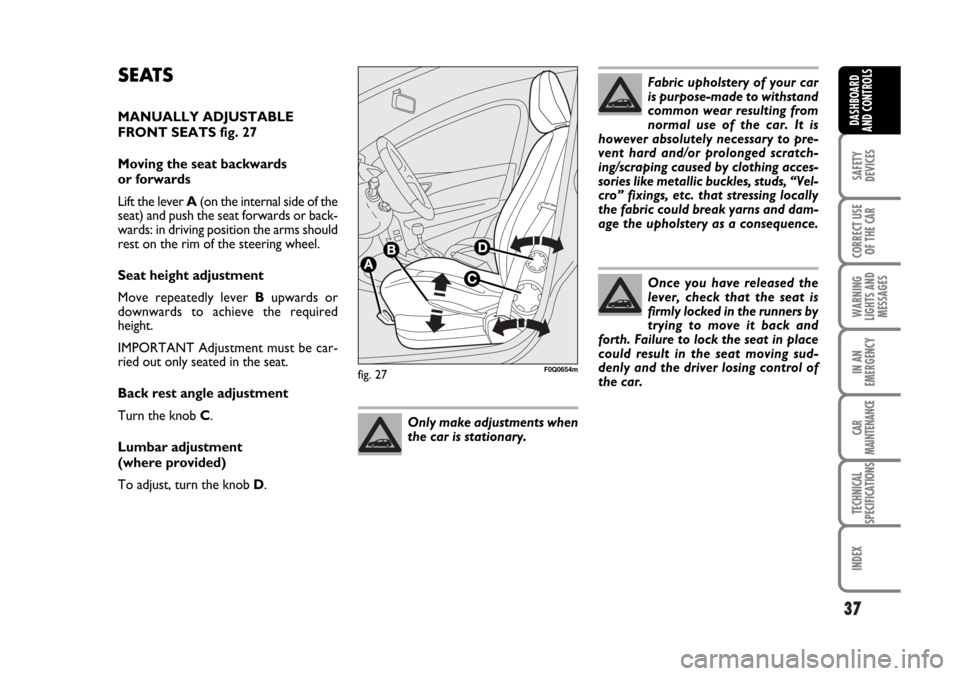
FRONT SEATS fig. 27
Moving the seat backwards
or forwards
Lift the lever A(on the internal side of the
seat) and push the seat forwards or back-
wards: in driving position the arms should
rest on the rim of the steering wheel.
Seat height adjustment
Move repeatedly lever Bupwards or
downwards to achieve the required
height.
IMPORTANT Adjustment must be car-
ried out only seated in the seat.
Back rest angle adjustment
Turn the knob C.
Lumbar adjustment
(where provided)
To adjust, turn the knob D.
037-056 BRAVO GB 10-05-2007 9:00 Pagina 37
Page 40 of 246
HEAD RESTRAINTS
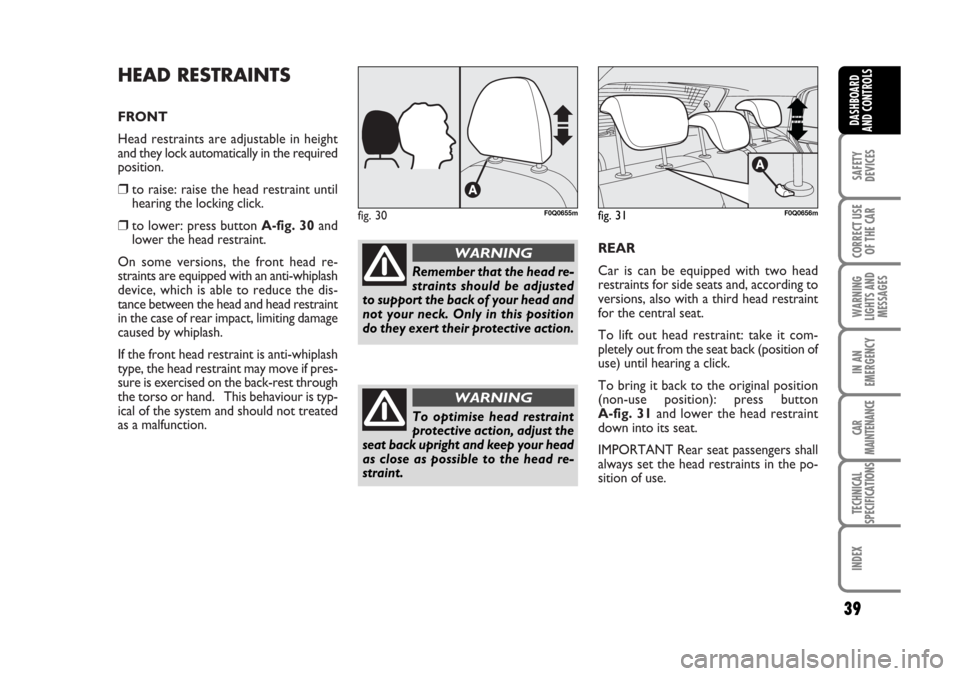
FRONT
Head restraints are adjustable in height
and they lock automatically in the required
position.
❒to raise: raise the head restraint until
hearing the locking click.
❒to lower: press button A-fig. 30and
lower the head restraint.
On some versions, the front head re-
straints are equipped with an anti-whiplash
device, which is able to reduce the dis-
tance between the head and head restraint
in the case of rear impact, limiting damage
caused by whiplash.
If the front head restraint is anti-whiplash
type, the head restraint may move if pres-
sure is exercised on the back-rest through
the torso or hand. This behaviour is typ-
ical of the system and should not treated
as a malfunction.REAR
Car is can be equipped with two head
restraints for side seats and, according to
versions, also with a third head restraint
for the central seat.
To lift out head restraint: take it com-
pletely out from the seat back (position of
use) until hearing a click.
To bring it back to the original position
(non-use position): press button
A-fig. 31and lower the head restraint
down into its seat.
IMPORTANT Rear seat passengers shall
always set the head restraints in the po-
sition of use.fig. 30F0Q0655m
Remember that the head re-
straints should be adjusted
to support the back of your head and
not your neck. Only in this position
do they exert their protective action.
WARNING
To optimise head restraint
protective action, adjust the
seat back upright and keep your head
as close as possible to the head re-
straint.
WARNING
fig. 31F0Q0656m
39
SAFETY
DEVICES
CORRECT USE
OF THE CAR
WARNING
LIGHTS AND
MESSAGES
IN AN
EMERGENCY
CAR
MAINTENANCE
TECHNICAL
SPECIFICATIONS
INDEX
DASHBOARD
AND CONTROLS
037-056 BRAVO GB 10-05-2007 9:00 Pagina 39
Page 41 of 246
40
SAFETY
DEVICES
CORRECT USE
OF THE CAR
WARNING
LIGHTS AND
MESSAGES
IN AN
EMERGENCY
CAR
MAINTENANCE
TECHNICAL
SPECIFICATIONS
INDEX
DASHBOARD
AND CONTROLS
STEERING WHEEL
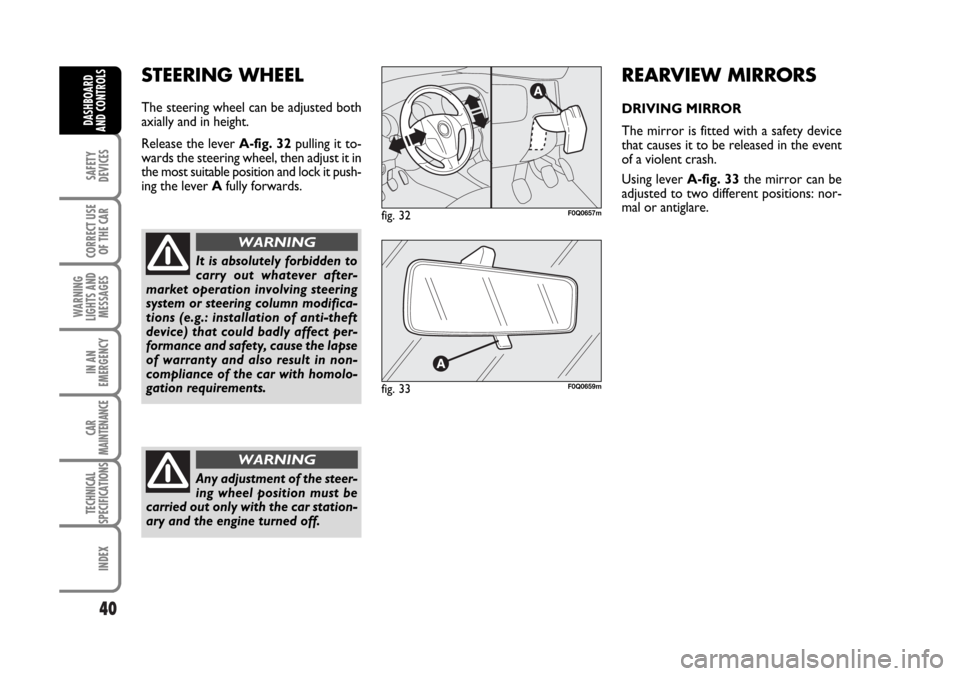
The steering wheel can be adjusted both
axially and in height.
Release the lever A-fig. 32pulling it to-
wards the steering wheel, then adjust it in
the most suitable position and lock it push-
ing the lever Afully forwards.
It is absolutely forbidden to
carry out whatever after-
market operation involving steering
system or steering column modifica-
tions (e.g.: installation of anti-theft
device) that could badly affect per-
formance and safety, cause the lapse
of warranty and also result in non-
compliance of the car with homolo-
gation requirements.
WARNING
Any adjustment of the steer-
ing wheel position must be
carried out only with the car station-
ary and the engine turned off.
WARNING
REARVIEW MIRRORS
DRIVING MIRROR
The mirror is fitted with a safety device
that causes it to be released in the event
of a violent crash.
Using lever A-fig. 33the mirror can be
adjusted to two different positions: nor-
mal or antiglare.
fig. 32F0Q0657m
fig. 33F0Q0659m
037-056 BRAVO GB 10-05-2007 9:00 Pagina 40
Page 65 of 246
64
SAFETY
DEVICES
CORRECT USE
OF THE CAR
WARNING
LIGHTS AND
MESSAGES
IN AN
EMERGENCY
CAR
MAINTENANCE
TECHNICAL
SPECIFICATIONS
INDEX
DASHBOARD
AND CONTROLS
fig. 56F0Q0670m
Light timing when getting out of the car
After removing the key from the ignition
switch, the ceiling lights will turn on as fol-
lows:
❒within 2 minutes from turning the en-
gine off for about 10 seconds;
❒when opening one of the side doors for
about 3 minutes;
❒when closing one of the doors for
about 10 seconds.
❒when fuel cut-off switch is activated,
they stay on for about 15 minutes, and
then go off automatically.
Timing will stop automatically when lock-
ing the doors (unless the fuel cut-off
switch has been activated).
fig. 57F0Q0740m
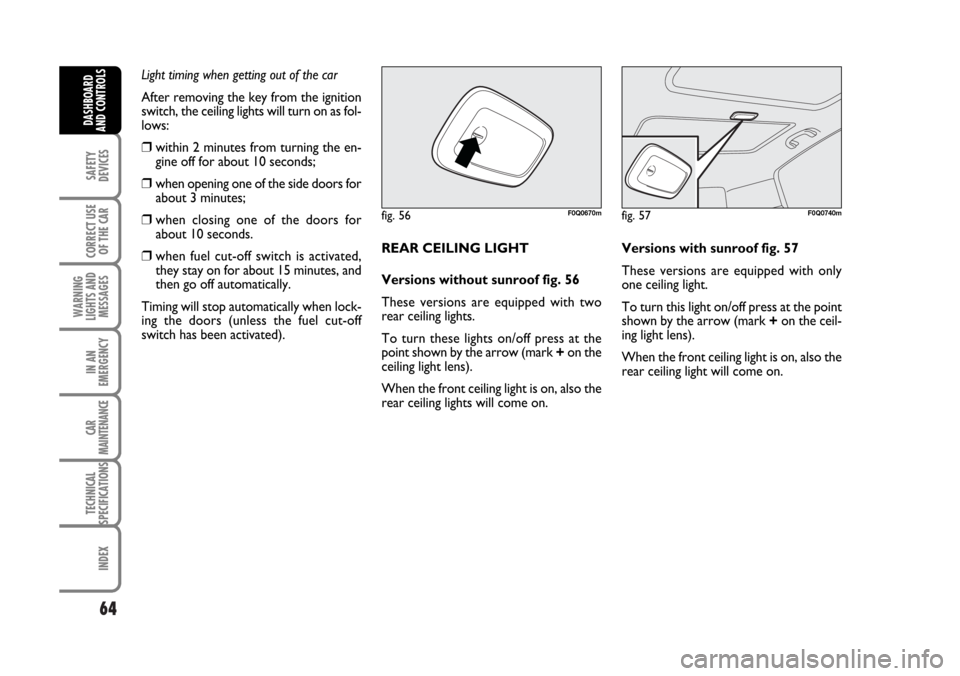
REAR CEILING LIGHT
Versions without sunroof fig. 56
These versions are equipped with two
rear ceiling lights.
To turn these lights on/off press at the
point shown by the arrow (mark +on the
ceiling light lens).
When the front ceiling light is on, also the
rear ceiling lights will come on.Versions with sunroof fig. 57
These versions are equipped with only
one ceiling light.
To turn this light on/off press at the point
shown by the arrow (mark +on the ceil-
ing light lens).
When the front ceiling light is on, also the
rear ceiling light will come on.
057-082 BRAVO GB 10-05-2007 9:09 Pagina 64
Page 67 of 246
66
SAFETY
DEVICES
CORRECT USE
OF THE CAR
WARNING
LIGHTS AND
MESSAGES
IN AN
EMERGENCY
CAR
MAINTENANCE
TECHNICAL
SPECIFICATIONS
INDEX
DASHBOARD
AND CONTROLS
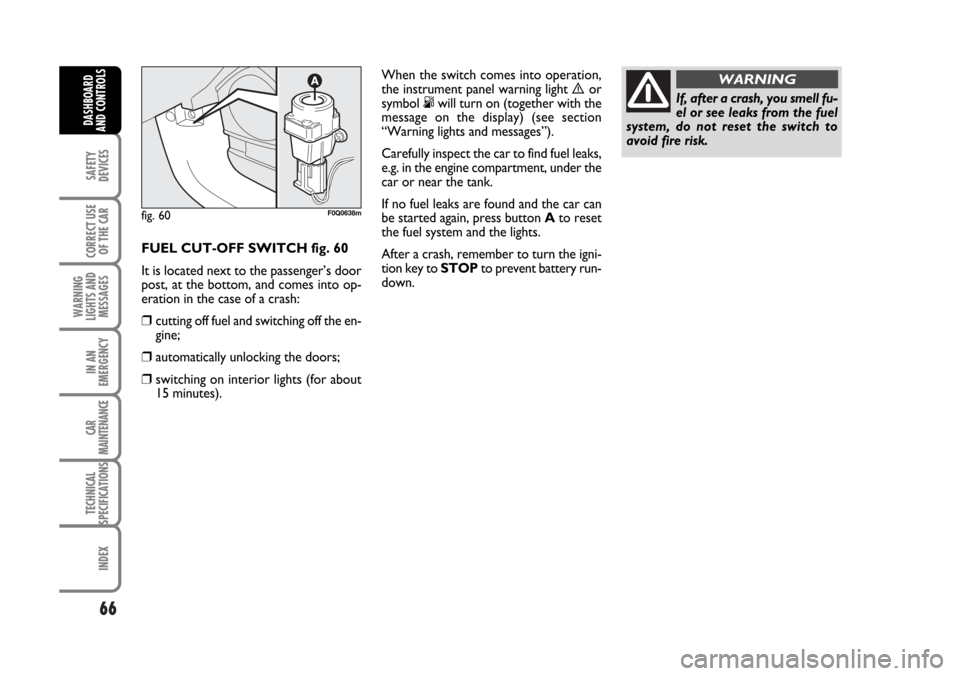
FUEL CUT-OFF SWITCH fig. 60
It is located next to the passenger’s door
post, at the bottom, and comes into op-
eration in the case of a crash:
❒cutting off fuel and switching off the en-
gine;
❒automatically unlocking the doors;
❒switching on interior lights (for about
15 minutes).
fig. 60F0Q0638m
If, after a crash, you smell fu-
el or see leaks from the fuel
system, do not reset the switch to
avoid fire risk.
WARNINGWhen the switch comes into operation,
the instrument panel warning light èor
symbol °will turn on (together with the
message on the display) (see section
“Warning lights and messages”).
Carefully inspect the car to find fuel leaks,
e.g. in the engine compartment, under the
car or near the tank.
If no fuel leaks are found and the car can
be started again, press button Ato reset
the fuel system and the lights.
After a crash, remember to turn the igni-
tion key to STOPto prevent battery run-
down.
057-082 BRAVO GB 10-05-2007 9:09 Pagina 66