display FIAT BRAVO 2007 2.G Radio CD MP3 Manual
[x] Cancel search | Manufacturer: FIAT, Model Year: 2007, Model line: BRAVO, Model: FIAT BRAVO 2007 2.GPages: 42, PDF Size: 0.27 MB
Page 29 of 42
QUICK
GUIDE
28
FUNCTIONS AND
ADJUSTMENTS
RADIO
COMPACT
DISC PLAYER
CD
CHANGER
INTRODUCTION
MP3 CD
PLAYER
INTRODUCTION
This section only describes MP3 CD play-
er operation variants : as concerns sound
system operation, refer to section
“FUNCTIONS AND ADJUSTMENTS”.
NOTE MPEG LAYER-3 audio decoding
technology licensed from Fraunhofer IIS
and Thomson multimedia.
MP3 MODE
In addition to standard audio CDs, the
sound system can also play audio files in
MP3 format. Sound system will operate as
described for the sound system with com-
pact disc player when inserting a conven-
tional audio CD, excluding functions CD
NAMING/TRACK SELECTION (TPM)
and CD NAMING that are disabled.READING MP3 CD
Inserting a CD-ROM into the proper slot
will start two stages:
– Scanning all CD tracks to find audio files.
Audio files take priority over the other
files and their identification enables the
sound system to play just these files. The
display will show the name and the word
“SCAN” flashing (e.g. “MIDNIGHT MO-
TION SCAN”).
– Reading all MP3 files to determine the
structure of folders and tracks. During this
stage the display will show the message
“READING DISC”. To read a complex
MP3 file structure (made up of different
sessions with several folders and files), ap-
proximately 2 minutes can be required.
For optimal playing use only top quality
CDs mastered at as low as possible speed.
CD-ROM reading will be interrupted in
the following cases:
– correct CD-ROM reading with MP3 files
identification. In this event the display will
show the “MP3” icon and track playback
will start from the first file and first fold-
er (see next paragraph “TRACK PLAY-
ING MODE”);– if after 2 minutes the CD-ROM reading
is not ended. The display will show, for
about 5 seconds, the message “CHECK
DISC”. In this event the sound system will
change the sound source and return to the
Tuner (Radio) mode.
– if no MP3 file is found. In this event the
display will show, for about 5 seconds, the
message “NO MP3 FILES”. In this event
the sound system will change the sound
source and return to the Tuner (Radio)
mode.
M M
P P
3 3
C C
D D
P P
L L
A A
Y Y
E E
R R
Page 30 of 42
29
QUICK
GUIDE
FUNCTIONS AND
ADJUSTMENTS
RADIO
COMPACT
DISC PLAYER
CD
CHANGER
INTRODUCTION
MP3 CD
PLAYER
TRACK PLAYING MODE
When playing a CD-ROM with MP3 files,
the sound system will display the track
name and play time (e.g. “MIDNIGHT
MOTION 4:37”).
During playback the following operations
can be performed:
– continuous or single scroll on track
name
– scrolling tracks up or down according to
single, multiple or continuous mode
– scrolling folders up or down (see next
paragraph “FOLDER STRUCTURE”).DISP FUNCTION
This function enables to change display
settings for the different CD info (e.g. files,
folder, singer’s name, album name, etc.).
To turn this function on keep button 4
DISPpressed for over 2 seconds and then use
the button/knob ON/OFF to select the in-
fo to display.
In MP3 mode, the sound system will:
– play MP3 files only
– play the tracks in alphabetic-numeric or-
der for each folder (also ordered with the
same criteria) (it is recommended to put
a number before the file name, e.g. “01”,
“02” or “001”, “002”)
– return to the start of the last file each
time the sound system is turned on.During track selection (see paragraph
track selection (forward/backward), the
display will show the folder number and
the track number and name (e.g. “3/13
MIDNIGHT MOTION”).
To facilitate track selection, the sound sys-
tem stores the number of pushes on pre-
set buttons (1 to 6) and then will skip once
like for a single request.
IMPORTANT MP3 files recorded with the
variable bit-rate method could produce
discrepancies when displaying the track
play time.
IMPORTANT The CD player can read
most of the compression systems cur-
rently on sale (e.g.: LAME, BLADE, XING,
FRAUNHOFER) however, due to the
evolution of these systems, reading of all
compression formats is not guaranteed.
Page 31 of 42
QUICK
GUIDE
30
FUNCTIONS AND
ADJUSTMENTS
RADIO
COMPACT
DISC PLAYER
CD
CHANGER
INTRODUCTION
MP3 CD
PLAYER
FOLDER STRUCTURE
The sound system with MP3 player:
– only recognizes folders that actually con-
tain MP3 files
– if MP3 files contained in a CD-ROM are
structured in several “sub-folders”, it will
level the structure of sub-folders in or-
der to obtain a single-level structure, i.e.:
it brings back “sub-folders” to main fold-
er level (see the example below).
Example: With a CD structured as fol-
lows:
+- MP3 collection - Volume 1
*- Celine Dion
*- Falling into you
|- It’s all coming back to me
now.mp3
|- Because you loved me.mp3
*- Incognito
|- Incognito.mp3
|- Lolita.mp3
|- Delivre-Moi.mp3*- Prodigy
*- Experience
|- Jericho.mp3
|- Wind it up.mp3
|- Out of space.mp3
*- The fat of the land
*- Favourite songs
|- Breathe.mp3
|- Firestarter.mp3
The sound system will recognize and will
pass progressively from one folder to the
other as follows:
*- Falling into you
*- Incognito
*- Experience
*- Favourite songs
Icon *indicates that the sound system is
displaying the folder name. Each time you
scroll folders up or down, the folder name
and number will be displayed (with max.
length of 15-18 characters, according to
the folder number).Selecting by the RDSMENU button the op-
tion “ON” or “ONCE” of the name scroll
function (see paragraph “NAME SCROLL
FUNCTION”), will obtain single scroll of
the full folder name in folder display mode,
before returning to shortened displaying.
SELECT NEXT/PREVIOUS
FOLDER
Press briefly button 1 CD /*+ to select
tracks contained in the next folder.
Press briefly button 2 CD /*– to select
tracks contained in the previous folder.
The display will show the number and the
name of the next/previous folder (e.g.: “9
MISC COLLECTION”).
Page 32 of 42
31
QUICK
GUIDE
FUNCTIONS AND
ADJUSTMENTS
RADIO
COMPACT
DISC PLAYER
CD
CHANGER
INTRODUCTION
MP3 CD
PLAYER
REPEAT FOLDER FUNCTION
(repeat tracks)
Press briefly button 5
RPTto change the
track repeat mode: press the button fur-
ther and the display will show in sequence
the following wordings: “CD REPEAT
TRACK” -> “CD REPEAT FOLDER” ->
“CD REPEAT DISC” -> “CD REPEAT
OFF”.
These wordings are associated with the
following functions:
– “CD REPEAT TRACK”: to repeat the
current track.
– “CD REPEAT FOLDER”: to repeat the
tracks contained in the folder selected.
– “CD REPEAT DISC”: to repeat the
whole MP3 CD.
– “CD REPEAT OFF”: to turn off the track
repeat function.
Changing the sound source, the function
is turned off.RANDOM FUNCTION
(random playing of a folder tracks)
To start random playing of the Compact
Disc tracks, press briefly button 6 RND:
press the button further and the display
will show in sequence the following word-
ings: “CD RANDOM FOLDER”-> “CD
RANDOM DISC”-> “CD RANDOM
OFF”.
These wordings are associated with the
following functions:
– “CD RANDOM FOLDER”: random
playing of the tracks contained in the fold-
er selected.
– “CD RANDOM DISC”: random playing
of the tracks contained in the MP3 CD.
– “CD RANDOM OFF”: turning off of the
random playing function.
Changing the sound source, the function
is turned off.
NOTE If during RANDOM playback, you
select the fast next/previous track for-
ward/backward function the current
RANDOM list will be aborted and a new
one will be created. In this event one or
several tracks could be played consecu-
tively.FOLDER NUMBER AND NAME
DISPLAYING
Press briefly button 4 DISPto display the
folder number and name.
Press button 4
DISPagain (or after about
5 seconds) to go back to previous dis-
playing.
Page 33 of 42
QUICK
GUIDE
32
FUNCTIONS AND
ADJUSTMENTS
RADIO
COMPACT
DISC PLAYER
CD
CHANGER
INTRODUCTION
MP3 CD
PLAYER
TRACK SELECTION
(forward/backward)
Press briefly button Íto play the next
track contained in the CD-ROM and but-
ton Èto play the previous one.
Press button Íagain to seek manually the
next track required. The display will show
the folder number, the track number and
name followed by wording “TK SEEK”
(track seek) (e.g.: “3/13 TK SEEK +6”).
Similarly, press button Èagain to seek
manually the previous track required. Al-
so in this case the display will show the
folder number, the track number and
name followed by wording “TK SEEK”
(track seek) (e.g.: “3/13 TK SEEK –4”).
Keep the button pressed to select track
continuously. The display will show the
folder number, the track number and
name (e.g.: “3/13 MIDNIGHT MO-
TION”).
If playing the track started more than 3
seconds ago, pressing button Èthe track
is played again from the start. In this case
if wanting to play the previous track, press
the button Ètwice consecutively.FAST TRACK SELECTION
(forward/backward)
Press briefly the button/knob 3
F-TRKto
enter the fast selection mode. The sound
system display will show the wording “Fy
TRx FASTTRACK” (y indicates the folder
number, x indicates the track number).
Turn the button/knob ON/OFF to select
the required track, and press it briefly to
confirm: track playback will start.NAME SCROLL FUNCTION
(track/folder name scroll)
Pressing briefly the RDSMENU button it is
possible, scrolling the menu, to acti-
vate/activate once/deactivate, full scrolling
of folder names.
The display will show, according to cas-
es:
– “NAME SCROLL: ON” = continuous
scroll of complete names of tracks/folders
– “NAME SCROLL: ONCE” = scroll once
the complete name of the folder and then
display 15/16 characters
– “NAME SCROLL: OFF” = fix display of
the first 15/16 characters of the track/fold-
er name
Page 34 of 42
33
QUICK
GUIDE
FUNCTIONS AND
ADJUSTMENTS
RADIO
COMPACT
DISC PLAYER
MP3 CD
PLAYER
CD
CHANGER
INTRODUCTIONSELECTING THE CD CHANGER
To turn on the CD Changer, turn the
sound system on and then press briefly
and repeatedly the SRC button to select
the “CDC” source (CD Changer).
POSSIBLE ERROR
MESSAGES
If the loader does not contain Compact
Discs, the display will show “NO CD”. If
at least one CD is found, it will be played.
If the CD played is illegible, the next CD
will be selected; if there are no other CDs
or if they are also illegible, the display will
show “NO CD” until the sound source
is changed.OPERATION
To play the Compact Discs in the CD
Changer, select “CDC” pressing briefly
and repeatedly the SRC button.
When listening to a Compact Disc for the
first time after inserting the CD loader,
playing starts from the first track on the
first disc available in the loader.
While playing the display shows the num-
ber of the track being played (e.g.
“TRACK 12” = twelfth track), the play-
ing time elapsed from the start of the track
(e.g. “11:10” = 11 minutes and 10 sec-
onds) and the number of the Compact
Disc selected (e.g. “CDC3” = third CD)
depending on the function selected in the
menu.
C C
D D
C C
H H
A A
N N
G G
E E
R R
INTRODUCTION
This section only describes CD Changer
(where provided) operation variants: as
concerns sound system operation, refer
to section “FUNCTIONS AND ADJUST-
MENTS”.
Should the CD Changer pre-
arrangement be requested it will be
provided with the necessary wiring
for correct CD Changer Blaupunkt
function.
Cable end will be easy to identify by
lifting the covering carpet in the boot
near the right wheel housing.
IMPORTANT If the Blue&Me™or the
Blue&Me™ Navare present in the car,
no type of CD Changer can be installed.
Page 35 of 42
QUICK
GUIDE
34
FUNCTIONS AND
ADJUSTMENTS
RADIO
COMPACT
DISC PLAYER
MP3 CD
PLAYER
CD
CHANGER
INTRODUCTION
SELECTING A CD
Press button 1 CD + to select the next
CD and button 2 CD – to select the pre-
vious CD.
If the loader does not contain a disc in the
position selected, the display shows “NO
CD”, and the next CD will be played au-
tomatically.
TRACK SELECTION
(forward/backward)
Press briefly button Íto play the next
track contained in the Compact Disc be-
ing played.
Press briefly button Èto play the previ-
ous track contained in the Compact Disc
being played.FAST FORWARD/BACKWARD
Keep button Ípressed to move the track
selected fast forward and keep button È
pressed to move it fast backward. Fast for-
ward/backward is stopped when the but-
ton is released.
SCAN FUNCTION
(scanning CD tracks)
With this function it is possible to listen to
all the tracks contained in the CD select-
ed.
Keep button SCAN pressed to play the
first 10 seconds of each track contained in
the CD. While playing the track, the dis-
play will alternately show the CD Chang-
er function selected (CD Changer name,
track playing time and number of the track
being played) and the word “SCAN” (e.g.:
“CDC3 SCAN TK12 0.04”)
If the Scan function is on, Repeat and Mix
functions are turned off.The scanning sequence is the following:
– from the track being played up to the
last one on the CD
– from the first track up to the one being
played when the scan function was start-
ed.
The Scan function is interrupted in the fol-
lowing cases:
– turning the sound system off
– pressing the SCAN button again to con-
tinue listening to the track being played
– pressing Íor Èthereby moving to the
next or previous track
– pressing a preset button
– changing the sound source
– pressing the
RDSMENU button.
If the Scan function is not interrupted, at
the end it will continue playing the track
played before scanning was started.
Page 36 of 42
35
QUICK
GUIDE
FUNCTIONS AND
ADJUSTMENTS
RADIO
COMPACT
DISC PLAYER
MP3 CD
PLAYER
CD
CHANGER
INTRODUCTION
PAUSE FUNCTION
To pause the CD player, press briefly the
button MUTE. The display will show
“CDC MUTE”.
To resume track playing, press button
MUTE again.
The pause function is automatically can-
celled when changing the sound source.
TRACK REPEAT FUNCTION
(track repeat)
Press briefly the preset button 5
RPTto lis-
ten repeatedly to the last track played: the
display will show “CDC REPEAT
TRACK”.
Press the preset button 5
RPTagain to turn
off the repeat function: the display will
show “CD REPEAT OFF”.
Changing the sound source, the function
is turned off.
IMPORTANT When the repeat function
is on, the SCAN and MIX functions are
turned off.RANDOM FUNCTION
(random track playing)
To start random playing of tracks on the
Compact Disc selected, press the preset
button 6
RND.
A new track will be played and the dis-
play will show “CDC RANDOM DISK”.
To start random playing of all the CDs
contained in the CD Changer, press again
button 6
RND; the display will show “CDC
RANDOM PACK”.
Press the preset button 6
RNDa third time
to turn the function off: the display will
show “CDC RANDOM OFF”. STOPPING CD PLAYING
Press button ˚or button SRC to return
to the tuner mode.
Page 37 of 42
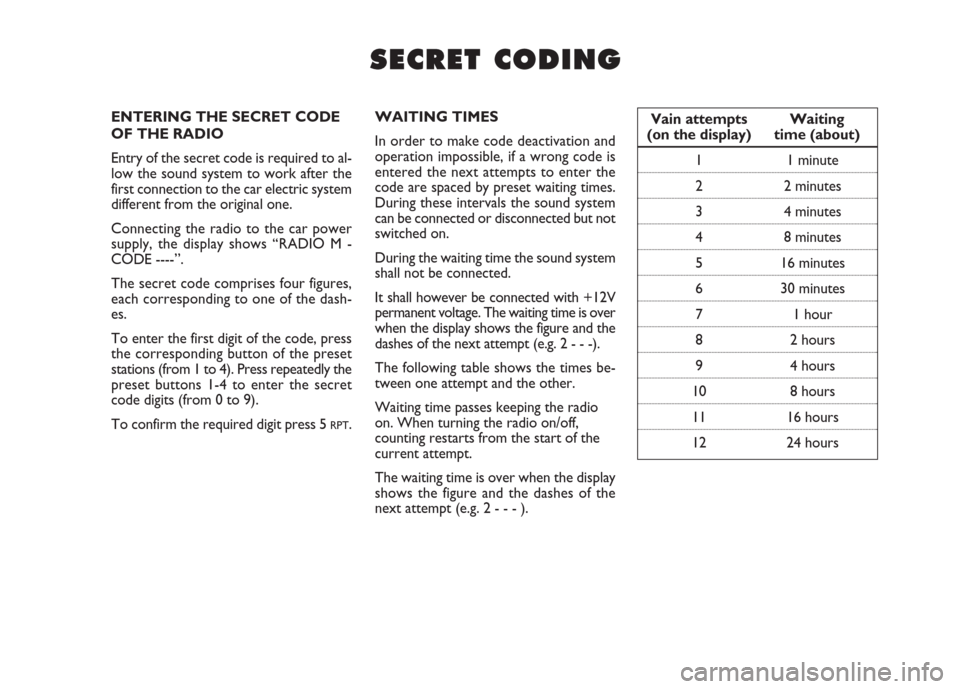
ENTERING THE SECRET CODE
OF THE RADIO
Entry of the secret code is required to al-
low the sound system to work after the
first connection to the car electric system
different from the original one.
Connecting the radio to the car power
supply, the display shows “RADIO M -
CODE ----”.
The secret code comprises four figures,
each corresponding to one of the dash-
es.
To enter the first digit of the code, press
the corresponding button of the preset
stations (from 1 to 4). Press repeatedly the
preset buttons 1-4 to enter the secret
code digits (from 0 to 9).
To confirm the required digit press 5
RPT.WAITING TIMES
In order to make code deactivation and
operation impossible, if a wrong code is
entered the next attempts to enter the
code are spaced by preset waiting times.
During these intervals the sound system
can be connected or disconnected but not
switched on.
During the waiting time the sound system
shall not be connected.
It shall however be connected with +12V
permanent voltage. The waiting time is over
when the display shows the figure and the
dashes of the next attempt (e.g. 2 - - -).
The following table shows the times be-
tween one attempt and the other.
Waiting time passes keeping the radio
on. When turning the radio on/off,
counting restarts from the start of the
current attempt.
The waiting time is over when the display
shows the figure and the dashes of the
next attempt (e.g. 2 - - - ).Vain attempts Waiting
(on the display) time (about)
1 1 minute
2 2 minutes
3 4 minutes
4 8 minutes
5 16 minutes
6 30 minutes
7 1 hour
8 2 hours
9 4 hours
10 8 hours
11 16 hours
12 24 hours
S S
E E
C C
R R
E E
T T
C C
O O
D D
I I
N N
G G