Format FIAT BRAVO 2007 2.G Radio CD MP3 Manual
[x] Cancel search | Manufacturer: FIAT, Model Year: 2007, Model line: BRAVO, Model: FIAT BRAVO 2007 2.GPages: 42, PDF Size: 0.27 MB
Page 2 of 42
FADER adjustment .................................................................... 14
LOUDNESS function ............................................................... 14
Telephone provision ................................................................ 14
RADIO (Tuner) ......................................................................... 15
Presetting buttons .................................................................... 15
Storing the last station heard .................................................. 15
Automatic tuning ...................................................................... 15
Manual tuning ............................................................................. 16
SCAN function ........................................................................... 16
Scanning preset stations ........................................................... 16
Manual station storage ............................................................ 17
AUTOSTORE function ............................................................. 17
Listening to stored stations .................................................... 17
AF function ................................................................................. 18
TA function ................................................................................ 18
PTY function .............................................................................. 19
Menu ............................................................................................ 20
Available settings ....................................................................... 21
COMPACT DISC PLAYER .................................................... 25
Introduction ............................................................................... 25
Selecting the CD player .......................................................... 25
Loading/ejecting a CD ............................................................. 25
Display information .................................................................. 25
Track selection .......................................................................... 25
Fast forward/backward ............................................................ 26
C C
O O
N N
T T
E E
N N
T T
S S
INTRODUCTION ................................................................... 3
Advice .......................................................................................... 3
- Road safety .............................................................................. 3
- Reception conditions ............................................................ 3
- Care and maintenance .......................................................... 4
- Compact Disc ......................................................................... 4
Technical data ............................................................................ 5
QUICK GUIDE ......................................................................... 6
Steering wheel controls .......................................................... 9
General information ................................................................. 10
- Radio section ........................................................................... 10
- Compact Disc section .......................................................... 10
- MP3 CD section ..................................................................... 11
- Audio section .......................................................................... 11
FUNCTIONS AND ADJUSTMENTS .................................. 12
Turning the sound system on ................................................. 12
Turning the sound system off ................................................. 12
Selecting Radio/CD/CD Changer ......................................... 12
SOUND SOURCE MEMORY function ............................... 12
Volume adjustment .................................................................. 12
MUTE function............................................................................ 13
SOFT MUTE function ............................................................... 13
Tone adjustment ........................................................................ 13
Balance adjustment ................................................................... 13
PRESET/XX EQ SET*/ CLASSIC/ ROCK/JAZZ function .. 14
Page 4 of 42
3
QUICK
GUIDE
FUNCTIONS AND
ADJUSTMENTS
RADIO
COMPACT
DISC PLAYER
MP3 CD
PLAYER
CD
CHANGER
INTRODUCTIONADVICE
Road safety
You are advised to learn how to use the
various sound system functions (e.g.: stor-
ing stations) before starting to drive.
Reception conditions
Reception conditions change constantly
when driving. Reception can be disturbed
by the presence of mountains, buildings,
bridges particularly when far away from
the broadcaster received.
IMPORTANT When receiving traffic in-
formation, the volume may be higher than
normal.
I I
N N
T T
R R
O O
D D
U U
C C
T T
I I
O O
N N
The sound system has been designed in ac-
cordance with the special features of the
passenger compartment, with a person-
alised design that blends with the style of
the dashboard.
The sound system is installed in a user-
friendly position for the driver and passen-
ger and the graphics on the front panel
make location of the controls quick, facili-
tating use.
In the following pages you will find the in-
structions for use, which you are advised
to read through carefully. The instructions
also contain the procedure for controlling
the CD Changer (where provided) through
the sound system. For the instructions for
use of the CD Changer refer to the specific
manual.
Too high a volume when dri-
ving can put the driver’s life at
risk and that of other people. There-
fore the volume should always be ad-
justed in such a way that it is always
possible to hear the noises of the sur-
rounding environment (e.g.: horns, am-
bulance, police sirens, etc.).
WARNING
Page 6 of 42
5
QUICK
GUIDE
FUNCTIONS AND
ADJUSTMENTS
RADIO
COMPACT
DISC PLAYER
MP3 CD
PLAYER
CD
CHANGER
INTRODUCTION
IMPORTANT The CD player can read
most of the compression systems cur-
rently on sale (e.g.: LAME, BLADE, XING,
FRAUNHOFER) however, due to the
evolution of these systems, reading of all
compression formats is not guaranteed.
IMPORTANT When loading a multi-ses-
sion CD, only the first session will be
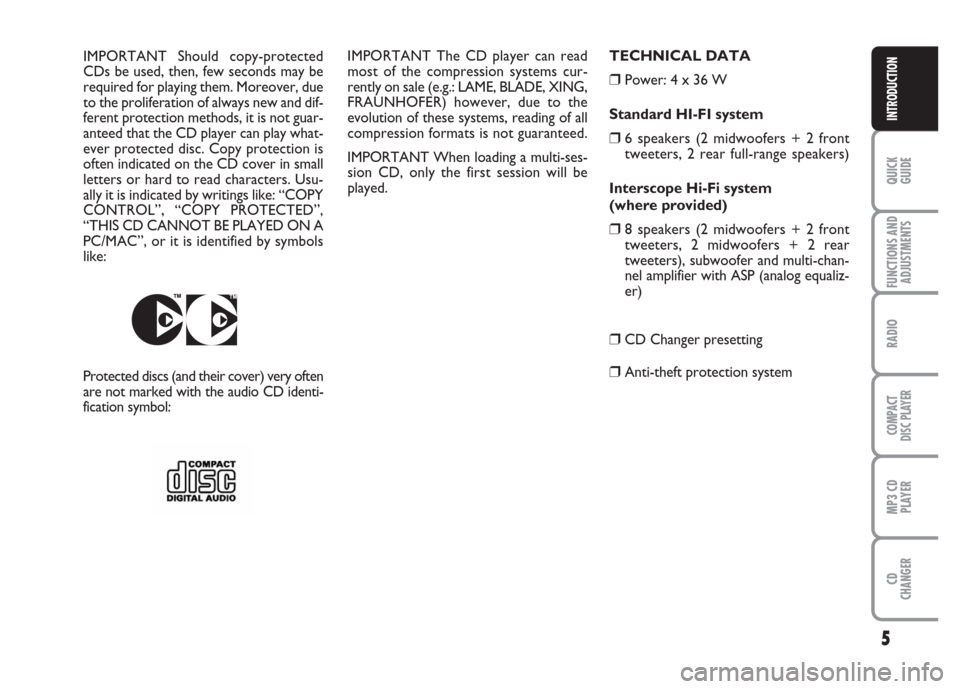
played. IMPORTANT Should copy-protected
CDs be used, then, few seconds may be
required for playing them. Moreover, due
to the proliferation of always new and dif-
ferent protection methods, it is not guar-
anteed that the CD player can play what-
ever protected disc. Copy protection is
often indicated on the CD cover in small
letters or hard to read characters. Usu-
ally it is indicated by writings like: “COPY
CONTROL”, “COPY PROTECTED”,
“THIS CD CANNOT BE PLAYED ON A
PC/MAC”, or it is identified by symbols
like:TECHNICAL DATA
❒Power: 4 x 36 W
Standard HI-FI system
❒6 speakers (2 midwoofers + 2 front
tweeters, 2 rear full-range speakers)
Interscope Hi-Fi system
(where provided)
❒8 speakers (2 midwoofers + 2 front
tweeters, 2 midwoofers + 2 rear
tweeters), subwoofer and multi-chan-
nel amplifier with ASP (analog equaliz-
er)
❒CD Changer presetting
❒Anti-theft protection systemProtected discs (and their cover) very often
are not marked with the audio CD identi-
fication symbol:
Page 11 of 42
10
FUNCTIONS AND
ADJUSTMENTS
RADIO
COMPACT
DISC PLAYER
MP3 CD
PLAYER
CD
CHANGER
INTRODUCTION
QUICK
GUIDE
❒Manual storage of 42 stations: 24 in the
FM band (6 in FM1, 6 in FM2, 6 in FMT
and 6 in FMAST), 6 in the MW band, 6
in the LW band and 6 in the AM band
(MW+LW) that can be stored with Au-
toSTore in the AMAST band
❒Automatic storage (AutoSTore func-
tion) of 6 stations in the FM band and 6
in the AM band
❒SENS DX/LO function (sensitivity ad-
justing in searching radio stations)
❒Scan function (scanning stored stations),
about 10 seconds per station
❒Automatic Stereo/Mono switching.Compact Disc section
❒Disc select (disc no.)
❒Track select (forward/backward)
❒Fast forward/backward
❒Track Repeat function (repetition of the
last track)
❒Track Scan function (scanning the
tracks on the Compact Disc, about 10
seconds per track)
❒RaNDom function (random track play-
ing).
❒TPM function (CD playing sequence
storage)
❒CD Naming function (allocating a name
to a CD), for CD Changer only. Not
available on sound system with MP3
CD player.
❒CD Compression function (volume re-
duction according to input signal level
from CD) GENERAL INFORMATION
The sound system features the following
functions:
Radio section
❒PLL tuning with FM/AM/MW/LW fre-
quency bands
❒RDS (Radio Data System) with TA
(traffic announcements) - PTY (Pro-
gram Type) - EON (Enhanced Other
Network) - REG (Regional pro-
grammes)
❒AF: alternative frequency search selec-
tion in RDS mode
❒Automatic/manual station tuning
Page 19 of 42
QUICK
GUIDE
18
FUNCTIONS AND
ADJUSTMENTS
COMPACT
DISC PLAYER
MP3 CD
PLAYER
CD
CHANGER
INTRODUCTION
RADIO
When the signal of the RDS station tuned
weakens, the following two cases may oc-
cur:
– With “AF SWITCHING: ON” the RDS
system activates automatic tuning of the
optimum frequency of the station chosen,
with the stations enabled, therefore the
radio is automatically tuned to the station
with the strongest signal that is broad-
casting the same programme. During the
journey it will thus be possible to contin-
ue listening to the station chosen with-
out having to change the frequency when
changing area. Of course, the station be-
ing listened to must be receivable in the
area the car is crossing.
– With “AF SWITCHING: OFF” the ra-
dio will not tune the strongest station au-
tomatically and it will have to be found
manually using the tuner buttons. AF FUNCTION
(alternative frequency search)
To turn the AF function on/off, press
briefly button AF
PTY. RDS name (if avail-
able) will stay on the display and if the
function is on the wording is shown.
– “AF SWITCHING: ON” = alternative
frequency search on
– “AF SWITCHING: OFF” = alternative
frequency search off.TA FUNCTION
(traffic information)
Certain stations in the FM band (in stor-
age blocks FM1, FM2, FM3 and FMAST)
are enabled to also broadcast information
about traffic conditions. During a traffic
bulletin, the message “TRAFFIC INFO”
will be displayed alternate with the cur-
rent one (e.g.: station name).
To turn the TA function on/off, press
briefly button TA. When the TA function
is on the display will show the message
“TA-ON”.
When the TA function is on, an incoming
traffic bulletin will stop temporarily the
current broadcasted programme or the
CD being played. Switching from the se-
lected station to the station broadcasting
traffic announcements is only possible if
connection for EON function is enabled.
Page 20 of 42
19
QUICK
GUIDE
FUNCTIONS AND
ADJUSTMENTS
COMPACT
DISC PLAYER
MP3 CD
PLAYER
CD
CHANGER
INTRODUCTION
RADIO
PTY FUNCTION
(selecting a type of programme)
Several radio station offer the programme
type service (PTY) within the FM band
(FM1, FM2, FM3). For example, stations
broadcasting info/news will display as PTY
code the message “NEWS”.
The PTY function activates a seek filter
that tunes only stations broadcasting pro-
grammes with the preselected PTY code
(e.g.: “POP”).
To turn on the PTY function, keep button
AF
PTYpressed.
The programme types offered by a radio
station may vary according to the pro-
gramme:
NEWS News and magazine
AFFAIRS Politics and
news
INFO Special information
programmes
SPORT Sport
programmes
EDUCATE Educational
programmes
DRAMA Radio dramas
and literature
CULTURE Culture, church
and religion
SCIENCE ScienceVARIED Variety
POP M Pop music
(hits)
ROCK M Rock music
EASY M Easy music
LIGHT M Light classic
music
CLASSICS Classic music
OTHER M Other types of music
(e.g. folklore)
WEATHER Weather report
FINANCE Finance news
CHILDRENChild’s programmes
SOCIAL Social information
RELIGIONReligion and philoso-
phy
PHONE INListener’s calls (other
than “
PHONE IN” func-
tion active only with
hands-free kit connec-
tion for mobile phone)
TRAVEL Tourist’s
informationLEISURE Free time and hobbies
JAZZ Jazz
COUNTRY Country music
NATION M National
broadcasting
OLDIES Golden Oldies
FOLK M Folk music
DOCUMENT Special reports
PTY automatic seek
To select a PTY through automatic seek,
select the required type of programme
from the list stored and then start auto-
matic seek. Procedure is described in next
paragraphs.
PTY function reactivation
Press button AF
PTYfor over 2 seconds.
The last programme type selected (e.g.
“POP”) will then be displayed.
Page 25 of 42
QUICK
GUIDE
24
FUNCTIONS AND
ADJUSTMENTS
COMPACT
DISC PLAYER
MP3 CD
PLAYER
CD
CHANGER
INTRODUCTION
RADIO
Second level menu options
1 - RDS (station time display)
This option makes it possible to display
the time of the current RDS station (if this
information is available).
2 - AUDIO CLIP DETECT
(“audio distortion clipper” on/off)
This function reduces automatically the ra-
dio output level when excessive distortion
is detected that could damage the speak-
ers.
Use buttons Èor Íto turn this function
on/off.
The display will show the current function
condition:
– “CLIP DETECT: ON” = function on
– “CLIP DETECT: OFF” = function off3 - MAX VOLUME (max. volume
setting at switching on)
This function makes it possible to set the
radio volume (from 10 to 33) at sound sys-
tem switching on.
Use the button/knob ON/OFF to adjust
the volume.
The display will show the set volume (e.g.:
“MAX VOLUME: 25”)
4 - PHONE
(phone volume adjustment)
This function makes it possible to set the
phone volume (from 1 to 3).
The display will show, as standard, the
message “PHONE LEVEL: OFF” (volume
set by the Manufacturer, corresponding to
max. level).
Use the button/knob ON/OFF to adjust
the volume to 3 different levels (PHONE
LEVEL 1 , PHONE LEVEL 2 and PHONE
LEVEL 3): the higher the number is, the
lower will be the phone volume.5 - AUTO (function setting)
With this function it is possible to set ra-
dio turning on/off depending on car igni-
tion/switching off or independent.
With this function on (radio is set to
switch off when the car is switched off),
it is however possible to switch on the ra-
dio.
With this function off, when switching off
the car the radio stays on.
Use buttons Èor Íto turn this function
on/off.
The display will show the current function
condition:
– “AUTO: ON” = function on
– “AUTO: OFF” = function off
Page 26 of 42
25
QUICK
GUIDE
FUNCTIONS AND
ADJUSTMENTS
RADIO
MP3 CD
PLAYER
CD
CHANGER
INTRODUCTION
COMPACT
DISC PLAYER
INTRODUCTION
This section only describes CD player op-
eration variants: as concerns sound sys-
tem operation, refer to section “FUNC-
TIONS AND ADJUSTMENTS”.
SELECTING THE CD PLAYER
To turn on the Compact Disc player in-
tegral with the sound system, when a CD
is already inserted, turn on the sound sys-
tem by pressing the button/knob ON/OFF
then press briefly and repeatedly button
SRC to select the “CD” mode.
Inserting a CD, also when the sound sys-
tem is off, will turn the CD player on au-
tomatically.
For optimal playing use only original CDs.
When using R/RW CDs, use top quality
CDs mastered at the as low as possible
speed.LOADING/EJECTING A CD
To insert the CD, set it gently in place to
activate the powered loading system,
which will position it correctly.
Press button ˚with the sound system on,
to operate the powered CD eject system.
DISPLAY INFORMATION
When the CD player is working, the dis-
play shows information which has the fol-
lowing meaning:
– “CD”: indicates the CD mode
– “TRACK 12”: shows the number of the
track on the CD
– “11.04”: shows the time elapsed since
the start of the track TRACK SELECTION
(forward/backward)
Press briefly button Íto play the next
track on the CD and button Èto play the
previous one.
To select tracks continuously, keep the
button pressed.
If playing the track started more than 3
seconds ago, pressing button Èthe track
is played again from the start. In this case
if wanting to play the previous track, press
the button Ètwice consecutively.
C C
O O
M M
P P
A A
C C
T T
D D
I I
S S
C C
P P
L L
A A
Y Y
E E
R R
Page 29 of 42
QUICK
GUIDE
28
FUNCTIONS AND
ADJUSTMENTS
RADIO
COMPACT
DISC PLAYER
CD
CHANGER
INTRODUCTION
MP3 CD
PLAYER
INTRODUCTION
This section only describes MP3 CD play-
er operation variants : as concerns sound
system operation, refer to section
“FUNCTIONS AND ADJUSTMENTS”.
NOTE MPEG LAYER-3 audio decoding
technology licensed from Fraunhofer IIS
and Thomson multimedia.
MP3 MODE
In addition to standard audio CDs, the
sound system can also play audio files in
MP3 format. Sound system will operate as
described for the sound system with com-
pact disc player when inserting a conven-
tional audio CD, excluding functions CD
NAMING/TRACK SELECTION (TPM)
and CD NAMING that are disabled.READING MP3 CD
Inserting a CD-ROM into the proper slot
will start two stages:
– Scanning all CD tracks to find audio files.
Audio files take priority over the other
files and their identification enables the
sound system to play just these files. The
display will show the name and the word
“SCAN” flashing (e.g. “MIDNIGHT MO-
TION SCAN”).
– Reading all MP3 files to determine the
structure of folders and tracks. During this
stage the display will show the message
“READING DISC”. To read a complex
MP3 file structure (made up of different
sessions with several folders and files), ap-
proximately 2 minutes can be required.
For optimal playing use only top quality
CDs mastered at as low as possible speed.
CD-ROM reading will be interrupted in
the following cases:
– correct CD-ROM reading with MP3 files
identification. In this event the display will
show the “MP3” icon and track playback
will start from the first file and first fold-
er (see next paragraph “TRACK PLAY-
ING MODE”);– if after 2 minutes the CD-ROM reading
is not ended. The display will show, for
about 5 seconds, the message “CHECK
DISC”. In this event the sound system will
change the sound source and return to the
Tuner (Radio) mode.
– if no MP3 file is found. In this event the
display will show, for about 5 seconds, the
message “NO MP3 FILES”. In this event
the sound system will change the sound
source and return to the Tuner (Radio)
mode.
M M
P P
3 3
C C
D D
P P
L L
A A
Y Y
E E
R R
Page 30 of 42
29
QUICK
GUIDE
FUNCTIONS AND
ADJUSTMENTS
RADIO
COMPACT
DISC PLAYER
CD
CHANGER
INTRODUCTION
MP3 CD
PLAYER
TRACK PLAYING MODE
When playing a CD-ROM with MP3 files,
the sound system will display the track
name and play time (e.g. “MIDNIGHT
MOTION 4:37”).
During playback the following operations
can be performed:
– continuous or single scroll on track
name
– scrolling tracks up or down according to
single, multiple or continuous mode
– scrolling folders up or down (see next
paragraph “FOLDER STRUCTURE”).DISP FUNCTION
This function enables to change display
settings for the different CD info (e.g. files,
folder, singer’s name, album name, etc.).
To turn this function on keep button 4
DISPpressed for over 2 seconds and then use
the button/knob ON/OFF to select the in-
fo to display.
In MP3 mode, the sound system will:
– play MP3 files only
– play the tracks in alphabetic-numeric or-
der for each folder (also ordered with the
same criteria) (it is recommended to put
a number before the file name, e.g. “01”,
“02” or “001”, “002”)
– return to the start of the last file each
time the sound system is turned on.During track selection (see paragraph
track selection (forward/backward), the
display will show the folder number and
the track number and name (e.g. “3/13
MIDNIGHT MOTION”).
To facilitate track selection, the sound sys-
tem stores the number of pushes on pre-
set buttons (1 to 6) and then will skip once
like for a single request.
IMPORTANT MP3 files recorded with the
variable bit-rate method could produce
discrepancies when displaying the track
play time.
IMPORTANT The CD player can read
most of the compression systems cur-
rently on sale (e.g.: LAME, BLADE, XING,
FRAUNHOFER) however, due to the
evolution of these systems, reading of all
compression formats is not guaranteed.