Off FIAT BRAVO 2007 2.G Radio CD MP3 Manual
[x] Cancel search | Manufacturer: FIAT, Model Year: 2007, Model line: BRAVO, Model: FIAT BRAVO 2007 2.GPages: 42, PDF Size: 0.27 MB
Page 2 of 42
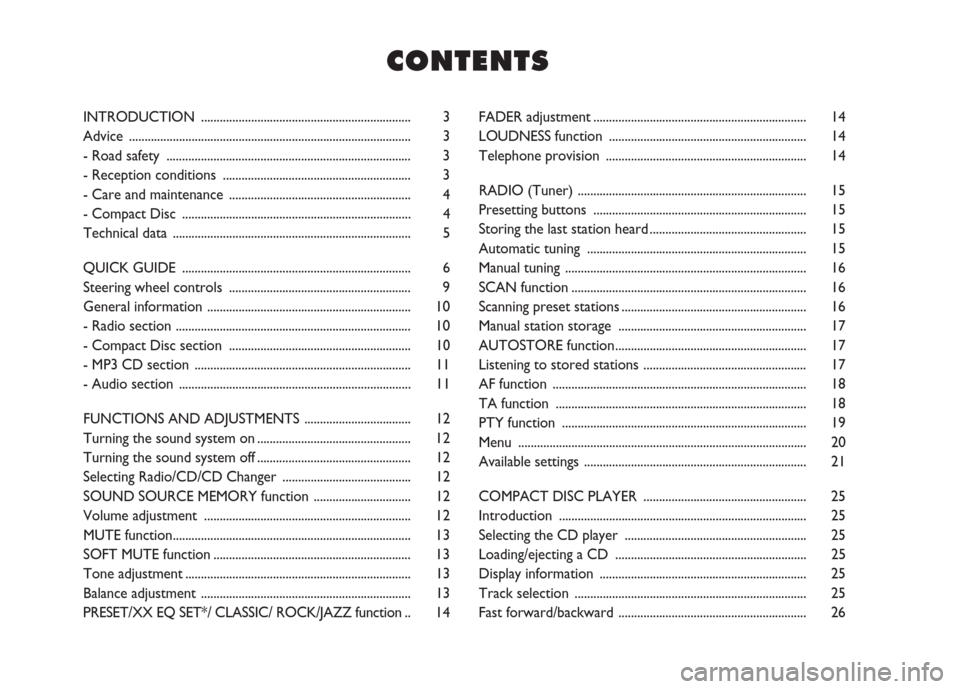
FADER adjustment .................................................................... 14
LOUDNESS function ............................................................... 14
Telephone provision ................................................................ 14
RADIO (Tuner) ......................................................................... 15
Presetting buttons .................................................................... 15
Storing the last station heard .................................................. 15
Automatic tuning ...................................................................... 15
Manual tuning ............................................................................. 16
SCAN function ........................................................................... 16
Scanning preset stations ........................................................... 16
Manual station storage ............................................................ 17
AUTOSTORE function ............................................................. 17
Listening to stored stations .................................................... 17
AF function ................................................................................. 18
TA function ................................................................................ 18
PTY function .............................................................................. 19
Menu ............................................................................................ 20
Available settings ....................................................................... 21
COMPACT DISC PLAYER .................................................... 25
Introduction ............................................................................... 25
Selecting the CD player .......................................................... 25
Loading/ejecting a CD ............................................................. 25
Display information .................................................................. 25
Track selection .......................................................................... 25
Fast forward/backward ............................................................ 26
C C
O O
N N
T T
E E
N N
T T
S S
INTRODUCTION ................................................................... 3
Advice .......................................................................................... 3
- Road safety .............................................................................. 3
- Reception conditions ............................................................ 3
- Care and maintenance .......................................................... 4
- Compact Disc ......................................................................... 4
Technical data ............................................................................ 5
QUICK GUIDE ......................................................................... 6
Steering wheel controls .......................................................... 9
General information ................................................................. 10
- Radio section ........................................................................... 10
- Compact Disc section .......................................................... 10
- MP3 CD section ..................................................................... 11
- Audio section .......................................................................... 11
FUNCTIONS AND ADJUSTMENTS .................................. 12
Turning the sound system on ................................................. 12
Turning the sound system off ................................................. 12
Selecting Radio/CD/CD Changer ......................................... 12
SOUND SOURCE MEMORY function ............................... 12
Volume adjustment .................................................................. 12
MUTE function............................................................................ 13
SOFT MUTE function ............................................................... 13
Tone adjustment ........................................................................ 13
Balance adjustment ................................................................... 13
PRESET/XX EQ SET*/ CLASSIC/ ROCK/JAZZ function .. 14
Page 8 of 42
7
FUNCTIONS AND
ADJUSTMENTS
RADIO
COMPACT
DISC PLAYER
MP3 CD
PLAYER
CD
CHANGER
INTRODUCTION
QUICK
GUIDE
Button
Button
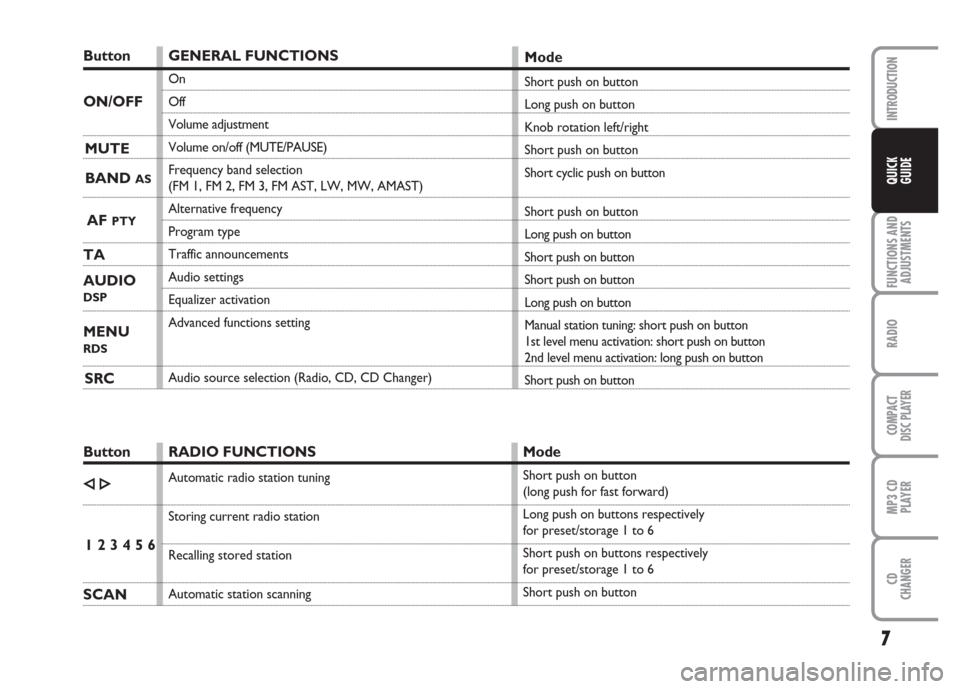
GENERAL FUNCTIONS
On
Off
Volume adjustment
Volume on/off (MUTE/PAUSE)
Frequency band selection
(FM 1, FM 2, FM 3, FM AST, LW, MW, AMAST)
Alternative frequency
Program type
Traffic announcements
Audio settings
Equalizer activation
Advanced functions setting
Audio source selection (Radio, CD, CD Changer)
Mode
Short push on button
Long push on button
Knob rotation left/right
Short push on button
Short cyclic push on button
Short push on button
Long push on button
Short push on button
Short push on button
Long push on button
Manual station tuning: short push on button
1st level menu activation: short push on button
2nd level menu activation: long push on button
Short push on button
RADIO FUNCTIONS
Automatic radio station tuning
Storing current radio station
Recalling stored station
Automatic station scanning
Mode
Short push on button
(long push for fast forward)
Long push on buttons respectively
for preset/storage 1 to 6
Short push on buttons respectively
for preset/storage 1 to 6
Short push on button
ON/OFF
MUTE
BAND
AS
AF PTY
TA
AUDIO
DSP
MENU
RDS
SRC
ÈÍ
1 2 3 4 5 6
SCAN
Page 9 of 42
8
FUNCTIONS AND
ADJUSTMENTS
RADIO
COMPACT
DISC PLAYER
MP3 CD
PLAYER
CD
CHANGER
INTRODUCTION
QUICK
GUIDE
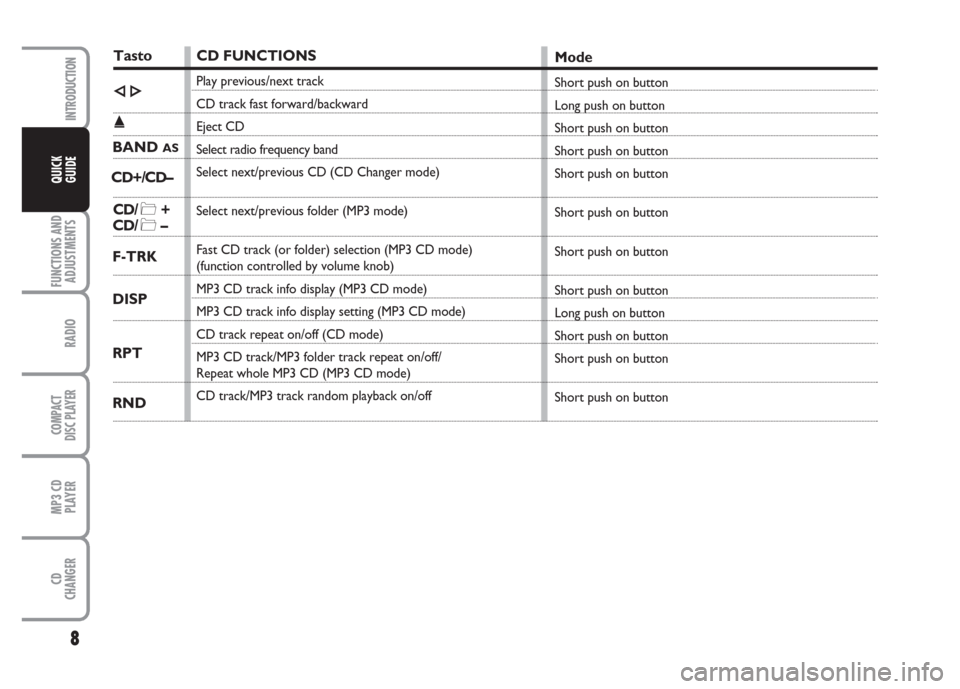
TastoCD FUNCTIONS
Play previous/next track
CD track fast forward/backward
Eject CD
Select radio frequency band
Select next/previous CD (CD Changer mode)
Select next/previous folder (MP3 mode)
Fast CD track (or folder) selection (MP3 CD mode)
(function controlled by volume knob)
MP3 CD track info display (MP3 CD mode)
MP3 CD track info display setting (MP3 CD mode)
CD track repeat on/off (CD mode)
MP3 CD track/MP3 folder track repeat on/off/
Repeat whole MP3 CD (MP3 CD mode)
CD track/MP3 track random playback on/off
Mode
Short push on button
Long push on button
Short push on button
Short push on button
Short push on button
Short push on button
Short push on button
Short push on button
Long push on button
Short push on button
Short push on button
Short push on buttonÈÍ
˚
BAND
AS
CD/ *+
CD/ *–
F-TRK
RPT
RND DISP CD+/CD–
Page 10 of 42
9
FUNCTIONS AND
ADJUSTMENTS
RADIO
COMPACT
DISC PLAYER
MP3 CD
PLAYER
CD
CHANGER
INTRODUCTION
QUICK
GUIDE
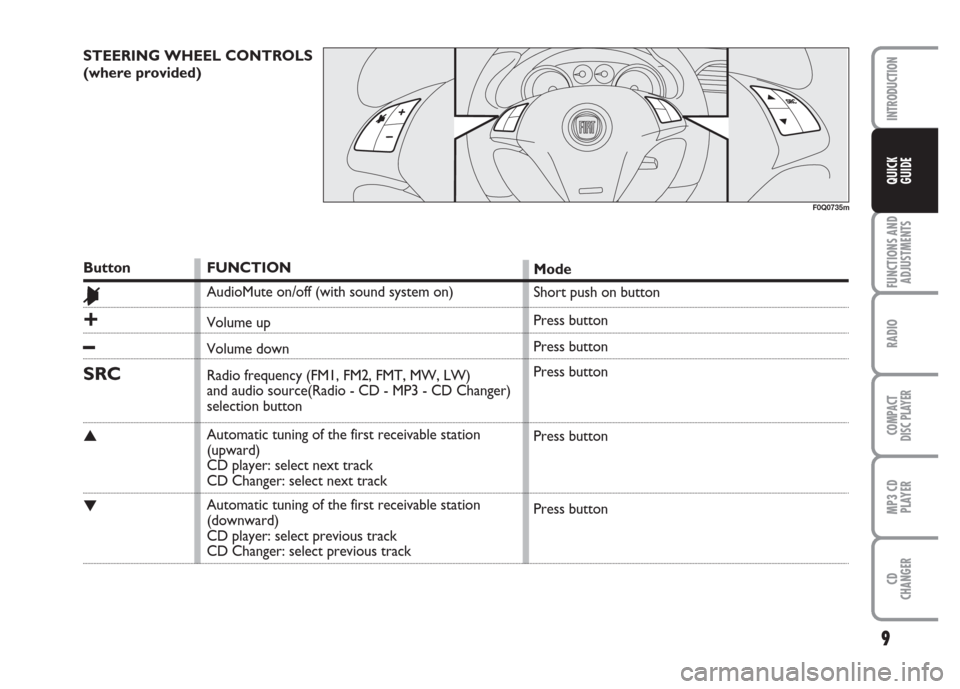
STEERING WHEEL CONTROLS
(where provided)
F0Q0735m
Button
&
+
–
SRC
▲
▼
FUNCTION
AudioMute on/off (with sound system on)
Volume up
Volume down
Radio frequency (FM1, FM2, FMT, MW, LW)
and audio source(Radio - CD - MP3 - CD Changer)
selection button
Automatic tuning of the first receivable station
(upward)
CD player: select next track
CD Changer: select next track
Automatic tuning of the first receivable station
(downward)
CD player: select previous track
CD Changer: select previous trackMode
Short push on button
Press button
Press button
Press button
Press button
Press button
Page 13 of 42
QUICK
GUIDE
12
RADIO
COMPACT
DISC PLAYER
MP3 CD
PLAYER
CD
CHANGER
INTRODUCTION
FUNCTIONS AND
ADJUSTMENTS
SELECTING RADIO/CD/
CD CHANGER
Pressing briefly and repeatedly button SRC
it is possible to select the following func-
tions in sequence:
– TUNER (Radio)
– CD (Compact Disc)
– CDC (CD Changer) (only if the CD
Changer is connected).
After changing sound source, the display
will show the current function selected:
TUNER (Radio), CD (Compact Disc),
CDC (CD Changer).
Functions not available (e.g. “CD” if a
Compact Disc is not inserted) are disabled
automatically.SOUND SOURCE MEMORY
FUNCTION
If while listening to a CD another function
is selected (e.g.: the radio), playing is
stopped and when the CD mode is re-
sumed, it starts again from the point in
which it was stopped.
If while listening to the radio another func-
tion is selected, when the Radio mode is
resumed, it is tuned to the last station se-
lected.
VOLUME ADJUSTMENT
Adjust volume through button/knob
ON/OFF.
Turn the knob clockwise to increase vol-
ume, turn the knob counter-clockwise to
lower the volume.
The display will show: “VOLUME 00” …
“VOLUME 12” TURNING THE
SOUND SYSTEM ON
The sound system is switched on pressing
the button/knob ON/OFF. The turning on
of the sound system radio can be con-
nected to the car ignition: turning the ig-
nition key to MAR, the radio turns on;
turning the key to STOP the radio turns
off (see paragraph “Setting the AUTO
function” is section “Radio”).
If the sound system is turned on with the
ignition key at STOP, it will turn off auto-
matically after about 20 minutes.
TURNING THE
SOUND SYSTEM OFF
To turn the sound system off keep but-
ton/knob ON/OFF pressed.
F F
U U
N N
C C
T T
I I
O O
N N
S S
A A
N N
D D
A A
D D
J J
U U
S S
T T
M M
E E
N N
T T
S S
Page 14 of 42
13
QUICK
GUIDE
RADIO
COMPACT
DISC PLAYER
MP3 CD
PLAYER
CD
CHANGER
INTRODUCTION
FUNCTIONS AND
ADJUSTMENTS
SOFT MUTE FUNCTION
When the Mute function is turned on/off
the volume will gradually increase or de-
crease (Soft Mute function).
TONE ADJUSTMENT
(bass/treble)
Proceed as follows:
– briefly and repeatedly press button AU-
DIO
DSPuntil the display shows “BASS”
or “TREBLE”.
– turn the knob ON/OFF clockwise to in-
crease bass or treble tones or turn it
counter-clockwise to decrease.
The display will show for a few seconds
the bass/treble levels (–10 to +10).
A few seconds after the last setting the dis-
play will resume the radio main screen.BALANCE ADJUSTMENT
Proceed as follows:
– briefly and repeatedly press button AU-
DIO
DSPuntil the display shows “BAL-
ANCE”
– turn the button/knob ON/OFF clock-
wise to increase the sound from the right
speakers or turn it counter-clockwise to
increase the sound from the left speakers.
The display will show for a few seconds
the balance levels, from Í+10 to È+10
(È= right, Í= left). A few seconds af-
ter the last setting the display will resume
the radio main screen. MUTE FUNCTION
(turning off the volume
completely)
To switch the Mute function on, press
briefly the button MUTE. Volume will
gradually lower (Soft Mute function) and
the display will show the current sound
source selected followed by the Mute (e.g.
“TUNER MUTE” when the Radio is se-
lected).
To switch the Mute function off, press
briefly the button MUTE again. Volume
will gradually become louder (Soft Mute
function) returning to the value set before
switching on the Mute function.
Turning the button/knob ON/OFF the
sound level changes; the Mute function will
however stay on. Press the button MUTE
again to turn it off.
When the Mute function is on, all the oth-
er functions can be used. If a traffic an-
nouncement arrives with the TA function
on, the traffic message will ignore the
Mute function.
Page 15 of 42
QUICK
GUIDE
14
RADIO
COMPACT
DISC PLAYER
MP3 CD
PLAYER
CD
CHANGER
INTRODUCTION
FUNCTIONS AND
ADJUSTMENTS
FADER ADJUSTMENT
Proceed as follows:
– briefly and repeatedly press button AU-
DIO
DSPuntil the display shows “FADE”
– turn the button/knob ON/OFF clock-
wise to increase the sound from the front
speakers or counter-clockwise to increase
the sound from the rear speakers.
A few seconds after the last setting the dis-
play will resume the radio main screen.LOUDNESS FUNCTION
The Loudness function improves the
sound volume when listening at low lev-
el, increasing the basses and trebles. When
volume is at max. the Loundness function
is excluded.
To switch the function on/off, open the
MENU by pressing briefly button MENU
RDSand scroll it. Function condition (on
or off) is shown on the display by message
“LOUDNESS: ON” or “LOUDNESS:
OFF”, that can be selected by means of
buttons Èor Í.
TELEPHONE PROVISION
If the hands-free kit is installed on the car,
when a phone call is received the volume
set will be the one selected for the
PHONE function in the menu, if required
it can be muted OFF. PRESET/XX EQ SET*/ CLASSIC/
ROCK/JAZZ FUNCTION
(equalizer on/off)
To turn the equalizer on press for long
button AUDIO
DSPand turn the but-
ton/knob ON/OFF to select one of the
following settings:
– “PRESET” (predefined equalizer setting);
– “CLASSIC” (predefined equalizer setting
for best playing of classic music);
– “ROCK” (predefined equalizer setting
for best playing of rock music);
– “JAZZ” (predefined equalizer setting for
best playing of jazz music);
– “CUSTOMER” (setting of the 5 equal-
izer bands that can be changed by the
user)
Press repeatedly button Èor Íto select
the required band and then use the but-
ton/knob ON/OFF to increase/decrease
the level in the selected frequency band.
Page 16 of 42
15
QUICK
GUIDE
FUNCTIONS AND
ADJUSTMENTS
COMPACT
DISC PLAYER
MP3 CD
PLAYER
CD
CHANGER
INTRODUCTION
RADIO
The AM band is divided into sections:
MW, LW and AMAST. The AMAST band
is reserved to the stations stored auto-
matically with the AutoSTore function.
The radio is always preset for receiving
stations broadcasting with RDS (Radio Da-
ta System).
PRESETTING BUTTONS
The buttons with symbols from 1 to 6
make it possible to set the following pre-
settings:
– 24 in the FM band ( 6 in FM 1, 6 in FM
2, 6 in FM 3, 6 in FMAST)
– 6 in the LW band
– 6 in the MW band
– 6 in the AMAST band
To call a preset station, choose the re-
quired frequency band and then press
briefly the corresponding preset button
(from 1 to 6). The display will show the
station name and frequency and also the
presetting number.STORING THE LAST
STATION HEARD
The radio automatically keeps in storage
the last station heard for each reception
band, which is then tuned when the ra-
dio is turned on or the reception band is
changed.
AUTOMATIC TUNING
Briefly press button Èor Íto start au-
tomatically searching the tuning for the
next station that it is possible to receive
in the direction chosen.
If the station on which the tuner stops is
one of the stations stored with the pre-
setting buttons (from 1 to 6), the display
will show the presetting number. When the sound system is turned on, the
last function selected before turning off
is played (Radio, Compact Disc or CD
Changer).
To select the Radio source while listening
to another audio source, press briefly and
repeatedly button SRC.
When the Radio source is selected, press
briefly and repeatedly button BAND
ASto
select the required reception band.
Each time the BAND
ASbutton is pressed
the bands: “FM1”, FM2”, “FM3”, “FMAST”,
“LW”, “MW” and “AMAST” are select-
ed in sequence
The FM band is divided into sections: FM1,
FM2, FM3 and FMAST. The FMAST band
is reserved to the stations stored auto-
matically with the AutoSTore function.
The “FMAST” reception band is reserved
to the stations stored automatically with
the AutoSTore function.
R R
A A
D D
I I
O O
Page 17 of 42
QUICK
GUIDE
16
FUNCTIONS AND
ADJUSTMENTS
COMPACT
DISC PLAYER
MP3 CD
PLAYER
CD
CHANGER
INTRODUCTION
RADIO
SCAN FUNCTION
(station scanning)
Press button SCAN to start scanning the
stations in the frequency band selected
(FM, AM, MW, LW). Each station found
will be heard for a few seconds and the
relevant frequency is shown on the dis-
play.
During scanning, the display will show the
message “TUNER SCAN”, with the word
“SCAN” flashing.
When the SCAN function is on, all the
other functions are cancelled.
The SCAN function is interrupted in the
following cases:
– pressing again button SCAN
– turning the sound system off
– changing the sound source (Radio, CD
Changer)
– changing the selected frequency band (or
the storage block)
– pressing one presetting button
– turning the AutoSTore function on (au-
tomatic storage)SCANNING PRESET STATIONS
Keep button SCAN pressed for at least
2 seconds to start scanning the preset sta-
tions in the current frequency band;
– FM: FM 1, FM 2, …., FM II 1, FM II 2,…
FM III 1, FM III 2,… FMAST 1,
FMAST 2,….
– AM: MW 1, MW 2, …. MW 6, LW 1,
LW 2, …. LW 6, AMAST 1,
AMAST 2,…
Each preset station will be heard for a few
seconds and its frequency shown on the
display.
The Scan function is interrupted in the fol-
lowing cases:
– pressing again button SCAN
– turning the sound system off
– pressing one presetting button
– turning the AutoSTore function on (au-
tomatic storage)
– changing the sound source (Radio, CD
Changer)
– changing the selected frequency band or
the FM level MANUAL TUNING
This allows manual station searching in the
chosen band. To turn this function on use
the MENU (see paragraph “Manual station
tuning on/off (TUNING SEEK) in section
“Radio”).
For manual tuning proceed as follows:
– Select the band using the button BAND
AS: FM1, FM2, FM3, MW or LW.
– Press briefly and repeatedly button Èor
Í.
Keeping one of the buttons Èor Í
pressed obtains fast forward seeking,
which is stopped when the button is re-
leased.
Page 19 of 42
QUICK
GUIDE
18
FUNCTIONS AND
ADJUSTMENTS
COMPACT
DISC PLAYER
MP3 CD
PLAYER
CD
CHANGER
INTRODUCTION
RADIO
When the signal of the RDS station tuned
weakens, the following two cases may oc-
cur:
– With “AF SWITCHING: ON” the RDS
system activates automatic tuning of the
optimum frequency of the station chosen,
with the stations enabled, therefore the
radio is automatically tuned to the station
with the strongest signal that is broad-
casting the same programme. During the
journey it will thus be possible to contin-
ue listening to the station chosen with-
out having to change the frequency when
changing area. Of course, the station be-
ing listened to must be receivable in the
area the car is crossing.
– With “AF SWITCHING: OFF” the ra-
dio will not tune the strongest station au-
tomatically and it will have to be found
manually using the tuner buttons. AF FUNCTION
(alternative frequency search)
To turn the AF function on/off, press
briefly button AF
PTY. RDS name (if avail-
able) will stay on the display and if the
function is on the wording is shown.
– “AF SWITCHING: ON” = alternative
frequency search on
– “AF SWITCHING: OFF” = alternative
frequency search off.TA FUNCTION
(traffic information)
Certain stations in the FM band (in stor-
age blocks FM1, FM2, FM3 and FMAST)
are enabled to also broadcast information
about traffic conditions. During a traffic
bulletin, the message “TRAFFIC INFO”
will be displayed alternate with the cur-
rent one (e.g.: station name).
To turn the TA function on/off, press
briefly button TA. When the TA function
is on the display will show the message
“TA-ON”.
When the TA function is on, an incoming
traffic bulletin will stop temporarily the
current broadcasted programme or the
CD being played. Switching from the se-
lected station to the station broadcasting
traffic announcements is only possible if
connection for EON function is enabled.