lock FIAT BRAVO 2012 2.G User Guide
[x] Cancel search | Manufacturer: FIAT, Model Year: 2012, Model line: BRAVO, Model: FIAT BRAVO 2012 2.GPages: 299, PDF Size: 5.81 MB
Page 24 of 299
BREAK-IN ATTEMPT INDICATION
Any break-in attempt is indicated by the warning
light
(or symbol in the display) lighting up,
together with a message shown in the display
(see “Warning lights and messages” chapter).DISABLING THE ALARM
To turn the alarm off completely (for example,
if the vehicle is not being used for a long time), the
vehicle must be closed by turning the metal insert
of the key with remote control in the lock.
IMPORTANT If the batteries of the key with
remote control run out or the system fails, the
alarm can be switched off by placing the key in the
ignition switch and turning it to MAR-ON.
20GETTING TO
KNOW YOUR CAR
SAFETY
STARTING AND
DRIVING
WARNING LIGHTS
AND MESSAGES
IN AN EMERGENCY
SERVICING AND
MAINTENANCE
TECHNICAL
SPECIFICATIONS
INDEX
Page 25 of 299
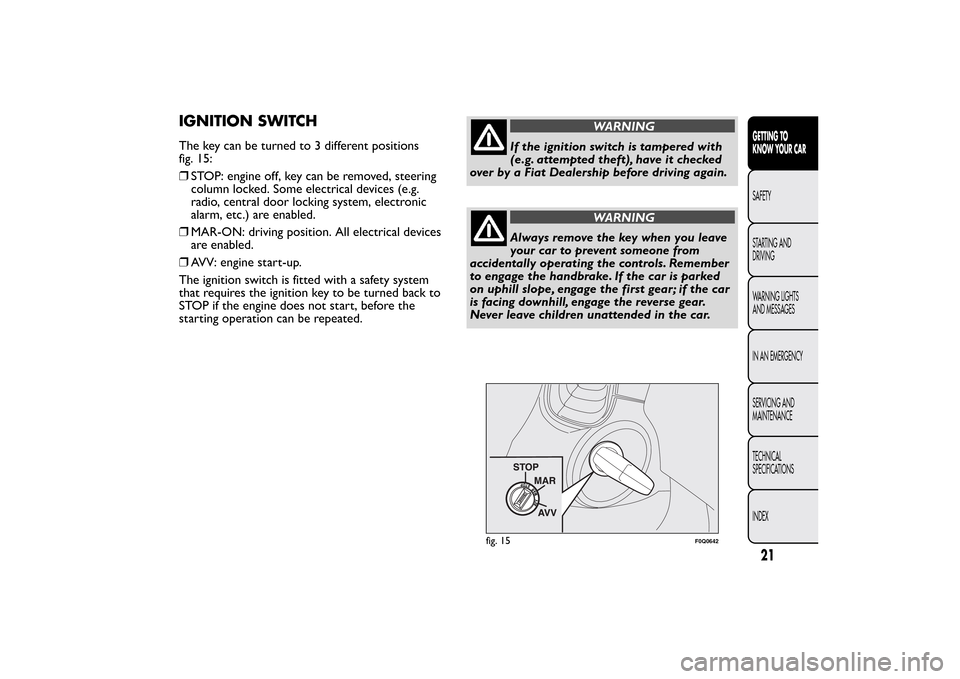
IGNITION SWITCHThe key can be turned to 3 different positions
fig. 15:
❒STOP: engine off, key can be removed, steering
column locked. Some electrical devices (e.g.
radio, central door locking system, electronic
alarm, etc.) are enabled.
❒MAR-ON: driving position. All electrical devices
are enabled.
❒AVV: engine start-up.
The ignition switch is fitted with a safety system
that requires the ignition key to be turned back to
STOP if the engine does not start, before the
starting operation can be repeated.
WARNING
If the ignition switch is tampered with
(e.g. attempted theft), have it checked
over by a Fiat Dealership before driving again.
WARNING
Always remove the key when you leave
your car to prevent someone from
accidentally operating the controls. Remember
to engage the handbrake. If the car is parked
on uphill slope, engage the first gear; if the car
is facing downhill, engage the reverse gear.
Never leave children unattended in the car.
fig. 15
F0Q0642
21GETTING TO
KNOW YOUR CARSAFETY
STARTING AND
DRIVING
WARNING LIGHTS
AND MESSAGES
IN AN EMERGENCY
SERVICING AND
MAINTENANCE
TECHNICAL
SPECIFICATIONS
INDEX
Page 26 of 299
STEERING LOCK
Engagement
When at STOP, remove the key and turn the
steering wheel until it locks.
Disengagement
Move the steering wheel slightly as you turn the
ignition key to MAR-ON.
IMPORTANT In some parking conditions (e.g.:
wheels turned) the effort required to move the
steering wheel and disengage the steering lock may
be increased.
WARNING
It is absolutely forbidden to carr y out
any aftermarket operation involving
steering system or steering column
modifications (e.g.: installation of anti-theft
device) that could badly affect performance
and safety, invalidate the warranty and also
result in non-compliance of the car with
type-approval requirements.
WARNING
Never remove the key while the car is
moving.The steering wheel will lock
as soon as it is turned.This holds true for cars
being towed as well.
22GETTING TO
KNOW YOUR CAR
SAFETY
STARTING AND
DRIVING
WARNING LIGHTS
AND MESSAGES
IN AN EMERGENCY
SERVICING AND
MAINTENANCE
TECHNICAL
SPECIFICATIONS
INDEX
Page 42 of 299
Trip B data (Activating Trip B)
With this function is possible to turn the Trip B
display (trip meter) on and off.
For further information, see “Trip computer”
paragraph.
Proceed as follows to switch the function on and
off:
❒briefly press the MODE button: On or Off
flashes on the display (according to the previous
setting);
❒press
or
to make your choice;
❒briefly press the MODE button to return to the
menu screen or hold the button down to return
to the standard screen without memorising.
Time adjustment (Clock adjustment)
This function enables to set the clock through two
submenus: “Time” and “Format”.
To carry out the adjustment, proceed as follows:
❒briefly press the MODE button and two
submenus, "Time" and "Format", are displayed;
❒press the button
or
to switch between the
two submenus;
❒once you have selected the submenu to be
changed, press the button MODE briefly;
❒when you select “Time”, briefly pressing the
MODE button makes the hours flash on the
display;❒press the
or
button to make the adjustment;
❒briefly press the MODE button: “minutes” starts
flashing on the display;
❒press the buttonor
for setting.
Note The setting will increase or decrease by one
unit each time
or
is pressed. Hold down the
button to increase/decrease the setting rapidly and
automatically. Complete the setting by briefly
pressing the button when you approach the
required value.
❒if you enter the "Format" submenu, pressing the
MODE button briefly makes the display format
flash on the display;
❒press button
or
to select “24h” or “12h”.
When you have made the adjustment, briefly press
the MODE button to go back to the submenu
screen or hold the button down to go back to the
main menu screen without storing.
❒Hold down MODE button again to return to the
standard screen or to the main menu according
to where you are in the menu.
38GETTING TO
KNOW YOUR CAR
SAFETY
STARTING AND
DRIVING
WARNING LIGHTS
AND MESSAGES
IN AN EMERGENCY
SERVICING AND
MAINTENANCE
TECHNICAL
SPECIFICATIONS
INDEX
Page 44 of 299
See radio (Audio information display)
With this function the display shows information
about the sound system.
❒Radio: selected radio station frequency or RDS
message, automatic tuning activation or
AutoSTore;
❒Audio CD, MP3 CDs: track number;
❒CD Changer: CD number and track number;
To show the radio information on the display
("On") or clear it ("Off"), proceed as follows:
❒briefly press the MODE button, the display will
show "On" or "Off" flashing depending on the
previous setting;
❒press
or
to make your choice;
❒briefly press the MODE button to return to the
menu screen or hold the button down to return
to the standard screen without memorising.
Autoclose (Automatic central locking with
the car in motion)
When activated (On), this function locks the doors
automatically when the vehicle speed exceeds 20
km/h.
Proceed as follows to activate or deactivate this
function:
❒briefly press the MODE button to display a
submenu;❒briefly press the MODE button: "On" or "Off"
flashes on the display (according to the previous
setting);
❒press
or
to make your choice;
❒briefly press the MODE button to return to the
submenu screen or hold the button down to
return to the main menu screen without storing;
❒hold down MODE button again to return to the
standard screen or to the main menu according
to where you are in the menu.
Unit of measurement (Setting the unit of
measurement)
With this function it is possible to set the units
through three submenus: "Distances",
"Consumption" and "Temperature".
To set the required unit proceed as follows:
❒briefly press the MODE button to display the
three submenus;
❒press buttonor
to navigate through the
three submenus;
❒once you have selected the submenu to be
changed, press the MODE button briefly;
❒when you select the “Distances” submenu, briefly
pressing the MODE button makes the display
show "km" or "mi" depending on the previous
setting;
40GETTING TO
KNOW YOUR CAR
SAFETY
STARTING AND
DRIVING
WARNING LIGHTS
AND MESSAGES
IN AN EMERGENCY
SERVICING AND
MAINTENANCE
TECHNICAL
SPECIFICATIONS
INDEX
Page 51 of 299
The fabric upholstery of your car has
been designed to withstand wear
deriving from common use of the car.You
are however recommended to avoid strong
and/or continuous scratching with clothing
accessories such as metal buckles, studs,Velcro
fastenings and the like, as these items cause
stress of the cover fabric that could lead to yarn
breaking and damage the upholstery.Once you have released the adjustment
lever, always check that the seat is
locked on the guides by trying to move it
back and for th. If the seat is not locked into
place, it may unexpectedly slide and cause the
driver to lose control of the car.
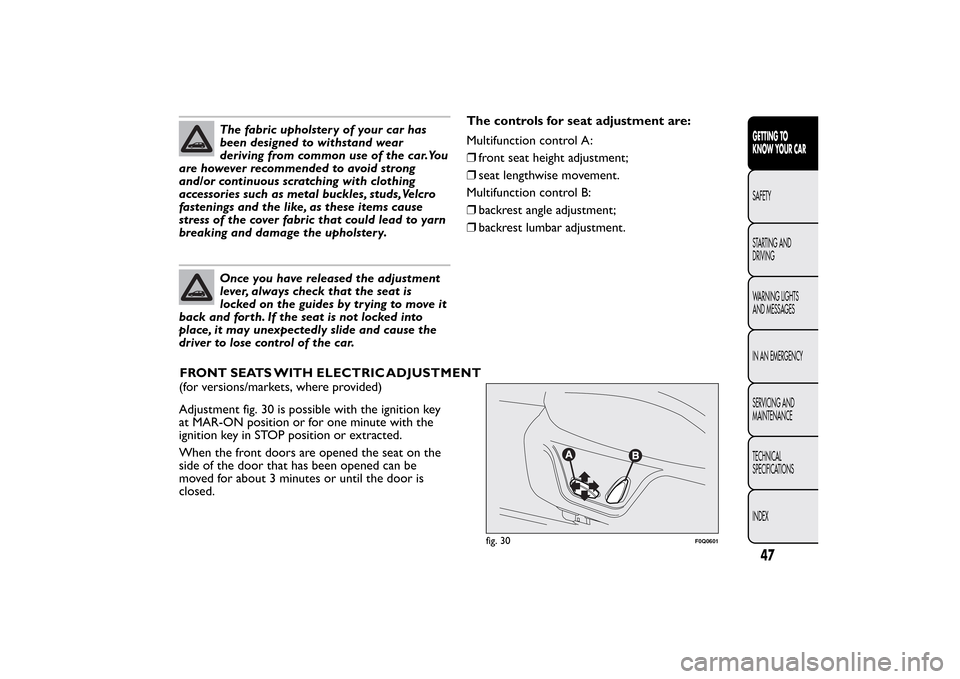
(for versions/markets, where provided)
Adjustment fig. 30 is possible with the ignition key
at MAR-ON position or for one minute with the
ignition key in STOP position or extracted.
When the front doors are opened the seat on the
side of the door that has been opened can be
moved for about 3 minutes or until the door is
closed.The controls for seat adjustment are:
Multifunction control A:
❒front seat height adjustment;
❒seat lengthwise movement.
Multifunction control B:
❒backrest angle adjustment;
❒backrest lumbar adjustment.
fig. 30
F0Q0601
47GETTING TO
KNOW YOUR CARSAFETY
STARTING AND
DRIVING
WARNING LIGHTS
AND MESSAGES
IN AN EMERGENCY
SERVICING AND
MAINTENANCE
TECHNICAL
SPECIFICATIONS
INDEX
FRONT SEATS WITHELECTRIC ADJUSTMENT
Page 52 of 299
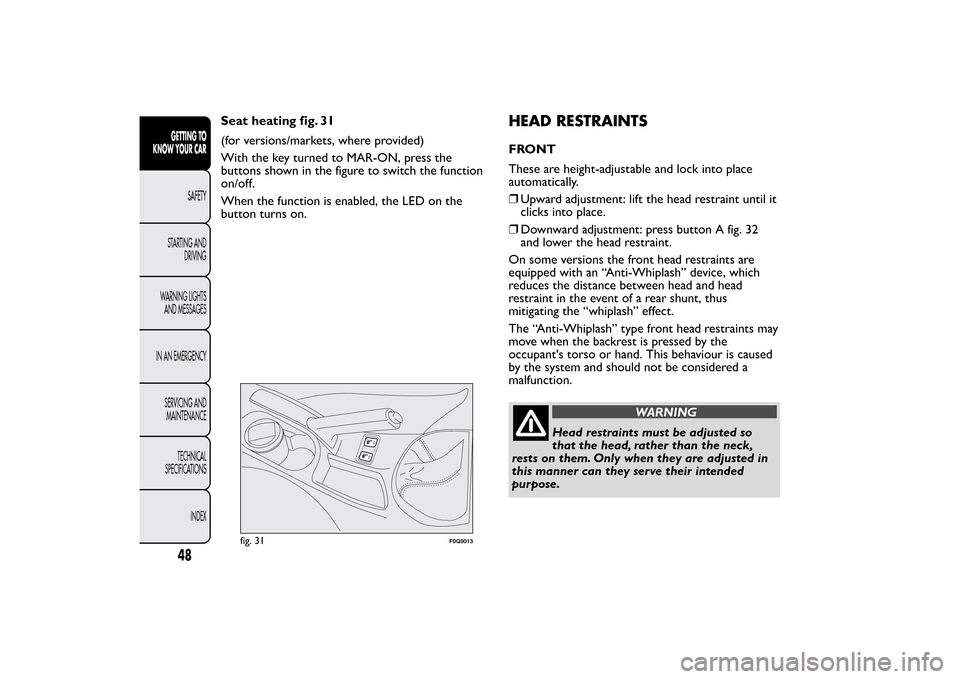
Seat heating fig. 31
(for versions/markets, where provided)
With the key turned to MAR-ON, press the
buttons shown in the figure to switch the function
on/off.
When the function is enabled, the LED on the
button turns on.
HEAD RESTRAINTSFRONT
These are height-adjustable and lock into place
automatically.
❒Upward adjustment: lift the head restraint until it
clicks into place.
❒Downward adjustment: press button A fig. 32
and lower the head restraint.
On some versions the front head restraints are
equipped with an “Anti-Whiplash” device, which
reduces the distance between head and head
restraint in the event of a rear shunt, thus
mitigating the “whiplash” effect.
The “Anti-Whiplash” type front head restraints may
move when the backrest is pressed by the
occupant's torso or hand. This behaviour is caused
by the system and should not be considered a
malfunction.
WARNING
Head restraints must be adjusted so
that the head, rather than the neck,
rests on them. Only when they are adjusted in
this manner can they serve their intended
purpose.
fig. 31
F0Q0013
48GETTING TO
KNOW YOUR CAR
SAFETY
STARTING AND
DRIVING
WARNING LIGHTS
AND MESSAGES
IN AN EMERGENCY
SERVICING AND
MAINTENANCE
TECHNICAL
SPECIFICATIONS
INDEX
Page 54 of 299
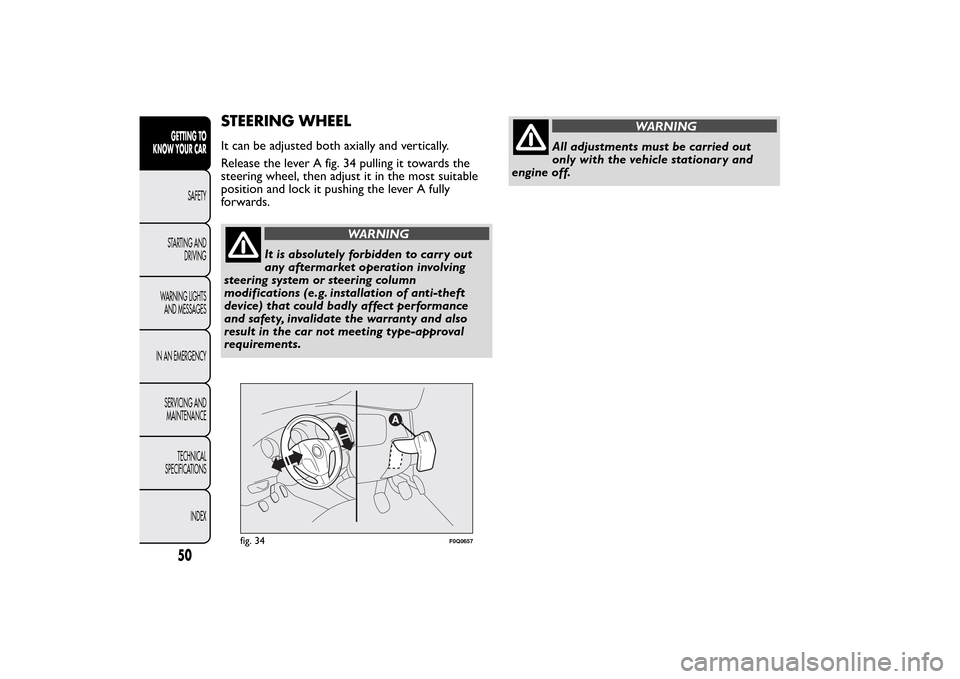
STEERING WHEELIt can be adjusted both axially and vertically.
Release the lever A fig. 34 pulling it towards the
steering wheel, then adjust it in the most suitable
position and lock it pushing the lever A fully
forwards.
WARNING
It is absolutely forbidden to carr y out
any aftermarket operation involving
steering system or steering column
modifications (e.g. installation of anti-theft
device) that could badly affect performance
and safety, invalidate the warranty and also
result in the car not meeting type-approval
requirements.
WARNING
All adjustments must be carried out
only with the vehicle stationary and
engine off.
fig. 34
F0Q0657
50GETTING TO
KNOW YOUR CAR
SAFETY
STARTING AND
DRIVING
WARNING LIGHTS
AND MESSAGES
IN AN EMERGENCY
SERVICING AND
MAINTENANCE
TECHNICAL
SPECIFICATIONS
INDEX
Page 84 of 299
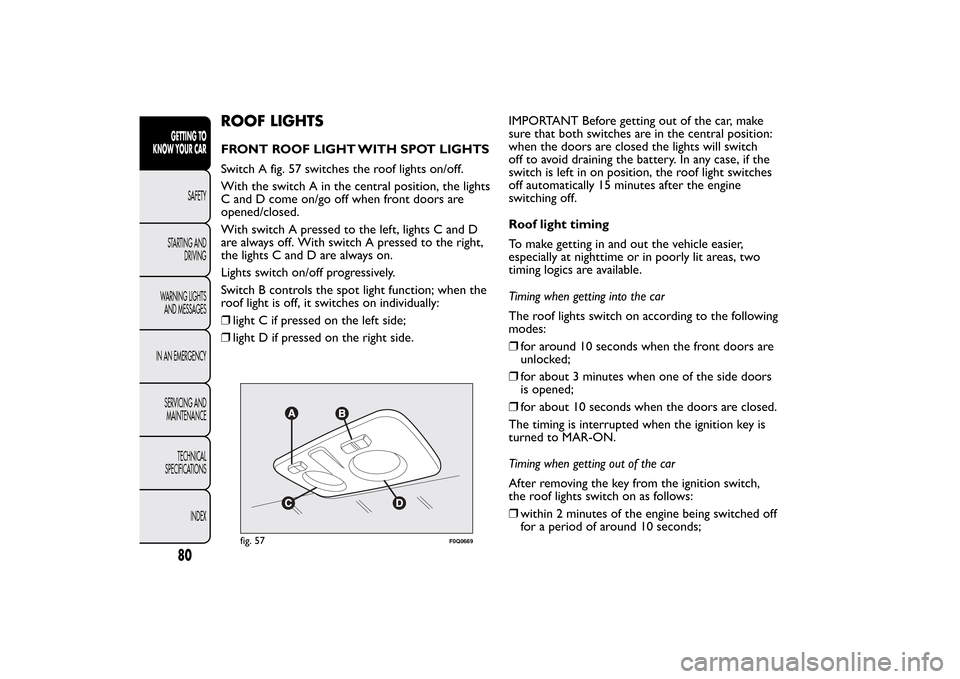
ROOF LIGHTSFRONT ROOF LIGHT WITH SPOT LIGHTS
Switch A fig. 57 switches the roof lights on/off.
With the switch A in the central position, the lights
C and D come on/go off when front doors are
opened/closed.
With switch A pressed to the left, lights C and D
are always off. With switch A pressed to the right,
the lights C and D are always on.
Lights switch on/off progressively.
Switch B controls the spot light function; when the
roof light is off, it switches on individually:
❒light C if pressed on the left side;
❒light D if pressed on the right side.IMPORTANT Before getting out of the car, make
sure that both switches are in the central position:
when the doors are closed the lights will switch
off to avoid draining the battery. In any case, if the
switch is left in on position, the roof light switches
off automatically 15 minutes after the engine
switching off.
Roof light timing
To make getting in and out the vehicle easier,
especially at nighttime or in poorly lit areas, two
timing logics are available.
Timing when getting into the car
The roof lights switch on according to the following
modes:
❒for around 10 seconds when the front doors are
unlocked;
❒for about 3 minutes when one of the side doors
is opened;
❒for about 10 seconds when the doors are closed.
The timing is interrupted when the ignition key is
turned to MAR-ON.
Timing when getting out of the car
After removing the key from the ignition switch,
the roof lights switch on as follows:
❒within 2 minutes of the engine being switched off
for a period of around 10 seconds;
fig. 57
F0Q0669
80GETTING TO
KNOW YOUR CAR
SAFETY
STARTING AND
DRIVING
WARNING LIGHTS
AND MESSAGES
IN AN EMERGENCY
SERVICING AND
MAINTENANCE
TECHNICAL
SPECIFICATIONS
INDEX
Page 85 of 299
❒when one of the side doors is opened for a
period of around 3 minutes;
❒when one of the doors is closed for a period of
about 10 seconds.
❒if the fuel cut-off switch operates, they are on for
about 15 minutes, then they switch off
automatically.
Door locking switches the lights off immediately
(unless the fuel cut-off switch is operating).
REAR ROOF LIGHT
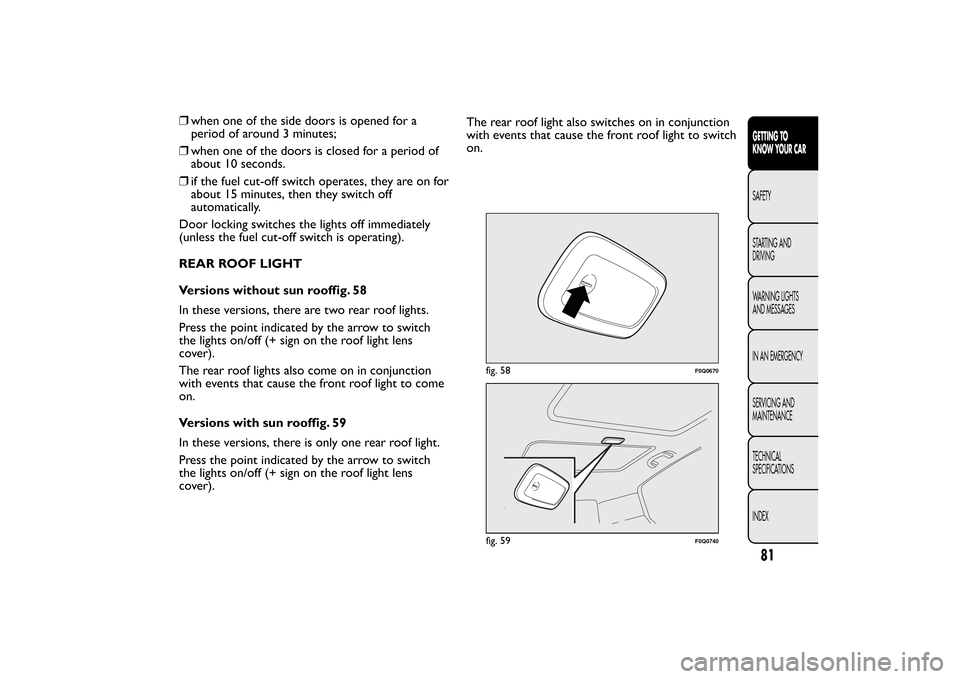
Versions without sun rooffig. 58
In these versions, there are two rear roof lights.
Press the point indicated by the arrow to switch
the lights on/off (+ sign on the roof light lens
cover).
The rear roof lights also come on in conjunction
with events that cause the front roof light to come
on.
Versions with sun rooffig. 59
In these versions, there is only one rear roof light.
Press the point indicated by the arrow to switch
the lights on/off (+ sign on the roof light lens
cover).The rear roof light also switches on in conjunction
with events that cause the front roof light to switch
on.
fig. 58
F0Q0670
fig. 59
F0Q0740
81GETTING TO
KNOW YOUR CARSAFETY
STARTING AND
DRIVING
WARNING LIGHTS
AND MESSAGES
IN AN EMERGENCY
SERVICING AND
MAINTENANCE
TECHNICAL
SPECIFICATIONS
INDEX