key FIAT BRAVO 2014 2.G User Guide
[x] Cancel search | Manufacturer: FIAT, Model Year: 2014, Model line: BRAVO, Model: FIAT BRAVO 2014 2.GPages: 275, PDF Size: 3.95 MB
Page 21 of 275
WARNING
It is absolutely forbidden to carr y out
any aftermarket operation involving
steering system or steering column
modifications (e.g.: installation of anti-theft
device) that could badly affect performance and
safety, invalidate the warranty and also result
in non-compliance of the car with type-
approval requirements.
WARNING
Never remove the key while the car is
moving.The steering wheel will lock
as soon as it is turned.This holds true for cars
being towed as well.
DISPLAYThe car is equipped with a multifunction display that,
according to the previously applied settings, will
show useful driving information.
When one of the front doors is opened, the display
is activated, showing the time and mileage for a
few seconds.
NoteWith a low outside temperature (below 0°C)
it may take longer than normal for information to
appear on the display.
17GETTING TO
KNOW YOUR CARSAFETY
STARTING AND
DRIVING
WARNING LIGHTS
AND MESSAGES
IN AN EMERGENCY
SERVICING AND
MAINTENANCE
TECHNICAL
SPECIFICATIONS
INDEX
Page 27 of 275
Set date (Setting the date)
Using this function it is possible to update the date
(day - month - year).
Proceed as follows to start the update:
❒briefly press the SET button: the “year” will flash
on the display;
❒press the
or
button to make the adjustment;
❒briefly press the SET button: the “month” will flash
on the display;
❒press the
or
button to make the adjustment;
❒briefly press the SET button: the “day” will flash on
the display;
❒press the buttonor
for setting.
IMPORTANT The setting will increase or decrease
by one unit each time the button
or
is pressed.
Hold down the button to increase/decrease the
setting rapidly and automatically. Complete the
adjustment with single presses of the button when
you approach the desired value.
Briefly press the MODE button to return to the
menu screen or hold the button down to return to
the standard screen without storing.First page (display of information on the main
screen)
(for versions/markets, where provided)
This function allows you to choose the information
you would like to display on the main screen.
You can choose to display the date or the
turbocharger boost pressure.
To make your choice, proceed as follows:
❒briefly press the MODE button: "First page" will
appear on the display;
❒briefly press the MODE button again to display the
"Date" and "Engine info" options;
❒press
or
to select the information you wish to
see on the main page of the display;
❒press the MODE button briefly to return to the
menu screen or hold the button down to return
to the standard screen without storing.
When the key is turned to MAR-ON and the initial
check stage is over, the display will show the
information set previously via the “First page” menu
function.
23GETTING TO
KNOW YOUR CARSAFETY
STARTING AND
DRIVING
WARNING LIGHTS
AND MESSAGES
IN AN EMERGENCY
SERVICING AND
MAINTENANCE
TECHNICAL
SPECIFICATIONS
INDEX
Page 30 of 275
Button volume (adjusting the button volume)
This function allows the volume of the acoustic
signal that accompanies MODE,
and
button
presses to 8 levels
To set the desired volume, proceed as follows:
❒press the MODE button briefly, making the display
flash the previously set volume "level";
❒press the
or
button to make the adjustment;
❒press the MODE button briefly to return to the
menu screen or hold the button down to return
to the standard screen without storing.
Seat belt buzzer (Buzzer activation for SBR
indication)
This function can be displayed only after a Fiat
Dealership has deactivated the SBR system (see the
“Safety” section in the “SBR system” paragraph).
To reactivate this function, proceed as follows:
❒briefly press the MODE button, the display shows
"Off" flashing. Press the
or
button and "On"
will appear;
❒briefly press the MODE button to return to the
submenu screen or hold the button down to
return to the main menu screen without storing.Service (Scheduled servicing)
Using this function you can display information about
the mileage intervals for car servicing.
To consult this information, proceed as follows:
❒briefly press the MODE button: the display shows
when servicing is due in km or mi according to the
previous setting (see paragraph “Units of
measurement”);
❒briefly press the MODE button to go back to the
menu screen or hold the button down to go back
to the standard screen.
NoteAccording to the “Scheduled Servicing Plan”,
the car must be serviced every 35,000 km (or
equivalent value in miles). This message is displayed
automatically - when the key is turned to MAR-ON -
2,000 km (or equivalent value in miles) before these
deadlines and reappears every 200 km (or equivalent
value in miles). Below 200 km servicing indications
are more frequent. The indication will appear in
kilometres or miles depending on the unit of
measurement settings. When one of the next
scheduled deadlines is approaching, the word
“Service” will appear on the display, followed by the
number of kilometres or miles left, when the key
is turned to MAR-ON. Contact a Fiat Dealership.
The operations in the “Scheduled servicing plan” will
be performed and the message will be reset.
26GETTING TO
KNOW YOUR CAR
SAFETY
STARTING AND
DRIVING
WARNING LIGHTS
AND MESSAGES
IN AN EMERGENCY
SERVICING AND
MAINTENANCE
TECHNICAL
SPECIFICATIONS
INDEX
Page 32 of 275
TRIP COMPUTERGeneral information
The Trip computer is used to display information on
car operation when the key is turned to MAR-ON.
Two separate trips, called “Trip A” and “Trip B”,
are provided to monitor the entire mission (journey)
in a reciprocally independent manner.
Both functions can be reset (reset - start of a new
journey).
“Trip A” is used to display the figures relating to:
❒Range
❒Distance covered
❒Average consumption
❒Instantaneous consumption
❒Average speed
❒Trip time (driving time).
“Trip B” is used to display the figures relating to:
❒Distance travelled B
❒Average consumption B
❒Average speed B
❒Trip time B (driving time).
NoteThe “Trip B” function may be disabled (see
“Activating Trip B”). The “Range” and “Instant
consumption" parameters cannot be reset.Values displayed
Range
This indicates the approximate distance which can be
travelled with the amount of fuel present in the
tank.“----”will appear on the display in the
following cases:
❒range value lower than 50 km (or 30 mi)
❒car parked with engine running for an extended
period.
IMPORTANT The range value variation can be
affected by several factors: driving style, type of route
(motorway, urban, mountain roads, etc.), conditions
of use (load, tyre pressures, etc.). Trip planning
must therefore take the above into account.
Distance covered
Shows the distance covered since the start of the
new journey.
Average consumption
Shows the approximate average fuel consumption
since the start of the new journey.
Instantaneous consumption
This indicates the fuel consumption. The value is
constantly updated. The display will show “----”if
the car is parked with the engine running.
28GETTING TO
KNOW YOUR CAR
SAFETY
STARTING AND
DRIVING
WARNING LIGHTS
AND MESSAGES
IN AN EMERGENCY
SERVICING AND
MAINTENANCE
TECHNICAL
SPECIFICATIONS
INDEX
Page 33 of 275
Average speed
This shows the average car speed as a function of the
overall time elapsed since the start of the new
journey.
Tr i p t i me
The time elapsed since the start of a new journey.
TRIP BUTTON
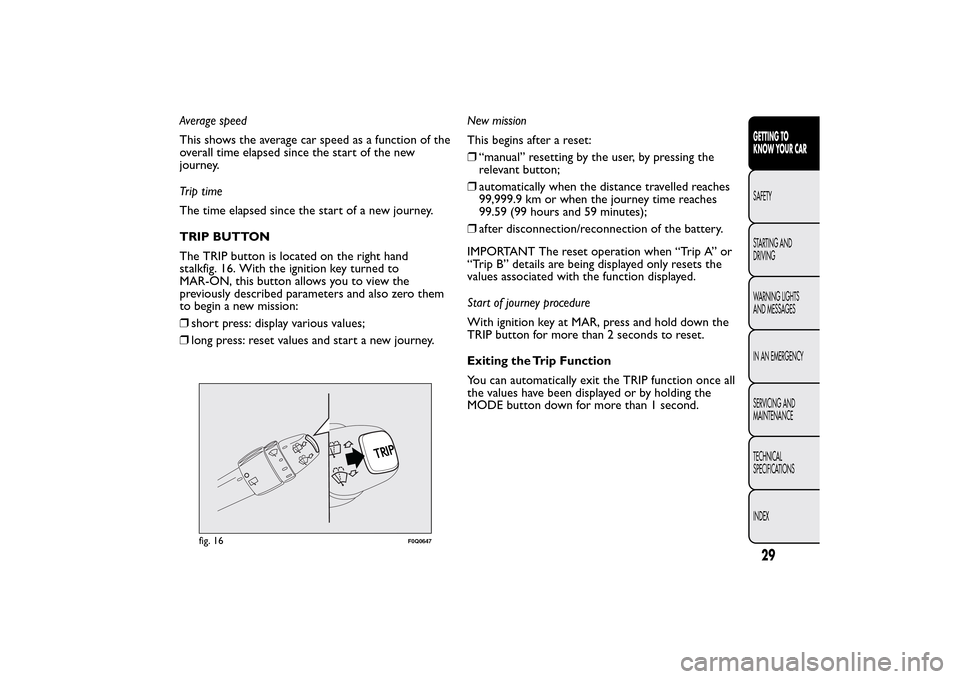
The TRIP button is located on the right hand
stalkfig. 16. With the ignition key turned to
MAR-ON, this button allows you to view the
previously described parameters and also zero them
to begin a new mission:
❒short press: display various values;
❒long press: reset values and start a new journey.New mission
This begins after a reset:
❒“manual” resetting by the user, by pressing the
relevant button;
❒automatically when the distance travelled reaches
99,999.9 km or when the journey time reaches
99.59 (99 hours and 59 minutes);
❒after disconnection/reconnection of the battery.
IMPORTANT The reset operation when “Trip A” or
“Trip B” details are being displayed only resets the
values associated with the function displayed.
Start of journey procedure
With ignition key at MAR, press and hold down the
TRIP button for more than 2 seconds to reset.
Exiting the Trip Function
You can automatically exit the TRIP function once all
the values have been displayed or by holding the
MODE button down for more than 1 second.
fig. 16
F0Q0647
29GETTING TO
KNOW YOUR CARSAFETY
STARTING AND
DRIVING
WARNING LIGHTS
AND MESSAGES
IN AN EMERGENCY
SERVICING AND
MAINTENANCE
TECHNICAL
SPECIFICATIONS
INDEX
Page 39 of 275
Electric adjustment
You can adjust the door mirrors only when the
ignition key is turned to MAR-ON.
Proceed as follows:
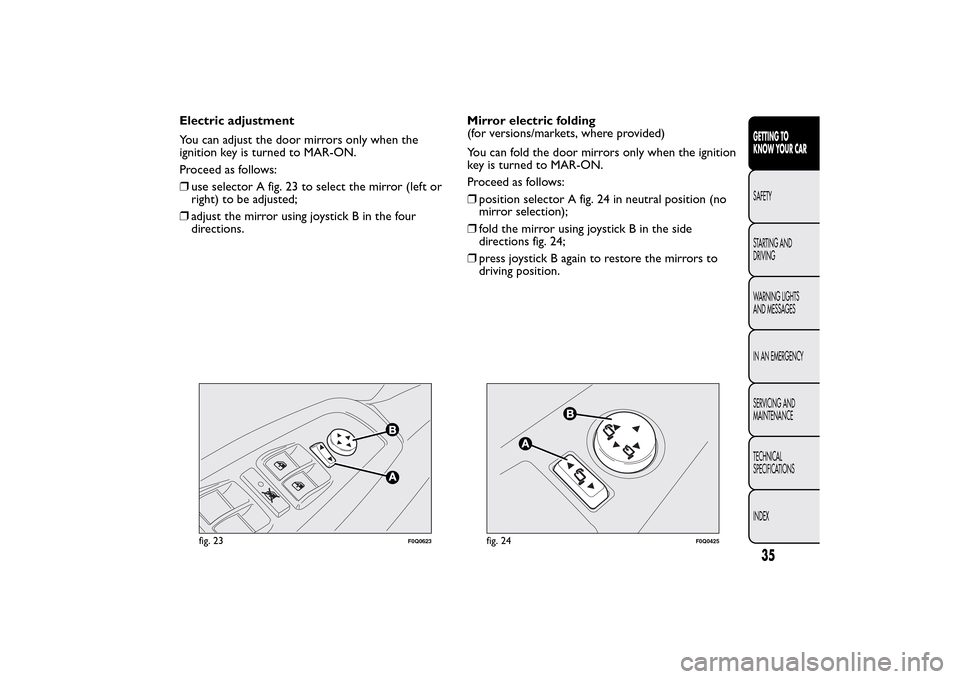
❒use selector A fig. 23 to select the mirror (left or
right) to be adjusted;
❒adjust the mirror using joystick B in the four
directions.Mirror electric folding
(for versions/markets, where provided)
You can fold the door mirrors only when the ignition
key is turned to MAR-ON.
Proceed as follows:
❒position selector A fig. 24 in neutral position (no
mirror selection);
❒fold the mirror using joystick B in the side
directions fig. 24;
❒press joystick B again to restore the mirrors to
driving position.
fig. 23
F0Q0623
fig. 24
F0Q0425
35GETTING TO
KNOW YOUR CARSAFETY
STARTING AND
DRIVING
WARNING LIGHTS
AND MESSAGES
IN AN EMERGENCY
SERVICING AND
MAINTENANCE
TECHNICAL
SPECIFICATIONS
INDEX
Page 56 of 275
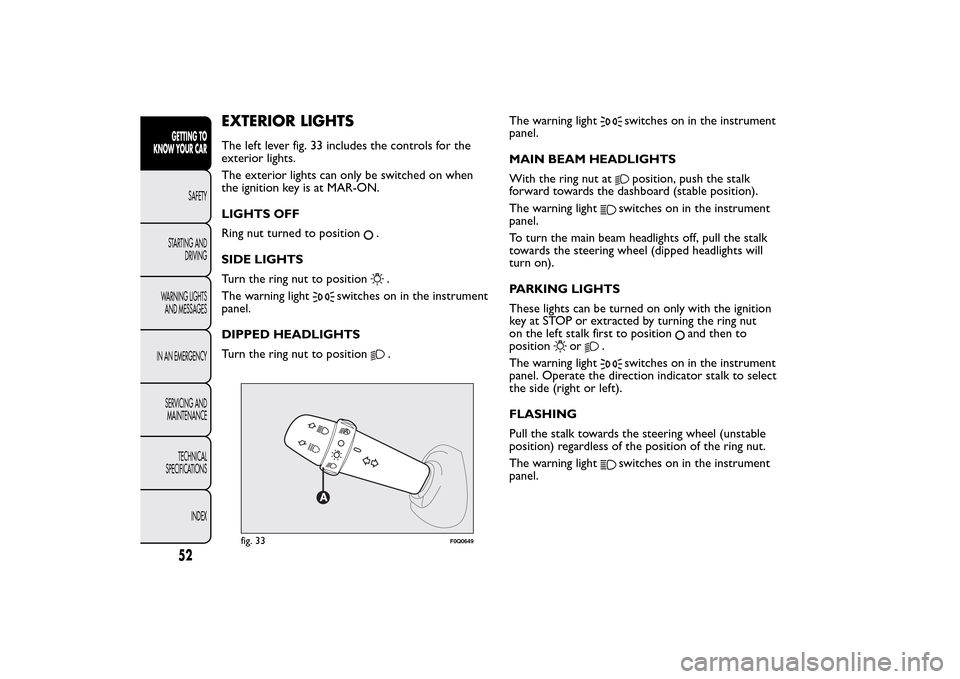
EXTERIOR LIGHTSThe left lever fig. 33 includes the controls for the
exterior lights.
The exterior lights can only be switched on when
the ignition key is at MAR-ON.
LIGHTS OFF
Ring nut turned to position
.
SIDE LIGHTS
Turn the ring nut to position.
The warning light
switches on in the instrument
panel.
DIPPED HEADLIGHTS
Turn the ring nut to position
.The warning light
switches on in the instrument
panel.
MAIN BEAM HEADLIGHTS
With the ring nut atposition, push the stalk
forward towards the dashboard (stable position).
The warning light
switches on in the instrument
panel.
To turn the main beam headlights off, pull the stalk
towards the steering wheel (dipped headlights will
turn on).
PARKING LIGHTS
These lights can be turned on only with the ignition
key at STOP or extracted by turning the ring nut
on the left stalk first to position
and then to
position
or
.
The warning light
switches on in the instrument
panel. Operate the direction indicator stalk to select
the side (right or left).
FLASHING
Pull the stalk towards the steering wheel (unstable
position) regardless of the position of the ring nut.
The warning lightswitches on in the instrument
panel.
fig. 33
F0Q0649
52GETTING TO
KNOW YOUR CAR
SAFETY
STARTING AND
DRIVING
WARNING LIGHTS
AND MESSAGES
IN AN EMERGENCY
SERVICING AND
MAINTENANCE
TECHNICAL
SPECIFICATIONS
INDEX
Page 57 of 275
DIRECTION INDICATORS
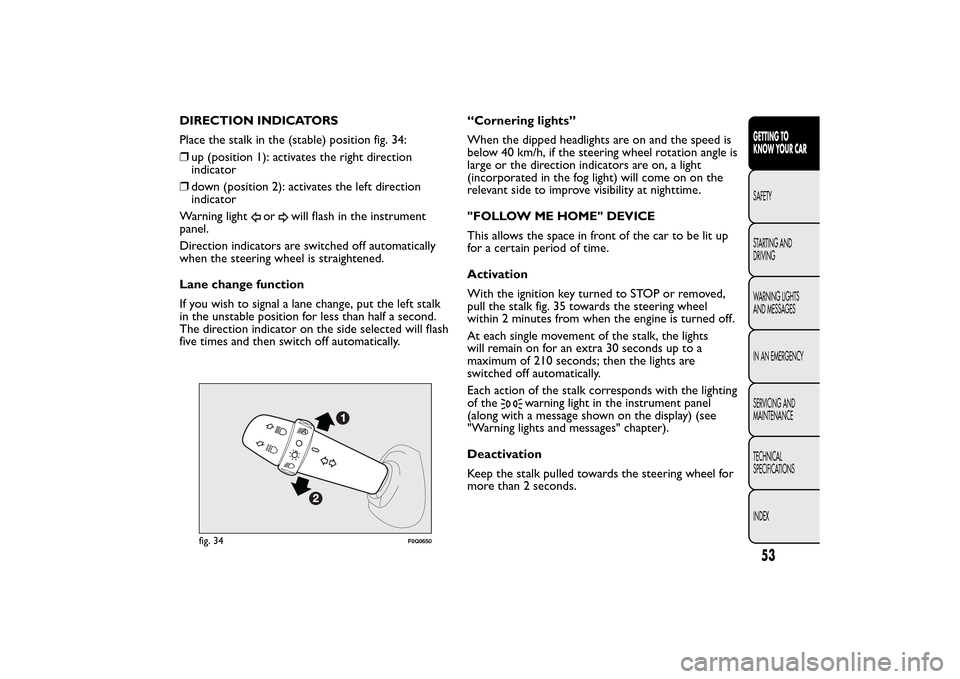
Place the stalk in the (stable) position fig. 34:
❒up (position 1): activates the right direction
indicator
❒down (position 2): activates the left direction
indicator
Warning light
or
will flash in the instrument
panel.
Direction indicators are switched off automatically
when the steering wheel is straightened.
Lane change function
If you wish to signal a lane change, put the left stalk
in the unstable position for less than half a second.
The direction indicator on the side selected will flash
five times and then switch off automatically.“Cornering lights”
When the dipped headlights are on and the speed is
below 40 km/h, if the steering wheel rotation angle is
large or the direction indicators are on, a light
(incorporated in the fog light) will come on on the
relevant side to improve visibility at nighttime.
"FOLLOW ME HOME" DEVICE
This allows the space in front of the car to be lit up
for a certain period of time.
Activation
With the ignition key turned to STOP or removed,
pull the stalk fig. 35 towards the steering wheel
within 2 minutes from when the engine is turned off.
At each single movement of the stalk, the lights
will remain on for an extra 30 seconds up to a
maximum of 210 seconds; then the lights are
switched off automatically.
Each action of the stalk corresponds with the lighting
of the
warning light in the instrument panel
(along with a message shown on the display) (see
"Warning lights and messages" chapter).
Deactivation
Keep the stalk pulled towards the steering wheel for
more than 2 seconds.
fig. 34
F0Q0650
53GETTING TO
KNOW YOUR CARSAFETY
STARTING AND
DRIVING
WARNING LIGHTS
AND MESSAGES
IN AN EMERGENCY
SERVICING AND
MAINTENANCE
TECHNICAL
SPECIFICATIONS
INDEX
Page 59 of 275
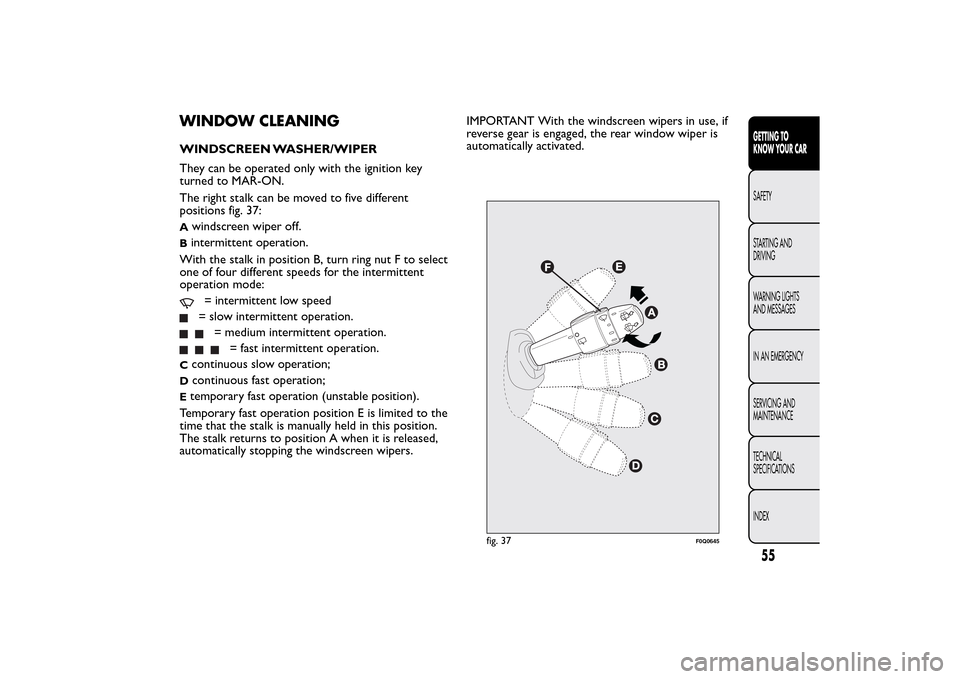
WINDOW CLEANINGWINDSCREEN WASHER/WIPER
They can be operated only with the ignition key
turned to MAR-ON.
The right stalk can be moved to five different
positions fig. 37:A
windscreen wiper off.
Bintermittent operation.
With the stalk in position B, turn ring nut F to select
one of four different speeds for the intermittent
operation mode:
= intermittent low speed= slow intermittent operation.
= medium intermittent operation.
= fast intermittent operation.
C
continuous slow operation;
D
continuous fast operation;
Etemporary fast operation (unstable position).
Temporary fast operation position E is limited to the
time that the stalk is manually held in this position.
The stalk returns to position A when it is released,
automatically stopping the windscreen wipers.IMPORTANT With the windscreen wipers in use, if
reverse gear is engaged, the rear window wiper is
automatically activated.
fig. 37
F0Q0645
55GETTING TO
KNOW YOUR CARSAFETY
STARTING AND
DRIVING
WARNING LIGHTS
AND MESSAGES
IN AN EMERGENCY
SERVICING AND
MAINTENANCE
TECHNICAL
SPECIFICATIONS
INDEX
Page 61 of 275
Activation
Move the right stalk down by one click.
The activation of the sensor is signalled by a "stroke"
to show that the command has been acquired.
IMPORTANT Keep the glass in the sensor area clean.
By turning ring nut F fig. 37 is it possible to increase
the sensitivity of the rain sensor to obtain a more
rapid variation between wiper still (no stroke) when
the windscreen is dry, to wiper at first continuous
speed (slow continuous operation).
The increasing of the rain sensor sensitivity is also
signalled by a stroke of the wipers.
If the windscreen washer is used with the rain sensor
activated, the normal washing cycle is performed,
after which the rain sensor resumes its normal
automatic operation.
Deactivation
Turn the ignition key to STOP.
At the next start-up (key at MAR-ON), the sensor
will not be reactivated even if the stalk is at B fig. 37.
To activate the sensor, move the stalk to position
A or C and then back to position B.
Rain sensor activation will be indicated by at least
one wiper “stroke” even if the windscreen is dry.
Do not activate the rain sensor when
washing the car in an automatic car wash.
Make sure the device is switched off if
there is ice on the windscreen.
WARNING
Make sure the device is switched off
whenever the windscreen is being
cleaned.
REAR WINDOW WASHER/WIPER
It can be operated only with the ignition key turned
to MAR-ON. The function stops when the stalk is
released.
Turning the stalk ring nut A fig. 40 from position
to position
will operate the rear window wiper
as follows:
❒in intermittent mode when the rear window wiper
is not operating;
❒in synchronous mode (at half the speed of the
windscreen wiper) when the windscreen wiper
is operating;
❒in continuous mode with reverse gear engaged and
the control active.
With the windscreen wiper on and reverse gear
engaged the rear window wiper is activated in
continuous mode. Pushing the stalk towards the
dashboard (unstable position) will activate the rear
window washer jet.
57GETTING TO
KNOW YOUR CARSAFETY
STARTING AND
DRIVING
WARNING LIGHTS
AND MESSAGES
IN AN EMERGENCY
SERVICING AND
MAINTENANCE
TECHNICAL
SPECIFICATIONS
INDEX